Have you ever heard the alarming news that the internet has officially run out of addresses? This is not a tech myth; it is a very real global networking crisis. As we connect more smartphones and smart appliances to our Wi-Fi every day, the original mathematical limits of the web have been completely exhausted.
If you are wondering exactly what is IPv6, it is the modern technological upgrade designed to save our digital infrastructure. This advanced system generates a virtually infinite supply of digital addresses to keep the world online.
In this guide, our network security team breaks down why this upgrade was necessary. We will explore how it differs from the old standard and explain why this new technology has a critical impact on your VPN privacy and daily internet connection.
Key takeaways
- What is IPv6: IPv6 is the sixth generation of the Internet Protocol, providing unique addresses so devices can communicate online.
- Infinite capacity: It utilizes a massive 128-bit format, providing enough unique IP addresses to support the explosive growth of modern tech.
- Built-in security: Unlike its predecessor, this modern standard was engineered with mandatory network encryption features right out of the box.
- The privacy threat: Many older privacy apps suffer from dangerous “IPv6 leaks,” which can accidentally expose your real physical location to your internet provider.
1. What is IPv6?
Internet Protocol version 6 (IPv6) is the latest iteration of the core communication standard that routes data across the Internet. Operating at the network layer, it establishes specific rules to identify separate hosts and track their locations so devices can exchange information successfully.
Developed by the Internet Engineering Task Force (IETF) as a successor to IPv4, it fundamentally changes how digital addresses are formatted. It replaces the legacy 32-bit system with an advanced 128-bit addressing structure, vastly expanding the global address pool.
This next-generation protocol not only provides unique identifiers for billions of new devices but also introduces a simplified network header. This streamlined design improves the efficiency of routing bandwidth-intensive traffic, making it highly optimized for modern cloud computing and large-scale streaming.
2. Why was IPv6 created?
The internet was originally designed as a small research network, not a global hub for billions of active users. As digital connectivity skyrocketed worldwide, network engineers quickly realized the underlying infrastructure needed a massive structural upgrade to survive.
2.1. The IPv4 exhaustion problem
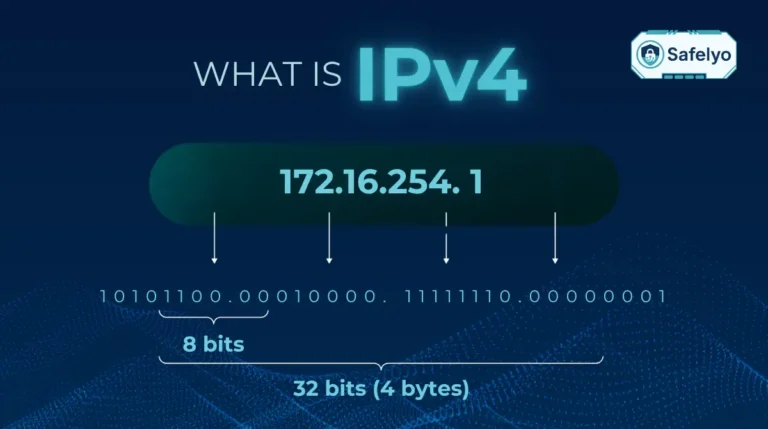
The original Internet Protocol utilized a 32-bit format that could only generate roughly 4.3 billion unique IP addresses. In the early decades of desktop computing, this mathematical cap seemed like a virtually limitless and inexhaustible supply.
However, the rapid explosion of smartphones, personal computers, and Internet of Things (IoT) devices changed the landscape completely. The global demand for internet connections surged, completely depleting the unassigned pool of IPv4 addresses by the mid-2010s.
2.2. How IPv6 solves the shortage
To prevent the internet from running out of space and stalling global innovation, developers engineered a much larger 128-bit address format. This massive structural expansion fundamentally shifts how we allocate digital identities across the world.
This upgraded framework generates an astronomical 340 undecillion unique IP addresses. To put that mathematical leap into perspective, it provides more than enough capacity to assign a dedicated internet address to every single grain of sand on Earth.
3. What does an IPv6 address look like?
To truly understand this next-generation technology, you need to see exactly how these network identifiers are structured. Because the system holds vastly more routing information than older protocols, the actual addresses look much longer and visually more complex to the average user.
3.1. The 128-bit hexadecimal format
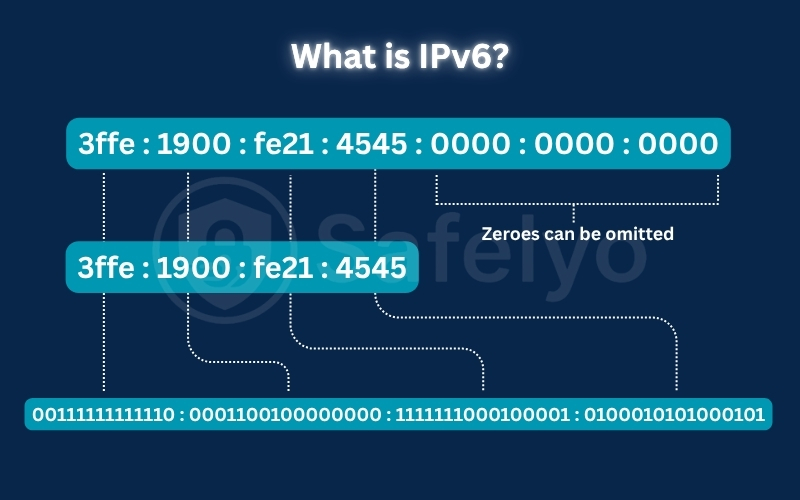
Older internet addresses use simple decimal numbers separated by periods, such as 192.168.1.1. In stark contrast, a full 128-bit address looks like this: 2001:0db8:85a3:0000:0000:8a2e:0370:7334.
This structure utilizes a hexadecimal numbering system, meaning it contains both numbers and letters ranging from A to F. The entire address is divided into eight specific groups of four alphanumeric characters, separated exclusively by colons.
3.2. Shortening rules for IPv6 addresses
Because these 128-bit strings are incredibly long, network engineers established specific rules to compress them for better human readability. You can safely drop any leading zeros within a specific group without altering the actual destination.
Furthermore, consecutive sections filled with zeros can be completely replaced with a double colon (::). By applying these zero compression rules, our previous lengthy example shrinks down efficiently to 2001:db8:85a3::8a2e:370:7334.
4. IPv4 vs IPv6: What are the main differences?
While both protocols serve the same purpose of routing traffic, their architectural differences are massive. The transition to the new 128-bit standard introduces fundamental changes in packet processing, device configuration, and overall network security.
| Technical Feature | IPv4 (Legacy Standard) | IPv6 (Modern Standard) |
|---|---|---|
| Address Length | 32-bit | 128-bit |
| Format Structure | Numeric (Decimal separated by dots) | Alphanumeric (Hexadecimal with colons) |
| Total Capacity | ~4.3 Billion addresses | ~340 Undecillion addresses |
| Network Configuration | Manual setup or DHCP required | Auto-configuration (SLAAC) supported |
| Data Transmission | Broadcast, Multicast, Unicast | Multicast, Anycast, Unicast (No Broadcast) |
| Header Complexity | Complex (Variable length up to 60 bytes) | Streamlined (Fixed 40-byte length) |
| NAT Dependency | Highly dependent on saving space | Not required (Direct end-to-end connection) |
| Security (IPsec) | Optional / Third-party add-on | Integrated natively into the protocol |
4.1. Expanded address space
The most obvious distinction is the sheer volume of available digital real estate. While the legacy 32-bit system is capped at roughly 4.3 billion addresses, the upgraded format generates an astronomical 340 undecillion unique identifiers.
This massive expansion ensures that we will never face another IP exhaustion crisis. Every modern smartphone, smart TV, and IoT sensor can now have its own dedicated public address without needing to share network space.
4.2. No more NAT dependency
Because older addresses ran out, internet providers rely heavily on Network Address Translation (NAT) to force multiple devices to share a single public IP. The sheer capacity of the modern standard eliminates this technical bottleneck, allowing hardware to communicate directly.
Removing NAT significantly simplifies complex network architecture for IT administrators. Furthermore, allowing for direct end-to-end communication greatly improves connection speeds and stability for real-time applications like VoIP calling and multiplayer gaming.
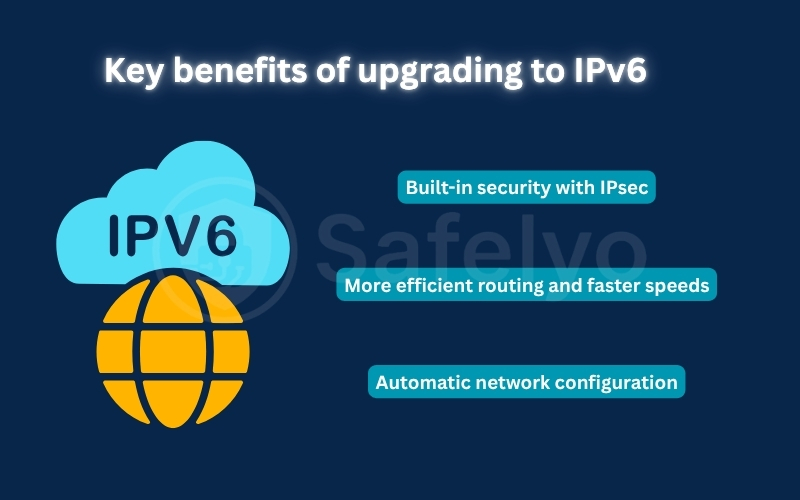
5. Key benefits of upgrading to IPv6
Upgrading the Internet’s addressing system does not just solve the mathematical address shortage. The new protocol introduces several major structural improvements that significantly enhance network efficiency, data security, and hardware configuration.
5.1. Built-in security with IPsec
Older network protocols were built before cybersecurity became a global priority. In contrast, the modern standard integrates IPsec (IP Security) natively into its core architecture rather than relying on optional third-party security patches.
This built-in protocol ensures that data encryption and cryptographic authentication can run automatically at the network layer. This native design provides a highly secure environment, actively protecting your private communications from tampering or interception.
5.2. More efficient routing and faster speeds
In the older system, routers had to constantly compute checksums for every data packet to check for transit errors. The new standard eliminates the header checksum requirement, significantly reducing the processing workload on intermediate routing hardware.
Furthermore, it utilizes a streamlined, fixed 40-byte header format. This simplified structure allows routers to process and deliver high-bandwidth data packages, such as 4K video streams and large file transfers, much faster.
5.3. Automatic network configuration
Setting up new devices on a legacy network often requires a central DHCP server to assign IP addresses. The modern standard introduces Stateless Address Autoconfiguration (SLAAC) to automate this device configuration process entirely.
When you connect a device, it automatically generates its own unique IP address by querying the local router. This instant plug-and-play setup eliminates the need for manual configurations, ensuring seamless and rapid network deployment.
6. How does IPv6 affect your VPN security?
An active IPv6 connection affects VPN security by creating a loophole known as an IPv6 leak. Because modern operating systems naturally prioritize IPv6 over older IPv4 traffic, any VPN that cannot encrypt the newer protocol will allow your real data to bypass the secure tunnel completely.
This technical mismatch is the exact way it compromises your privacy. Even though your VPN is turned on, your device will silently send data over the unencrypted IPv6 route, exposing your location and search history to your internet provider.
6.1. Why legacy VPN tunnels fail under dual-stack networks
Most computers and smartphones run a dual-stack network, meaning they support both protocols simultaneously. When your device connects to the internet, the operating system automatically prioritizes IPv6 to establish faster website connections.
If your VPN only encrypts IPv4, it creates a massive security blind spot. Your system-wide IPv4 traffic goes through the secure tunnel, but your IPv6 data routes completely unprotected over your standard network connection.
6.2. The consequences of an IPv6 data leak
When this split-routing occurs, the VPN fails to protect your digital identity. Websites and third-party trackers can easily read your real 128-bit IPv6 address, exposing your exact location and ISP information despite your active VPN connection.
This leakage also allows your local internet service provider to log your DNS queries. This means they can still build a detailed history of the websites you visit, completely defeating the purpose of using a privacy tool in the first place.
6.3. How to verify and prevent leakage
To find out if your connection is compromised, visit a diagnostic site like ipleak.net while your VPN is active. If you see your actual ISP name or your true city of residence in the results, your data is currently leaking.
You can resolve this by enabling IPv6 leak protection in your app settings or upgrading to premium services. Top providers like NordVPN, ExpressVPN, and Surfshark prevent leaks by natively routing all 128-bit traffic or automatically blocking it
7. The big question: Why are we still using IPv4?
Although the advanced 128-bit standard was designed in the late 1990s, the global transition remains incredibly slow. Upgrading the world’s digital infrastructure is a massive logistical challenge that requires much more than a simple software update.
The primary obstacle is that the legacy 32-bit system and the new standard cannot communicate with each other natively. A modern device using only the new protocol cannot load an older website unless an expensive translation gateway is placed in the middle.
Because of this communication gap, network providers must invest heavily in dual-stack hardware to support both systems simultaneously. The high cost of hardware replacement causes many businesses to delay their network upgrades until their legacy routers completely fail.
8. How to check if you are using IPv6 (Step-by-step)
Discovering your network status is an essential troubleshooting step, particularly if you suspect your VPN is leaking data. You can easily verify if your internet service provider has upgraded your connection using these simple steps.
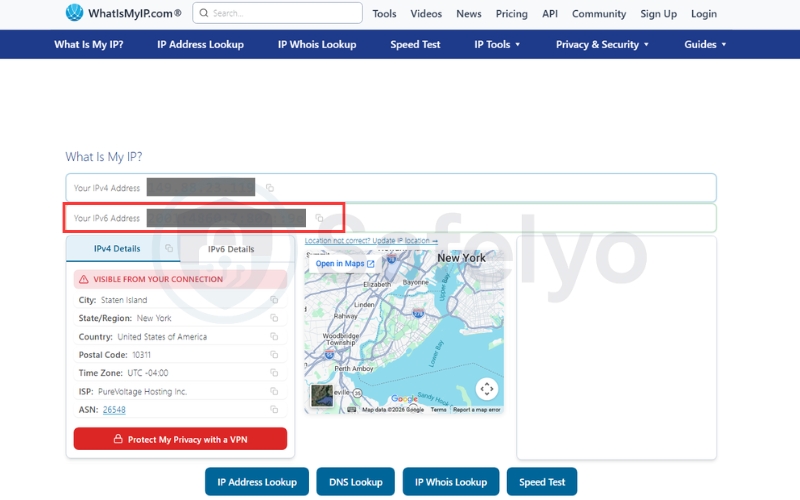
8.1. The quick online test
The fastest way to check your network status is by using an automated online diagnostic tool.
- Step 1: Turn off your VPN completely so your browser displays your raw network connection.
- Step 2: Open your web browser and navigate to the official testing site “What is my IP address“.
- Step 3: Wait for the page to run its automated analysis. It will immediately show your active IP addresses and display a compatibility score out of ten.
8.2. How to check on Windows?
If you want to verify your connection status locally without visiting a website, you can use the built-in system tools.
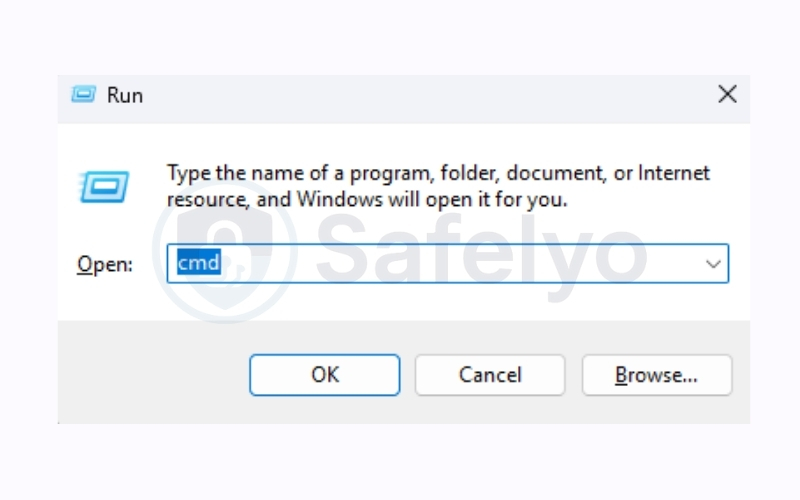
- Step 1: Press the Windows key + R on your keyboard to open the Run dialog box.
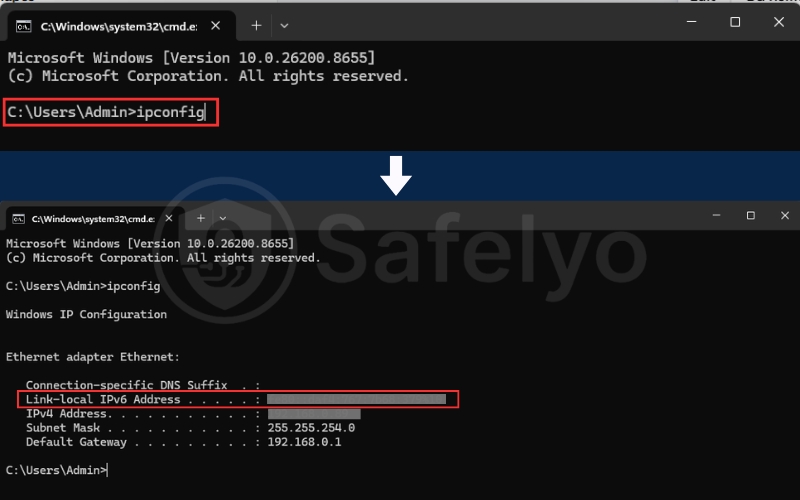
- Step 2: Type the command “ipconfig” and press Enter to load your local network details.
- Step 3: Look for the line labeled “IPv6 Address” or “Temporary IPv6 Address.” If you see a long alphanumeric string separated by colons, your system is active.
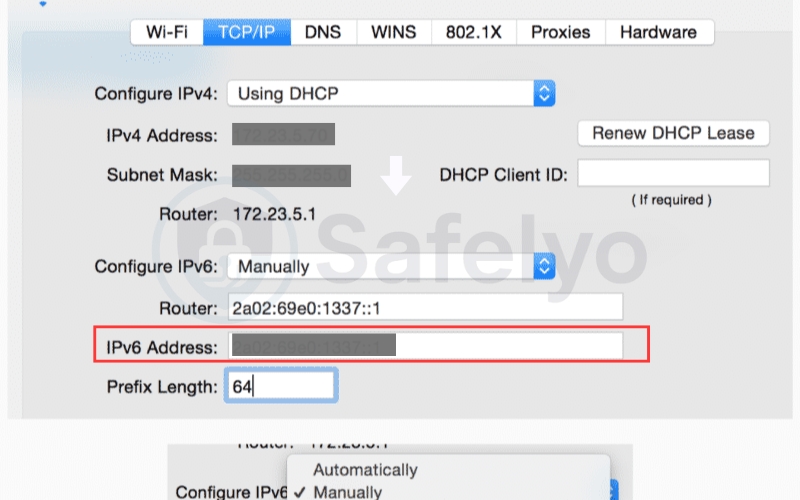
8.3. How to check on macOS?
Apple computer users can easily view their network configuration details directly within the system settings.
- Step 1: Open your System Settings from the Apple menu, then click the Network panel in the sidebar.
- Step 2: Click on your active Wi-Fi or Ethernet connection, then click the TCP/IP button.
- Step 3: Look for the line labeled “IPv6 Address”
9. Frequently asked questions
How do I know if I am using IPv6?
The easiest way to check your connection status is by visiting a specialized diagnostic site like test-ipv6.com. Alternatively, you can open your device’s network settings and check if an alphanumeric address is assigned to your active connection.
Is there an IPv5?
Yes, but it was never commercialized. Internet Protocol version 5 (ST) was designed in the late 1970s as an experimental streaming protocol for real-time video and voice data and was eventually abandoned in favor of IPv6.
Should I disable IPv6 on my router?
Generally, you should keep it enabled to ensure full compatibility with modern web servers. However, you should temporarily disable it if you are using an older VPN that suffers from leak issues, preventing your real location from being exposed.
Is IPv6 faster than IPv4?
In theory, yes, because it simplifies packet headers and removes the need for NAT translation bottlenecks. In practice, however, most home internet users will not notice a significant speed difference during standard web browsing or file downloading.
Does IPv6 improve gaming latency and ping?
Yes, it can improve gaming performance. Eliminating the need for NAT routing, it allows your console or PC to establish direct end-to-end connections with game servers, which can significantly reduce latency and packet loss.
Do all VPNs support IPv6 routing?
No, many commercial providers still do not support this protocol natively. Instead of routing the 128-bit traffic securely, many older VPN apps choose to completely block IPv6 in the background to prevent accidental location leaks.
Can IPv4 and IPv6 devices communicate directly?
No, the two protocols cannot speak to each other natively due to different packet structures. They require translation technologies like NAT64 or dual-stack networks to bridge the communication gap between different devices.
10. Conclusion
The global transition to this advanced standard represents a massive leap in how the internet operates. Knowing what is IPv6 highlights the critical infrastructure built to resolve the address shortage while enhancing overall routing efficiency and native network security.
However, this technological shift also introduces new privacy vulnerabilities, like dual-stack data leaks that require your immediate attention. You can find comprehensive tutorials on how to secure your network and shield your personal data within our Privacy & Security Basics category at Safelyo.