Imagine trying to receive a package without having a physical home address. The internet works the same way, relying on a massive global directory to ensure data reaches the correct device securely.
If you are wondering exactly what is IPv4, it is the foundational addressing system that makes global web browsing possible. While it powers almost all of our daily connections, understanding how it routes your traffic is an essential first step in mastering digital privacy.
Key Takeaways
- What is IPv4? IPv4 (Internet Protocol version 4) is the foundational 32-bit address system that helps internet-connected devices identify each other and route data across networks.
- The standard format: It assigns numeric addresses, such as 192.168.1.1, to computers, smartphones, and servers.
- The address limit: The system supports roughly 4.3 billion unique addresses, which is why the internet is currently transitioning to the larger IPv6 system.
- Public vs. Private: Public IPs are visible to websites and assigned by your ISP, while Private IPs are used exclusively inside your local home network.
- How NAT helps: Network Address Translation (NAT) extends the lifespan of IPv4 by allowing multiple devices in your home to share a single public IP address.
- Privacy risks: Your public IPv4 address reveals your ISP and approximate location. Using a VPN is the best way to hide this data from third-party trackers.
1. What is IPv4? The foundation of the internet
Internet Protocol version 4, commonly known as IPv4, is the core set of rules governing how data travels across the internet. Introduced by the Internet Engineering Task Force (IETF) in 1981 under RFC 791, it acts as the primary communication protocol that routes internet traffic between completely different computer networks.
Operating at the Network Layer (Layer 3) of the OSI model, it assigns a unique numerical identity to your smartphone, laptop, or router. This address system ensures that every time you request a website or send an email, the data packets never end up at the wrong destination.
Unlike some transmission protocols that verify every single data packet, IPv4 is a connectionless protocol that uses a “best-effort” delivery model. This design choice makes it incredibly fast and efficient, explaining why it still carries the vast majority of global web traffic today despite being over forty years old.
2. IPv4 address format and structure
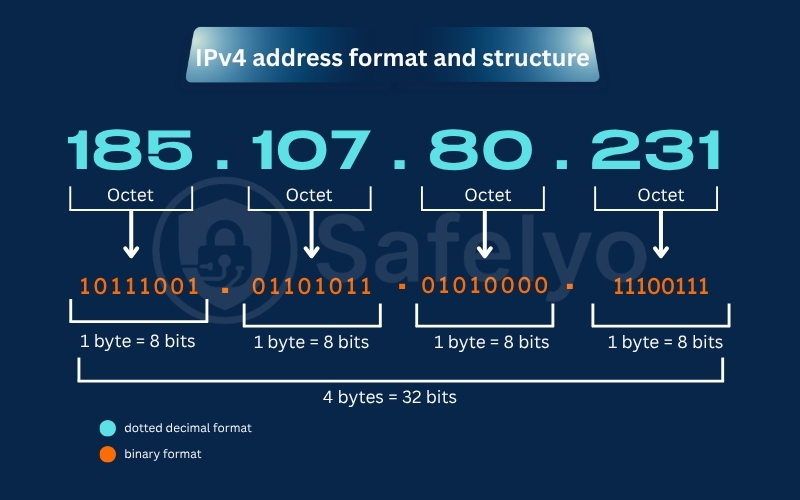
Computers process data in binary code, meaning they read IP addresses as a continuous string of 32 ones and zeros. Because humans cannot easily memorize a 32-bit binary sequence, engineers designed a readable format called dotted-decimal notation.
This standard structure divides the 32-bit address into four blocks, each called an octet. Each octet contains exactly 8 bits of data, separated by periods, creating familiar number sequences such as 192.168.1.1.
Due to strict mathematical constraints, the numerical value of each octet can only range from 0 to 255. To help routers process network traffic efficiently, this 32-bit format is logically divided into three specific parts.
- Network part
The network part acts as the primary identifier for the broader system or organization. It guides internet traffic toward the correct general area, ensuring external routers know exactly which local network should receive the data packets.
- Host part
The host part identifies your specific machine, such as your smartphone or laptop, within that network. For devices to communicate locally, their network parts must match, but their host parts must be unique to prevent data collisions.
- Subnet part
The subnet part is an additional component used to break a massive, congested network down into smaller, manageable pieces. These smaller subnets reduce unnecessary internal traffic, improving overall network speed and giving administrators better security control.
3. Understanding IPv4 address classes
Historically, engineers categorized the entire 32-bit address space into five distinct classes based on the leading bits of the address. This rigid classification system helped early internet routers determine the exact size and scope of a network instantly.
The table below outlines the five traditional classes, their specific address ranges, and their primary networking purposes.
| Class | IP Address Range | Supported Hosts | Primary Use |
|---|---|---|---|
| Class A | 1.0.0.0 – 126.255.255.255 | 16,777,216 | Massive global networks |
| Class B | 128.0.0.0 – 191.255.255.255 | 65,536 | Medium enterprise networks |
| Class C | 192.0.0.0 – 223.255.255.255 | 256 | Small and home networks |
| Class D | 224.0.0.0 – 239.255.255.255 | N/A | Multicast applications |
| Class E | 240.0.0.0 – 255.255.255.255 | N/A | Experimental research |
- Class A addresses
Identified by a leading prefix bit of “0”, Class A addresses were designed for massive entities like government agencies and major tech corporations. A single Class A network can support over 16.7 million host devices, making it incredibly spacious.
- Class B addresses
Class B networks use the leading prefix bits “10” and cater to medium-sized organizations like large universities or regional ISPs. Each network block within this category can seamlessly support up to 65,536 individual connected devices.
- Class C addresses
This is the most widely recognized category for everyday users, utilizing the prefix bits “110” for identification. Class C caters to small businesses and home Wi-Fi setups, supporting a maximum of 256 addresses per network block.
- Class D and Class E addresses
Class D does not assign addresses to individual devices; instead, it handles multicast traffic to send data to specific groups simultaneously. Finally, Class E is strictly reserved for experimental research and is never deployed for standard public internet use.
While this five-class system established the early internet, it led to massive inefficiencies. Because organizations were forced into rigid categories, millions of IP addresses were left unused, forcing engineers to develop a smarter allocation method called subnetting.
4. What is IPv4 subnetting?
IPv4 subnetting is the technical process of dividing one massive network block into multiple smaller, efficient segments. It helps organizations conserve valuable address space and improves overall routing speeds across complex infrastructure.
4.1. Why does subnetting help?
Subnetting organizes chaotic enterprise networks by keeping departmental data separated. It reduces unnecessary background broadcast traffic, which prevents large corporate servers from experiencing severe performance bottlenecks.
It also enhances security by isolating vulnerable devices from the core system. If one specific subnet experiences a malware infection, IT administrators can contain the digital threat quickly without having to shut down the entire company network.
4.2. What is a subnet mask?
A subnet mask acts as a digital filter that tells your router which part of an IP address represents the network and which part represents the host. It ensures data packets know their precise boundaries within a local system.
For example, a common subnet mask is 255.255.255.0. This specific configuration tells the local router that the network supports a limit of 256 local IPs, which is the absolute standard size for most residential Wi-Fi setups.
4.3. What is CIDR?
Classless Inter-Domain Routing (CIDR) was introduced to replace the wasteful, rigid A, B, and C class system. It allows network providers to allocate exact blocks of IPs based on actual demand rather than forcing companies into fixed categories.
Instead of writing out a full, lengthy subnet mask, CIDR uses a flexible slash notation at the end of an address. For instance, appending /24 or /16 instantly indicates the network’s capacity, making global routing tables much cleaner and significantly easier to manage.
5. The biggest limitation of IPv4: Address exhaustion
The original creators of this protocol could never have predicted the massive explosion of modern consumer technology. While a 32-bit system mathematically generates 4.29 billion unique addresses, that seemingly enormous number was simply not enough to sustain global digitalization.
5.1. Why demand grew so fast
In the 1980s, the internet primarily connected a handful of academic and military mainframes. However, the unexpected boom of commercial home broadband, smartphones, and smart TVs caused an unprecedented global demand for unique public IP addresses.
The rise of cloud computing and the Internet of Things (IoT) further accelerated this digital depletion. Today, a single household might have ten smart devices connected to the web simultaneously, which drains the remaining free pool of public addresses.
5.2. What happened after IPv4 exhaustion?
By the mid-2010s, major regional internet registries officially exhausted their supply of newly unassigned IPv4 blocks. Surprisingly, the internet did not break or shut down overnight as many early technicians had feared.
Instead, the tech industry adapted by creating a secondary marketplace where companies could buy and sell used IPv4 blocks at premium prices. More importantly, engineers deployed a clever networking patch called NAT to keep the legacy protocol functioning while they slowly rolled out IPv6.
6. How NAT keeps IPv4 alive
NAT is one of the main reasons IPv4 still works at scale. It lets multiple devices in a private network share one public IPv4 address. It is a brilliant router technology that allows an entire household of devices to share a single public IP address efficiently.
6.1. Why NAT matters
Without this technology, every single smartphone, laptop, and smart fridge in your house would require its own costly, unique public IP. By translating traffic, NAT reduced the global demand for new public addresses, single-handedly extending the lifespan of the IPv4 system for decades.
It also acts as an accidental, rudimentary firewall for home users. Because external internet traffic only sees the router’s single public face, your internal home devices remain hidden from direct public exposure, blocking many basic, automated cyberattacks.
6.2. How NAT works in practice
When your laptop requests a web page, the local router intercepts that internal request and translates it. The router replaces your laptop’s private IP with its own public IP, then sends the data packet out to the global internet on your behalf.
When the web server replies, the data travels back to the router’s public face. The router checks its internal memory tables, translates the data back, and delivers the webpage directly to your specific laptop, all in a fraction of a second.
This seamless translation process happens constantly in the background. While it saved the internet’s addressing system, it also created a strict dividing line between the addresses used globally and those used locally inside our homes.
7. Public vs. private IPv4 addresses: What is the difference?
That strict dividing line created by NAT means your devices actually rely on two different types of IP addresses simultaneously to function. Understanding how these two categories interact is essential for managing your home network and evaluating your personal digital security.
| Feature | Public IPv4 Address | Private IPv4 Address |
|---|---|---|
| Network location | Used on the open internet | Used inside a local home or office network |
| Assigned by | Your Internet Service Provider (ISP) | Your local Wi-Fi router |
| Visibility | Seen by all websites and trackers | Hidden from the external internet |
| Common format | Randomly assigned (e.g., 203.0.113.5) | Predictable format (e.g., 192.168.1.20) |
7.1. Understanding your public IP
Your public IP is the outward-facing digital address assigned directly by your Internet Service Provider. When you stream a video or load a webpage, every website, application, and tracking script records this specific numeric identifier on its servers.
It acts as your primary digital footprint on the web. Because it is globally unique, it openly reveals your internet provider, your network type, and your approximate geographical region or city to anyone analyzing your internet traffic.
7.2. Understanding your private IP
Your private IP is the internal address assigned by your home Wi-Fi router. The Internet Engineering Task Force (IETF) reserved certain network blocks, such as the widely recognized 192.168.x.x and 10.x.x.x ranges, strictly for local use.
These internal addresses help your laptop, smart TV, and wireless printer communicate with each other safely inside your house. Because they are restricted to your local area network (LAN), these private addresses are never directly visible to external websites or remote hackers.
8. Static vs. dynamic IPv4 addresses
Just as addresses are split by their public and private roles, they are also categorized by how they are assigned to your hardware. Network administrators allocate these connections based on whether a device needs a permanent digital home or a temporary visitor pass.
8.1. Dynamic IPs for everyday users
The vast majority of residential internet users operate on dynamic IP addresses. Your ISP assigns you a temporary public address from a shared pool, which can change automatically if you reboot your modem or after a set lease period expires.
This automated assignment relies on the Dynamic Host Configuration Protocol (DHCP) to manage network settings in the background. It is highly cost-effective for ISPs and requires zero technical setup from the user, making it the perfect standard for everyday web browsing.
8.2. Static IPs for specific needs
A static IP address is manually configured and never changes, remaining permanently linked to one specific machine. This absolute stability is mandatory for hosting corporate email servers, managing remote desktop connections, and running high-end security camera systems.
Because these critical systems must be reachable at the same network location 24/7, administrators cannot afford unexpected IP changes. Consequently, internet providers typically charge a premium monthly fee to reserve and maintain these dedicated static addresses.
While static and dynamic IPv4 allocations continue to power our daily connections, the underlying 32-bit architecture is finally showing its age. To accommodate the next massive wave of internet expansion, engineers have actively begun migrating to a 128-bit upgrade.
9. IPv4 vs. IPv6: What’s the difference?
Although the legacy 32-bit system is reliable, its mathematical constraints forced the creation of a massive successor. Internet Protocol version 6 (IPv6) was engineered to solve the global address exhaustion crisis while improving network routing efficiency.
| Feature | IPv4 | IPv6 |
|---|---|---|
| Address Size | 32-bit | 128-bit |
| Format Structure | Dotted-decimal | Hexadecimal |
| Example | 192.168.1.1 | 2001:0db8:85a3::8a2e:0370:7334 |
| Total Capacity | ~4.3 billion | 340 undecillion (virtually limitless) |
9.1. The shift to a 128-bit hexadecimal format
Unlike its predecessor, IPv6 utilizes a massive 128-bit address space written in a complex hexadecimal format. This alphanumeric structure includes numbers and letters separated by colons, generating a virtually limitless pool of 340 undecillion unique internet addresses.
This astronomical capacity eliminates the need for network translation workarounds like NAT. With IPv6, every single smartphone, smart car, and IoT sensor on the planet can have its own dedicated public routing address without ever running out of space.
9.2. Why do both systems run side by side
Despite the clear advantages of the newer system, replacing the entire global internet infrastructure takes decades of cautious engineering. Routers, servers, and older software applications worldwide must be physically upgraded to read the new 128-bit format correctly.
To prevent the internet from breaking during this massive transition, engineers utilize a technique called dual-stack routing. This allows network providers to support both IPv4 and IPv6 traffic simultaneously, ensuring older devices can still communicate smoothly with modern web servers.
While this dual-stack approach keeps the internet functional, neither protocol was originally designed to protect consumer privacy. Because your IP address is strictly required to route traffic, it acts as a highly visible digital tracking tag.
10. IPv4 security concerns and privacy risks
The foundational architecture of internet routing prioritizes raw speed and delivery over digital anonymity. Because every data packet you send must contain your source IP address, your online footprint is constantly exposed to external monitoring and data collection.
10.1. What your public IPv4 reveals about you
Every time you visit a webpage, the hosting server logs your public IP address in its access records. Advertisers and tracking scripts use this numeric identifier to determine your Internet Service Provider and approximate geographical location, enabling them to build hyper-targeted marketing profiles.
Furthermore, exposing your raw IP address on unencrypted public Wi-Fi networks or peer-to-peer torrenting swarms invites serious cyber threats. Malicious actors can use this exposed data to launch targeted DDoS attacks, attempt unauthorized network access, or cross-reference your location for doxxing campaigns.
10.2. Shielding your IP address with a VPN
You cannot simply turn off your IP address to hide from trackers, because the internet requires it to send data back to your screen. However, you can effortlessly mask your true identity from the public web by routing your traffic through a Virtual Private Network (VPN).
When you connect to a premium VPN, the application encrypts your data and replaces your real public IPv4 with the IP address of the secure remote server. To your ISP and the websites you visit, it appears as though your traffic is originating from the VPN server, ensuring your true physical location remains confidential.
Safeguarding your identity is simple once you know what information you are actually broadcasting. The first practical step in securing your digital privacy is learning how to locate and verify your own network addresses across different devices.
11. How to find your IPv4 address
Discovering your network identity is a fundamental IT skill that helps you troubleshoot connectivity issues and verify your security software. Depending on whether you need to check your external footprint or manage a local printer, the search method differs slightly.
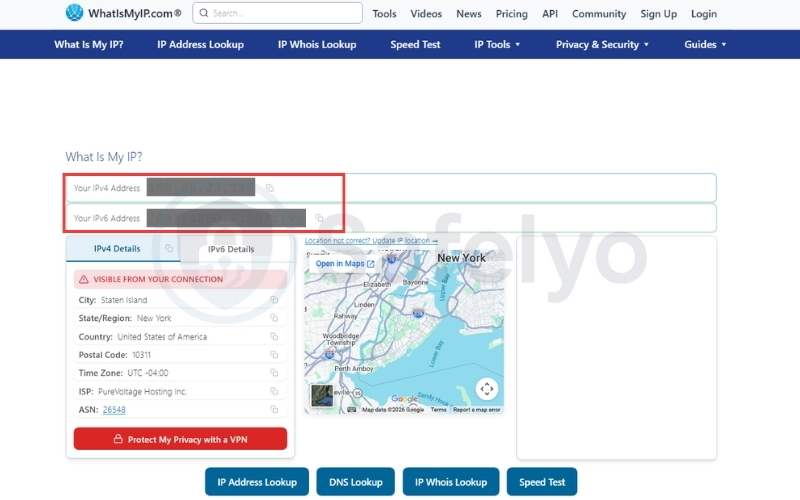
11.1. Finding your public IP online
Locating the public address that websites use to track you is straightforward. Simply open your web browser, navigate to a search engine like Google, and type “what is my IP address.” The results page will display your unique 32-bit public identifier.
If you want to verify that your privacy software is working correctly, you should check this address twice. Check it once with your security app turned off and once with it turned on. If the numbers change successfully, your real identity is hidden.
11.2. Finding your private IP (Windows & Mac)
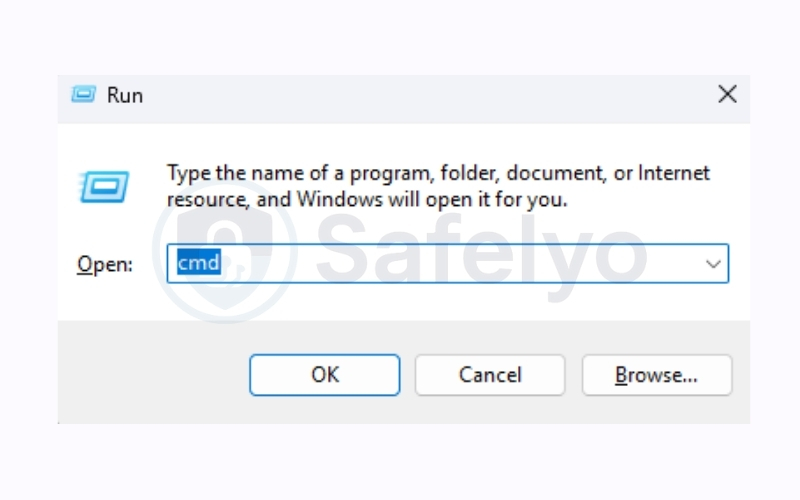
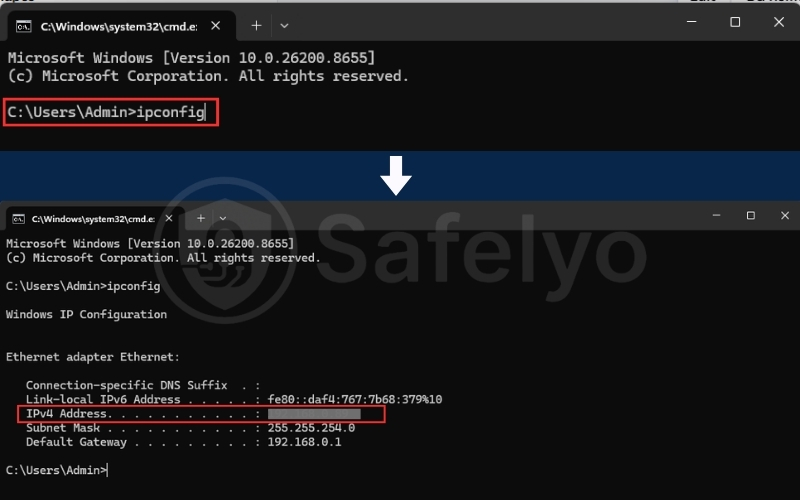
To find the local IP address assigned to your Windows PC by your router, follow these steps:
- Press the Windows key + R on your keyboard to open the Run dialog box.
- Type “cmd” and press Enter to open the Command Prompt.
- Type “ipconfig” and press Enter.
- Look for the line labeled “IPv4 Address.” Your local IP address will be listed directly next to it.
To find the local IP address on macOS, follow these steps:
- Click the “Details…” button next to your connected network to reveal your private IP address.
- Open “System Settings” from the Apple menu in the top-left corner of your screen.
- Click on the “Network” panel in the left sidebar.
- Select your active connection, such as “Wi-Fi” or “Ethernet”.
11.3. Finding your private IP (Android & iOS)
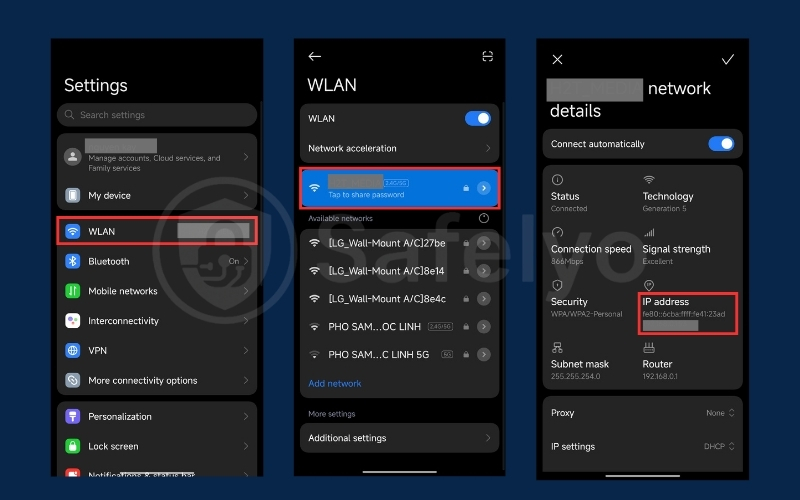
Mobile operating systems make it very easy to find your local network details without any command lines. To find your local IP address on an Android device, follow these steps:
- Open “Settings”.
- Tap “Network & internet” (or “WLAN” on some devices).
- Select your active Wi-Fi network.
- Tap your connected network to view your assigned IP address.
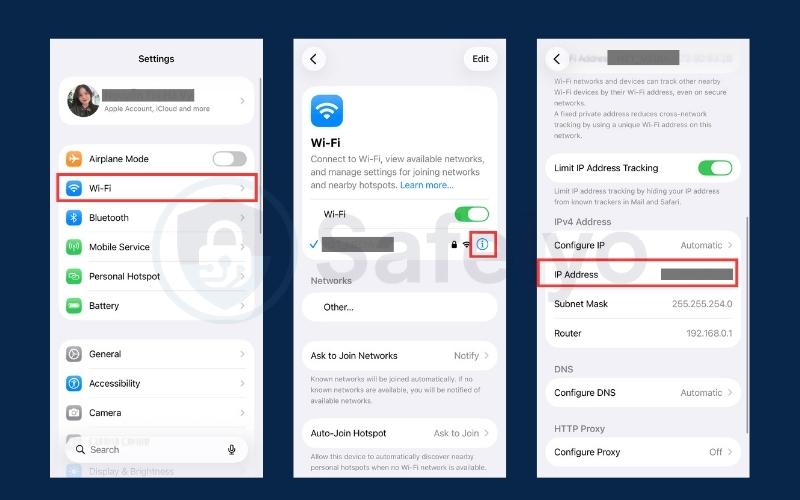
For iPhone and iPad users, the steps are nearly identical. To find your local IP address on an iPhone or iPad, follow these steps:
- Open the “Settings” app.
- Tap on “Wi-Fi”.
- Tap the blue “i” (Information) icon located next to your currently connected network.
- Scroll down to find your specific address listed next to “IP address.”
12. FAQs about IPv4
What is an example of an IPv4 address?
A standard IPv4 address is formatted as four distinct numbers separated by periods. For example, 192.168.1.1 is the most common private address used by home networking routers to manage local Wi-Fi traffic.
How many IPv4 addresses are there?
Because the system is based on a rigid 32-bit mathematical structure, it has a hard limit of approximately 4.3 billion total possible addresses. While this sounds massive, the explosion of smart devices worldwide has completely exhausted the original supply of public addresses.
Is my private IPv4 visible to websites?
No, your private internal address is strictly hidden from the public internet. Before your data leaves your house, your home router uses Network Address Translation (NAT) to disguise your private IP, replacing it with the router’s single public-facing address.
Can someone find my exact house using my IPv4?
No, a public IP address cannot reveal your highly specific street address or apartment number to random websites. It generally only reveals your Internet Service Provider (ISP) and your approximate geographical region, state, or metropolitan city area.
How can I hide my public IPv4 address?
The absolute most reliable way to hide your digital footprint is by using a premium Virtual Private Network (VPN). This security tool encrypts your traffic and replaces your real public IP with the IP address of a secure remote server, making your physical location untraceable.
13. Conclusion
Understanding what is IPv4 reveals the incredible engineering that continues to hold the modern internet together. Despite facing severe address exhaustion, this legacy 32-bit system successfully routes billions of data packets every second, ensuring your smartphones and laptops can communicate globally without failure.
While it is a highly efficient delivery system, it was never designed with user privacy in mind. Because your public address actively broadcasts your geographic location and ISP to advertisers, understanding how to mask this data is critical for modern cybersecurity. To learn how to hide your IP address and stop online tracking, explore our comprehensive guides in the Privacy & Security Basics category at Safelyo today.