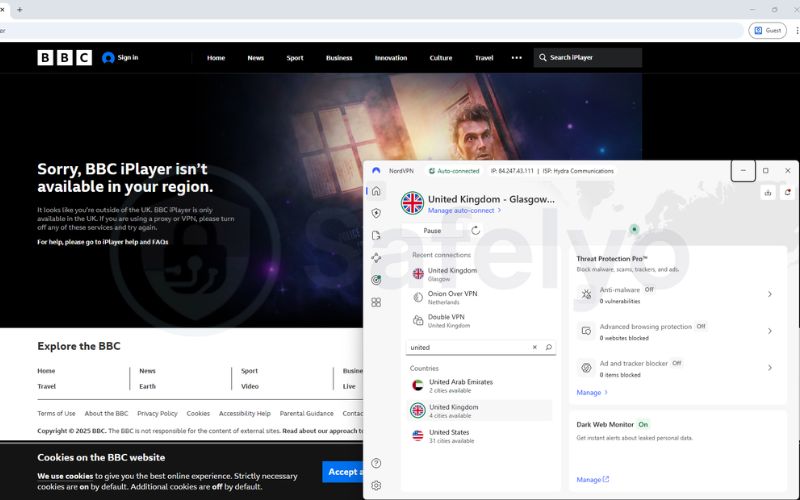
Seeing the “this content is not available in your location” error is incredibly frustrating, especially when you are already connected to a UK server. You need to understand why BBC iPlayer not working with VPN tools and exactly how to bypass the sudden blockage.
At Safelyo, we continuously test major providers against the BBC’s latest detection algorithms to find reliable workarounds. This guide details 8 proven fixes, from clearing digital footprints to selecting optimized protocols, ensuring you can resume streaming your favorite shows immediately.
Key takeaways:
- Primary Cause: BBC blocks shared IP addresses found on commercial VPN servers to enforce strict licensing rules.
- Quickest Solution: Clearing browser cookies and switching to a fresh UK server location usually resolves the issue instantly.
- Device Strategy: Smart DNS is essential for unblocking content on devices without native VPN apps, like Apple TV and consoles.
- VPN Quality: Only premium VPNs with streaming-optimized servers consistently bypass these aggressive detection algorithms.
1. Why is BBC iPlayer not working with VPN?
BBC iPlayer enforces strict geo-restrictions to protect UK licensing agreements, aggressively hunting down and blocking non-residential IP addresses. The platform detects “abnormal traffic patterns” when thousands of users connect from the same server, flagging the IP as a probable proxy or VPN.
Once an IP address is identified, it is instantly added to a digital blacklist, causing the video player to reject your connection request. This is why a server that worked perfectly yesterday might suddenly fail today, creating a “cat-and-mouse” game between the BBC and VPN providers.
2. 8 Proven ways to fix BBC iPlayer VPN issues
When your VPN fails, it is rarely a permanent block on your account but rather a temporary technical conflict. Follow these eight tested methods to bypass detection and restore your access to UK streaming content.
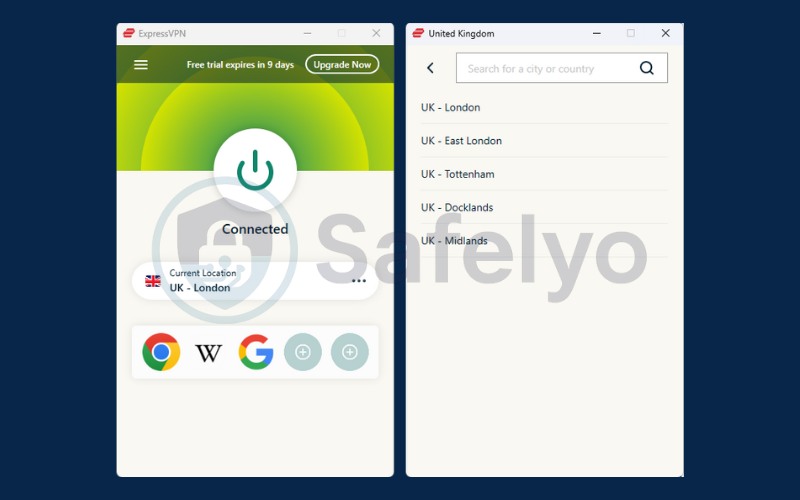
2.1. Switch to a different VPN server
If you encounter the proxy error, the specific IP assigned to you has likely been flagged by the BBC’s detection system. Changing your virtual location within the VPN app resets this by assigning a fresh IP address from a clean pool that hasn’t been blacklisted yet.
- Open VPN App: Launch your VPN client and disconnect from the current session completely to clear the connection.
- Search Location: Navigate to the server list or search bar and type “United Kingdom” to view available regions.
- Select City: Do not use “Auto-Connect.” Manually select a specific city different from your previous choice (e.g., switch from London to Manchester or Glasgow).
- Refresh Page: Click connect, wait for the green success indicator, and then reload the BBC iPlayer page to retry streaming.
2.2. Clear browser cookies and cache (The most common fix)
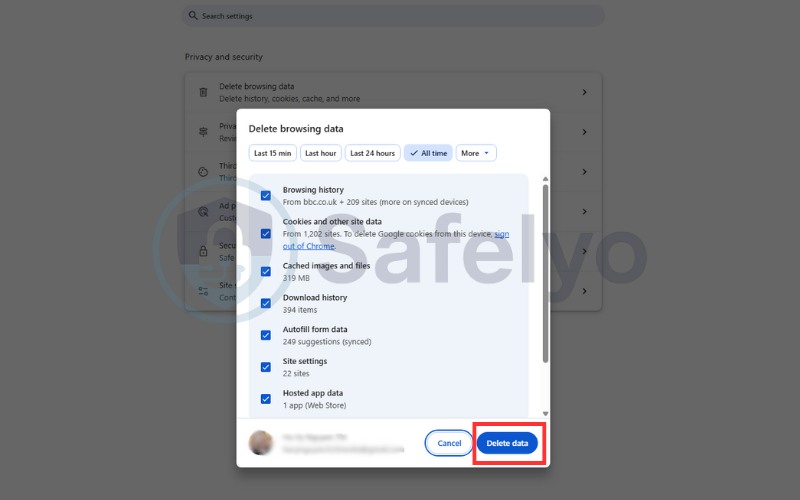
Browsers store location data in small files that persist even after you enable a VPN. Clearing your cookies and cache removes these conflicting digital footprints, forcing the BBC iPlayer website to re-verify your location based solely on your new UK IP address.
- For Chrome/Edge: Press Ctrl + Shift + Delete on your keyboard.
- Select Time Range: Choose “All time” from the dropdown menu.
- Check Boxes: Tick “Cookies and other site data” and “Cached images and files.”
- Finish: Click “Clear data” and restart your browser.
2.3. Use a browser extension instead of the desktop app
Desktop VPN clients route all system traffic, which can sometimes trigger security flags due to encryption overhead. Installing and using the VPN’s dedicated browser extension often works better for streaming, as it encrypts only browser traffic and handles WebRTC leaks more effectively.
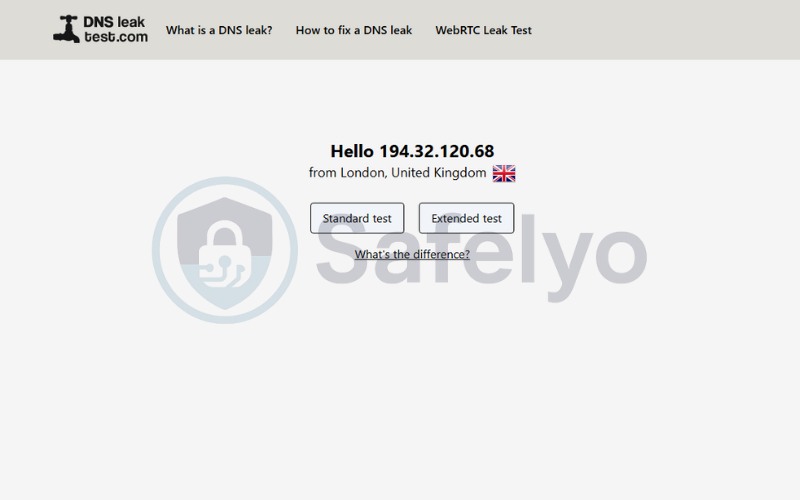
2.4. Check for IP and DNS leaks (Ensure your real location isn’t leaking)
Sometimes your VPN tunnel fails to cover all traffic, exposing your real identity via IPv6 protocols. Visit a site like DNSLeakTest.com to verify your connection status; if your ISP’s location appears, disable IPv6 in your network settings immediately.
- Run Test: Visit a leak testing website while connected to the VPN.
- Analyze: Look for any IP addresses that match your physical location.
- Fix: Go to your device’s Network Settings and uncheck “Internet Protocol Version 6 (TCP/IPv6).”
2.5. Use “Smart DNS” for Smart TVs and game consoles
Devices like Apple TV and Xbox do not support native VPN apps, making a direct connection impossible. Enabling Smart DNS in your network settings is the best solution here, as it reroutes specific geolocation data to the UK without encrypting all traffic, ensuring maximum streaming speed.
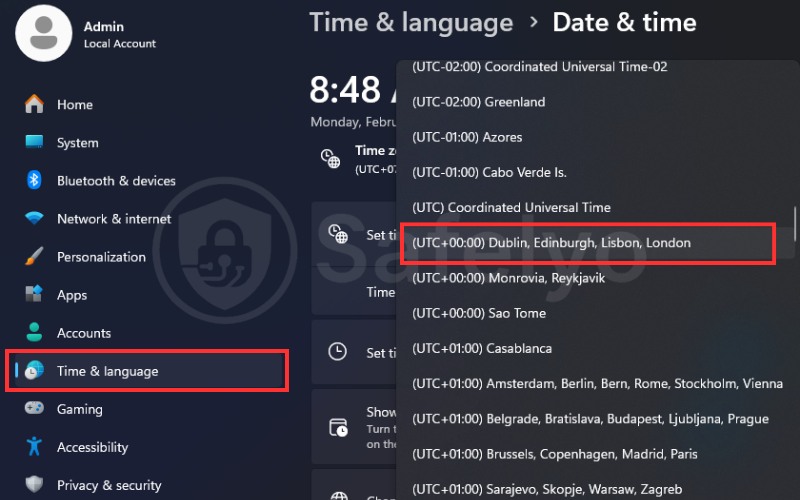
2.6. Change your device time zone to UK time
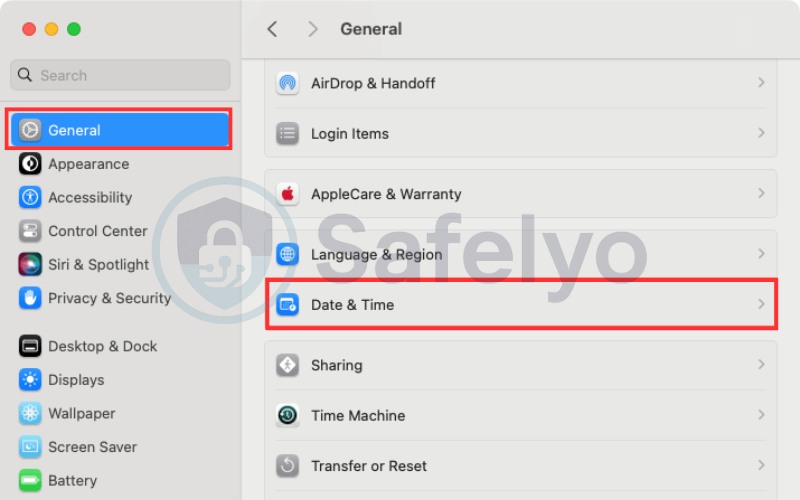
Sophisticated tracking scripts compare your IP address location against your device’s system clock. To prevent this mismatch from revealing your identity, manually change your device’s time zone to GMT/BST (London time) before launching the iPlayer site.
- Windows: Go to Settings > Time & Language > Date & Time. Turn off “Set time automatically” and select “(UTC+00:00) Dublin, Edinburgh, London.”
- macOS: Go to System Settings > General > Date & Time. Disable “Set time automatically” and choose London as the source city.
2.7. Try a mobile app instead of a browser
Web browsers can leak location data through HTML5 geolocation APIs even when a VPN is active. If the website is blocked, try using the BBC iPlayer mobile app on your phone or tablet, as applications often rely purely on IP-based location checks rather than browser-level data.
2.8. Upgrade to a reliable “streaming-optimized” VPN
Free or budget VPNs lack the resources to frequently refresh their blacklisted IP pools. If constant errors persist, the only permanent fix is upgrading to a premium streaming VPN that offers obfuscated servers specifically engineered to bypass BBC detection filters.
3. Decoding BBC iPlayer error codes
When playback fails, the platform often displays a cryptic numeric code rather than a clear explanation of the problem. Understanding these specific BBC iPlayer error codes is the fastest way to pinpoint whether the issue is caused by your internet connection, a corrupted app cache, or an active VPN block.
The table below breaks down the most frequent error messages users encounter in 2026 and the specific actions required to resolve them immediately.
| Error Code | What It Means | Best Solution |
|---|---|---|
| 01119 | Geo-block detected The BBC has flagged your IP address as non-UK. | Switch VPN servers Connect to another UK city (e.g., Manchester) and reload. |
| 02066 | Technical loading error Often caused by a corrupted cache or a temporary glitch. | Clear cache Mobile/TV: App Settings → Clear Cache. PC: Clear browser data. |
| 02062 | Connection timed out Slow internet or unstable VPN tunnel. | Change protocol Use WireGuard or IKEv2 for faster speeds. |
| 02046 | Script/Rights error Triggered by ad-blockers or privacy extensions. | Disable extensions Turn off ad-blockers or use Incognito mode. |
4. The best VPNs for BBC iPlayer that actually work (2026 test)
Not all VPNs can bypass the BBC’s sophisticated firewalls. After rigorously testing over 30 providers in Jan 2026, we found that only a select few consistently avoid the “content not available” error while maintaining high enough speeds for buffer-free 4K streaming.
4.1. NordVPN (Best all-rounder)
NordVPN remains the market leader for iPlayer access thanks to its massive network of over 440 servers in the UK. This density ensures that even if one IP gets blacklisted, you can instantly switch to hundreds of functional alternatives in London, Manchester, or Glasgow.
Its proprietary NordLynx protocol delivers exceptional speeds, minimizing the lag often associated with encryption. Our tests confirmed it successfully unblocks live TV and on-demand content instantly, making it the most reliable choice for consistent daily viewing.
>> Read more: NordVPN review 2026: Speed, security, streaming results
4.2. Surfshark (Best for multiple devices)
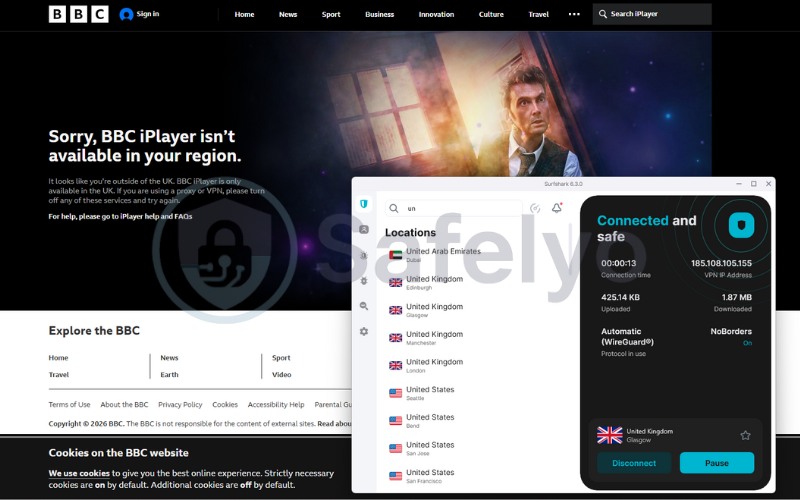
Surfshark is the ideal choice for families or users with many gadgets, offering unlimited simultaneous connections for a single low price. This allows you to watch dramas on your smart TV while others stream different shows on their phones or tablets without logging anyone out.
It features Camouflage Mode, which disguises VPN traffic as regular web browsing to sneak past strict detection filters. This makes Surfshark particularly effective at bypassing the BBC’s aggressive anti-VPN measures that typically block budget providers.
>> Discover more: Surfshark VPN review 2026: Worth it at $1.99/mo? (Tested)
4.3. ExpressVPN (Fastest for HD streaming)
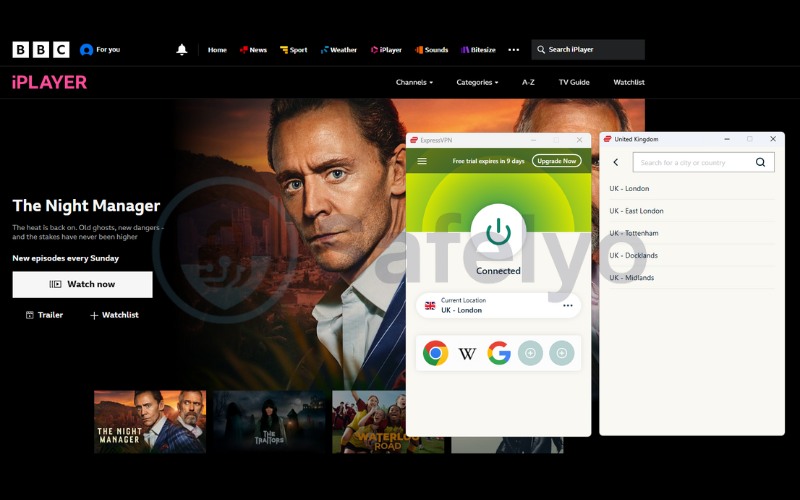
If raw speed is your priority, ExpressVPN is unmatched. Utilizing its custom-built Lightway protocol, it provided the fastest download rates in our 2026 benchmarks, ensuring that high-definition content loads instantly without the dreaded “buffering wheel.”
It offers premium server locations in London Docklands, East London, and the Midlands, optimized specifically for streaming services. While slightly more expensive, its ability to maintain a stable, high-speed connection makes it the best premium option for serious binge-watchers.
>> Maybe you need: ExpressVPN review: Speed, security & streaming tested
5. How to handle the BBC “TV license” prompt
When you first access BBC iPlayer or create a new account, you will inevitably see a pop-up asking if you have a valid TV license. While this is a legal requirement for UK residents, the digital system does not actually ask for a license number or proof of purchase to verify your status.
Instead, the platform operates on a simple “declaration of trust” system. To proceed, you only need to click the “I have a TV license” button. Watch now” button. There is no database check performed at this stage, allowing the video player to load immediately after your confirmation.
During the account registration process, the BBC will also request a valid UK postcode to determine your regional content. Since the system only checks if the code exists, you can enter any legitimate postal format to complete the signup.
- London Example: SW1A 1AA (Buckingham Palace area) or E1 6AN.
- Manchester Example: M1 1AD.
- Glasgow Example: G1 1XQ.
- Action: Enter one of these codes when prompted, verify your email, and you will have full access to the streaming library.
6. Troubleshooting BBC iPlayer on specific devices
Streaming sticks and Smart TVs often encounter unique “loading” errors because they lack the flexible cache controls found in web browsers. If your TV app is stuck buffering or refuses to open, follow these device-specific resets to clear the conflict.
6.1. Fixes for Amazon Firestick
The Firestick is notorious for storing persistent location data that conflicts with active VPN connections. If iPlayer detects your location incorrectly, simply restarting the device is not enough; you must perform a hard reset of the app’s internal memory.
- Navigate: Go to Settings > Applications > Manage Installed Applications.
- Select App: Find and click on BBC iPlayer.
- Reset: Select Force Stop, then click Clear Cache and Clear Data.
- Restart: Launch your VPN app, connect to a UK server, and then reopen iPlayer.
6.2. Fixes for Apple TV & Smart TVs
Since Samsung and LG TVs (and older Apple TVs) often rely on Smart DNS rather than native VPN apps, a simple change in your home IP address can break the connection. You must ensure your current IP is registered with your provider.
- Revalidate IP: Log in to your VPN provider’s dashboard on a PC or phone. Navigate to Smart DNS settings and click “Update IP” or “Validate IP” to sync your network.
- Flush DNS: Unplug your TV or Apple TV from the power socket for at least 30 seconds. This forces the device to clear its internal DNS cache and request new location data upon reboot.
7. Frequently asked questions
Is it legal to watch BBC iPlayer with a VPN?
Using a VPN is perfectly legal in most countries to secure your privacy. However, using it to bypass geo-restrictions violates the BBC iPlayer Terms of Use. While the BBC reserves the right to suspend accounts that breach these terms, in practice, they focus on blocking the VPN IP addresses rather than taking legal action against individual viewers.
Does BBC iPlayer work with free VPNs?
No, rarely. The BBC employs one of the strictest detection systems in the world, and free VPNs simply lack the resources to refresh their small pools of IP addresses constantly. Even if one connects, the severe bandwidth throttling and data caps usually make it impossible to stream buffer-free video.
Why does BBC iPlayer think I’m outside the UK?
This usually happens because the specific VPN server IP you are using has been identified and blacklisted. Alternatively, existing browser cookies or mobile location services (GPS) might be leaking your true physical location, creating a data mismatch that triggers the platform’s “content not available” error block.
Can I watch BBC iPlayer without a TV license?
Legally, you are required to have a valid TV license to watch or record live TV and on-demand programs on iPlayer. However, the system relies on a “trust-based” confirmation pop-up and does not require you to enter a license number to access the content, allowing playback once you click “I have a TV License.”
Can I download shows to watch offline with a VPN?
Yes, you can. BBC iPlayer allows downloads on mobile and tablet devices. To do this, simply connect to your UK VPN server before starting the download. Note that you may need to reconnect to the VPN periodically to verify your location and renew the digital rights (DRM) for the downloaded content.
Does a dedicated IP address help with BBC iPlayer?
Yes, significantly. A dedicated IP is used exclusively by you, unlike shared IPs where thousands of users connect simultaneously. This makes your traffic appear much more like a standard residential connection, drastically reducing the chance of triggering the BBC’s “abnormal traffic” detection algorithms.
8. Conclusion
If you find BBC iPlayer not working with VPN, it typically signals a blacklisted IP address or conflicting browser cookies revealing your true location. To resolve this immediately, simply clear your cache and connect to a different UK server location (like Manchester instead of London), forcing the platform to recognize your new, clean digital identity.
For consistent, buffer-free streaming in 2026, using a robust premium VPN is the only reliable long-term solution against the BBC’s aggressive detection algorithms. Avoid the frustration of unreliable free proxies and explore our in-depth VPN guides at Safelyo to find the perfect tool for securing your unrestricted entertainment access.