You are trying to browse the web, but flashing banners and unskippable videos are ruining your browsing experience. You already know that a VPN helps protect your online privacy, but do VPNs block ads as well?
The answer is yes. Many modern VPNs now include ad blocking functionality that stops ads at the network level. This guide explains how they work, what they catch, and why they might miss things like YouTube ads.
Key takeaways:
- Premium VPNs use DNS filtering to stop pop-ups and banners before they reach your device.
- This process saves mobile data and speeds up your page loading times significantly.
- VPNs cannot stop Spotify ads because they are baked into the content stream.
- These tools are more effective at blocking malicious trackers and security threats than browser extensions.
- We recommend using a VPN alongside a browser extension for the best results.
1. Do VPNs block ads?
By default, VPN services focus on privacy and do not block ads, but many VPN providers now include built-in ad blockers designed to stop ads and trackers. Unlike a browser extension that hides ads already on your screen, a VPN-based blocker prevents the ad from ever loading.
When you enable this feature, the VPN acts like a digital bouncer for your internet traffic. It identifies requests coming from known ad servers, such as those used for display ads or pop-up ads, and blocks the connection immediately. This means the ad never reaches your device, which saves your mobile data and battery life.
I have researched 47 popular services to find which ones include this feature and the specific name of their tool. Here is what I found:
| VPN Provider | Offers ad-blocker | Feature name |
|---|---|---|
| AdGuard VPN | Yes | No specific name |
| Astrill VPN | Yes | No specific name |
| Bitdefender VPN | Yes | No specific name |
| Celo VPN | Yes | No specific name |
| Clear VPN | Yes | No specific name |
| CryptoStorm | Yes | No specific name |
| CyberGhost | Yes | Block content |
| FastestVPN | Yes | No specific name |
| IVPN | Yes | Anti-tracker |
| Mullvad | Yes | DNS content filtering |
| NordVPN | Yes | Threat Protection Pro |
| OVPN | Yes | No specific name |
| Perfect Privacy | Yes | TrackStop |
| Private Internet Access | Yes | MACE |
| Proton VPN | Yes | NetShield |
| PureVPN | Yes | No specific name |
| Surfshark | Yes | CleanWeb |
| TorGuard | Yes | No specific name |
| TunnelBear | Yes | TunnelBear Blocker |
| VeePN | Yes | NetGuard |
| VPNSecure | Yes | No specific name |
| Windscribe | Yes | R.O.B.E.R.T. |
| ExpressVPN | Yes | Threat Manager |
| Hide.me | Yes | SmartGuard |
| F-Secure Freedome VPN | Yes | No specific name |
| IPVanish | Yes | IPVanish Threat Protection |
| PrivadoVPN | Yes | No specific name |
| LimeVPN | No | – |
| Betternet | No | – |
| AirVPN | No | – |
| AzireVPN | No | – |
| BeetVPN | No | – |
| Encrypt.me | No | – |
| Goose VPN | No | – |
| Hotspot Shield | No | – |
| Ivacy | No | – |
| Phantom VPN | No | – |
| SaferVPN | No | – |
| Trust.Zone | No | – |
| VirtualShield VPN | No | – |
| VPN.ac | No | – |
| Internxt secure VPN | No | – |
| VyprVPN | No | – |
| CactusVPN | No | – |
| HideMyAss | No | – |
| StrongVPN | No | – |
| VPN Unlimited | No | – |
2. How do VPN ad blockers actually work?
To understand why VPN blockers are unique, we need to look at the technology they use, which is quite different from a standard plugin.
2.1. The DNS filtering process
The core technology is called DNS filtering. Every time you click a link, your device looks up the website’s address. When a VPN with ad blocking is active, it checks every request against a massive database (a “blacklist”) of bad domains.
If your browser tries to load a known ad server (like ads.doubleclick.net), the VPN sees the match on the blacklist and cancels the request instantly.
2.2. Ad blocking at the network level vs. browser level
This is the most important distinction for users:
- Network Level (VPN): Works across your entire operating system. This means it can block ads in your web browser, but also inside other apps, mobile games, and on your entire device.
- Browser Level (Extensions): Only works inside the specific browser (like Chrome or Firefox). It is great at rearranging the page to look clean (“cosmetic filtering”), but it cannot stop ads inside your Spotify app or phone games.
3. Ad blocker vs VPN: Do I need an ad blocker if I have a VPN?
If your VPN blocks ads, you might wonder if you can uninstall your ad-blocking extension. In most cases, it is better to keep both.
A VPN covers the “heavy lifting” by stopping dangerous trackers and reducing data usage across your whole device.
However, because it stops traffic at the network level, it often leaves empty white spaces on websites where the ad used to be. A browser extension is better at “cleaning up” these visual gaps. For 100% protection and a clean look, they work best as a team.
4. Limitations: What can (and can’t) a VPN block?
While VPNs are powerful privacy tools, they are not magic wands. There are specific types of ads that DNS filtering cannot stop.
4.1. Can a VPN block YouTube, Spotify & Google ads?
Most users find that these major platforms are difficult to bypass. Here is how VPNs interact with them:
- YouTube: It is hit or miss. While some people report that certain VPNs can block YouTube ads, the platform constantly updates its ad-block detection and delivery systems. Because of these frequent updates, there is no guarantee that the ad-blocking feature will still be effective at the exact moment you are using it.
- Spotify: No. Audio ads are baked into the stream within the app.
- Google Search Ads: Sometimes. A VPN can block the tracking links behind a sponsored result, but the text-based “Sponsored” ad itself is served by Google and will usually still appear.
This is not a limitation unique to VPNs. Even dedicated ad-blocking applications typically cannot stop Spotify ads. This happens because Spotify encrypts its audio stream and injects ads directly into that same stream on the server side. Because of this, external tools are unable to separate the music from the commercial messages.
4.2. Malicious ads, pop-ups & trackers
This is where VPNs excel. They are incredibly effective at blocking:
- Pop-up ads: Common on torrenting sites or free streaming platforms.
- Invisible trackers: Third-party scripts that follow your digital footprint to build a profile on you.
- Malware domains: Sites known to host viruses are blocked instantly, providing a security layer that goes beyond simple convenience.
5. Best VPNs that block ads effectively (Tested)
We reviewed several top providers to see which ones offer the most reliable ad-blocking capabilities. Each of these tools uses slightly different technology to clean up your browsing experience.
5.1. NordVPN (Threat Protection)
NordVPN offers “Threat Protection Pro,” which acts like a hybrid between a VPN and antivirus software.
This feature is comprehensive because it works even when you are not connected to a VPN server. It identifies and blocks malicious domains, stops intrusive pop-up ads, and scans your downloaded files for malware in real-time.
5.2. Surfshark (CleanWeb)
Surfshark’s CleanWeb feature is known for being strict and user-friendly.
It is particularly effective at blocking ads on Smart TVs or FireSticks where you cannot install browser extensions. This tool focuses on blocking video ads and banners at the DNS level, ensuring your streaming apps remain uncluttered without slowing down your connection.
5.3. Private Internet Access (MACE)
PIA uses a feature called MACE, which is a simple and ruthless DNS blocker.
It compares every request your device makes against a database of known ad and tracker servers. MACE is highly efficient at stopping cross-site trackers and preventing your browser from loading heavy ad scripts, which significantly speeds up page loading.
5.4. Proton VPN (NetShield)
Proton offers NetShield, which stands out for its granular control and focus on security.
You can choose between three levels of protection: off, block malware only, or block malware, ads, and trackers together. This flexibility is useful if you find that strict blocking is breaking certain websites and you need to adjust your settings quickly.
5.5. Windscribe (R.O.B.E.R.T.)
Windscribe offers a highly customizable tool called R.O.B.E.R.T.
It allows you to manage your own blocklists across various categories like social media, gambling, or specific ad networks. This makes it a strong choice for users who want to decide exactly which malicious actors or trackers to ban from their entire network.
6. How to block ads with a VPN (Step-by-step)
Setting up ad blocking is usually a simple process within the VPN app. Most premium providers place this toggle within their security or privacy menus.
Quick general step:
- Open your VPN app.
- Go to Settings or Privacy.
- Locate the ad-blocking feature (e.g., CleanWeb, NetShield).
- Toggle it ON.
- Connect to a server and refresh your webpage.
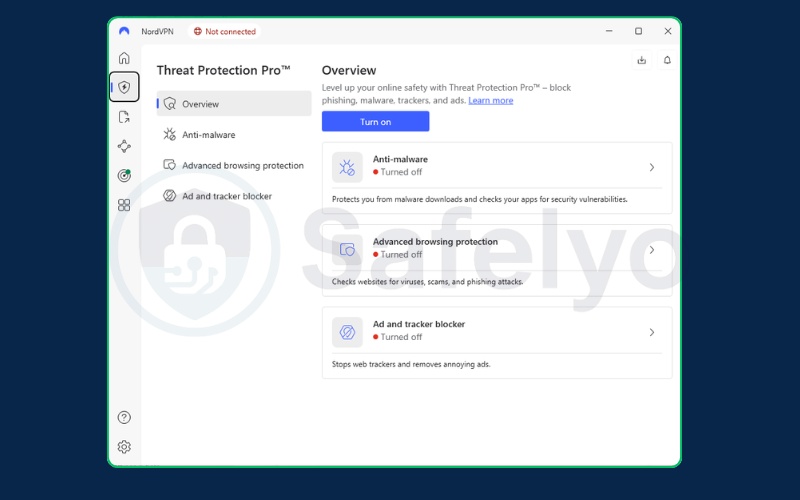
While the general steps are similar, some apps have slightly different labels. Here is how you can activate the most popular feature, NordVPN’s Threat Protection Pro, on your desktop:
- Launch the NordVPN app on your computer.
- Click on the Shield icon (Threat Protection) on the left-hand sidebar.
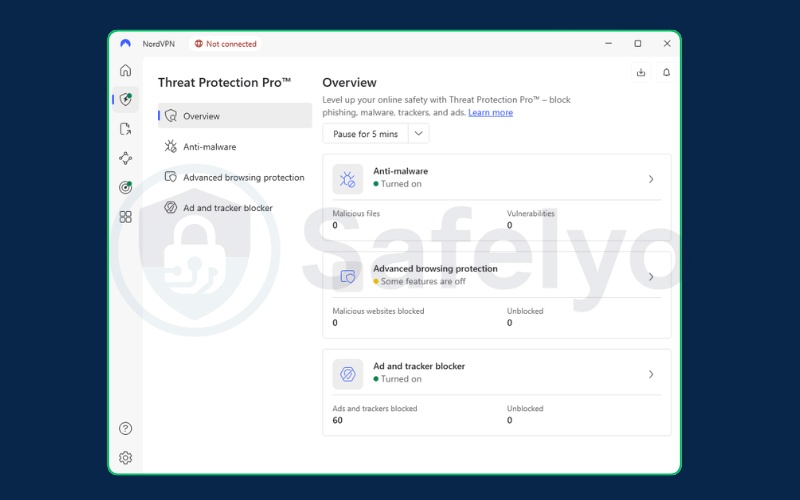
- Turn on the main Threat Protection Pro switch.
- Follow any on-screen prompts to install the necessary browser permissions if requested.
- Once active, the shield icon will turn green, indicating that ads and trackers are being blocked even if you are not connected to a VPN server.
7. FAQs about Do VPNs block ads
Does NordVPN block ads on Android?
Yes, but with a restriction. If you download the app from the Google Play Store, the feature might be limited to “DNS only” due to Google’s policies. For full ad blocking, you should download the .apk file directly from the NordVPN website.
Does ExpressVPN block ads?
ExpressVPN’s “Threat Manager” focuses primarily on trackers and malicious sites rather than display ads. While excellent for privacy, it is not a dedicated ad blocker like Surfshark’s CleanWeb.
Can a VPN block ads on mobile games?
Yes. Since most free mobile games load video ads from external servers, a VPN running in the background can prevents these ads from loading. This often allows you to play without interruption.
Is there a free VPN to block ads?
Yes, some providers like Windscribe offer free versions that include limited ad and malware blocking capabilities.
However, many other free plans, such as the one from Proton VPN, do not include ad blocking and are restricted to basic privacy features only. Generally, free versions also come with data limits or fewer server options compared to their paid counterparts.
8. Conclusion
So, do VPNs block ads? Yes, they are a powerful tool for stopping pop-ups, speeding up your connection, and enhancing your security. By cutting off the connection to ad servers, they act as a shield for your data.
However, they are not a complete solution for YouTube or streaming services. For a truly clean internet, use a reliable VPN to handle invisible threats and a browser extension to handle the visuals.
For more step-by-step VPN tutorials and practical security tips, visit the VPN Guides category on Safelyo.