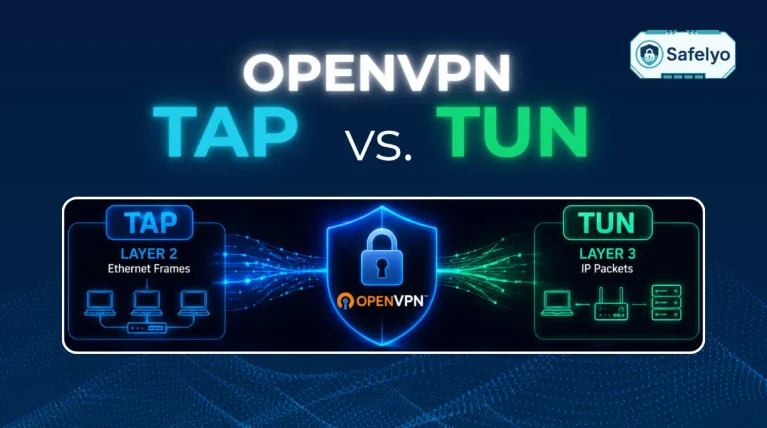
VPN encryption works by scrambling your internet traffic into unreadable code on your device before transmission, sending it through an isolated virtual tunnel, and decrypting it at the VPN server using a shared cryptographic key.
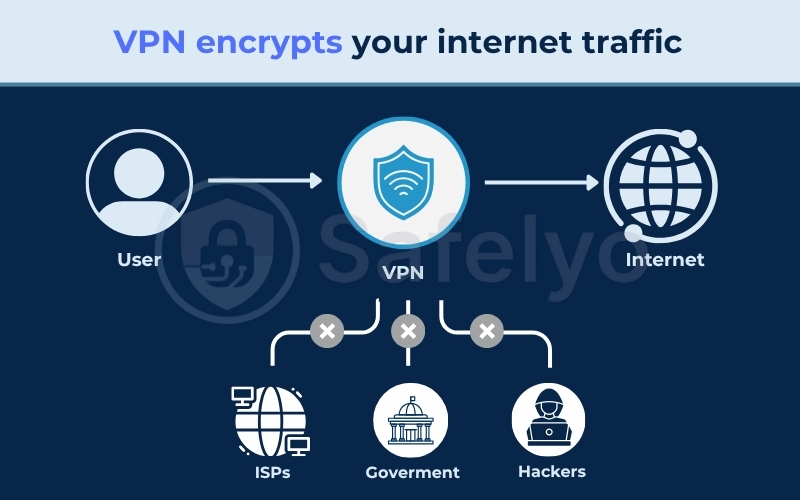
This continuous process shields your personal data from local network snoopers and prevents Internet Service Providers (ISPs) from inspecting your online activity.
Understanding how VPN encryption works helps you evaluate protocol security, avoid configuration flaws, and select reliable software for your privacy needs.
Key takeaways:
- The initial handshake authenticates the server and establishes a secure channel across public networks.
- VPNs combine asymmetric encryption for key exchange with symmetric encryption for rapid data processing.
- Tunneling wraps your original IP packets inside new outer headers to hide source details and destination addresses.
- Strong ciphers like AES-256 and ChaCha20 resist brute-force attacks without causing noticeable latency on modern processors.
- Encryption protects against local snooping and provider tracking, but it cannot prevent phishing scams, malware infections, or account-level tracking.
1. What is VPN encryption? (Quick definition)
VPN encryption is the process of turning all outgoing and incoming internet traffic from your device into unreadable, scrambled text that only authorized devices can decode. Without the proper decryption key, intercepted data looks like random characters to anyone monitoring the connection.
Many users assume that browser-level HTTPS encryption makes a separate VPN redundant. HTTPS only secures traffic between your web browser and a specific visited website, leaving background applications, DNS queries, and destination IP data exposed to your network administrator or Wi-Fi owner.
A VPN encrypts every data packet leaving your operating system at the network level, protecting all active applications simultaneously.
Network privacy tools use different methods to route and secure data across the web. To understand these differences, you can compare VPNs, proxies, and Tor to examine how their encryption models and privacy guarantees apply to different privacy needs.
2. How VPN encryption works (Step-by-step)
To protect unencrypted traffic across public networks, a VPN client establishes an authenticated connection, exchanges cryptographic keys, wraps data packets, and safely decodes them at your device and the VPN server.
2.1. Step 1: The handshake (Establishing trust)
The connection process begins when your device contacts the VPN server to initiate a secure handshake. During this phase, both your device and the VPN server verify each other’s identity using digital security certificates and negotiate the cryptographic rules for the active session.
This handshake confirms that your client is communicating with a genuine VPN server rather than an attacker attempting a man-in-the-middle attack. Once identity verification succeeds, both systems agree on which encryption ciphers and authentication methods to apply to the session.
2.2. Step 2: Key exchange (Symmetric vs asymmetric)
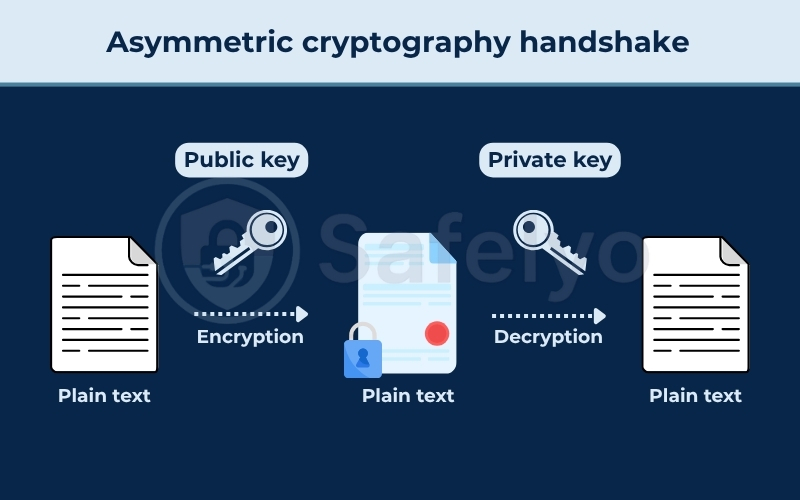
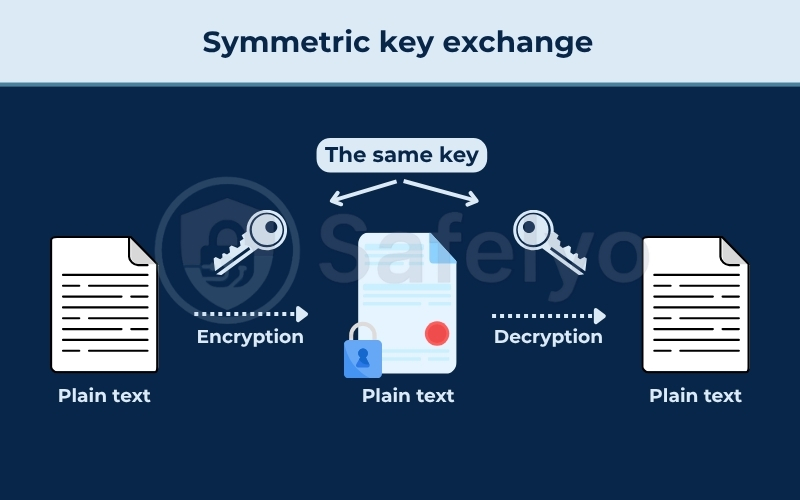
The VPN uses asymmetric encryption to share session keys securely across an open network, then switches to symmetric encryption to encrypt your regular traffic.
Asymmetric cryptography uses two mathematically linked keys: a public key that anyone can use to encrypt data, and a private key kept secret by the receiver to decrypt it.
Algorithms like Diffie-Hellman handle the secure key exchange, while digital certificates (often using RSA) verify the identity of the endpoints without exposing sensitive secrets over an open network.
Once the initial handshake succeeds, the systems generate a shared symmetric key for ongoing communication. Symmetric ciphers like AES and ChaCha20 use the same key for both encryption and decryption.
VPNs rely on this hybrid model because asymmetric cryptography requires a lot of processing power, whereas symmetric encryption processes massive data streams rapidly without placing heavy loads on your hardware.
2.3. Step 3: Tunneling (Wrapping your data)
Tunneling wraps your original data packets inside an additional layer of data before transmitting them across the internet.
During this wrapping process, the VPN client takes the original packet (including its web traffic and destination IP address) and encrypts it entirely. It then wraps this encrypted data inside an outer packet that displays only the IP address of the VPN server. Intermediate routers and local internet service providers can see only the outer wrapper, which prevents them from inspecting the true destination of your traffic.
This wrapping process increases overall packet size slightly. If the maximum transmission unit (MTU) size on your network is not configured properly, this extra data header can occasionally cause packet fragmentation and transmission delays on unstable lines.
2.4. Step 4: Decryption at the other end
When the wrapped packet arrives at the VPN server, the server uses the established symmetric key to strip away the outer wrapper and decrypt the data.
The VPN server then forwards the original request to the destination website on the open internet.
When the website returns data, the server encrypts the response using the same symmetric key and routes it back through the tunnel to your device, where your VPN software decrypts it instantly. This cryptographic calculation occurs in milliseconds, ensuring that data transformation does not create noticeable connection lag.
3. VPN encryption protocols explained
A VPN protocol defines the specific set of transmission rules, transport layers, and ciphers that govern how your encrypted tunnel functions.
3.1. Protocol comparison at a glance
The following table compares the performance, security profiles, and primary use cases of major modern and legacy VPN protocols:
| Protocol | Speed | Security level | Best for |
|---|---|---|---|
| WireGuard | Very fast | High (Modern cryptography) | Streaming, gaming, and general daily use |
| OpenVPN | Moderate | High (Industry-tested standard) | Restrictive networks and bypassing firewalls |
| IKEv2/IPsec | Fast | High (Legacy IPsec standard) | Mobile devices switching between networks / Manual operating system setup without third-party apps |
| L2TP/IPsec | Moderate | Moderate (Double encapsulation overhead) | Legacy systems lacking modern protocol support |
| SSTP | Moderate | High (Native Windows integration) | Windows environments bypassing strict port blocks |
| PPTP | Very fast | Low (Obsolete ciphers) | Obsolete setups where security is not required |
3.2. Encryption algorithms and cipher modes explained
Modern VPN configurations rely primarily on two symmetric ciphers: AES-256 and ChaCha20.
AES-256 uses a 256-bit key length, creating 2^256 possible key combinations. This mathematical scale makes brute-force attacks computationally impossible with standard computing hardware. Most modern desktop processors include dedicated AES-NI hardware acceleration instructions, allowing them to process AES encryption without consuming heavy resources.
How AES handles your data depends on its operational cipher mode:
- AES-CBC (Cipher Block Chaining): An older mode that encrypts data in strict sequential blocks. It requires a separate authentication step, which can reduce processing speeds and introduce configuration vulnerabilities if implemented incorrectly.
- AES-GCM (Galois/Counter Mode): The standard option for VPNs today. It encrypts data blocks in parallel and provides built-in cryptographic authentication, delivering significantly faster throughput and tighter security than CBC.
Encryption scrambles your web traffic, but it does not stop attackers from attempting to alter packets in transit. To prevent data tampering, protocols use message authentication codes like HMAC or Poly1305. These authentication codes verify packet integrity before decryption, ensuring that intercepted or modified data is discarded immediately.
ChaCha20 pairs natively with the Poly1305 authenticator in modern protocols like WireGuard. This stream cipher maintains fast speeds on smartphones and low-power CPUs that lack dedicated AES hardware instructions. Neither cipher is universally superior, as both provide strong cryptographic protection when implemented correctly across supported hardware.
3.3. Which protocol should you actually choose
Choosing the right protocol depends on your specific network environment and daily online activities.
- Select WireGuard as your default choice for high-speed streaming, gaming, and general daily use.
- Select OpenVPN if you need to bypass strict firewalls, unblock restricted workplace networks, or configure a home router.
- Select IKEv2/IPsec only if you need to establish a manual VPN connection directly inside your operating system settings without installing a third-party app.
The commercial VPN industry has retired legacy options like PPTP, L2TP/IPsec, and SSTP, while many major providers (including NordVPN and Mullvad) have dropped IKEv2/IPsec from their official applications.
Because WireGuard and proprietary protocols handle mobile roaming seamlessly with minimal battery drain, IKEv2 is no longer necessary for daily smartphone use. Today, leading services build their software almost entirely around WireGuard, OpenVPN, and custom in-house protocols.
Leading VPN brands develop proprietary protocols to optimize speed and efficiency across modern devices:
- NordLynx (NordVPN): Adapts the core WireGuard protocol with a double Network Address Translation system, delivering high speeds while preventing user IP addresses from remaining on server memory.
- Lightway (ExpressVPN): A custom, lightweight protocol designed from scratch that establishes connections instantly and conserves mobile battery life.
These modern protocols integrate automatically into client apps, giving you fast connections and reliable mobile performance without requiring technical configuration.
4. What encryption protects you from (and what it doesn’t)
Evaluating VPN security requires a clear understanding of what network encryption can defend against and what network encryption cannot do.
4.1. What VPN encryption protects against
Network encryption isolates your data stream from local observers and public networks.
- ISP data collection: Prevents your internet provider from logging your browsing habits, application usage, and visited web domains.
- Public Wi-Fi snooping: Protects unencrypted network traffic from packet sniffers operating on open wireless access points.
- Man-in-the-middle attacks: Blocks rogue routers from altering data packets or injecting unauthorized code into your connection.
- Traffic-based throttling: Stops internet service providers from selectively slowing down your bandwidth based on streaming or torrenting activity.
4.2. What VPN encryption does not protect against
Encryption secures the transmission path between your device and the VPN server, but it does not protect against software vulnerabilities or deceptive websites.
- Phishing attacks: Entering login credentials on fraudulent websites compromises your account regardless of active network encryption.
- Malware downloads: Malicious files execute locally on your operating system and bypass network tunnel protections.
- Untrusted provider logging: An unverified VPN service can log your unencrypted traffic at the server level if it lacks an independently audited no-logs policy verified by auditing firms like PwC or Deloitte.
- Post-server unencrypted traffic: Traffic traveling from the VPN exit server to an unencrypted HTTP destination remains readable on the open web.
For high-risk browsing situations requiring decentralized routing, users often deploy Tor to distribute network trust across multiple volunteer relays rather than relying on a single VPN provider.
5. Common misconceptions about VPN encryption
The following table contrasts common misunderstandings about cryptographic strength against actual technical realities:
| Common misconception (Myth) | Technical reality (Fact) |
|---|---|
| AES-256 makes a VPN impossible to compromise | Security breaches target misconfigured servers, software vulnerabilities, and weak credentials rather than breaking the cipher mathematically. |
| Strong encryption alone guarantees complete privacy | Encryption cannot prevent data exposure if your client application lacks an automatic kill switch or leaks DNS queries. |
| VPN encryption provides complete online anonymity | Encryption conceals your traffic from internet providers, but tracking cookies, browser fingerprinting, and active logins can still identify you. |
6. Does VPN encryption slow down your internet?
No, the encryption process itself does not noticeably slow down your connection.
Modern processors handle symmetric ciphers effortlessly using dedicated hardware instructions, consuming only 1% to 3% of CPU capacity. Noticeable speed drops stem from packet header overhead, routing distance, and server load rather than cryptographic calculations.
To evaluate this behavior in a real-world setting, we ran standardized speed tests from Vietnam on a Windows 11 PC using Ookla, connecting to nearby Singapore servers. Using NordVPN as a practical example, the encrypted connection maintained an average of over 400 Mbps against our unencrypted 800 Mbps baseline.
This speed reduction reflects standard network routing and packet overhead, yet it still provides more than enough bandwidth for uninterrupted 4K streaming and large file downloads.
7. How to tell if your VPN’s encryption is actually working
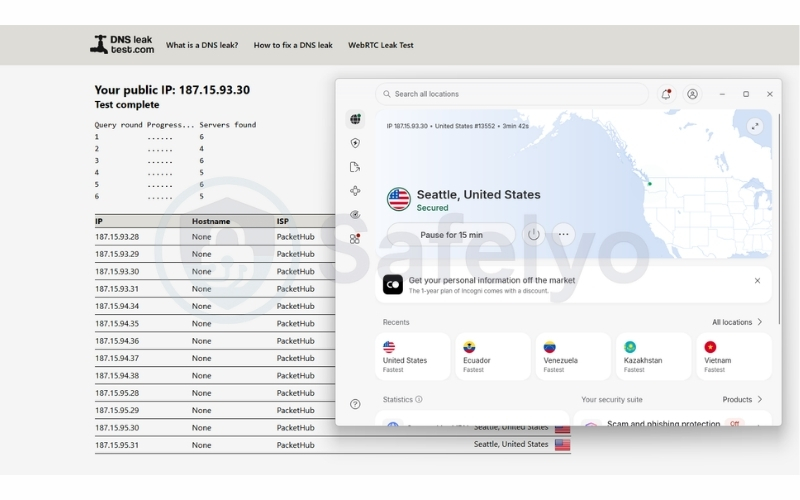
You can verify whether your VPN successfully encrypts traffic and conceals your network identity using standard diagnostic tests.
- Verify your public IP address: Before launching your VPN, visit a lookup tool like whatismyipaddress.com and record your actual IP address and location. Connect to a VPN server, refresh the page, and ensure the tool displays the VPN server’s assigned IP and location instead of your home network.
- Run a DNS leak test: Open ipleak.net in your browser while the VPN remains active. Review the list of detected DNS server addresses to confirm that all requests route through your VPN provider’s private resolvers rather than your local internet provider.
- Check for WebRTC leaks: Navigate to browserleaks.com/webrtc with your VPN connection enabled. Check the WebRTC test results to ensure your browser does not expose your real local or public IP address through real-time communication channels.
8. What to look for in a VPN’s encryption
Selecting a reliable VPN requires assessing its technical configuration, protocol selection, and operational transparency.
- Modern ciphers: Verify that the service uses AES-256-GCM or ChaCha20-Poly1305, avoiding legacy options like Blowfish or DES.
- Modern protocol implementations: Choose software supporting WireGuard and OpenVPN rather than obsolete options like PPTP.
- Perfect Forward Secrecy (PFS): Ensure the VPN negotiates unique, temporary session keys so that historical traffic remains secure even if a long-term server key leaks.
- Automatic kill switch: Confirms that your operating system drops all internet traffic instantly if the VPN connection drops unexpectedly.
- Audited no-logs infrastructure: Look for third-party security audits conducted by reputable firms like Cure53, PwC, or Deloitte to verify that servers run entirely on volatile RAM.
Services like Proton VPN, Mullvad, and NordVPN maintain these cryptographic baselines, ensuring high security standards across their server networks.
9. FAQs
Does a VPN encrypt all of my internet traffic?
Yes, a system-level VPN encrypts all outbound and inbound network data generated by every active application on your operating system, including web browsers, background tools, and messaging clients.
Is 256-bit AES encryption safe for a VPN?
AES-256 remains the global security standard for commercial and government communications, providing a huge number of key combinations that cannot be cracked by modern computing power.
Can VPN encryption be broken?
Modern ciphers like AES-256 and ChaCha20 cannot be broken through direct brute-force attacks. Attackers instead target implementation errors, weak user credentials, or outdated software on connected devices to access unprotected data.
What is Perfect Forward Secrecy, and why does it matter?
Perfect Forward Secrecy is a security mechanism that generates a unique, temporary key for every individual browsing session. If an unauthorized third party acquires a master encryption key in the future, they still cannot decode previously recorded network sessions.
Does VPN encryption slow down my internet speed?
Encryption algorithms produce negligible processing delays on modern CPUs. Noticeable network slowdowns occur primarily due to physical distance to the VPN server, local network throttling, or server congestion.
Is a VPN the same as HTTPS?
HTTPS encrypts communication only between your web browser and a single visited website. A VPN encrypts all data packets leaving your entire operating system, regardless of the application generating the traffic.
How do I know if my VPN connection is really encrypted?
You can inspect your data packets using diagnostic network capture tools like Wireshark. When your VPN is running correctly, captured data packets appear as scrambled, unreadable code with no visible destination URLs or plain text.
10. Conclusion
Understanding how VPN encryption works helps you look past marketing claims and assess the actual security measures defending your traffic. While modern ciphers form a strong technical baseline, true privacy requires combining secure protocols, a verified no-logs policy, and an automatic kill switch.
When selecting a VPN, check for third-party security audits from firms like PwC or Deloitte instead of relying on cipher claims alone. Pairing an audited no-logs policy with ChaCha20 or AES-256 encryption ensures your daily traffic stays private.
You can explore more technical tutorials in our VPN Guides category, or visit Safelyo to compare verified privacy tools and real-world performance benchmarks.