When you compare a VPN vs Proxy vs Tor, you must understand that merely swapping your IP address does not make you untraceable.
A proxy changes your IP address for basic web tasks, a VPN encrypts your entire device’s internet connection, and Tor routes your traffic through three randomized volunteer network nodes to separate your identity from your destination. The reality of your online privacy depends on how data packets are routed, whether transport encryption is applied, and how much trust you place in intermediate servers.
This guide breaks down the raw technical differences between proxies, VPNs, and onion routing, mapping each tool to specific privacy needs to help you choose the correct setup.
Key takeaways:
- Proxies change your IP address at the application or session layer to bypass geographic restrictions, but they do not provide built-in transport encryption for your connection.
- VPNs secure your traffic against local network threats like ISP snooping, but require you to trust the provider’s servers with your data.
- Tor provides strong anonymity by dividing trust across multiple volunteer relays, but this process noticeably slows down internet speeds.
- Changing your IP address does not block all online tracking, because websites can still identify your device through saved browser cookies and digital fingerprinting.
Disclaimer: This article is for informational purposes only. Please use VPNs, proxies, and privacy tools responsibly and in compliance with local laws.
1. VPN vs Proxy vs Tor: Quick comparison
Choosing the right tool requires understanding that privacy and anonymity are distinct concepts. To select the right option, you need to understand how these core technologies function:
- Proxy: A server that relays traffic for a specific application, making websites see the proxy’s IP address instead of the user’s, but generally not encrypting the traffic itself.
- VPN (Virtual Private Network): A service that encrypts traffic between a device and a VPN server, making websites see the VPN server’s IP address while shielding data from local network observers.
- Tor (The Onion Router): A privacy network that routes traffic through multiple volunteer-operated relays using layered encryption to improve anonymity.
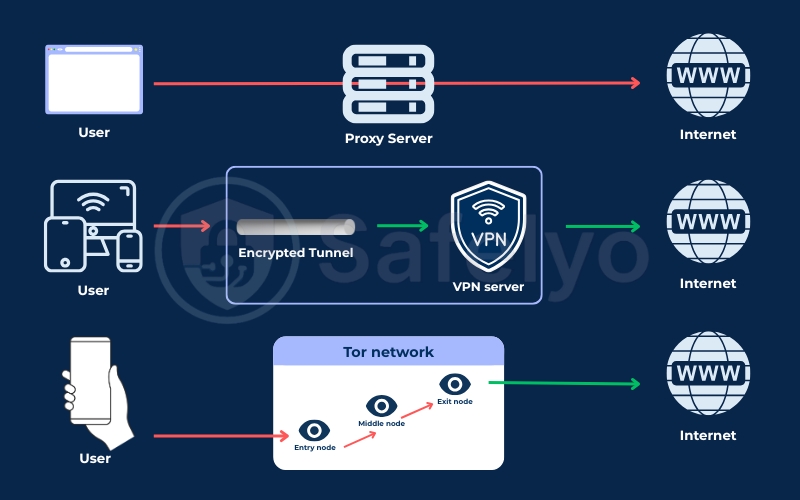
Selecting an improper tool for your activity can lead to security issues. Routing unencrypted banking traffic through an unknown proxy risks exposing your credentials to the server operator. Conversely, attempting to stream video through Tor causes severe network congestion and constant buffering due to the latency of multi-node relays.
The following table summarizes the fundamental technical differences across all three tools:
| Feature | Proxy (HTTP/SOCKS5) | VPN (Virtual Private Network) | Tor (The Onion Router) |
|---|---|---|---|
| Scope | Usually applies only to the configured application | Usually protects traffic routed through the VPN | Usually accessed via the Tor Browser |
| Encryption | No built-in encryption layer; protection depends on protocols like HTTPS | Encrypts traffic between the device and the VPN server | Multi-layered encryption between the device and relays in the circuit |
| Website Sees | Usually sees the proxy’s IP | Usually sees the VPN server’s IP | Usually sees the exit relay’s IP |
| Speed | Usually faster due to fewer processing steps | Usually drops slightly to moderately, depending on the server and protocol | Usually much slower due to passing through multiple relays |
| Cost | Often free or very cheap | Usually requires a monthly subscription | Always free |
| Main Limitations | Must trust the proxy; does not protect the whole device and may not encrypt data | Must trust the VPN provider; does not replace HTTPS and does not stop all tracking | Slow, can be blocked by websites or networks, and still requires HTTPS and safe browsing habits |
| Best For | Changing IP for scraping, checking regional content, and non-sensitive tasks | Securing connections on public Wi-Fi and everyday internet use | Reducing the link between your real IP and the website for high privacy needs |
2. How a proxy works: IP spoofing without encryption
A proxy acts as an intermediary server that intercepts web requests and forwards them to destination websites on your behalf. Operating primarily at the application or session layer of the OSI model, a proxy replaces your original IP address with its own address.
Because standard proxies do not add transport-layer encryption to your network traffic, your local internet service provider (ISP) or network administrator can still see that you are communicating with a proxy server. The primary appeal of a proxy is speed and low resource overhead, making it ideal for high-volume, non-sensitive tasks where device-wide encryption is unnecessary.
2.1. HTTP vs SOCKS5 proxies
An HTTP proxy operates strictly at the Application layer and is designed specifically to handle web browser traffic. When you route traffic through an HTTP proxy, the server interprets web requests and manages the underlying TLS connections, making it suitable for simple web browsing or basic data extraction.
A SOCKS5 proxy operates at the Session layer and is protocol-agnostic, meaning it can process any type of network traffic, including HTTP, FTP, and peer-to-peer data. Because SOCKS5 proxies support UDP traffic and user authentication without inspecting the underlying data payload, they are commonly configured within torrent clients and specialized software rather than standard web browsers.
2.2. Datacenter vs. residential proxies
Datacenter proxies utilize IP addresses assigned by cloud hosting providers and commercial data centers. These connections offer high bandwidth speeds and low costs, but website security systems easily identify them as server infrastructure, leading to frequent IP blocks and CAPTCHA prompts.
Residential proxies route connections through IP addresses provided by consumer ISPs and assigned to physical home networks. Because residential proxies appear as authentic consumer traffic, they easily bypass basic security filters, though they carry significantly higher bandwidth costs.
2.3. The hidden dangers of free proxies
Free proxy servers present severe security risks to users who rely on them for sensitive tasks. A 2024 study titled Free Proxies Unmasked by researchers from Inria, CNRS, and Datadome analyzed 640,600 free proxies and revealed that 16,923 (2.6%) actively manipulated web traffic.
This research also flagged 4,452 distinct vulnerabilities across the free proxy ecosystem. Translating these figures into daily usage means roughly 1 in every 40 free proxies actively tampers with your connection, creating risks of session cookie theft, credential harvesting, or malicious code injection.
3. How a VPN works: Device-wide transport encryption
A VPN operates at the operating system level, capturing all outgoing traffic from your device and wrapping it in an encrypted tunnel before it leaves your network interface. Modern VPN providers utilize lightweight protocols like WireGuard, which uses the ChaCha20 cipher to maintain fast connection speeds with minimal processing latency.
By encrypting data at the transport layer, a VPN prevents local Wi-Fi eavesdroppers, network administrators, and ISPs from viewing the contents of your traffic or the specific websites you visit.
However, a VPN does not provide end-to-end encryption to the destination website; once data leaves the VPN server, it relies on standard HTTPS protocols for protection across the public web.
3.1. Moving trust from ISPs to VPN providers
When you connect to a VPN server, the provider’s remote server decrypts your network traffic before forwarding it to the target location. This architectural design means that using a VPN does not eliminate third-party visibility; it simply shifts visibility away from your local ISP and transfers it to the VPN provider.
Because the VPN operator can potentially inspect unencrypted traffic leaving its servers, selecting a provider with a verified no-logs policy audited by independent security firms is critical for maintaining true data privacy.
To help you evaluate trustworthy providers, we have compiled a tested list of the Best VPNs that maintain independently audited no-logs policies.
3.2. Advanced vulnerabilities: The TunnelCrack Wi-Fi exploit
Even robust transport encryption can be compromised by local network configurations. In the paper Bypassing Tunnels: Leaking VPN Client Traffic by Abusing Routing Tables, researchers identified the TunnelCrack vulnerability, an exploit technique that targets VPN clients on untrusted public Wi-Fi networks using DHCP spoofing.
By manipulating local DHCP settings, a malicious network administrator can assign conflicting IP ranges to your device, tricking the operating system into routing specific traffic outside the encrypted VPN tunnel. To mitigate this specific network vulnerability, you must enable a reliable Kill Switch feature within your VPN client to block all unprotected data packets if the tunnel degrades.
4. How Tor works: Cryptographic anonymity and onion routing
Tor (The Onion Router) is a decentralized privacy network designed to separate your physical location from your online destination. Traffic entering the Tor network is multiplexed over a single TLS/TCP channel and routed through three randomly selected volunteer servers called relays.
To prevent adversary nodes from spoofing the network topology, the system relies on 9 global Directory Authorities that maintain and digitally sign trusted lists of active relays. Because no single server in the relay chain knows both your original IP address and your final web destination, Tor provides a decentralized approach to identity protection that fundamentally differs from single-node proxy or VPN architectures.
4.1. The 3-hop circuit: Guard, middle, and exit nodes
Data passing through the Tor network moves through three distinct layers:
- Guard Node (Entry): The entry point into the network. The Guard node sees your real IP address, but cannot see the content of your traffic or your final destination.
- Middle Node (Relay): The intermediary relay. The Middle node receives encrypted data from the Guard node and passes it to the Exit node, knowing neither your identity nor the target website.
- Exit Node: The final relay in the circuit. The Exit node decrypts the final layer of encryption and forwards the request to the target website.
While the Exit node sees the destination server, it does not know your real IP address. However, because the Exit node decrypts the final onion layer, operating an unencrypted HTTP connection over Tor allows the Exit node owner to inspect plaintext data. Always ensure websites use HTTPS when browsing over Tor.
4.2. Why Tor is slow: Ephemeral keys and multiplexing
Users frequently notice significant speed reductions when launching the Tor Browser. This latency is a direct consequence of the network’s core security design. Tor negotiates ephemeral encryption keys with each of the three relays in your circuit, discarding these cryptographic keys as soon as the browsing session concludes.
Routing packets across three distinct global geographic locations creates significant physical latency that is difficult to eliminate entirely. While this design is highly effective for reading text documents or accessing censorship-resistant news outlets, Tor is structurally ill-suited for bandwidth-heavy tasks like high-definition video streaming or large file downloads.
5. Which privacy tool should you actually use?
Selecting an effective privacy tool involves matching your software to your actual daily needs. Using a heavy-duty anonymity network for basic web browsing simply creates unnecessary performance drops, while relying on a basic proxy for private communications leaves your data visible to third parties.
5.1. When to use a proxy
A proxy is best suited for automated, high-speed tasks that require swapping IP addresses without the processing overhead of device-wide encryption.
Use a proxy for these tasks:
- Running automated web scraping scripts across multiple public domains.
- Checking localized search engine results pages (SERPs) across different geographic regions.
- Bypassing basic regional restrictions on non-sensitive media connections.
5.2. When to use a VPN
A VPN is the standard choice for general internet users who need simple, reliable transport security across all applications running on their operating system.
Use a VPN for these tasks:
- Encrypting internet connections while using untrusted public Wi-Fi networks in cafes or airports.
- Preventing local ISPs from logging and selling your daily browsing history.
- Unblocking streaming platforms, reducing gaming latency across regions, and securing peer-to-peer (P2P) torrenting connections.
- Protecting background applications, email clients, and system software simultaneously.
5.3. When to use Tor
Tor is designed specifically for high-risk scenarios where isolating your physical identity from your online activity is a critical requirement.
Use Tor for these tasks:
- Researching sensitive topics under restrictive regulatory environments.
- Bypassing strict, nation-state-level internet censorship and firewalls.
- Sharing sensitive research, independent journalism, or privacy-focused commentary online without exposing your physical location.
Note that using Tor will frequently trigger automated fraud prevention checks on commercial banking portals, causing temporary account locks due to shared exit node IPs.
6. What these privacy tools cannot hide
Hiding your IP address does not make you invisible online. Modern web tracking extends far beyond network-layer identification, relying on client-side browser features and session markers to build persistent user profiles.
Logging into personal web accounts (such as email or social media) while connected to a proxy, VPN, or Tor immediately links your current browsing session to your real identity, rendering the IP modification largely ineffective for concealing your personal identity.
6.1. Browser fingerprinting and persistent cookies
Websites regularly deploy tracking scripts that gather structural information about your client device. By collecting details like screen resolution, installed system fonts, local time zone offsets, graphics hardware capabilities, and persistent tracking cookies, advertising networks construct a unique browser fingerprint.
Because a browser fingerprint remains consistent regardless of your network connection, tracking companies can follow your activity across different web sessions even if you change your IP address using a VPN or proxy.
6.2. WebRTC and DNS leak vulnerabilities
A WebRTC leak occurs at the browser level when real-time communication protocols request local network interfaces for voice or video connections.
Because STUN/TURN requests open direct UDP sockets outside the standard network interface, your web browser can accidentally expose your true public IP address, regardless of how strongly your VPN encrypts your traffic. This exposure happens due to web browser design rather than a flaw in the VPN cipher itself.
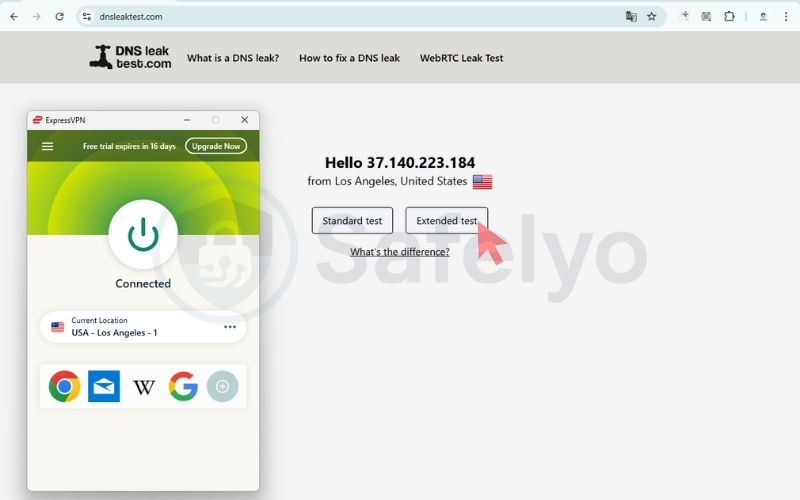
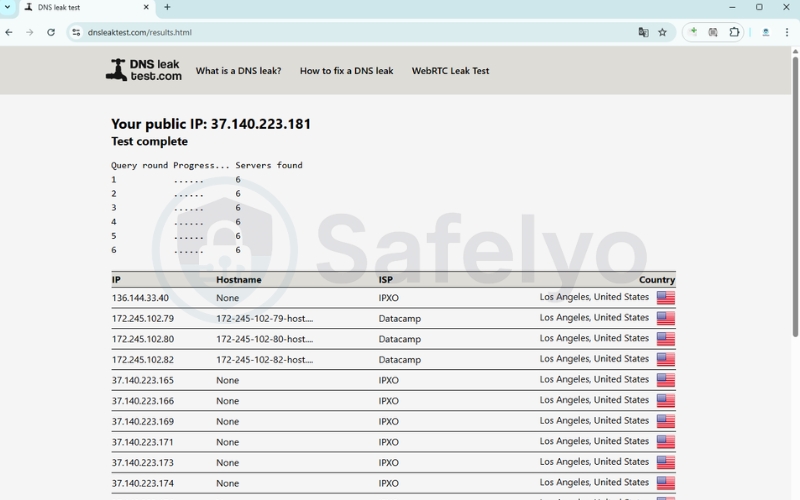
Similarly, a DNS leak happens when your device accidentally sends Domain Name System requests to your default ISP rather than through the encrypted VPN tunnel. Even though the traffic payload remains encrypted, a DNS leak allows your local ISP to see exactly which website domains you are asking to visit.
Beyond browser and VPN vulnerabilities, basic proxy setups have their own built-in data leaks. Simple transparent proxies frequently append X-Forwarded-For or Via text string headers to outgoing HTTP requests, openly transmitting your real IP address to the target website. In contrast, Elite proxies (high-anonymity proxies) actively strip these identification headers from data packets.
To verify that your privacy setup is operating securely, regularly run diagnostic checks using dedicated online IP checker tools like IPLeak.net, BrowserLeaks.com, or DNSleaktest.com to confirm that no WebRTC leaks, DNS leaks, or X-Forwarded-For headers are exposing your true IP address.
7. Combining tools: Using Tor with a VPN
A setup known as Tor over VPN involves connecting to a VPN server first and then launching the Tor Browser. In this routing configuration, data travels from your device to the VPN server, enters Tor’s Guard node, passes through the Middle and Exit relays, and finally reaches the target website.
The primary benefit of this setup is that your local ISP only sees an encrypted connection to your VPN provider; they cannot detect that you are accessing the Tor network. Furthermore, Tor’s Guard node sees the IP address of the VPN server rather than your physical home IP.
However, combining these tools places the speed degradation of a VPN on top of Tor’s multi-hop circuit latency. For daily internet use, this combination creates severe connection slowdowns without providing meaningful extra security for the average user. Reserve this complex setup for situations where hiding your Tor usage from an oppressive network administrator is strictly necessary.
8. FAQs about VPN vs Proxy vs Tor
8.1. Is using Tor illegal in the USA?
No, using the Tor Browser is legal in the United States and most democratic nations. However, using the network to engage in illicit activities remains illegal, and private web platforms retain the right to block incoming connections originating from known Tor exit nodes.
8.2. Can the police track a VPN?
A VPN provides transport privacy, not absolute legal immunity. If a law enforcement agency obtains a court order, a VPN provider maintaining server logs may be legally compelled to disclose connection timestamps or real IP data.
8.3. Is Tor a VPN or a proxy?
Tor is neither a standard VPN nor a basic proxy. Tor is a decentralized, multi-hop anonymity network that routes encrypted data across independent volunteer relays, whereas VPNs and proxies rely on single-provider centralized server infrastructures.
8.4. Are free proxies safe to use?
No, free proxies carry substantial security risks. Empirical research analyzing 640,600 free proxies showed that 2.6% actively modified web traffic, exposing connected users to data manipulation and credential theft.
8.5. Can you use a proxy and VPN together?
Yes, you can route a proxy connection through an active VPN tunnel to change your apparent IP address twice. However, this configuration introduces complex network routing rules and reduces connection performance without delivering significant privacy benefits over a standard VPN.
8.6. Can you use Tor and a proxy together?
Yes, you can configure the Tor Browser to route traffic through a proxy before entering the Tor network. However, configuring this manually requires technical expertise, and using official Tor Bridges is a simpler method for bypassing local network blocks.
8.7. Can you use Tor and VPN together?
Yes. You can route your connection using either Tor over VPN (connecting to a VPN first, then launching Tor) or VPN over Tor (connecting to Tor first, then tunneling a VPN connection through the network).
While Tor over VPN hides Tor usage from your ISP, VPN over Tor routes your VPN traffic out of a Tor exit node. Both configurations combine the speed reduction of a VPN with Tor’s multi-hop latency, making them impractical for everyday browsing.
9. Conclusion
Understanding the distinctions when analyzing VPN vs Proxy vs Tor allows you to select the precise tool required for your specific security needs.
Proxies excel at high-speed, application-specific IP swapping for non-sensitive data tasks. VPNs provide robust, device-wide transport encryption for everyday browsing, streaming, and public Wi-Fi protection. Tor provides decentralized, multi-hop anonymity for high-risk situations where separating your identity from your destination is paramount.
Digital privacy works best as a layered strategy rather than a single software fix. Protecting your online presence requires combining network encryption with healthy browser habits, active tracker blocking, and routine audits of your security configuration.
For deeper technical evaluations and step-by-step software configuration guides, explore the VPN Guides category on the Safelyo homepage.