Proton VPN Secure Core is a multi-hop routing feature that redirects your internet traffic through two secure servers instead of one. Before your data reaches your chosen website or destination network, it passes through a hardened server owned and operated by Proton in Switzerland, Iceland, or Sweden.
This multi-server journey conceals your real IP address even if an exit server in a high-risk country faces secret monitoring, though the extra transit distance lowers your browsing speed.
In this guide, we break down how this defense architecture protects your identity, measure its real-world performance impact, and walk through the setup steps across desktop and mobile devices.
Key takeaways:
- Two-layer protection: Your traffic routes through an entry server in Switzerland, Iceland, or Sweden first, hiding your real IP address if the destination server faces surveillance.
- Wholly owned hardware: Entry servers operate in high-security facilities, including an underground center in Sweden and a former military base in Iceland, managed directly by Proton.
- Speed trade-off: Download speeds decrease by 12% to 35% compared to standard VPN connections, making the feature best suited for sensitive privacy tasks rather than streaming or gaming.
- Paid plans only: The feature is available exclusively on Proton VPN Plus and Proton Unlimited accounts, with no access on the free tier.
This article is for informational purposes only. Please use VPNs responsibly and legally.
1. What is Proton VPN Secure Core?
Proton VPN Secure Core is an advanced multi-hop routing architecture designed to protect your privacy when an exit server is monitored or compromised.
In a standard single-hop setup, your device connects directly to one VPN server, which forwards your requests to the public internet. State agencies in countries with broad surveillance powers can legally compel data center operators to log network traffic. This risk is common in jurisdictions like the US, the UK, Russia, or Turkey. Observers monitoring that single server can match incoming and outgoing connection times to identify users.
Connecting directly to a single server in a monitored region leaves your traffic vulnerable to timing analysis. Secure Core prevents this by sending your data through a privacy-protected entry server first, ensuring the destination server never sees your original IP address.
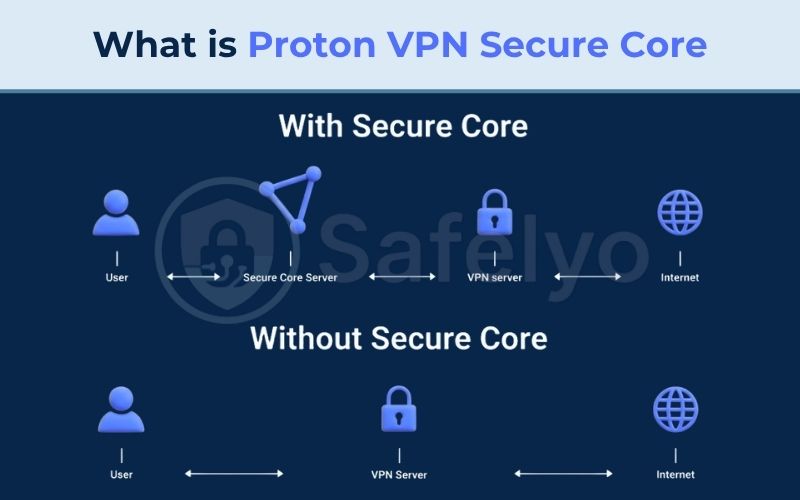
The network maintains 125 dedicated Secure Core servers supporting exit routes to 68 countries worldwide. Proton stations every entry node exclusively in Switzerland, Iceland, or Sweden because these jurisdictions enforce strong privacy regulations outside the 5/9/14 Eyes global surveillance alliances.
Multi-hop protection requires an active paid subscription, such as Proton VPN Plus or Proton Unlimited.
Warning: Secure Core is unavailable on the Proton VPN Free tier. Free accounts connect exclusively to standard single-hop servers in select regions.
2. How Secure Core multi-hop architecture works
Multi-hop routing separates the server handling your real IP from the server delivering your traffic to the web. This layered setup creates an extra protective barrier through three core pillars: two-stage routing, hardened physical hardware, and defense against network correlation attacks.
2.1. Two-hop routing process
Two separate layers of encryption wrap your data before it leaves your device, ensuring that neither server in the chain holds complete visibility over your connection.
The connection follows a structured three-step routing sequence:
- First hop (Secure entry node): Your device encrypts your data twice and transmits it across a secure tunnel directly to an entry server in Switzerland, Iceland, or Sweden.
- Second hop (Destination exit node): The entry server strips away the first layer of encryption and routes the traffic through an internal network to a second VPN server located in your chosen destination country.
- Internet destination: The exit server removes the second encryption layer and delivers your request to the target website or online service.
The traffic travels across the network along the following path:
Your Device -> First Encrypted Hop -> Secure Core Entry Server (Switzerland / Iceland / Sweden) -> Second Encrypted Hop -> Exit Server (Destination Country) -> Public Internet
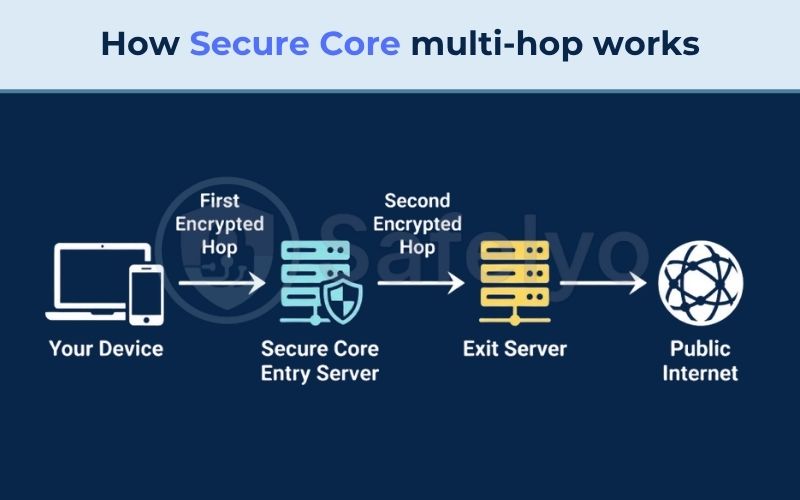
If a snooper monitors or compromises the exit server in the destination country, they only see incoming traffic from the Secure Core entry node. Your real IP address and home internet provider stay protected behind the first server.
2.2. Hardened physical server infrastructure
Physical server security protects against third-party tampering by keeping the hardware, storage, and networking layers under Proton’s direct control.
Proton relies on four technical pillars to protect its entry infrastructure:
- Wholly owned and provisioned: Proton purchases every Secure Core server directly, configures the hardware in-house, and ships each unit on-site directly from Proton offices to prevent third-party supply-chain backdoors.
- Dedicated network and LIR management: Every server connects through Proton’s dedicated network infrastructure, using IP address blocks owned and managed by Proton’s own Local Internet Registry (LIR).
- Full-disk encryption (FDE): Hardware-level full-disk encryption protects all server software, operating system files, and digital certificates, preventing attackers from extracting encryption keys even if they gain physical possession of a machine.
- High-security data centers: The machines operate inside physical facilities designed to resist unauthorized physical entry.
In Sweden, the hardware resides in a high-security underground data center. In Iceland, servers sit within a secure facility built on a former military base. In Switzerland, the infrastructure operates in fortified data centers governed by the Swiss Federal Act on Data Protection (FADP).
The following table summarizes the physical security and legal frameworks protecting these entry locations:
| Server location | Physical security facility | Jurisdiction & legal framework | Hardware management |
|---|---|---|---|
| Switzerland (CH) | High-security Swiss data center | Swiss Federal Act on Data Protection (FADP), outside 5/9/14 Eyes | 100% owned & provisioned by Proton, LIR managed IP |
| Iceland (IS) | High-security center on a former military base | Strong Icelandic privacy laws, outside 14 Eyes | 100% owned & provisioned by Proton, full-disk encryption |
| Sweden (SE) | High-security underground data center | Strong Swedish personal data regulations | 100% owned & provisioned by Proton, dedicated routing |
2.3. Network defense against correlation attacks
Traffic correlation attacks attempt to identify VPN users by matching the precise timing and packet sizes of data entering and leaving a server.
In regions with strict network surveillance, legal regulations can require network providers to log traffic. While Proton operates under Swiss jurisdiction, foreign host networks might still track server connections abroad.
Routing traffic through an entry station breaks this correlation chain. Observers monitoring an exit server in a high-risk jurisdiction can only trace packets back to the edge of the Secure Core network in Switzerland, Iceland, or Sweden.
This network barrier makes discovering your real IP address and physical location exceedingly difficult for outside trackers.
3. Why not just connect directly to Switzerland?
Connecting straight to a standard Swiss server assigns you a Swiss IP address, which prevents you from accessing region-locked websites and local web services in other countries.
Many online platforms, financial portals, and news publishers restrict content to domestic IP ranges. If you require access to services in the United States, Germany, or Japan, a Swiss IP address triggers immediate geo-blocks.
Secure Core solves this dilemma by granting you an IP address in your chosen destination country while keeping your traffic rooted in Swiss, Icelandic, or Swedish legal protections.
Researchers and remote workers often need access to local web content in restricted regions. Multi-hop routing lets them browse local portals using a domestic exit IP without exposing their real location to the destination network.
4. Speed trade-offs and performance impact
Enabling Secure Core reduces download speeds by 12% to 35% compared to a standard single-hop VPN connection because packets must travel greater physical distances and undergo two separate encryption cycles.
We evaluated connection performance on a Windows 11 PC connected to an ~800 Mbps baseline fiber connection in Vietnam, using Ookla speed tests across single-hop and multi-hop configurations.
On our ~800 Mbps baseline network, a standard nearby single-hop server achieved 300 to 480 Mbps. Routing that same connection through Secure Core yielded 200 to 420 Mbps, reflecting an overall 47% to 75% drop from raw baseline speeds, but maintaining plenty of bandwidth for high-definition streaming and standard web work.
Latency increased from our local 1 to 20 ms baseline up to 40 to 85 ms on nearby multi-hop routes. This ping level remains fast enough for casual web browsing and buffer-free HD video, but introduces noticeable input delay during competitive online gaming.
The following test data illustrates the performance impact across each connection state:
| Connection state | Download speed | Latency (Ping) | Performance drop (%) | Practical everyday impact |
|---|---|---|---|---|
| No VPN (Baseline network) | ~800 Mbps | 1 – 20 ms | 0% | Baseline high-speed fiber connection |
| Standard Proton VPN (Single-hop) | 300 – 480 Mbps | 20 – 50 ms (nearby / local) | ~40% – ~62% vs baseline | Smooth 4K streaming, competitive gaming, rapid file downloads |
| Proton VPN Secure Core (Multi-hop) | 200 – 420 Mbps | 40 – 85 ms (nearby / local) | ~47% – ~75% vs baseline (12% – 35% vs single-hop) | Buffer-free HD video, private web browsing, slower file transfers |
Keep in mind that your connection speeds will fluctuate depending on your home Wi-Fi, hardware performance, and current server load.
Pro tip: To maximize multi-hop speeds, select the WireGuard protocol in your application settings. If your connection encounters congestion during peak hours, manually switch your entry node between Switzerland, Iceland, and Sweden to find a lower-load route.
5. When to use Proton VPN Secure Core
Secure Core is a specialized defense tool engineered for high-threat scenarios, not an everyday setting intended to run continuously.
You should turn the feature ON when facing surveillance or network filtering, and turn it OFF for everyday tasks like online banking, 4K streaming, and gaming.
Standard single-hop connections already encrypt your traffic with AES-256 or ChaCha20, fully protecting you against snoopers on public coffee shop Wi-Fi without unnecessary routing delays.
The decision matrix below outlines the best settings for common online activities:
| Use case / Activity | Recommended mode | Primary reason | Best practice workaround |
|---|---|---|---|
| Whistleblowing, activism & sensitive research | Secure Core ON | Blocks correlation attacks and shields true IP even if exit node is monitored | Select entry node closest to your physical location |
| Connecting from/to high-surveillance regions | Secure Core ON | Adds a legal and physical buffer in privacy-friendly nations | Route via Switzerland or Iceland; enable Stealth protocol if DPI blocks entry nodes |
| Online banking & government portal access | Secure Core OFF | Avoids automated security lockouts, strict fraud triggers, and CAPTCHAs | Use a standard local Single-hop server |
| 4K streaming (Netflix, Disney+, Prime Video) | Secure Core OFF | Prevents buffer delays and circumvents aggressive streaming service VPN blocks | Use dedicated Plus streaming servers |
| P2P file sharing & large torrent downloads | Secure Core OFF | Eliminates bandwidth throttling and avoids overloading double-hop routes | Connect to specialized Proton P2P servers |
| Competitive online gaming | Secure Core OFF | Minimizes ping penalty and avoids frame latency spikes | Use nearest standard server with WireGuard |
5.1. High-risk browsing and sensitive tasks
High-risk environments require multi-hop routing to anchor your connection in privacy-friendly nations, protecting your real identity if an exit server is monitored. Always pick the entry station (Switzerland, Iceland, or Sweden) located geographically closest to your physical position to minimize transit delay.
In regions with strict network filtering, national firewalls often use Deep Packet Inspection (DPI) to identify VPN signatures and block known entry IP addresses. Proton counters this with the Stealth protocol, which disguises VPN traffic as standard HTTPS packets, and Alternative Routing to bypass network blocks.
You can turn on both settings in the application menu, though packet obfuscation adds extra latency and lowers download speeds, requiring patience during browsing sessions.
Multi-hop routing operates strictly at the Network Layer, securing the data tunnel between your hardware and the web. However, it cannot stop identity leaks that occur at the Application Layer.
Warning: Secure Core cannot protect you if you log into personal accounts (such as Google or Apple), leak your real IP through browser WebRTC, or use a browser vulnerable to fingerprinting. Always pair multi-hop routing with an isolated, privacy-focused browser and remain logged out of personal profiles.
5.2. Everyday services and high-bandwidth tasks
Everyday activities run much better with Secure Core turned off. Standard single-hop Proton VPN servers still use AES-256 or ChaCha20 encryption under an audited strict no-logs policy, providing reliable protection for daily browsing and public Wi-Fi safety without routing delays.
High-bandwidth and fraud-sensitive services often clash with multi-hop connections. Banking platforms trigger account lockouts and CAPTCHAs when detecting datacenter IP chains, while streaming services and torrent networks suffer from unnecessary buffering and speed throttling.
For online banking on desktop and mobile, you can use Proton VPN’s Split Tunneling feature to route your banking app outside the VPN tunnel while keeping the rest of your internet traffic fully protected.
6. How to enable Secure Core on your device
You can activate Secure Core across Windows, macOS, Android, iOS, and Linux with an active Proton VPN Plus or Proton Unlimited account.
The application allows you to let the system automatically select the most efficient entry station (Iceland, Sweden, or Switzerland) based on your target country, or you can manually pick your preferred entry node.
The following sections walk through the exact steps for desktop operating systems, mobile devices, and command-line Linux installations.
6.1. On Windows and macOS desktop apps
Both desktop applications provide a dedicated filter toggle to activate multi-hop routing in just a few clicks.
To enable the feature on Windows:
- Open the Proton VPN app to display the Home screen.
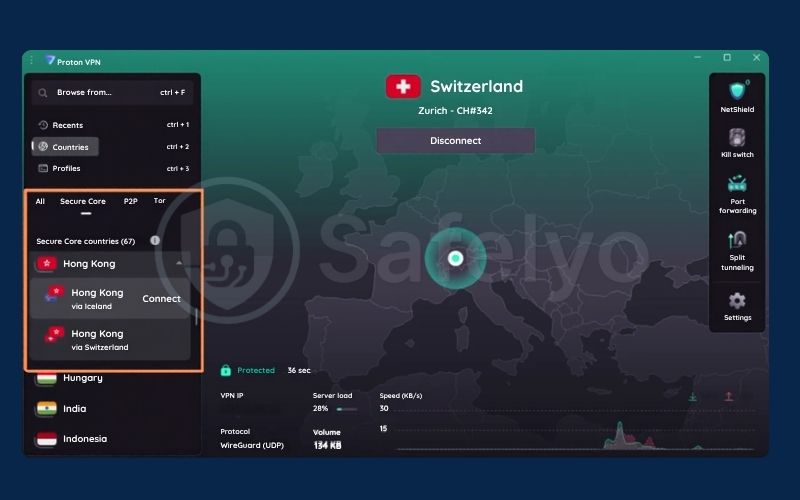
- Select the Countries tab, then click the Secure Core filter tab to view supported locations.
- Choose your destination country to let the app automatically route traffic through the fastest entry node.
- To select an entry station manually, click the dropdown arrow (⏷) next to your target country and pick your preferred entry location.
- Once connected, your active routing path appears directly on the Home screen.
To enable the feature on macOS:
- Open the Proton VPN app, click the Secure Core button, and select Secure Core On.
- Choose your destination country and click Connect to route your traffic through an optimized entry node.
- Alternatively, click the dropdown arrow (∨) beside any country to designate your preferred entry station manually.
6.2. On Android and iOS mobile devices
Mobile clients integrate multi-hop controls directly into their primary server tabs for rapid toggling on touchscreens.
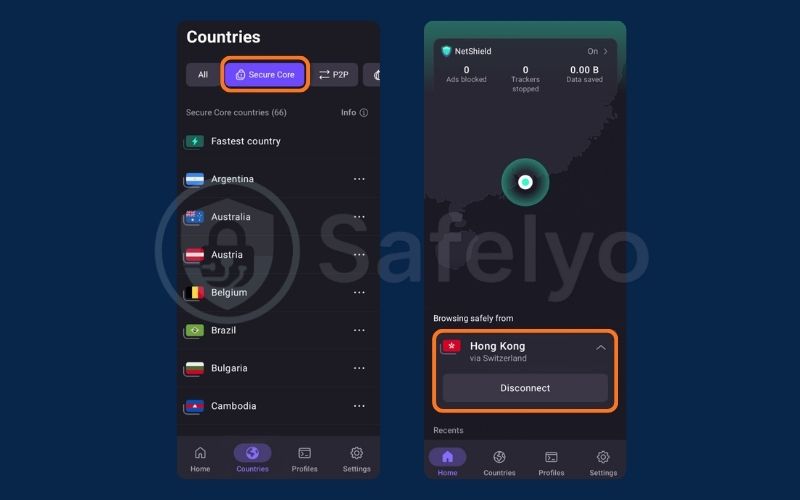
To enable the feature on Android:
- Open the Proton VPN app, tap the Countries tab, and select the Secure Core filter tab.
- Tap your desired destination country to route traffic automatically through the optimal entry node.
- To choose an entry location manually, tap the three dots (⋯) next to the country name and select your preferred entry hub.
- The complete two-hop route will display on your Home screen once the connection establishes.
To enable the feature on iOS and iPadOS:
- Open the Proton VPN app and toggle the Secure Core switch to the on position.
- Tap the country you wish the VPN to exit from.
- Tap the on button next to the specific Secure Core country you want your traffic to pass through.
6.3. On Linux command-line and desktop clients
The Linux client identifies multi-hop connections using standard Alpha-2 ISO country codes formatted as [Entry location]-[Exit server].
A server labeled CH-LU#1 indicates an entry server located in Switzerland (CH) forwarding traffic to exit server number one in Luxembourg (LU#1). Entering a dash (-) in the application search bar instantly filters and displays all available multi-hop server pairs.
Pro tip: In the Proton VPN Linux app, type a minus or dash symbol (-) into the search bar to reveal every active Secure Core pair. This lets you quickly locate specific combinations like CH-LU#1 without scrolling through individual country lists.
7. Secure Core vs Tor over VPN: Key differences
Secure Core routes data across two high-speed servers owned by Proton AG, whereas Tor over VPN sends traffic through three decentralized, volunteer-run relays.
Secure Core relies entirely on dedicated hardware in hardened underground or military facilities. Tor relies on thousands of community-operated nodes, some of which may run on insecure consumer connections or face monitoring.
Secure Core experiences a moderate 12% to 35% speed dip, keeping bandwidth practical for regular browsing. Tor over VPN frequently slashes download speeds by more than 75% and introduces severe latency spikes.
Secure Core provides an exit IP in a chosen target country to browse the regular public web. Tor over VPN provides anonymity within decentralized networks and opens access to specialized .onion hidden services.
The following comparison highlights the technical differences between both approaches:
| Feature / Attribute | Proton VPN Secure Core | Tor over VPN |
|---|---|---|
| Number of network hops | 2 hops (Fixed entry node, flexible exit node) | 3 hops (Guard node, middle relay, exit node) |
| Hardware ownership | 100% owned & provisioned by Proton AG | Decentralized, volunteer-operated servers |
| Speed & bandwidth impact | Moderate reduction (-12% to -35%) | Severe speed reduction and high latency |
| Access to .onion sites | No (Standard public internet only) | Yes (Direct access to Tor onion services) |
| Infrastructure security | Hardened underground centers & full-disk encryption | Variable node security; risk of rogue exit monitors |
8. FAQs
Is Proton VPN Secure Core available on the free plan?
No, the feature is strictly reserved for paid subscribers on Proton VPN Plus and Proton Unlimited plans. Users on the Proton VPN Free tier only have access to standard single-hop servers in select regions.
Does Proton VPN Secure Core slow down internet speeds?
Yes, because your data travels through two physical servers and undergoes two layers of encryption, you should expect a speed reduction between 12% and 35% along with higher latency compared to a standard single-server connection.
Can the police track traffic when using Secure Core?
Proton VPN operates under Swiss privacy laws with an independently audited no-logs policy and full-disk encryption. Because traffic is pushed back to the edge of the Secure Core network and no browsing logs exist, identifying users through network correlation becomes exceedingly difficult under legal inquiries.
Should you keep Secure Core turned on all the time?
No, you should keep it turned off for online banking to avoid fraud triggers, and disable it for 4K streaming or gaming to prevent lag. Standard single-hop connections already secure your traffic against local network snoopers on public Wi-Fi. Multi-hop routing is best reserved for high-surveillance regions and sensitive research.
Can you use Secure Core for torrenting or streaming?
While the network technically supports these activities, it is not recommended because multi-hop routing introduces buffering during video playback and throttles peer-to-peer download speeds compared to Proton VPN’s dedicated streaming and P2P servers.
9. Conclusion
Secure Core delivers specialized defense against compromised servers in high-surveillance regions by routing data behind two layers of encryption and wholly owned hardware in Switzerland, Iceland, and Sweden.
The inevitable 12% to 35% speed penalty makes multi-hop routing a targeted defense system for sensitive moments rather than an everyday default setting. If you are a researcher or remote worker operating in restrictive network environments, the feature justifies an upgrade to Proton VPN Plus.
For standard web browsing, digital banking, video streaming, or public Wi-Fi safety, standard single-hop servers provide the ideal mix of speed, compatibility, and privacy.
For anyone seeking robust protection against advanced surveillance, Proton VPN Secure Core remains one of the most capable multi-hop architectures available today. Check your desktop or mobile app to test multi-hop routes firsthand, or explore Proton VPN’s protocol settings to fine-tune your connection speeds.