Traditional VPNs assign your device a single static IP address for the entire duration of your session. If you want a fresh address, you must manually disconnect and rebuild a new tunnel, which interrupts your active downloads and streams.
Surfshark Nexus technology solves this limitation by linking all its servers into a unified software-defined network (SDN). This system allows your public exit IP to rotate in the background without dropping your underlying connection.
In this guide, we explore how Nexus routes your traffic, how its dynamic IP features enhance privacy against tracking, what it means for your connection speeds and torrenting, and how to configure your settings to prevent banking lockouts.
Key takeaways:
- Nexus serves as the core software-defined routing fabric connecting all servers into a unified cloud.
- Core features like IP Rotator cycle your public exit IP every 5 minutes within your connected location (with optional regional or global scopes on macOS) without dropping the underlying tunnel.
- Transport layer (TCP) persistence keeps data transfers alive, but changing exit IPs can still invalidate sensitive application-layer logins without split tunneling.
- Built-on innovations like FastTrack optimize long-distance routing, while the built-in Everlink self-healing mechanism reinforces network resilience.
- Nexus is an integral network layer available to all Surfshark VPN subscribers at no extra subscription cost.
1. What is Surfshark Nexus technology?
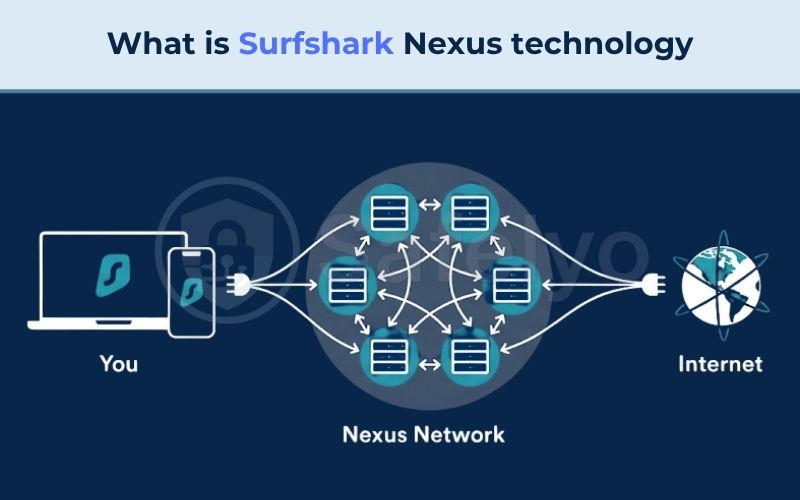
Surfshark Nexus is an internal network framework built on software-defined networking (SDN). Instead of locking your connection into a single standalone server, Nexus connects all Surfshark servers across 100 countries into an interconnected pool. Your device connects to the closest Entry Node for low latency, while the internal system routes your data to your chosen Exit Node before it reaches the public web.
For your daily browsing, this architecture addresses two of the most common frustrations of traditional VPNs: sudden connection drops and unpredictable server slowdowns. If your connected server experiences traffic congestion or undergoes routine maintenance, Nexus shifts your data flow to an adjacent node in the background. This internal rerouting helps keep your 4K video stream or download running smoothly without triggering frequent disconnects.
Connecting through the Nexus network delivers three practical benefits:
- Uninterrupted connection stability: Surfshark can update server hardware or optimize transit routes without terminating your VPN connection or exposing your real IP address.
- Traffic-based performance routing: The network detects general data patterns like video streaming or large downloads, directing your packets along pathways configured for high bandwidth.
- Seamless background IP rotation: The infrastructure allows specialized tools to cycle your public exit IP internally without resetting your active internet session.
IP Rotator is one of several features that use this network. Nexus handles the routing for standard Surfshark connections, while IP Rotator is an optional setting. The network also supports Dynamic MultiHop for custom server pairs, FastTrack for route optimization, and Everlink for server maintenance.
By default, your connection maintains a single static IP address throughout your session. You only need to turn on IP rotation if you want your public IP to change periodically.
2. Traditional VPN tunnels vs. the Nexus network
Standard VPN architectures rely on rigid point-to-point connections, whereas the Nexus network decouples where your data enters the VPN from where it leaves. To understand why this change matters for connection stability, we must look at how legacy systems handle traffic routing, how software-defined meshes manage packet flows, and how underlying network layers respond to changes in your exit IP.
The table below contrasts the technical characteristics of a traditional single-server setup against the Surfshark Nexus mesh architecture:
| Architecture & Performance Factors | Traditional Single-Server VPN Tunnel | Surfshark Nexus SDN Mesh Architecture |
|---|---|---|
| Network Topology | Direct point-to-point tunnel to an isolated VPS | Unified software-defined server mesh across 100 countries |
| Traffic Flow Model | Traffic enters and exits through the exact same node | Traffic enters nearest node and exits via designated target node |
| IP Cycling Mechanism | Requires dropping the tunnel and reconnecting to a new server | Shifts public exit IP internally without resetting the underlying tunnel |
| Transport Layer (TCP) Impact | Sockets drop during server changes, pausing file transfers | Socket states persist, allowing continuous data stream flow |
| Application Layer (HTTP) Impact | Session cookies and tokens drop during disconnections | Sensitive sessions (banks, work) may still drop due to exit IP changes |
| Server Maintenance Resilience | Triggers Kill Switch and forces manual user reconnection | Everlink reroutes traffic to adjacent nodes without session drop |
| Infrastructure Base | Often mixed physical disks and varying server port speeds | 100% diskless RAM-only infrastructure with 10 Gbps ports |
2.1. The limits of single-server VPN connections
A traditional VPN establishes a rigid point-to-point tunnel that binds your device to a single physical or virtual private server. All incoming and outgoing data must pass through this exact machine for the duration of your session.
If that specific server undergoes maintenance or encounters network congestion, your connection must drop completely so your device can build a fresh tunnel to a different server. Maintaining an identical exit IP across multiple hours also creates static IP accumulation. Over time, automated tracking platforms and ad exchanges can correlate your browsing habits across different websites based on that persistent address.
2.2. How the Nexus network balances traffic
Instead of pushing all your data down a single crowded pipeline, the Nexus network spreads traffic across multiple connected servers. If a server along your route starts to slow down, the system automatically redirects your traffic to nearby nodes with more available bandwidth.
This dynamic balancing happens entirely behind the scenes. You never have to manually disconnect or search for a less crowded server just to keep your speeds stable during peak hours.
2.3. Why some services stay connected while others log out
Understanding network layers clarifies why some web services stay connected during an IP change while others log you out immediately:
- Transport layer behavior (L4): The encrypted tunnel between your device and the local entry server remains uninterrupted. Because the system does not reset the underlying TCP sockets, active data streams such as file downloads and video buffers continue to flow without pausing.
- Application layer security (L7): Web browsers and secure platforms monitor the public exit IP attached to your active session cookies. When Nexus switches your exit node, financial portals and remote workplace dashboards interpret the sudden IP change as potential session hijacking and immediately terminate your login.
Maintaining active transport sockets ensures that your physical connection stays online, but it cannot stop strict web platforms from invalidating your application session. Managing these sensitive accounts requires targeted routing tools like split tunneling.
3. Core privacy features powered by Nexus
Nexus serves as the network base for several of Surfshark’s privacy features. Connecting servers into a shared network enables specific tools like IP Rotator, Dynamic MultiHop, traffic pattern routing, and Everlink without exposing your real location.
The following sections explain how each of these features works during everyday browsing, file sharing, and server maintenance.
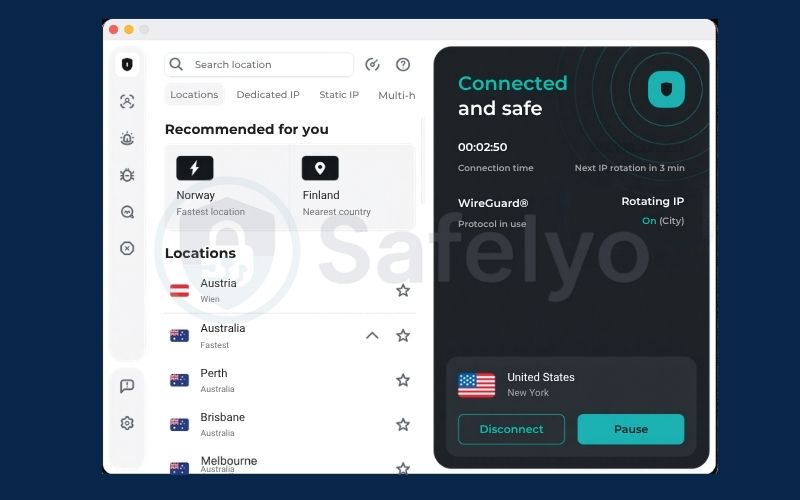
3.1. Surfshark IP Rotator
By default, Surfshark maintains your chosen server location with a static IP address. If you want stronger tracking protection, you can turn on Surfshark IP Rotator.
This optional feature changes your public exit IP every 5 minutes in the background without dropping your connection. By default, it cycles addresses within your connected server location, while macOS users can optionally expand this scope across a country, region, or globally.
Regularly rotating your public address provides an effective traffic correlation defense. By distributing your web requests across diverse IP addresses, the system limits the ability of external trackers to link independent browsing sessions together. Because internal DNS resolution handles all domain lookups inside the encrypted SDN tunnel, your DNS requests remain private during each IP transition without leaking to your internet service provider.
While background IP rotation works seamlessly for web browsing, it behaves differently with peer-to-peer (P2P) file sharing. When IP Rotator changes your public address, your torrent client must briefly reconnect with other downloaders in the sharing network.
This background sync takes only a few seconds, but it can cause short, temporary dips in your download speeds every 5 minutes. If you need stable download speeds or want to maintain a consistent seeding ratio, keep IP Rotator turned off and connect to a regular static server instead.
How to enable:
- Open the Surfshark application and go to Settings.
- Select VPN settings.
- Toggle the switch next to Rotating IP to the on position.
3.2. Surfshark Dynamic MultiHop
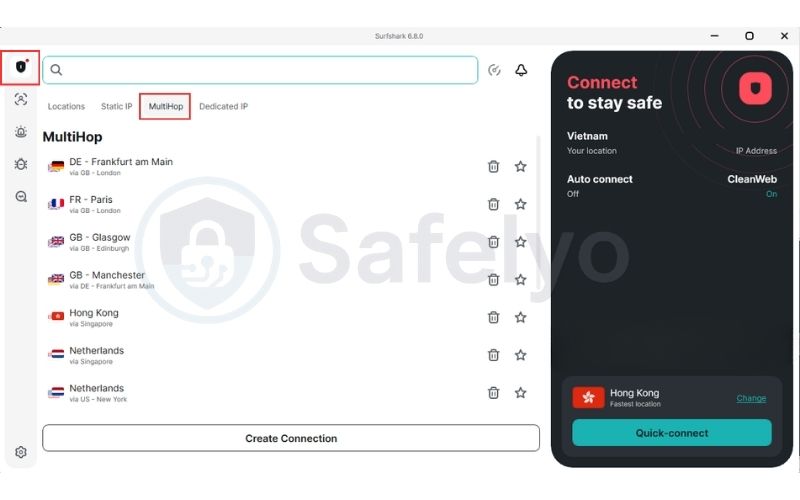
Surfshark Dynamic MultiHop allows you to build custom double-VPN routes by manually selecting separate entry and exit locations across 100 countries. Standard double-VPN configurations restrict you to fixed server pairs, but Dynamic MultiHop lets you pair any entry node with any exit node.
This architecture applies two independent layers of encryption to your internet traffic. The entry server sees your real IP address but cannot see your web destination, while the exit server sees the websites you visit but has no record of your originating IP. To balance privacy with performance, select an entry server close to your actual physical location.
How to enable:
- Open the Surfshark application and select the MultiHop tab on the main screen.
- Click on Create your own pair / Create Connection.
- Choose your preferred entry country and exit country, then connect.
3.3. Smart routing based on your activity
The Nexus infrastructure can analyze network packet characteristics to route data through server pathways configured for specific activities. The network identifies whether an incoming data stream matches heavy streaming, peer-to-peer file transfers, or lightweight web browsing, directing packets to nodes with matching resource allocations.
This routing model inspects only packet timing, sizes, and frequencies at the network layer to optimize flow. The system does not decrypt packet payloads, read data contents, or record your browsing history. This separation of routing metrics from user activity preserves privacy across every session.
3.4. Everlink self-healing network layer
Everlink self-healing network functions as an integrated stability mechanism built directly on the Nexus infrastructure for WireGuard connections. When an exit node encounters hardware faults or undergoes routine system maintenance, Everlink automatically reroutes traffic to a neighboring node within the software-defined mesh without dropping the connection.
While a standard Kill Switch protects privacy by halting all internet access when a connection drops, Everlink prevents the drop from occurring in the first place. Migrating active data flows seamlessly between physical nodes reduces the risk of packet drops and minimizes exposure windows.
4. Performance impact and FastTrack route optimization
Routing traffic through an internal software mesh preserves bandwidth for everyday tasks, but routing data across multiple internal nodes introduces measurable latency overhead. Data packets take longer to travel when directed across multi-hop paths, creating higher ping times that can affect time-sensitive online activities.
The following sections examine baseline performance across different Nexus configurations and explain how the FastTrack system optimizes long-distance routing.
4.1. Speed performance and latency impact
Connecting to a standard Nexus server typically reduces download speed slightly compared to WireGuard, while still leaving enough bandwidth for 4K streaming and high-capacity downloads.
However, enabling Dynamic MultiHop increases your ping considerably depending on the physical distance between your selected servers. Because of this added latency, MultiHop configurations are not recommended for competitive first-person shooters or fast-paced games where low input lag is essential.
The table below outlines baseline throughput retention and latency impact across common connection setups:
| Connection Configuration | Baseline Speed Retention | Average Latency Impact | Recommended Use Case |
|---|---|---|---|
| Standard Nexus Single Server | High | Low (+5–15 ms increase) | 4K streaming, general browsing, casual gaming |
| Dynamic MultiHop (Same Region) | Moderate | Noticeable (+30–50 ms increase) | Sensitive research, enhanced location privacy |
| Dynamic MultiHop (Cross-Continent) | Lower | Significant (+100–180 ms increase) | High-risk environments, double encryption priority |
Single-server connections keep ping low enough for video conferencing and casual gaming without noticeable delay. Cross-continent server pairs cause noticeable latency increases, making them suitable primarily for privacy-sensitive tasks rather than real-time applications.
4.2. How FastTrack optimizes connection speeds
FastTrack route optimization is an intelligent routing technology built on top of the Nexus mesh. The system relies on distributed probe nodes that evaluate international transit paths in real time to lower latency and improve bandwidth, specifically targeting high-demand traffic hubs such as Seattle, Vancouver, and Sydney before expanding across the global network.
Internet service providers often direct packets through the cheapest peering agreements rather than the fastest physical routes. FastTrack bypasses these bottlenecks by forwarding data over Surfshark’s internal network pathways.
Surfshark states that its FastTrack system can improve connection speeds by up to 70% on long-distance routes, though actual everyday gains vary based on local ISP peering and baseline infrastructure conditions.
FastTrack operates purely as a physical routing algorithm designed to lower latency. It does not alter your encryption ciphers or add secondary encryption layers. To prevent unnecessary overhead, the FastTrack indicator appears in the application only when the system verifies that routing traffic through the Nexus mesh delivers better performance than a direct ISP pathway.
5. How to resolve everyday app conflicts
Rotating your public exit IP can trigger automated fraud filters on financial portals, disrupt remote workplace sessions, or cause persistent CAPTCHA challenges. Online banking portals and corporate networks track client IP addresses to guard against session hijacking, and an unexpected IP change midway through an authenticated session will often prompt security lockouts or two-factor authentication challenges.
You can resolve these conflicts by using split tunneling, adjusting your rotation area, or refreshing your exit connection as described below.
5.1. Configure Bypasser for banking and work
Bypasser split tunneling prevents application-layer session drops by routing sensitive apps through your regular internet connection while leaving all other traffic protected by the VPN.
Quick steps:
- Open the Surfshark application on your device.
- Navigate to Settings (gear icon) and select VPN settings, then click on Bypasser.
- Select the Bypass VPN menu tab.
- Click Add apps or Add websites to add your banking software, remote desktop client, or corporate workplace portal.
- Relaunch the selected application so the direct connection rule takes effect.
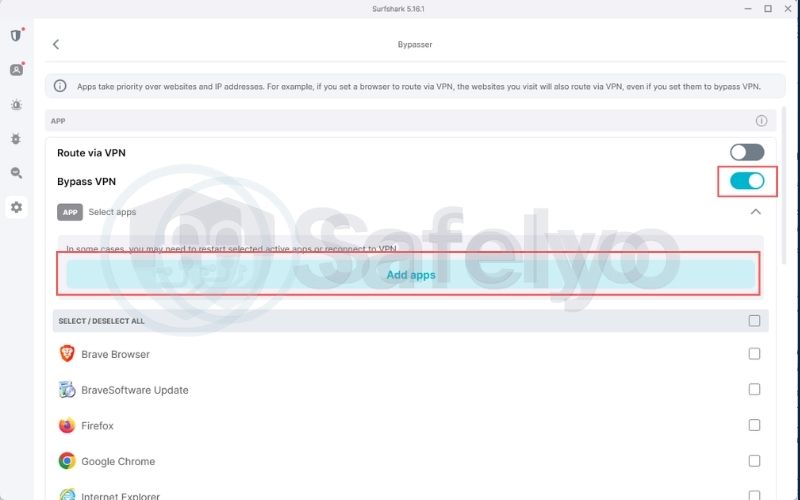
Routing identity-sensitive tools outside the VPN tunnel eliminates unexpected logouts, while your web browsers continue to benefit from Nexus IP rotation.
5.2. Restrict rotation scope to a single country or location
On Windows, Android, and iOS, Surfshark automatically limits IP rotation to addresses within the same location only.
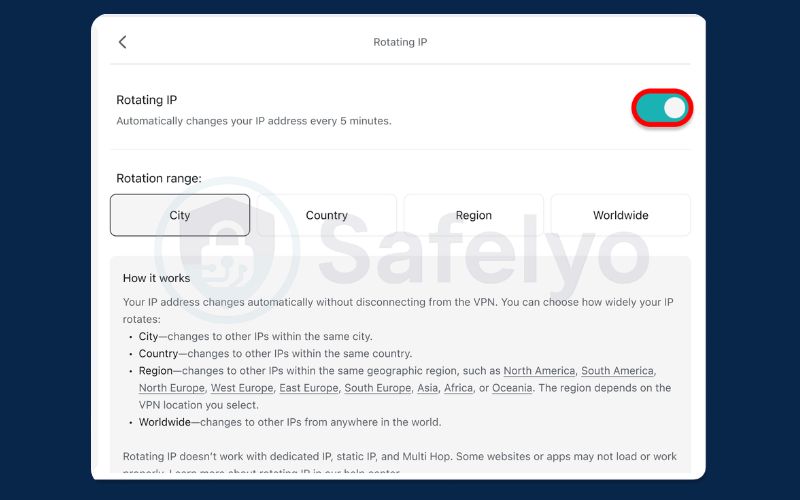
If you use macOS, Surfshark provides advanced settings that let you expand rotation across a whole country, a region (like the EU), or globally. While broad rotation maximizes privacy, jumping between countries will trigger fraud filters on secure platforms. If you encounter frequent login challenges on a Mac, restrict your rotation scope back to a single country or city.
Quick steps (macOS only):
- Open the Surfshark application and navigate to Settings (gear icon).
- Select VPN settings, then click on Advanced settings.
- Locate Rotating IP and set your rotation scope strictly to a single country or local area instead of a regional or global pool.
5.3. Reset exit nodes to bypass CAPTCHAs
Frequent CAPTCHA challenges appear when an exit node shares an IP address that previously generated suspicious traffic or high query volumes on services like Cloudflare or Google.
You can clear these loops by clicking Disconnect in the Surfshark application and selecting Quick-connect immediately afterward. The Nexus routing engine will assign your device a different exit node with a clean reputation score, allowing you to bypass repetitive verification challenges without manually solving image grids.
6. FAQs
Does Nexus disconnect internet during IP changes?
No, the Nexus network does not drop your internet connection when rotating your IP address. The encrypted tunnel between your device and the entry server stays active while the routing system changes the exit node internally. Because the underlying TCP socket remains open, file downloads and streaming media continue without interruption.
What is the difference between Rotator and MultiHop?
The primary difference lies in the number of server hops and the frequency of IP address changes. IP Rotator sends your traffic through one server location and updates your public IP every 5 minutes within that same area (or across broader custom scopes on macOS).
Dynamic MultiHop directs your traffic through two separate servers in different countries simultaneously, applying two layers of encryption for increased privacy.
Why does rotating IP trigger banking security alerts?
Banking portals monitor the public IP address linked to your authenticated browser session to prevent unauthorized access. When IP Rotator updates your public address, the bank’s security system detects the sudden change and invalidates your session cookie as an anti-hijacking safeguard.
You can resolve this issue by adding your banking application to Surfshark’s Bypasser tool.
Is Surfshark Nexus available on Android and Windows?
Yes, the core Nexus network infrastructure is fully functional across Android, Windows, macOS, and iOS applications. Users on all these operating systems benefit from underlying connection stability, automatic route optimizations like FastTrack, and primary privacy features like IP Rotator and Dynamic MultiHop.
Does Surfshark Nexus slow down connection speeds?
Under standard single-server use, Nexus maintains typical VPN performance over WireGuard. Speeds decrease and ping times increase when you use Dynamic MultiHop, as your packets must travel through two physical server locations.
Conversely, FastTrack can help reduce latency on long-distance connections by bypassing congested public transit routes.
Why does Netflix block some Nexus servers?
Streaming platforms use automated detection filters that monitor and flag commercial IP ranges associated with high concurrent viewer numbers. If IP Rotator switches your connection to an exit node that has been flagged, your video stream may halt.
If this happens, reconnect to generate a fresh exit IP, or temporarily disable IP Rotator while streaming video content.
7. Conclusion
Surfshark’s Nexus technology fixes the common headaches of traditional VPNs by tying servers into a shared, intelligent network. In everyday use, this means your 4K streams and large downloads keep running smoothly, even if Surfshark performs background maintenance or balances heavy server traffic. You get these speed and stability perks automatically the moment you connect.
For privacy, the system lets you cycle your public IP address every few minutes without dropping your connection. This constant background rotation scatters your digital footprint across multiple addresses, making it much harder for ad trackers and data brokers to build a profile on your browsing habits.
To avoid accidental lockouts on strict platforms, just take a minute to route your banking and workplace tools through Bypasser before switching on IP Rotator. This quick tweak keeps your essential logins completely stable while letting Nexus protect the rest of your daily web traffic.