Bitdefender is a giant in the antivirus world, protecting millions of devices globally. But does that expertise translate to building a world-class VPN? We tested their “Premium VPN” service to see if it is a hidden gem or just a basic add-on for their existing security users.
In this Bitdefender VPN review, we put the service through a rigorous test on a high-speed connection to check its speed, unblocking capabilities, and privacy standards.
Key takeaways
- Great Value: Extremely affordable at roughly $2.92/mo for the yearly plan.
- Streaming Friendly: Surprised us by successfully working with Netflix, Hulu, Disney+, HBO Max, Prime Video and BBC iPlayer.
- Inconsistent Speed: Fast in nearby regions but struggled significantly on specific long-distance servers.
- Simple to Use: Clean interface that is perfect for beginners.
- Privacy: Based in Romania (privacy-friendly) but relies on third-party infrastructure.
Safelyo is reader-supported. When you buy through links on our site, we may earn an affiliate commission to help maintain our operations. This does not affect our independent testing process.
Note: Data recorded on Jan 5, 2026. All long-distance tests originated from Vietnam, so your results may differ based on your region.
1. Bitdefender VPN review: Overview
Bitdefender VPN is a solid, budget-friendly choice for existing Bitdefender users who want a simple solution for basic privacy and streaming global content.
However, inconsistent speeds on distant servers and high gaming latency hold it back from competing with the top-tier standalone VPNs.
VPN Score:
7.2 / 10
Bitdefender VPN - Best for Security Suite Users
| Feature | Details |
| No-logs policy | Yes (but uses Pango infrastructure) |
| Streaming Services | Netflix, Hulu, Disney+, HBO Max, BBC iPlayer |
| Gaming Performance | Poor (High Latency) |
| Torrenting/P2P | Supported on all servers |
| Dedicated IP | No |
| Security Features | AES-256, Kill Switch, Ad-blocker |
| VPN Protocols | Hydra (Hotspot Shield), WireGuard (limited) |
| Simultaneous Connections | 10 Devices |
| Platforms & Devices | Windows, macOS, iOS, Android |
| Customer support | 24/7 Live Chat & Email |
Pros & Cons
| Pros | Cons |
| Very affordable ($2.92/mo) | Massive speed drop on specific US/UK servers |
| Unblocks most streaming sites (Netflix, Hulu) | Lacks advanced features like Dedicated IP |
| User-friendly interface | High ping makes it unsuitable for gaming |
| Ad-blocker included | Virtual server locations can be confusing |
| Generous 10-device limit |
Best for: Existing Bitdefender users who want a cheap, simple solution for accessing streaming libraries without technical headaches.
2. Bitdefender VPN: Speed and performance
Score: 5.5/10
Speed is often the deal-breaker for VPN users. To evaluate Bitdefender’s performance accurately, we tested it on a high-speed fiber connection (Baseline: ~873 Mbps) from Vietnam. We used the proprietary Hydra protocol, which Bitdefender claims is optimized for speed.
| Server | Download Speed | Upload Speed | Ping | Speed Loss (%) |
|---|---|---|---|---|
| Baseline (No VPN) | 873.2 Mbps | 525.69 Mbps | 3 ms | – |
| Automatic | 462.19 Mbps | 140.71 Mbps | 84 ms | ~47% |
| Japan | 374.19 Mbps | 63.89 Mbps | 174 ms | ~57% |
| US (Automatic) | 218.99 Mbps | 64.06 Mbps | 446 ms | ~75% |
| US (Los Angeles) | 18.34 Mbps | 68.16 Mbps | 442 ms | ~98% |
| UK Server | 19.1 Mbps | 61.78 Mbps | 419 ms | ~98% |
| Hong Kong | 26.28 Mbps | 208.01 Mbps | 53 ms | ~97% |
| South Korea | 25,14 Mbps | 94,32 Mbps | 170 ms | ~97% |
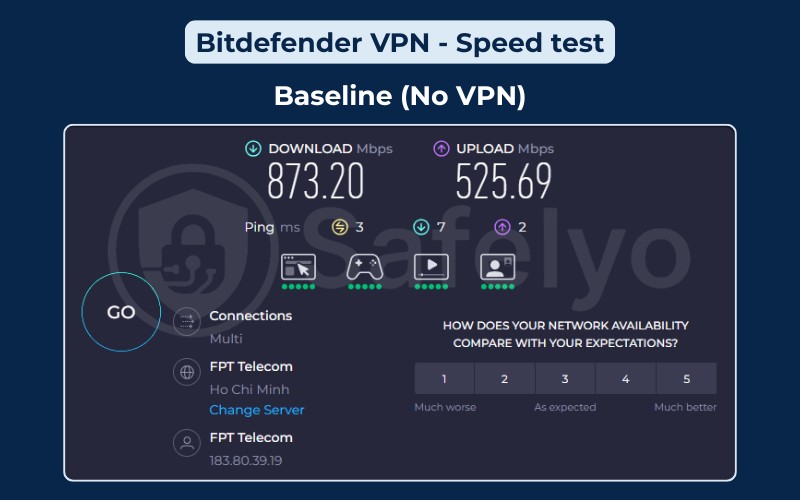
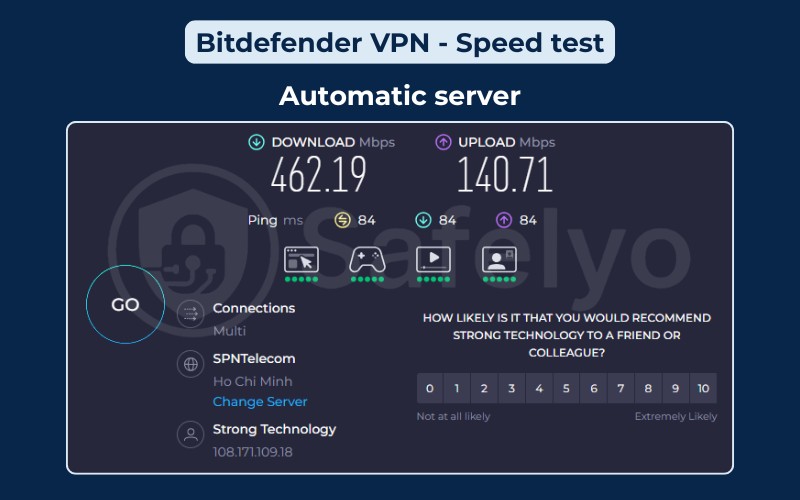
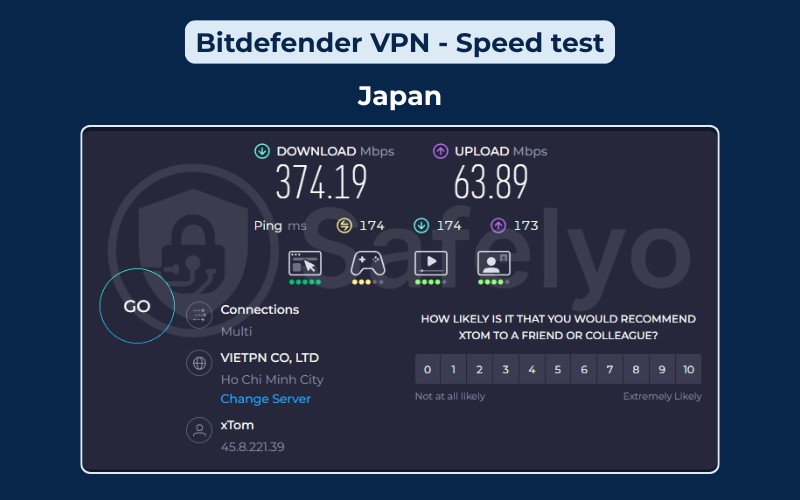
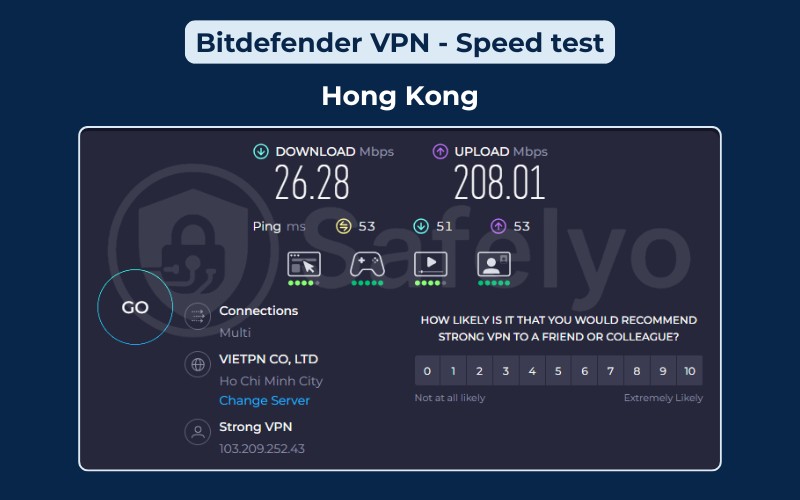
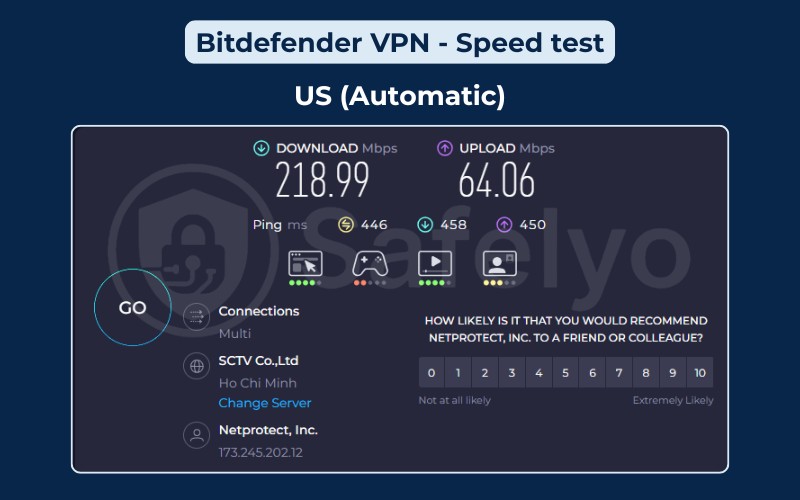
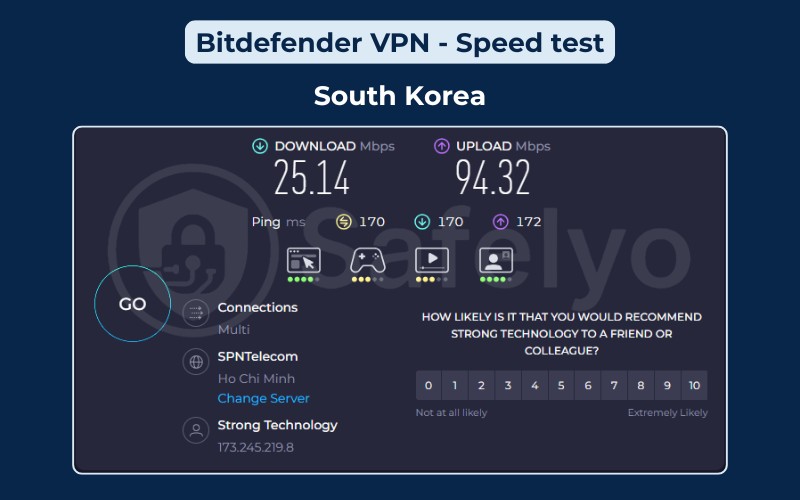
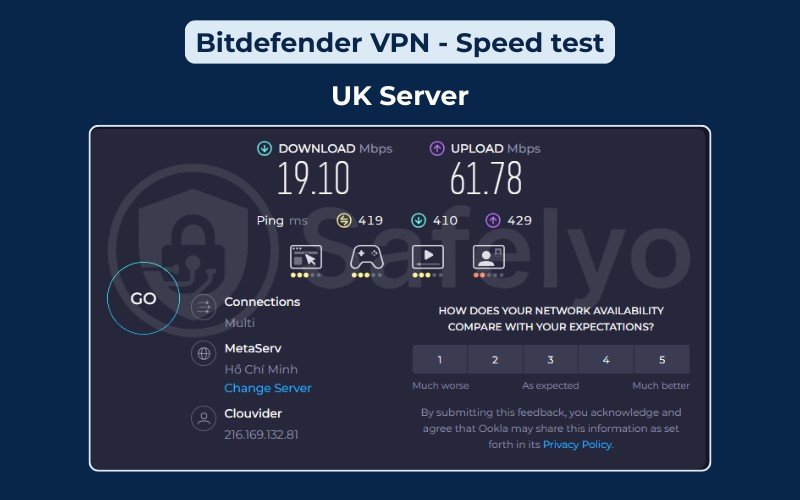
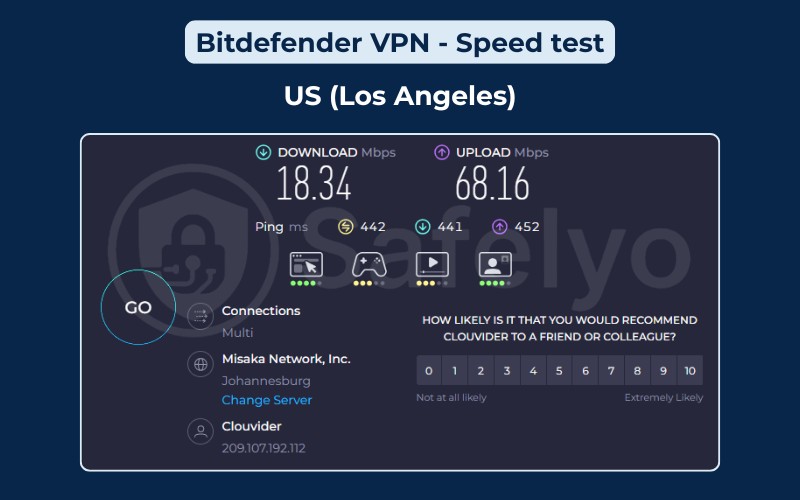
Our extensive testing revealed a distinct behavior in Bitdefender’s network: it performs significantly better when you rely on its automatic server selection. When we used the “Automatic” setting for the US connection, the VPN routed us through an optimized node that delivered a healthy 219 Mbps, which is more than enough for buffer-free 4K streaming.
However, the performance collapsed when we manually forced a connection to specific cities like Los Angeles, where speeds plummeted to just 18.34 Mbps. This massive gap indicates that while the network has capacity, individual server nodes vary wildly in quality.
This inconsistency extended to regional connections, where Bitdefender defied the standard logic that closer servers provide better speeds:
- The Japan server retained a robust 374 Mbps despite being further away than other Asian locations.
- In contrast, closer locations like Hong Kong and South Korea struggled to pass 26 Mbps, representing a staggering 97% speed loss from our baseline.
In short, Bitdefender VPN is fast, but only if you stick to the “Automatic” setting or major power hubs like Japan. If your specific needs require you to manually select a location like the UK or a specific US city, you may encounter frustratingly slow speeds.
Note: Internet speeds can vary significantly depending on your physical location and ISP. To see if it suits your specific needs, we highly recommend taking advantage of Bitdefender VPN 7-day free trial to test the speeds yourself.
3. Bitdefender VPN: Pricing & plans
Score: 9.0/10
Bitdefender offers one of the most competitive price points in the market. It positions itself aggressively against standalone giants like ExpressVPN by undercutting them significantly on price.
Pricing & plans
| Plans | Price (per month) |
|---|---|
| 1 Month | $6.99 |
| 1 Year | $2.92 |
Value & payment
| Feature | Details |
|---|---|
| Money-Back Guarantee | 30 Days |
| Free Trial | 7 Days (No Credit Card required) |
| Free version | Yes (200MB/day limit) |
| Payment methods | Credit Card, PayPal |
| Simultaneous Connections | 10 Devices |
At $2.92 per month (billed as $34.99 for the first year), Bitdefender is a steal compared to NordVPN (~$5.49) or ExpressVPN (~$4.79).
However, users should be aware of hidden renewal costs. The low introductory price applies only to the first term. The renewal price for subsequent years can be significantly higher. We strongly advise checking the renewal rate and disabling “Auto-renewal” in your account settings to avoid unexpected high charges.
The inclusion of 10 simultaneous connections adds immense value for families. The Free Version acts more like a teaser. With a strict 200MB daily limit, you cannot stream video or download large files.
But the 7-day free trial requires no credit card, which is a rare and user-friendly “try before you buy” offer.
Please note that prices were recorded on January 5, 2026, and may change due to seasonal deals, taxes, or your location.
4. Bitdefender VPN: Privacy and security
Score: 7.0/10
Security is Bitdefender’s home turf. They bring good encryption standards to the table, but the infrastructure setup adds a layer of complexity.
| Feature | Bitdefender VPN Status |
|---|---|
| Logging Policy | No-logs (Privacy Policy states no traffic logging) |
| Server Infrastructure | Uses Hotspot Shield (Pango) servers |
| Jurisdiction | Romania (Safe – Outside 14 Eyes) |
| Encryption Standard | AES-256 GCM |
| Kill Switch | System-wide (Reliable) |
| Advanced Features | Ad-blocker, Anti-tracker |
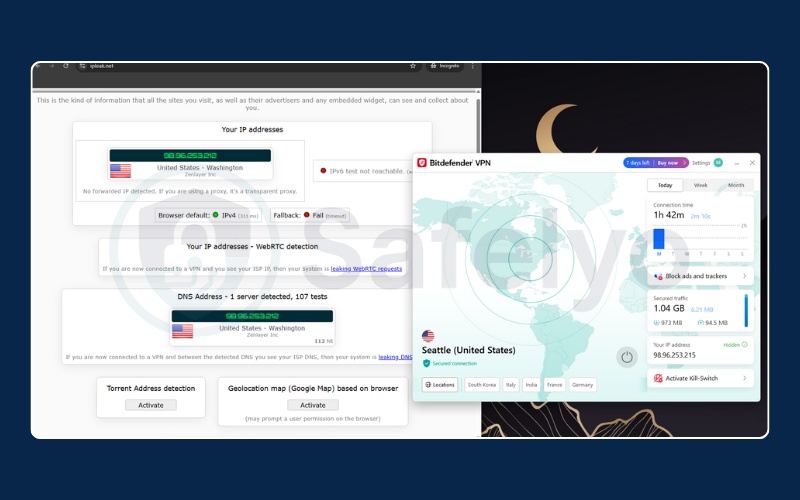
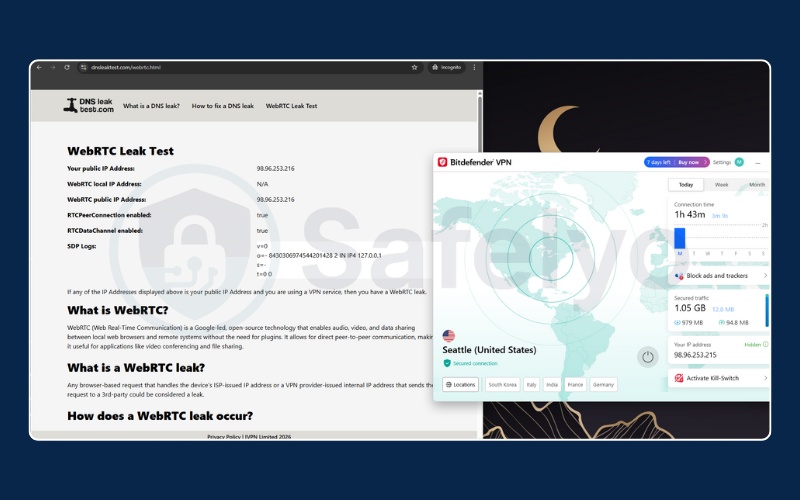
| Leak Test Results | Passed (No IP/DNS Leaks) |
Bitdefender is based in Romania, a country with excellent privacy laws that does not participate in the “14 Eyes” intelligence-sharing alliance. This is a major plus.
However, Bitdefender VPN is largely a “white-label” product. It runs on the server infrastructure of Pango (Hotspot Shield).
While Bitdefender manages the policy and your account, the actual connection travels through Pango’s servers, which are US-based (a 5-Eyes country). Bitdefender assures users that no traffic logs are kept, but purists might prefer a VPN that owns its own hardware entirely.
During our tests, the Kill Switch worked perfectly. We simulated a network crash, and the app instantly cut our internet access to prevent any data leaks.
Beyond the Kill Switch, we also ran comprehensive leak tests to verify its reliability. We used industry-standard tools like ipleak.net and dnsleaktest.com to check for IP, DNS, and WebRTC leaks. Bitdefender VPN passed every test, successfully keeping our real location and identity hidden without any accidental exposure.
5. Bitdefender VPN: Server network & locations
Score: 8.5/10
For a service often viewed as an “add-on,” the network size is surprisingly robust.
| Feature | Bitdefender VPN Stats |
|---|---|
| Total Countries | 100+ |
| Total Servers | 3,000+ |
| Infrastructure Ownership | Rented/Leased (Pango Network) |
| Virtual Locations | Yes (Widespread) |
| Static/Dedicated IP | No |
With over 3,000 servers spread across 100+ countries, Bitdefender ensures you are rarely stuck on an overcrowded server. The coverage includes most major regions, though it relies heavily on virtual locations for smaller countries.
This means you get an IP address from that country, but the physical server might be elsewhere. This is standard practice but worth noting for users who need strict physical presence.
6. Bitdefender VPN: Streaming support
Score: 8.9/10
Streaming is a surprising strength for Bitdefender. We expected it to struggle, but it cleared most hurdles easily.
| Features | Bitdefender VPN |
|---|---|
| Netflix | Yes (10+ libraries) |
| Hulu | Yes |
| Disney+ | Yes |
| HBO Max | Yes |
| Amazon Prime Video | Yes |
| BBC iPlayer | Yes (inconsistent) |
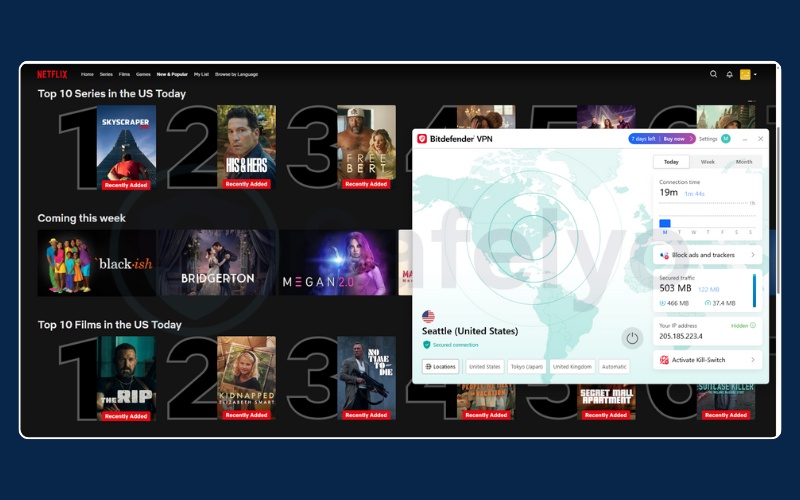


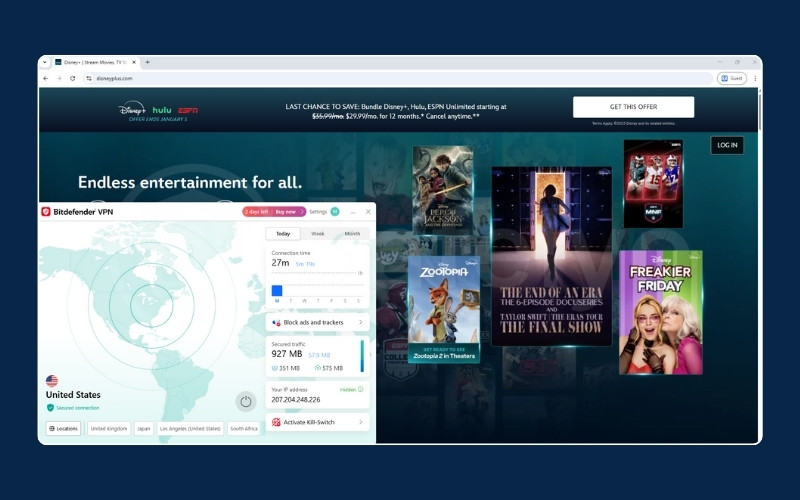
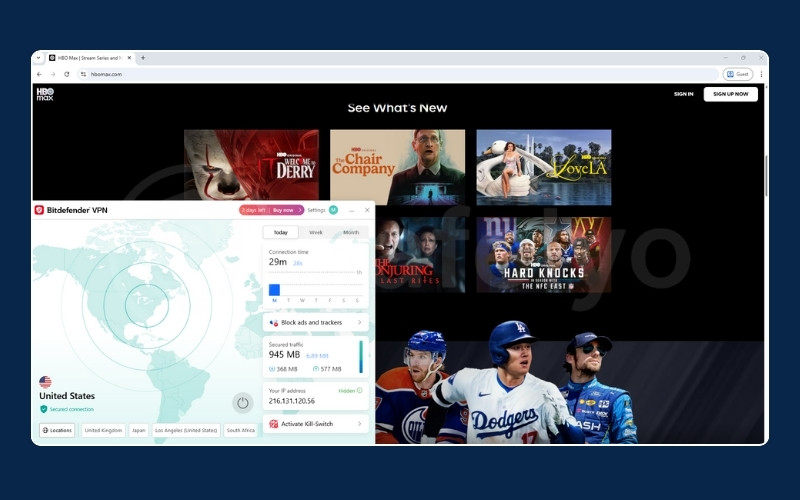
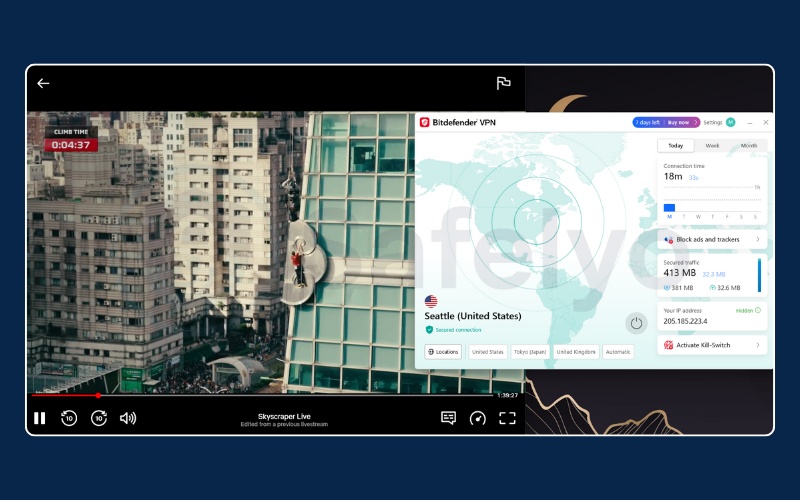
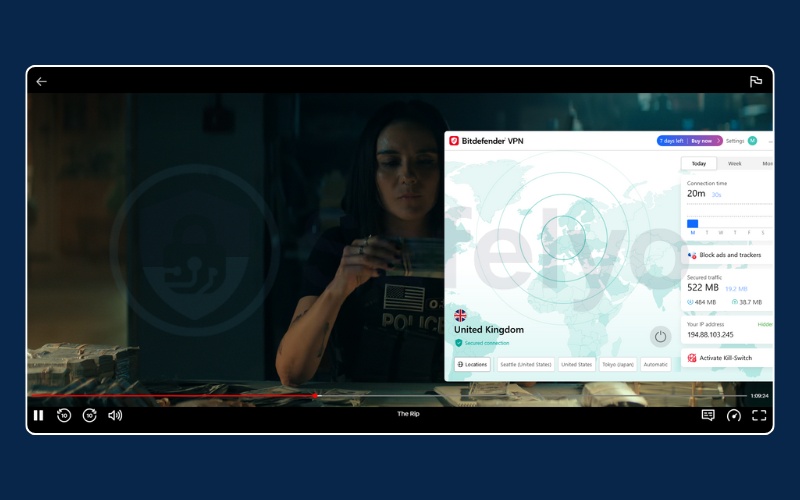
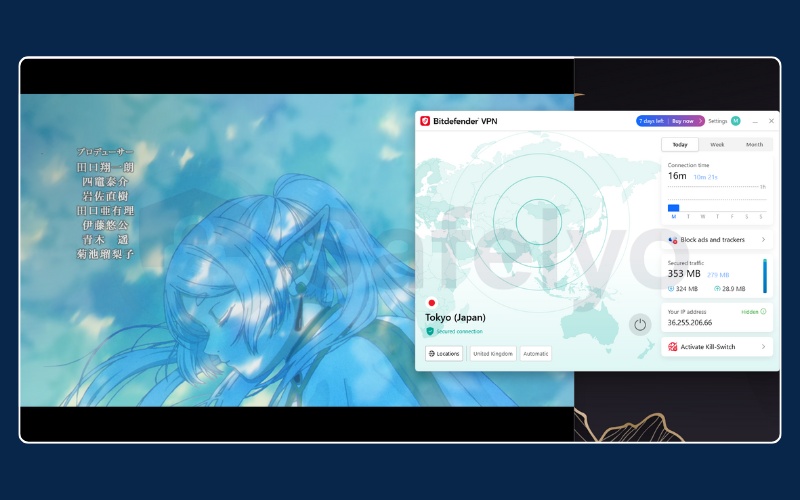
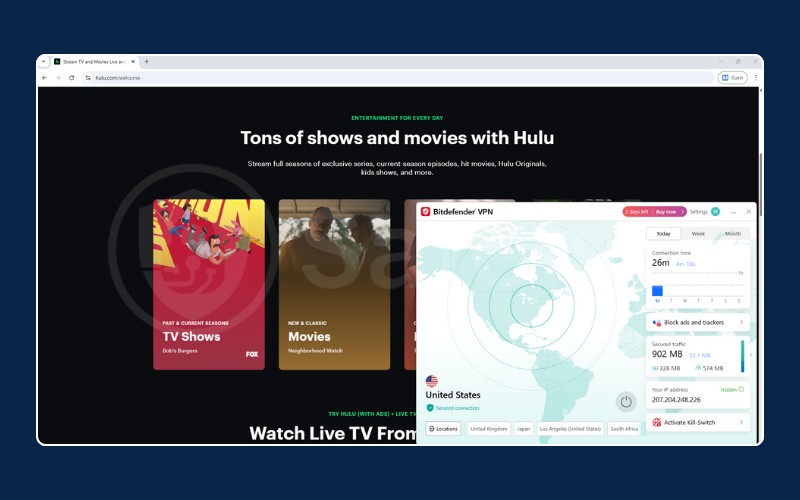
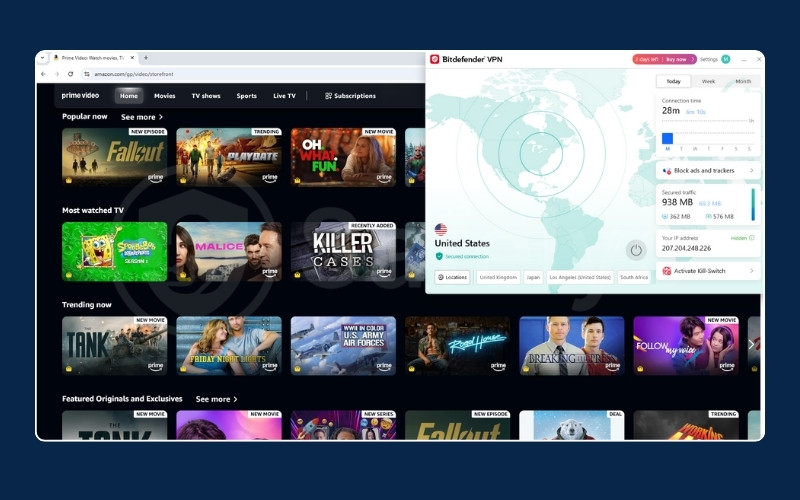
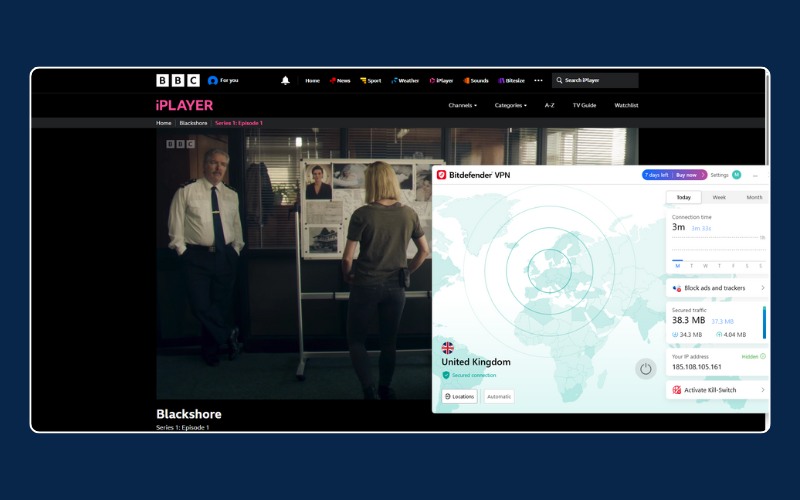
We accessed Netflix, Hulu, Disney+, HBO Max, and Prime Video without triggering We accessed Netflix, Hulu, Disney+, HBO Max, and Prime Video without triggering the dreaded proxy error message.
Bitdefender also excelled in our Netflix library tests, unblocking 10+ regional libraries. Although the service likely supports even more regions, this figure represents the 10 specific locations we tested and verified: the US, the UK, Japan, Canada, Brazil, Germany, France, India, Italy, and South Korea.
We were particularly impressed that Bitdefender managed to bypass the strict geoblocks of BBC iPlayer. This is often a stumbling block for budget VPNs, but Bitdefender handled it without issue.
However, the speed drops mentioned earlier (18 Mbps on US servers) mean that while you can watch, you might not always get the crispest 4K quality during peak hours. But for 1080p HD streaming, the experience was smooth and buffer-free across all tested platforms.
7. Bitdefender VPN: Gaming support
Score: 4.0/10
Gamers should look elsewhere. The latency (ping) impact makes this VPN unsuitable for competitive play.
| Feature | Result |
|---|---|
| Local Ping Impact | 3 ms -> 84 ms (Automatic) |
| International Ping | > 350 ms (US/UK) |
| Packet Loss | Noticeable latency spikes |
| Router Support | Limited |
| DDoS Protection | Yes (Standard) |
Ideally, a VPN should only add 10-20ms to your local ping. Bitdefender jumped from 3ms to 84ms even on the nearest “Automatic” server.
In fast-paced games like Valorant or Counter-Strike, this delay is the difference between winning and losing. The international ping times of 400ms+ effectively rule out playing on overseas servers.
8. Bitdefender VPN: Torrenting and P2P
Score: 7.0/10
Bitdefender keeps it simple for file sharing. You do not need to hunt for special servers; the entire network supports P2P.
| Feature | Bitdefender VPN Status |
|---|---|
| P2P Servers | Supported on all servers |
| Port Forwarding | No |
| SOCKS5 Proxy | No |
| Kill Switch | Yes (Essential for safety) |
| Logging Policy | No traffic logs |
| DMCA Policy | Standard (Handles via Pango) |
It works for downloading files, and the Kill Switch provides the necessary safety net if your connection drops.
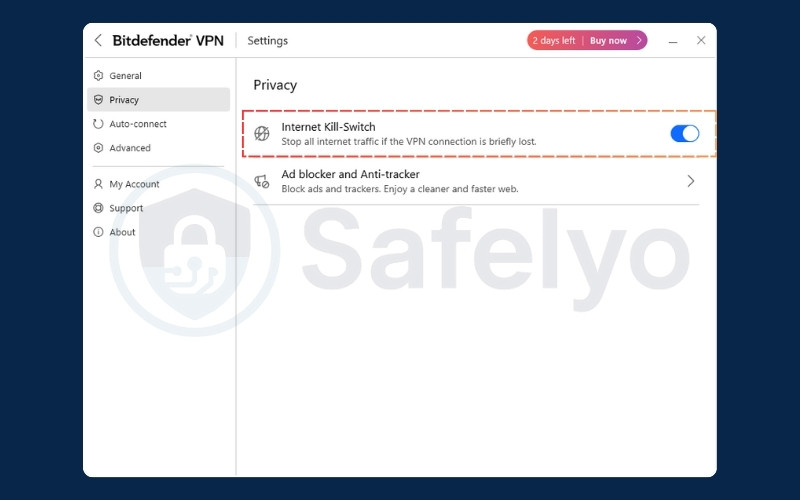
However, the lack of Port Forwarding means you cannot optimize your connection for “seeding” (uploading) files, which might affect your standing on private trackers. The slow international speeds also mean you should stick to local servers for large downloads.
9. Bitdefender VPN: Apps & user experiences
Score: 8.5/10
If you have used Bitdefender Antivirus, you will feel right at home. The design is sleek, modern, and incredibly easy to navigate.
| Feature | Details |
|---|---|
| Supported OS | Windows, macOS, iOS, Android |
| Browser Extensions | No |
| Interface Design | Clean, Modern (matches Antivirus UI) |
| Setup Difficulty | Very Easy (One-click install) |
| Unique Feature | App Traffic Optimizer |
We loved the App Traffic Optimizer feature. It allows you to prioritize traffic for specific applications.
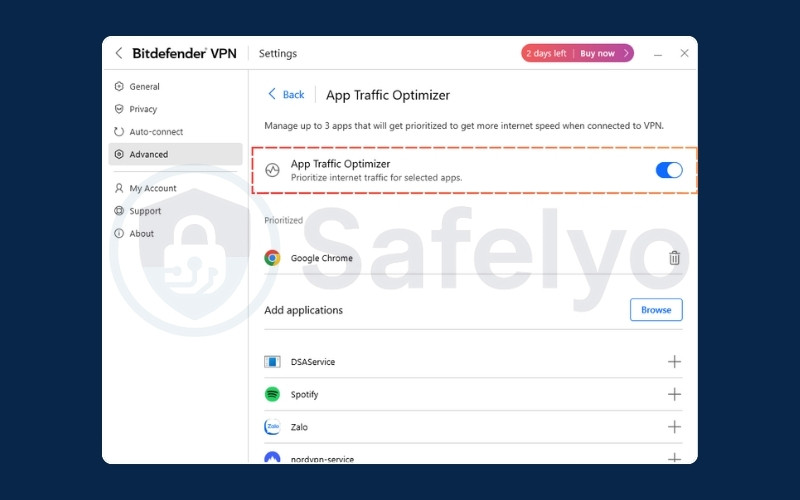
If you are on a slow network, you can tell the VPN to give bandwidth priority to your browser or streaming app, ensuring they don’t lag even if other background tasks are running.
10. Bitdefender VPN: Customer support
Score: 7.0/10
Bitdefender VPN benefits from the massive support infrastructure of its parent antivirus company.
| Feature | Bitdefender VPN Service |
|---|---|
| Live Chat | Yes (24/7) |
| Response Time | Fast (Under 3 mins) |
| Email Support | Yes |
| Knowledge Base | Extensive |
We tested the 24/7 Live Chat. Initially, you interact with a chatbot, but we were able to request a human agent fairly quickly.
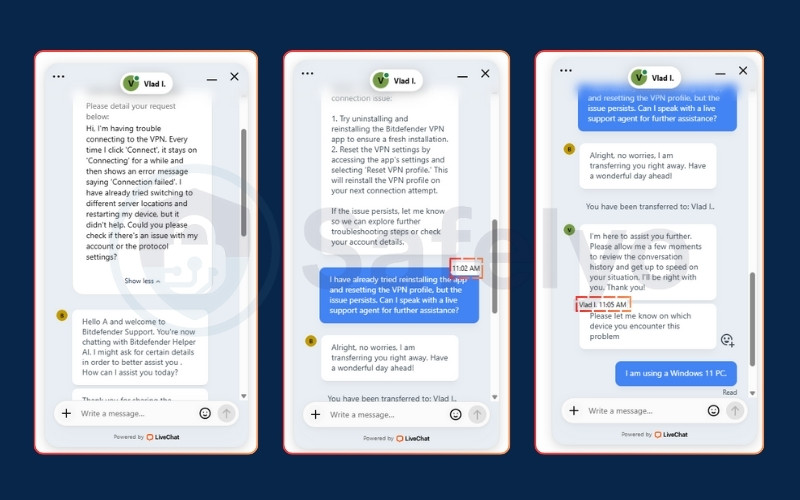
Overall, the support experience is reliable and efficient, ensuring that help is always available if you run into technical trouble.
11. Standout features: Hydra protocol & split tunneling
Bitdefender VPN has two notable features you should know about: the proprietary Catapult Hydra protocol and website-based split tunneling.
11.1. Catapult Hydra protocol explained
Bitdefender VPN does not use the standard OpenVPN protocol by default. Instead, it relies on Catapult Hydra, a proprietary protocol developed by Hotspot Shield (Pango).
Hydra is marketed as being faster than OpenVPN. Bitdefender claims it optimizes data transport to reduce latency on long-distance connections, theoretically positioning it as a robust choice for speed-intensive tasks.
However, because Hydra is a closed-source protocol controlled by Pango, it lacks the transparency of open-source alternatives like WireGuard. This is a trade-off. You get speed and strong encryption (AES-256), but you must trust the technology provider behind it.
11.2. Split tunneling for websites
Most VPNs offer Split Tunneling. This feature usually lets you choose which apps go through the VPN and which stay on your regular connection.
Bitdefender takes this a step further. It allows you to whitelist specific websites (URLs).
For example, you can keep the VPN on for security, but add “safelyo.com” or your local banking website to the Split Tunneling list. When you visit those sites, the VPN will automatically bypass them. This is incredibly useful. You do not have to turn off the VPN just to access local services that block foreign IP addresses.
12. Bitdefender VPN vs. top competitors
Bitdefender is significantly cheaper than most standalone VPNs, but how does it stack up against market leaders like NordVPN and Surfshark in terms of features and performance?
| Feature | Bitdefender VPN | NordVPN | Surfshark |
|---|---|---|---|
| Best Price (Monthly) | ~$2.92/mo | ~$3.39/mo | ~$1.99/mo |
| Server Count | 3,000+ | 8,900+ | 4,500+ |
| Connections | 10 Devices | 10 Devices | Unlimited |
| Speed Consistency | High Drop (Long Distance) | Consistent | Fast & Consistent |
| Privacy Audit | Policy only | Independently Audited | Independently Audited |
Choose Bitdefender if you are already using their antivirus suite and want a convenient add-on.
Choose NordVPN if you need the absolute best speeds and advanced security tools.
Choose Surfshark if you want the best value for money and need to protect unlimited devices for a large family.
13. How we tested Bitdefender VPN
To ensure this review is accurate and based on real-world usage, we followed a strict testing methodology utilizing high-performance equipment.
- Test Location: Vietnam.
- Internet Connection: High-speed Fiber Optic (Baseline: ~873 Mbps Download / ~525 Mbps Upload).
- Testing Device: Windows 11 PC.
- Date of Testing: January 5, 2026.
- Speed Analysis: We used Ookla Speedtest to measure ping, download, and upload speeds across different server locations.
- Leak Testing: We verified DNS, WebRTC, and IPv6 leak protection using ipleak.net and dnsleaktest.com to ensure true privacy.
We calculate the final score based on the following weighted categories:
| Category | Weight | Description |
|---|---|---|
| Privacy & security | 30% | Logging policies, encryption, jurisdiction. |
| Speed & performance | 20% | Local/International speed retention. |
| Server network | 10% | Global coverage & ownership. |
| Streaming | 10% | Unblocking Netflix, Disney+. |
| Pricing & value | 10% | Cost analysis & refund policy. |
| Apps & UX | 5% | Ease of use & device support. |
| Gaming | 5% | Latency & stability. |
| Torrenting | 5% | P2P support & safety. |
| Customer support | 5% | Response time & quality. |
For a deeper look into our evaluation process, you can read our full guide on How we test and review VPNs.
14. FAQs about Bitdefender VPN
Is Bitdefender a reliable VPN?
Yes, it is reliable for general use. It is backed by a reputable cybersecurity company and uses the robust Hotspot Shield protocol. It is safe for banking and privacy, though privacy purists may dislike its reliance on US-based server infrastructure.
Should I allow Bitdefender VPN through my firewall?
Yes. During installation, Bitdefender VPN will ask for permission to communicate through your firewall. You must allow this for the VPN to connect to the internet and mask your IP address effectively.
Is Bitdefender VPN better than NordVPN?
For most users, no. NordVPN is faster, has more consistent speeds globally, and offers advanced features like Double VPN and Meshnet. However, Bitdefender is significantly cheaper and easier to use if you only need basic protection.
How much does Bitdefender VPN cost per month?
If you buy the yearly plan, it breaks down to roughly $2.92 per month (billed as one payment of ~$35). If you prefer to pay month-to-month without a commitment, the price is $6.99 per month.
Does Bitdefender VPN work on iPhone?
Yes. The iOS app is well-designed and includes most of the key features found in the Windows version, including the Kill Switch and Auto-connect options.
Does Bitdefender VPN work in China?
It is not reliable for China. Although the Hydra protocol has some obfuscation capabilities, Bitdefender does not offer a dedicated “Stealth Mode” to consistently bypass the Great Firewall. We recommend specialized VPNs for use in restrictive regions.
15. Conclusion
To wrap up our Bitdefender VPN review, we conclude that the Premium service is an excellent “add-on” choice. It is incredibly cheap, works well with most major streaming platforms, and comes from a trusted name in security.
However, power users will need to accept a trade-off. While the local speeds and “Automatic” connections are fast (200+ Mbps), the inconsistency on manual long-distance servers and high gaming latency prevent it from achieving a perfect score.
Buy it if you want the most affordable way to stream content securely. Avoid it if you need raw, consistent speed for gaming.
If you are looking for more options, you can explore reviews of other VPN providers in the VPN Reviews category. For broader security advice, visit Safelyo to keep your digital life protected.