If you want to know what happens if ISP catches you torrenting, the short answer is that your provider will forward a DMCA notice, but you will not face sudden fines or police at your door.
Opening an automated email from an internet provider like Comcast Xfinity, Charter Spectrum, or AT&T can be alarming. However, these notices represent an administrative compliance process rather than an active criminal investigation.
Internet providers do not monitor your downloads to punish you directly. Instead, they act as neutral intermediaries complying with federal copyright laws, forwarding third-party complaints and applying account restrictions only if file sharing continues.
Key takeaways:
- DMCA notices: Internet providers act as intermediaries, forwarding copyright complaints when copyright monitors detect your public IP address sharing files in peer-to-peer swarms.
- Speed throttling: Certain providers enforce technical bandwidth caps on accounts that generate persistent peer-to-peer traffic after receiving initial warnings.
- Account suspension: Accumulating three to five strikes can temporarily lock your browser to a verification page (a walled garden) or lead to permanent service cancellation.
- Civil vs. criminal reality: Everyday downloaders do not face criminal charges or jail time, though aggressive copyright monitoring firms may send settlement letters requesting cash payments.
This article is for informational purposes only. Please use VPNs responsibly and legally.
1. What happens if ISP catches you torrenting
Internet providers handle copyright complaints through an internal graduated response framework known as a Strike System. Each verified DMCA notice sent to your provider logs a strike against your customer account, moving your connection toward stricter technical penalties if the behavior continues.
Broadband carriers do not enforce a single, rigid “three-strikes” rule across the industry. Instead, individual providers set their own warning limits based on account history, notice volume, and how quickly those complaints arrive.
The table below outlines the log retention windows, warning thresholds, and final penalties enforced by the three largest residential internet providers in the United States:
| Internet Provider | IP Log Retention Period | Warning / Strike Threshold | Final Enforcement Action |
|---|---|---|---|
| Comcast Xfinity | 180 days | Tiered review based on monthly notice volume | Minimum 180-day service termination (365 days for repeat offenses) |
| Charter Spectrum | 6 to 12 months | 2 or more notices classify user as “repeat infringer” | Permanent account termination and blacklisting |
| AT&T | 12 months (DHCP lease logs) | Up to 9 warning notices before severe action | Permanent disconnection of broadband service |
Please note: Strike policies and disciplinary actions differ significantly between internet providers. The details above show common graduated response models for reference only, and individual carriers may enforce different warning limits or technical penalties.
1.1. Early strikes: Official warning notices
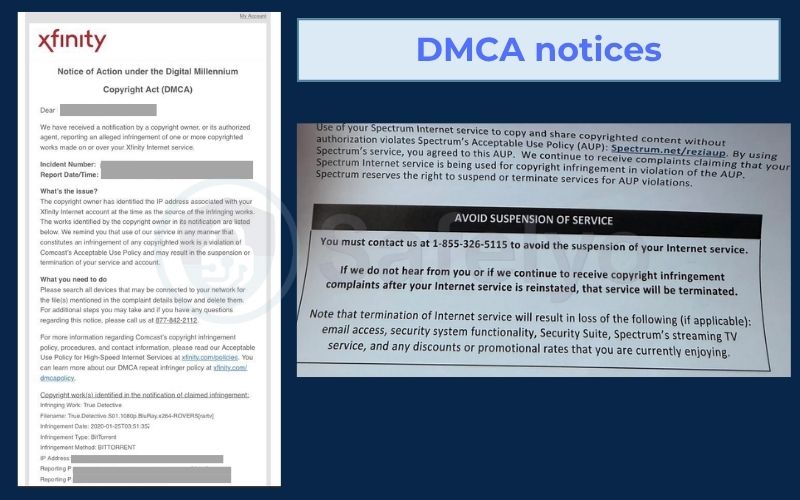
Your first or second copyright notice serves as an administrative alert delivered to the primary account holder by email or postal mail. These initial letters simply establish a paper trail proving that the provider notified you of the complaint.
An official notice contains specific connection metadata gathered during the transfer. This summary details the copyrighted filename, the info-hash identifying the shared file, your public IP address, the exact UTC timestamp, and references to your provider’s terms of service.
Your internet connection remains fully functional during these initial alerts. Bandwidth speeds stay normal, and your equipment retains complete access to the web. You should use the timestamp listed in the message to identify which device on your home network initiated the download.
1.2. Mid strikes: Speed throttling and captive portals
A third or fourth notice moves your account beyond simple warnings into actual network penalties. At this point, network management systems apply automated restrictions to ensure the primary account holder acknowledges the problem.
Certain carriers apply Quality of Service rate limits to your line. This bandwidth throttling reduces downstream speeds across all connected devices, causing web pages, video streams, and downloads to stall.
Providers also use a Walled Garden to demand your direct attention. In network administration, a walled garden refers to a captive portal where provider DNS servers redirect all web browser traffic to an internal verification page. You cannot access outside websites until you sign into your customer portal and confirm that you read the infringement notice.
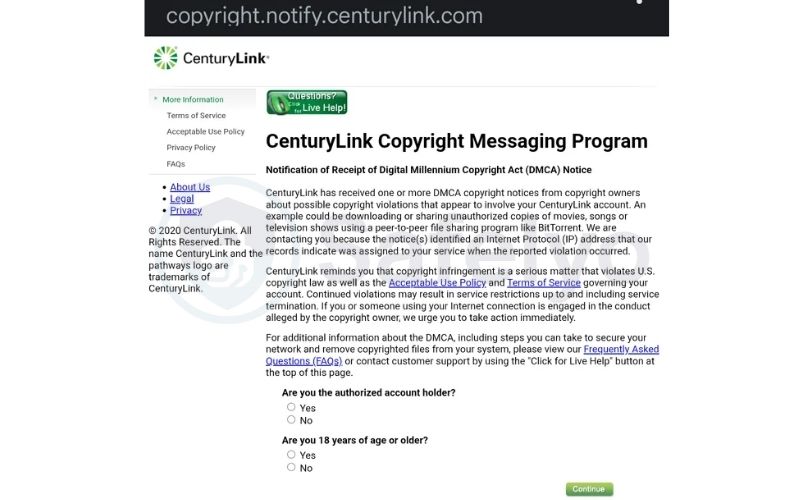
1.3. Repeat strikes: Service suspension and termination
Accounts that accumulate five or more strikes face formal disciplinary reviews. At this threshold, network operators classify the subscriber as a Repeat Infringer.
The provider will suspend your connection temporarily or cancel your broadband contract entirely. Comcast Xfinity, for instance, enforces a minimum 180-day service ban for disconnected accounts, extending the penalty to a full year for recurring violations.
Service cancellations often result in address blacklisting within internal databases. When an account is terminated for policy violations, anyone residing at that physical address may encounter difficulty opening a new broadband line with that carrier.
The primary account holder remains legally responsible for all network traffic. Even if a roommate, guest, or neighbor on unsecured Wi-Fi initiated the download, the person named on the broadband bill faces the penalties.
2. How copyright holders and ISPs detect torrenting
Your ISP does not scan your hard drive, inspect personal folders, or catalog the files stored on your computer.
Instead, detection happens entirely outside your home connection. Media companies hire independent copyright monitoring agencies to monitor public peer-to-peer networks and flag unauthorized downloads.
These monitoring efforts protect massive commercial interests. Independent economic research estimates that digital copyright piracy costs the U.S. economy between $29.2 billion and $71 billion each year in lost revenue.
2.1. Swarm tracking by copyright enforcement agencies
Peer-to-peer transfers rely on direct connections between personal computers. When you download a torrent file, your client joins a Swarm, which is the network of users actively downloading and uploading the same piece of media.
Every participant in a swarm must announce its public IP address and port number to trackers and the Distributed Hash Table (DHT) so nearby peers can share data chunks. Because these connection logs are publicly accessible, anyone connected to the swarm can view your IP address.
Monitoring companies deploy automated software to join these public swarms continuously. These bots log visible IP addresses, capture file metadata, record precise UTC timestamps, and verify that your system is actively sending file pieces across the network.
2.2. Subscriber identification through internal DHCP logs
Once a monitoring bot logs an active IP address, it runs a quick public network registry lookup to pinpoint exactly which commercial internet provider owns that connection block. The agency then submits a formal complaint under Section 512(c) of the DMCA directly to the provider’s Abuse Desk.
The Abuse Desk manages internal complaints concerning network security, spam, and digital copyright violations. Because residential broadband accounts use dynamic IP addresses that change over time, the provider must identify the specific customer behind the transfer.
Network engineers match the agency’s timestamp and IP address against internal DHCP lease logs and authentication records. These databases confirm which customer modem held that IP address at that exact moment. The monitoring agency never receives your name, street address, or billing details during this process.
3. Warning notices vs settlement demands: Legal realities
An ISP copyright notice is a policy warning, not a lawsuit. Heavy criminal fines and prison time only target large-scale commercial piracy rings, not people downloading at home. Your only task is distinguishing between a provider alert and an outside settlement demand.
3.1. Official ISP copyright warning notices
Broadband providers forward copyright notices to preserve their Safe Harbor protection under Section 512 of the DMCA. Safe Harbor status shields network operators from copyright lawsuits as long as they notify subscribers of complaints and handle repeat offenders.
A genuine warning letter from your internet carrier never asks for credit card payments, bank transfers, or gift cards. The document functions strictly as an operational warning instructing you to delete the file and check your network security.
Your provider does not share your identity with the copyright owner during standard administrative forwarding. The monitoring company only possesses your raw IP address unless a federal judge issues a formal subpoena ordering the carrier to disclose your personal account records.
3.2. Third-party settlement demand letters
Some copyright owners attach monetary payment requests directly to the notices forwarded by broadband carriers. Within the legal industry, this mass-mailing tactic is known as speculative invoicing.
These letters demand settlement fees, frequently around $150 to several hundred dollars per title, in exchange for waiving legal action. The notices direct recipients to external payment portals, using urgent legal warnings to pressure recipients into paying immediately out of fear.
However, these demands are largely a psychological tactic because the enforcement firm has no idea who you are. The copyright holder only recorded a raw IP address in a public swarm and relied on your provider’s legal requirement to pass the letter along to your inbox.
Engaging with the letter or paying the requested fee backfires by confirming your real-world identity to the monitoring agency. Legal experts consistently advise household recipients to disregard informal settlement requests attached to routine notices, reserving formal responses strictly for court-stamped subpoenas.
4. How to handle an ISP DMCA notice
Receiving a notice requires quick, practical troubleshooting to halt active transfers and protect your privacy. Following a direct four-step response plan resolves the issue before it escalates into account restrictions.
4.1. Stop all active torrent transfers immediately
Open your torrent client, pause all active downloads, and shut down the software entirely. Seeding uploads file pieces in the background, so use Pause All or Force Stop and exit the application from your system tray or task manager to cut off outgoing peer traffic immediately.
Leaving the client running allows peer connections to linger. Fully closing the process ensures no background trackers continue reporting your IP address to active monitoring bots.
4.2. Delete affected torrent files and metadata
Remove the flagged transfer and its downloaded files from your client. Simply pausing a task leaves metadata intact, allowing the program to re-index chunks and resume seeding if the software restarts.
Select the option to remove both the torrent entry and the downloaded data. Afterward, check your downloads folder and delete any orphaned .torrent files or temporary .part fragments to prevent accidental reconnects.
4.3. Ignore informal settlement demands and payment links
Never respond to voluntary settlement requests or payment demands forwarded by your provider. Do not click external payment links or call the numbers listed in the letter, as reaching out only confirms that you are the person behind that IP address.
Enforcement firms rely on automated systems to collect payments from anxious users who volunteer their information. Visiting an external settlement portal directly associates your name and contact details with the logged IP address, giving monitoring groups the exact evidence needed to pursue formal claims.
Do not reply to the letter, contact the sender, or volunteer information unless you receive an official, court-stamped judicial subpoena. Routine provider warnings only demand that you stop file sharing on your line. Halting your downloads, deleting the files, and keeping quiet remains your safest course of action.
4.4. Update home Wi-Fi security and passwords
If another device or guest on your network triggered the complaint, update your router settings to eliminate unauthorized connections. Access your router admin dashboard, switch your wireless security to WPA3-Personal or WPA2-AES, and set a stronger password.
Disable open guest networks that allow unauthenticated devices to access your bandwidth. Checking the active DHCP Client Table helps ensure only recognized household hardware remains connected to your line.
5. How a VPN protects you from ISP monitoring
A VPN shields your online traffic by building an encrypted tunnel between your computer and a remote VPN server. Modern VPN software encrypts outgoing data using strong ciphers like AES-256 or ChaCha20 across reliable protocols like WireGuard and OpenVPN.
This encryption changes what your internet provider can see on its routing equipment. Without an encrypted tunnel, your provider inspects packet headers and uses identifiable network signatures to detect BitTorrent traffic. When your VPN is running, your provider only sees encrypted data packets moving toward a single remote IP address, hiding packet contents and application types.
The VPN server also replaces your public IP address with its own. When your computer joins a peer-to-peer swarm, other users and monitoring bots only see the IP address belonging to the VPN data center. Copyright firms can only send notices to the hosting facility, shielding your residential broadband account.
Quality VPN providers deploy diskless, RAM-only servers that operate without permanent hard drives. These systems run entirely in temporary system memory, clearing all operational records whenever a machine restarts. If an enforcement firm sends a notice to the VPN company, the provider has no logs linking that data center IP address to your personal account.
Beyond basic encryption, certain VPNs offer port forwarding to help maximize download speeds within active swarms. If you want to optimize your transfer rates without exposing your identity, read our complete guide on Port forwarding vs no port forwarding for torrenting.
6. Why torrent users still get caught with VPNs
A common source of frustration among home users is receiving an infringement notice despite paying for an active VPN subscription.
The cryptographic ciphers themselves do not fail during transmission. Instead, IP leaks occur during temporary connection drops, such as brief connection interruptions, software startup delays, or operating system routing conflicts. When these transition gaps occur, your network traffic temporarily circumvents the protective tunnel.
6.1. Split-second connection drops without a Kill Switch
Even minor Wi-Fi jitter or automated server rebalancing can interrupt an active VPN tunnel for a fraction of a second. Without an active system-level Kill Switch, background torrent processes continue transmitting during that split-second outage, broadcasting your identity before the tunnel recovers.
Basic software kill switches operate reactively, meaning they only intervene after detecting that the tunnel has collapsed. This creates a brief delay that lets unencrypted packets slip through.
Robust VPN clients solve this by using an always-on firewall filter that rejects all non-tunnel traffic continuously. This persistent firewall rule ensures that no data packets can escape during micro-disconnects.
6.2. Torrent client startup before VPN connection
Operating system startup sequences are another common source of unexpected IP leaks. Many users allow their torrent client to launch automatically on system boot while leaving their VPN software set to manual connection mode.
During system startup, background torrent programs initialize quickly and broadcast peer lookup requests over your regular home network. These early tracker handshakes reach public swarms minutes before you open your VPN app and establish a secure tunnel.
Monitoring bots record these initial connection requests immediately. You should open your operating system Startup Apps settings and disable your torrent software from launching automatically when you turn on your computer.
6.3. Unbound network adapters leaking local IP data
Relying exclusively on a VPN kill switch can still leave you vulnerable if the VPN desktop application freezes or crashes. When a VPN app fails at the system level, operating system routing rules often restore regular traffic through your physical Ethernet or Wi-Fi card.
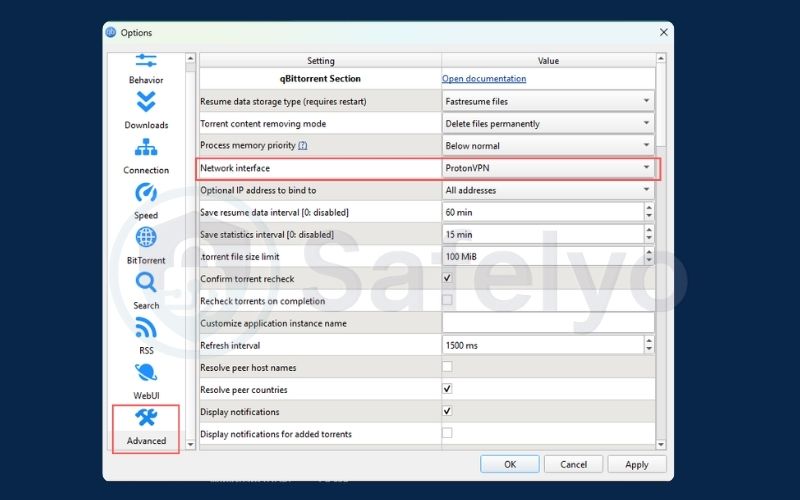
You can prevent this issue by configuring Network Interface Binding inside your torrent client. This setting forces the software to communicate exclusively through the virtual network adapter created by your VPN tunnel.
If the VPN connection drops or the software crashes, the virtual adapter disappears from your operating system. The torrent client cannot find an authorized network path and halts all traffic at 0 B/s, keeping your residential IP address hidden.
To configure this feature in qBittorrent, open Tools > Options > Advanced. Locate the Network Interface setting, switch the option from Any interface to your VPN’s virtual adapter name, such as wintun, NordLynx, or wg0, and click Apply.
7. How to choose a VPN for torrenting
Choosing a secure VPN for peer-to-peer transfers requires reviewing technical hardware and operational policies rather than relying on advertising claims. A dependable service must prevent data leaks and maintain strict privacy under heavy bandwidth usage.
- Audited No-Logs policy: The provider must undergo independent third-party security audits verifying that its servers do not record IP addresses, connection timestamps, or browsing history.
- Diskless RAM-only servers: The server fleet must run purely on volatile memory hardware that wipes all data upon reboot.
- System-level Kill Switch: The desktop and mobile applications must block all unencrypted internet traffic if the VPN tunnel disconnects.
- Full P2P support: The network must permit peer-to-peer traffic across its standard server infrastructure without throttling connections.
- Port forwarding capabilities: The service should provide optional port forwarding to help your client connect with more peers inside active swarms.
Here are some VPNs you can trust for torrenting:
- NordVPN: Operates an independently audited no-logs infrastructure and automatically directs peer-to-peer traffic to specialized server groups when it detects active transfers.
- Surfshark: Supports unlimited simultaneous device connections on a single subscription and routes peer-to-peer traffic to optimized server pools without manual setup.
- Windscribe Pro: Provides advanced ephemeral port forwarding that remains active for seven days per request, supported by a built-in firewall system that blocks traffic leaks during sudden disconnects.
8. FAQs
Will my ISP catch me torrenting with a VPN?
Your ISP cannot detect your file transfers if your VPN is running properly and your network settings are configured correctly. The secure tunnel encrypts all traffic using ciphers like ChaCha20 or AES-256, meaning your provider only sees encrypted packets directed to an external VPN server.
Notices only occur if the VPN disconnects without an active kill switch or if the torrent client launches before the tunnel connects.
Can an ISP terminate your account after one strike?
Broadband providers rarely cancel a residential subscription after a single copyright notice. Major carriers like AT&T, Comcast, and Spectrum use graduated response models where initial alerts serve as educational warnings to secure your network.
However, ignoring recurring notices will trigger progressive penalties, including speed throttling, temporary browsing blocks, or complete account termination.
Do copyright holders file lawsuits against personal torrenters?
Copyright owners seldom file federal lawsuits against everyday consumers downloading files for personal use. The extensive legal expenses required to identify account holders and litigate individual federal claims make civil lawsuits against non-commercial downloaders financially impractical.
Instead, monitoring agencies rely on automated notice distribution and settlement letters to discourage public file sharing.
Can your ISP see what specific files you download?
When you download files without a VPN, your provider learns the exact filename and hash metadata from the infringement notice sent by copyright monitoring firms. If you use a properly configured VPN, your provider cannot see filenames, web destinations, or application types. The encrypted tunnel prevents broadband carriers from monitoring the content of your data transfers.
Are torrent clients like qBittorrent illegal to use?
Torrent applications like qBittorrent and Transmission are entirely legal tools. The underlying BitTorrent protocol simply transfers data across distributed networks, which organizations use legitimately to distribute open-source software, Linux operating system images, and public research datasets.
Legal issues only emerge if you use the software to download or distribute copyrighted material without permission.
9. Conclusion
Understanding what happens if ISP catches you torrenting helps put automated warning emails into perspective. While seeing an infringement notice is unsettling, it represents a network leak rather than an impending lawsuit or criminal charge.
You can resolve the problem quickly by stopping active transfers, deleting cited file metadata, and ignoring third-party settlement demands. To protect your home network moving forward, update your Wi-Fi credentials, enable a system-level Kill Switch, bind your client to your VPN adapter, and use an independently audited no-logs VPN.
For step-by-step setup tutorials and verified hardware tests, explore our complete VPN Guides on Safelyo.