Upgrading to Surfshark One costs just a fraction more than the standard VPN, adding built-in antivirus, scam screening, and identity leak alerts into a single dashboard. However, if you only need basic VPN privacy or already have security software you like, sticking with the Starter plan is the smarter move.
Buying separate subscriptions for standalone VPNs, antivirus software, and dark web monitors quickly drives up your software bills. Managing multiple standalone security utilities also risks system clutter, as conflicting background processes can slow down everyday tasks.
Below, our hands-on Surfshark One bundle review breaks down real-world protection scores, day-to-day computer performance, and exact plan pricing to help you decide if the upgrade is worth your money.
Key takeaways:
- Upgrade cost: The One bundle requires an additional $0.30 per month on the two-year plan, totaling $75.33 compared to $67.23 for the first 27 months.
- Core protection: Surfshark Antivirus earned a 6.0/6.0 Protection score from AV-TEST on Windows sample sets while maintaining a negligible background footprint during idle periods.
- Anti-fraud utility: The Scam Protection toolset uses AI-powered email screening and fraudulent text alerts to block online scams before you ever tap a malicious link.
- Hardware impact: Deep full scans can push CPU usage up to 85%, so scheduling them overnight or during breaks prevents your computer from slowing down.
- Platform limits: Antivirus protection supports Windows, macOS, and Android for up to 5 devices, while providing no malware scanning capabilities on iPhones or iPads.
1. Core security features in the Surfshark One bundle
Managing separate cybersecurity apps, accounts, and passwords can quickly become a headache. Surfshark One solves this by bringing your core digital safety tools into one clean, responsive dashboard. Instead of just hiding your internet traffic, this all-in-one setup also guards your downloaded files, blocks scam messages, and watches out for leaked personal data.
| Security pillar in the One bundle | Primary protective role | Platform support and device quota |
|---|---|---|
| Surfshark VPN | Encrypts internet traffic, masks IP addresses, blocks ads via CleanWeb | All major platforms (Unlimited simultaneous connections) |
| Surfshark Antivirus | Real-time malware scanning, webcam privacy controls, isolated file quarantine | Windows, macOS, Android (Up to 5 devices; no iOS support) |
| Surfshark Alert | Continuous surveillance for multiple email accounts, payment cards, and national IDs across 90 countries | Web dashboard and native apps |
| Alternative ID | Generates fictional personas and proxy email forwarding to prevent spam | Global availability (Virtual phone number add-on US only) |
| Scam Protection | AI-powered phishing screening for incoming emails, smishing text alerts, and web content filtering with 2FA | Integrated across native applications and web browsers |
Each tool targets a specific gap that standard encryption leaves open, shielding your local hardware and identity when web traffic alone is not the target.
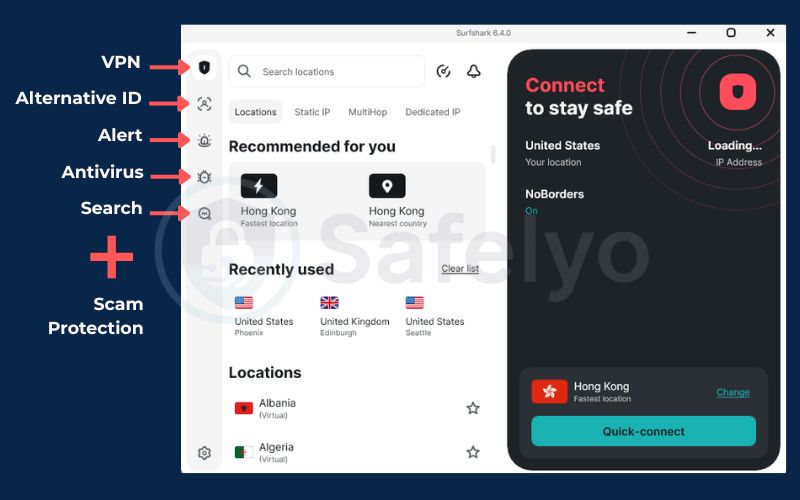
1.1. Surfshark VPN: Encrypted traffic and CleanWeb
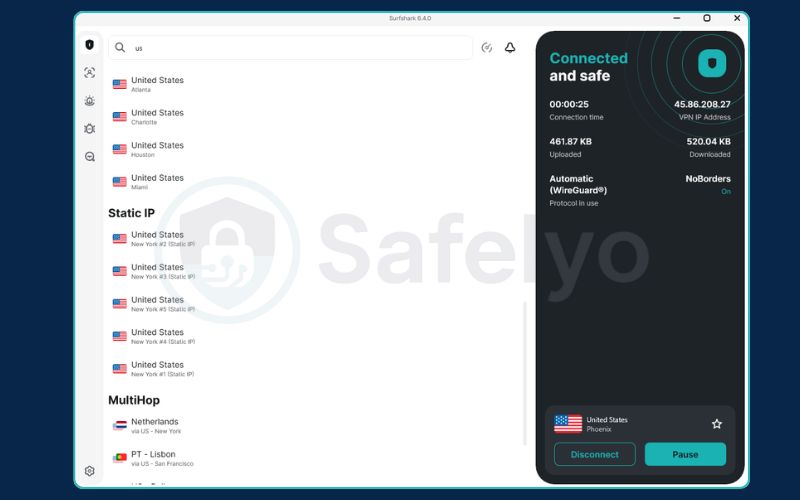
Surfshark VPN provides the primary networking foundation for the entire security suite. The client encrypts outbound and inbound web traffic using modern protocols like WireGuard, masks your true IP address, and routes data through more than 4,500 RAM-only servers across 100 countries. Because RAM-only servers run entirely on temporary memory instead of physical hard drives, every server reboot wipes all operational data and session traces automatically.
A standout benefit of the VPN service is its unlimited simultaneous connections policy. A single subscription protects every desktop, smartphone, tablet, and streaming console in your household without enforcing device caps.
The integrated CleanWeb feature inspects incoming web elements at the DNS level. By intercepting connection requests before pages load, CleanWeb blocks intrusive ads, hidden trackers, and annoying cookie pop-ups.
Upgrading to Surfshark One will not boost your internet speeds or unlock exclusive VPN servers, as both the Starter and One tiers share the exact same high-speed network infrastructure.
1.2. Surfshark Antivirus: Real-time and on-demand scans
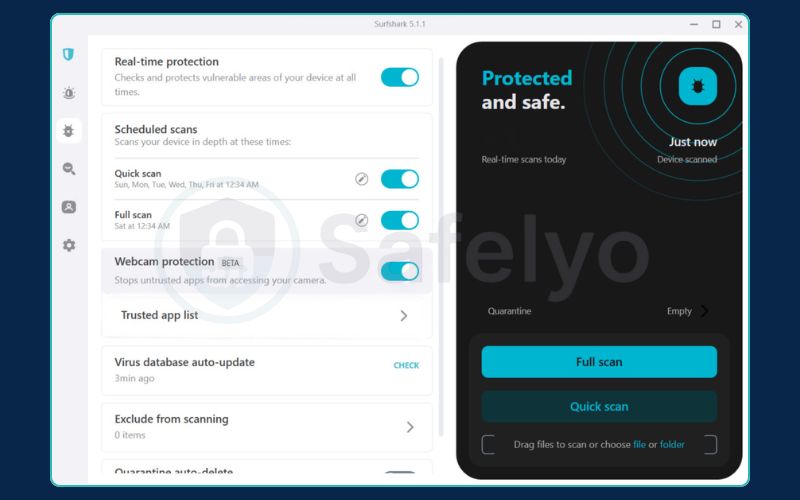
Surfshark Antivirus provides on-device protection designed to stop malicious files before they can run. Real-time scanning watches files as you download, move, or launch them. Rather than relying only on known threat databases, its heuristic engine inspects suspicious software behavior to catch brand-new malware variants before they spread.
Users can choose between a Quick Scan for critical system registries and a Full Scan across all drives. To catch the newest threats, the malware database refreshes automatically every three hours, and it runs a mandatory check for updates right before any scan begins.
The antivirus interface also includes Webcam Protection and Quarantine Management. Webcam Protection alerts you whenever an application requests camera access, letting you block unauthorized software with a single click. The Quarantine Management module safely isolates detected threats in a restricted folder, giving you time to review false alarms or permanently purge malicious software.
1.3. Surfshark Alert: Identity leak and dark web monitoring
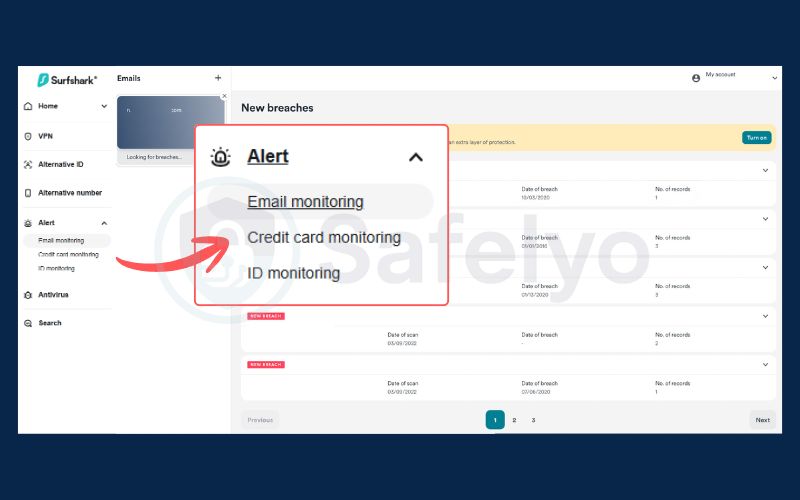
Surfshark Alert continuously scans dark web breach dumps to check whether hackers have leaked your personal data. When you add an email, payment card, or ID number, the tool checks for past leaks first, then monitors those credentials around the clock to send instant alerts if a new breach occurs.
The monitoring service tracks multiple identity categories across personal and financial accounts:
- Email addresses: Monitors multiple personal and professional email accounts for credential breaches.
- Credit and debit cards: Tracks payment card numbers to alert you if financial data surfaces on underground carding forums.
- National identification numbers: Scans compromised databases for leaked social security and national identity numbers across 90 supported countries.
To keep you informed about your digital footprint, Alert delivers regular security summaries outlining detected breaches and recommending immediate steps to secure compromised accounts.
1.4. Alternative ID: Virtual persona and masked email
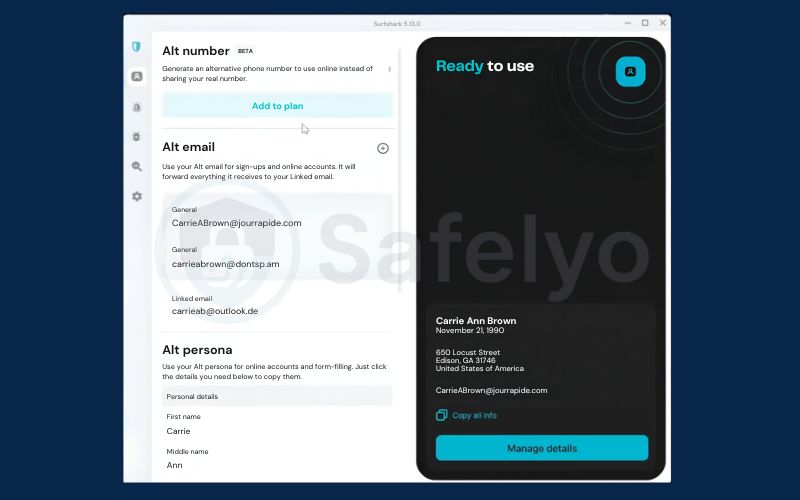
Alternative ID functions as a proactive defense mechanism that prevents marketing agencies and data brokers from collecting your authentic personal details. Rather than reacting to breaches after they happen, this tool helps you avoid distributing your personal information in the first place.
The system generates a complete synthetic online profile featuring a fictional name, birth date, and valid physical residential address. It pairs this persona with a masked email alias designed to receive incoming correspondence and forward it directly to your primary personal inbox.
You can use these generated credentials when signing up for message boards, downloading resources, or entering one-time promotional contests. If a third-party vendor suffers a database leak or sells its subscriber contact lists, your real identity remains insulated, and your primary inbox stays free of spam.
US residents can also choose to add the Alternative Number add-on. This paid feature provides a virtual phone line to receive SMS verification codes and telephone calls, keeping your private mobile number off public classified platforms and marketing lists.
1.5. Scam Protection: Phishing email and text defense
The Scam Protection suite intercepts phishing emails, fraudulent text messages, and social engineering scams before they can trick you out of your hard-earned money. Phishing attempts and deceptive text messages bypass traditional firewalls by manipulating human trust, making dedicated screening layers necessary.
The Scam Protection module incorporates three specific security tools:
- Email scam checker: This utility uses AI to inspect incoming email messages. It analyzes sender details, phrasing patterns, and destination links to flag deceptive phishing attempts before you click.
- Scam text protection: Designed for mobile platforms, this feature flags suspicious SMS messages, such as fraudulent parcel delivery updates or banking alerts, helping you avoid smishing schemes that steal financial credentials.
- Web content blocker: A filtering tool that lets you restrict harmful or unwanted website categories across every shared device in your home. It features a 2FA feature lock to prevent unauthorized changes and an allowlist to maintain uninterrupted access to your trusted websites.
Standard VPN tunnels and antivirus scanners cannot determine whether an incoming text message or delivery notification contains social engineering traps. Scam Protection addresses this blind spot directly, screening communications before deception turns into financial loss.
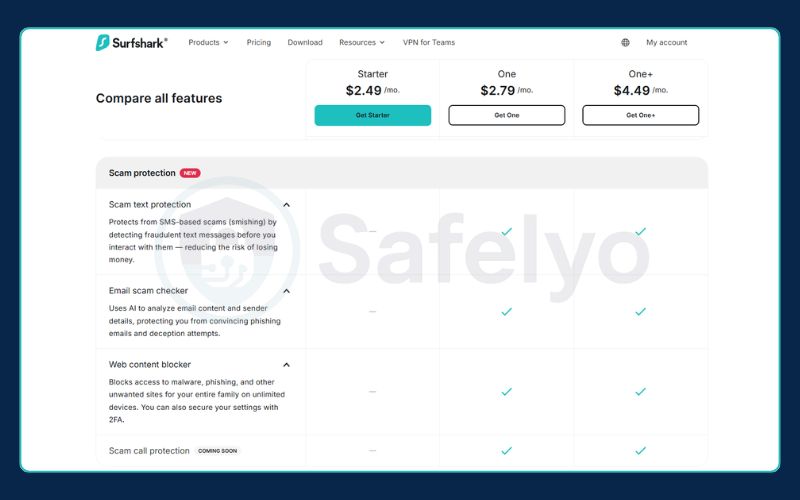
Note on Surfshark Search: Earlier versions of the bundle also featured an ad-free private search engine called Surfshark Search. In August 2026, Surfshark officially discontinued the search tool due to low user engagement, reallocating its engineering resources to strengthen its primary VPN, Antivirus, Scam Protection, and Alert tools.
2. Surfshark Antivirus lab test results and performance
A dependable security program must block threats without freezing your operating system or draining laptop battery life. Here is how Surfshark Antivirus handles both demands in independent lab testing and real-world system loads.
2.1. Independent lab scores and detection rates
Independent testing confirms that Surfshark Antivirus catches common malware effectively, but real-world lab data also exposes clear performance penalties and a heavy reliance on post-download scanning.
During May and June 2026, independent labs tested the software against live malware pools on Windows 11. While the engine neutralized almost every threat, the results highlight measurable trade-offs in system responsiveness and browser-level filtering.
Test reports from AV-TEST (Report 261317) and the AVLab Cybersecurity Foundation record the following benchmarks:
- High-rate malware interception (AV-TEST): Earned a 6.0/6.0 Protection score by blocking 100% of zero-day attacks in May and 99.8% in June across 224 live samples, while catching 100% of 11,772 widespread malware samples.
- Zero false warnings (AV-TEST): Secured a 6.0/6.0 Usability score by generating zero false alarms across 1,223,746 legitimate programs and 500 clean websites.
- App installation delays (AV-TEST): Received a 4.5/6.0 Performance score after new software installations took 137% longer than usual on standard PCs, significantly lagging behind the 30% industry average.
- 99.72% overall interception (AVLab): Neutralized 359 out of 360 real-world malware samples in the May 2026 evaluation to receive AVLab’s EXCELLENT Certificate.
- Heavy reliance on runtime defense (AVLab): Blocked only 73.33% of threats at the Web-Layer, letting more than 26% reach the operating system before catching them via Runtime Defense with an average remediation time of 15.28 seconds.
- Single sample missed (AVLab): Failed to stop one live threat (a 0.28% compromise rate) out of 360 total samples.
These laboratory detection metrics reflect defensive strength against specific threat pools at a fixed point in time. While the results verify dependable detection, they do not guarantee absolute immunity against every newly engineered exploit.
| Testing organization | Evaluation category | Score / Result | Key operational observation |
|---|---|---|---|
| AV-TEST (May–June 2026) | Protection (Win 11, v6.9 & 6.11) | 6.0 / 6.0 | Blocked 99.8%–100% of 0-day threats; caught 100% of widespread samples |
| AV-TEST (May–June 2026) | Usability | 6.0 / 6.0 | Zero false alerts across 1,223,746 clean software samples |
| AV-TEST (May–June 2026) | Performance Impact | 4.5 / 6.0 | Software installation took 137% longer on standard PCs (Industry average: 30%) |
| AVLab (May 2026) | Real-world in-the-wild test | 99.72% overall block | Blocked 73.33% at Web-Layer and 26.39% via Runtime Defense; missed 1 of 360 samples |
2.2. System resource impact during full scans
Surfshark Antivirus maintains a light footprint during passive protection, but deep on-demand scans can push your computer hard.
When idling in real-time protection mode, the software operates quietly in the background. It typically uses a modest 300 to 500 MB of RAM and rarely exceeds 3% CPU utilization, meaning everyday tasks like multi-tab web browsing, streaming media, and working in documents run smoothly without any noticeable slowdown.
Hardware demands climb quickly if you run an on-demand Full Scan. Deep scanning inspects every file and storage partition, which can push mid-range processors up to an 85% load.
If you start a deep scan while gaming or exporting 4K video, expect noticeable lag. For heavy tasks, it is best to run scans when your PC is idle.
For a fast daily check-up, the Quick Scan option finishes in roughly one minute by examining essential operating system files and startup registries. It creates virtually no system lag, though it intentionally skips compressed archives and secondary drives where dormant malware droppers often hide.
Pro tip: Schedule deep scans with the Scheduled scans tool in the antivirus settings. Configuring scans to run automatically overnight or during scheduled breaks ensures complete storage hygiene without competing for CPU power during your active workday.
2.3. Protection comparison with Microsoft Defender and Norton
Deciding whether to upgrade to Surfshark One usually comes down to your existing setup: Can you simply pair a basic VPN with free built-in tools, or do you need a dedicated commercial security suite?
- Surfshark One vs. Microsoft Defender (Free default): While Microsoft Defender handles basic threats well, upgrading to Surfshark One brings everything into a single, unified dashboard. You get cross-platform protection that covers both macOS and Android, plus dedicated privacy perks like webcam hijacking alerts that free Windows Security simply doesn’t offer.
- Surfshark One vs. Norton 360 and Bitdefender (Paid suites): Standalone suites run between $30 and $80 annually and include advanced utilities like customizable two-way software firewalls and automated ransomware rollback tools. Surfshark One offers a much cleaner, ad-free experience without aggressive upsell pop-ups or heavy system bloat, though it relies on your operating system for network port filtering.
WARNING: Always fully uninstall older security suites like Norton or Bitdefender before activating Surfshark Antivirus. Running two active antivirus engines at the same time causes severe system conflicts, app crashes, and heavy PC slowdowns.
3. Device compatibility and setup limitations
Because Apple and Google enforce completely different operating system rules, your experience with Surfshark One varies depending on the platform you run. Understanding these device boundaries ensures you deploy each security tool effectively.
3.1. Device connection caps across bundled tools
The Surfshark One subscription applies different device quotas depending on the specific utility you are using.
The VPN component allows unlimited simultaneous connections on a single account. You can install and run the VPN across an unlimited number of desktop computers, mobile phones, streaming devices, and home routers.
By contrast, the Antivirus engine enforces a strict cap of 5 devices.
This 5-device limit is sufficient for individual users who need to protect two personal computers and a couple of Android phones or tablets. However, large households with multiple active family PCs will need to decide which specific computers receive the antivirus software.
3.2. Platform limitations on iOS devices
Apple enforces strict operating system boundaries that prevent Surfshark Antivirus from running on iPhones and iPads.
This sandboxing architecture prevents third-party apps from accessing other applications’ files, memory, or system processes, which prevents traditional background antivirus scanners from operating on iOS.
As a result, iOS users who purchase the One subscription can access only the following features on their devices:
- The core Surfshark VPN client with CleanWeb filtering.
- The Alternative ID persona and email masking tool.
- Dark web breach notifications via the web-based Alert dashboard.
WARNING: If your digital setup consists exclusively of iPhones and iPads, do not upgrade to the Surfshark One plan. The antivirus component cannot install on iOS, meaning the lower-priced Surfshark Starter subscription provides the exact same functional protection for your devices.
3.3. Manual installation requirements for macOS
Mac users face unique installation requirements when setting up Surfshark Antivirus due to Apple software distribution policies.
The version of Surfshark distributed through the official Mac App Store does not include the Antivirus tab. Apple requires software sold through its storefront to conform to strict sandboxing guidelines, which prevents the App Store build from performing system-level antivirus scans.
To use the antivirus on macOS, you must download the standalone .dmg installer straight from Surfshark’s official website rather than using the Mac App Store.
After launching the direct installation package, you must grant the software elevated administrative permissions through your operating system settings:
- Open your Mac System Settings and select Privacy & Security.
- Navigate to Full Disk Access and toggle the switch to grant permission for Surfshark.
- Scroll down to the security section and approve the prompted System Extension.
Without granting these two system-level permissions, the antivirus engine cannot inspect storage sectors or monitor background processes on macOS.
4. Missing features in the Surfshark One bundle
Surfshark One handles the essentials of web encryption, malware defense, and basic scam filtering. However, it does not replace a full-featured commercial utility suite, omitting advanced extras like local network port monitoring, file vaults, and system maintenance utilities.
The bundle lacks the following components:
- No dedicated firewall: The suite lacks a dedicated two-way firewall to inspect local network traffic and block unauthorized incoming connection requests. Users must continue using the native firewall built into Windows or macOS.
- No advanced parental controls: The package omits dedicated family safety tools, such as daily screen-time limits, app-level time restrictions, or social media activity tracking. Content filtering remains limited to basic domain blocking through the VPN Web Content Blocker.
- No integrated password manager: The bundle does not provide an encrypted credential vault for generating, storing, and autofilling login details. The Alert tool informs you if your password surfaces in a breach, but it cannot manage your daily credentials securely.
- No system tune-up tools: The application excludes PC maintenance tools, such as junk file cleaners, duplicate file finders, or disk cleanup utilities.
- No secure cloud backup: The subscription does not allocate encrypted cloud storage space to back up personal files in the event of an aggressive ransomware attack.
5. Surfshark One pricing and plan comparison
Weighing Surfshark’s three pricing tiers comes down to contract length and how much security software you want to manage under one roof. Examining total contract costs highlights the subscription options that provide the best balance of features and affordability.
5.1. Subscription tiers from Starter to One+
Surfshark divides its consumer offerings into three tiers across two-year, annual, and monthly billing options. Long-term commitments offer substantial discounts compared to monthly billing cycles.
| Subscription tier | 24-month term (+3 extra months) | 12-month term (Annual billing) | 1-month term (Monthly billing) | Core security features included | Geographic limits and restrictions |
|---|---|---|---|---|---|
| Surfshark Starter | $2.49 / month ($67.23 upfront for 27 months) | $3.39 / month ($40.68 upfront) | $16.45 / month | VPN (unlimited devices), Alternative ID, CleanWeb DNS filter | Available globally without regional restrictions |
| Surfshark One | $2.79 / month ($75.33 upfront for 27 months) | $3.59 / month ($43.08 upfront) | $18.95 / month | All Starter features plus Antivirus (5 devices), Alert, and Scam Protection | Global availability (Antivirus does not support iOS) |
| Surfshark One+ | $4.49 / month ($121.23 upfront for 27 months) | $7.49 / month ($89.88 upfront) | $21.85 / month | All One features plus Incogni automated data removal and $1M identity insurance | Insurance limited to US (excludes New York State); Incogni supports US, UK, EU, CH, CA |
The top-tier One+ plan comes with important regional restrictions that international buyers need to know before signing up. The identity theft recovery policy covers up to $1M in restoration costs and $1,000 for mental health counseling underwritten by HSB Specialty Insurance Company. However, this coverage applies only to US residents and excludes residents of New York State.
Subscribers outside the United States who upgrade to One+ receive the Incogni data broker removal tool, which covers individuals in the US, UK, EU, Switzerland, and Canada, but gain no access to the financial insurance policy.
Every subscription tier includes a 30-day money-back guarantee, allowing you to test connection speeds and antivirus scanning performance without long-term financial risk.
5.2. Upgrade costs on the two-year term
Reviewing the price difference between the Starter and One plans illustrates the economic appeal of the middle tier:
- The monthly price difference on the two-year term is $2.79 minus $2.49, which equals $0.30 per month.
- The total upfront cost difference across the full 27-month period is $75.33 minus $67.23, which equals $8.10.
For an extra $8.10 spread across more than two years, the One plan adds:
- Antivirus coverage on up to 5 Windows, macOS, and Android devices, saving you the $20 to $40 per year that standalone antivirus subscriptions typically cost.
- Continuous dark web breach tracking for multiple personal email accounts and national identification numbers through Surfshark Alert.
- Automated protection against deceptive phishing messages and fraud using the AI Email scam checker and SMS text protection.
Paying an extra $0.30 per month represents minor overhead relative to the independent value of these combined tools, making the One tier the most practical sweet spot in the Surfshark lineup.
5.3. Automatic renewal terms and price changes
Promotional pricing applies exclusively to the initial subscription period. Once your initial 27-month contract ends, your plan automatically renews at standard non-promotional annual renewal rates.
Applicable sales taxes and VAT are calculated automatically based on the billing country linked to your payment method. Surfshark notifies users by email 30 days before charging an account for an upcoming annual renewal.
Pro tip: You can turn off automatic renewal immediately after completing your purchase by opening your web dashboard and navigating to Account Settings. Disabling auto-renewal prevents unexpected renewal charges after 27 months while leaving your active security features fully functional for the entire paid term.
6. Is the Surfshark One bundle worth it?
Determining whether the Surfshark One bundle makes sense for your household depends on your operating systems, your existing security software, and how much you value unified account management.
Drawing from our complete Surfshark One bundle review, here is a quick checklist to help you decide if the upgrade fits your digital routine:
Who should buy Surfshark One:
- Users seeking unified management: Individuals who prefer controlling their VPN, malware scanner, and identity alerts inside one clean desktop client rather than managing separate applications.
- Unprotected PC and Android owners: Users who run Windows, macOS, or Android devices and currently lack a paid, dedicated antivirus subscription.
- Active online shoppers and remote workers: Individuals who want an extra layer of defense against sophisticated phishing emails and smishing text scams.
- Privacy-conscious individuals: Users who want to protect their primary inbox using Alternative ID aliases while tracking compromised accounts through Alert.
- Value-conscious consumers: Anyone looking for comprehensive online security that costs only an extra $0.30 per month over standard VPN service.
Who should skip Surfshark One:
- Apple-only mobile households: Individuals whose digital devices consist exclusively of iPhones and iPads, as iOS sandboxing prevents antivirus software from running.
- Users with existing security software: People who already pay for comprehensive suites like Norton, Bitdefender, or Kaspersky, or who are completely satisfied with free Microsoft Defender on Windows.
- International users wanting data removal: If your main goal is having your personal records automatically deleted from broker registries, you will need the higher-tier One+ plan with Incogni rather than the standard One bundle.
7. FAQs
Do I need antivirus software if I already use Surfshark VPN?
Yes. A VPN only encrypts your active internet connection, while an antivirus scans files directly on your device. You need both to stop malicious downloads and prevent unauthorized software from accessing your webcam.
Is Surfshark Search still included in the Surfshark One bundle?
No. Surfshark discontinued Search in August 2026 to focus entirely on its core security apps. The tool has already been removed from mobile apps and will leave desktop platforms before the end of the year.
Does Surfshark Antivirus work on iPhone and iPad?
No. Apple’s strict operating system sandboxing prevents third-party apps from scanning system memory and files on iOS. If you only use iPhones and iPads, stick with the lower-priced Surfshark Starter plan instead.
Is Surfshark Antivirus better than Microsoft Defender?
Both deliver comparable, near-perfect malware detection on Windows. However, Surfshark adds valuable extras that free Windows Security lacks, including webcam hijacking protection, support for macOS and Android, and a single dashboard for both your VPN and antivirus.
Can I purchase Surfshark Antivirus as a standalone app?
No. Surfshark Antivirus is not sold separately. It is available only as part of the Surfshark One and Surfshark One+ cybersecurity bundles.
What happens if I already have another antivirus running on my PC?
You must uninstall your existing antivirus first. Running two active scanners simultaneously causes software conflicts, severe computer slowdowns, and false security warnings as both engines compete for system resources.
What is the main difference between Surfshark One and Surfshark One+?
The core security features are identical, but One+ adds Incogni to automatically remove your personal details from data broker databases. Eligible US residents outside New York also receive up to $1M in identity theft recovery insurance with One+.
8. Conclusion
Our Surfshark One bundle review confirms that this cybersecurity package strikes an effective balance between daily convenience, reliable threat detection, and low subscription costs.
For an extra $0.30 per month, totaling $8.10 across the initial 27-month term, you upgrade a standard VPN into a versatile security hub equipped with lab-tested malware scanning, dark web breach tracking, AI phishing screening, and synthetic email identities.
While the suite omits specialized tools like proprietary network firewalls and cannot run malware scans on Apple iOS devices, it provides dependable protection for personal computers and Android devices.
We suggest testing the bundle yourself using Surfshark’s 30-day money-back guarantee to evaluate its scanning speeds and system responsiveness on your everyday devices.