Imagine typing your banking website perfectly into your browser but landing on an identical phishing page. This kind of silent redirection can happen without an obvious warning, making it especially dangerous for everyday internet users. Understanding what is DNS spoofing helps you recognize how attackers manipulate online traffic and how to protect your most sensitive personal data.
Safelyo’s team investigates invisible threats like DNS spoofing to help you browse more safely. This attack targets the internet’s address book, tricking your device or DNS resolver into connecting a trusted domain name to the wrong IP address. In this guide, we explain how DNS spoofing works, the warning signs to watch for, and the most effective ways to reduce your risk.
Key takeaways
- The attack tricks your device or DNS resolver into accepting a fake DNS response.
- It can silently redirect you to phishing pages, malware downloads, or fake login portals.
- DNSSEC validation, encrypted DNS protocols, and trusted DNS resolvers can reduce the risk of tampered DNS responses.
- A reputable VPN with DNS leak protection can help protect DNS queries on public Wi-Fi, but it is not a complete replacement for DNSSEC, HTTPS, and safe browsing habits.
1. What is DNS spoofing?
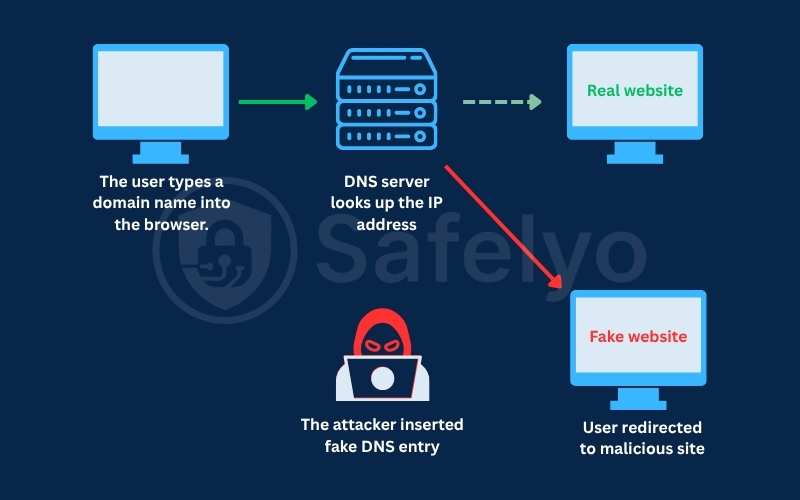
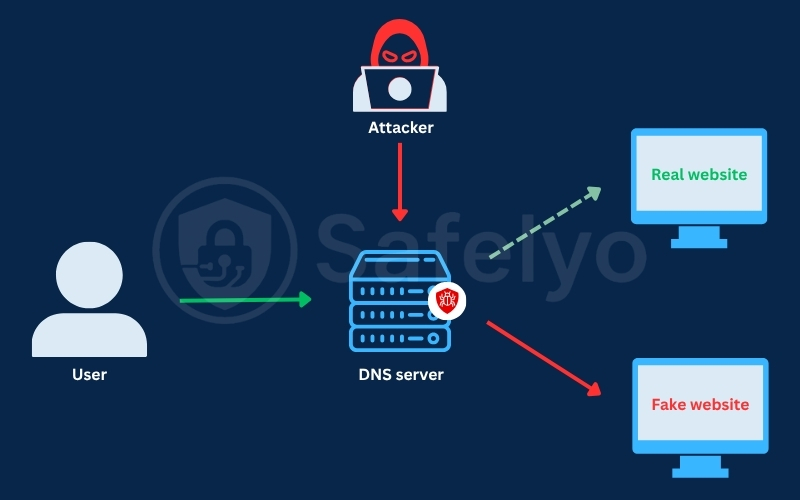
This threat is a cyberattack that manipulates DNS records or DNS responses to redirect internet users from a legitimate domain name to a fraudulent or malicious IP address. In simple terms, you type the correct website address, but your device is tricked into visiting the wrong server.
This attack abuses the trust built into the DNS lookup process. Without proper validation, a device or resolver may accept a forged DNS response as if it were legitimate. As a result, attackers can silently redirect users to fake websites, phishing pages, or servers designed to deliver malicious content.
DNS spoofing can happen in several ways, including poisoned DNS caches, compromised DNS servers, malicious public Wi-Fi networks, router hijacking, or manipulated DNS settings on a device. Once redirected, users may be tricked into entering passwords, payment details, or other sensitive information on a page that looks almost identical to the real website.
2. How does DNS normally work?
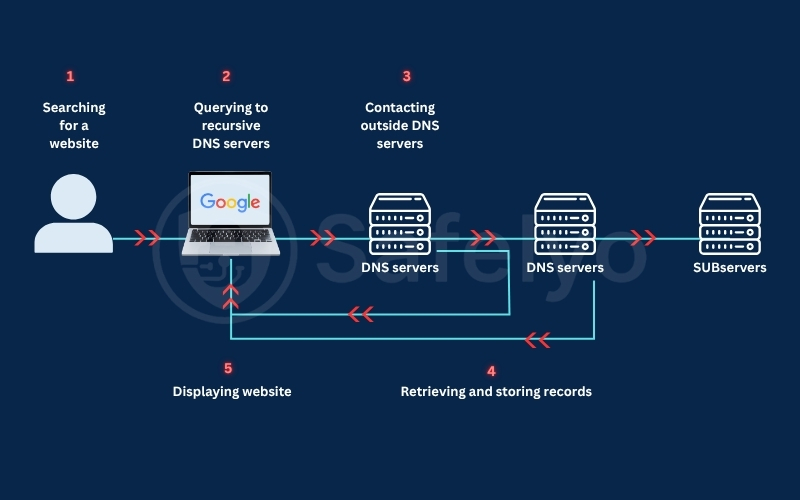
To understand how cybercriminals manipulate your web traffic, you must first understand the standard internet address book. The Domain Name System acts as a digital translator, converting readable domain names into numerical IP addresses so your browser can locate the correct server.
2.1. Domain names and IP addresses
Computers communicate across the Internet using numerical labels known as IP addresses. Because humans cannot easily memorize these long numeric codes, we use simple, readable domain names like safelyo.com instead. The DNS framework bridges this communication gap. It translates the domain name you type into the correct IP address that your browser needs to load the website’s content.
2.2. DNS resolver, authoritative nameserver, and DNS cache
When you type a website address, your device sends a DNS query to a DNS resolver. Your internet service provider, your organization, your router, or a trusted third-party DNS service often manages this resolver.
If the resolver does not already know the answer, it asks other DNS servers until it reaches the authoritative nameserver. This authoritative nameserver holds the official DNS records for that domain. To speed up future browsing, the resolver temporarily caches the correct IP address. This ensures your device does not have to repeat the full lookup process every time you visit the same website.
2.3. Why Time-To-Live settings matter
Every saved DNS record includes a specific Time-To-Live setting, often shortened to TTL. This value tells the resolver how long it should keep the DNS answer in its temporary cache before requesting a fresh update.
This timing mechanism is highly relevant to network security. If an attacker manages to place a fake DNS record into a resolver’s cache, that poisoned record may keep redirecting users until the cache expires or is cleared. This is why DNS cache poisoning can remain dangerous even after the initial attack has already happened.
3. How does DNS spoofing work?
The original internet address system was built for fast domain translation, not for today’s complex cybersecurity threats. In many traditional DNS lookups, requests are sent without encryption or built-in validation, which can allow attackers to manipulate the answer before your device reaches the real website.
In a DNS spoofing attack, the attacker’s goal is to make your device trust a fake DNS answer. Once that happens, a legitimate domain name can be redirected to an IP address controlled by the attacker.
3.1. Normal DNS lookup versus spoofed DNS lookup
During a normal DNS lookup, your browser asks a DNS resolver for the IP address connected to a domain name. The resolver returns the correct IP address, allowing your browser to connect to the website you intended to visit.
In a spoofed lookup, the attacker interferes with this process by sending a fake DNS response. If your device or resolver accepts that forged response, the domain name may point to a malicious server instead of the legitimate website.
3.2. A simple attack flow explained
A DNS spoofing attack often begins in a poorly secured environment, such as a free public Wi-Fi network. The attacker may monitor local traffic and wait for users to request popular websites, including banking portals, email services, or social media platforms.
Once a victim sends a DNS query, the attacker attempts to inject a fraudulent answer before the legitimate DNS response is accepted. This may happen through a man-in-the-middle attack, DNS cache poisoning, router compromise, or malicious DNS settings.
If the fake response is accepted, the browser may be redirected to an attacker-controlled server. That server can host a phishing page, a fake login form, or a site designed to trick users into downloading malware.
3.3. Why users may not notice the attack immediately
The most dangerous part of this cyberattack is that the redirection can happen before the website even loads. From the user’s perspective, the page may appear normal, especially if the fake website closely imitates the real one.
However, DNS spoofing does not automatically defeat HTTPS. If the attacker cannot present a valid security certificate for the real domain, the browser may show a certificate warning or block the connection, and users should never ignore that warning.
Cybercriminals often design fraudulent pages to look almost identical to real login portals. If users overlook warning signs, fail to check the URL carefully, or enter credentials on a fake page, they may expose passwords, payment details, or other sensitive information.
4. DNS spoofing vs DNS cache poisoning vs DNS hijacking
People often confuse these cyber threats because they all involve redirecting users through manipulated DNS information. However, they are not the same. Understanding the difference helps you identify where the attack happens and which security measures are most effective.
| Attack type | Primary target | Mechanism and scale |
|---|---|---|
| DNS spoofing | DNS communication | A broad attack category where a user or resolver receives a fake DNS response that points a real domain to the wrong IP address. |
| DNS cache poisoning | Resolver cache | A specific spoofing technique that stores fraudulent DNS records in a resolver’s cache, potentially affecting many users who rely on that resolver. |
| DNS hijacking | DNS settings or DNS infrastructure | An attack that changes where DNS queries are sent or modifies DNS records through a compromised device, router, DNS provider, ISP, or domain account. |
- The broad scope of spoofing
DNS spoofing is the broadest term. It describes any attack where fake DNS information tricks a device or resolver into connecting a legitimate domain name to a malicious IP address.
This can happen through local network interception, forged DNS responses, cache poisoning, or compromised DNS infrastructure. The result is usually the same: the user types the correct domain but may be sent to the wrong destination.
- The larger reach of cache poisoning
DNS cache poisoning is a specific type of DNS spoofing. Instead of targeting only one user, the attacker tries to place a fake DNS record inside a resolver’s temporary cache.
If the poisoned record is accepted, users who depend on that resolver may be redirected until the cache expires or is cleared. This makes cache poisoning especially dangerous because one successful attack can affect multiple users, not just the attacker’s immediate target.
- The configuration risk of hijacking
DNS hijacking works differently because it focuses on changing DNS settings or DNS infrastructure. For example, malware may change the DNS resolver on a personal computer, or an attacker may compromise a home router and force every connected device to use a rogue DNS server.
In more serious cases, hijacking can also happen at the DNS provider, registrar, or ISP level. That is why protecting DNS accounts, router settings, and domain management access is just as important as protecting individual devices.
5. Common DNS spoofing attack methods
Cybercriminals can manipulate DNS traffic in several ways depending on their target. Some attacks focus on a single device or public Wi-Fi network, while others target routers, DNS resolvers, domain accounts, or DNS provider infrastructure.
Understanding these common attack methods helps you identify where the weakness may exist in your own home network, workplace system, or domain management setup.
- DNS cache poisoning
DNS cache poisoning happens when an attacker manages to place a fraudulent DNS record inside a resolver’s temporary cache. If the resolver accepts the fake answer, future users who rely on that cached record may be sent to the wrong IP address.
Older DNS systems were especially vulnerable because attackers could try to guess transaction details and race the legitimate DNS response. Modern protections such as source port randomization, stronger resolver security, and DNSSEC validation make this harder, but misconfigured or outdated systems can still be at risk.
- Man-in-the-Middle Attacks on Public Wireless Networks
Public wireless networks in airports, hotels, and coffee shops can expose users to man-in-the-middle attacks if the network is poorly secured. In this scenario, an attacker on the same local network may try to intercept DNS requests or force users toward a malicious DNS resolver.
This risk is lower when your device uses encrypted DNS, a trusted VPN with DNS leak protection, and HTTPS websites. However, users should still avoid ignoring browser security warnings or entering sensitive information on pages that look suspicious.
- Router or local network DNS hijacking
Many users never change the default administrator password on their home router. If attackers gain access to the router settings, they can replace the legitimate DNS resolver with a rogue DNS server.
This change can affect every device connected to the same network, including laptops, phones, tablets, and smart TVs. Even if the devices themselves are clean, they may still receive manipulated DNS answers because the router is sending their queries to an attacker-controlled resolver.
- Compromised DNS server or provider account
In some cases, attackers bypass the local network and target DNS infrastructure directly. They may use phishing, credential theft, or weak account security to break into the DNS provider account that manages a domain’s records.
Once inside, they can modify important records such as A, AAAA, MX, TXT, or NS records. This can redirect website traffic, disrupt email delivery, or help attackers impersonate legitimate services until the changes are detected and reversed.
- Registrar or domain account compromise
Website owners register domain names through companies known as domain registrars. If an attacker steals the login credentials for a registrar account, they may be able to change nameservers, transfer the domain, or redirect traffic at a much higher level.
This type of compromise can be especially damaging because it affects the domain’s core control point. Strong passwords, multi-factor authentication, registrar lock, and careful access control are essential for reducing this risk.
- Time-to-live abuse and long-lasting poisoned records
Every DNS record includes a TTL. This value tells resolvers how long they can keep a DNS answer in cache before checking for a fresh version.
TTL can make a DNS attack more persistent if a fake or malicious record is cached for longer than expected. However, attackers do not always have full control over TTL values in every scenario. The real danger is that poisoned or unauthorized DNS records may continue affecting users until caches expire, settings are corrected, or the compromised records are removed.
6. What can happen after a DNS spoofing attack?
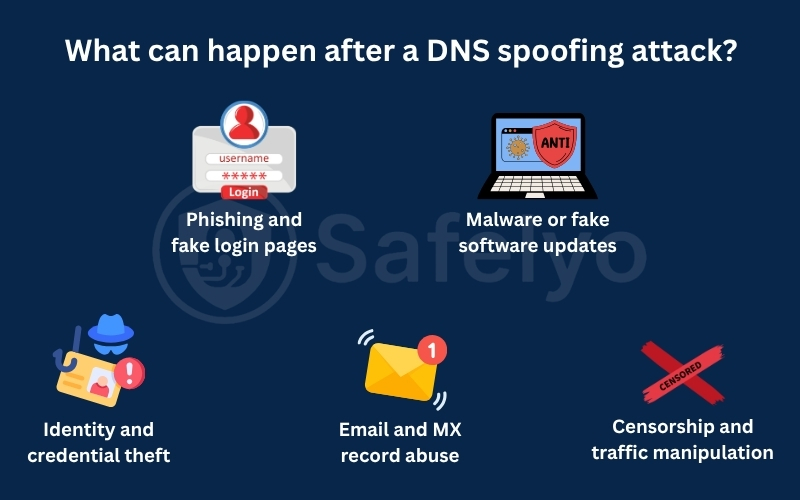
Once internet traffic is redirected, attackers can use that access to support several types of cybercrime. The impact may range from stolen passwords to malware exposure, email interception, or large-scale traffic manipulation. The danger is that users may believe they are visiting a trusted website while the DNS response has quietly sent them somewhere else.
- Phishing and fake login pages
One of the most common outcomes is redirection to a cloned website that looks similar to a real banking, email, or social media login page. Because the user typed the correct domain name, the fake page may feel more convincing than a normal phishing link. If the user enters their credentials, attackers can capture the username, password, and sometimes additional details such as one-time codes or payment information. They may then use that data for account takeover, fraud, or further phishing attempts.
- Malware or fake software updates
Attackers may also redirect users from legitimate websites to pages that promote fake software updates, browser plugins, security tools, or document viewers. These pages are designed to make the download look urgent and trustworthy.
If the user installs the file, it may deliver malware, spyware, ransomware, or a remote access tool. This can give attackers a foothold on the device, allowing them to steal data, monitor activity, or spread the attack further.
- Identity and credential theft
DNS spoofing is not limited to banking websites. Attackers may target email accounts, cloud storage, work portals, social media platforms, or password reset pages. Stolen credentials can expose a much larger part of a person’s digital identity. Once attackers gain access to one important account, they may try password reuse attacks, impersonate the victim, contact friends or colleagues, or search for more sensitive information.
- Email and MX record abuse
DNS does not only control website traffic. It also includes records that help route email, including MX records. If attackers manipulate these records through DNS compromise or domain account takeover, email delivery may be redirected or disrupted.
This can be especially dangerous for businesses. Attackers may try to intercept sensitive messages, monitor business communication, or abuse password reset emails to gain access to additional accounts.
- Censorship and traffic manipulation
DNS manipulation can also be used for censorship or traffic control. Instead of sending users to the correct website, a network operator or attacker may block the request, return a false address, or redirect users to a warning page. In this context, DNS spoofing is not always used for direct financial theft. It may be used to restrict access to news websites, social platforms, messaging services, or other online resources.
7. Real-world examples of DNS manipulation
Real-world incidents show how DNS-related attacks can redirect users even when they type the correct website address. One well-known case involved MyEtherWallet in 2018, when attackers used BGP hijacking to interfere with DNS traffic connected to Amazon Route 53.
As a result, some users were sent to a fake MyEtherWallet page designed to steal wallet credentials. The fake site triggered a certificate warning, but users who ignored it risked exposing their private keys.
Reports said attackers stole more than $150,000 in Ethereum during the incident. This case shows why users should never ignore HTTPS warnings and why website owners need DNS monitoring, strong account security, and DNSSEC where supported.
8. How to detect signs of DNS spoofing
DNS spoofing can be hard to notice because the attack happens before the website fully loads. However, there are still warning signs that can help you stop before entering passwords, payment details, or other sensitive information.
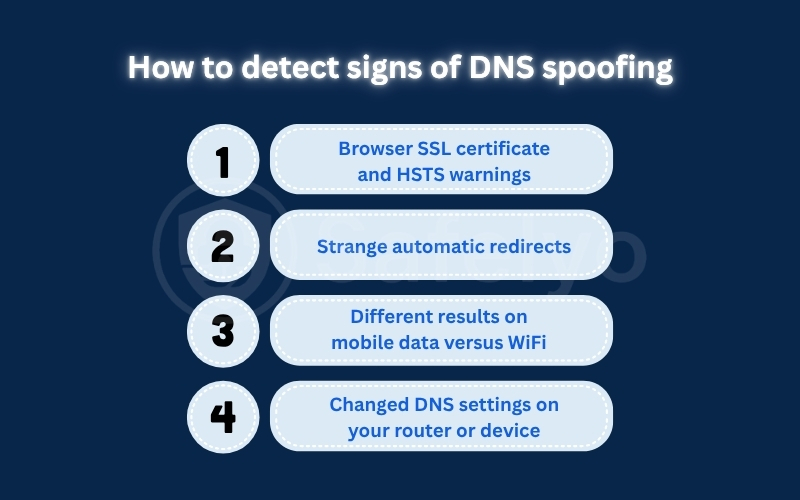
- Browser SSL certificate and HSTS warnings
Browser security warnings are one of the strongest signs that something is wrong. Attackers may be able to copy a website’s design, but they usually cannot present a valid TLS certificate for the real banking, email, or payment domain. If your browser shows a certificate warning, privacy error, or blocked connection page, do not ignore it. Websites that use HSTS may also prevent you from bypassing the warning, which helps protect users from visiting a fake or unsafe version of the site.
- Strange automatic redirects
Unexpected redirects are another red flag. For example, you may type a familiar website address but briefly see an unfamiliar domain, a suspicious login page, or a warning that the connection is not secure. Be especially careful if a site that normally uses HTTPS suddenly loads over HTTP, behaves strangely, or asks you to log in again for no clear reason. In that case, close the page and avoid entering any personal information.
- Different results on mobile data versus WiFi
A simple way to check for a local network problem is to compare Wi-Fi with mobile data. If a website shows certificate errors, strange redirects, or a fake-looking page on Wi-Fi but loads normally on mobile data, the issue may be related to your router, DNS settings, or the public network you are using.
This does not prove DNS spoofing by itself, but it is a useful warning sign. You should avoid using that network for sensitive accounts until you confirm the cause.
- Changed DNS settings on your router or device
Attackers may try to change the DNS settings on your router or device, so your traffic is sent through an untrusted resolver. This can affect your browser even when you type the correct website address.
Check whether your DNS settings point to a provider you recognize, such as your ISP, workplace, VPN provider, or a trusted public DNS service. If you find unfamiliar DNS server addresses, reset them to a trusted option, change your router admin password, update the router firmware, and run a malware scan on your devices.
9. How to prevent DNS spoofing as an everyday user
You do not need to be a network engineer to reduce the risk of DNS spoofing. Most protections come from using trusted services, avoiding unsafe networks, and paying attention to browser warnings before entering sensitive information. The goal is not to rely on one single tool. A safer setup combines trusted DNS, encrypted DNS where appropriate, secure browsing habits, router protection, and a VPN with DNS leak protection when using public Wi-Fi.
- Use a trusted DNS resolver
Many home networks use the default DNS resolver provided by an internet service provider. This may work fine for normal browsing, but users who want stronger security and clearer privacy practices may prefer a trusted public resolver or the DNS resolver provided by a reputable VPN service.
Trusted DNS providers often support security features such as DNSSEC validation, which can help detect forged DNS data for domains that have DNSSEC properly enabled. Popular examples include Google Public DNS, Cloudflare, Quad9, and other well-known resolver services, but you should always review each provider’s privacy policy before switching.
- Enable secure DNS where appropriate
Modern browsers and operating systems may let you enable secure DNS through protocols such as DNS over HTTPS or DNS over TLS. These protocols encrypt DNS queries between your device and the DNS resolver, making it harder for people on the same local network to read or modify your DNS requests.
However, encrypted DNS is not a complete privacy shield. It does not hide all browsing activity, and it does not fix every DNS attack if the resolver itself is malicious or if the domain’s official DNS records have been compromised. Use it as one layer of protection, not as your only defense.
- Do not ignore HTTPS warnings
Browser certificate warnings are one of the clearest signs that something may be wrong. If a website that normally loads safely suddenly shows a privacy error, an invalid certificate warning, or a blocked connection page, you should stop immediately. This is important for banking, email, crypto, payment, and work accounts. Attackers can copy a website’s design, but they usually cannot present a valid TLS certificate for the real domain unless they have compromised another part of the security chain.
- Keep router firmware updated and change default passwords
Your home router controls how devices on your network connect to the internet. If attackers gain access to the router admin panel, they may change the DNS resolver and send all connected devices through an untrusted DNS server. Change the default router username and password, update the firmware regularly, and disable remote administration unless you truly need it. You should also check your router’s DNS settings from time to time to make sure they point to a provider you recognize.
- Can a VPN prevent DNS spoofing?
A reputable VPN with DNS leak protection can reduce the risk of local DNS manipulation, especially on public Wi-Fi. When configured correctly, the VPN routes DNS queries through the encrypted VPN tunnel instead of exposing them to the coffee shop, airport, hotel, or other local network.
However, a VPN cannot prevent every form of DNS spoofing. It will not fix a compromised registrar account, a hacked DNS provider, or malicious changes to a domain’s authoritative DNS records. For the best protection, use a VPN together with HTTPS awareness, trusted DNS, DNSSEC validation where available, and strong account security.
- Flush your DNS cache when troubleshooting
Flushing your DNS cache can help if a bad or outdated DNS record is stored locally on your device. This forces your computer to request fresh DNS information instead of reusing the cached answer. This is only a troubleshooting step, not a complete fix. If the problem comes from your router, public Wi-Fi network, DNS resolver, or the website owner’s DNS infrastructure, clearing your local cache alone will not solve the root cause.
10. How website owners can prevent DNS spoofing risks
Website owners and administrators also play an important role in reducing DNS spoofing risks. If attackers gain control of domain settings, DNS provider accounts, or routing records, users may be redirected even when their own devices are secure.
The strongest approach is a layered defense. Domain owners should combine DNSSEC, account protection, registrar safeguards, DNS monitoring, and certificate monitoring to detect unauthorized changes quickly and limit the damage.
- Enable DNSSEC on your domain
DNSSEC adds cryptographic signatures to DNS records so validating resolvers can check whether the response is authentic. This helps protect users from forged DNS data and can reduce the risk of DNS cache poisoning for domains that are correctly signed. DNSSEC is not the same as encrypted DNS. It does not hide DNS queries from the resolver or local network. Its main purpose is to help verify that DNS data has not been tampered with before the user reaches your domain.
- Use a registrar lock or registry lock
A registrar lock helps prevent unauthorized domain transfers and unexpected changes to domain ownership. This is a basic but important protection for any website owner. For high-value domains, a registry lock can provide stronger protection by requiring additional verification before critical domain changes are made. This is especially useful for financial platforms, SaaS companies, media websites, e-commerce stores, and other domains where downtime or traffic redirection would be highly damaging.
- Protect DNS provider accounts with MFA
Many DNS attacks begin with stolen account credentials. If an attacker logs in to your DNS provider, hosting account, or registrar account, they may be able to change A, AAAA, MX, TXT, or NS records. Use multi-factor authentication for every account that can manage your domain or DNS records. For sensitive business domains, hardware security keys and strict access control are better than relying only on passwords or SMS-based verification.
- Monitor A, AAAA, MX, TXT, and NS record changes
DNS record changes should never go unnoticed. Attackers may alter A records to redirect website traffic, MX records to interfere with email delivery, TXT records to abuse verification systems, or NS records to move control to a different nameserver. Use DNS monitoring tools that alert your team when important records change. Fast alerts make it easier to investigate suspicious activity, reverse unauthorized modifications, and notify affected users if needed.
- Use certificate transparency monitoring
Even when attackers redirect traffic, they often need a valid certificate to make a fake site appear trustworthy in modern browsers. Certificate Transparency monitoring helps website owners detect newly issued certificates for their domain or similar domains. This does not stop every phishing attempt, but it gives your team an early warning signal. If you see a suspicious certificate, you can investigate quickly, contact the certificate authority, and take action before more users are exposed.
11. Frequently asked questions
Is DNS spoofing still common today?
Yes, but the risk depends on the environment. Large-scale resolver attacks are harder on well-secured systems, while public Wi-Fi attacks, router hijacking, and weak DNS settings can still put users at risk.
Is DNS spoofing the same as DNS cache poisoning?
No. DNS spoofing is the broader term for fake DNS responses. DNS cache poisoning is one method by which fake DNS records are stored in a resolver’s cache.
Does flushing my DNS cache fix DNS spoofing?
Sometimes. It can help if the bad DNS record is stored on your device. It will not fix problems caused by your router, DNS resolver, public Wi-Fi network, or a compromised domain account.
Can HTTPS stop DNS spoofing?
HTTPS cannot prevent DNS spoofing, but it can warn you when a fake server presents a valid certificate for the real domain. Never ignore browser certificate warnings.
Can a VPN prevent DNS spoofing?
A VPN with DNS leak protection can reduce the risk of local DNS spoofing on public Wi-Fi. However, it cannot fix attacks involving a compromised registrar, DNS provider, or authoritative DNS records.
Does DNSSEC encrypt DNS traffic?
No. DNSSEC validates DNS data to detect tampering. It does not encrypt DNS queries. For DNS encryption, users need protocols like DNS over HTTPS or DNS over TLS.
Does Google DNS protect against spoofing?
Google Public DNS and other trusted resolvers can help because they use modern resolver protections and support DNSSEC validation. However, no DNS resolver can block every DNS-related attack.
Can an antivirus detect DNS spoofing?
Not always. DNS spoofing can happen at the network or resolver level, so antivirus software may miss it. Browser warnings, trusted DNS, router security, and safe browsing habits are still important.
What should I do if I suspect DNS spoofing?
Stop using the suspicious network, do not enter passwords, switch to mobile data, check your DNS settings, restart or secure your router, flush your DNS cache, and change important passwords if you entered them on a suspicious page.
12. Conclusion
Knowing what is DNS spoofing is essential for anyone wanting to maintain their digital privacy. While this invisible routing attack is highly dangerous, you can easily neutralize the threat by switching to trusted public DNS resolvers, enforcing validation checks, and encrypting your daily traffic.
Establishing a layered network defense is the most effective way to secure your digital footprint from invisible cyberattacks. You can explore more expert tutorials and simplified technical guides within our Privacy & Security Basics category at Safelyo to protect your device data.