If you are frustrated by slow download speeds or getting banned from strict private trackers, the Port Forwarding vs No Port Forwarding for torrenting debate holds the answer. Using port forwarding effectively resolves these issues by enabling incoming connections, whereas “no port forwarding” leaves your network firewalled and your transfers stalled.
In this guide, we explain exactly how passive connections throttle your speeds. We also outline the security risks and provide step-by-step instructions to configure your VPN and P2P client securely.
Key Takeaways:
- Port forwarding helps your torrent client act as an active node, noticeably increasing your accessible peers.
- Without port forwarding, your inability to accept incoming connections ruins upload ratios and triggers private tracker bans.
- Opening ports carries inherent security risks, but a modern port-forwarding VPN masks your real residential IP.
- You must disable UPnP and bind your network interface to prevent IP leaks.
Disclaimer: This article is for informational purposes only. Please use VPNs responsibly and legally.
1. What is port forwarding in P2P networks?
Port forwarding configures your torrent client to act as an active node. This setup allows your device to accept incoming connection requests directly and bypass the NAT firewall.
Network Address Translation (NAT) functions as your router’s default firewall. It blocks inbound connection requests to protect your local network. When you forward a port, you create a specific rule that tells the NAT to allow inbound traffic on a single port to reach your P2P software.
The necessity of this configuration depends heavily on swarm size. For highly seeded public torrents, the impact remains less noticeable. However, for rare files with few seeders or strict private trackers, maintaining an active connection is crucial.
Networking standards continue to evolve in 2026. On modern IPv6 dual-stack networks, you no longer need traditional NAT port forwarding. Instead, you configure direct firewall rules to allow incoming traffic straight to your IPv6 Global Unicast Address.
You can review a complete lineup of tested providers in our Best VPNs for Torrenting breakdown to see which architectures fit your P2P workflow.
2. Port Forwarding vs No Port Forwarding for torrenting: The real impact
The real impact of Port Forwarding vs No Port Forwarding for torrenting comes down to the physical number of peers your client can reach.
Transitioning from a passive to an active state improves bandwidth utilization, reduces peer discovery time, and stabilizes heavy swarms.
To clearly illustrate the operational differences, here is a breakdown of how your torrent client behaves in both scenarios:
| Feature | Port Forwarding | No Port Forwarding |
|---|---|---|
| Network Status | Active Node | Passive Node (Firewalled) |
| Connection Direction | Accepts Incoming & Makes Outgoing | Makes Outgoing Only |
| Swarm Accessibility | Connects to all available peers | Only connects to peers with open ports |
| Private Tracker Viability | High (Easily maintains upload ratios) | Low (Struggles to seed to leechers) |
| Setup Complexity | Requires manual VPN configuration | Automatic (Default client behavior) |
Choosing “no port forwarding” forces your client to rely entirely on other users who already have open ports. If you join a massive swarm with active peers, you will still connect to them, and your download will proceed. However, operating passively severely shrinks your available peer pool.
For rare files, staying firewalled often stalls your download completely because you cannot connect to the few available peers who also sit behind closed ports.
3. The “firewalled” bottleneck: Why passive connections kill download speeds
To establish a handshake, at least one peer in any exchange must have an open port.
If both you and the target peer remain passive, neither of you can connect. This friction directly causes the network errors or yellow flame icons you see in your client.
Keeping your connection firewalled can cause the following drawbacks:
- Stalled transfers: Your downloads stall when the available swarm consists mostly of other passive nodes, making a handshake impossible.
- Ignored incoming requests: Your client systematically rejects inbound requests from peers trying to download pieces you already hold.
- Private tracker penalties: Passive nodes constantly fail mandatory upload ratio requirements. Since you cannot accept inbound requests from leechers, your seeding numbers stagnate, triggering automated bans on strict trackers.
4. Who actually needs VPN port forwarding in 2026?
Configuring a VPN for port forwarding requires manual effort and specific software. Your daily usage habits dictate whether you actually need this setup.
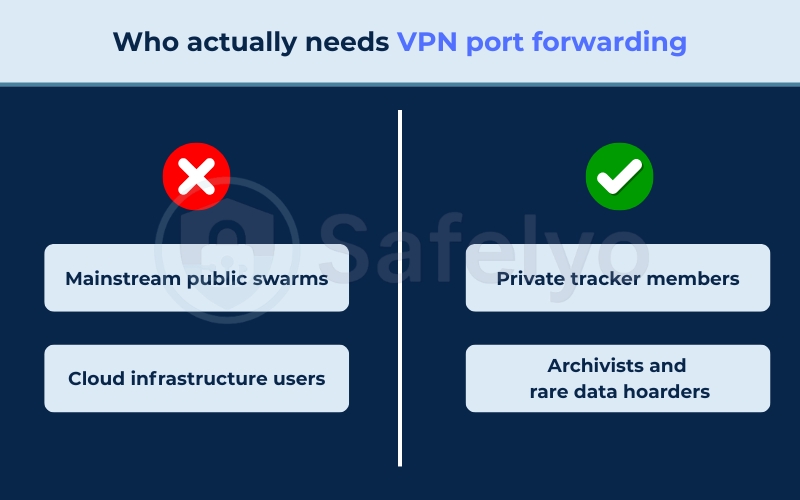
4.1. Users who typically do NOT need port forwarding
If you primarily download popular files from public trackers, you usually do not need to modify your network due to the following scenarios:
- Mainstream public swarms: Files like a popular Linux ISO or trending public domain media contain thousands of seeders. Even as a passive node, connecting to just the small fraction of users with open ports easily saturates a standard home gigabit connection.
- Cloud infrastructure users: If you rely on cloud-based seedboxes or Debrid services, you completely bypass local networking issues. This makes local port forwarding redundant.
4.2. Users who require port forwarding
If you interact with limited peer pools or strict seeding rules, you must open a port to keep your workflow alive:
- Private tracker members: Private torrenting communities enforce strict sharing economies that require a positive upload ratio. If you stay firewalled, you cannot accept inbound requests from leechers, causing your upload speeds to flatline. This directly triggers automated account bans.
- Archivists and rare data hoarders: If you download highly niche files with very few seeders (such as 1 to 5 peers), you must connect to every available node. If the only person seeding the file is also a passive node, your download often stalls. NAT traversal tricks fail reliably unless you open a port to initiate the handshake.
5. The security risks of opening ports (and how to mitigate them)
Opening a port on a local router creates a direct listening endpoint on the public internet. This exposes your real residential IP address to potential scanning.
While network security methods vary, you can mitigate this exposure by routing your traffic through a third-party server. When you open a port locally on your default ISP router, anyone observing the swarm sees exactly where that open port leads.
A VPN acts as your primary defense layer. It shifts the risk away from your physical location. The public swarm sees the VPN server’s IP address instead of your personal home network, shielding your actual hardware from unwanted probing.
Security Warning: Opening ports always carries inherent risks. Ensure your underlying OS firewall stays active and only forward the specific port your P2P client requires.
6. Bypassing CGNAT: Selecting a modern port-forwarding VPN
Carrier-Grade NAT (CGNAT) is a common ISP practice that creates a significant technical barrier to local router port forwarding. CGNAT shares a single public IP among multiple households, which prevents ISPs from routing inbound traffic directly to your private IP address.
Because of this bottleneck, local router port forwarding fails unless you use specialized ISP configurations or a VPN. A VPN navigates CGNAT by routing inbound traffic through the VPN provider’s public IP address. This bypasses your ISP’s restrictive firewall.
However, the VPN industry landscape remains highly volatile. Due to network abuse and security concerns, top providers like Mullvad recently removed port forwarding capabilities entirely.
Based on our current data in 2026, the following VPN providers currently support port forwarding features:
- Proton VPN
- Private Internet Access (PIA)
- AirVPN
- OVPN
- PrivateVPN
- PureVPN
7. How to configure VPN port forwarding for torrenting
To enable incoming connections, you must provision a port within your VPN application before configuring your local software.
VPNs provide either a Static port, which remains permanent, or a Dynamic port, which assigns a new number every time you reconnect.
Follow these core steps to activate the feature in a standard VPN app:
- Open your VPN application and navigate to the advanced network settings.
- Locate the port forwarding toggle and switch it to the ON position.
- Connect to a supported server specifically marked for P2P traffic.
- Copy the specific 5-digit port number assigned to you by the VPN dashboard.
8. Optimizing BitTorrent client settings (qBittorrent, uTorrent, Vuze)
Once the VPN provisions an open port, you must tell your local software to listen to that exact number. If you fail to configure your torrent client settings to match the VPN, the port forwarding will fail.
8.1. Securing the torrent client: Interface binding and disabling UPnP
To prevent connection drops and IP leaks, you must manually align the client’s internal routing with the active VPN tunnel.
Leaving automated network mapping protocols enabled creates severe routing conflicts.
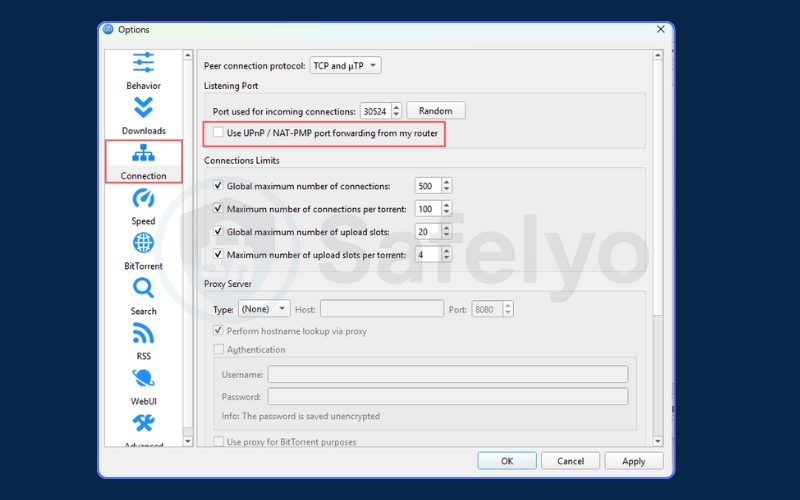
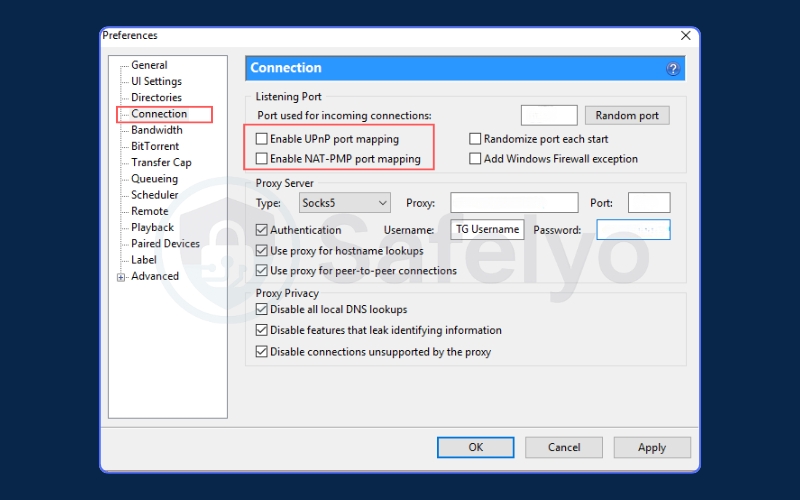
Step 1: Disable UPnP and NAT-PMP
Leaving UPnP or NAT-PMP checked forces your torrent client to request port mappings from your local home router instead of utilizing the VPN’s port forwarding tunnel.
This conflict can expose your real public IP address to the network and cause incoming connection requests to fail. Uncheck these options in your client’s connection settings to ensure all port mapping is handled strictly by your VPN provider.
- For qBittorrent: Navigate to Tools > Options > Connection and uncheck “Use UPnP / NAT-PMP port forwarding from my router”.
- For uTorrent/BitTorrent: Navigate to Options > Preferences > Connection and uncheck both “Enable UPnP” and “Enable NAT-PMP port mapping”.
Step 2: Bind the Network Interface
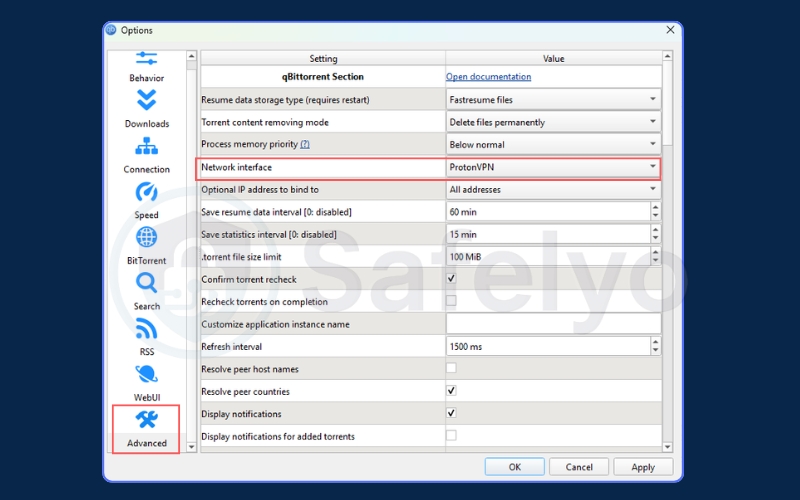
To prevent your actual IP from leaking if the VPN disconnects, you must bind the client strictly to the VPN’s network adapter.
- For qBittorrent (Recommended): Navigate to Tools > Options > Advanced. Click the Network Interface dropdown menu and select your specific VPN adapter (such as wg0, tun0, or the VPN application name).
- For uTorrent/BitTorrent: You must bind the client to the VPN’s IP address.
- Connect to your VPN and copy the assigned IP address (e.g., via ipleak.net).
- Navigate to Options > Preferences > Advanced.
- Type ip into the Filter box.
- Select net.bind_ip and net.outgoing_ip, paste the VPN IP into the Value field, and click Set. Click OK and restart the software.
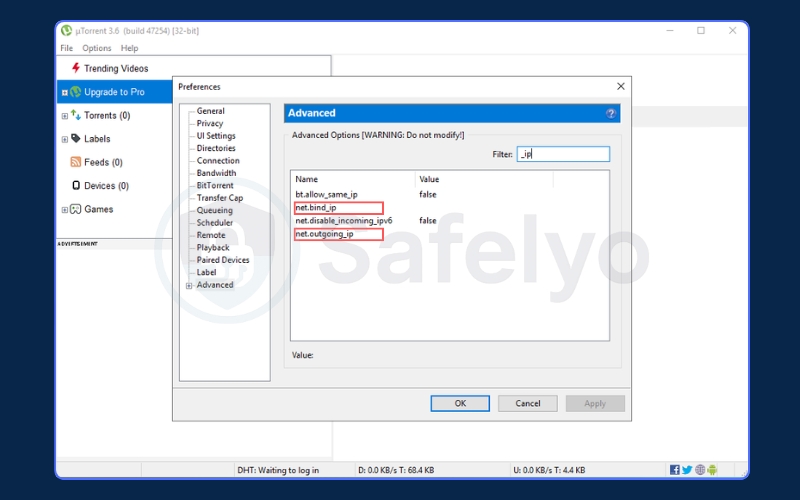
(Note: Every time you reconnect or change VPN servers, your IP changes. You must manually repeat this process in uTorrent to update the IP).
8.2. Why you must avoid default BitTorrent ports (6881-6889)
ISPs actively monitor the default BitTorrent ports 6881 through 6889 to apply basic blocks or aggressive traffic limits. You can evade these basic port-blocking rules simply by changing your port to a custom high port (such as 55000).
However, if your ISP uses sophisticated Deep Packet Inspection (DPI) to identify the BitTorrent protocol itself, changing the port number alone fails to protect you. To evade Deep Packet Inspection effectively, you must change the default port and encrypt the traffic via a VPN.
We recommend using a high-range port between 49152 and 65535 to avoid conflicts with standard system services.
9. FAQs about Port Forwarding vs No Port Forwarding for Torrenting
Should I use port forwarding for qBittorrent?
Yes, if you want optimal speeds and need to maintain ratios on private trackers. It allows your client to act as an active node, directly increasing your available peer connections.
Does NordVPN or Mullvad still support port forwarding?
No. Both providers removed the feature from their networks due to security and infrastructure concerns. You must select an alternative provider that explicitly supports inbound P2P connections.
Is there a downside or security risk to port forwarding?
Yes. Opening a port creates a listening endpoint that exposes your network to internet scanning. Using a VPN mitigates this risk by exposing the VPN server’s IP address instead of your actual home IP.
Should I use TCP or UDP for qBittorrent port forwarding?
Ideally, you should enable both. Modern P2P protocols utilize TCP for standard connections and UDP for uTP (Micro Transport Protocol) to reduce network lag and overhead.
Can an ISP tell if you are torrenting with a VPN?
ISPs generally cannot see your actual files or swarm activity through the encrypted tunnel. However, they can make an educated guess based on specific traffic patterns, such as massive and sustained data transfers occurring over long periods.
10. Conclusion
The choice between Port Forwarding vs No Port Forwarding for torrenting really depends on what you need to do online. If you mostly download popular files with a lot of users sharing them, you might be just fine without opening any ports.
However, if you often share rare files or use private communities that require you to give back as much as you take, opening a port is definitely the better way to go. It helps you find more people to connect with and keeps your download speeds high without freezing.
At Safelyo, our goal is to make internet security easy to understand. We recommend checking out our VPN Guides to read general privacy tips and find the best services for your daily life.