When comparing VPN browser extensions vs desktop apps, the core difference is the scope of coverage. VPN desktop apps encrypt your entire operating system using virtual network drivers. Meanwhile, VPN browser extensions act as lightweight proxies that only protect the traffic inside your specific browser window.
Because of this structural difference, many users experience frustration when their real IP address leaks simply because they relied on the wrong tool for their specific setup.
To help you avoid this mistake, this guide will break down the routing mechanics, performance differences, and the exact real-world scenarios where you should use a VPN desktop app instead of a VPN browser extension.
Key takeaways:
- VPN desktop apps provide system-wide encryption for torrents, background applications, gaming traffic, and bypassing strict streaming firewalls.
- VPN browser extensions use lightweight proxies to provide a faster connection setup and smoother 4K streaming on older computers.
- VPN extensions bypass Administrator privileges, making them a highly practical workaround for restricted corporate or university computers.
- Using both simultaneously can enable double-encryption and advanced tracker blocking, but this may cause connection drops depending on your VPN provider.
Disclaimer: This article is for informational purposes only. Please use VPNs responsibly and legally in accordance with your local regulations.
1. What is a VPN desktop app?
A VPN desktop app operates by using system-level virtual network drivers to route your internet connection. These drivers, commonly known as TAP or TUN, interact directly with your operating system.
The VPN desktop app uses full system-level protocols like OpenVPN and WireGuard, along with modern proprietary upgrades like NordLynx, Lightway, and Dausos.
These applications provide system-wide encryption. VPN desktop apps act as a device-wide routing mechanism, meaning your torrents, emails, and background syncs are all encrypted simultaneously before leaving your computer.
This full coverage ensures that hidden data requests, such as silent Windows updates or background app refreshes, cannot bypass the secure connection.
Additionally, VPN desktop apps feature advanced security protocols designed to bypass local network restrictions. They include a Kill Switch to block internet access if the connection drops.
They also use obfuscation techniques designed to hide your traffic from Deep Packet Inspection (DPI) on strict networks. This allows the VPN desktop app to bypass firewalls and proxy-blocks implemented by major streaming platforms like Netflix or Amazon Prime.
2. What is a VPN browser extension?
A VPN browser extension acts strictly as a browser-level proxy rather than a complete security tool. Most VPN extensions rely entirely on HTTPS or SOCKS5 proxies to route your traffic.
Some marketing materials might suggest that their browser add-ons offer the exact same full-device security as the main software. However, you should always check the provider’s technical details yourself to be sure.
Most of these lightweight VPN extensions do not use full VPN protocols like WireGuard or OpenVPN to encrypt your data.
Because of this setup, VPN extensions act as a browser-specific proxy for just your active tab. This means if you minimize Chrome and open an external application like Spotify or a desktop email client on public Wi-Fi, that outside data remains completely exposed to your internet service provider or network administrator.
The encryption simply does not leave the browser window.
However, VPN browser extensions offer unique localized benefits. They feature native timezone and GPS spoofing, which automatically matches your browser’s internal clock and location data to the server’s location. This makes your location change appear much more authentic to web trackers.
Also, because they do not use heavy system encryption, they run much smoother on older computers when you want to stream 4K videos on websites like YouTube.
3. Key differences: Scope, security, and setup
The coverage area, installation requirements, and protocol architectures differ drastically between VPN desktop apps and VPN browser extensions.
A VPN desktop app acts like a master switch for your entire computer. It routes every single piece of internet traffic (including web browsers, games, and background updates) through a secure tunnel using deep system drivers.
On the other hand, a VPN browser extension only controls the traffic inside your specific web browser, like Chrome, Firefox, or Edge. It uses standard web proxies instead of deep system files.
Because of this structural difference, VPN desktop apps require you to have an administrator password to install them. VPN browser extensions do not need these special permissions.
| Feature / Spec | VPN Desktop App | VPN Browser Extension |
|---|---|---|
| Coverage Area | System-wide (Entire OS and all apps) | Browser traffic only (Chrome/Firefox/Edge) |
| Routing Technology | Virtual Network Drivers (TAP/TUN) | HTTPS / SOCKS5 Proxies |
| Installation Permissions | Requires Administrator Rights | No Admin Rights Required |
| Speed & Resource Load | Higher CPU/RAM usage | Lower resource load; faster connection initialization |
| Advanced Features | Kill Switch, Split Tunneling, DPI Evasion, Ad/Tracker Blocking | Ad/Tracker Blocking, Timezone Spoofing |
VPN browser extensions inherently function as a basic form of split tunneling. By isolating your browser traffic from your core system traffic, you can keep your gaming ping untouched on the desktop while simultaneously hiding your location in a browser tab to access restricted content.
Both modern VPN desktop apps and VPN extensions also include built-in tracker blocking features, though they execute them differently.
VPN desktop apps usually block trackers at the network level, which can leave blank spaces on web pages. Meanwhile, VPN extensions block trackers directly on the web page interface and can automatically delete tracking cookies.
4. Speed comparison: VPN apps vs browser extensions
Historically, VPN browser extensions connected faster and felt lighter because they only process web browser traffic. This avoided the heavy encryption workload needed for older computers.
However, modern VPN desktop apps use optimized protocols that have significantly reduced this demand. This means both VPN tools now offer very similar speeds on modern devices.
To see exactly how this impacts daily use, we tested NordVPN to compare speeds across both options.
We conducted all speed measurements consecutively on a Windows 11 PC in Vietnam on August 6, 2026. Our baseline connection when testing without a VPN was 867.55 Mbps for downloads and 267.10 Mbps for uploads.
During the tests, the NordVPN desktop app was set to use the NordLynx protocol.
| Server Location | Platform | Download (Mbps) | Upload (Mbps) | Ping (ms) |
|---|---|---|---|---|
| Local (Vietnam) | Baseline (No VPN) | 867.55 | 267.10 | 24 |
| Local (Vietnam) | NordVPN Desktop App | 478.83 | 172.60 | 64 |
| Local (Vietnam) | NordVPN Browser Extension | 489.56 | 284.39 | 72 |
| Nearby (Singapore) | NordVPN Desktop App | 484.15 | 169.22 | 57 |
| Nearby (Singapore) | NordVPN Browser Extension | 462.23 | 258.10 | 50 |
| Long-distance (US) | NordVPN Desktop App | 451.15 | 70.00 | 203 |
| Long-distance (US) | NordVPN Browser Extension | 387.06 | 128.66 | 203 |
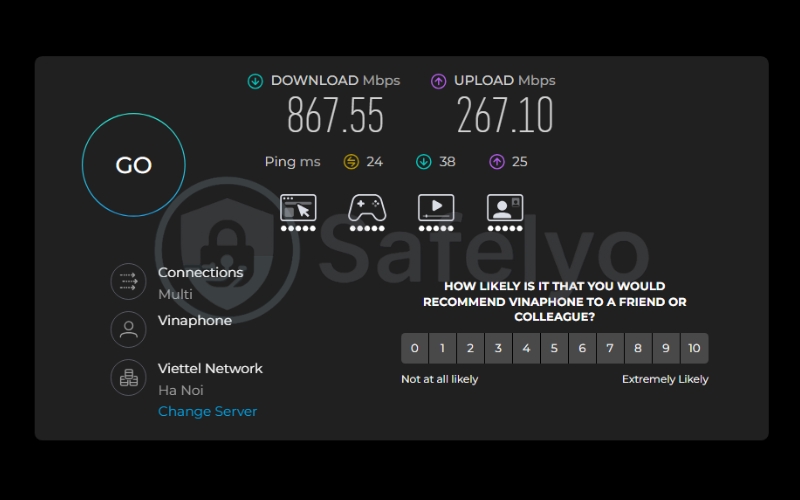
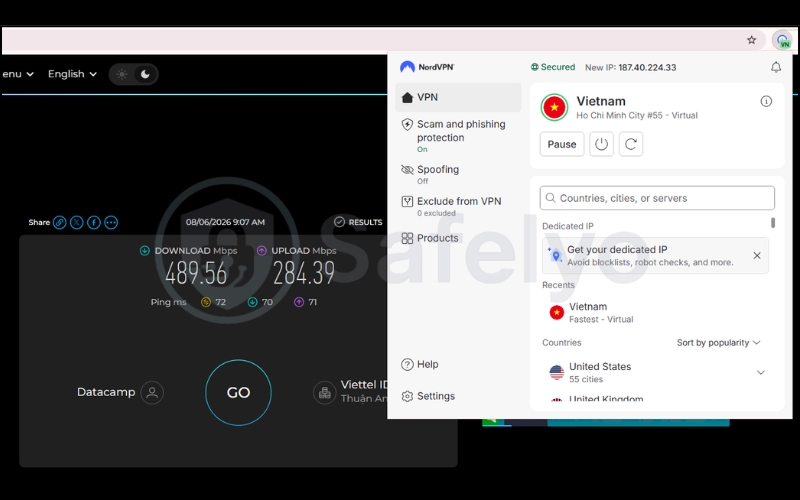
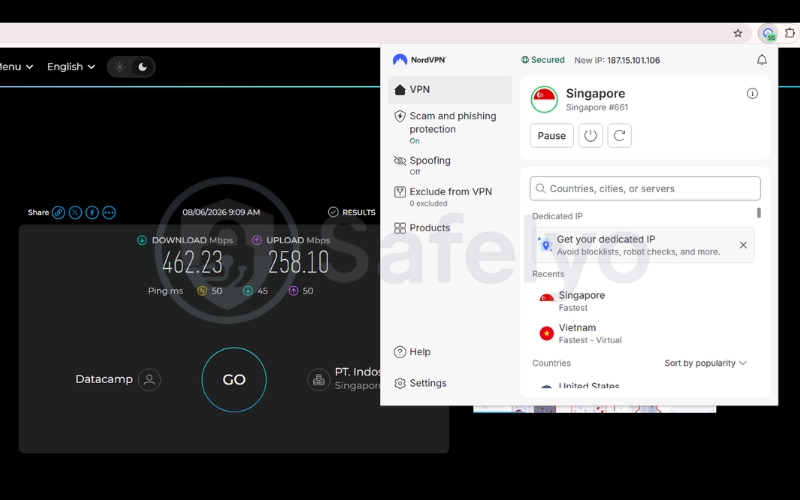
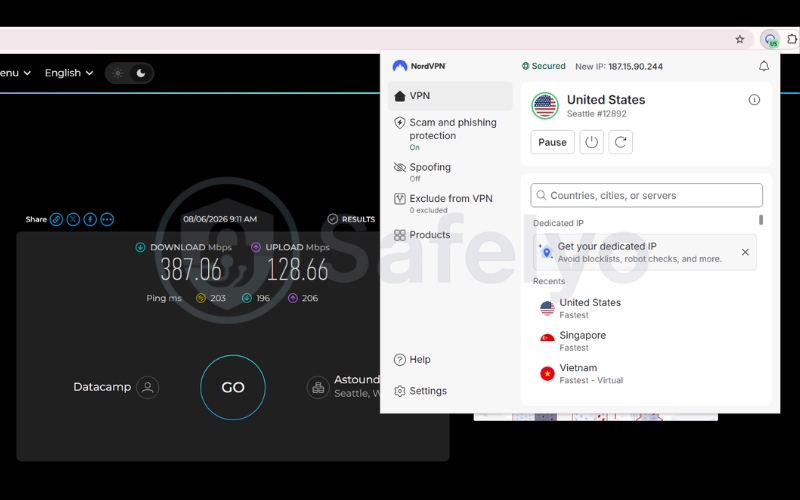
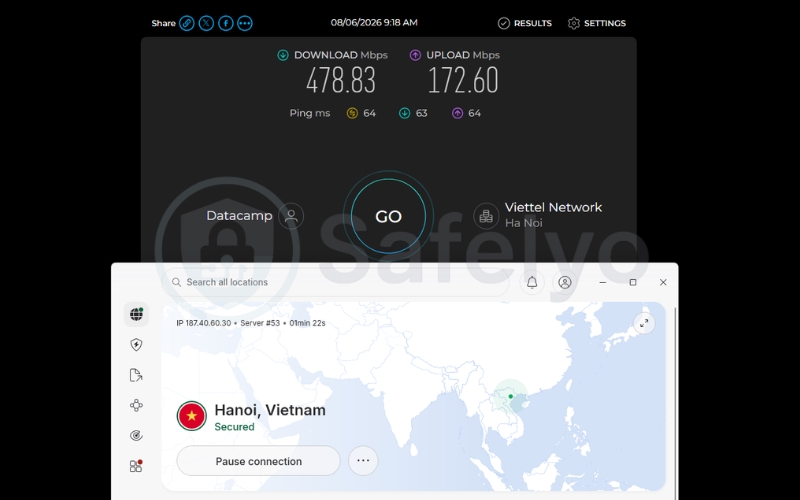
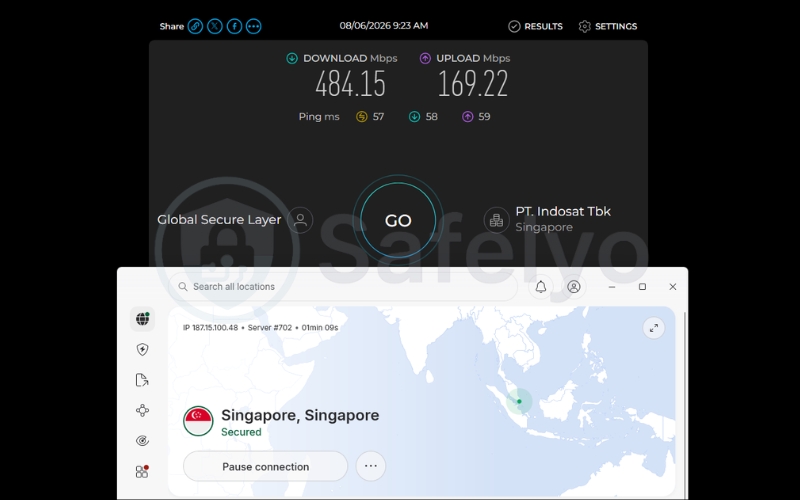
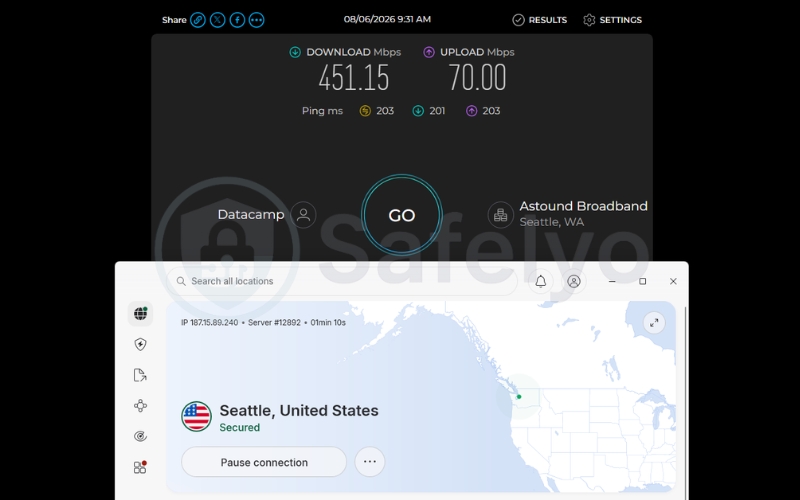
When looking at the test results, the small speed differences between the VPN desktop app and the VPN browser extension are mostly unnoticeable during daily internet use across local and regional servers.
Both tools easily maintained fast enough speeds to handle heavy activities like continuous 4K streaming without any performance drops.
Ultimately, our test results show that as long as you have a fast baseline internet connection, choosing between a VPN app and a VPN extension will not drastically slow you down. You can confidently pick the right tool for your specific setup without worrying about a major drop in performance.
Note: We used NordVPN strictly as a real-world testing example in this section. This performance parity does not guarantee identical results for all other VPN providers on the market.
5. When to use a dedicated VPN desktop app
You must use a VPN desktop app when your daily tasks require system-level encryption to function securely. You should use a VPN desktop app in these specific situations:
- Securing devices on public Wi-Fi: If you connect to an airport or coffee shop network, a VPN app prevents background programs like your email client or cloud storage from leaking private data.
- Torrenting and sharing files: Because P2P file-sharing software operates entirely outside the web browser, using a VPN extension leaves that traffic completely exposed. You need a VPN app to secure this traffic.
- Bypassing strict internet limits: If your internet service provider tries to slow down your connection or uses Deep Packet Inspection to see what you are doing, a VPN app has the necessary obfuscation tools to hide your activity.
- Gaming and unblocking strict streaming platforms: Major streaming services actively block basic proxies. A VPN desktop app uses robust protocols and obfuscation to mask traffic, preventing proxy errors while streaming. Additionally, it routes standalone gaming clients through an encrypted connection, protecting your device from network attacks.
Ultimately, a VPN desktop application is the standard choice for internet activities that operate outside a web browser. If your tasks involve standalone software, background syncing, or device-wide protection, a desktop app provides the necessary OS-level encryption.
Keep in mind that a desktop client only covers the specific computer it is installed on. If you need to secure household devices that do not support native installations, consider reviewing our breakdown of native VPN apps vs router-level VPNs.
6. When to use a VPN browser extension
A VPN browser extension is the best choice when you lack the necessary device permissions to install full software.
VPN desktop apps require Administrator privileges to install network drivers deep within the operating system, but VPN extensions bypass this rule entirely.
You should use a VPN browser extension in these specific situations:
- Working on a restricted computer: VPN extensions are highly practical for corporate laptops or university computer labs where IT departments block custom software installations.
- Lacking Administrator rights: You can easily add the proxy directly to Chrome or Firefox without needing system-level passwords.
- Isolating specific web traffic: VPN extensions are perfect when you only want to change the location of a single web tab for research or reading, without affecting the rest of your computer’s internet connection.
- Streaming on weaker computers or less strict websites: If you have an older device that struggles with heavy software, a VPN extension uses fewer system resources and reduces lag when watching 4K videos. It is also a great option for quick access to YouTube or anime websites that do not use aggressive firewall blocking.
In summary, VPN browser extensions offer a lightweight, accessible alternative when full system encryption is either unneeded or restricted by system permissions.
7. Hidden vulnerabilities of browser extensions: WebRTC and DNS leaks
VPN extensions are securely sandboxed to the browser, but this structure makes them vulnerable to WebRTC IP leaks and DNS leaks. Because the proxy only handles standard web traffic, underlying browser functions can occasionally bypass the connection and expose your true location.
7.1. Diagnosing WebRTC browser leaks
WebRTC (Web Real-Time Communication) is a built-in browser feature used for real-time video and audio communication. However, this protocol can bypass proxy extensions and expose your local IP address.
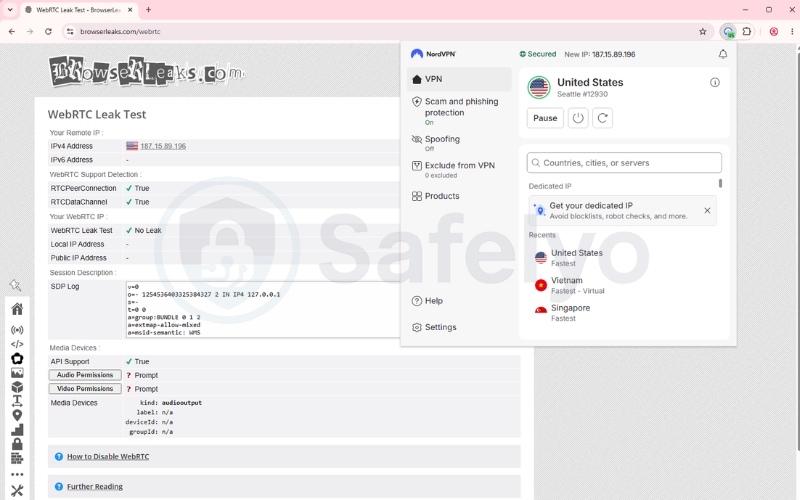
To test your browser for WebRTC leaks, follow these diagnostic steps:
- Turn on your VPN browser extension.
- Visit a free diagnostic tool such as browserleaks.com/webrtc.
- Check the displayed IP address under the WebRTC diagnostic section.
If the page reveals your actual home IP address provided by your ISP instead of the VPN proxy server’s IP address, your browser is actively leaking your location through WebRTC.
7.2. Diagnosing and preventing DNS leaks
A DNS leak occurs when domain lookup requests bypass the VPN proxy and travel directly to your local Internet Service Provider. This vulnerability exposes which websites you visit, even if your web traffic appears encrypted.
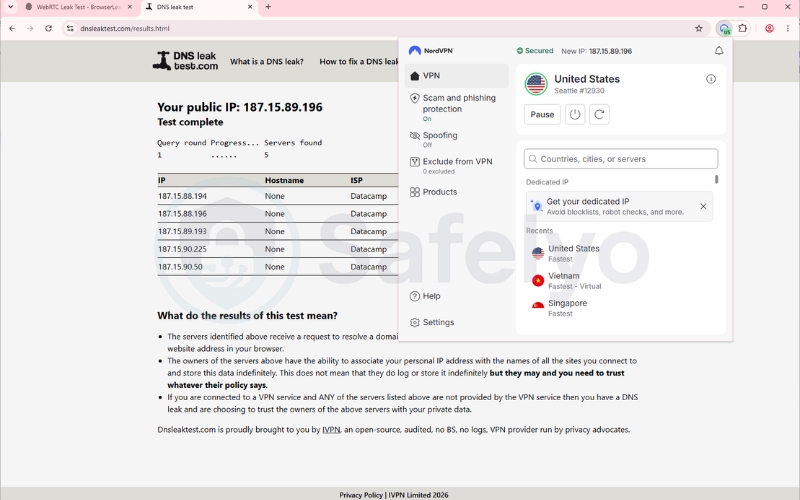
To test your browser for DNS leaks, follow these diagnostic steps:
- Turn on your VPN browser extension.
- Visit a free diagnostic tool such as dnsleaktest.com.
- Run the standard test and check the reported ISP names.
If the test results display the name or IP address of your actual home ISP rather than the VPN provider’s servers, your browser is actively leaking your DNS requests.
8. Can you use a VPN app and VPN extension simultaneously?
Using both tools at the same time is highly dependent on the VPN brand.
NordVPN explicitly advises against simultaneous use, while providers like Windscribe and Proton VPN actively support and design features around it.
8.1. The connection interference warning
Running the VPN desktop app and the VPN extension at the same time can cause direct connection interference. Overlapping a system-level tunnel and a browser proxy can cause severe routing conflicts.
This often disrupts internet access entirely on certain software configurations, forcing the connection to drop until one of the tools is turned off.
8.2. The double-hop and ad-blocking advantage
Conversely, brands like Windscribe and Proton VPN design their VPN extensions to work alongside the VPN desktop app to provide a Double Hop connection. This routes your traffic through two distinct servers for layered security.
Furthermore, this hybrid setup maximizes ad-blocking capabilities. VPN desktop apps generally block ads via DNS-level filtering, which leaves empty blank spaces on web pages and cannot manipulate browser cookies. VPN extensions block ads via cosmetic filtering and DOM manipulation right at the browser interface.
Users run the VPN desktop app for primary system-wide encryption, while running the VPN extension simultaneously to use targeted cookie auto-deletion and cleaner interface-level tracker blocking.
9. FAQs about VPN browser extensions vs desktop apps
Does a VPN extension protect my whole computer?
No, a VPN browser extension only protects the traffic generated inside that specific browser window.
Can I install a VPN without Admin rights?
Yes, by using a VPN browser extension, you can bypass the need for administrator privileges on restricted computers.
Are free VPN browser extensions secure?
Many free VPN extensions operate as basic, unencrypted proxies that log your data. You must carefully verify the specific logging policy of the provider before installing.
Should I use a VPN desktop app or VPN extension for web browsing?
A VPN extension is generally sufficient for standard web browsing and unblocking pages. However, you must be aware of your local network policies and potential WebRTC vulnerabilities.
10. Conclusion
VPN desktop apps provide system-wide protection, handle full protocol support, and require higher resource capabilities.
In contrast, VPN browser extensions function as lightweight proxies that strictly handle browser-only routing. This allows users to bypass administrative installation restrictions.
Evaluating the differences between VPN browser extensions vs desktop apps comes down to your specific technical environment.
If you are operating on a restricted computer, a VPN extension serves as a practical option. If your tasks include P2P sharing or public Wi-Fi access, a VPN desktop app is functionally required.
For more advanced tutorials and privacy tools, check out our complete VPN Guides on Safelyo.