A VPN warrant canary is a publicly posted digital statement where a privacy provider declares they have not received any secret government subpoenas or gag orders. Therefore, a “dead” VPN warrant canary means the provider has either received a secret government subpoena attached to a gag order, or the administrative team simply failed to update their cryptographic signature on time.
This sudden silence effectively communicates a potential compromise, naturally causing immediate anxiety about whether your browsing data is exposed to authorities.
We will explain the legal mechanics of compelled silence, outline the exact difference between false alarms and actual server raids, provide a triage action plan, and detail the manual cryptographic verification steps needed to verify a provider’s safety.
Key takeaways:
- A warrant canary uses the legal loophole between compelled speech and compelled silence.
- Missing canaries often result from minor, unrelated gag orders or administrative errors rather than full server seizures.
- Verification requires manual PGP signature validation, which you can run directly via secure browser tools or a command-line interface.
- Major providers are actively abandoning canaries in favor of RAM-only infrastructure and quarterly transparency reports.
Disclaimer: This article is for informational purposes only. Please use VPNs responsibly and legally.
1. What is a VPN warrant canary?
A warrant canary is an implicitly published negative statement, typically a text file declaring the VPN has not received any National Security Letters. The mechanism relies on communicating through silence by stopping the scheduled updates to this public statement.
When a government issues a secret National Security Letter (NSL) or a FISA court order, it typically includes a strict gag order. This gag order legally prevents the company from disclosing the investigation to the public.
The canary works by pre-scheduling a safety message during normal operations. If the authorities compromise the provider, the system administrators simply stop updating the text file.
This intentional failure to post the scheduled message bypasses the gag order. It successfully warns users of the compromise without the VPN provider actually speaking.
2. The legal loophole: Gag orders vs compelled speech
The First Amendment of the United States Constitution protects individuals and corporations from compelled speech. The government can legally force a company to stay silent about an investigation using a gag order.
However, the government cannot legally force a systems administrator to actively type out and sign a fake message stating the servers remain secure. Removing the canary uses this specific legal loophole.
By choosing not to speak, the VPN provider warns users without technically violating the gag order.
Warning:
This legal defense remains largely untested in supreme courts, making it a fragile legal loophole rather than a technical guarantee. In 2014, prominent cryptographer and security researcher Moxie Marlinspike consulted with several lawyers regarding this specific First Amendment defense.
His assessment concluded that intentionally removing or failing to update a warrant canary likely carries the exact same legal consequences as explicitly publishing a notice that you received a warrant. Because courts generally do not view passive non-compliance favorably, a judge could rule that triggering the canary by stopping updates is simply an illegal method of tipping off a suspect.
3. Jurisdictions where canaries are useless
Local privacy laws override provider marketing, making canaries legally meaningless in specific geographic regions. Under Swiss law, the government must eventually notify the target of a data request.
Because the government must eventually disclose the investigation to the user, permanent secret gag orders do not work in Switzerland. This structural legal difference nullifies the core purpose of a warrant canary for any Swiss-based provider.
Similarly, Australia explicitly outlawed warrant canaries under the Telecommunications (Interception) Amendment Act 1995. You cannot rely on Australian-based VPNs for this feature because the national law strictly prohibits telecom and internet companies from disclosing the existence or non-existence of interception warrants.
For a deeper breakdown of how country-specific privacy laws and global intelligence-sharing networks affect your data security, see our full guide on VPN Jurisdiction Explained: Five Eyes, Nine Eyes, 14 Eyes.
4. When a canary dies: False alarms vs real threats
A triggered canary does not automatically mean intelligence agencies are actively monitoring all user browsing logs. Because courts issue gag orders for a wide variety of legal requests, a dead canary simply indicates that a legal action has occurred, but it cannot tell you the severity of that action. This creates a frustrating situation where minor administrative disputes trigger the exact same warning as a major server raid.
The risk of false alarms:
The incident involving the privacy provider Riseup in late 2016 perfectly illustrates this flaw. When Riseup failed to update its warrant canary on schedule, it prompted widespread concern among privacy communities that their servers had been compromised.
However, in February 2017, Riseup explained that they had merely received two sealed FBI warrants accompanied by a gag order. These warrants specifically targeted an international DDoS extortion ring and an account associated with ransomware-based extortion.
Because Riseup’s canary was drafted too broadly, issuing a new update would have violated the gag order. Riseup later acknowledged that this episode showed how an overbroad canary can turn a relatively limited legal matter into a misleading signal, causing users to unnecessarily fear a major security compromise.
Genuine security threats:
Conversely, a dead canary can also signal a direct and critical server compromise. This typically happens if authorities physically seize the datacenter hardware or legally force the VPN to begin logging user traffic. If the hardware is physically seized, the server goes offline, naturally resulting in a missing canary file (such as a 404 error).
Alternatively, if the VPN is secretly forced to log traffic while keeping servers active, the administrative team deliberately refuses to digitally sign the upcoming canary file. In both situations, this deliberate silence successfully warns users of an active breach on the network.
5. Action plan for a dead canary
If you discover your provider’s canary is missing or outdated, you must evaluate the situation methodically rather than panicking. Follow these exact triage steps to assess the threat level and secure your internet connection.
Step 1: Check the VPN location.
First, find out where your VPN is legally based. If you use a Swiss VPN, local laws require the government to notify users about surveillance eventually. This makes the canary system unnecessary. If you use an Australian VPN, the law explicitly bans canaries. In these specific locations, a canary does not provide useful information.
Step 2: Look for missing or late files.
Check the web address of the canary. If the page shows a “404 Not Found” error, the file was deleted. You should view this as a clear warning and move to Step 4.
On the other hand, the file might still be there but missed its scheduled update time. Because providers update these files weekly or monthly, a staff member might just forget to upload the new version. It is reasonable to wait 24 hours past the deadline to see if they fix the mistake.
Step 3: Verify the digital signature.
If the provider uploads a new file or the current file looks normal, you should not just trust the plain text. A controlled server could show a fake safety message. You need to manually check the PGP signature and the recent data included in the file. This confirms that the original VPN owners actually wrote the message.
Step 4: Consider changing your VPN.
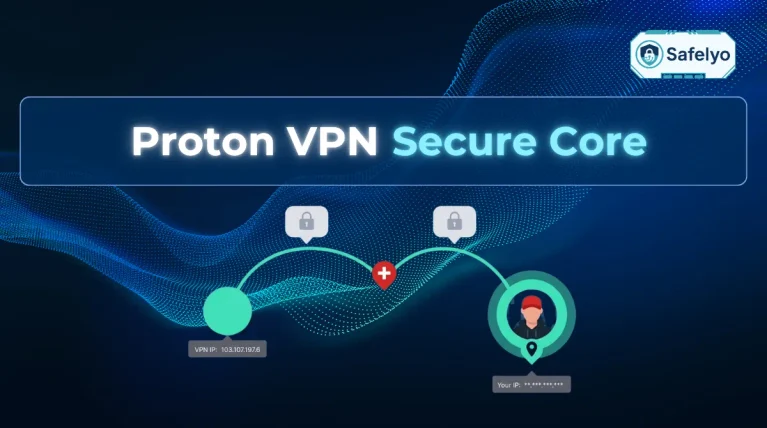
If the canary file is deleted, stays late after 24 hours, or fails the signature check, the service might not be safe. At this point, it is practical to switch to a different VPN provider that uses secure, RAM-only servers.
6. How to manually verify canary PGP signatures
No automated GUI button exists inside VPN applications for this verification process. It is strictly a manual cryptographic verification process to ensure a hijacked server is not spoofing the canary file.
You cannot rely on a webpage simply displaying the words “All Clear”, as a compromised server can easily display fake plain text to trick users. A PGP signature proves that the original VPN owner authored the text file.
This cryptographic math prevents rogue agents or hackers from easily faking the canary.
6.1. Step-by-step browser verification (No file download required)
The following steps use IVPN as a concrete example so you can easily visualize the process and try it immediately. While the core cryptographic principles are identical across the privacy industry, the exact URLs or formatting will vary slightly depending on your specific VPN provider.
Note: IVPN updates its warrant canary on a monthly basis.
Step 1: Access the latest canary.
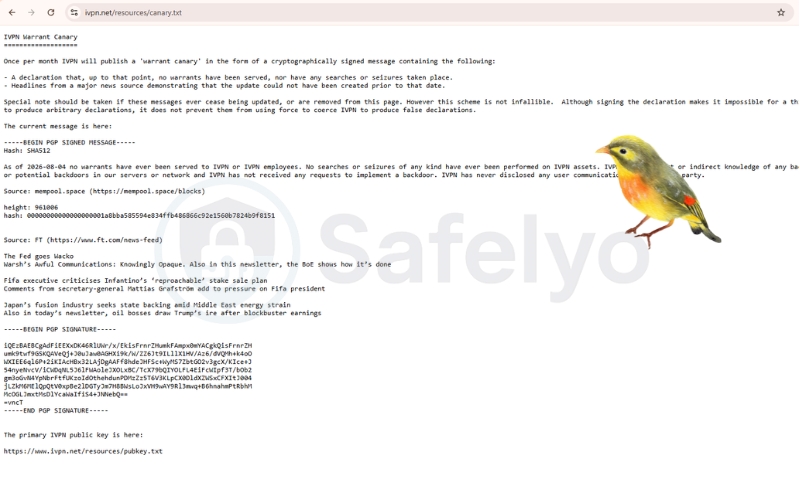
Open your web browser and navigate to the provider’s canary page. For example, IVPN uses https://www.ivpn.net/resources/canary.txt.
Highlight and copy the entire text block. You must start copying exactly from —–BEGIN PGP SIGNED MESSAGE—– and end exactly at —–END PGP SIGNATURE—–.
Crucial Warning: If the page returns a blank screen or a “404 Not Found” error, stop immediately. This means the provider has actively deleted the file, which is a major red flag indicating the canary is officially dead. Do not proceed to Step 2.
Step 2: Retrieve the provider's public key.
Open a new browser tab and navigate to the official public key page. For IVPN, this is https://www.ivpn.net/resources/pubkey.txt or the equivalent .asc file.
Highlight and copy the entire text block starting exactly with —–BEGIN PGP PUBLIC KEY BLOCK—–.
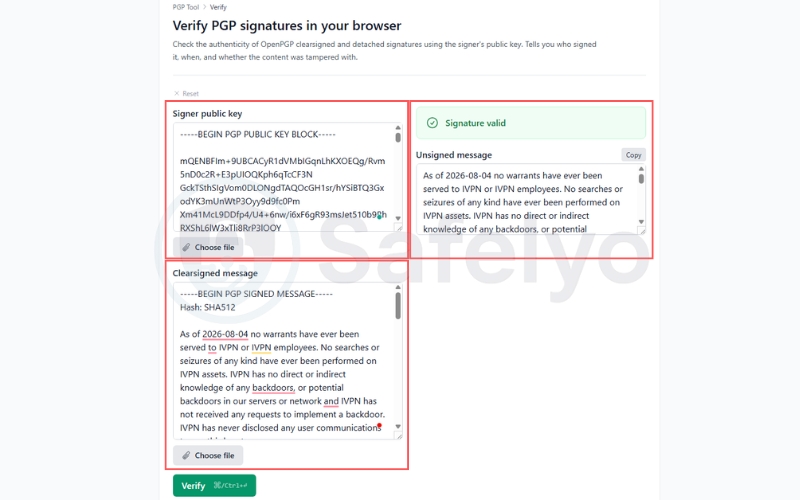
Step 3: Paste into a web-based PGP verification tool.
Open a trusted browser-based PGP tool such as https://pgptool.dev/verify/.
Paste the public key you copied in Step 2 into the Signer public key field. Next, paste the copied canary text from Step 1 into the Clearsigned message field.
Step 4: Click Verify and read the results.
Click the Verify button to run the tool. If the cryptographic signature is correct, the tool will explicitly display Signature valid.
This confirms the file has not been altered since the provider signed it. If the tool returns an error, stop immediately, as the canary is compromised.
Step 5: Read the core legal declarations.
Once validated, scroll down to read the main text of the canary file. Legitimate VPNs will explicitly state they have no backdoors, never disclosed user communications to third parties, and faced no physical searches.
The valid PGP signature guarantees these specific legal claims have not been secretly altered by law enforcement.
Step 6: Independently verify time data for freshness.
To ensure the canary is not an old file replayed by a hacker, you must verify the proof of freshness data embedded in the text. You can perform this verification using the data points provided in the file.
- Bitcoin Block Check: If the canary cites a Bitcoin block hash, open https://mempool.space/blocks. Search for the exact block number or paste the hash to confirm it actually exists on the public blockchain. Confirm the hash matches exactly, and ensure the block creation time aligns logically with the canary date.
- News Headline Check: If the canary cites specific financial news headlines, open https://www.ft.com/news-feed. Verify those exact headlines were published around the stated time and date of the canary file.
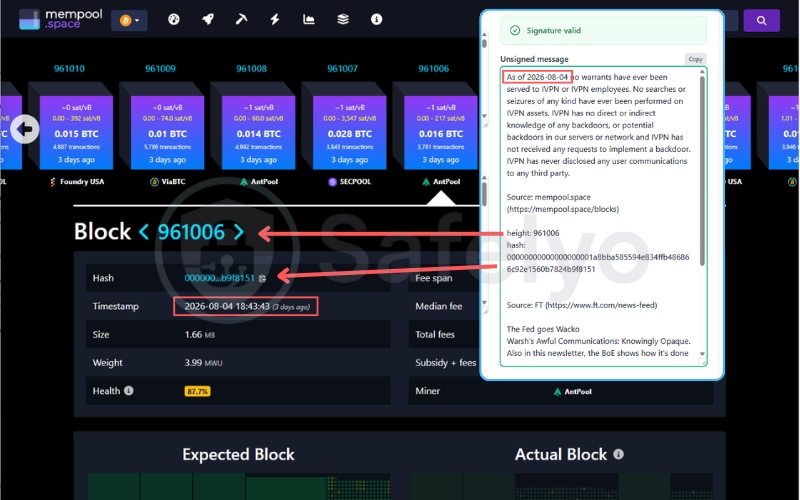
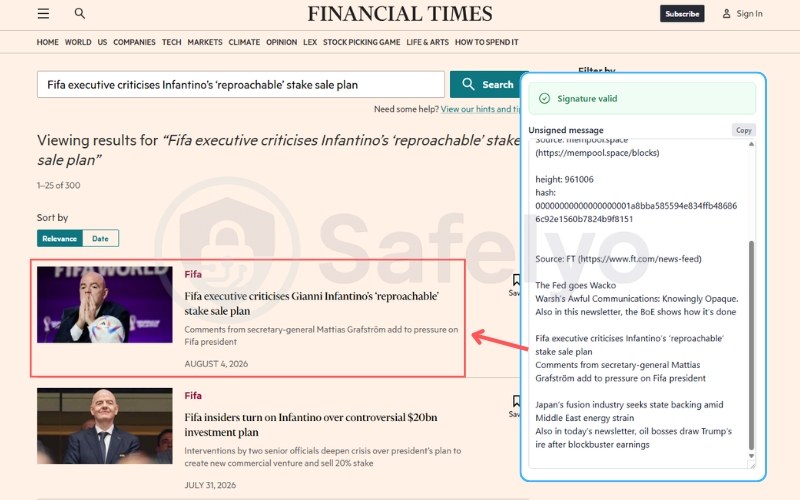
Step 7: Final Conclusion.
If the PGP signature is valid, the Bitcoin block is verifiable, and the news headlines exist, the canary is trustworthy as of the stated date. If any of these three distinct elements fail the check, treat it as a critical warning signal and assume the VPN is compromised.
6.2. Alternative verification methods
While web-based tools are highly convenient, advanced users who prefer high operational security may choose offline verification methods. These methods prevent you from pasting sensitive keys into a third-party website.
- Command-Line Interface (GnuPG): Users can download the pubkey.txt and canary.txt files locally to their machine. You can then use terminal commands such as gpg –import and gpg –verify to validate the signature completely offline. The terminal will output “Good signature” if the file is safe.
- Desktop PGP Software: Users who prefer local GUI applications can import the VPN’s public key certificate into their desktop keychain. Tools like Kleopatra or Gpg4win allow you to verify the downloaded canary text file directly within the local software environment.
- Keybase Identity Platforms: Some providers upload their cryptographic proofs to third-party identity verification networks like Keybase. This allows users to cross-reference the provider’s public key against their official social media profiles or domain identities, ensuring the public key itself was not spoofed.
7. RAM servers vs warrant canaries
Diskless RAM-only architecture wipes all server data upon every reboot. This provides a much stronger physical hardware protection compared to a fragile legal piece of paper like a canary.
Even if a secret court order gags the VPN provider and forces the canary to die, pulling the power plug on a RAM-only server will instantly wipe the stored data. Because volatile memory requires continuous power to store information, this hardware architecture prevents the long-term storage of browsing logs.
While advanced techniques like live memory extraction (RAM dumps) exist if authorities seize a running server before it loses power, a simple reboot destroys the data. This makes retroactive data handovers highly unlikely and proves that secure hardware is more reliable than a legal loophole.
Here is a clear comparison showing why modern security prioritizes physical hardware over legal statements:
| Feature | VPN Warrant Canary | RAM-Only Servers |
|---|---|---|
| Protection Type | Legal loophole (Compelled silence) | Physical hardware failsafe (Volatile memory) |
| Reliability | Fragile (Can easily trigger false alarms) | High (Data cannot survive without continuous power) |
| Government Response | Government can challenge the canary in court | Government cannot extract wiped data after a reboot |
| Trust Priority | Low (Used as a secondary warning system) | High (The primary standard for modern network privacy) |
8. Why top VPNs are abandoning canaries
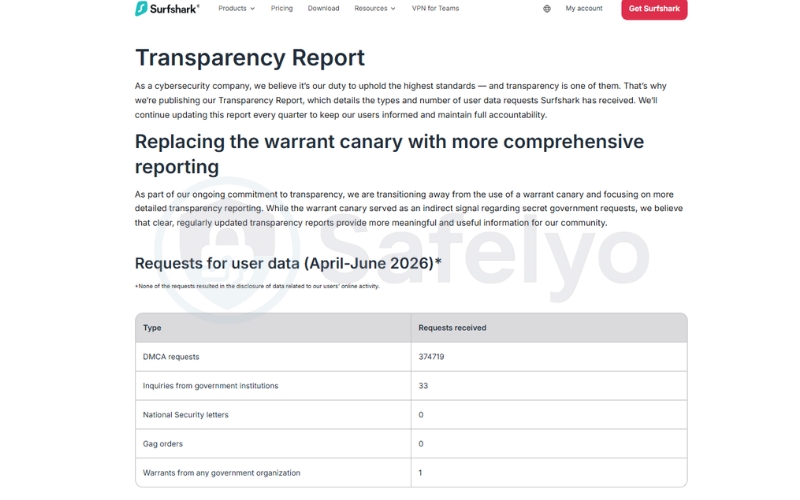
Top providers like NordVPN and Surfshark explicitly transitioned away from canaries in favor of quarterly Transparency Reports. They abandoned the canary model because it frequently caused unnecessary user panic through false alarms and relied heavily on an untested, fragile legal theory.
Publishing hard statistics on data requests provides a clearer, legally safer, and more consistent picture of government pressure. A transparency report details the exact number of government subpoenas, DMCA requests, and gag orders the company receives each quarter.
This active statistical disclosure provides far more actionable intelligence to the user than the older method of relying on passive cryptographic silence.
Instead of a vague binary warning that something might be wrong, a transparency report explicitly shows users how many times the provider successfully and legally defended user data against authorities. This establishes a verifiable track record of trust.
9. FAQs about VPN warrant canary
What does a “warrant canary” mean?
A warrant canary is a silent warning system. It bypasses secret government gag orders by stopping scheduled updates to a safety declaration, communicating danger through silence.
Does NordVPN still have a warrant canary?
No. NordVPN explicitly transitioned away from canaries in favor of publishing quarterly transparency reports.
Is a dead canary proof of FBI tracking?
No. A dead canary can trigger from minor administrative actions, such as extortion gag orders or DMCA requests, rather than a direct federal server seizure.
Are warrant canaries legally enforceable?
This remains highly debated among privacy lawyers. Legal experts indicate that removing a canary may carry the exact same legal penalty as explicitly tipping off a suspect with a warrant notice.
What is the difference between a transparency report and a canary?
A transparency report is an active statistical disclosure of government and corporate data requests. A canary relies on passive cryptographic silence to indicate a potential breach.
10. Conclusion
To sum it up, a VPN warrant canary is a passive warning system designed to bypass government gag orders. When a VPN warrant canary is “dead,” the provider has intentionally stopped updating their safety message. It’s an important alert, but historically, it is usually triggered by minor administrative issues rather than a major server raid.
While the canary was a popular privacy tool in the past, relying on a legal loophole isn’t the only way to stay safe anymore.
The industry standard has shifted toward hardware and hard data. RAM-only servers ensure that user data is wiped cleanly every time a server is powered off, while regular transparency reports show exactly how many legal requests a provider actually receives. These physical and transparent safeguards are now taking the place of the traditional warrant canary.
To learn more about securing your online privacy and understanding the ongoing relevance of a VPN warrant canary, navigate to our VPN Guides on the Safelyo homepage.