You found Cloudflare’s free “1.1.1.1 + WARP” app and saw it creates a “VPN profile” on your phone. Naturally, you might wonder: Is Cloudflare WARP a VPN?
While they use similar encryption technology, the WARP vs VPN comparison reveals two completely different tools. WARP is built for speed and security, whereas a traditional VPN is designed for privacy and freedom. This guide breaks down their differences, performance, and specific use cases to help you decide which one you need.
Key takeaways:
- WARP encrypts your traffic to secure you on public Wi-Fi.
- WARP replaces your original IP address but does not change your geographic location.
- VPNs hide your IP address and allow you to change your virtual location completely.
- WARP cannot unblock Netflix or other geo-restricted content.
- VPNs are better for anonymity; WARP is better for raw speed.
1. Is Cloudflare WARP a VPN?
This is the most common question users have. To understand the WARP vs VPN comparison, we need to look at what happens to your data.
Is Cloudflare WARP a VPN? Technically, the answer is yes, but functionally, the answer is no.
Cloudflare WARP uses modern VPN protocols like WireGuard and MASQUE to create a secure tunnel between your device and the internet. This means your data is encrypted, and no one on your local network can steal it.
However, there is a critical distinction in how it handles your identity:
- Traditional VPN: It encrypts your data, hides your original IP, AND changes your virtual location. The website you visit thinks you are sitting in the VPN server’s location (e.g., Japan or the UK), not your actual home.
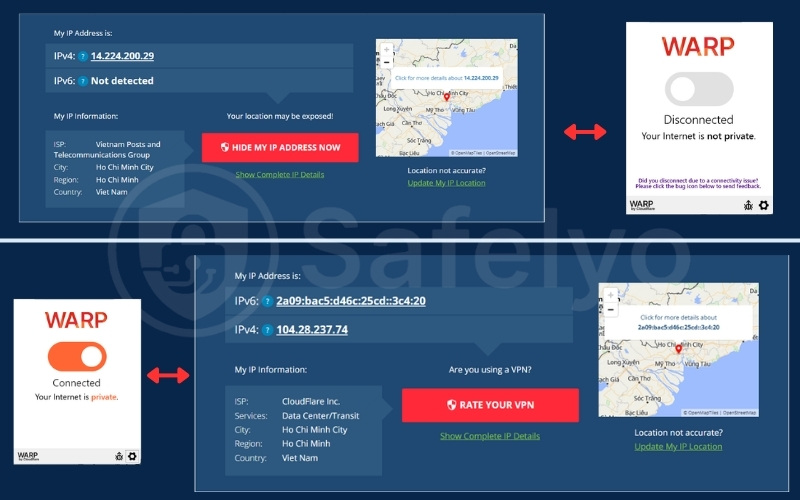
- Cloudflare WARP: It encrypts your data and replaces your ISP’s IP with a Cloudflare IP. However, because WARP connects to the nearest Cloudflare server (usually in your own city), it does not change your geographic location. Websites see a Cloudflare IP, but they still know roughly where you are.
2. Cloudflare WARP vs. VPN: Detailed feature comparison
Let’s break down the battle across the most critical categories to see which tool fits your needs.
2.1. WARP vs. VPN: Privacy and Anonymity
If your goal is to browse the web without leaving a trace, this is the most important section to understand. The fundamental difference lies in who can see your digital footprint.
A VPN acts as a mask. It replaces your personal IP address with one from its own server fleet. This prevents advertising trackers, websites, and even your Internet Service Provider (ISP) from linking your browsing activity to your physical location. Premium VPNs also strictly adhere to no-logs policies, meaning they don’t even keep records of what you do.
Does Cloudflare WARP guarantee anonymity? No, it does not. While WARP gives you a new IP address, it passes your approximate physical location to the websites you visit to maintain speed.
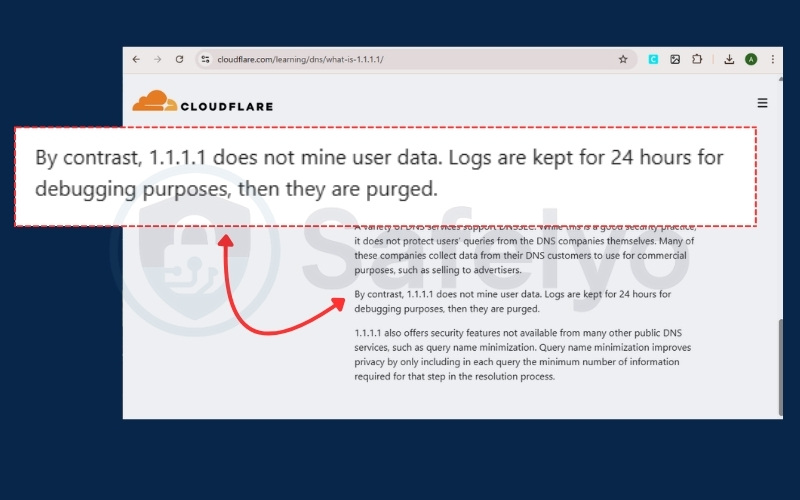
Furthermore, Cloudflare keeps limited “connection logs” for 24 hours to help debug network issues. This means while you are private from your ISP, you are not truly anonymous to the sites you visit or to Cloudflare itself.
Verdict: VPN Wins. (If you need anonymity, WARP fails).
2.2. WARP vs. VPN: Speed and Performance
VPNs can typically impact connection speeds due to encryption overhead and the physical distance to servers. WARP aims to mitigate this by routing traffic through Cloudflare’s global network.
To find the winner, I conducted a direct head-to-head test. I compared NordVPN (using the “Fastest Server” auto-select feature) against Cloudflare WARP on the same fiber network. The results were decisive:
- Download speed: Cloudflare WARP recorded a speed of 465.92 Mbps. In a close race, NordVPN followed just behind at 456.32 Mbps. Both services utilized nearly the full capacity of the network, showing no noticeable slowdown during browsing or streaming.
- Upload speed: NordVPN significantly outperformed WARP in this metric. It reached 237.90 Mbps, whereas WARP reached 75.21 Mbps. This makes the VPN significantly better for video calls, backing up files, or posting content.
- Ping (latency): The results were virtually identical. WARP showed a latency of 68 ms, while NordVPN showed 70 ms. The difference is imperceptible to the average user.
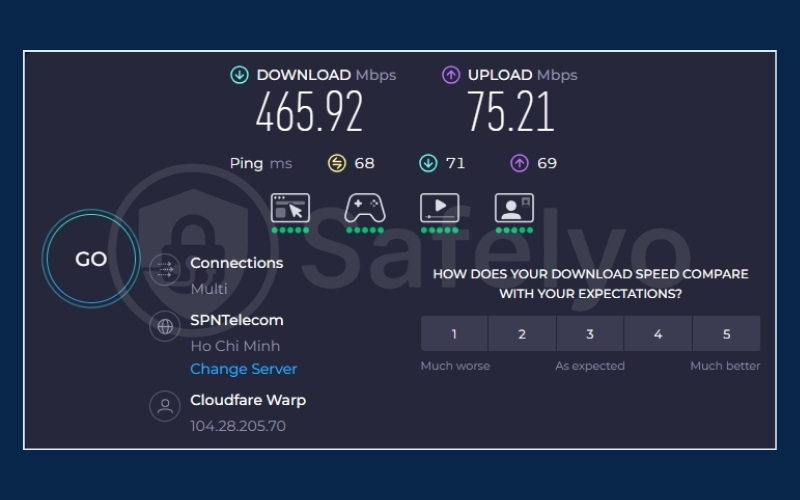
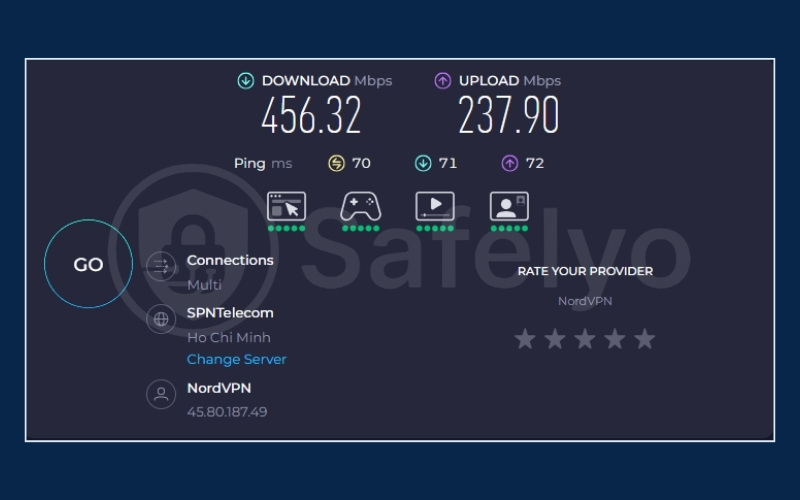
The paid VPN wins because it offers a significantly more balanced and robust connection. While both services maxed out the download line, NordVPN delivered 3x faster upload speeds, making it far superior for activities like video calls, cloud backups, and gaming.
Verdict: Paid VPN Wins. (Superior overall performance with much faster upload speeds).
2.3. WARP vs. VPN: Streaming and Geo-Restrictions
Many users buy a VPN specifically to watch content that is blocked in their country, such as accessing Netflix US, BBC iPlayer, or Hulu from abroad.
- VPN: Allows you to “spoof” your location. You can select a server in New York, and Netflix will believe you are in the USA. This is the primary selling point for many paid VPNs.
- WARP: Since it does not hide your physical location, you cannot use it to bypass geo-blocks. If you are in Germany, Netflix still sees you in Germany, even with WARP turned on. In fact, some streaming services might even block WARP entirely because they recognize the traffic is coming from a data center rather than a standard home connection.
Verdict: VPN Wins.
2.4. WARP vs. VPN: Security and Encryption
When you connect to public Wi-Fi at a hotel or airport, your data is vulnerable to theft. Both tools provide a solution here, but they protect you in slightly different ways.
- VPN: Uses military-grade encryption (often AES-256) to scramble your data. It wraps your traffic in a secure tunnel all the way to the VPN server, ensuring no one in between can read it.
- WARP: Uses WireGuard and MASQUE protocol. These protocols are modern, efficient, and highly secure. It automatically encrypts traffic leaving your phone, protecting you from “Man-in-the-Middle” attacks where hackers try to intercept your data on insecure networks.
Verdict: Tie. (Both are excellent for public Wi-Fi safety).
2.5. WARP vs. VPN: Money-back guarantee & Pricing
Budget is often the deciding factor for many users, and the pricing models here are drastically different.
Cloudflare WARP operates on a freemium model that is extremely generous:
- WARP (Free): Completely free forever with unlimited bandwidth. Unlike shady free VPNs, Cloudflare does not sell your data or blast you with ads; they make their money from corporate clients.
- WARP+: A low-cost monthly subscription (usually under $5) that offers faster routing.
Traditional VPNs are generally more expensive and require an upfront commitment:
- Premium VPNs: Usually cost between $10-$13 per month if you pay monthly, or $3-$5 per month if you commit to a year.
- Refunds: They rarely offer free trials. Instead, they rely on a “30-day money-back guarantee,” which means you must pay first and ask for a refund later if you aren’t satisfied.
Verdict: WARP Wins on price and accessibility.
2.6. WARP vs. VPN: Device compatibility
In a modern household, you likely have more than just a phone and a laptop. You need to consider which devices each service can actually protect.
Cloudflare WARP is designed primarily as a mobile-first solution:
- It has excellent, simple apps for iOS and Android.
- It offers decent desktop clients for Windows, macOS, and Linux.
- Limitation: Native apps are not available for routers, but advanced users can manually configure WireGuard profiles on supported routers.
Premium VPNs offer a much broader ecosystem of protection:
- They provide apps for almost every device with a screen.
- Router Support: You can install the VPN directly on your home router. This protects every device in your house, including your smart fridge, PlayStation, and Roku, without needing to install an app on each one.
Verdict: VPN Wins (More versatile).
2.7. WARP vs. VPN: P2P file sharing (Torrenting)
For users who frequently share files via BitTorrent, legal safety is the most critical security requirement.
Cloudflare WARP is technically capable of P2P traffic, but it is not recommended for this purpose due to privacy jurisdiction:
- Cloudflare is a US-based company subject to strict copyright laws.
- Unlike offshore VPNs, Cloudflare complies with DMCA (Digital Millennium Copyright Act) requests and keeps temporary logs. If you download copyrighted material, Cloudflare can be legally compelled to identify you.
Premium VPNs are built specifically to handle these risks:
- No-logs policy: They are often based in privacy-friendly countries (like Panama or Switzerland) and do not store data that can identify you.
- Kill Switch: If the VPN connection drops for even a second, the Kill Switch instantly cuts your internet access to prevent your identity from leaking.
Verdict: VPN Wins (Do not use WARP for torrenting).
2.8. Final verdict: Who wins?
To give you a clear picture, let’s look at the final scorecard to see how they stack up side by side:
| Category | Winner | Reason |
| Privacy & Anonymity | VPN Wins | VPNs strictly follow no-logs policies, while WARP keeps limited logs and complies with DMCA. |
| Speed & Performance | Paid VPN Wins | Both have fast download speeds, but Paid VPN offers 3x faster upload speeds. |
| Streaming & Geo-Restrictions | VPN Wins | VPNs can unblock Netflix/Disney+ globally; WARP cannot change your geographic location. |
| Security & Encryption | Tie | Both use advanced encryption (WireGuard/MASQUE vs AES-256) to secure public Wi-Fi. |
| Pricing | WARP Wins | WARP is free forever; VPNs require a monthly subscription. |
| Device Compatibility | VPN Wins | VPNs support routers and smart TVs; WARP is limited to mobile and PC. |
| Torrenting (P2P) | VPN Wins | VPNs hide your identity and ignore DMCA requests; WARP does not. |
If you just want a free and simple app to keep your phone safe at a coffee shop, Cloudflare WARP is fantastic. It is fast, free, and easy to use.
However, a Paid VPN is the real winner because it unlocks the full potential of the internet. It does the things WARP simply cannot do. It makes you truly invisible, lets you watch movies from any country, and protects every device in your home. If you want total freedom and privacy without compromises, a premium VPN is the undisputed choice.
Still undecided? Read the next sections to see exactly when you should stick with the free app and when it is time to upgrade to a paid service.
Read more:
3. Understanding the tiers: WARP vs WARP+ vs VPN
Users often get confused by the upgrade options within the Cloudflare app. Here is the breakdown:
- Standard WARP (Free): This encrypts your traffic and routes it over the public internet. It is secure and free, but speed depends on normal internet traffic conditions.
- WARP+ (Paid Subscription): This is the focus of WARP vs WARP+. The paid version routes your traffic over Cloudflare’s private “Argo” network. Think of it as paying a toll to use a private express lane to avoid traffic jams. It is faster, but it still does not hide your physical location.
- Premium VPN: This offers the full package: server selection, strict no-logs policies, location spoofing, and complete anonymity.
4. When should you use Cloudflare WARP?
You should download and use WARP if:
- Free public Wi-Fi security: You want to protect your data on insecure public networks (like coffee shops or airports) completely for free, without worrying about bandwidth limits or ads.
- Bypassing ISP throttling: Your internet provider deliberately slows down specific traffic like video streaming or gaming. WARP helps you bypass these artificial limits to restore your connection speed.
- Basic privacy on a budget: You want to hide your browsing history from your ISP without paying a monthly fee.
5. When should you use a paid VPN?
You should invest in a paid VPN if:
- Streaming: You want to access global content libraries (Netflix US, Disney+, BBC iPlayer) that are not available in your region.
- Gaming: You want to change your region to find easier lobbies or access games early. It also protects your IP address from DDoS attacks during competitive matches.
- Torrenting: You need to share files via P2P networks safely. A trustworthy paid VPN protects you from legal notices by hiding your identity and strictly adhering to a no-logs policy.
- True privacy: You want to browse the web anonymously, preventing advertisers and your ISP from tracking your browsing habits or physical location.
Read more:
6. FAQs about WARP vs VPN
Is Cloudflare WARP safe?
Yes. Cloudflare is a massive, publicly traded cybersecurity company. It is not a random free app that steals your data. It is a legitimate tool used to secure connections.
Is Cloudflare WARP free?
Yes. The standard version of WARP is free forever and does not have data caps. You can leave it on 24/7 without paying a cent.
Can I use WARP for torrenting?
Technically you can, but it is dangerous. Cloudflare logs connection data for 24 hours and complies with DMCA regulations. This means you are not protected from copyright infringement notices.
Is WARP a proxy or a VPN?
It is a hybrid. It uses VPN protocols (WireGuard) to encrypt traffic like a VPN, but it functions more like a secure proxy because it does not guarantee anonymity or hide your physical location.
What are the disadvantages of Cloudflare WARP?
The main downsides are that it does not hide your physical location, it cannot unblock geo-restricted content like Netflix, and it provides significantly less anonymity than a paid VPN.
Is WARP VPN better than other free VPNs?
It depends on your goal. WARP is better for speed and unlimited data. However, free VPNs like ProtonVPN or Windscribe are better for privacy because they actually hide your IP address, even on their free plans.
Is Cloudflare a Chinese company?
No. Cloudflare is an American company headquartered in San Francisco, California. While they have a “China Network” to help websites load faster in that region, they are not Chinese-owned.
7. Conclusion
In the WARP vs VPN debate, the winner depends entirely on what you want to achieve.
- If you want a “Set it and forget it” button to keep your phone secure on public Wi-Fi without slowing it down, Cloudflare WARP is the perfect choice.
- If you need to hide your identity, access blocked content, or ensure total digital privacy, you need a Paid VPN.
To build a stronger defense for your personal data, explore more guides in the Privacy & Security Basics category on Safelyo.