If you’ve ever wondered how your phone’s camera works the moment you open it, or why your router connects automatically after a restart, the answer lies in firmware. It’s the hidden code inside devices that bridges the gap between hardware and software.
In this guide, you’ll learn:
- What is firmware and why it matters
- How it works in computers, phones, and smart devices
- Different types of firmware and how they compare to software or hardware
- Why updates are essential for security and performance
Let’s start with the basics before diving into how firmware keeps your everyday tech running smoothly.
1. What is firmware?
What is firmware? Firmware is the built-in program stored in a device’s nonvolatile memory such as read-only memory (ROM), erasable programmable read-only memory (EPROM), or flash memory.
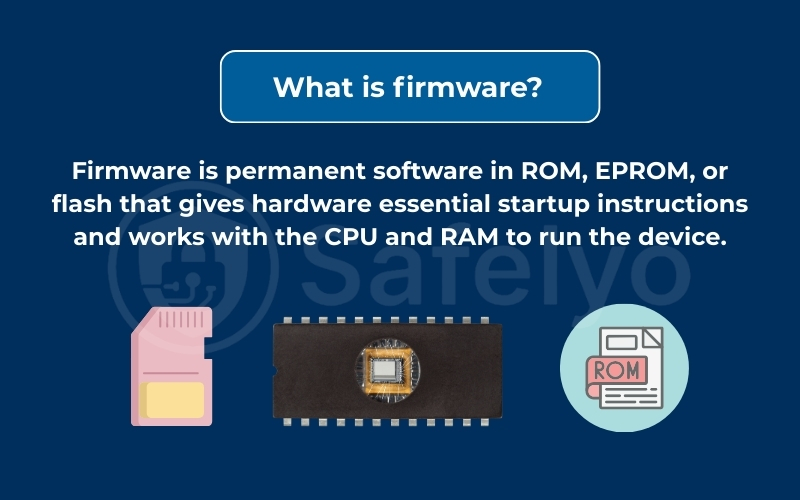
Its main role is to give hardware the low-level instructions it needs to function. Unlike normal applications that can be installed or deleted, firmware is persistent and runs every time the device powers on.
It also interacts with other hardware elements such as the central processing unit (CPU) and random access memory (RAM) during startup, ensuring that the device can initialize and operate correctly.
Clear examples of firmware in action include:
- On a computer, the BIOS or UEFI initializes the CPU, RAM, and storage before loading the operating system.
- In a router, firmware manages device authentication, wireless channels, and security protocols.
- On Android devices, firmware enables features like camera operation, touchscreen response, and battery management.
The U.S. National Institute of Standards and Technology (NIST, 2023) defines firmware as “the software program or set of instructions programmed on a hardware device, typically stored in non-volatile memory such as ROM or flash”. This means firmware operates at a fundamental level, ensuring hardware and software can communicate reliably.
Put simply, firmware is the invisible but essential foundation that allows your hardware and software to talk to each other effectively. Without it, even the most advanced smartphone or PC would be nothing more than powered-on silicon.
Read more:
2. How firmware works in a device
Firmware acts like the first language your device understands. It sits between the hardware and the operating system (OS), ensuring that everything is initialized and ready before higher-level software takes over. Understanding how firmware works helps explain why updates and security are so important.
2.1. The role of firmware in the boot process
When you press the power button, firmware is the first code to run. On computers, this is typically the BIOS or UEFI, which performs tasks such as:
- Power-on self-test (checking CPU, RAM, storage, and peripherals)
- Initializing hardware components like graphics and network adapters
- Handing control to the bootloader, which then loads the operating system
Without firmware, the operating system would have no instructions to start, and the device would remain unusable.
2.2. How firmware differs from drivers and operating systems
It’s easy to confuse firmware with other types of code, but each has a distinct role:
- Firmware: Permanent, low-level instructions stored in ROM or flash, guiding the hardware’s core behavior.
- Drivers: Software that allows the operating system to interact with specific hardware (e.g., printer or graphics card).
- Operating system: The main software layer (like Windows, macOS, Linux, or Android) that manages user interaction and applications.
Firmware is like the foundation of a house, drivers are like the doors and wiring, and the OS is the living space where people interact.
2.3. How updates are saved and applied to firmware
Firmware updates are written to the device’s nonvolatile memory. This process is sometimes called “flashing.” Depending on the device, updates may be:
- Manual: Downloading a file from the vendor’s website and applying it through a special tool or BIOS utility
- Automatic/OTA (Over-the-Air): For smartphones and IoT devices, updates are delivered wirelessly, often bundled with security patches
- Semi-automatic: Routers or smart TVs prompt the user to accept and install a downloaded update
According to CISA (2024), keeping firmware updated is crucial because outdated firmware may contain unpatched vulnerabilities that attackers can exploit. This makes regular updates a key part of device security and performance.
3. Common types of firmware
Not all firmware is the same. Different devices use different forms of firmware depending on their function, complexity, and required security level. Broadly, firmware can be grouped into three main categories.
3.1. System firmware (BIOS, UEFI, BMC)
System firmware is the first layer that starts a computer. Examples include:
- BIOS (Basic Input/Output System): The traditional firmware on PCs that initializes hardware and loads the OS.
- UEFI (Unified Extensible Firmware Interface): A modern replacement for BIOS with a graphical interface, faster boot times, and support for larger storage devices.
- BMC (Baseboard Management Controller): Found in servers, it allows remote management and monitoring even if the main system is powered off.
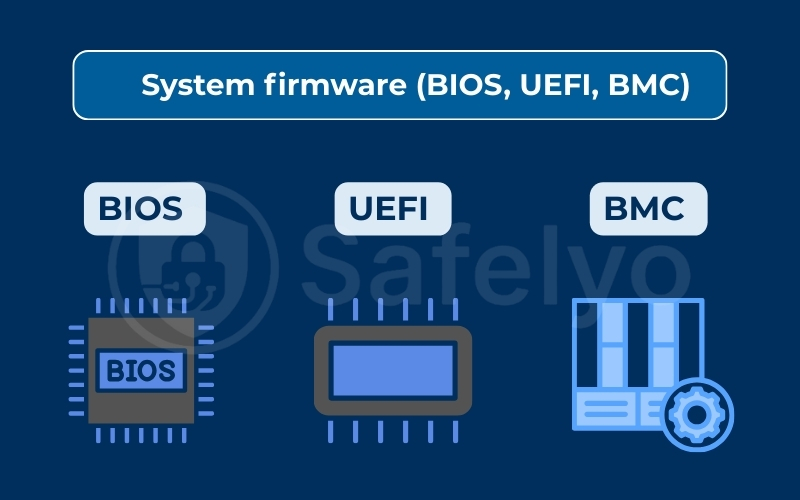
These system firmware types are critical for ensuring reliable startup and overall stability.
3.2. Device firmware
Individual hardware components often have their own firmware to manage specific functions:
- Hard drives and SSDs: Control how data is read, written, and corrected for errors.
- Graphics cards (GPUs): Optimize rendering, clock speeds, and cooling.
- Wi-Fi chips: Handle wireless protocols and encryption.
- Printers: Manage print queues, paper feed, and ink usage.
Updating device firmware can improve performance, fix bugs, and enhance compatibility with new operating systems.
3.3. Embedded and smart devices (routers, cameras, TVs, IoT gadgets)
Many modern gadgets run on embedded firmware:
- Routers and modems: Regulate internet connections and firewall settings.
- Cameras and smart TVs: Control user interfaces, streaming compatibility, and media playback.
- Internet of Things (IoT) devices (like smart locks, thermostats, or appliances): Enable connectivity and automation.
Firmware also plays a key role in automotive systems, controlling engines, braking systems, and in-car entertainment.
ENISA (2023) highlights that firmware in IoT devices is often a weak link in security because vendors sometimes neglect to provide timely updates, leaving devices exposed to vulnerabilities.
3.4. Low-level, high-level, and subsystem firmware
Not all firmware works at the same depth. Some interact almost directly with hardware, while others sit closer to the operating system. Understanding these categories helps clarify what is firmware in different contexts.
- Low-level firmware:
This type operates closest to the hardware. It is often stored in ROM or flash memory and handles fundamental tasks such as booting the system or managing essential hardware functions. A good example is the microcode that controls how the CPU executes instructions.
- High-level firmware:
Positioned nearer to the operating system, high-level firmware provides more advanced features. It can support device-specific functions like touch input on smartphones or advanced power management in laptops.
- Subsystem firmware:
Many devices include separate components that require their own firmware. Examples are network interface cards, storage controllers, or the transmission control unit in automotive systems. Each of these runs its own embedded code to ensure smooth operation within the larger device.
By breaking firmware into these categories, you can clearly see its importance, from initializing hardware at the lowest level to enabling specialized functions in complex systems.
4. Firmware vs software vs hardware
Exploring what is firmware also means clarifying how it differs from both hardware and software.
Firmware is often confused with regular software or even hardware itself. To see why it is different, let’s break down their core roles and how they interact.
4.1. Main differences between firmware, software, and hardware
Each layer serves a unique function within a device:
- Hardware: The physical components of a device, such as the CPU, RAM, or storage drive.
- Firmware: The permanent, low-level code stored in nonvolatile memory that makes hardware usable.
- Software: The applications and operating systems that run on top of hardware and firmware, enabling user interaction.
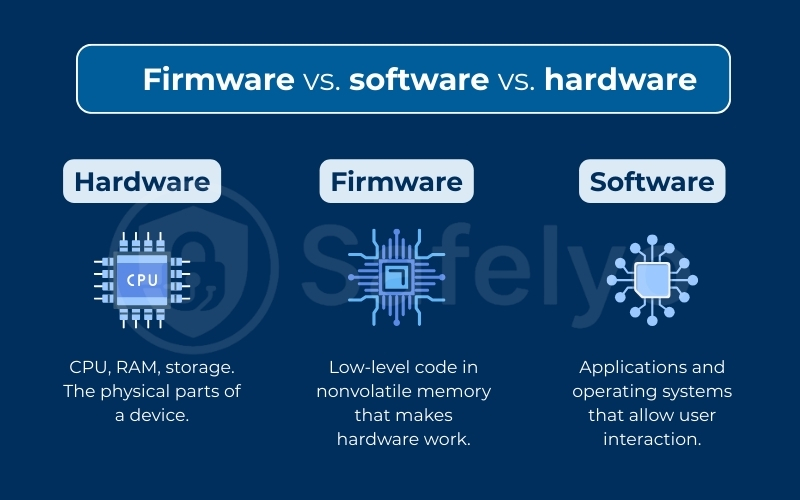
In simple terms, hardware is the body, firmware is the nervous system, and software is the brain that executes higher-level functions.
4.2. Update cycles for each type of technology
Update frequency also sets these three apart:
- Firmware updates: Infrequent but essential, often addressing security flaws or hardware compatibility issues.
- Software updates: Regular, sometimes weekly, focusing on new features and bug fixes.
- Hardware updates: Physical upgrades like replacing RAM, hard drives, or adding new graphics cards.
This explains why firmware versions may remain stable for years while software changes frequently.
4.3. How each one affects performance and compatibility
The impact of each layer is different but interconnected:
- Hardware defines the upper limits of performance (e.g., processing speed).
- Firmware ensures proper communication between hardware and the operating system.
- Software creates the user-facing experience through applications, games, or productivity tools.
According to ENISA (2023), outdated firmware can create exploitable vulnerabilities that compromise even well-protected systems, proving that firmware security is as critical as software patching or hardware upgrades.
The table below summarizes the key distinctions between the three layers:
| Feature | Firmware | Software | Hardware |
|---|---|---|---|
| Definition | Low-level code stored in nonvolatile memory | Applications and OS running on a device | Physical components of a device |
| Update Frequency | Rare, only when fixes or patches are needed | Frequent, often weekly or monthly | Requires physical replacement |
| Role | Enables hardware to function and talk to OS | Provides user interaction and app functions | Executes instructions physically |
| Examples | BIOS, UEFI, router firmware | Windows, Android, Microsoft Office | CPU, RAM, SSD, motherboard |
| Impact on Performance | Determines hardware compatibility and startup | Defines usability and user experience | Sets physical performance limits |
5. Why firmware updates are important
One key part of answering what is firmware is understanding why updates matter.
Firmware updates might not seem urgent, but they are crucial for keeping your devices safe and reliable. Many users ignore update prompts, yet outdated firmware can leave hardware vulnerable to bugs, security flaws, and performance issues. Below are the main reasons why staying current matters.
5.1. Fixing security flaws and bugs
Firmware updates often patch known vulnerabilities that attackers could exploit.
For example, router firmware patches frequently fix flaws that could allow hackers to gain remote access. Updates also resolve bugs that cause devices to freeze, crash, or misbehave.
5.2. Adding new features and improvements
Updates do more than just fix problems. They can also add fresh capabilities:
- Support for new hardware standards (e.g., faster Wi-Fi protocols)
- Enhanced battery optimization on smartphones
- Additional configuration options in smart devices
These improvements extend the usefulness of your devices without requiring a hardware upgrade.
5.3. Meeting compliance and privacy standards
In many industries, keeping firmware updated is not just about performance but also about meeting legal and regulatory requirements. Organizations in sectors such as healthcare, finance, and manufacturing must ensure their devices remain compliant with security frameworks like GDPR in Europe or NIST guidelines in the United States.
This requirement is especially critical for embedded systems, which are widely used in medical equipment, industrial controllers, and safety devices. If firmware in these systems is left outdated, it may introduce vulnerabilities that put sensitive data or even human safety at risk.
Manufacturers therefore release firmware updates not only to patch flaws but also to align with evolving compliance rules and privacy standards. Regularly applying these updates helps businesses avoid fines, maintain trust, and ensure the safe operation of essential technology.
6. How to check and update firmware safely
Keeping firmware up to date improves security and stability, but the process must be done carefully. A failed or malicious update can render a device unusable. Below are safe ways to manage firmware on different platforms.
6.1. Checking firmware versions on Windows, macOS, and Linux
Each operating system has its own method for viewing firmware information:
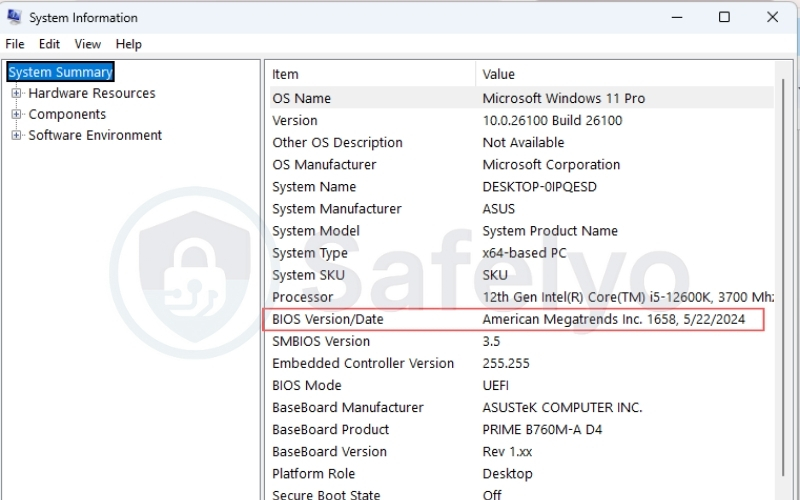
- Windows: Open System Information and look under BIOS Version/Date for PC firmware details. Some hardware like SSDs or graphics cards require vendor tools (e.g., Samsung Magician, NVIDIA Control Panel).
- macOS: Go to About This Mac → System Report → Hardware Overview to see the Boot ROM version.
- Linux: Use commands like dmesg | grep BIOS or check /sys/class/dmi/id/ for firmware data.
6.2. Updating routers and network devices
Routers typically allow firmware updates through a built-in web interface:
- Log in to the router’s admin panel.
- Navigate to the firmware or update section.
- Upload the official file downloaded from the vendor’s website.
- Enable automatic updates if supported for ongoing protection.
6.3. Updating phones and smart devices
Smart devices handle firmware differently depending on the platform:
- Smartphones (Android and iOS): Receive firmware over the air (OTA) from manufacturers or carriers.
- Smart TVs, cameras, and IoT devices: Updates are either automatic or installed through a companion mobile app.
6.4. Safety tips before updating
Before applying any firmware update, it’s important to follow certain precautions:
- Backup important data to avoid loss if the update fails.
- Ensure a stable power supply; use a fully charged battery or keep the device plugged in.
- Download only from trusted sources such as the official manufacturer website or app store.
- Check the update notes to confirm compatibility with your device model and version.
7. Best practices for firmware security
Firmware-level attacks can be especially dangerous because they operate below the operating system, making them hard to detect and fix. To reduce these risks, security agencies and researchers recommend a set of layered practices that balance usability and protection.
7.1. Secure boot and code signing explained
One of the most important protections is secure boot. During startup, the device checks that the firmware is digitally signed by the manufacturer. If the signature is missing or invalid, the system blocks the boot sequence. This process ensures only trusted code runs.
- Secure boot in PCs: Modern UEFI firmware verifies signatures before handing control to the operating system.
- In smartphones: Both Android and iOS use secure boot chains to prevent custom or malicious firmware images from loading.
Code signing as a key safeguard, since it creates a verifiable link between firmware code and the vendor that released it. Without this mechanism, attackers could slip in modified code without detection.
7.2. Using TPM and mobile device management (MDM)
Additional layers of security can further strengthen devices:
- TPM (Trusted Platform Module): A physical chip built into many PCs that stores encryption keys and performs integrity checks. It can detect if firmware or boot code has been altered.
- MDM (Mobile Device Management): Used by organizations to push firmware updates, enforce encryption, and verify that employee devices are running official builds. This prevents outdated or jailbroken devices from becoming weak links in company networks.
These technologies help secure both consumer devices and enterprise environments.
7.3. Locking debug ports (JTAG, UART, DMA)
Developers use hardware debugging interfaces such as JTAG, UART, or DMA to test devices. However, if these ports remain open in consumer products, attackers could connect directly and inject malicious code.
Best practice is to:
- Disable debug ports in production firmware.
- Require authentication before port access.
- Physically block or fuse debug interfaces on critical devices like medical equipment or automotive control units.
By removing these “back doors,” manufacturers significantly reduce attack surfaces.
7.4. Protecting supply chains with signed updates
Firmware often moves through complex supply chains, from chipmakers to device vendors to end-users. Attackers can attempt to insert malicious updates anywhere in this chain.
To address this risk, vendors should:
- Deliver digitally signed updates that the device can verify before installation.
- Use secure servers and encrypted channels for distributing updates.
- Provide transparency reports to confirm that update mechanisms are not compromised.
7.5. Protecting devices from firmware hacking
Firmware hacking refers to the practice of modifying or injecting malicious code into a device’s firmware. Because firmware operates below the operating system, these attacks are extremely difficult to detect and can persist even after reinstalling software or wiping storage.
Common methods attackers use include:
- Exploiting unpatched vulnerabilities in outdated firmware.
- Installing rootkits at the UEFI or BIOS level to gain persistent access to computers.
- Tampering with IoT device firmware to build botnets or spy on users.
Real-world examples have shown how dangerous this can be. Security researchers documented UEFI rootkits that allowed attackers to remain hidden even after the system was reinstalled. ENISA (2023) notes that IoT devices are especially at risk because many lack regular firmware updates.
To defend against firmware hacking, users should keep devices updated, verify digital signatures of updates, and avoid downloading firmware from unofficial sources. For enterprises, supply chain protections and hardware-based security like TPM can add extra layers of defense.
8. Risks and how to recover
While firmware updates are designed to improve security and performance, they also carry risks. A failed or tampered update can make a device unstable, insecure, or even unusable. Knowing the main risks and recovery methods helps reduce downtime and data loss.
8.1. What to do if a firmware update fails
A failed update may cause devices to freeze during boot or enter a loop. In such cases, you can:
- Restart with recovery mode if the device supports it (common in smartphones and routers).
- Re-flash the firmware using the official update file and vendor tool.
- Contact manufacturer support if no self-service recovery is possible.
Many vendors design “dual BIOS” or “fallback partitions” so the system can restore itself after an interrupted update.
8.2. How to roll back or restore firmware
Sometimes an update introduces new problems. To fix this, users can:
- Roll back to the previous firmware version if the vendor provides the option.
- Use built-in recovery utilities like PC motherboard BIOS flashback features.
- Rely on vendor apps (e.g., smartphone companion software) to restore stable builds.
Rollback functions are limited, so it is always wise to check vendor documentation before updating.
8.3. Spotting and avoiding fake firmware files
Cybercriminals sometimes disguise malware as firmware updates. To avoid this risk:
- Download only from official vendor sites or apps.
- Verify digital signatures where possible.
- Be cautious of unsolicited update prompts or links in emails.
The U.S. Federal Trade Commission (FTC, 2023) warns that fake software updates are a common phishing method, which applies equally to firmware. Verifying the source before installation is the best defense.
9. Firmware terms you should know
Firmware discussions often include technical terms that can be confusing if you are not familiar with them. Below are some of the most common ones:
- Bootloader: A small program that runs before the operating system. It initializes hardware and loads the system software into memory.
- BIOS (Basic Input/Output System): Legacy system firmware on PCs that starts hardware and passes control to the OS.
- UEFI (Unified Extensible Firmware Interface): Modern replacement for BIOS, offering faster boot, graphical interfaces, and support for larger drives.
- Microcode: Low-level instructions that control how a CPU executes operations. Manufacturers sometimes release microcode updates to fix processor bugs.
- Drivers: Software modules that allow the operating system to communicate with specific hardware components, such as printers or graphics cards.
- OTA (Over-the-Air) updates: Updates delivered wirelessly, often used by smartphones and IoT devices for firmware and software patching.
These terms form the foundation for understanding how firmware works across computers, phones, and smart devices.
10. FAQs about what is firmware
Users often have specific questions about firmware, especially when dealing with updates or troubleshooting. Here are clear answers to the most common ones.
What does firmware actually do?
Firmware provides the low-level instructions that make hardware usable. It tells the device how to start, interact with components, and communicate with the operating system.
Is firmware part of software or hardware?
Firmware is technically software, but it is embedded into nonvolatile memory on hardware devices. This makes it a hybrid layer that directly links hardware with higher-level software.
Can firmware updates be unsafe?
Yes. If an update fails, it may cause the device to stop working. Fake or malicious firmware files can also introduce malware. To stay safe, always update using official vendor sources and follow recommended precautions.
Can hackers infect firmware with malware?
Yes. Firmware-level malware is harder to detect because it runs below the operating system. Security researchers, including those at MITRE ATT&CK (2023), have documented real-world firmware exploitation techniques.
What happens if firmware is deleted?
If firmware is erased or corrupted, the device will usually not boot or function at all. Some devices include backup firmware or recovery modes to restore functionality, but not all do.
How can I see my firmware version?
The method varies by device: PCs list BIOS or UEFI versions in system information, routers display it in the admin panel, and smartphones show it under “About device” in settings.
What’s the difference between BIOS and UEFI?
BIOS is older system firmware with limited features and support, while UEFI is newer, faster, more secure, and supports larger storage drives.
Do routers update firmware automatically?
Some modern routers do update automatically, but many still require manual checks through the web admin interface. It’s best to enable automatic updates when available.
11. Conclusion
Firmware is the hidden layer that makes your devices function, sitting between hardware and software to ensure everything works as intended. Without it, a computer would never boot, a router would not manage connections, and a smartphone could not control its touchscreen or camera.
To recap, here are the key takeaways from this guide:
- Firmware is built-in software stored in nonvolatile memory that enables hardware functionality.
- It differs from drivers and operating systems, serving as the bridge between raw hardware and higher-level software.
- Common types include system, device, and embedded firmware, each critical to performance.
- Updates are vital for fixing security flaws, adding features, and ensuring compliance.
- Safe update practices like backups and trusted downloads help prevent failures and malware infections.
- Security best practices such as secure boot, signed updates, and locked debug ports protect against firmware-level attacks.
From personal experience, I once updated a router’s firmware that had frequent crashes. After the update, stability improved significantly, and new configuration features became available. This highlighted how firmware updates not only fix bugs but also extend the usefulness of existing hardware.
By understanding what is firmware and why it matters, you can make smarter decisions about maintaining your devices and protecting them against hidden threats.
For more expert guides on protecting your devices, securing updates, and improving digital safety, visit the Antivirus section at Safelyo.