OpenVPN technically refers to a VPN protocol, client software, and a company. However, most people use the term to describe the open-source connection protocol that virtual private networks (VPNs) use to encrypt data and route internet traffic securely. Although this option frequently appears in the settings menus of many security apps, its specific function is not always obvious to everyday users.
This guide answers what is OpenVPN by explaining how it works, its practical uses, alternative options, and when it remains the right choice.
Key takeaways:
- OpenVPN functions as a set of networking rules, a client software application, and a corporate entity.
- The protocol protects your private data using strong AES-256 encryption.
- The core code underwent an independent security audit in 2017, and all discovered vulnerabilities were promptly patched.
- The software is open-source, meaning cybersecurity experts worldwide constantly check its code for vulnerabilities.
1. What is OpenVPN?
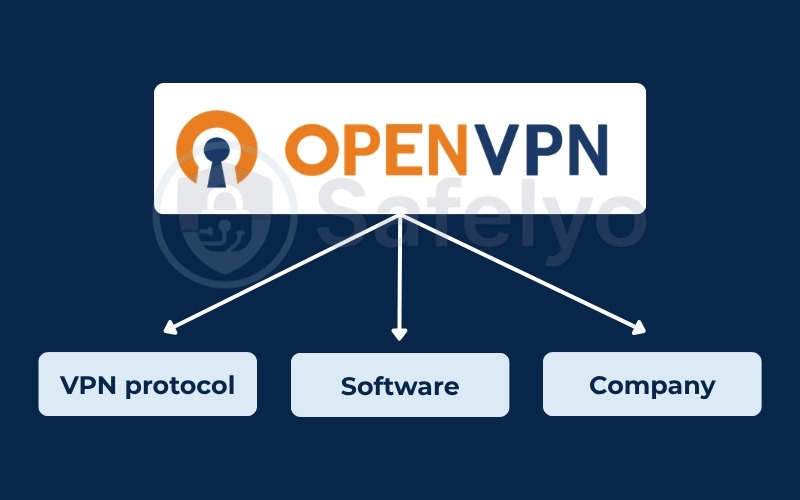
When someone mentions OpenVPN, they could be talking about three distinct things: a networking protocol, a client software, or a corporate entity. This overlapping terminology is the biggest source of confusion for beginners trying to secure their networks.
However, in most everyday conversations, OpenVPN refers to the VPN protocol itself.
To make things perfectly clear, here is a simple breakdown of each component:
- The VPN protocol (The most common meaning): This is the invisible framework of rules. It is the specific set of mathematical instructions that dictates exactly how your computer and a remote server talk to each other securely over the internet.
- The software (OpenVPN Connect / GUI): This is the actual client application you interact with daily. It is an open-source program that you install on your laptop or smartphone to configure and initiate the secure connection.
- The company (OpenVPN Inc.): This is the corporate organization behind the technology. They wrote the original underlying code and currently sell premium enterprise-level management tools designed for large corporate networks.
For the remainder of this guide, whenever we discuss OpenVPN, we will be focusing specifically on the VPN protocol and how it works to secure your daily internet traffic.
2. What is OpenVPN used for?
OpenVPN is primarily used to secure data on public Wi-Fi, provide remote corporate access, and bypass restrictive network firewalls. It handles these vital security tasks reliably for both regular consumers and large corporations.
Here are the most common ways people utilize this protocol daily:
- Securing public Wi-Fi: It encrypts your connection at coffee shops or airports. This prevents local snoops from intercepting your data or tracking the websites you visit over shared networks.
- Remote corporate access: Businesses use it to let remote workers access internal company servers securely. This supports a modern Zero Trust security approach.
- Bypassing network restrictions: Running the connection on TCP port 443 makes your encrypted traffic look like normal HTTPS web traffic. This effectively fools basic school or workplace firewalls into letting you access blocked sites.
Note: Be aware that advanced Deep Packet Inspection (DPI) tools can still identify the connection by analyzing the TLS handshake. Furthermore, mobile users should know that this older protocol can drain iOS and Android batteries noticeably faster than newer, lighter alternatives.
3. How does OpenVPN work?
OpenVPN works by creating a secure, private connection between your device and a remote server. Before your data goes out to the public internet, the system completely scrambles it so that no one, not even your internet service provider, can read what you are doing.
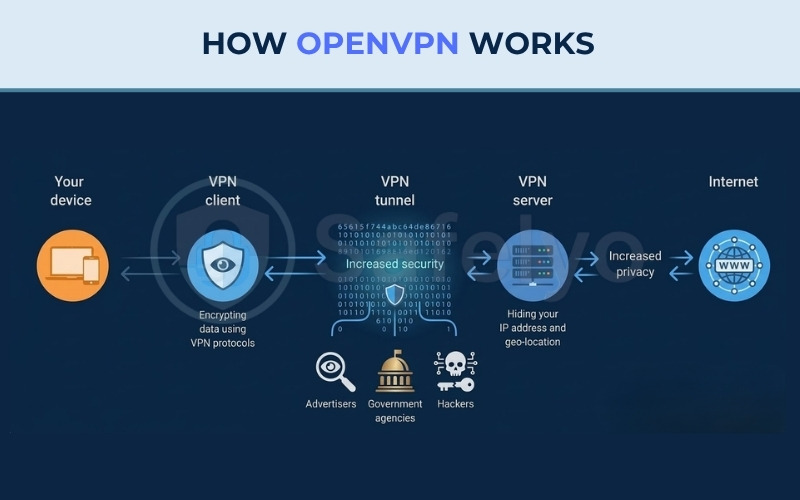
The journey of your private data happens in five simple stages:
3.1. Step 1: Initiation
OpenVPN starts by establishing a link to your device. Your VPN client sends a connection request to the OpenVPN server. During this initial stage, the client and server exchange fundamental information, such as their IP (Internet Protocol) addresses, to successfully initiate the connection.
3.2. Step 2: Authentication
Next, the system must verify the exact identities of both your device and the VPN server. OpenVPN strictly manages this access, utilizing various authentication methods to approve the connection and prepare the secure pathway. This standard verification process relies on login credentials, digital certificates, and a public key infrastructure.
3.3. Step 3: Tunnel creation
Following successful authentication, OpenVPN constructs a highly secure VPN tunnel. This creates a private, isolated route where your web traffic can travel safely away from outside observers. To establish this VPN tunnel, your VPN client and the server agree on specific encryption rules, typically deploying Secure Sockets Layer/Transport Layer Security (SSL/TLS) protocols.
3.4. Step 4: Encryption
As your data enters this VPN tunnel, it is enclosed in a protective layer of encryption. OpenVPN utilizes robust algorithms like the Advanced Encryption Standard (AES) to completely scramble your information. High-quality setups use AES-256, an advanced method that alters your data 14 distinct times before transmission, ensuring that anyone intercepting the traffic cannot read it.
3.5. Step 5: Transmission
Encrypted data finally travels through a VPN tunnel directly into the OpenVPN server, where it is carefully decrypted. This VPN server then forwards requests toward a target website. When the internet sends data back, it gets re-encrypted and routed down that tunnel to your device. Finally, a VPN client decrypts incoming information for safe browsing.
To summarize this five-step process, you can refer to the illustration below detailing how the OpenVPN protocol works. This diagram visually maps the journey of your data. It starts at your device and moves to the VPN client for encryption. The data then travels securely through the VPN tunnel. This step blocks tracking from advertisers, government agencies, and hackers. Finally, the data reaches the VPN server. The server hides your IP address and geo-location to provide increased privacy before you connect to the public internet.
4. How secure is OpenVPN? (Independent audits & encryption)
OpenVPN is highly secure because it uses standardized encryption methods and its core code has been successfully reviewed by independent security experts. Instead of trusting marketing claims, we can verify its safety by looking at actual audit results and the specific technology it uses to lock your data.
4.1. The 2017 OSTIF security audits
In 2017, the Open Source Technology Improvement Fund (OSTIF) commissioned two separate cybersecurity teams, QuarksLab and Cryptography Services, to review the OpenVPN codebase. Their goal was to find hidden weaknesses before hackers could exploit them.
The auditors discovered a few bugs, including two notable denial-of-service vulnerabilities (CVE-2017-7478 and CVE-2017-7479) that could potentially crash a server. Critically, neither vulnerability allowed attackers to bypass the encryption or steal private user data. The OpenVPN development team patched these specific issues promptly in software versions 2.3.15 and 2.4.2. This level of transparency proves that the core technology is heavily scrutinized and reliable for daily use.
4.2. Standardized encryption (AES and TLS)
The protocol secures your connection by relying entirely on proven industry standards like AES-256 and SSL/TLS.
AES-256 is the exact same encryption standard utilized by global banks and government agencies to protect sensitive information. TLS is the technology that safely manages the secure tunnel between your device and the server. Because OpenVPN uses these globally trusted tools instead of unproven custom cryptography, it ensures your daily browsing habits stay private.
4.3. What the Snowden documents actually say (and what they don’t)
Many security blogs repeat a popular claim that “OpenVPN was the only commonly used protocol the NSA couldn’t crack”. However, this statement is not entirely accurate and heavily oversimplifies the reality of the Snowden leaks.
The actual reporting, published by Der Spiegel in December 2014 based on leaked NSA documents, tells a more nuanced story. The documents revealed that the NSA ran a large-scale exploitation program targeting VPN traffic, listing four protocols under active attack: IPSEC, PPTP, SSL, and SSH. Because OpenVPN relies on SSL/TLS, it was firmly within, not outside, the scope of NSA interest.
What the documents did confirm is that older protocols like PPTP and weak IPsec implementations were successfully exploited. In contrast, leaked memos revealed the NSA found AES, the core cipher used by OpenVPN, highly difficult to attack cryptanalytically. The agency admitted they possessed very few in-house techniques to break it. While OpenVPN was not explicitly named alongside tools that gave the NSA significant trouble like Tor or PGP, the strength of its underlying encryption was clearly acknowledged.
In short, the leaks do not prove OpenVPN is cryptographically immune or the “only” secure protocol. However, the NSA’s own characterization of AES strongly suggests that a properly configured OpenVPN setup resisted their large-scale mass surveillance techniques. A strict configuration requiring AES-256, 2048-bit Diffie-Hellman, and Perfect Forward Secrecy via PKI certificates directly mitigates the exact vulnerabilities the agency exploited. While no system is immune to targeted attacks, a properly configured OpenVPN setup provides a formidable baseline of defense.
5. OpenVPN TCP vs. UDP: What’s the difference?
When configuring your connection, you must choose between two transmission methods: TCP and UDP. While both carry your encrypted data, they prioritize different aspects of network performance.
| Feature | TCP (Transmission Control Protocol) | UDP (User Datagram Protocol) |
|---|---|---|
| Primary Goal | Reliability & Accuracy | Speed & Efficiency |
| Error Checking | Strict (Retransmits lost data) | None (Does not wait for confirmation) |
| Latency | Higher | Much Lower |
| Connection Stability | Better for unstable networks | Best for stable, fast networks |
| Default Port | 443 | 1194 |
| Best Use Case | Bypassing firewalls, web browsing | Streaming, gaming, downloading |
5.1. TCP (Transmission Control Protocol)
TCP is designed for maximum reliability. It uses a “three-way handshake” to establish a connection and requires the receiver to acknowledge every single packet of data. If a packet is lost or corrupted during transmission, TCP pauses everything and retransmits the missing data.
While this ensures your files are 100% accurate, the constant error-checking creates higher latency. Furthermore, if your physical connection is unstable, TCP can enter a “meltdown” state where the constant retransmissions significantly drop your overall speed.
5.2. UDP (User Datagram Protocol)
UDP is the default and recommended choice for most users because it prioritizes speed and efficiency. Unlike TCP, it is a connectionless protocol that sends data packets without waiting for a confirmation from the receiver. This lack of overhead results in much lower latency and faster download speeds.
While UDP does not guarantee packet delivery, modern internet connections are stable enough that the occasional lost packet does not impact your experience. This makes it the superior choice for streaming high-definition video, online gaming, and VoIP calls.
6. OpenVPN vs. other VPN protocols
Compared to other protocols, OpenVPN offers a solid balance of proven security and firewall-bypassing capabilities, though it is slower than newer options like WireGuard. Let us see how it stacks up against the modern competition and older legacy options.
This matrix compares the most common protocols available today based on crucial performance metrics:
| Criteria | OpenVPN | WireGuard | IKEv2/IPsec | PPTP |
|---|---|---|---|---|
| Speed | Average | Very fast | Fast | Fast |
| Security | High | High | Safe | Weak |
| Code Audit | Extensive | Extensive | Standard | None |
| Mobile Performance | Average | Excellent | Excellent | Poor |
| Firewall Bypass | Good | Poor | Average | Poor |
| Open-Source | Yes | Yes | Mostly no | No |
| Setup Complexity | High | Low | Medium | Low |
6.1. OpenVPN vs. WireGuard
When comparing OpenVPN vs. WireGuard, the biggest difference is the balance between speed and proven security. WireGuard typically offers faster download speeds and superior mobile battery life because it utilizes a much lighter, modern codebase.
In contrast, OpenVPN has a longer track record of security audits. Furthermore, OpenVPN can bypass standard network firewalls by disguising its traffic, which is an area where WireGuard often struggles.
6.2. OpenVPN vs. IKEv2/IPsec
The comparison between OpenVPN and IKEv2/IPsec comes down to network stability versus firewall evasion. IKEv2 is highly efficient for mobile users because it reconnects almost instantly when your phone switches from Wi-Fi to cellular data. OpenVPN is generally slower to reconnect during these network switches.
However, IKEv2 operates strictly on fixed network ports, making it easy for network administrators to detect and block. OpenVPN can bypass those same network blocks by routing its traffic through standard web ports.
6.3. OpenVPN vs. PPTP and L2TP (legacy protocols)
Unlike OpenVPN, PPTP and L2TP are outdated technologies with known vulnerabilities. While OpenVPN uses modern AES-256 encryption to protect your data, PPTP and L2TP possess documented security flaws that hackers can exploit.
You will still find these legacy protocols in the settings menus of older routers. However, you should choose OpenVPN or other modern alternatives over them to ensure your personal data remains protected against modern cyber threats.
7. Is OpenVPN free?
The core OpenVPN Community Edition software is completely free and open-source, while the enterprise Access Server requires a paid subscription for full features. The total cost depends entirely on which specific version of the software you intend to deploy.
Here is how the official pricing structure breaks down:
- Community Edition: This open-source version is completely free for anyone to download, modify, and use forever without any subscription fees.
- Access Server: This is a paid enterprise product designed specifically for businesses, offering a helpful visual management interface and official technical support. It does include a limited free tier restricted to two concurrent connections, which is useful for brief testing or very small personal home setups.
8. How to set up OpenVPN
Setting up OpenVPN depends entirely on how you plan to use it. You can either activate the protocol inside a commercial service, use the official client software for remote work, or manually build your own private server.
8.1. Using a VPN provider vs. self-hosting
Before starting, you must decide how much technical responsibility you want to manage. You generally have two paths to choose from:
- Using a commercial VPN provider: This is the recommended route for everyday users. You do not manually install the protocol yourself. The commercial company manages the complex server infrastructure and encryption keys in the background. Your only job is to download their application and select OpenVPN as your preferred connection method.
- Self-hosting your own server: This advanced route is strictly for IT professionals who want total network control. You must install the open-source software on your own hardware, such as a home router or a rented cloud server. In this scenario, you are entirely responsible for configuring firewalls, managing digital certificates, and applying security updates.
8.2. Basic setup steps (consumer-friendly version)
If you choose the convenient route, you will likely encounter one of two simple scenarios based on whether you are using a commercial app or importing a custom profile.
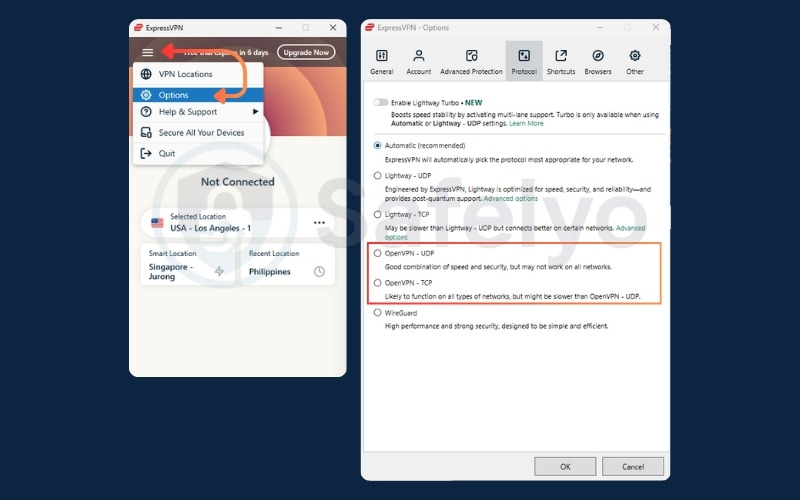
Scenario A: Changing the protocol in a commercial app
If you already pay for a commercial VPN service, you just need to adjust your connection settings to use the protocol:
- Open your chosen commercial VPN application.
- Navigate to the Settings, Preferences or Options menu.
- Locate the Connection or Protocol tab.
- Select OpenVPN from the list of available options, choosing either TCP or UDP.
Scenario B: Importing a custom configuration profile
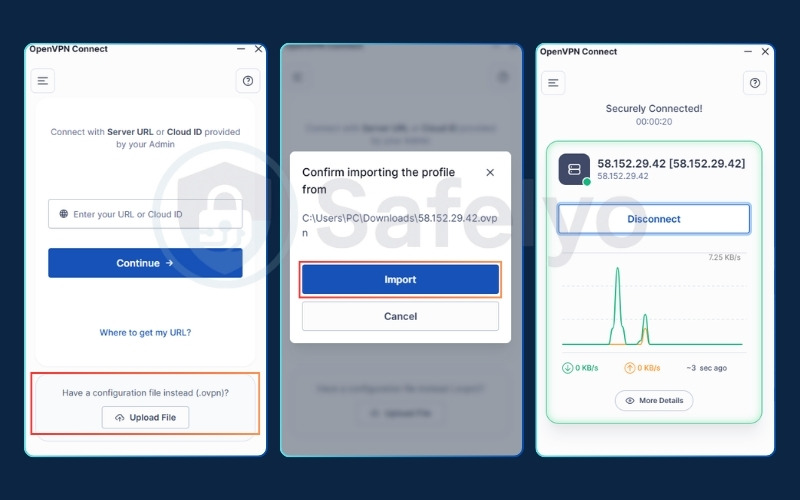
If you are connecting to a workplace network, a university server, or a custom self-hosted VPN, you will likely receive a specific configuration file (ending in .ovpn). In this case, you must use the official client application:
- Download the free “OpenVPN Connect” application from your device’s official app store.
- Save the .ovpn file provided by your network administrator or VPN provider to your local device.
- Open the application and select the “Import Profile” or “Upload File“.
- Upload your configuration file, enter your assigned login credentials, and click connect.
9. OpenVPN security misconfiguration risks (What NOT to do)
OpenVPN is incredibly secure by design, but human error can easily compromise it. If you choose to manually set up your own server, avoid these three common amateur mistakes to keep your network truly private:
- Using outdated encryption: Do not rely on old cryptographic ciphers like BF-CBC, as modern hackers can easily break them. Always check your configuration files and update them to use current industry standards, specifically AES-256-GCM.
- Trusting passwords alone: Passwords can be easily guessed, shared, or stolen in data breaches. Instead of just asking for a password, your server should require digital client certificates. These act like secure, unforgeable digital ID cards physically installed on each user’s device.
- Forgetting the kill switch: If your VPN connection briefly drops, your computer will instantly reconnect using your normal, unencrypted Wi-Fi. This instantly leaks your real IP address to the public. Always enable a kill switch in your settings to block all internet traffic until the secure tunnel is restored.
10. OpenVPN: Pros and cons
Every VPN protocol comes with its own set of trade-offs. Understanding its core advantages and limitations can help you decide if it fits your specific networking needs.
| Pros | Cons |
|---|---|
| Battle-tested security | Slower top speeds |
| Excellent firewall bypassing | Higher battery consumption |
| Open-source transparency | Complex manual configuration |
| Universal compatibility | Sluggish reconnection times |
10.1. The pros of OpenVPN
These core advantages make the protocol a highly reliable choice for secure networking:
- Battle-tested security: It utilizes strong AES-256 encryption and has successfully passed multiple independent security audits. You do not have to blindly trust marketing claims; its safety is proven.
- Excellent firewall bypassing: By routing your traffic through TCP port 443, OpenVPN disguises your VPN connection as standard HTTPS web traffic. This effectively sneaks past strict firewalls at schools, workplaces, or restrictive internet providers.
- Open-source transparency: Because the core codebase is completely public, cybersecurity experts worldwide can continuously inspect it for hidden backdoors or vulnerabilities.
- Universal compatibility: It is highly customizable and works seamlessly on virtually any operating system, mobile platform, or third-party router available today.
10.2. The cons of OpenVPN
However, the protocol’s age and complexity introduce a few notable limitations:
- Slower top speeds: Because it relies on a much older and heavier codebase, OpenVPN generally delivers slower download and upload speeds compared to leaner, modern protocols like WireGuard.
- Higher battery consumption: The complex, resource-heavy encryption process demands more processing power. This can drain the battery on mobile phones and tablets noticeably faster during prolonged use.
- Complex manual configuration: While selecting OpenVPN in a commercial app is easy, manually building and configuring your own OpenVPN server from scratch is a highly complicated process that requires advanced IT knowledge.
- Sluggish reconnection times: Your device may frequently switch networks, like walking out of your house and changing from Wi-Fi to cellular data. When this occurs, OpenVPN takes a few seconds longer to re-establish the secure tunnel compared to protocols like IKEv2.
11. Is OpenVPN still worth using in 2026?
The short answer is yes. It remains a deeply established, reliable standard for internet security and privacy across the globe.
Where OpenVPN still shines: If you are working on a laptop, using public Wi-Fi, or trying to bypass a school firewall, this protocol is highly dependable. Its track record of security audits provides strong peace of mind for privacy-conscious users.
When to consider WireGuard instead: However, if you are an average consumer purely prioritizing maximum download speeds, newer options make logical sense. For mobile users who need to preserve their daily battery life, WireGuard is a very practical and efficient alternative.
12. FAQs about what is OpenVPN
What is the difference between a VPN and OpenVPN?
A VPN is the broad, general concept of a secure, private network connection. OpenVPN is the specific underlying set of mathematical rules (the protocol) used to actually build and maintain that secure connection.
Is OpenVPN free to use?
Yes, the core Community Edition software is completely free and open-source. However, if you want to connect to a commercial provider’s global server network, you usually have to pay a monthly fee for their subscription.
Why would someone use OpenVPN?
People use it to encrypt their web traffic on untrusted public networks and to securely access remote work servers. It is especially useful for bypassing restrictive firewalls by disguising its encrypted traffic.
Is OpenVPN safe?
Yes, it is highly safe. It uses industry-standard AES-256 encryption and has passed independent security audits, proving it has no hidden backdoors or data leaks.
What is better than OpenVPN?
Nothing is strictly better in every single category, but WireGuard is generally faster and kinder to mobile smartphone batteries. OpenVPN still wins when it comes to bypassing firewalls and demonstrating a proven security history.
13. Conclusion
Understanding what is OpenVPN helps clarify why it continues to be widely used today. Even with the rise of newer and faster alternatives, it remains a practical and secure standard that reliably bypasses strict firewalls and protects your data with proven AES-256 encryption.
Whether you prioritize absolute data integrity on public Wi-Fi or need a dependable way to navigate restricted networks, this protocol offers a solid foundation for your security. For more comprehensive tips on protecting your digital footprint, explore our in-depth VPN Guides category, or discover many other useful articles at Safelyo.