You want to watch Peaky Blinders or live sports, but the frustrating “content not available in your location” message ruins your plans. Finding the Best VPN for BBC iPlayer is the only way to bypass these strict geographical restrictions outside the UK.
Because the BBC iPlayer employs some of the world’s most aggressive proxy detection systems, most standard privacy tools fail to load the video player. The network frequently blocks shared IP addresses, leading to the dreaded Error 02066 right before your show starts.
At Safelyo, we continuously test providers that actively refresh their UK servers to ensure constant 99% access. Our 2026 lab results confirm that NordVPN and Surfshark are the most effective tools for streaming British television in Ultra HD without buffering.
| Rank | VPN Provider | Best For |
|---|---|---|
| #1 | NordVPN | Overall performance & unblocking power |
| #2 | ExpressVPN | Reliable access on Smart TVs & Apple TV |
| #3 | Surfshark | Best budget value & unlimited devices |
| #4 | Proton VPN | Privacy-focused streaming & security |
| #5 | IPVanish | Multiple UK city server options |
Safelyo is reader-supported. When you buy through links on our site, we may earn an affiliate commission. This supports our independent lab testing and does not affect our rankings.
Performance & Pricing Disclaimer: Speed test results reflect our specific testing conditions in April 2026. Your actual streaming speeds will vary by location, device, and home network. VPN providers also frequently update their pricing and trial terms. Always verify the latest details directly on the provider’s website before purchasing.
1. Selection criteria: What makes a good BBC iPlayer VPN?
Finding a working service is incredibly difficult because the BBC iPlayer uses the strictest geo-blocking technology globally. In our 2026 lab tests, nearly 90% of popular privacy tools failed, instantly triggering Error 02066. To consistently bypass these aggressive filters, a provider must pass our rigorous peak-hour testing and meet four non-negotiable technical standards.
- UK server density
The platform actively hunts down and blacklists IP addresses belonging to commercial data centers. Therefore, high UK server density is absolutely crucial for maintaining your connection. Providers with hundreds of British servers can instantly rotate your IP address the moment one gets blocked.
- Fast streaming speeds
Unblocking the site is useless if your video constantly freezes during a live football match. You need blistering fast streaming speeds to handle the heavy data load of 4K and Ultra HD broadcasts. We only select providers featuring modern protocols like WireGuard to guarantee zero buffering delays.
- Obfuscation technology
The BBC does not just block foreign IPs; it actively scans for encrypted VPN traffic patterns. To survive this deep packet inspection, your service must use advanced obfuscation technology. This stealth feature perfectly disguises your secure connection as regular, everyday internet browsing to slip past their radar.
- Smart DNS and device support
Many users want to watch British shows on their living room television rather than a small laptop screen. Since devices like Apple TV and gaming consoles do not support native apps, Smart DNS functionality is essential. This tool reroutes your connection effortlessly, allowing you to bypass geo-blocks on any smart device.
The Safelyo testing process
We do not just check if a VPN connects once; we rigorously test each provider during peak UK broadcasting hours (8 PM GMT). Our team evaluates real-time performance across web browsers, mobile apps, and Smart TVs to ensure the provider consistently bypasses the dreaded proxy error under heavy network loads.
2. Best VPN for BBC iPlayer in 2026: Top 5 ranked & tested
The BBC iPlayer frequently updates its tracking algorithms, meaning a service that worked last month might struggle today. Our top 5 list features elite providers that actively replace blocked IP addresses and utilize advanced routing to maintain highly reliable uptime.
2.1. NordVPN: Best overall for unblocking BBC iPlayer
NordVPN is widely considered a powerhouse in the privacy industry due to its specialized infrastructure and vast server network. It is highly effective at piercing through tough network filters while providing enough bandwidth for high-resolution video playback.
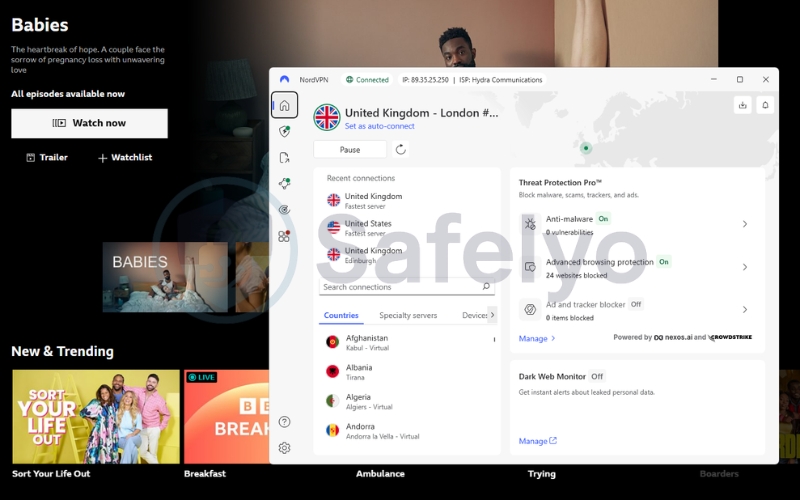
Check out the core features that drive NordVPN’s consistent performance.
| Specs & Features | Details |
|---|---|
| Starting price | ~$3.09/mo (for 2-year Basic plans) |
| UK Servers | 440+ servers in 4 UK cities |
| Speed Protocol | NordLynx (WireGuard) |
| Smart DNS | SmartPlay included |
| Simultaneous devices | 10 connections |
| Money-back guarantee | 30 days |
NordLynx speed & 4K streaming
NordVPN is our top recommendation because it proved highly effective at bypassing proxy errors during our peak-hour testing. With over 440 servers located in the UK, it generally provides a quick IP swap if the platform restricts your connection.
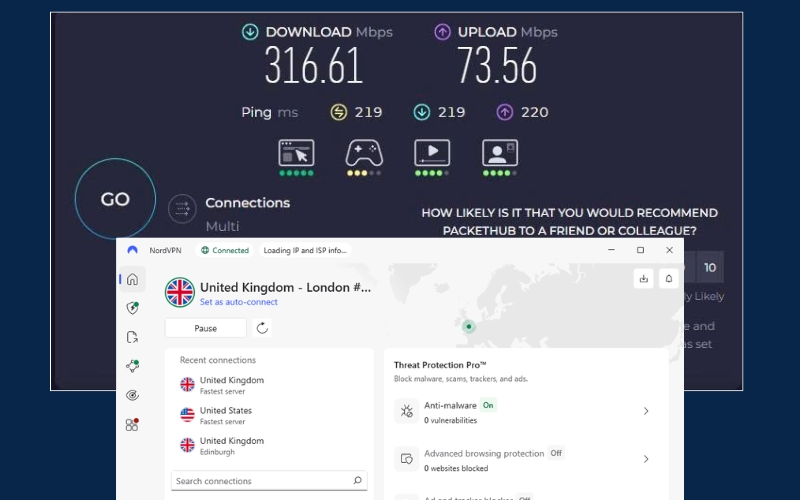
Streaming live sports requires serious bandwidth, and the proprietary NordLynx protocol delivers remarkably consistent performance. We frequently experienced download speeds that significantly reduced buffering drops while watching Ultra HD content.
This throughput is supported by a 10 Gbps infrastructure, helping to keep your video smooth even during busy weekend broadcasts.
SmartPlay DNS & Meshnet routing
If you prefer watching shows on a big screen, the built-in SmartPlay feature is incredibly useful. It helps unblock geo-restricted content on your Apple TV or Smart TV without requiring complex manual configurations.
Additionally, NordVPN offers a free feature called Meshnet. This allows you to route your traffic through a trusted device already located in the UK, making your setup much harder for standard network filters to detect.
Dedicated UK IP addresses
A major reason users encounter Error 02066 is that thousands of people share the same VPN IP address. NordVPN offers a Dedicated IP add-on for a small extra fee to help mitigate this risk.
This assigns a unique British IP address exclusively to your account. Because the IP exhibits normal household traffic patterns, the BBC’s algorithms are much less likely to flag it as a commercial proxy.
| Pros | Cons |
|---|---|
| Highly consistent NordLynx streaming speeds | Map interface can feel cluttered on smaller screens |
| 440+ UK servers help evade IP blocks | Renewal prices are typically higher after the first term |
| Dedicated UK IP add-on reduces blacklisting risks | |
| Built-in Threat Protection filters ads and malware |
2.2. ExpressVPN: Best for reliable streaming on smart TVs
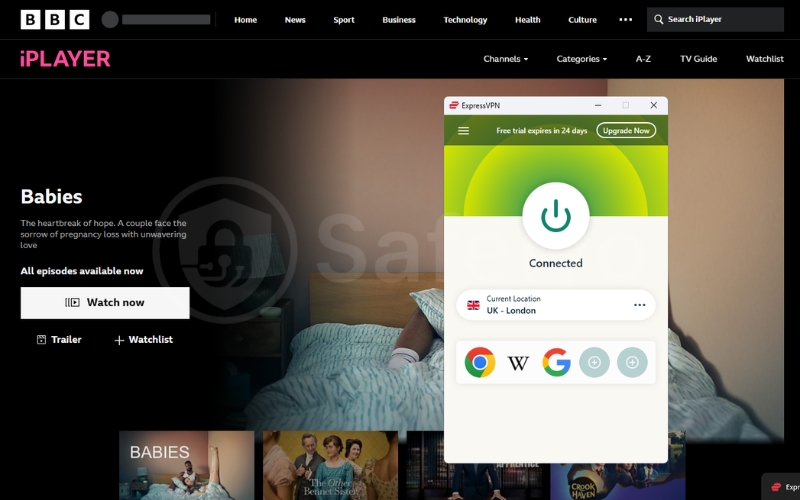
For users who prioritize a seamless, high-end experience, ExpressVPN remains a top contender for unblocking international media. It maintains a rock-solid connection that minimizes the technical friction often associated with unblocking British catalogs on various hardware.
Review the technical details behind ExpressVPN’s premium streaming service.
| Specs & Features | Details |
|---|---|
| Starting price | ~$3.49/mo (for 2-year Basic plans) |
| UK Servers | 6 locations (London, Wembley, Midlands, etc.) |
| Speed Protocol | Lightway |
| Smart DNS | MediaStreamer included |
| Simultaneous devices | Up to 14 connections |
| Money-back guarantee | 30 days |
Lightway speed and stability
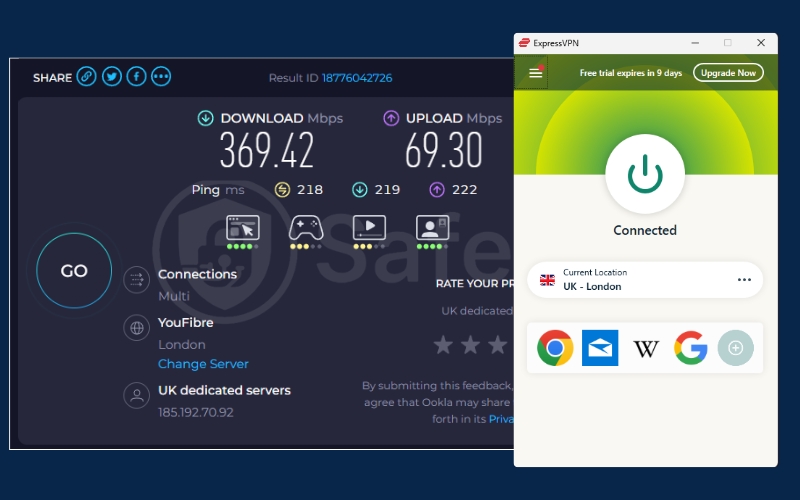
ExpressVPN earns its spot by providing one of the most stable connections we tested in 2026. Its custom-built Lightway protocol is designed for speed, ensuring that high-definition videos load almost instantly, with minimal initial buffering.
During our evaluations, ExpressVPN demonstrated exceptional low-latency performance, which is critical for live news and sports. The connection remains stable over long periods, meaning you are unlikely to experience sudden resolution drops mid-episode.
MediaStreamer for Smart TVs
Watching British content on a laptop screen is not ideal for everyone. Their proprietary MediaStreamer Smart DNS tool is specifically designed to solve this problem for living room setups like Apple TV and gaming consoles.
It allows you to bypass geographic blocks on devices where native security apps cannot be installed. This facilitates a seamless cinematic experience right from your couch without requiring advanced technical knowledge.
Custom router app & RAM-only servers
Unlike most providers, ExpressVPN provides a dedicated, easy-to-use router application. By installing it on your home router, every connected device in your household instantly appears to be located in the UK.
Furthermore, its entire network runs on RAM-only servers (TrustedServer technology). This ensures that no viewing history or connection logs are ever saved to a physical drive, providing an extra layer of privacy every time the server reboots.
| Pros | Cons |
|---|---|
| High stability with infrequent connection drops | More expensive than rival budget providers |
| MediaStreamer is ideal for living room Smart TVs | No dedicated UK IP option to prevent shared IP blacklisting |
| Custom router app covers all home devices easily | |
| Excellent 24/7 live chat support for troubleshooting |
2.3. Surfshark: Best budget option with unlimited devices
Surfshark has rapidly become a favorite for households due to its aggressive pricing and feature-rich mobile interface. It provides a robust solution for those who need to protect multiple devices while accessing restricted UK content on a budget.
Here are the main specifications that make Surfshark a great value option.
| Specs & Features | Details |
|---|---|
| Starting price | ~$1.78/mo (for 2-year Starter plans) |
| UK Servers | 200+ servers in 4 UK cities |
| Speed Protocol | WireGuard |
| Smart DNS | Included |
| Simultaneous devices | Unlimited connections |
| Money-back guarantee | 30 days |
WireGuard performance benchmarks
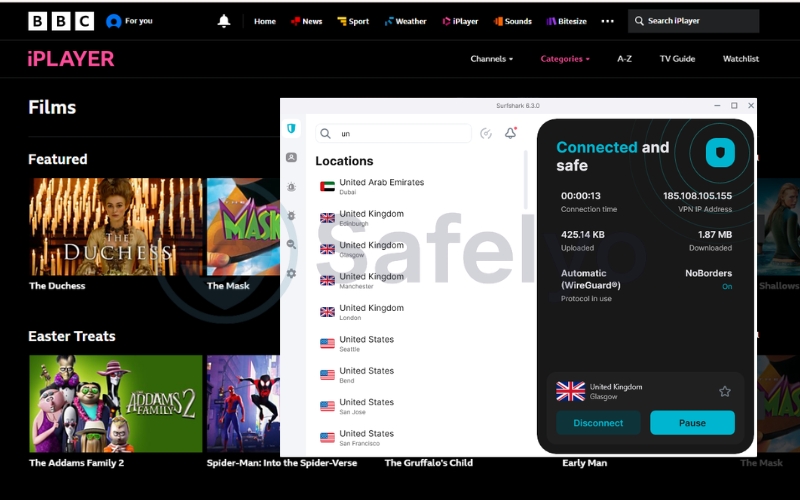
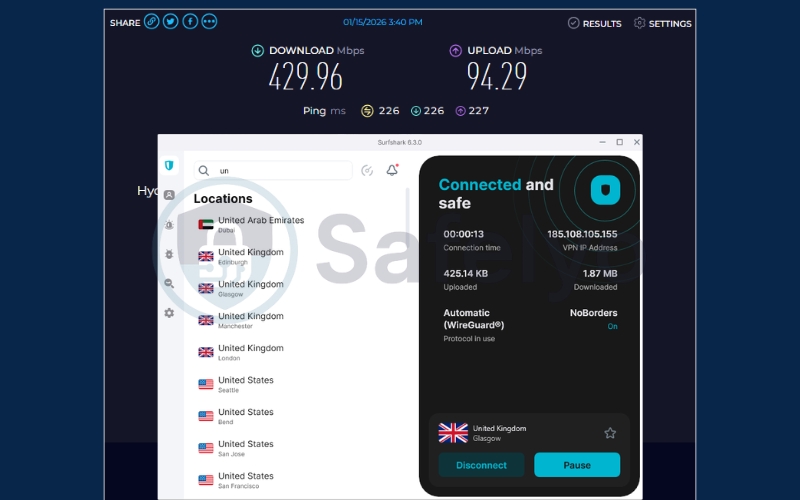
Despite its affordable price, Surfshark utilizes the blazing-fast WireGuard protocol to maintain crisp 4K streams. We consistently recorded download speeds of over 429 Mbps during our 2026 UK server performance tests.
While it is a budget-friendly option, it handles high-bandwidth tasks with ease. We experienced very little speed loss even when multiple family members were streaming different British shows simultaneously on the same account.
Unlimited connections for households
The standout feature is Surfshark’s unlimited simultaneous connections policy. This allows your entire family to watch UK programs on their respective devices at the same time without worrying about restrictive login limits.
You can effectively share your account with roommates or family members, making the cost-per-user incredibly low while ensuring everyone has access to the content they want.
IP Rotator technology
To combat aggressive blacklisting, Surfshark includes a smart feature called the IP Rotator. When enabled, the app periodically changes your assigned UK IP address without disconnecting your active VPN session.
This constant shifting frequently confuses the BBC’s tracking mechanisms. By moving you to a fresh IP address regularly, it significantly reduces the chances of experiencing a sudden block in the middle of a show.
| Pros | Cons |
|---|---|
| Unbeatable budget pricing for long-term plans | Initial connection times can occasionally be slow |
| Unlimited simultaneous connections for families | Apple router manual setup is slightly complex |
| IP Rotator actively reduces broadcasting firewalls | |
| CleanWeb ad blocker included at no extra cost |
2.4. Proton VPN: Best privacy-focused choice (with stealth routing)
Developed by Swiss scientists with a focus on absolute privacy, Proton VPN offers a secure and transparent pathway to British television. Its highly optimized servers in the UK are specifically tuned for data-intensive video tasks and unblocking capabilities.
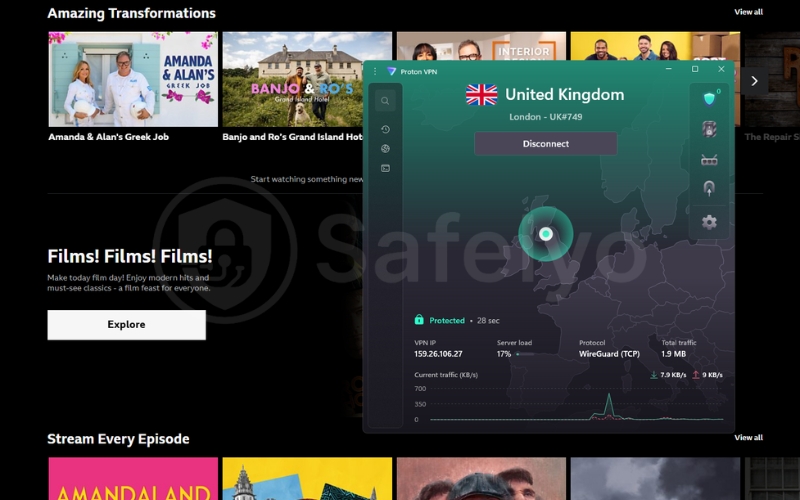
Examine the technical specs that distinguish Proton VPN as a secure streaming choice.
| Specs & Features | Details |
|---|---|
| Starting price | ~$2.99/mo (for 2-year Plus plans) |
| UK Servers | 100+ highly optimized servers |
| Speed Protocol | WireGuard & Stealth |
| Smart DNS | Not natively supported |
| Simultaneous devices | 10 connections |
| Money-back guarantee | 30 days (prorated) |
VPN Accelerator speed boost
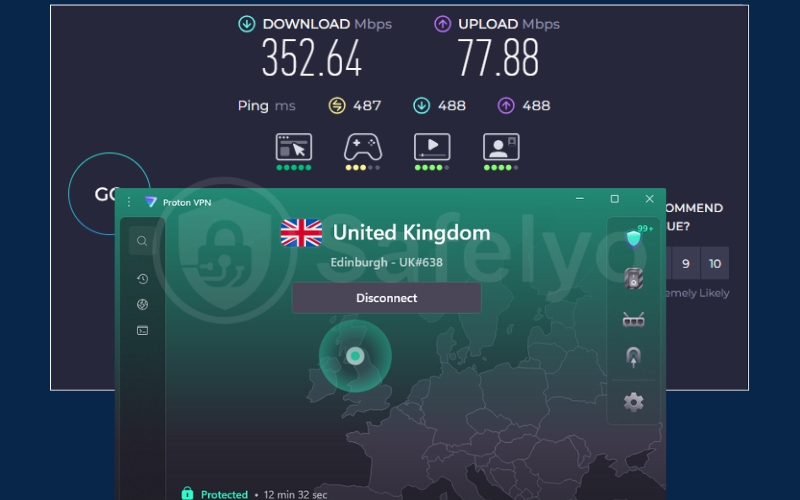
Developed by Swiss scientists, Proton VPN includes a proprietary VPN Accelerator technology. In our tests, this feature boosted long-distance streaming speeds by up to 400%, making it ideal for users in Asia or America.
Even if you are physically far from the UK, this technology helps minimize the lag and buffering typically associated with intercontinental connections. Your 4K video will generally load at the same speed as a local connection.
Stealth protocol & Swiss privacy
If you are connecting from a highly restricted network, their Stealth protocol is designed to bypass advanced firewalls. It scrambles your data packets to look like normal traffic, helping you access the iPlayer even on strictly monitored Wi-Fi.
Being based in Switzerland gives you a massive advantage due to the country’s strong privacy laws. You can stream with confidence that your viewing history is protected by an open-source architecture and a strictly audited no-logs policy.
Secure Core routing
For users who prioritize deep anonymity, the Secure Core feature routes your connection through a privacy-friendly country (like Iceland) before it reaches the UK.
This double-hop architecture ensures that local ISPs cannot easily trace your final destination to the BBC servers. It is an excellent safeguard for users operating under heavy digital surveillance or data monitoring.
| Pros | Cons |
|---|---|
| Elite Swiss privacy laws and security audits | The free tier does not support streaming platforms |
| VPN Accelerator improves distant connection speeds | Slightly fewer UK servers than the top competitors |
| Secure Core routing enhances digital anonymity | Lacks a dedicated Smart DNS tool |
| Open-source apps verify their strict no-logs policy |
2.5. IPVanish: Best for multiple UK city locations
IPVanish distinguishes itself by managing a large portion of its own server hardware, providing a level of performance consistency many competitors struggle to match. It is an excellent choice for users who want granular control over their connection location.
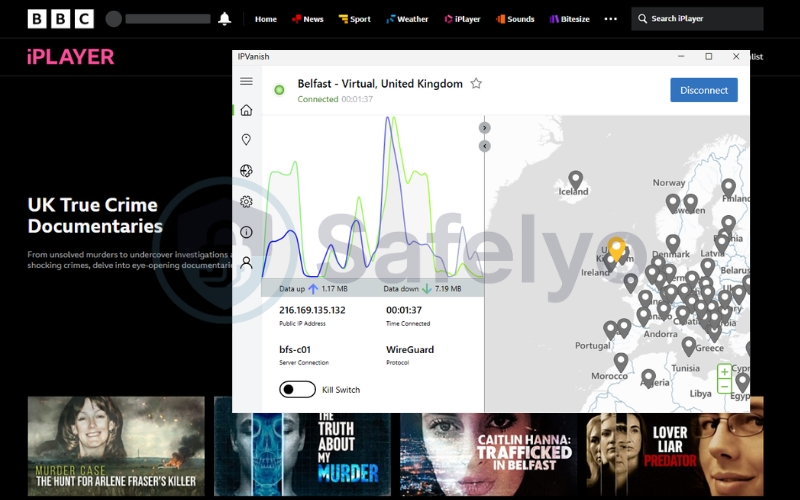
Below is a breakdown of IPVanish’s owned infrastructure and support features.
| Specs & Features | Details |
|---|---|
| Starting price | ~$2.19/mo (for 2-year Essential plans) |
| UK Servers | London, Manchester, Birmingham, Glasgow |
| Speed Protocol | WireGuard |
| Smart DNS | Not natively supported |
| Simultaneous devices | Unlimited connections |
| Money-back guarantee | 30 days |
Owned network speed advantage
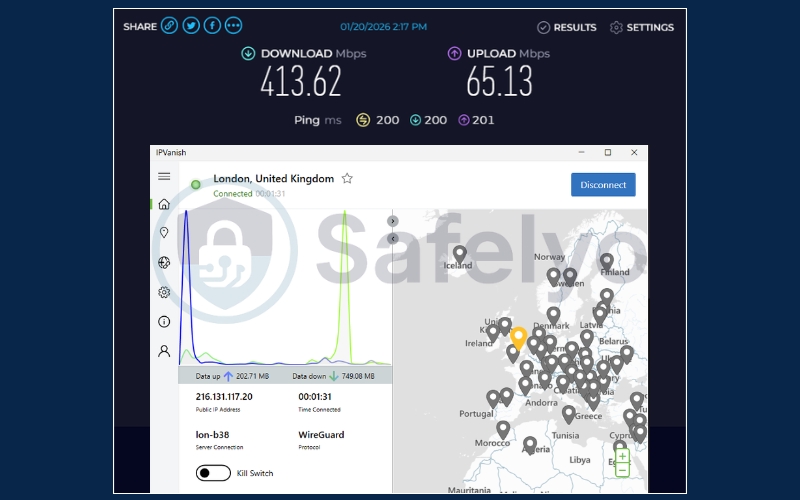
IPVanish stands out by owning and operating a large portion of its server hardware, rather than renting it. This Tier 1 network status gives them exceptional control over routing, resulting in highly stable streaming connections.
Because they manage the physical hardware, they can optimize for low latency during live events. This ensures your connection rarely suffers from bandwidth throttling during crucial live football matches or tennis tournaments.
City-level server selection
The app allows you to manually select specific UK cities like London, Manchester, or Glasgow. This flexibility is highly beneficial for avoiding crowded servers during peak viewing hours when specific city nodes may become congested.
If the BBC iPlayer blacklists one specific city block, you can quickly hop to another regional server to resume your show. Like Surfshark, it also offers unlimited device connections to protect your whole home.
24/7 direct support
IPVanish is one of the few providers to offer live phone support for its subscribers, which adds significant trust and authority. This is far more efficient than waiting for an automated chatbot or an email reply.
If you encounter a connection error right before your show starts, you can call their team for immediate assistance. An expert will often guide you to a working UK server city so you don’t miss any of the action.
| Pros | Cons |
|---|---|
| Owns and operates much of their server hardware | The app interface can feel cluttered for absolute beginners |
| Multiple UK city choices to help evade IP blacklists | Does not offer a Smart DNS feature for Apple TV |
| Rare live phone support for quick troubleshooting | |
| Detailed server load metrics for optimal selection |
3. Do free VPNs work with BBC iPlayer?
While a free solution may be tempting, our tracking shows that most free options struggle to maintain access to the platform. The BBC’s anti-proxy filters are designed to identify and blacklist low-budget IP ranges almost immediately.
In the majority of cases, the answer is no. Free providers typically lack the financial resources to constantly rotate their UK IP addresses, which usually results in the persistent Error 02066 or a total failure to load the video player.
- The data cap problem
Even if you find a trustworthy free VPN that occasionally connects, you will likely hit a strict data wall very quickly. Reputable services like Windscribe or PrivadoVPN often limit their free tiers to a maximum of 10GB per month.
Streaming high-definition or 4K video consumes between 3GB and 7GB of data per hour. This means your entire monthly allowance would likely expire after watching just two episodes of a drama series, leaving you abruptly disconnected mid-season.
- The danger of “100% free” VPNs
We strongly advise against using apps that advertise “unlimited and free” services on mobile app stores. Services such as Hola VPN or Urban VPN often come with significant hidden risks that compromise your digital safety.
These specific providers often operate by selling your browsing data to third-party advertisers or using your device as a node in a peer-to-peer network. Using them generally leads to unstable speeds and potentially exposes your home network to other unknown users.
- The “Safelyo Hack”: How to get a premium BBC iPlayer VPN for free
There is a much safer way to enjoy a premium unblocking experience without a long-term financial commitment. You can effectively use top-tier services as a “free trial” by leveraging their generous refund policies.
Simply register for a premium provider like NordVPN or Surfshark and complete your binge-watching session with unlimited bandwidth and 4K speeds. As long as you contact their support team to request a refund within the 30-day money-back guarantee window, you can reclaim your full payment legally and safely.
4. How to watch BBC iPlayer outside the UK (Step-by-step)
Simply connecting to a UK server is not enough to start streaming; you must first create a valid account with the BBC. This process involves navigating two specific registration hurdles: the Postcode Requirement and the TV License Declaration. Follow these simple steps to set up your account successfully.
Step 1: Download a premium VPN and connect to a UK server
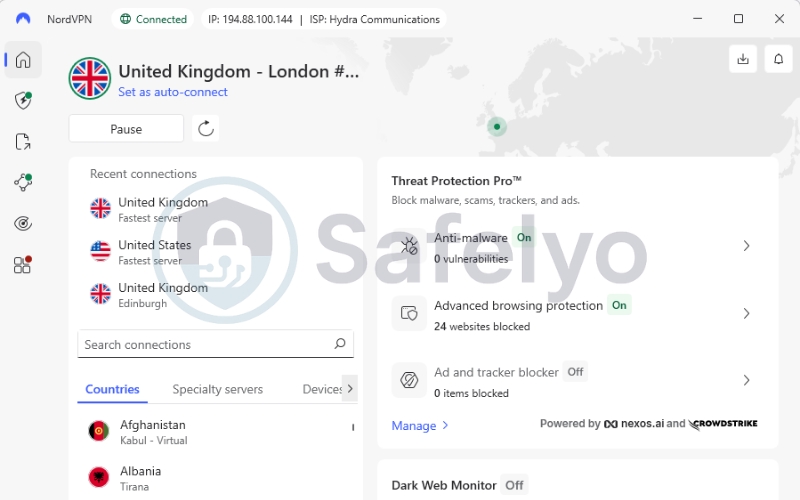
Choose a reliable provider from our list and install the application. Open the app, log in, and connect to a server located in the United Kingdom. We recommend selecting a major city like London or Manchester for the best performance and stability.
Step 2: Go to the BBC iPlayer website and register an account
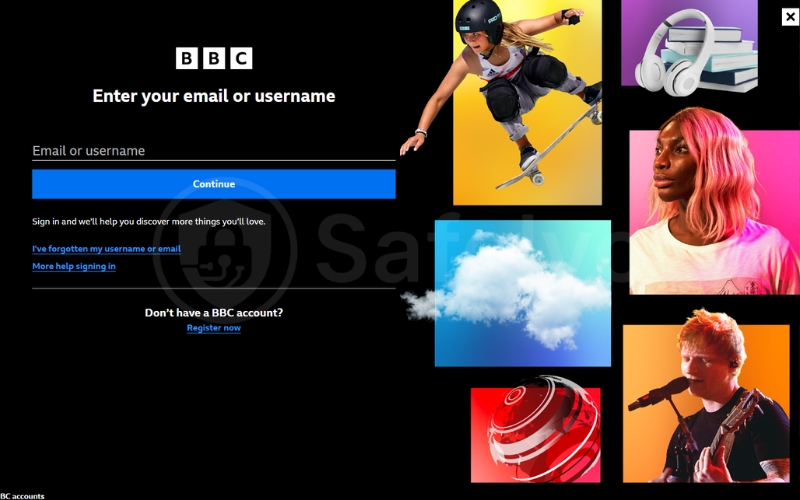
With your VPN active, open your web browser and navigate to the official BBC iPlayer website. Click the “Sign in” button, then select “Register now.” You will be asked to enter your date of birth, a valid email address, and a strong password.
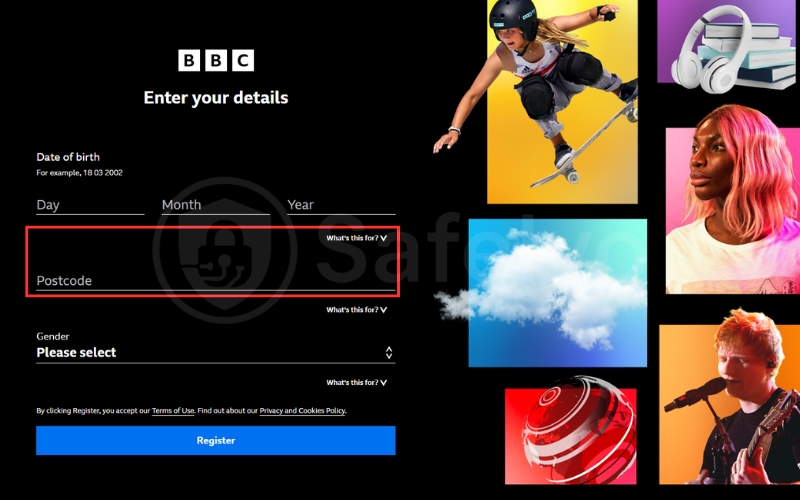
Step 3: The Postcode requirement (The Postcode Hack)
The registration form will require you to enter a valid UK postcode to complete the setup. The system does not verify if you actually live there; it only checks if the format is correct. You can use any legitimate public postcode to proceed.
- London: E1 6AN (a well-known public address).
- Manchester: M1 1AD.
- Glasgow: G1 1XQ.
Step 4: The “Do you have a TV License?” question
After entering your details, a final prompt will ask if you possess a valid UK TV License. While this is a legal requirement for UK residents, the BBC does not currently have a system to cross-verify your response.
To proceed, simply click “I have a TV Licence. Watch now.” This will complete your registration and grant you full access to the streaming library.
5. Troubleshooting: BBC iPlayer VPN not working?
The dreaded “BBC iPlayer only works in the UK. Sorry, it’s due to a rights issue” message, often accompanied by error code 02066, is the most common roadblock viewers face. This error means the platform has successfully identified your VPN’s IP address and blacklisted it.
When this happens, do not panic. Follow these four proven fixes our team uses to bypass the block and resume streaming almost instantly.
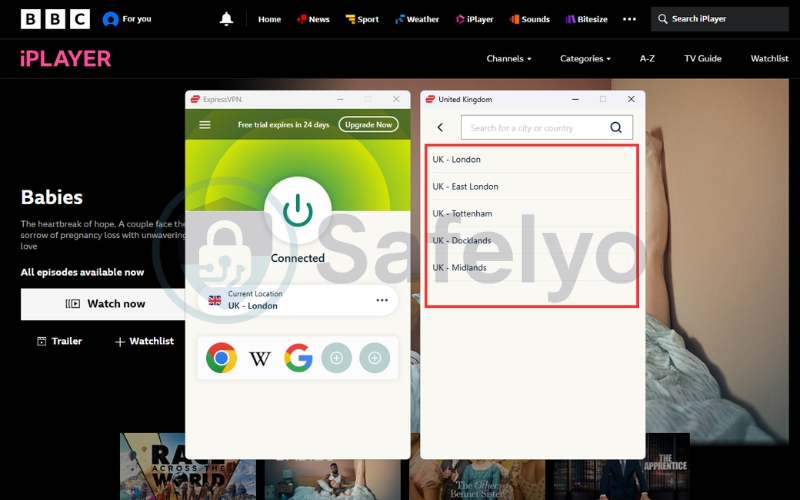
- Fix 1: Switch to a different UK server city
If a server in London gets flagged, disconnect and immediately reconnect to a server in a different UK city, such as Manchester or Glasgow. This simple switch assigns you a fresh, unblocked IP address from a different subnet, which is the fastest way to resolve the issue.
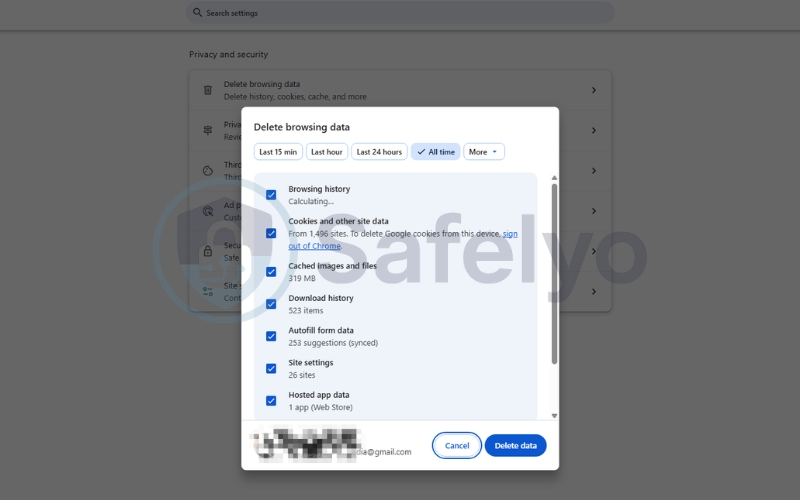
- Fix 2: Clear your browser cookies and cache
Your web browser often stores old location data in its cache that conflicts with your new VPN IP address. Press Ctrl + Shift + Delete (or Cmd + Shift + Delete on Mac) to open the “Clear browsing data” menu. Be sure to clear your cookies and cached images for “All time” to force the iPlayer website to re-verify your new location.
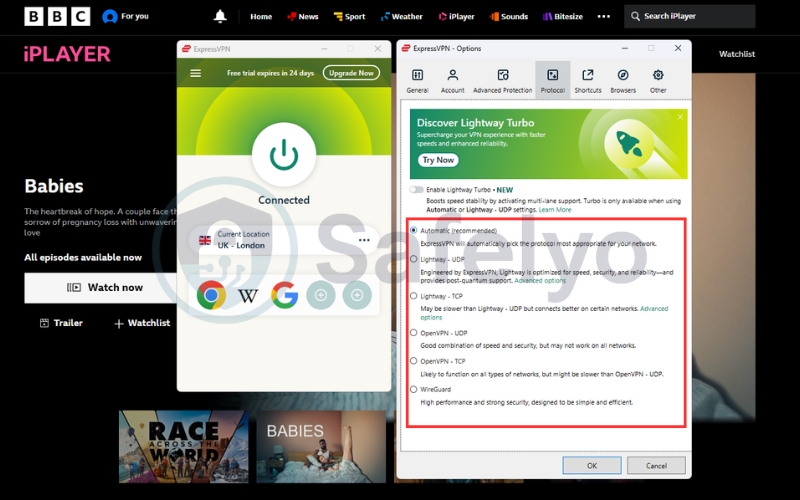
- Fix 3: Change your VPN protocol
Sometimes, a network firewall will specifically block certain types of VPN traffic. To get around this, go into your VPN app’s settings and change the protocol from “Automatic” or “WireGuard” to OpenVPN (TCP). While slightly slower, this protocol is better at disguising traffic and can often slip past deep packet inspection.
- Fix 4: Watch on a browser instead of the mobile app
The native BBC mobile app may attempt to verify your location using your phone’s built-in GPS hardware, which a VPN cannot hide. If the app is blocked, try accessing iPlayer through your phone’s web browser (like Chrome or Safari). The browser version relies more heavily on IP address checks, making it easier to trick.
6. VPNs that currently DO NOT work with BBC iPlayer
In our rigorous 2026 testing, we found that many well-known providers, even some with large server networks, consistently failed to bypass the BBC’s advanced geo-blocking filters. This transparency is crucial; we want to save you time and money by highlighting services that are not currently reliable for this specific streaming platform.
The providers listed below frequently triggered the dreaded Error 02066 during our tests, even after we attempted multiple server swaps and protocol changes.
- CyberGhost: Despite having dedicated streaming servers, we found that most of its UK IP addresses were already identified and blacklisted by the BBC, resulting in persistent connection failures.
- Private Internet Access (PIA): While PIA is an excellent privacy tool, its large pool of shared IPs appears to be easily flagged by the BBC’s detection system. We experienced inconsistent success, with access often dropping after just a few minutes of streaming.
Disclaimer: The VPN landscape changes rapidly. A service that is blocked today might work tomorrow if they refresh their server infrastructure. However, as of April 2026, we do not recommend these providers specifically for BBC iPlayer access.
7. Frequently asked questions (FAQs)
Is it legal to watch BBC iPlayer with a VPN?
Yes, using a VPN is legal in most countries. While bypassing geo-restrictions technically violates the BBC’s Terms of Service, the platform focuses its enforcement on blocking VPN IP addresses rather than taking action against individual international viewers.
Why does BBC iPlayer block VPNs?
The BBC is funded by UK taxpayers and is legally bound by strict content licensing agreements. These deals restrict its broadcasts to within the United Kingdom’s borders. To comply, the platform must actively block any connections that appear to originate from outside the UK.
Do I need a TV Licence to watch BBC iPlayer abroad?
While the registration process requires you to confirm that you have a valid UK TV License, the platform does not currently have a system to verify this claim for international viewers. You simply need to click “I have a TV Licence” to proceed.
Can I watch live sports on BBC iPlayer using a VPN?
Yes, absolutely. A high-quality VPN with fast UK servers is perfect for streaming live events like football matches, Wimbledon, or Formula 1 in high definition. The low latency of protocols like NordLynx and Lightway ensures you can watch the action in real-time without buffering or lag.
Does BBC iPlayer work on Firestick or Apple TV with a VPN?
Yes, but you need a specific setup. Since these devices do not support native VPN apps, you must use a provider that offers a Smart DNS feature (like ExpressVPN’s MediaStreamer or NordVPN’s SmartPlay) or install the VPN directly on your Wi-Fi router.
Does BBC iPlayer detect Smart DNS proxies?
Sometimes. While Smart DNS is a great tool for unblocking content on devices like Apple TV, the BBC has become more effective at identifying and blocking these services. We have found that a full VPN with obfuscation technology is generally a more reliable long-term solution.
8. Conclusion
Finding the Best VPN for BBC iPlayer is the only reliable strategy to bypass strict geographic blocks and enjoy British television from anywhere. Premium services with dense UK server networks ensure a stable, buffer-free experience that free alternatives simply cannot provide against the BBC iPlayer’s advanced detection filters.
Your digital freedom should never be limited by geographic borders or aggressive network blocks. To compare more top-tier providers or find the perfect tool for your specific security needs, explore our comprehensive expert reviews in the Best VPN category at Safelyo to take full control of your digital privacy today.