If you’re using or considering the Norton 360 security suite, a key question often comes up: Does Norton 360 include VPN? In the landscape of digital security, Norton is renowned for its robust malware protection and cybersecurity tools, but adding a VPN is crucial for complete protection.
The short answer is a definitive yes. Most modern Norton 360 plans come bundled with an integrated service called Norton Secure VPN. But that simple ‘yes’ leads to a much more important question: Is this included VPN actually any good? Can it truly stand in for a dedicated, standalone VPN service?
In this guide, we won’t just confirm the existence of Norton Secure VPN. We’ll show you exactly how to activate and use it, analyze its key features, and provide an honest assessment of its strengths and weaknesses. Our goal is to help you decide if this convenient, bundled tool is sufficient for your privacy needs. Let’s dive deeper with me into the VPN hidden inside Norton 360.
Seeking a quick answer about the VPN feature within Norton 360? Here’s the bottom line on what it includes, how good it is, and whether it’s the right choice for you.
- The direct answer is yes. Most Norton 360 plans (Standard, Deluxe, etc.) include the Norton Secure VPN at no extra cost. It is conveniently integrated directly into the main Norton application dashboard.
- It is safe for basic protection. The included VPN is a secure tool for everyday use. It features strong AES-256 encryption and a no-logs policy, which are the two most critical features for protecting your data on public Wi-Fi.
- It’s a limited, not a full-featured, VPN. This is the biggest trade-off. It lacks advanced features like split tunneling, is unreliable for unblocking streaming services like Netflix, and completely blocks torrenting (P2P) traffic.
- The verdict: It’s a great bonus, not a replacement. If you already have Norton 360, it’s a fantastic, convenient tool for basic security. However, if your primary need is a powerful VPN for streaming, torrenting, or advanced features, you should invest in a dedicated, standalone service.
1. Does Norton 360 include VPN?
Let’s clear this up right away. For the vast majority of users, if you have a current subscription to a Norton 360 plan, you almost certainly have access to their VPN.
1.1. Which Norton 360 plans have a VPN?
Nearly all modern Norton 360 plans come with Norton Secure VPN included. This usually starts with the entry-level “Norton 360 Standard” plan and extends through the “Deluxe” and “Premium” tiers. Generally, the higher the price of the plan, the more device licenses you receive for both the antivirus and the VPN. These subscription options feature competitive pricing as they bundle the VPN with essential tools like parental controls and password management.
It is worth noting, however, that some older, more basic packages (like the legacy “Norton AntiVirus Plus”) might not include the VPN feature. If you’re on an older plan, it’s always best to check your subscription details in your Norton account.
1.2. What is Norton Secure VPN?
Norton Secure VPN is Norton’s own Virtual Private Network service. Its primary purpose is to do what all VPNs do: encrypt your internet connection, hide your real IP address, and protect your data from snoopers, especially when you’re using unsecured public Wi-Fi networks. This added VPN layer effectively boosts your online anonymity and ensures robust Wi-Fi security wherever you go.
From my perspective as a security analyst, the most important thing to understand is that Norton Secure VPN is a bundled feature, not a flagship, standalone product. It was designed as a valuable addition to a larger security suite. This means its focus is on providing core safety protection. It may lack the extensive, specialized features found in a dedicated VPN service. Think of it as a strong supporting character, not the main hero.
2. How to use the VPN in your Norton 360 app
One of the best things about Norton’s VPN is its convenience. Since it’s already part of the security suite you have installed, turning it on is just a few clicks away. Here’s how to find and activate it.
Before installing the VPN, check the device compatibility to ensure you can maximize your available simultaneous connections across all your hardware.
2.1. On desktop (Windows & Mac)
The process on a computer is incredibly straightforward, as the VPN is integrated directly into the main Norton dashboard.
- Open your “My Norton” application dashboard. This is the main window that shows your security status.
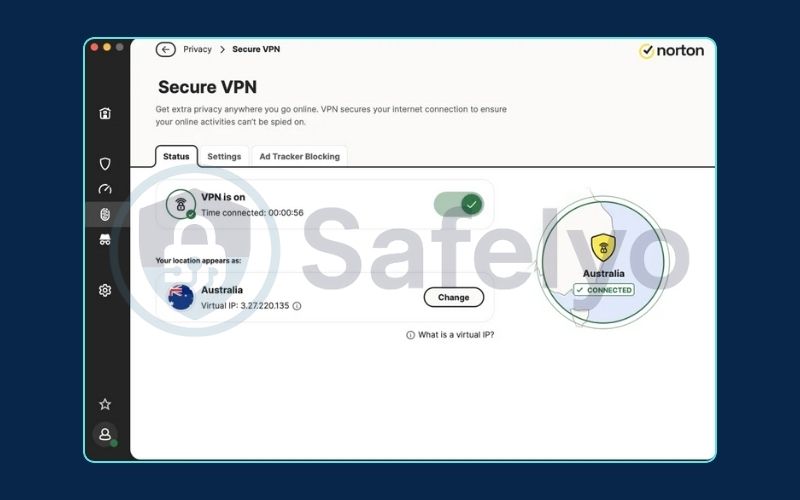
- On the main panel, you will see a section labeled “Secure VPN” next to other features like “Device Security.”
- Simply click the “Turn On” button right next to it. The status will change from “Off” to “On,” and the icon will light up, indicating your connection is now encrypted.
- The first time you do this, your operating system may ask you to approve the installation of a VPN profile. You must click “Allow” or “OK” for it to work.
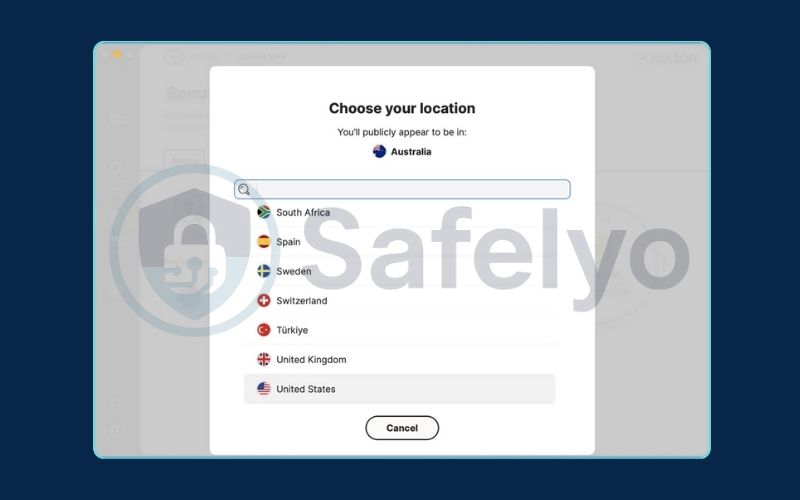
- To change your virtual location, click on the “Secure VPN” tab. You’ll see an option for “VPN Region” where you can select a specific country from the list.
2.2. On mobile (Android & iOS)
Setting up the VPN on your phone is just as easy, though it’s done through the dedicated Norton 360 mobile app.
- First, make sure you have the Norton 360 app installed from the Apple App Store or Google Play Store.
- Open the app and sign in with your Norton account credentials.
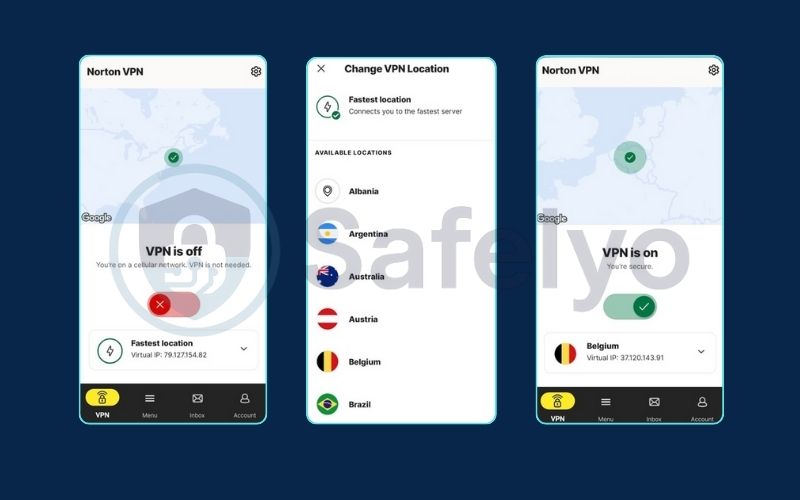
- On the main dashboard, look for the “Privacy” section.
- Inside the Privacy section, you will see an option for “VPN.”
- Simply toggle the switch to the “On” position. As with the desktop version, your phone will ask you to approve the VPN configuration on your first use. Tap “Allow” to complete the setup. Your mobile data is now secure.
3. Norton Secure VPN review: Is it any good?
So, the VPN is included and easy to use. But the million-dollar question remains: is it actually a good VPN?
To answer this, I evaluated Norton Secure VPN not just as a free add-on. I assessed it as a standalone security tool and compared its features and performance to what I’d expect from a dedicated service.
3.1. The good: What we like about Norton’s VPN
For a bundled product, Norton gets the most important fundamentals right.
- Strong Security Basics: This is a huge plus. The VPN uses AES encryption with a 256-bit key length, which is the industry gold standard. More importantly, Norton has a genuine no-logs policy, meaning they don’t track or store your browsing activity. From a core security and privacy perspective, these are the two most critical boxes to check. Users concerned about safety will appreciate that this VPN maintains a strict no logs policy regarding your data.
- Seamless Integration and Ease of Use: Its biggest advantage is convenience. Being built directly into the Norton 360 dashboard makes it incredibly simple. There’s no separate app to install on your desktop and no complicated settings. It’s truly a one-click solution to turn on basic protection.
- Decent for Everyday Privacy: If your main goal is to protect your connection on public Wi-Fi at a coffee shop, airport, or hotel, the VPN does this job perfectly. It effectively hides your activity from local snoopers.
3.2. The bad: Where it falls short compared to standalone VPNs
When you compare Norton’s VPN to a specialized provider like NordVPN or ExpressVPN, the limitations become very clear. Standalone VPN services often include a dedicated ad blocker and a customizable kill switch, unlike the basic VPN found here.
3.3. The verdict
So, is Norton VPN good? It’s a good “bonus feature” for an existing Norton360 subscription. It provides a valuable, basic layer of security that is far better than having no VPN at all. However, it simply cannot compete on features, server system size, or performance with any of the leading dedicated VPN services. Dedicated VPN providers also excel at bypassing geo restrictions and usually offer superior live customer support.
Here’s a quick comparison of the key differences:
| Feature | Norton Secure VPN | A Top Standalone VPN (e.g., NordVPN) |
| Primary Goal | A bonus security feature | A dedicated, full-featured privacy tool |
| Advanced Features | Very basic (no split tunneling on desktop) | Extensive (split tunneling, kill switch, specialty servers) |
| Streaming | Unreliable | Optimized for unblocking |
| Torrenting (P2P) | Not allowed | Fully supported on dedicated servers |
| Server Network | Limited | Vast (thousands more servers in more countries) |
4. Who should use the Norton 360 VPN?
Based on our review, the decision of whether to use Norton’s included VPN comes down to your individual needs and expectations. It’s a great fit for some users and completely inadequate for others.
Let me break down the ideal user profiles for each choice.
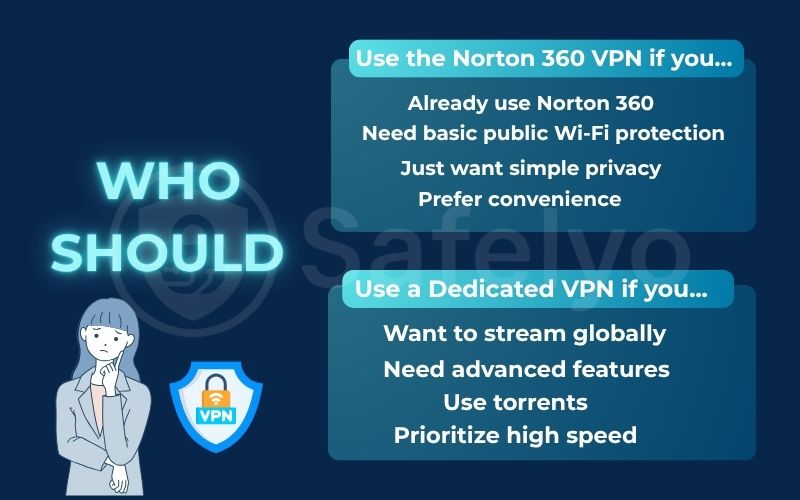
You should use the included Norton 360 VPN if:
- You’re already a happy Norton 360 customer. If you’re paying for the antivirus suite anyway, this VPN is a fantastic, no-cost bonus that you should absolutely be using.
- Your main goal is basic public Wi-Fi protection. You just want a simple, one-click way to encrypt your connection at the coffee shop, airport, or hotel. For this, it’s perfect.
- You only need to hide your IP for general web browsing. You aren’t interested in gaming, torrenting, or other specialized activities.
- You value convenience above all else. You prioritize a seamless user experience and want a set-and-forget VPN solution without complex settings. You love that it’s all in one app and don’t want to manage another subscription or piece of software.
You should consider a standalone, dedicated VPN if:
- Streaming is a priority. You want to reliably unblock different Netflix libraries, BBC iPlayer, Hulu, and other services from around the world. This is a primary reason I use a dedicated VPN.
- You need advanced security features. You rely on an ad blocker while browsing or need a fail-safe kill switch that some basic VPN versions might lack. You’re a power user who wants a more reliable kill switch, split tunneling to manage your app traffic, or the ability to choose your VPN protocol.
- You need the fastest speeds possible. Top-tier VPNs invest heavily in their server infrastructure, which usually results in better and more consistent speeds than bundled services.
- You download files via torrents. Since Norton blocks P2P traffic, you will need a torrent-friendly VPN service.
5. FAQs about Norton 360 VPN
Let’s answer a few final, common questions about the VPN that comes with Norton’s security suite.
Does Norton 360 include VPN?
Yes, almost all modern Norton 360 plans (Standard, Deluxe, Premium) include the Norton Secure VPN as a bundled feature at no extra cost. It is integrated directly into the “My Norton” dashboard.
Is Norton’s VPN safe to use?
Yes, for basic security needs, it is a safe choice. It uses strong AES-256 encryption and, crucially, has a no-logs policy, which means it doesn’t track your online activity. It’s a trustworthy option for protecting your data on public networks. Also, if you encounter issues like a failing kill switch, their customer support can assist with the VPN configuration.
Can I buy Norton Secure VPN separately?
Yes, Norton does offer its Secure VPN as a standalone product. However, its best value is typically found when it’s bundled with a Norton 360 plan, where it serves as a valuable addition to the overall security package.
Does Norton VPN slow down the internet?
All VPNs will cause some speed reduction due to the encoding process. In my tests, Norton’s speeds are generally decent for browsing but can be inconsistent and are often slower than the top-tier standalone VPNs, especially when connecting to distant servers.
6. Conclusion
So, let’s circle back to the original question: Does Norton 360 include a VPN? The answer is yes, and it’s a genuinely valuable and secure addition to an already strong security suite.
However, the key is to understand its role. Think of the Norton Secure VPN as a high-quality, lightweight jacket. It’s ideal for protecting you from a sudden chilly wind, such as an unsecured Wi-Fi network. Additionally, it’s incredibly convenient to have. But it’s not the heavy-duty, feature-packed winter coat you’d rely on in a blizzard.
At Safelyo, we believe in using the right tool for the right job. The Norton VPN is a fantastic bonus. However, if you’re seeking a primary VPN, don’t let the convenience of a bundle prevent you from obtaining the robust protection you need. Ready for that “heavy-duty winter coat” level of protection? Explore our expert rankings of the best standalone VPN services of 2025 to find the perfect provider for every possible need, and continue learning in our Privacy & Security Basics category.