Streaming services detect VPN IPs by checking incoming traffic against commercial hosting databases, tracking traffic volume on shared addresses, and spotting DNS location mismatches.
When looking at how streaming services detect VPN IPs, platforms focus on server infrastructure instead of decrypting private user traffic.
While VPN encryption shields your web activity from local internet providers, it cannot conceal the commercial data center running the exit server. This guide examines the primary detection layers platforms rely on and explains how to keep your streaming access unblocked.
Key takeaways:
- Datacenter IP blacklists automatically block connections coming from commercial hosting providers.
- Traffic spikes flag shared servers when dozens of users stream video from the same IP at once.
- DNS mismatches and browser proxy leaks can expose your real location even when your VPN is running.
- Desktop VPN apps with built-in leak protection and unflagged servers offer the most consistent streaming access.
1. How streaming services detect VPN IPs
Streaming platforms spot proxy connections using five main checks split between their servers and your device.
Video services like Netflix and Disney+ do not try to crack encrypted data packets. Instead, anti-proxy systems inspect network routing, traffic volume, and browser settings. These checks verify IP ownership, track active streams, and flag mismatches between your IP location and your device clock.
The breakdown below shows how streaming services spot proxy connections across their servers and user browsers:
| Inspection check | Where it runs | Trigger signals | Self-test capability | Primary fix |
|---|---|---|---|---|
| Datacenter IP check (ASN) | Streaming service server | Hosting and datacenter IP databases | Yes (public IP lookup tools) | Switch to a premium VPN server, use a residential proxy/VPN, or buy a dedicated/static IP |
| WebRTC leak | Web browser (client-side) | Direct connection requests exposing real ISP IP | Yes (WebRTC leak tests) | Use a desktop VPN app or turn off WebRTC |
| Shared IP traffic spikes | Streaming service server | Hundreds of streams playing from one single IP address | No (internal streaming metrics) | Switch to a less crowded server or use a dedicated IP |
| DNS mismatch | DNS resolver and network path | DNS server location does not match the VPN IP location | Yes (DNS leak tests) | Turn on VPN DNS leak protection or change DNS servers |
| Timezone mismatch | Browser and device operating system | Device clock or locale does not match the VPN IP location | Yes (system clock check) | Adjust device clock to match the VPN server time zone |
Each check works independently. Passing server-side checks will not help if a simple browser leak exposes your real location.
For a closer look at Netflix, see our guide on the Netflix VPN Ban.
2. IP blacklists and ASN classification
Streaming platforms identify datacenter connections right away by checking the Autonomous System Number (ASN) tied to the incoming IP address.
Every block of public IP addresses belongs to an ASN, which identifies the network operator managing that traffic. Commercial IP intelligence providers like MaxMind, Digital Element, and IPinfo maintain global databases that categorize every ASN as a home internet provider, a corporate network, or a web hosting facility.
Connecting through a commercial VPN or a personal cloud server on AWS or DigitalOcean routes traffic through a datacenter ASN. Streaming services subscribe to these threat intelligence feeds and automatically restrict hosting IP ranges. Regular subscribers stream entertainment from home internet connections, not commercial data centers.
Residential IPs route through standard home internet providers, but suspicious activity can still trigger a block.
The comparison below shows the key differences between datacenter and residential IPs:
| Evaluation criteria | Datacenter or hosting IP | Residential IP |
|---|---|---|
| ASN owner | Cloud hosting and server providers | Consumer internet service providers |
| Flagging speed | Flagged rapidly upon database ingestion | Flagged gradually based on behavioral signals |
| Primary detection database | MaxMind GeoIP Anonymous IP feeds | MaxMind Anonymous Plus and confidence scores |
| Vulnerability to automated blocking | High, flagged by default infrastructure rules | Moderate, blocked when shared usage triggers risk scores |
Residential proxies bypass automatic datacenter filters, but platforms still monitor connection behavior. If an IP shows unusual traffic surges or appears on public proxy lists, security databases assign it a higher risk score that blocks your stream.
3. WebRTC leaks: Why browsers expose your real IP
Even when a VPN routes traffic through a clean residential server, browser settings can still leak your real location. Understanding this risk comes down to how browsers handle real-time communication and why desktop VPN apps protect you better than browser extensions.
3.1. STUN requests and ICE candidate discovery
WebRTC can expose your real public IP when browser connections bypass lightweight proxy tunnels.
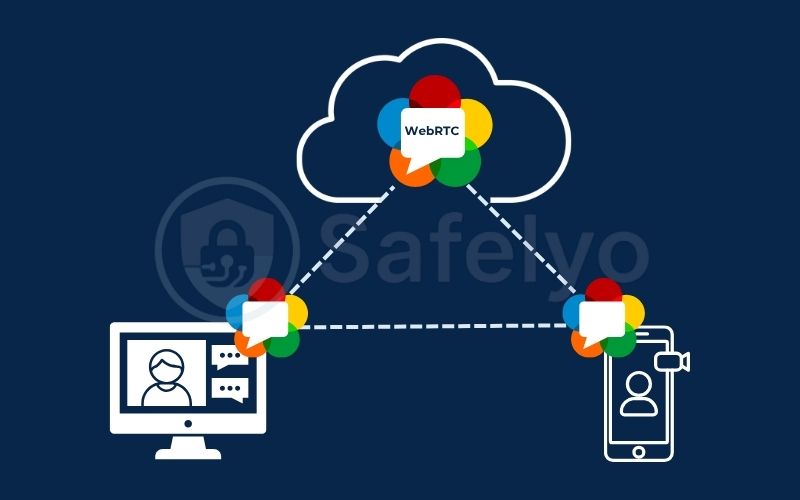
Web Real-Time Communication (WebRTC) is a built-in browser feature for voice, video, and direct file sharing. To connect devices behind home routers, WebRTC uses the STUN protocol to find your public IP address.
During connection setup, the browser sends quick UDP test packets to an external STUN server. This generates connection profiles called ICE candidates, which contain routing details including the real public IP assigned by your internet provider.
While streaming services rely mainly on server-side ASN checks, fraud-detection scripts and leak tests can easily read these ICE candidates. If you route browser traffic through a basic proxy, background STUN requests still travel through your physical network card, exposing your real public IP.
3.2. Browser extensions vs. system-level VPN clients
VPN browser extensions fail to stop WebRTC leaks because they only act as browser proxies instead of full-system network tunnels.
Most browser extensions only redirect standard web requests. Because extensions lack operating system access, they cannot control low-level UDP traffic, letting STUN queries bypass the proxy entirely.
Desktop VPN apps work at the operating system level by creating a virtual network adapter (TUN/TAP interface). This setup routes all computer traffic, including background UDP packets, directly through the encrypted tunnel.
Conflicting network routes or devices connected to multiple networks can still let STUN requests slip through your physical network card. High-quality desktop apps prevent this by using built-in leak shields that block unauthorized UDP requests.
4. Traffic density and IP clustering detection
Streaming platforms spot shared VPN servers by tracking sudden spikes in simultaneous video streams from a single IP address.
A typical household usually runs between one and four video streams at the same time across phones, TVs, and laptops. Streaming services know what normal household traffic looks like, monitoring active connections and viewing durations for typical accounts.
Commercial VPN services often place hundreds of users on the exact same public IP. When security systems detect dozens of accounts streaming different shows from that single address, the platform flags the IP as a shared server.
This clustering explains why a VPN server can work in the morning but fail in the evening. As viewer traffic surges during peak hours, the flood of simultaneous streams crosses platform thresholds and triggers an instant block.
5. DNS leaks, IPv6 leaks, and timezone mismatch signals
Streaming services spot proxy connections by checking for location mismatches between your VPN IP, your DNS server, and your device clock.
A DNS leak happens when your computer sends website lookup requests through your local internet provider instead of the VPN tunnel. If your streaming request comes from a US IP address, but your DNS queries resolve through a local provider in Vietnam, content networks spot the mismatch and block the video.
Your system clock provides another telltale signal. Web scripts can easily read device time zone settings using standard browser APIs like Intl.DateTimeFormat().resolvedOptions().timeZone.
If your IP address points to New York while your device clock is set to Indochina Time in Hanoi, the platform flags the conflict and blocks access.
Unmanaged IPv6 connections cause similar issues. Many VPNs only tunnel standard IPv4 traffic, leaving IPv6 requests unprotected. If a streaming site supports IPv6, your browser connects using your real home IPv6 address, giving away your true location.
6. How to test your VPN connection before streaming
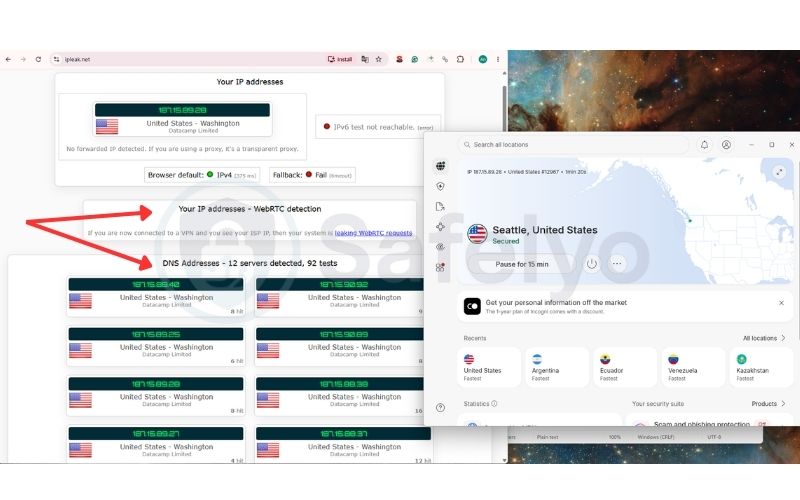
Before opening Netflix or Disney+, run a quick check on ipleak.net to make sure your browser is not leaking your real location.
Step-by-step test guide:
- Connect to your VPN: Open your desktop VPN app and choose a server in the country you want to watch (for example, a US server).
- Open the test site: Go to https://ipleak.net in your web browser.
- Check the WebRTC box: Look at the WebRTC Detection box. If you see your real home IP address or local provider listed here, your browser is leaking data.
- Check the DNS box: Look at the DNS Addresses section. Every country flag and IP address must match your VPN location. If you see your home country’s flag, your DNS is leaking.
If either test shows your real IP or home country, disconnect from the VPN. Turn on “Leak Protection” and the “Kill Switch” inside your desktop VPN app settings, reconnect, and refresh the test page.
7. How to prevent streaming services from detecting your VPN
Stopping streaming blocks comes down to using a desktop VPN application, connecting to clean IP addresses, and aligning your local device settings.
Follow these practical steps to keep your streaming connection unblocked:
- Use a desktop VPN app instead of browser extensions: Browser extensions only protect web tabs and often leak your real IP. A desktop app secures your entire device and stops background leaks.
- Try a dedicated or residential IP: Shared servers often get blocked when hundreds of people stream at the same time. A private or residential IP helps you avoid crowded server flags. Keep in mind that neither option offers a 100% guarantee against blocks.
- Turn off IPv6 and enable DNS protection: Uncheck IPv6 in your computer’s network settings to prevent leaks, and make sure DNS leak protection is turned on inside your VPN app.
- Match your device clock to your VPN: Set your computer or phone clock to match your VPN server’s time zone. Streaming sites flag connections when your device time does not match your IP location.
- Clear your browser cache and cookies: Delete your cookies and site data before opening your streaming site. This removes stored location markers from your previous visits.
- Block WebRTC in your browser: If you stream on a web browser, use an extension like WebRTC Control or uBlock Origin to stop IP leaks. (Note that this can affect web call apps like Google Meet).
In our testing, purchasing an expensive dedicated IP or residential VPN is rarely necessary unless you have extra budget and a specific requirement for a static address. Reputable VPNs like NordVPN, ExpressVPN, and Surfshark reliably unblock streaming platforms on their standard plans. When a proxy error appears, simply disconnecting and switching to another server in the same country usually resolves the block immediately.
8. FAQs
Can streaming services see my actual physical home address through a VPN?
No, streaming platforms cannot see your street address or apartment number through a VPN. They only see an estimated city or country using GeoIP databases, DNS queries, and WebRTC leak tests.
Does disabling WebRTC break regular video playback on Netflix or Disney+?
No, turning off WebRTC will not break regular streaming on Netflix or Disney+. Major platforms deliver video using standard HTTPS streaming protocols rather than WebRTC. However, disabling WebRTC can break browser communication tools like Google Meet, Discord, or Zoom web.
Why does a newly created personal VPN on a private VPS still get blocked?
Cloud providers like AWS, DigitalOcean, and Vultr register their network blocks under commercial datacenter ASNs. Streaming intelligence databases flag these entire hosting ranges automatically, blocking connections even if you are the sole user on that private server.
Will streaming platforms ban my user account if they detect a VPN?
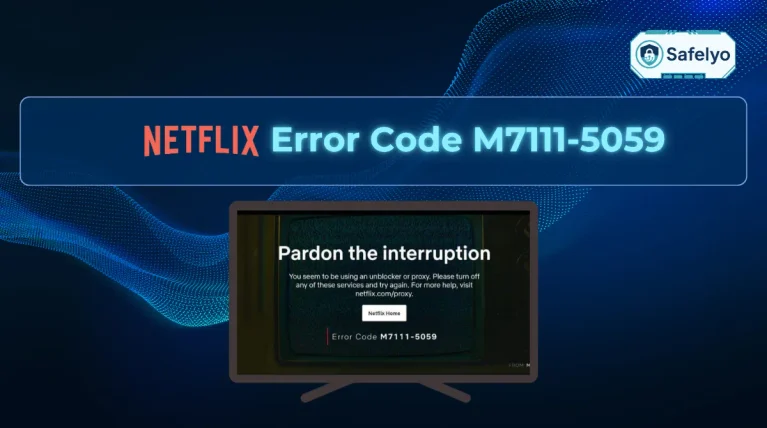
Streaming services rarely ban accounts for using a VPN. Instead, they simply block playback and display a proxy error message until you turn off the VPN or fix your connection leaks.
Do streaming services like Netflix use Deep Packet Inspection to detect VPNs?
Streaming services do not use Deep Packet Inspection (DPI) to spot VPN users. Internet providers and national firewalls use DPI to detect VPN handshakes across transit networks, while streaming platforms operate at the destination server.
Streaming platforms rely on datacenter ASN blacklists, shared traffic spikes, and DNS mismatches. Obfuscation features will not help if the streaming site has already blacklisted the server IP address.
9. Conclusion
Streaming platform defenses rely mainly on server-side IP blacklists and traffic tracking, backed by browser-level checks. While datacenter blacklists block commercial servers automatically, simple DNS leaks and unprotected browser traffic can disrupt even high-quality residential connections.
Knowing how streaming services detect VPN IPs makes one thing clear: encryption alone cannot guarantee smooth streaming access. You should run regular connection tests for DNS and WebRTC leaks instead of relying on marketing promises.
To discover more useful articles about VPNs, visit the VPN Guides section or the Safelyo homepage.