Finding a specific app or game only to discover it’s region-locked is incredibly frustrating. You need to know how to change country in Google Play Store to access content unavailable in your location, whether you have moved or just want to download a new release.
This expert guide from Safelyo details the exact steps to safely modify your digital location across different platforms. We will walk you through the complete configuration process for both your Android smartphone and your desktop PC. By following these instructions, you can effortlessly bypass regional blocks and download the restricted apps you need today.
-
Enable VPN connection
Turn on your VPN app and select a server in your target country. This matching IP address is required to unlock the country-switching menu.
-
Open Play Store app
Launch the Google Play Store on your Android device, then tap your profile icon in the top-right corner.
-
Access account settings
Go to Settings > General, then expand the Account and device preferences section to view your active profile.
-
Switch country profile
-
Add local payment method
-
Open Payments website
Go to the Google Payments center (pay.google.com) in your web browser.
-
Open settings menu
Click Settings in the left sidebar.
-
Find payments profile
Navigate to the Payments profile section.
-
Edit country region
Next to Country/Region, click the pencil icon to edit.
-
Create new profile
Set up a new payment profile for your desired country, enter a local address, and add a payment method issued in that region.
-
Remove old profile
1. Important rules before changing your Play Store region
Changing your Google Play region is not a simple, unrestricted switch. Google enforces strict policies to prevent frequent changes, ensuring fair content licensing and adherence to local market regulations. Understanding these rules is crucial to avoiding account issues.
- You can only change your country once per year
Google’s policy explicitly states that you are limited to one country change every 12 months. This means if you switch your region today, you must wait a full year before you can change it again, even if you move to a different country sooner.
- You need a local payment method
To complete an official country change, Google requires a valid credit or debit card issued by a bank in the new target country. Without a local payment method, the system will not allow you to finalize the region update, even if you intend only to download free apps.
- Your Google Play balance will not transfer
Any existing balance on your Google Play account, including gift cards or promotional credits, is tied to your current country. These funds will not transfer to the new region and cannot be used there. You must spend any remaining balance before initiating a country change.
2. How to change country in Google Play Store
This is the legitimate and permanent way to update your Google Play region. Our experience at Safelyo shows this method is ideal if you have genuinely moved to a new country and plan to reside there long-term, as it fully integrates your account with the new local store.
2.1. Change Play Store country on Android
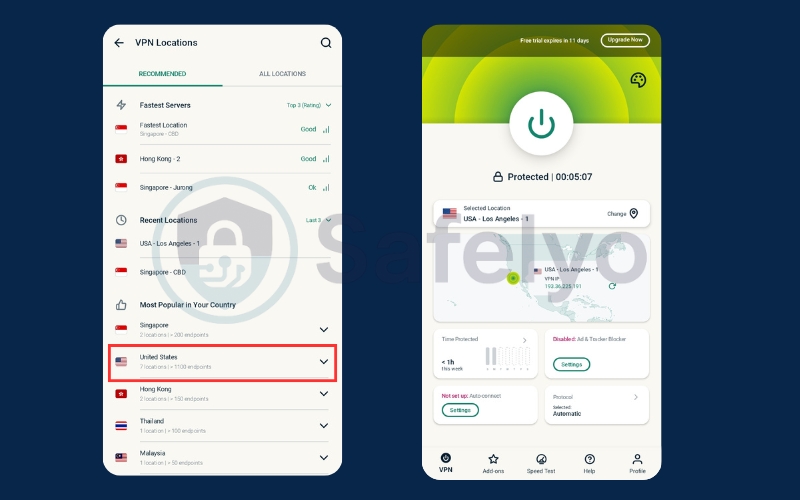
This process updates your region directly in the app. Because Google uses your device’s IP address to determine your location, you must connect to a VPN first if you haven’t physically traveled to the new country yet.
Step 1: Turn on your VPN app and select a server in your target country. This matching IP address is required to unlock the country-switching menu.
Step 2: Launch the Google Play Store on your Android device, then tap your profile icon located in the top-right corner.
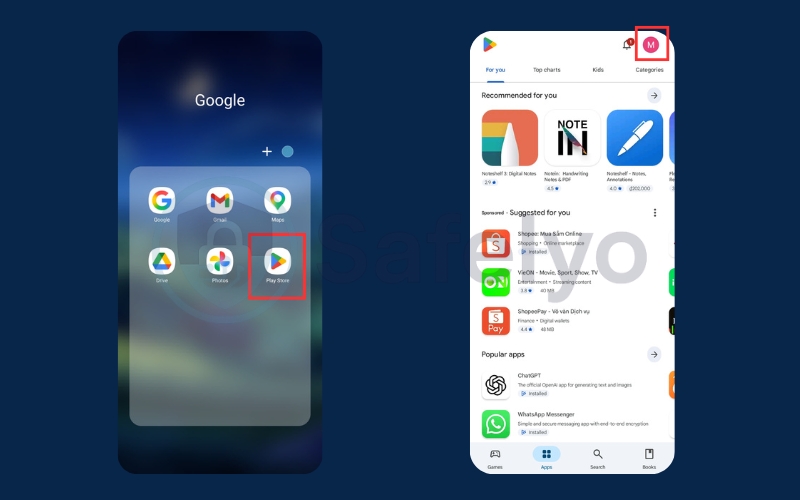
Step 3: Navigate to Settings > General, and expand the Account and device preferences section to view your active profile.
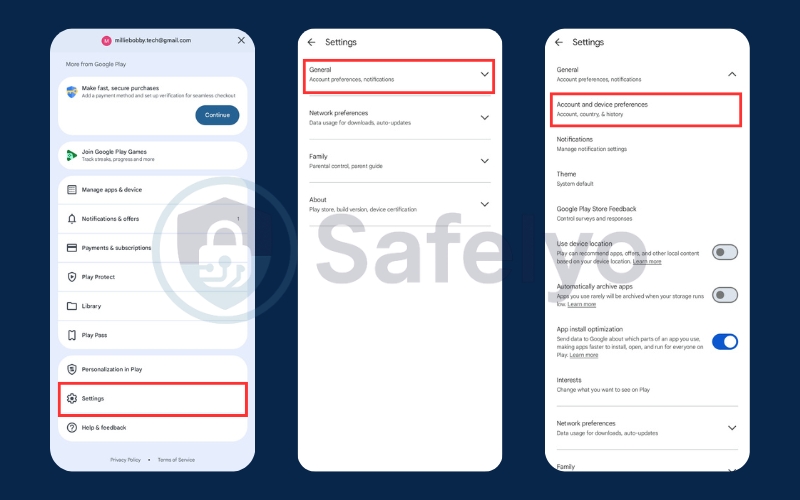
Step 4: Look under the Country and profiles tab. Thanks to your VPN, you will now see the option to switch to that new region. Tap it to proceed.
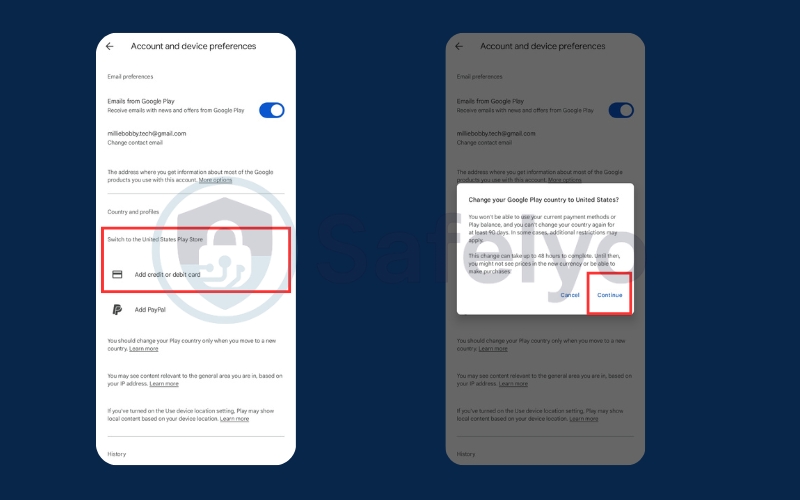
Step 5: Follow the on-screen prompts to enter a valid credit or debit card physically issued in that specific country.
Safelyo Insight: This is where most users get stuck. Google’s billing system is incredibly strict; your old domestic credit card will be automatically rejected here, even if your IP address matches the new region.
2.2. Change Play Store country on PC (Google Payments center)
You can also manage your payment profiles and country settings via a web browser on your computer. This method gives you a broader overview of your payment history with Google.
Step 1: Go to the Google Payments center website (pay.google.com) in your web browser.
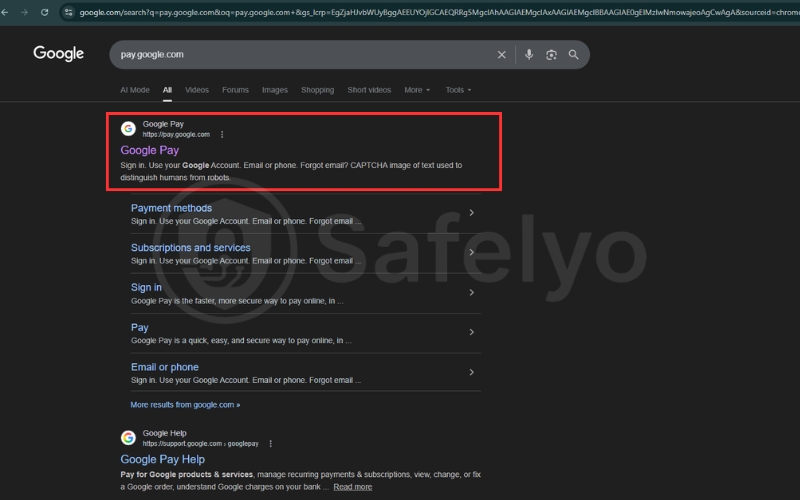
Step 2: Click Settings in the left sidebar.
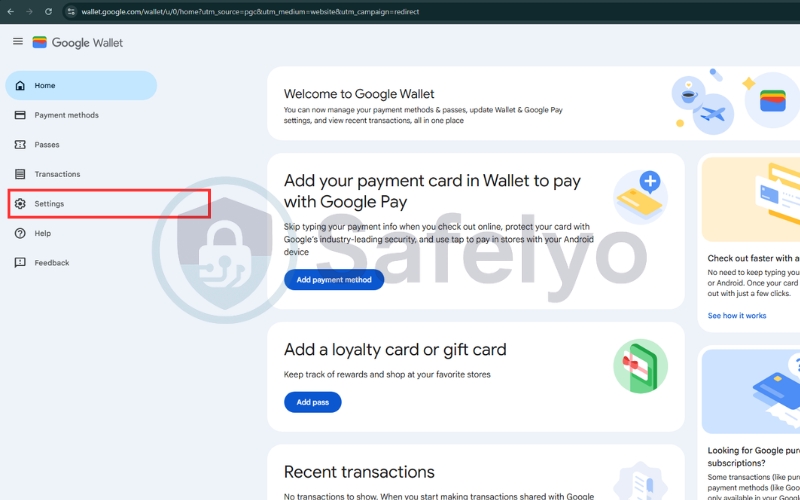
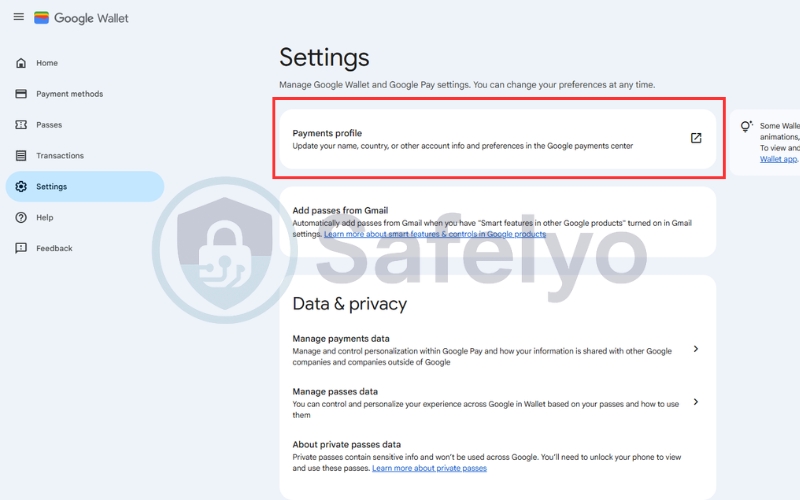
Step 3: Go to the Payments profile section
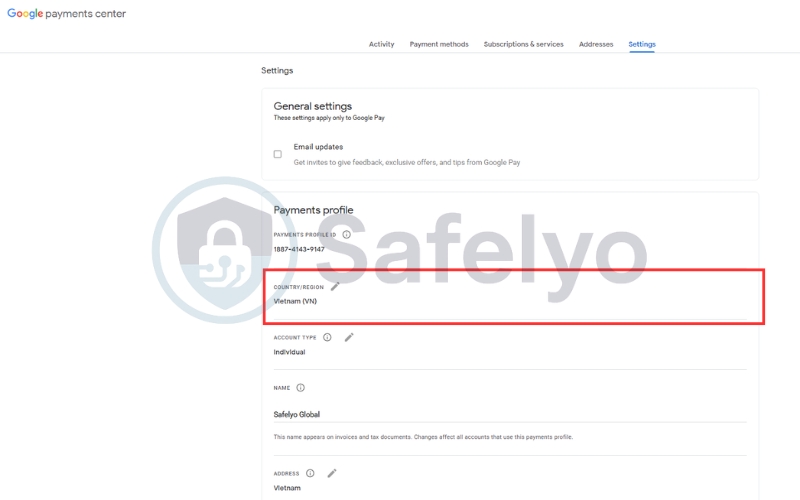
Step 4: Next to “Country/Region,” click the pencil icon to edit.
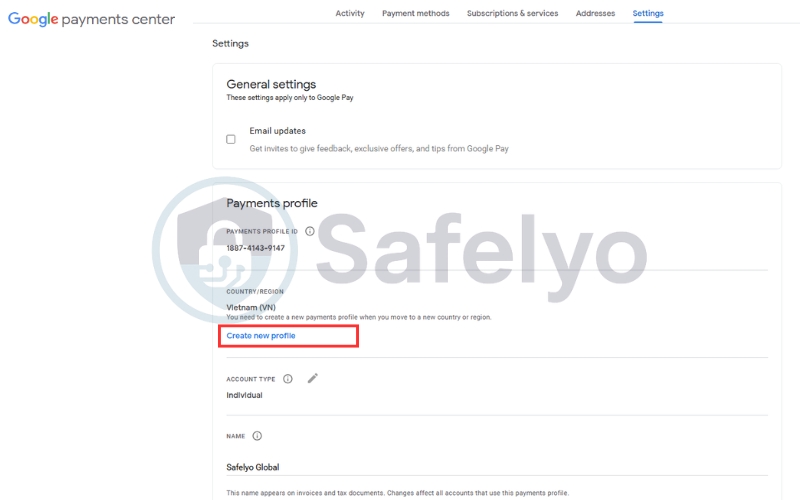
Step 5: Create a new payment profile for your desired country, enter a local address, and add a payment method issued in that region.
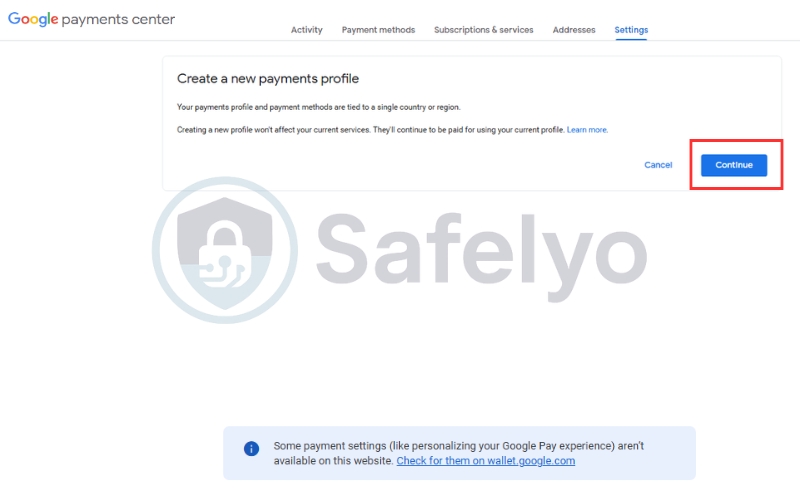
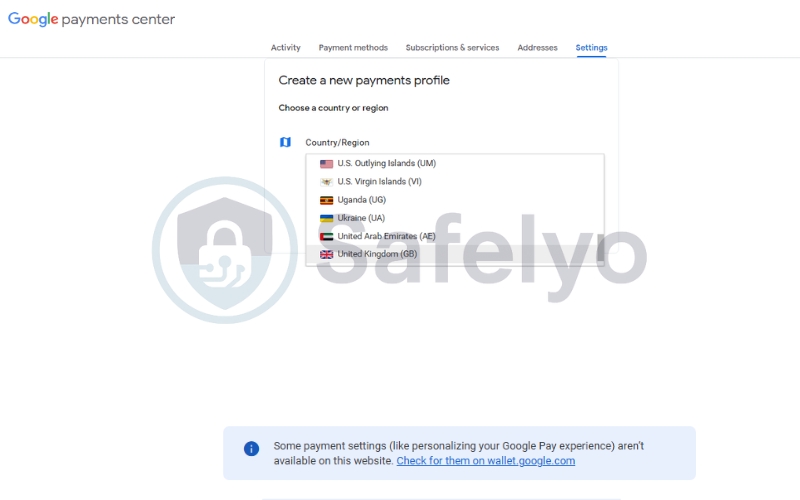
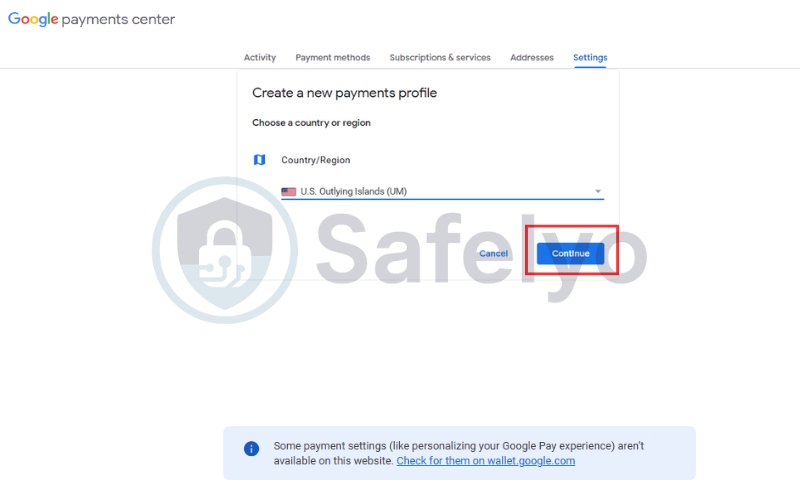
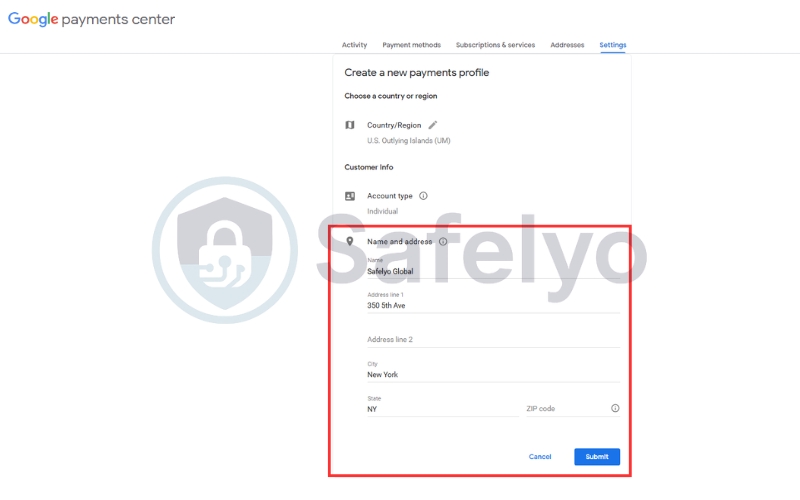
Step 6: Once the new profile is confirmed, delete your old payment profile.
Expert Note: After making the change, Google’s systems may take 24 – 48 hours to update your profile across all services fully. During this time, your Play Store may still display old content or experience errors.
4. Best VPNs for changing the Google Play Store country
Not all VPNs are equally effective at tricking Google Play’s robust geo-detection systems. Based on our 2026 tests, the best providers for this task combine a vast server network with stable connections and advanced obfuscation capabilities to consistently bypass restrictions.
4.1. NordVPN
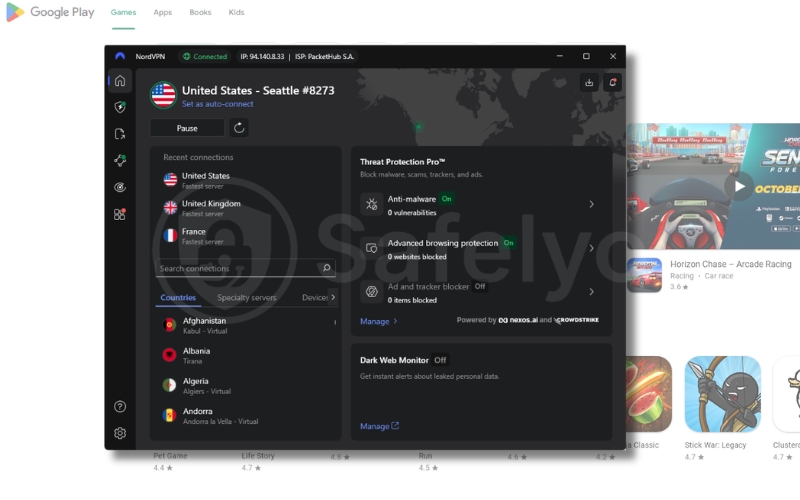
NordVPN is a top performer for this specific use case, offering a massive network of over 6,000 servers globally. Our Safelyo team frequently uses its diverse IP pool to test new Google Play regional content, confirming its high success rate.
Key advantages for Play Store access:
- Vast server network: Easily find unblocked IP addresses in virtually any target country for account creation.
- NordLynx protocol: Delivers fast and stable connections, crucial for Google’s security checks during account setup.
- Threat Protection: Blocks intrusive ads and trackers that could potentially compromise your new Google account privacy.
4.2. Surfshark
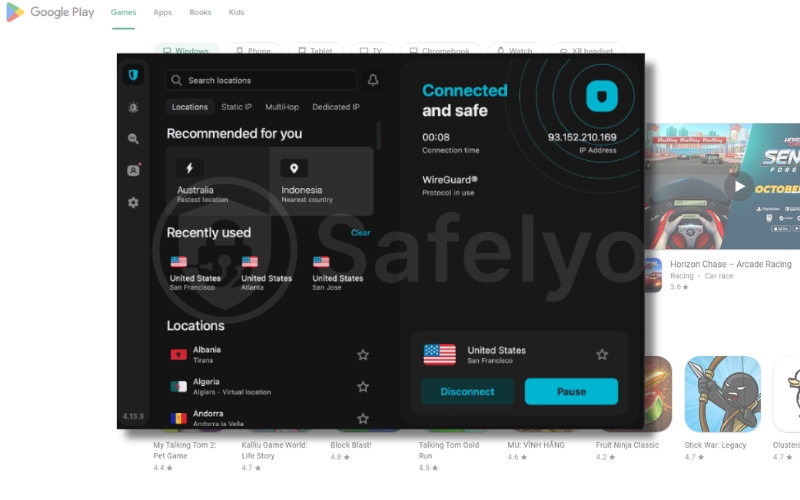
Surfshark offers exceptional value, especially if you need to access multiple app stores simultaneously on various devices. Its unlimited simultaneous connections policy is unmatched for multi-regional account testing.
Key advantages for Play Store access:
- Unlimited devices: Create multiple regional Google accounts across all your phones and tablets with one subscription.
- Camouflage Mode: Our tests confirm this obfuscation feature helps disguise VPN traffic, making it harder for Google to detect.
- Affordable pricing: A budget-friendly option that punches above its weight in bypassing geo-restrictions for app downloads.
4.3. ExpressVPN
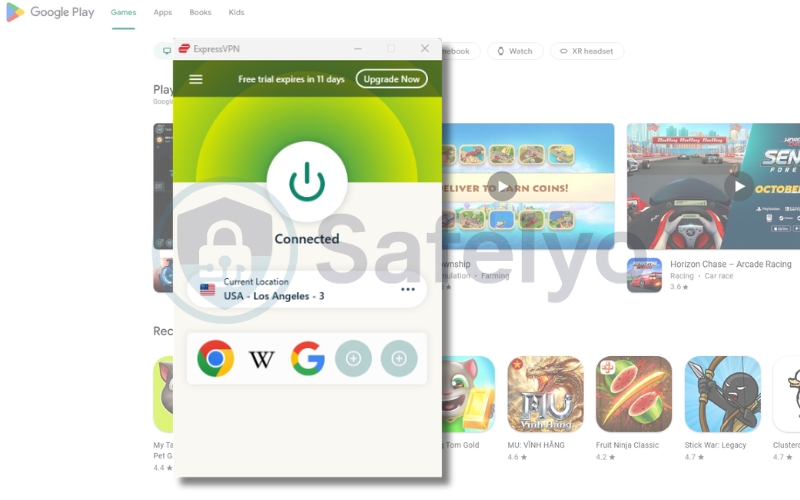
ExpressVPN consistently delivers the fastest speeds and most stable connections in our evaluations, which is crucial when Google’s systems are actively checking your connection. Its servers are highly optimized for streaming and geo-unblocking, making it reliable for Play Store access.
Key advantages for Play Store access:
- Proprietary Lightway protocol: Ensures rapid connection times and minimal drops during sensitive account creation.
- Reliable global network: Our real-world tests show high success rates for accessing even difficult regions like Netflix Japan.
- Easy-to-use apps: Simple interface on Android and PC, perfect for quickly switching servers and creating new accounts.
5. Alternatives to download region-locked apps
Changing your Google Play region or creating new accounts can be cumbersome, especially with Google’s strict 12-month limit. If you only need to download a specific app or game and prefer to keep your main Play Store account as is, these alternative methods offer quick and effective solutions.
5.1. Download APK files from APK sites
This is the most direct workaround. APK (Android Package Kit) files are the raw installation files for Android apps. By downloading an APK file directly, you bypass the Google Play Store entirely and manually install the app onto your device.
- How it works: Visit a reputable APK repository site (like APKMirror or APKPure) on your browser. Search for the region-locked app, download its APK file, and install it.
- Safelyo Warning: Always download from trusted sites. Unknown sources can host malicious APKs containing malware. Ensure “Install unknown apps” is enabled in your Android settings for your browser.
5.2. Use Aurora Store
Aurora Store is a popular open-source client that acts as an unofficial gateway to Google Play. It allows you to browse and download apps from Google’s catalog without needing a Google account or being restricted by your device’s registered country.
- How it works: Download the Aurora Store APK from its official website. Install it and open the app. You can use it anonymously (without logging in) or with a dummy Google account to access region-locked apps directly.
- Expert Note: This is an excellent option for maintaining privacy, as it reduces your dependency on Google’s tracking mechanisms. However, it still requires enabling “Install unknown apps” for its initial setup.
Read more:
6. Troubleshooting Play Store region issues
Even with the correct steps, unexpected errors can occur due to Google’s strict detection systems. If you are struggling to update your region or access foreign catalogs, these solutions will help fix the most common roadblocks.
6.1. “Change country” option missing
You open your account preferences, but the option to switch your Play Store region is either completely missing or grayed out, preventing any updates.
- Wait out the 12-month lock: Google strictly limits country changes to once per year. If you recently switched, you must wait a full 365 days before trying again.
- Check Family Link restrictions: If your account is managed via Family Link, the family manager must remove restrictions to allow region updates.
- Clear your Play balance: The system will hide the change option if you have pending subscriptions or remaining Google Play credit. You must spend it all first.
6.2. VPN connected but apps still unavailable
Your VPN shows a successful connection to the target country, but the Play Store still displays your old local apps or shows the “item not available” error.
- Clear cache and data: The Play Store saves your old location. Go to Settings > Apps > Google Play Store > Storage, then tap Clear cache and Clear data to force a refresh.
- Fix DNS leaks: Your VPN might be leaking your real location. Test your connection on DNSLeakTest.com and disable IPv6 on your device if your true ISP appears.
- Create a new account: Google often ties your existing profile strongly to your original country. Creating a brand-new Google account while the VPN is active usually bypasses this issue entirely.
6.3. Payment method declined
You try to add a credit card to finalize the official region change, but Google rejects the payment method, blocking you from accessing the new app store.
- Use a local card: Google’s billing system requires a card issued by a bank physically located in your new target country. Your old domestic card will not work here.
- Match your billing address: Ensure the address in your Google Payments profile exactly matches the specific country you selected. A mismatch will trigger an automatic decline.
- Try virtual credit cards: As an expert workaround, you can try using regional virtual prepaid cards if you lack a physical local bank account, though success rates vary.
7. FAQs about changing Google Play Store country
Can I change Play Store country without a credit card?
You cannot do this using the official settings, as Google mandates a local payment method to verify your new residency. However, you can easily bypass this requirement by using the VPN workaround to create a brand-new account focused only on downloading free regional apps.
What happens to my Google Play balance?
Your existing Google Play balance is strictly tied to your original country’s currency and will not transfer to your new region. You must spend your remaining balance before making an official switch, or you will lose access to those funds entirely.
Can I use a foreign gift card to change regions?
No, Google enforces heavy region locks on all gift cards to prevent currency exploitation. You cannot redeem a US gift card on a UK-based account, and entering a foreign gift card code will not bypass the requirement for a local credit card during setup.
Will I lose my apps after switching country?
No, the apps you have already installed will remain on your Android device and continue receiving standard updates. Keep in mind that some highly specialized local apps might lose specific functionality if they rely on regional servers that detect you have moved.
Is it legal to use a VPN for Google Play?
Using a privacy tool is perfectly legal in almost all jurisdictions. However, spoofing your location to download restricted content technically violates Google’s Terms of Service, though they rarely ban regular users for simply downloading free apps from foreign catalogs.
How long does a region change take?
When using the official payment profile method, it typically takes 24 to 48 hours for Google’s servers to sync and display the new catalog. If you use the VPN and new account trick, the regional switch happens almost instantly after you clear your app data.
8. Conclusion
Knowing how to change country in Google Play Store gives you ultimate freedom over the apps and games on your Android device. The official settings method is your best route if you are permanently moving abroad and have a local bank card ready to verify your new address. Alternatively, downloading raw APK files or using the Aurora Store lets you skip account modifications entirely, keeping your primary profile completely untouched and safe.
Don’t let digital borders restrict your mobile experience or compromise your online privacy. For more expert tips on bypassing geo-blocks and securing your data, explore our comprehensive VPN Guides at Safelyo to take full control of your digital life today.