ISP throttling is the intentional slowing of your internet connection by your provider to manage network congestion, enforce data caps, or target specific activities like streaming and gaming. If you suspect your speeds are being artificially restricted, the most reliable way to confirm this is to run a baseline Ethernet speed test and then run a second test with a Virtual Private Network (VPN) turned on.
In this article, we will walk you through the technical mechanisms ISPs use to detect your traffic, the signs that indicate your connection is being restricted, and actionable steps to bypass these limits.
Key takeaways:
- Throttling is typically triggered by network congestion, exceeding data caps, paid prioritization, or Terms of Service violations.
- You can easily detect these restrictions by comparing a standard speed test against a VPN speed test to confirm if your provider is targeting specific activities.
- Using a VPN stops activity-based throttling by preventing your provider from identifying high-bandwidth traffic like streaming or gaming.
- If you are experiencing data-cap throttling, a VPN will not work, and you must track your data volume or upgrade to an unlimited plan instead.
- You can bypass network congestion entirely by scheduling heavy downloads during off-peak hours or switching to a dedicated fiber internet provider.
Disclaimer: Information is subject to change. Readers should check official provider policies before making purchasing decisions. This article is for informational purposes only and does not constitute financial advice.
1. What is ISP throttling?
ISP throttling is the practice where an Internet Service Provider (ISP) deliberately restricts your available bandwidth for specific online activities or during certain times of the day. Often referred to more broadly as internet throttling, this is not a random glitch or a broken router.
Instead, internet throttling is a calculated network management protocol. Providers use this mechanism to limit the network resources consumed by high-bandwidth activities, such as streaming high-definition video or downloading large files.
Because the restriction targets specific traffic types, you might notice that a heavy file download barely moves while your basic web browsing remains fast. This targeted bandwidth restriction allows internet companies to regulate their infrastructure load without completely disconnecting users from the network.
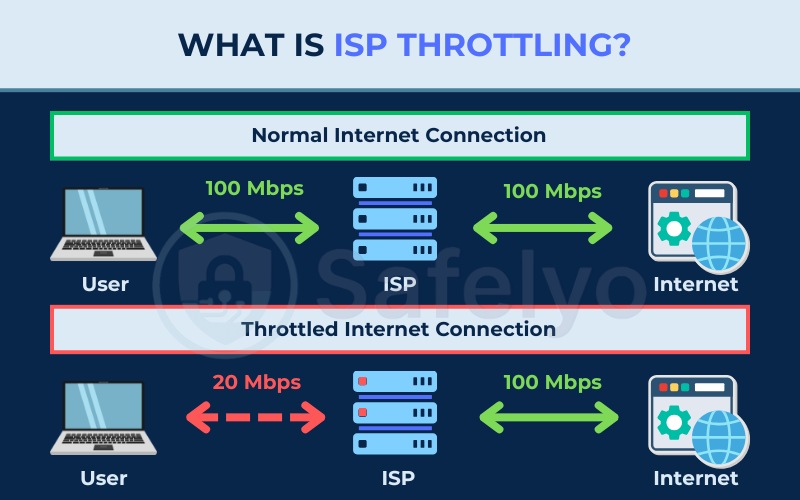
While discussing this topic, it is important to note that many users confuse standard throttling with a technique called traffic shaping. These are two distinct network management methods. Standard throttling slows down your entire connection, usually after you exceed a monthly data cap. Traffic shaping uses Deep Packet Inspection to slow down only specific activities like streaming or torrenting.
Here is a quick comparison table between throttling and traffic shaping that you can reference to understand exactly what is happening to your network:
| Feature | Throttling (Total slowdown) | Traffic shaping (Prioritization) |
|---|---|---|
| What it does | Slows down your entire connection. | Slows down only specific activities. |
| How it works | Caps overall bandwidth to a lower limit. | Identifies activity types and moves them to a slower lane. |
| User experience | Everything is slow, including basic web browsing. | Videos buffer, but text-based websites remain fast. |
| VPN effectiveness | No. A VPN cannot hide your total data usage. | Yes. A VPN hides the activity type from inspection tools. |
| Trigger condition | Occurs after exceeding your data cap. | Applied during peak hours or to specific applications. |
2. How ISPs actually detect and throttle your traffic
ISPs do not simply guess what you are doing online. Instead, they actively monitor your connection by deploying advanced inspection tools to categorize your traffic and utilizing data usage trackers to monitor your total volume.
The specific tracking method they use determines exactly how they restrict your connection, beginning with how they look inside your data packets.
2.1. What is Deep Packet Inspection (DPI)?
Deep Packet Inspection (DPI) is the core technology that internet providers use to identify high-bandwidth traffic. When you request a video from a streaming platform, the data is broken down into small packets.
The DPI system scans the unencrypted metadata attached to these packets. If the metadata identifies the data as a Netflix stream or a massive peer-to-peer download, the internet provider’s automated system routes those packets into a slower, restricted bandwidth queue.
This inspection process happens in milliseconds and allows the provider to selectively throttle specific websites while letting standard web traffic pass through unrestricted.
2.2. Activity-based throttling vs. data-cap throttling: Why the fix is different
Understanding exactly why your provider is restricting your speed is critical because the solutions are completely different. Applying the wrong fix will simply waste your time and money.
Here is a breakdown of how the two primary throttling types dictate your next steps:
- Activity-based throttling: The provider uses DPI to spot specific activities (like gaming or torrenting) and slows them down. Because this relies on the provider reading your traffic metadata, you can use a VPN to prevent this throttling.
- Data-cap throttling: The provider monitors the total volume of data you have consumed over the month. Once you hit a predefined hard limit, your overall speed is slashed across all activities. Because a VPN cannot hide the total amount of data you are pulling through the network, a VPN will not fix data-cap throttling.
3. Why do ISPs throttle your internet?
Internet providers restrict bandwidth for several distinct reasons, ranging from basic network preservation to aggressive corporate profit strategies.
Understanding these motivations helps clarify whether your slowdown is a temporary neighborhood issue or a strict policy enforcement targeting your account.
3.1. Network congestion
Network congestion occurs when too many users in the same physical area attempt to use heavy data applications at the same time. Peak hours typically run from 7 PM to 11 PM when entire neighborhoods log on to stream movies or play online games.
To prevent the local network infrastructure from crashing under the massive data load, the provider slows everyone down until the high-traffic period passes.
3.2. Exceeding data caps
Many modern internet contracts feature a hidden data cap trap wrapped inside an “unlimited plan” marketing slogan. Providers often enforce soft caps where your connection is entirely unrestricted up to a certain point (for example, 50GB of usage on a mobile or home wireless plan).
Warning: Once your household crosses that specific soft cap threshold, the provider automatically drops your speeds to a crawl for the remainder of the billing cycle. You will still have internet access, but the speeds will only be sufficient for basic text emails and light web browsing.
3.3. Paid prioritization
Paid prioritization involves the creation of prioritized routing for specific corporate partners. Internet providers may prioritize streaming services or websites that pay them premium fees for guaranteed delivery speeds.
Consequently, the provider might intentionally slow down traffic from competing services that refuse to pay the premium. This creates a frustrating experience where one streaming app works flawlessly while a rival app struggles to load a standard definition video.
3.4. Forbidden activity (ToS violations)
Internet providers strictly enforce their Terms of Service agreements using automated throttling triggers. If the network detects forbidden activities, the system responds with an instant bandwidth restriction.
Common forbidden activities include running unapproved commercial web servers from a residential connection, extensive peer-to-peer file sharing, or continuous torrenting. The provider throttles these specific ports immediately to force compliance and protect their network from potential legal liabilities or excessive continuous strain.
4. Signs of Internet throttling
Distinguishing between deliberate throttling and failing hardware saves you from buying a new router unnecessarily. If your entire network drops offline randomly or every single device struggles to load basic text, you likely have a hardware failure.
Deliberate throttling presents clear, pattern-based symptoms. Look for the following signs:
- Your connection speed drops dramatically at the exact same time every evening.
- YouTube videos constantly buffer, but regular web browsing remains lightning fast.
- Your download speeds are incredibly slow, yet an official speed test shows excellent numbers.
- Your internet becomes uniformly sluggish during the final week of your billing cycle.
- Specific online games experience severe lag spikes while background voice chats remain perfectly clear.
If you are still unsure whether your network problems are caused by your internet provider or a local hardware failure, you can use the following quick self-diagnosis table. By comparing your symptoms, you can easily determine if you are dealing with artificial restrictions or a standard technical issue.
| Symptom | Likely throttling | Likely standard issue |
|---|---|---|
| Timing | Connection only slows down in the evening. | Connection is slow all day, regardless of the hour. |
| Specific apps | Netflix buffers, but Google loads instantly. | Every website and application is equally slow. |
| Data limit | Speed drops drastically after hitting a usage threshold. | Your current plan does not have a data cap. |
| VPN test | Speeds increase significantly when a VPN is active. | Speeds stay the same or drop slightly with a VPN. |
| Multiple devices | All devices show the exact same slowdown pattern. | Only one device is slow, indicating a local WiFi dead zone. |
| Speed test variation | Speed test shows fast numbers, but actual usage is slow. | Both speed tests and actual usage are slow. |
| Billing cycle | Speeds crash during the final week before renewal. | Speeds are completely unrelated to your billing date. |
| Gaming | Certain online games lag, but voice chat remains crystal clear. | All online games and voice chats lag equally. |
5. How to test if your ISP is throttling you
Relying on objective testing rather than guesswork is the only way to prove your provider is restricting your connection. To gather concrete evidence, you need to compare your standard network performance against secure, encrypted traffic.
You can also use specialized port scanners and alternative routing tools to isolate specific bottlenecks. The following three testing methods will help you identify exactly how your traffic is being managed.
5.1. Method 1: The baseline and VPN speed comparison
This is the most definitive way to check for targeted activity restrictions. It requires two phases. First, you must establish your normal unencrypted speed, and then mask your traffic to see if the provider stops limiting your connection.
Follow these steps to execute the baseline and VPN speed test:
- Plug an Ethernet cable directly into your modem to eliminate Wi-Fi interference.
- Run a test on Speedtest.net and record your baseline download speed.
- Turn on your VPN application and connect to a local server.
- Re-run the Speedtest.net tool and compare the new results against your baseline.
By running a clean baseline test without a VPN, you create a control metric for your network under normal conditions. When you activate the VPN, your traffic becomes encrypted, meaning the provider’s inspection tools can no longer analyze the metadata on your data packets.
It is important to understand that VPN encryption inherently slows down your standard connection due to the extra processing required.
Therefore, if your download speed actually increases while the VPN is active, or even stays exactly the same instead of naturally dropping, you have definitive proof. This confirms the automated system was previously identifying and restricting your high-bandwidth activity.
5.2. Method 2: Run a blocked ports check
Internet providers frequently throttle or completely close the specific network ports used by gaming applications and file-sharing networks. This advanced testing method is highly technical and specifically designed for gamers, torrent users, or self-hosters who are comfortable modifying network settings.
This method is not recommended for average users because it requires configuring your local router and firewall. If you are an ordinary user looking for a quick answer, the VPN speed test in Method 1 remains the most practical and reliable option.
To run this test accurately, you must ensure that your target application is active and running on your computer during the test. Online port scanners function by sending a signal from the outside into your network. If the specific software is closed, no service is actively listening to reply to the scanner, which causes the tool to report the port as “Closed” even if your internet service provider is not blocking it.
Here is the step-by-step process to check for blocked ports on your network:
- Launch the specific application (such as your game or torrent client) and keep it running in the background.
- Find the port number your application uses. For online games, search the developer’s official support page (e.g., “Valorant required network ports”). For torrent clients like qBittorrent, open the application, navigate to Preferences > Connection, and locate the port used for incoming connections.
- Ensure port forwarding is configured on your router for that specific port, or verify that UPnP (Universal Plug and Play) is enabled in your router settings.
- Navigate to a free web tool like PortChecker.co or CanYouSeeMe.org, enter the port number, and click Check.
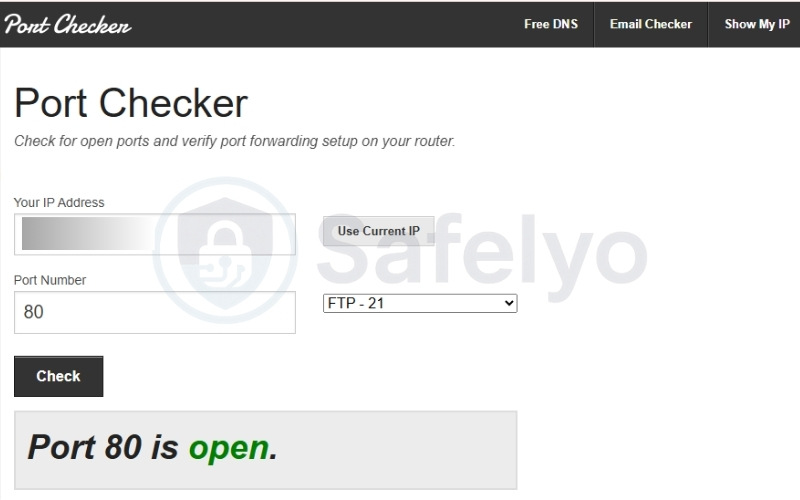
If you have successfully configured your router, verified the application is actively running, and the online tool still reports the port as “Closed”, you have found highly targeted throttling. In these cases, your internet service provider is actively blocking that specific digital doorway upstream before the traffic can reach your home.
5.3. Method 3: Compare performance across different websites
This comparison is useful because Netflix owns Fast.com and operates it directly on their infrastructure. When we run a test there, our provider processes the traffic exactly as if we were streaming a Netflix video. In contrast, Speedtest.net connects to generic testing servers.
However, comparing results between these two tools is not enough to definitively conclude that throttling is happening. Because they use completely different server infrastructures and measurement methods, speed variations might simply stem from network routing, server location, or current network load.
To get an accurate assessment, follow this testing sequence:
- Navigate to Fast.com and record the final download speed.
- Navigate immediately to Speedtest.net and record the download speed.
- Compare the two numbers to check for significant variations.
- Repeat the test multiple times, comparing normal daytime hours against peak evening hours.
For instance, in our baseline test shown below, we recorded a download speed of 450 Mbps on Fast.com, while Speedtest.net reported 763.42 Mbps.
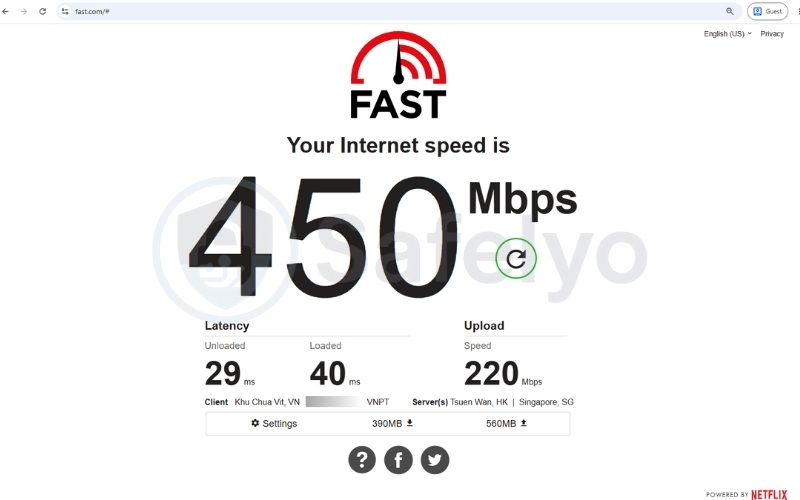
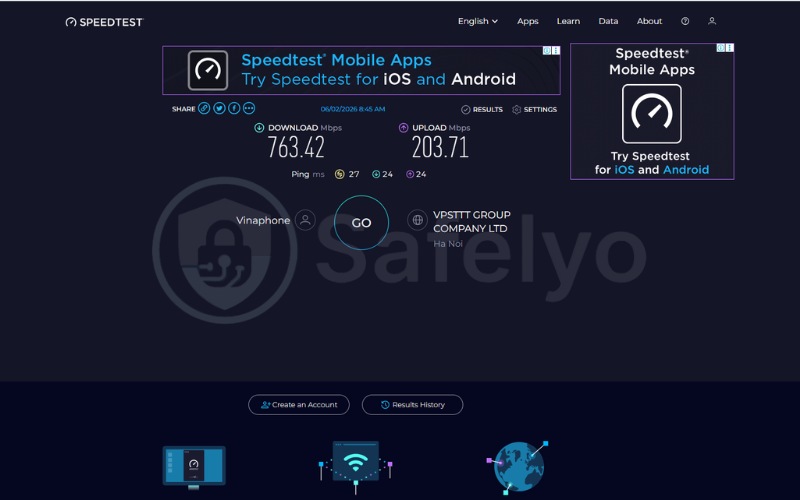
When you spot a massive gap like this, always check the server locations before blaming your provider. In our test from Vietnam, Fast.com routed the connection to international servers in Hong Kong and Singapore, while Speedtest.net used a nearby local server in Hanoi. That speed drop happens purely because the data travels a much longer physical distance, not because of active ISP throttling.
If we were truly experiencing targeted streaming restrictions, the contrast would be much more drastic. Fast.com would consistently report severely degraded speeds, often dropping to around 5 to 15 Mbps, while Speedtest.net remained at 700 Mbps or higher.
We highly recommend monitoring these speeds over a few days to completely rule out temporary routing issues before assuming your provider is throttling the connection.
6. How to stop ISP throttling
Once you have gathered your testing evidence, you can apply a targeted fix to restore your internet speed.
Depending on what caused your slowdown, you can resolve the restriction by deploying a VPN to encrypt your traffic, altering your usage schedule, or bypassing the provider’s infrastructure entirely.
6.1. Fix 1: Use a VPN
A VPN is the absolute best solution for activity-based throttling. By masking your data type, the provider loses the ability to enforce traffic-specific speed limits.
To bypass these targeted restrictions effectively, follow these straightforward steps:
- Subscribe to a reputable, paid VPN provider.
- Install the application on your computer, phone, or router.
- Connect to a server located geographically close to your home.
- Resume your streaming or gaming activities.
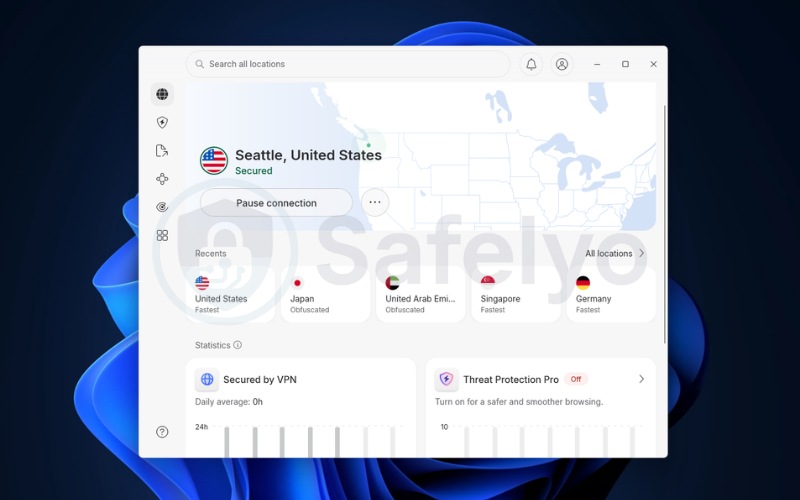
VPN applications secure your outgoing traffic with robust encryption protocols. This stops the internet provider’s DPI tools from analyzing the specific contents of your data packets.
Because the provider only sees a generic stream of scrambled information, they cannot trigger the automated rules that slow down your video streams or gaming sessions.
To find a reliable service that perfectly fits your specific needs, head over to our VPN Reviews category or browse through our Best VPN rankings.
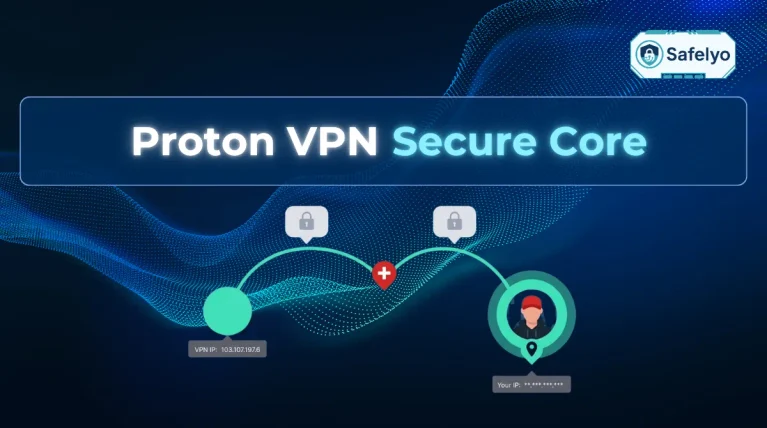
We strongly recommend testing industry-leading providers like NordVPN, ExpressVPN, Proton VPN, or Surfshark VPN, as these platforms offer robust obfuscation features specifically designed to defeat network restrictions.
6.2. Fix 2: Use a proxy server
A proxy server acts as an intermediary server for your web traffic, masking your final destination from your provider. This lightweight alternative to a VPN works well for targeted applications.
Configuring a proxy for specific software involves a few quick adjustments in your application settings:
- Locate the proxy settings inside your specific application (like a torrent client).
- Enter the proxy IP address and designated port number.
- Save the settings and restart the application.
- Route only that specific application’s traffic through the proxy.
Proxy servers are excellent for bypassing app-specific throttling without encrypting your entire operating system’s connection. While a proxy hides your traffic’s destination, it does not provide the heavy encryption of a VPN, meaning advanced inspection tools might still detect the traffic type.
6.3. Fix 3: Monitor and manage your data usage
If your provider is limiting you for hitting a hard usage limit, a VPN will not help you. You must actively manage your consumption to maintain standard speeds.
Implement these management tactics to keep your connection running smoothly all month long:
- Log into your internet provider’s customer portal.
- Check your current billing cycle data consumption.
- Set up automated SMS or email data alerts.
- Throttle your own background app usage and lower default streaming resolutions.
Understanding your data cap policies is essential for long-term network performance. By manually reducing your streaming quality from 4K to 1080p, you drastically cut your daily data consumption. This ensures your household speeds remain fast throughout the entire month instead of crashing during the final week.
6.4. Fix 4: Use the internet during off-peak hours
Bypassing network congestion throttling requires strategic timing. Shifting your heaviest data tasks to quiet periods ensures you get maximum bandwidth.
To dodge the busiest network periods in your area, follow this scheduling strategy:
- Identify the network rush hours in your local neighborhood.
- Schedule massive software updates or game downloads for midnight.
- Avoid downloading large 4K movie files during local prime time.
- Configure your devices to sync cloud backups only between 2 AM and 5 AM.
Peak hours put immense strain on shared infrastructure. By scheduling your heavy downloads for off-peak hours, you utilize the network when the provider has plenty of excess capacity, entirely avoiding their automated congestion management limits.
6.5. Fix 5: Switch your internet provider
When persistent congestion throttling ruins your daily workflow, abandoning the restrictive network is the most effective permanent fix. Moving to superior infrastructure eliminates the bottleneck entirely.
If you are ready to upgrade your home network, take these transition steps:
- Research local internet alternatives using your zip code.
- Check for dedicated fiber optic availability in your neighborhood.
- Verify the new provider has strict no-data-cap policies in writing.
- Cancel your current service and switch.
Cable internet relies on shared neighborhood nodes, making it highly susceptible to evening congestion. Switching to a direct fiber internet connection provides you with a dedicated line, rendering neighborhood rush-hour throttling obsolete.
6.6. Fix 6: File a complaint with your regulator
Internet providers despise formal regulatory oversight. Submitting an official complaint forces the provider to bypass basic customer service and assign an executive escalation team to your case.
To escalate your connectivity issues formally, follow this complaint procedure:
- Gather your screenshot evidence from your baseline and VPN speed tests.
- Navigate to your country’s telecommunications regulator website (for example, the FCC in the US, Ofcom in the UK, or your local Ministry of Communications).
- Submit a formal complaint detailing the deceptive speed practices.
- Wait for the internet provider’s executive team to contact you directly.
Internet companies must respond to formal government complaints rapidly to avoid compliance fines. This process often results in the provider quietly removing the artificial restrictions on your account to resolve the regulatory ticket quickly.
7. What to do when a VPN doesn’t fix the throttling
Sometimes, applying a secure tunnel actually makes the problem worse because network administrators actively hunt for encrypted traffic to suppress.
When this happens, you must alter how your connection appears to the network by utilizing specialized obfuscated servers or alternative protocols.
7.1. When ISPs throttle VPN traffic
The ongoing conflict between privacy tools and network administrators has escalated. Some advanced internet providers now use DPI to recognize the distinct cryptographic signature of standard VPN protocols.
If the automated system cannot read your traffic but recognizes the cryptographic signature of a VPN, the provider may aggressively throttle all of your encrypted traffic entirely. They do this assuming you are hiding forbidden activities.
7.2. Alternative protocols (WireGuard, obfuscated servers)
When standard privacy tools fail, you must change how your traffic appears to the network. Modern VPN applications offer specialized VPN protocols to evade detection.
To bypass VPN blocks effectively, adjust your connection settings using these steps:
- Open your privacy application’s advanced settings menu.
- Change the connection protocol to Stealth, Obfuscated, or WireGuard.
- Reconnect to the server to reset the network handshake.
- Test your speed again to confirm the restriction is bypassed.
Obfuscation features (often called Stealth VPN) disguise your encrypted traffic to look exactly like standard HTTPS web browsing. This fools the provider’s inspection tools, allowing you to bypass the VPN block.
Alternatively, switching to the WireGuard protocol reduces cryptographic overhead, instantly speeding up your connection if protocol heaviness was causing the slowdown.
8. Which internet providers offer unlimited data?
If strict usage limits are the root cause of your internet woes, moving to a provider with truly unlimited infrastructure is the only permanent fix. However, the definition of “unlimited” can vary depending on your exact location and the specific tier you choose.
While many companies market unlimited plans, you must always verify the fine print. The following major providers in the United States are currently known for offering premium plans that do not enforce strict data caps:
- Spectrum: Offers unlimited data across all of its standard internet plans without hidden soft caps.
- Frontier: Provides fiber internet service with zero data limits, ensuring consistent month-long speeds.
- AT&T Fiber: Removes usage limits entirely on all of its dedicated fiber optic tiers.
- Verizon Fios: Delivers a true unlimited data experience on its residential fiber network.
If you are outside the US, look for local fiber optic providers in your region and explicitly ask about their data cap policies before signing up.
Important note: You must verify these policies directly with the sales representatives before signing a contract. Regional availability, grandfathered plans, and specific service tiers frequently alter the official terms of service, meaning an “unlimited” plan in one state might still have hidden soft caps in another.
9. Does throttling affect mobile data?
Bandwidth restrictions heavily impact cellular networks, but you must distinguish between hard throttling and cellular deprioritization.
Hard throttling occurs when you exceed your monthly mobile data allowance, causing the carrier to lock your phone’s speed to a maximum of 2G or 3G levels for the rest of the month.
Deprioritization is a temporary traffic management tactic. If you are connected to a highly congested cell tower at a crowded stadium, the carrier pushes your device to a lower priority queue to favor premium-tier customers. Once you drive away from the crowded tower, your normal cellular speeds instantly return.
10. Is ISP throttling legal?
The short answer is yes, but the exact regulations vary depending on your location. To understand why, you first need to know about a concept called net neutrality. This is the fundamental principle suggesting that internet service providers should treat all web traffic equally, without blocking content, creating paid fast lanes, or intentionally slowing down specific websites.
The legality of this practice depends entirely on your specific jurisdiction. If you live in a region with strict net neutrality laws, targeted traffic shaping is almost certainly illegal. In regions without these protections, the practice is legal but must be clearly stated in your contract.
10.1. United States federal regulations
In the United States, internet providers currently maintain broad authority to manage their network traffic. In January 2025, the Sixth Circuit Court of Appeals struck down the federal rules that previously protected net neutrality.
Following this ruling, there is no comprehensive nationwide law prohibiting providers from restricting bandwidth. Under current federal guidelines, internet companies are legally permitted to enforce data caps, throttle connections during high-traffic periods, and utilize paid prioritization models. Unless local laws supersede these guidelines, your provider operates entirely under the conditions you agreed to in their published terms of service.
10.2. United States state-level protections
Despite the absence of federal oversight, the legal framework is not uniform across the board. Several individual states and local jurisdictions have enacted their own regulations to maintain open internet access and protect consumers from artificial network degradation. Because these local utility laws change frequently, it is a good idea to verify the current net neutrality rules in your specific area.
| State | Protection Level | Key Legislation | Status |
|---|---|---|---|
| California | Full net neutrality | SB-822 (2018) | Upheld by courts and currently active. |
| Washington | Anti-throttling | HB 2282 (2018) | Currently active. |
| Oregon | Anti-throttling | HB 4155 (2018) | Currently active. |
| Maine | Privacy and net neutrality | 2019 legislation | Currently active. |
| Other states | No specific protection | Not applicable | Subject to federal law only. |
10.3. International regulations
If you live outside the United States, your consumer rights regarding network speeds are likely much stronger. Many countries have established strict utility frameworks that classify internet access as a highly regulated service.
| Region | Regulatory Status | Governing Body |
|---|---|---|
| European Union | Mostly banned | BEREC enforces strict net neutrality rules. |
| United Kingdom | Restricted | Ofcom requires ISPs to disclose traffic management policies. |
| Canada | Heavily restricted | CRTC strictly enforces net neutrality principles. |
| Japan | Strong protection | Governed by the Telecommunications Business Law. |
| India | Strong protection | Comprehensive net neutrality rules established in 2018. |
| Brazil | Protected | Governed by the Marco Civil da Internet. |
If you live in a region with strict net neutrality laws, targeted traffic shaping is almost certainly illegal. In regions without these protections, the practice is legal but must be clearly stated in your contract.
11. How to file a formal complaint with the FCC
If your internet provider is throttling your connection without clear disclosure, United States residents have the right to file an official complaint with the Federal Communications Commission (FCC). Providers are legally obligated to respond to these regulatory complaints within 30 days.
To ensure your complaint is processed correctly, follow these specific submission steps:
- Visit the portal: Go to the official FCC Consumer Complaints center at https://consumercomplaints.fcc.gov/hc/en-us.
- Select your issue: Look for the “File a complaint” box on the main page and select the “Internet service issues” category.
- Open the form: Click the “Start your complaint with the FCC” link to access the submission portal.
- Enter core details: Fill out the primary form fields, including your contact email, a clear subject line, and a detailed description of your speed issues. Be sure to mention your speed test comparisons.
- Categorize the problem: In the dropdown menus, select “Speed” as your internet issue. Proceed to fill out the remaining required fields, such as the specific internet speed sub-issue and your current internet method (cable, fiber, or satellite).
- Submit: Review your information for accuracy and click submit.
12. FAQs about ISP throttling
How do I stop my ISP from throttling?
Use a reliable VPN to hide your activity from inspection tools. If the restriction stems from strict usage limits, you must actively manage your monthly data consumption. For persistent evening congestion issues, upgrading to a dedicated fiber internet provider is the best solution.
Why is my ISP throttling my connection?
Providers restrict speeds to manage heavy network congestion during peak hours or enforce monthly data caps. They also throttle connections to prioritize paying corporate partners or to instantly block forbidden activities like unauthorized server hosting and excessive peer-to-peer file sharing.
Is it legal for my ISP to throttle my internet?
It depends on your country’s laws. In the US, for example, it is generally legal at the federal level following the 2025 Sixth Circuit Court ruling, though some states have their own protections. In other countries, strict net neutrality laws may completely prohibit providers from artificially degrading traffic.
How can I test if my ISP is throttling me?
Run a baseline Ethernet speed test using a tool like Speedtest.net. Immediately activate a secure VPN and run the exact same test again. If your download speeds increase significantly while the VPN is active, the provider is deliberately restricting your normal traffic.
How do I fix ISP throttling without a VPN?
You can mitigate restrictions by strictly managing your monthly data limits, shifting your heavy downloads to off-peak hours, or switching to a fiber internet provider. If your ISP uses deceptive practices, filing a formal complaint with your country’s telecommunications regulator (like the FCC in the US or Ofcom in the UK) forces an executive review.
13. Conclusion
To get the internet speed you actually pay for, it is important to understand exactly how your provider manages your connection. Once you run comparative speed tests, you will know whether your network is subject to activity-based traffic shaping, which can be bypassed with a VPN, or a hard data cap that requires a plan upgrade.
You can follow this straightforward action plan to diagnose and fix your connection speeds:
| Step | Action | Estimated time |
|---|---|---|
| 1 | Diagnose the restriction. Run a baseline speed test and compare it against a VPN speed test to confirm if your provider is specifically targeting your streaming or gaming traffic. | 5 minutes |
| 2 | Apply the correct fix. If you detect traffic shaping, compare the best VPNs to bypass ISP throttling → to hide your activity. For data caps or local congestion, shift heavy downloads to off-peak hours or upgrade your plan. | 10 to 15 minutes |
| 3 | Monitor and escalate. Set up automated data usage alerts in your provider dashboard. If deceptive speed restrictions continue without clear disclosure, submit a formal complaint to your telecommunications regulator. | 5 minutes |
For more detailed strategies on protecting your digital privacy and optimizing your network, explore our VPN Guides category or visit the Safelyo homepage for the latest cybersecurity resources.