When evaluating a SOCKS5 proxy vs VPN for torrenting, many users are tempted to choose a proxy to maximize their download speeds. However, this choice often overlooks significant privacy risks on a standard home network.
While a SOCKS5 proxy successfully changes your IP address in the torrent swarm, it operates without encryption. This means your data remains in plaintext, allowing your ISP to monitor your BitTorrent activity through Deep Packet Inspection (DPI). Additionally, background system processes can still expose your real IP through unexpected DNS or IPv6 leaks.
Although routing your traffic through an encrypted VPN tunnel will noticeably reduce your top download speeds compared to a proxy, accepting this performance drop is a necessary trade-off to secure your connection. Below, we explain the technical differences between these routing methods, when skipping encryption actually makes sense, and how to properly secure your torrent client.
Key Takeaways:
- Context matters: Skipping encryption is a reasonable choice if you rely strictly on closed private trackers or use low-power hardware (like a NAS). For home networks downloading from public swarms, an encrypted VPN is usually required.
- Plaintext is a liability: SOCKS5 masks your IP from other peers, but because it lacks encryption, your ISP can still identify your downloads using Deep Packet Inspection.
- System-level vulnerabilities: Relying solely on a proxy can expose your real IP address to third parties due to IPv6 routing bypasses and OS-level DNS leaks.
- Network Interface Binding: The most reliable way to prevent IP leaks during unexpected connection drops is to bind your torrent client directly to a VPN’s network adapter.
Disclaimer: This guide is for educational and network security purposes only. Safelyo does not condone or encourage copyright infringement. While P2P technology itself is perfectly legal, users are solely responsible for ensuring they have the legal right to download or distribute specific files. You must comply with all local laws and your ISP’s terms of service. Privacy tools like VPNs and SOCKS5 proxies should be used strictly to enhance digital security, never to mask illicit activities.
1. What is a SOCKS5 proxy and how does it route P2P traffic?
The SOCKS5 protocol operates strictly at OSI Layer 5 and relays traffic between your torrent client and the network. It works by assigning a new IP address to your incoming and outgoing TCP and UDP torrent pieces inside the swarm.
This application-level routing protects the specific software you configure, such as qBittorrent, without affecting your entire device.
The protocol natively connects through Port 1080 to process these requests. SOCKS5 manages this connection without altering the packet headers extensively, which helps the traffic avoid certain firewall triggers.
While the protocol successfully masks your true IP address from other users in the peer-to-peer swarm, it lacks built-in encryption. This structural design means your traffic still carries a visible BitTorrent protocol signature.
This lack of encryption creates a massive vulnerability when dealing with modern network surveillance, highlighting exactly why a VPN requires a different structural approach.
2. What is a VPN and how does it secure torrents?
A Virtual Private Network creates an OS-level encrypted tunnel for all traffic leaving your device. When you connect to a VPN server, the software encrypts your internet requests using a strong encryption protocol before they leave your device.
An ISP inspecting the connection will only see scrambled data routing to a single external server. This prevents the ISP from seeing the specific files being downloaded, successfully bypassing Deep Packet Inspection (DPI).
Furthermore, premium VPNs include a Kill Switch, a security feature that cuts internet access instantly if the encrypted tunnel drops.
This device-wide encryption completely alters the safety baseline for peer-to-peer file sharing. By hiding both your identity and your packet metadata, the VPN removes the specific risks associated with proxy routing.
3. SOCKS5 proxy vs VPN for torrenting: Key differences
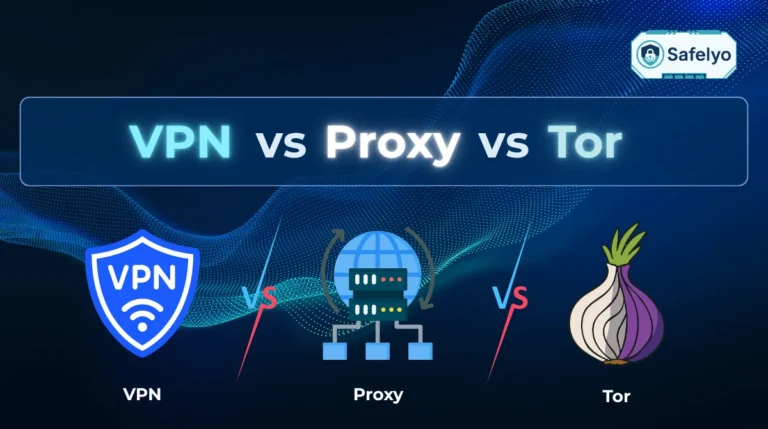
A proxy offers application-level routing that only protects the specific program you configure, while a VPN offers comprehensive device-wide protection. This means a proxy will secure qBittorrent but leave your web browser exposed, whereas a VPN secures everything simultaneously.
The most critical difference lies in traffic handling. SOCKS5 moves data quickly because it does not apply encryption, but this speed comes at the cost of total transparency to your ISP.
A VPN requires more processing power to encrypt the data, but it guarantees absolute privacy against network monitoring.
| Feature | SOCKS5 Proxy | VPN (Virtual Private Network) |
|---|---|---|
| IP Masking in Swarm | Yes | Yes |
| Traffic Encryption | No (Plaintext) | Yes (OS-Level) |
| Hides Activity from ISP | No (Fails against DPI) | Yes |
| Protection Scope | Application-specific (e.g., qBittorrent only) | Device-wide |
| Leak Potential | High (DNS, IPv6, WebRTC bypasses) | Low (Protected by Kill Switch and Network Binding) |
4. When is encryption actually unnecessary?
VPN encryption (OpenVPN or WireGuard) requires processing power, which creates a real trade-off in some cases. A SOCKS5 proxy without encryption is a reasonable choice only when the content itself carries low legal risk:
- Private trackers or legal content: Closed, invite-only trackers and legal public-domain files, such as Linux distributions, carry very low risk of a copyright complaint. If you also run this on older hardware like a Synology NAS or a Raspberry Pi, SOCKS5 avoids the CPU load that VPN encryption would add.
- Lenient copyright jurisdictions: If your country permits personal downloading, or your ISP does not act on copyright notices, hiding your traffic from your ISP matters less. SOCKS5 still hides your IP address from other peers without the overhead of full encryption.
5. Why SOCKS5 still leaks data on home networks
However, if you are downloading from public trackers (like 1337x) on a home network, skipping encryption creates a serious risk. Hiding your IP address in the torrent swarm does not keep you safe from DMCA copyright notices.
Because SOCKS5 lacks an encrypted tunnel, ISPs use Deep Packet Inspection (DPI) to read the plaintext metadata of the packets. The ISP easily identifies the BitTorrent protocol signature and logs the activity directly to your billing account.
Community insights from forums like r/PrivatePackets confirm that relying solely on a proxy leads users to underestimate their actual risk. The proxy provides no privacy from the user’s own ISP; it only hides the user’s IP address from other peers in the swarm.
If a copyright troll monitors the swarm, they might only see the proxy IP, but the ISP still sees the illegal download in plaintext.
These plaintext vulnerabilities are just the baseline failures of the protocol. SOCKS5 also has specific network bypasses that expose your real IP address to third parties without your knowledge.
5.1. IPv6 swarm bypass and WebRTC vulnerabilities
The SOCKS5 protocol is designed primarily to route IPv4 traffic. When torrent peers utilizing IPv6 connect to your client, the traffic will completely bypass the proxy configuration in most modern torrent software.
This flaw exposes your real residential IP address to copyright enforcement groups monitoring the torrent swarm. Furthermore, WebRTC STUN requests bypass proxy routing entirely in browser-based clients, exposing your true network identity instantly.
To mitigate this temporarily, you must manually disable IPv6 in your operating system and your specific torrent client. This is a temporary workaround, not a permanent fix for the underlying limitations of the SOCKS5 protocol.
5.2. How DNS queries and plaintext expose your traffic to ISPs
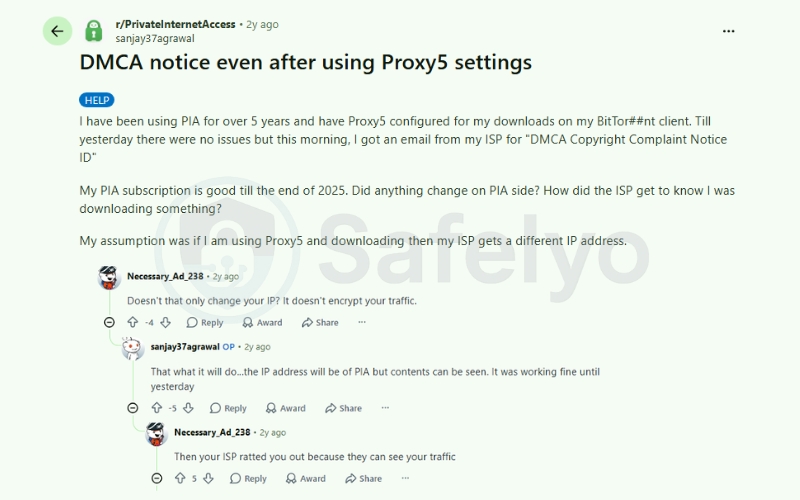
A common misconception among torrenters is that simply changing an IP address is enough to stay safe. Real-world community discussions often highlight this flaw. In a Reddit thread, a user reported receiving a DMCA Copyright Complaint Notice from their ISP despite having a SOCKS5 proxy correctly configured in their BitTorrent client.
The user was confused, assuming the proxy’s new IP would protect them. As the community quickly pointed out, a proxy only changes the IP address. It does not encrypt the traffic. Because the data remains in plaintext, an ISP has the technical ability to monitor the activity.
This plaintext vulnerability can be further complicated by potential DNS leaks at the operating system level. For example, Windows 10 includes a feature called smart multi-homed name resolution. This feature may route DNS queries for torrent tracker domains through multiple available network interfaces rather than sticking strictly to the proxy connection.
When this happens, there is a risk that these domain requests bypass your configured proxy port (1080). As a result, tracker requests might be sent directly to your ISP’s DNS servers without encryption. If this occurs, your ISP can log the activity and issue automated DMCA warnings, even if the torrent swarm only sees your proxy IP.
While some advanced setups use SOCKS5h to resolve hostnames remotely and help minimize these leaks, desktop torrent clients do not always support it natively. To better protect your DNS requests and P2P traffic from local network monitoring, using a Virtual Private Network is generally a much safer approach, as it routes the entire connection through an OS-level encrypted tunnel.
6. The speed trade-off: Why total privacy is worth the performance drop
The primary argument for using SOCKS5 is the desire to maximize raw bandwidth. Wrapping your peer-to-peer traffic in OS-level encryption and routing it through a remote server will reduce your download speeds.
If you have a Gigabit connection (1 Gbps) with a real-world baseline of around 800 Mbps, routing your torrent client through top-tier VPN servers from providers like NordVPN, ExpressVPN, or Surfshark will typically throttle your speeds down to the 300 Mbps to 500 Mbps range.
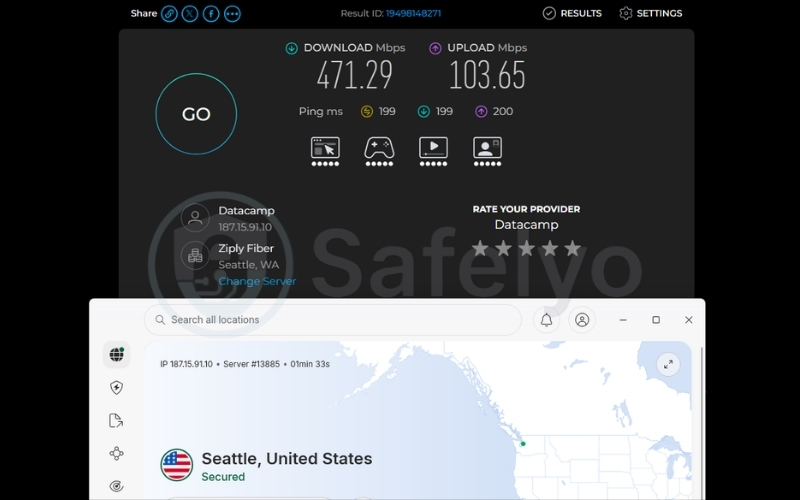
Because a SOCKS5 proxy lacks this heavy encryption, it might keep your speeds much closer to that 800 Mbps baseline. This may seem appealing to users who want faster downloads, but it does not reflect the actual level of protection.
However, we need to reframe how you evaluate this performance metric. Achieving 300 to 500 Mbps through an encrypted VPN tunnel is still exceptionally fast for heavy torrenting.
Saving a few minutes on a large media file download is not worth the risk of exposing your real IP address through DNS or IPv6 leaks.
Accepting this speed reduction is a reasonable trade-off. The slight increase in download time is the cost of preventing Deep Packet Inspection, so your ISP cannot monitor your traffic or issue copyright notices.
If you are also curious about how encrypted tunnels impact your overall connection latency, you can read our full breakdown here: Does a VPN reduce ping
7. Network Interface Binding: The most reliable way to prevent leaks
Standard VPN kill switches often have a delayed response latency ranging from 50ms to 3 seconds. Furthermore, if your torrent client crashes, UPnP port forwards can remain open, leaking your real IP entirely past the kill switch.
Network Interface Binding guarantees zero traffic leaks by forcing the torrent client to communicate exclusively through the VPN’s virtual adapter.
If the VPN connection drops, the torrent client immediately loses all network access because it physically cannot route traffic through your standard ISP connection. This is the most reliable method for preventing IP leaks during torrenting.
Follow these steps to configure Network Interface Binding in qBittorrent:
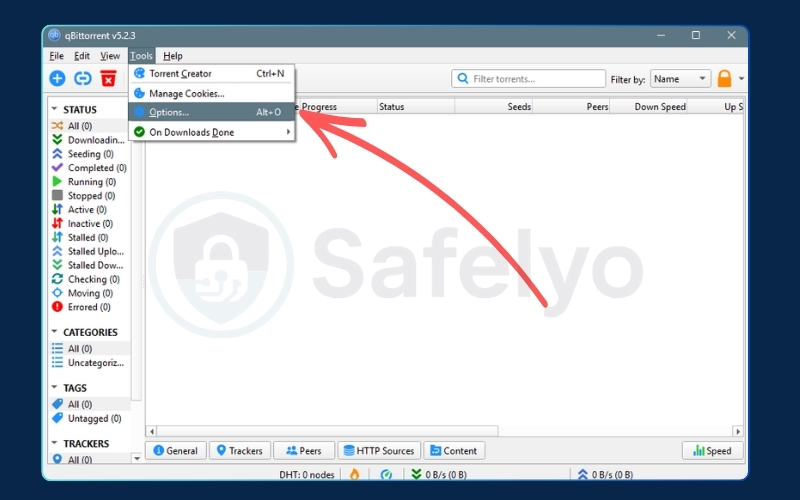
- Open the qBittorrent client and click Tools in the top menu.
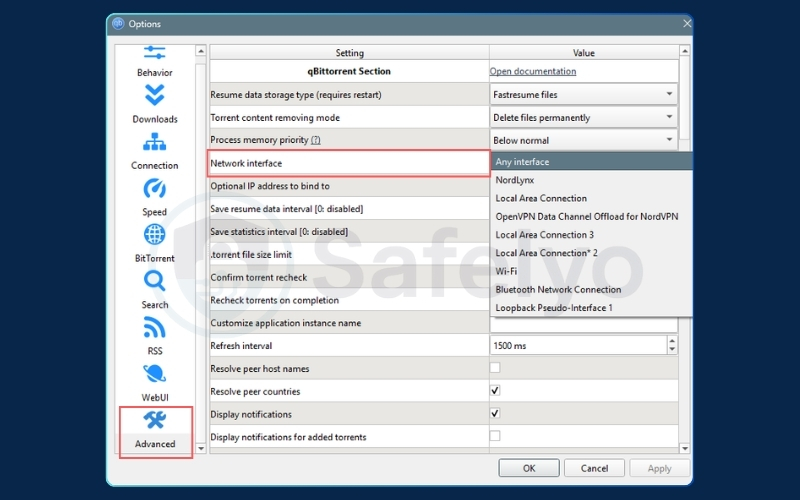
- Select Options and navigate to the Advanced tab on the left.
- Locate the Network Interface dropdown menu.
- Change the setting from Any Interface to the VPN’s specific adapter (e.g., select tun0 on Linux/Mac, or the Local Area Connection / TAP adapter on Windows).
- Click Apply and restart the client.
Pro Tip: To be absolutely sure your new setup is working, we highly recommend testing it before downloading any real files. We usually grab a tracking magnet link from a free tool like ipleak.net or ipMagnet and load it into qBittorrent. This simple step lets us verify that the torrent swarm is only seeing the VPN’s IP address, giving us peace of mind that our real identity is safely hidden.
8. VPN provider support for SOCKS5 (Updated August 2026)
Several major providers have removed SOCKS5 support due to its privacy limitations, so many older setup tutorials no longer apply.
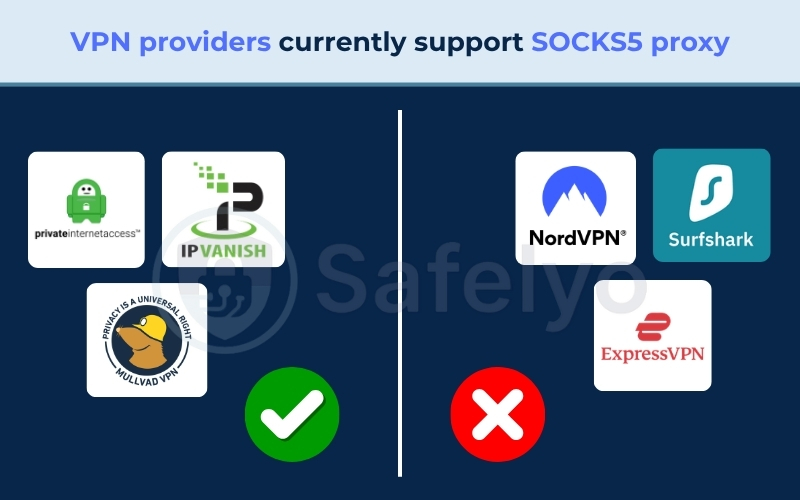
As of August 2026, major VPN providers such as NordVPN, ExpressVPN, and Surfshark do not support SOCKS5 proxies. Windscribe also officially retired its SOCKS5 feature back in April 2022 to protect user privacy.
However, Private Internet Access (PIA), Mullvad, and IPVanish DO currently support SOCKS5 proxies for users who require dual-layer routing.
9. FAQs about SOCKS5 proxy vs VPN for torrenting
Is a SOCKS5 proxy safe enough for torrenting?
No, unless you are strictly using private trackers or live in a lenient copyright jurisdiction. For standard home networks downloading from public swarms, SOCKS5 leaves your download data in plaintext. This allows your ISP to use Deep Packet Inspection to read your files and issue copyright warnings.
Can I use a SOCKS5 proxy and a VPN together for torrenting?
Yes, you can configure dual-layer routing by placing proxy credentials inside an active VPN tunnel. However, this is largely redundant and slows down your connection if the VPN is already utilizing Network Interface Binding.
Does a SOCKS5 proxy hide my torrent traffic from my ISP?
No. The proxy successfully hides your IP address from peers in the swarm, but the ISP still sees the BitTorrent protocol signature and tracker requests in plaintext.
Why are torrent trackers blocking my proxy IP?
Many public torrent trackers actively auto-ban the default SOCKS5 Port 1080 to prevent network abuse and spam. You typically need a provider that allows custom port rotation to bypass these tracker bans.
What happens if my proxy connection drops while torrenting?
If the proxy disconnects, the torrent client will instantly fall back to your direct, unencrypted internet connection. This immediately exposes your real residential IP to the swarm, which is why interface binding is mandatory.
10. Conclusion
When evaluating a SOCKS5 proxy vs VPN for torrenting, the right choice depends entirely on your network environment. While SOCKS5 is efficient for bypassing CPU bottlenecks on low-power hardware or utilizing private trackers, it is fundamentally insecure for everyday downloading.
Trading the OS-level encryption of a VPN for the slight speed boost of a SOCKS5 proxy on a standard home connection exposes you to unavoidable DNS and IPv6 leaks. SOCKS5 simply does not possess the structural capability to stop ISP monitoring or Deep Packet Inspection.
Pairing a WireGuard VPN with qBittorrent Network Interface Binding is the most reliable setup for downloading files. This configuration prevents IP leaks even during unexpected network crashes.
To secure your daily traffic, verify that your chosen VPN supports interface binding and configure your client accordingly. For more detailed application configurations and objective security breakdowns, explore our comprehensive VPN Guides and visit the Safelyo homepage.