VPN protocol overhead is the extra data, processing power, and network delay added to your internet traffic when using a secure tunnel. Your device must attach additional routing headers and encryption bytes to every packet to ensure it reaches the secure server safely.
You cannot define this overhead as a single fixed percentage because it fluctuates constantly. The actual cost depends heavily on the specific protocol you choose, the size of network packets, and the underlying transport-layer configuration.
Key takeaways
- VPN protocol overhead includes added bytes, processing work, latency, and throughput loss.
- There is no universal overhead percentage for WireGuard, OpenVPN, or IKEv2 IPsec.
- Fixed headers account for a larger percentage of small packets than large packets.
- MTU problems and fragmentation can increase overhead beyond normal packet costs.
- WireGuard usually has a compact data path, while OpenVPN results vary greatly by configuration.
1. What is VPN protocol overhead?
VPN protocol overhead is the absolute sum of extra data, hardware processing, and network delay caused by establishing a secure tunnel. It represents the exact cost your device pays to encapsulate, encrypt, and authenticate traffic before sending it across the internet.
- Packet overhead
Packet overhead is the physical increase in byte size for every single piece of data leaving your device. The protocol must attach an outer IP header, a transport header, an authentication tag, and structural padding to protect the original application payload.
- Data usage overhead
Data usage overhead measures the total increase in internet bandwidth consumed during your secure session. This added volume directly impacts users on metered mobile connections or strict data caps. However, an increase in data volume does not automatically cause a proportional drop in internet speed.
- Processing overhead
Processing overhead represents the direct computational strain placed on your local hardware components. Your CPU must spend valuable cycles performing encryption and decryption algorithms while encapsulating packets. This extra workload also involves copying memory and routing traffic between the kernel and user space.
- Performance overhead
Performance overhead is the actual measurable delay and speed reduction you experience while browsing or downloading. It manifests as throughput reduction, increased network latency, jitter, and accelerated battery drain on mobile devices. You must treat this as a completely separate metric from raw data usage overhead.
2. How does a VPN add overhead to a packet?
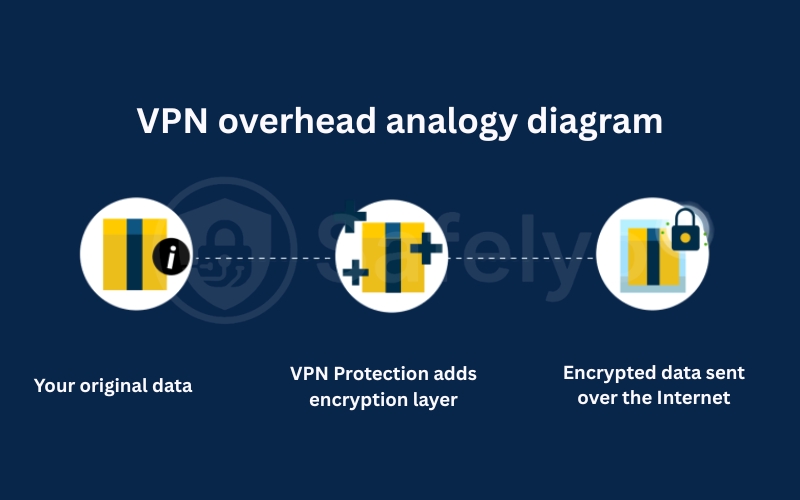
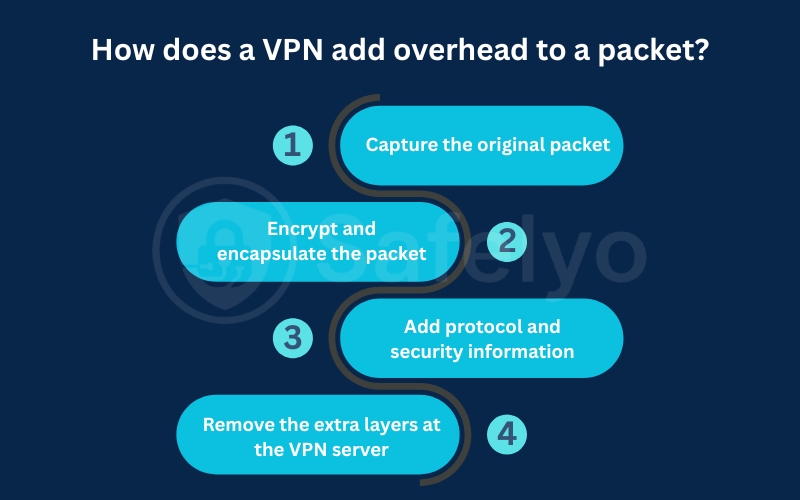
A virtual private network adds overhead by processing your original network packet before sending it through an encrypted tunnel. During this process, it encrypts the packet, wraps it in a new outer shell, and adds the metadata needed to route and protect the connection. This encapsulation process happens in four distinct stages.
- Step 1: Capture the original packet
When an application sends data, the VPN client intercepts the original IP packet before it leaves your device. At this stage, the packet only contains its normal payload, the standard transport header like TCP or UDP, and the final destination IP address.
- Step 2: Encrypt and encapsulate the packet
The client software encrypts the original packet and encapsulates it completely inside a new outer packet. Instead of sending your original data directly across the internet, the software creates an outer protective shell addressed strictly to the secure server while keeping your original packet hidden safely inside.
- Step 3: Add protocol and security information
To make the encrypted tunnel work, the software attaches vital routing and security information to the new outer packet. This includes an outer IP header, a transport header, the VPN protocol header, authentication data, nonces, and any required padding bytes. These extra fields increase the packet size mathematically and ensure the data can be securely routed and verified.
- Step 4: Remove the extra layers at the VPN server
After the encapsulated packet reaches the secure server, the hardware verifies its cryptographic integrity, removes the outer headers, and recovers the original packet. It then forwards that clean packet to its intended internet destination. Every single piece of data sent through the tunnel repeats this exact process, which explains why protocol overhead applies continuously throughout your entire session.
3. Why VPN overhead is not one fixed percentage
You cannot assign a universal overhead percentage to any protocol because the mathematical ratio changes with every packet sent. The percentage of wasted space fluctuates drastically based on the size of the payload being transmitted and the specific network configuration.
3.1. Packet size changes the percentage
A protocol adds a fixed number of bytes to a packet regardless of how much application data it contains. This means the overhead percentage will be extremely high on a small packet but remarkably low on a large packet.
For example, if a protocol adds sixty bytes of overhead to a packet, the impact varies wildly. Adding sixty bytes to a massive fourteen-hundred-byte payload creates roughly four percent overhead. Adding that same sixty bytes to a tiny sixty-byte payload creates one hundred percent overhead.
3.2. IPv4 and IPv6 have different header sizes
The underlying network layer significantly alters the total size of the encapsulated packet. An outer IPv6 header is substantially larger than an outer IPv4 header, requiring more bytes for transmission. Your results will change depending on the specific combination of inner and outer network layers your provider utilizes.
3.3. Transport and tunnel configuration matter
The specific configuration choices made by your provider directly influence the final overhead cost. The software must account for UDP or TCP transport requirements, NAT traversal mechanisms, and whether the tunnel operates in TUN or TAP mode. Enabling extra features like proxy layers or obfuscation will increase the baseline overhead significantly.
3.4. Active traffic and idle traffic behave differently
The type of internet activity you perform changes the ratio of payload data to control traffic. A large file transfer pushes massive packets where the fixed header overhead is mathematically negligible. Conversely, an idle connection generates small keepalive packets where the entire transmission is essentially pure protocol overhead.
4. VPN protocol overhead comparison
Every connection standard utilizes a different mathematical formula for encapsulation and authentication, resulting in unique overhead profiles. The table below outlines the primary sources of overhead and performance considerations for the most common networking protocols.
| Protocol | Transport | Main overhead sources | Relative packet overhead | Main performance considerations |
|---|---|---|---|---|
| WireGuard | UDP | Outer IP UDP WireGuard header authentication tag | Generally low | MTU keepalive implementation |
| OpenVPN UDP | UDP | Outer headers: OpenVPN data channel cipher authentication | Moderate and configuration-dependent | User-space cipher MTU |
| OpenVPN TCP | TCP | OpenVPN overhead plus outer TCP behavior | Usually higher | TCP over TCP retransmissions |
| IKEv2/IPsec | UDP, IPsec ESP | ESP authentication, possible NAT | Moderate | Mobile reconnection ESP mode |
| L2TP/IPsec | UDP/IPsec | L2TP, UDP, ESP, and outer IP layers | Relatively high | Multiple encapsulation layers |
- WireGuard overhead
WireGuard generally produces low overhead because it utilizes a highly compact packet format over a UDP transport layer. It relies on efficient AEAD authentication and does not require a separate control channel for management. However, the protocol still generates background data through constant rekeying and persistent keepalive packets.
- OpenVPN UDP overhead
OpenVPN UDP generates a highly variable amount of overhead depending heavily on how the provider configures the software. The total packet size changes based on the specific cipher chosen, the authentication tag length, and the data channel format. Utilizing user space processing or adding traffic obfuscation will significantly increase the total processing burden.
- OpenVPN TCP overhead
OpenVPN TCP almost always produces higher overhead because it wraps your inner application traffic inside an outer TCP header. This configuration frequently causes a condition known as TCP over TCP meltdown on unstable networks. The system wastes massive amounts of bandwidth attempting to manage congestion and retransmit dropped packets simultaneously on both layers.
- IKEv2/IPsec overhead
IKEv2 handles the security associations while the IPsec ESP layer actively protects the data traffic during transmission. The total overhead cost depends heavily on whether NAT traversal adds UDP encapsulation and the specific algorithm used for padding. This protocol is highly efficient at handling mobile reconnections but carries a moderate fixed packet cost.
- L2TP/IPsec overhead
L2TP IPsec generates relatively high overhead because it forces the data through multiple heavy layers of encapsulation. The packet must carry an outer IP header, an IPsec ESP layer, a UDP header, and an L2TP header. This redundant structure makes it highly inefficient for modern broadband networks compared to newer streamlined protocols.
- Vendor-specific protocols
Many commercial providers have developed proprietary solutions to minimize packet overhead and solve specific routing challenges. When evaluating NordLynx vs. Lightway, both protocols heavily optimize user-space packet handling to improve overall throughput.
While these modified solutions are incredibly fast, evaluating their exact packet overhead requires independent laboratory testing. Because their core modifications are often kept private, public documentation regarding their exact byte costs remains highly limited.
5. Data overhead vs. VPN speed loss
You must not confuse the extra bytes added to a packet with the actual reduction in your download speed. Data overhead measures physical network volume while speed loss measures the overall performance efficiency of your hardware and routing path.
| Comparison Factor | Data Overhead | VPN Speed Loss & Performance |
|---|---|---|
| Core Concept | Extra structural bytes attached to each packet | Reduction in usable bandwidth and delivery speed |
| Primary Unit | Bytes, Kilobytes, or total data percentage (%) | Megabits per second (Mbps), Latency (ms), Ping |
| Main Causes | Encryption headers, authentication tags, padding | CPU limits, physical server distance, packet loss |
| Impact on User | Consumes mobile data caps and bandwidth allowances | Causes video buffering, website delay, and gaming lag |
| Effect of Distance | Unchanged regardless of server location | Increases significantly as server distance grows |
- Why extra data does not equal speed loss
A five percent increase in data volume does not mean your download speed will drop by exactly five percent. CPU limitations, severe packet loss, or server congestion will reduce your speed far more than the protocol headers. Conversely, dedicated hardware acceleration can process heavy encryption so quickly that the processing overhead becomes virtually zero.
- Throughput
Throughput measures the actual amount of useful application payload delivered to your device every second. This metric is completely distinct from your total link bandwidth, which includes all the wasted overhead bytes. Your final throughput is heavily influenced by the protocol efficiency, local CPU power, network congestion, and packet loss rates.
- Latency and jitter
Latency measures the delay added by protocol processing and the physical distance to the secure server. A distant server will drastically increase your latency, but it will never change the fixed byte size of the protocol headers. Jitter measures the inconsistency of this delay, which is critical for real-time applications.
- CPU, memory, and battery use
Processing overhead directly dictates how much CPU power and memory your device consumes to maintain the tunnel. This cost is highly noticeable on low-power mobile devices and home routers where heavy encryption causes significant battery drain. Modern lightweight protocols reduce this computational strain, allowing weak hardware to achieve maximum broadband throughput.
6. MTU, MSS, and fragmentation overhead
The most severe performance degradation often comes from packets that are simply too large to fit through the network. When encapsulation expands a packet beyond the network’s maximum allowed size, routers must break it apart, causing catastrophic processing delays.
6.1. What is MTU?
The Maximum Transmission Unit (MTU) defines the absolute largest packet size permitted on a specific network link. Standard internet connections typically enforce a strict 1,500-byte MTU limit for all outgoing traffic. Consequently, every byte added by the VPN protocol’s fixed headers permanently reduces the remaining space available for the inner application payload.
6.2. How a VPN reduces the usable tunnel MTU
If your physical network link supports exactly 1,500 bytes, the secure tunnel must operate at a slightly lower capacity. For instance, if the encryption protocol requires an 80-byte header, your inner packet cannot exceed 1,420 bytes. There is no universal tunnel MTU because every protocol and cipher combination requires a distinctly different header size.
6.3. What happens when packets are too large?
When an encapsulated packet exceeds the path MTU, the router must either drop it or fragment it into smaller pieces. The network typically returns an “ICMP Packet Too Big” message to trigger Path MTU Discovery and negotiate a smaller size. If aggressive firewalls block these ICMP control messages, the connection stalls completely, leading to endless network timeouts.
6.4. Why fragmentation increases overhead
Fragmentation ruins network efficiency because intermediate routers must attach new IP headers to every newly created fragment. The receiving device must then expend valuable CPU cycles holding these fragments in memory until they can be fully reassembled. Worse, if a single fragment is lost in transit, the network must discard and retransmit the entire original packet.
6.5. MSS and OpenVPN mssfix
The Maximum Segment Size (MSS) specifically dictates the largest allowable TCP payload within a network packet. Administrators use tools like the OpenVPN mssfix command to artificially lower the TCP segment size before encapsulation begins. This proactive adjustment ensures the final encrypted packet never exceeds the tunnel MTU, though you should never adjust these settings blindly.
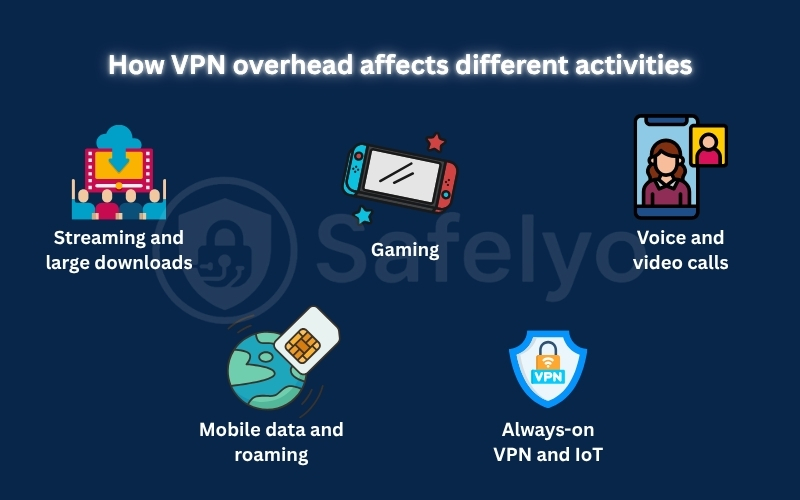
7. How does VPN overhead affect different activities?
The mathematical cost of protocol headers impacts your internet experience differently depending on the nature of your traffic. Understanding how your primary online activity behaves helps you mitigate the worst performance bottlenecks effectively.
- Streaming and large downloads
Transferring massive files and streaming high-definition video rely almost entirely on sending large, maximum-capacity packets. In these scenarios, the fixed protocol header accounts for a mathematically negligible percentage of the total data transferred. Your actual throughput and viewing quality depend heavily on server bandwidth and network routing, rather than the minor byte cost of encapsulation.
- Gaming
Online multiplayer gaming transmits a continuous stream of incredibly small data packets to update player positions rapidly. Because the payload itself is tiny, the fixed protocol headers represent a massive percentage of your total data usage. However, for gamers, minimizing network jitter and processing latency is vastly more important than calculating the overall data consumption.
- Voice and video calls
Voice-over-IP (VoIP) applications require a steady, uninterrupted flow of small audio packets to function correctly. This real-time traffic is highly sensitive to network jitter and the processing delays caused by heavy encryption algorithms. Because the conversation is live, delayed retransmissions caused by packet fragmentation will severely degrade your call quality and cause noticeable audio stuttering.
- Mobile data and roaming
When utilizing a metered cellular connection, the extra bytes added by encapsulation directly consume your monthly data cap. Constant background traffic from persistent keep-alive packets also drains both your data allowance and your smartphone battery. Mobile users must select a lightweight protocol that handles network handoffs efficiently without establishing new, heavy connections every time.
- Always-on VPN and IoT
Devices maintaining a permanent secure connection often transmit very little active application data throughout the day. In these idle scenarios, continuous keep-alive messages and rekeying procedures account for nearly all data usage. This constant control traffic represents a massive overhead burden for low-bandwidth satellite links or strictly metered IoT hardware.
8. How to measure VPN protocol overhead?
You cannot rely on simple browser-based speed tests to accurately measure the true cost of an encrypted tunnel. A professional evaluation requires packet-capture tools to isolate specific data costs from environmental factors like server congestion or temporary ISP throttling.
- What should be measured?
A proper network audit requires you to track several distinct metrics simultaneously to understand the full impact. You must measure total bytes sent, total bytes received, and the raw application payload bytes using tools like Wireshark. Data volume is only half the equation. You also need to actively record changes in network latency, connection jitter, packet loss rates, and total CPU usage during the encrypted session.
- Establish a no-VPN baseline
Before testing any secure tunnel, you must establish a clear performance baseline without any security software running. This provides the mathematical foundation necessary to calculate the exact impact of the protocol headers. You have to use the same device, the same local network, and target the identical destination server. You must also download the same test file during the same time of day to rule out network-level congestion.
- Keep protocol test conditions consistent
To compare different protocols fairly, you must eliminate all external variables that could skew the laboratory results. Record whether you are testing over UDP or TCP, and note the specific cipher suite being utilized by the client. Ensure features like split-tunneling, traffic obfuscation, and custom MTU settings are completely disabled during the test. Even switching from an IPv4 to an IPv6 network mid-test will drastically alter the packet header size and ruin your data.
- Test large and small packets separately
A single file download only tests how the protocol handles massive payloads, where overhead percentages are naturally lower. To get a complete picture, you must run at least three distinct network scenarios. Test a large file transfer, run a small-packet simulation for competitive gaming, and monitor the connection while it sits completely idle. This reveals how the protocol handles intense fragmentation versus background keepalive traffic.
- Calculate data overhead
You can calculate the exact percentage of extra data consumed using a simple, standardized mathematical formula. Subtract the baseline bytes from the VPN bytes, divide that number by the baseline bytes, and multiply by 100. Remember that this formula only measures total data volume added by the encapsulation process. It does not measure the processing power required by your CPU or the actual throughput speed loss you experience.
- Why one download test is not enough
Relying on a single burst download test ignores the complex realities of modern internet usage. A basic speed test does not reflect the continuous background traffic, mobile network handoffs, or severe packet loss issues. It also fails to reveal performance drops caused by silent MTU failure or TCP-over-TCP meltdown. To truly judge a protocol’s efficiency, you must monitor its stability over extended, varied usage periods.
9. How to reduce VPN protocol overhead?
While you cannot eliminate the mathematical cost of encryption, you can optimize your client setup to minimize the performance impact. Adjusting a few core settings prevents unnecessary encapsulation and ensures your hardware processes the traffic efficiently.
- Choose an efficient protocol
Selecting the right cryptographic foundation is the easiest way to improve your overall network speeds. WireGuard provides the best general performance due to its incredibly streamlined, lightweight codebase. You should only use OpenVPN TCP as an absolute last resort when your local network strictly blocks all standard UDP traffic. TCP encapsulation naturally introduces massive overhead and should never be your default choice for speed.
- Avoid unnecessary tunnel layers
Every extra security feature you enable adds another layer of encapsulation and processing delay to your packets. Features like multi-hop routing, traffic obfuscation, and routing over Tor severely impact your overall throughput. You should only activate these heavy privacy tools when you are facing strict government censorship or targeted surveillance. For daily browsing, a standard single-hop connection is more than sufficient and significantly faster.
- Use split tunneling
Split tunneling allows you to route only specific, highly sensitive applications through the encrypted tunnel. This leaves trusted apps, like local gaming clients or Netflix, running on your standard unencrypted network. While this does not reduce the structural overhead applied to each encrypted packet, it is highly effective. It significantly lowers the total data volume the VPN tunnel must process, saving processing power and bandwidth.
- Check MTU when connections stall
If websites only load partially or video calls drop constantly, you likely have an MTU fragmentation problem. When the tunnel adds too many headers, the resulting packets become too large for the physical network to handle. Manually lowering your VPN client’s MTU setting (for example, from 1500 to 1280) prevents this fragmentation. This simple adjustment often resolves persistent stalling issues immediately and restores smooth web browsing.
- Avoid unnecessary persistent keepalive
Keepalive packets are essential for maintaining a connection through strict firewalls and NAT routers. However, setting the interval too frequently generates massive amounts of wasted background data. This constant chatter drains mobile batteries rapidly and consumes cellular data allowances. You should only adjust the keepalive interval if you fully understand your specific network routing requirements.
- Use nearby servers for latency, not packet savings
Connecting to a server in your own city will drastically reduce your physical latency and improve route quality. However, a shorter physical distance does not change the mathematical byte size of the protocol headers. The packet overhead remains the same whether the server is located next door or across the globe. Proximity simply minimizes the chance of packet loss and annoying retransmissions over the internet.
- Use capable hardware
Your internet speed is ultimately bottlenecked by the CPU power of your local device. This is especially true for home routers and low-power mobile devices trying to process heavy encryption algorithms. If your hardware lacks AES-NI cryptographic acceleration, it will severely limit your throughput regardless of the protocol you choose. For maximum speeds, always run your VPN on modern desktop processors rather than weak router CPUs.
10. Frequently asked questions
What is VPN protocol overhead?
VPN protocol overhead is the extra data, processing power, and network latency required to secure your internet traffic. It includes the added byte headers for encapsulation and the CPU cycles needed to encrypt and decrypt your application data.
How much extra data does a VPN use?
There is no single fixed percentage for overhead. Depending on the protocol you choose and the size of the packets you are sending, a VPN typically increases your total data usage by roughly 4% to 20% compared to unencrypted traffic.
Which VPN protocol has the lowest overhead?
WireGuard generally produces the lowest packet overhead because of its highly streamlined codebase and efficient data structures. It uses modern, lightweight cryptographic algorithms that require far fewer system resources to process than legacy protocols like OpenVPN.
Does WireGuard use less data than OpenVPN?
Yes, in most scenarios, WireGuard uses slightly less data. It adds a smaller, fixed-size header to each packet and generates significantly less background keep-alive traffic during active sessions, making it highly efficient for metered connections.
Why does OpenVPN TCP have more overhead?
OpenVPN TCP wraps your inner application data inside an outer TCP header, creating redundant congestion-control checks. This configuration often leads to constant network retransmissions, severely reducing routing efficiency and drastically increasing overall packet overhead.
Does VPN encryption reduce Internet speed?
The encryption process naturally consumes CPU power and adds routing delays, which can reduce your overall throughput. However, modern lightweight protocols and hardware acceleration make this speed reduction virtually imperceptible on high-speed broadband connections.
Does split tunneling reduce VPN data usage?
Yes, split tunneling routes only specific, highly sensitive applications through the secure tunnel, leaving the rest unencrypted. While it does not change the overhead ratio per packet, it significantly reduces the total volume of data passing through the VPN.
Can a VPN exceed a mobile data cap?
Yes. Because encapsulation physically adds extra bytes to every packet, using a VPN permanently increases your total data consumption. If you are on a strict, metered mobile data plan, this continuous background overhead can quickly drain your monthly allowance.
Does a nearby VPN server reduce protocol overhead?
No, a nearby server drastically reduces your physical latency (ping), but it does not change the mathematical byte size of the protocol headers. The packet overhead remains the same whether the server is located next door or across the globe.
Can changing MTU improve VPN performance?
Yes, if your encrypted packets are exceeding the network’s maximum allowed size, they will fragment or drop completely. Manually lowering your VPN’s MTU setting prevents this fragmentation, which can instantly resolve stalled connections and dramatically improve throughput.
11. Conclusion
Understanding exactly how VPN protocol overhead works reveals that network encryption is never just a simple, flat percentage. The actual cost to your internet speeds is a highly dynamic combination of extra packet bytes, hardware processing strain, and inevitable MTU fragmentation limits.
You should never select a connection protocol based solely on theoretical data percentages; instead, choose a lightweight option like WireGuard that fits your specific daily activities. To optimize your encrypted setup and learn more about network safety, explore our comprehensive expert tutorials in the VPN Guides category at Safelyo today.