



What is a VPN? Think of it as your own private, encrypted tunnel, shielding your data from prying eyes, protecting your online privacy, and masking your IP address whenever you’re online. Whether you’re working remotely, managing finances online, or simply browsing on public Wi-Fi, a VPN offers critical protection.
If you want to understand how a VPN secures your digital life, here are the essential answers you need:
- What is a virtual private network?
→ It acts as a private, encrypted tunnel for your internet traffic, shielding your data and masking your IP address from prying eyes. - Why should you use one?
→ It secures your connection on risky public Wi-Fi, prevents ISPs from tracking your browsing history, and enhances overall online privacy. - Can it bypass geo-blocks?
→ Yes. By masking your real location, a VPN allows you to access restricted content and streaming libraries from other countries. - Does a VPN make you 100% anonymous?
→ No. While it hides your location, it cannot stop tracking via browser cookies, or if you log into accounts like Google or Facebook. - Are free VPNs safe?
→ Generally, no. Many free services sell your data to cover costs; for real security, choose a provider with a verified no-logs policy.
With a hands-on experience in cybersecurity and network infrastructure, I’ve seen how often users become targets of data breaches – all because they overlooked this simple, powerful tool. A VPN isn’t just for tech experts; it’s a fundamental privacy measure for anyone navigating the internet today.
Don’t wait for a data leak to take your security seriously. Let me walk you through everything you need to know to take control of your online privacy, starting now.
1. What is a VPN?
In my years of reviewing security tools, I’ve found that while the technology behind VPNs is complex, the concept is simple: It is a tool that enhances your digital privacy by creating a secure connection between your device and the internet.
If you’ve ever felt like someone is watching over your shoulder while you browse the web, you’re not paranoid – you’re just aware of how the modern internet works. Between advertisers, Internet Service Providers (ISPs), and hackers, your online data is surprisingly exposed. This is exactly where a VPN comes into play.
1.1. What does VPN stand for?
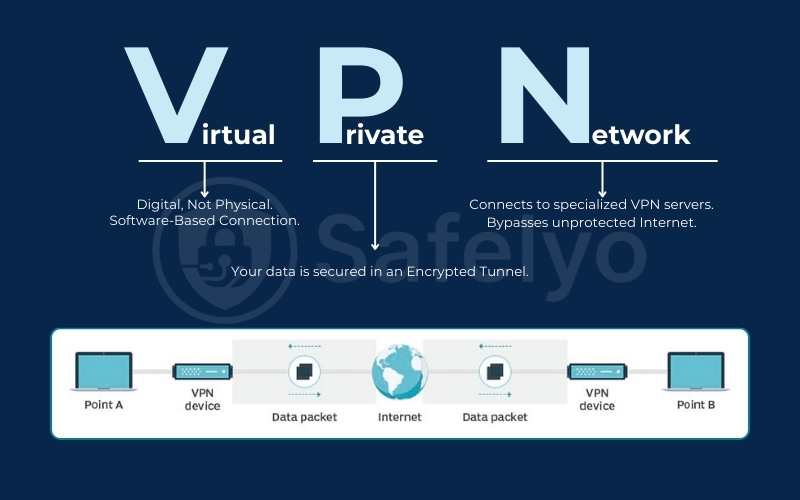
VPN stands for Virtual Private Network.
- Virtual: It is digital, not physical. You don’t need to run a new cable from your house to a server in another country. It happens entirely through software.
- Private: This is the key. It creates a secluded environment where your data is kept away from the public eye.
- Network: It connects your device (computer, phone, or tablet) to a specialized network of servers, rather than connecting directly to the open, unprotected internet.
1.2. What does a VPN actually do?
When I switch on a VPN on my laptop, two main things happen instantly. First, my actual location is hidden. Second, my data becomes unreadable to anyone trying to intercept it. Here is a closer look at the core functions of a VPN:
- It masks your IP address: Your IP address is like your digital home address. A VPN replaces your real IP with one from the VPN server you connect to. If I am in New York but connect to a server in London, websites will think I am browsing from the UK.
- It encrypts your internet traffic: A VPN wraps your data in a layer of strong encryption. Imagine sending a letter written in a secret code that only the recipient can read. Even if a hacker intercepts the letter, they see gibberish, not your passwords or credit card numbers.
- It bypasses censorship: By routing your traffic through a different location, a VPN allows you to access websites and apps that might be blocked in your current region (like accessing Facebook in a country where it’s banned).
1.3. What a VPN does NOT do
This is where many beginners get confused. Marketing often paints VPNs as a magical “force field” that protects you from everything. This is not true. To maintain trust and transparency, we need to be clear about the limitations right from the start.
Understanding these limitations is vital. A VPN is a privacy tool, not a cure-all for every internet danger. Here is what a VPN generally cannot do:
- It is not an antivirus: A VPN hides your data, but it doesn’t scan for malware. If you choose to download a suspicious file or click a phishing link, a standard VPN cannot stop the virus from infecting your computer.
- It does not make you 100% anonymous: While it makes you private, it doesn’t make you invisible. If you log into your Google account while using a VPN, Google still knows it’s you. Furthermore, the VPN provider itself can technically see your traffic (which is why choosing a “No-Logs” provider is crucial – we will cover this later).
- It does not speed up your internet (usually): Because your data has to travel further to a VPN server and undergo encryption, your internet speed might actually drop slightly.
2. How does a VPN work? (Step-by-Step)
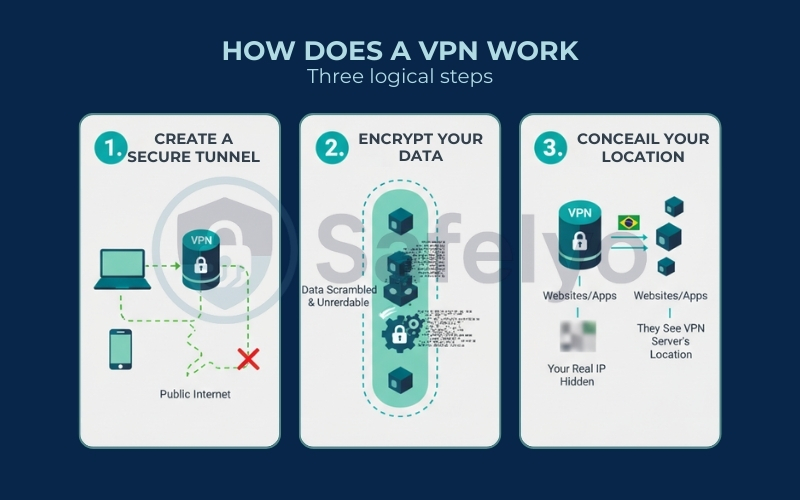
While the technology involves complex mathematics and networking protocols, the actual process of how a VPN works can be broken down into three logical steps.
1. Creating an encrypted pathway for your data
2. Scrambling your information to make it unreadable to outsiders
3. Concealing your true online location
When I explain this to friends, I usually compare it to sending a package. Instead of handing a transparent box to a mailman (where everyone can see the contents), you are putting that item inside an unbreakable steel safe before it leaves your house.
Here is exactly what happens from the moment you click “Connect” on your VPN app.
2.1. Step 1: Creating a secure tunnel
The moment you launch your VPN software and choose a server (say, in Switzerland), the software initiates a “handshake” with that server. This creates a secure tunnel between your device and the VPN server.
Think of this tunnel as a direct, private pipe built inside the chaotic public infrastructure of the internet.
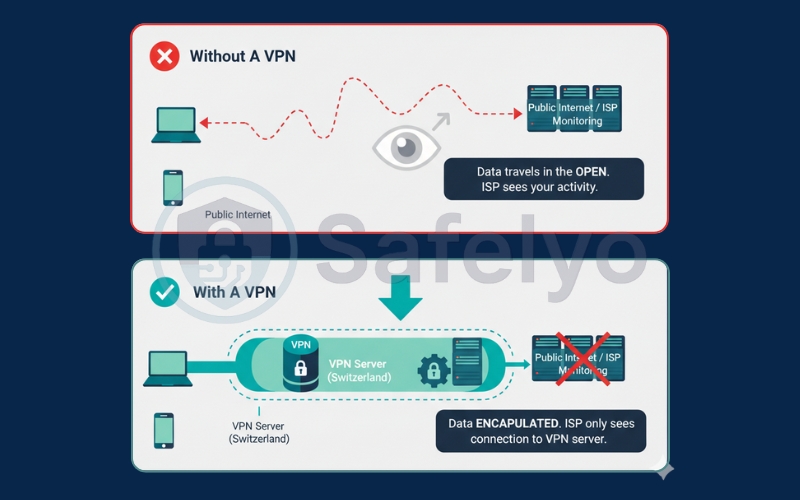
- Without a VPN: Your data travels in the open, bouncing through various checkpoints where your ISP (Internet Service Provider) can log exactly where you are going.
- With a VPN, the software encapsulates your data. Even though the data is physically traveling over your ISP’s cables, the ISP can no longer see what is inside the “pipe” or where the pipe leads – they just see that you are sending data to a VPN server.
2.2. Step 2: Encrypting your internet traffic
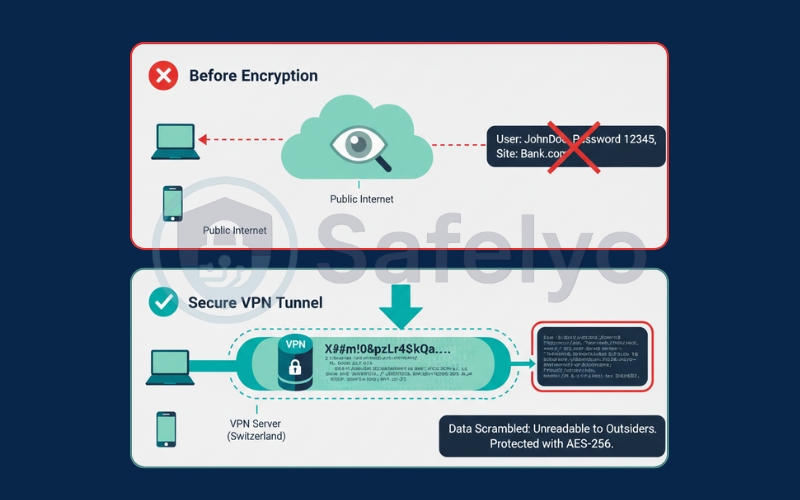
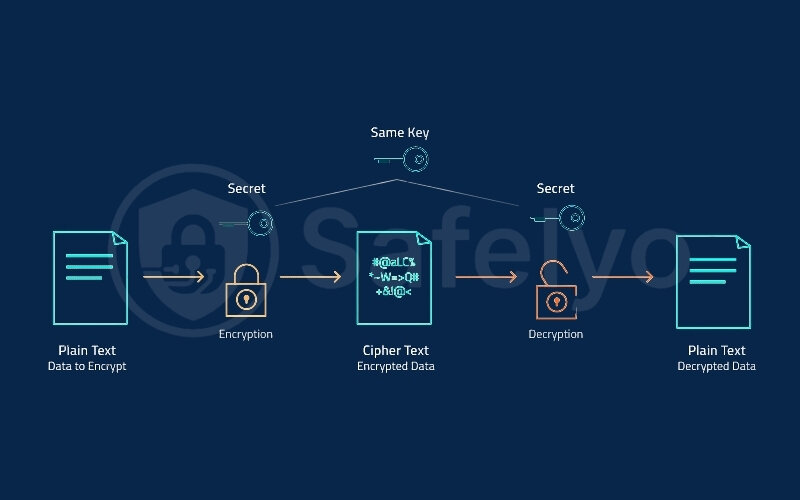
Once the tunnel is established, the VPN protects the data traveling through it using encryption. This is the process of scrambling your information into an unreadable format.
Most top-tier VPNs use AES-256 encryption, which is the same standard used by banks and military organizations.
- Before Encryption: A hacker intercepting your request might see: “User: JohnDoe, Password: 12345, Site: Bank.com”
- After Encryption: That same hacker would see:
X9#m!0&pzLr4$kQa...
To anyone looking from the outside – be it a hacker on public Wi-Fi or a government agency – your browsing history looks like complete gibberish. Only your device and the VPN server hold the “keys” to decode this mess back into readable information.
2.3. Step 3: Masking your IP address
This is the final step where the magic happens. Once your encrypted data reaches the VPN server, the server decrypts it and sends your request to the website you want to visit (e.g., Netflix or Facebook).
Here is the trick: Because the request is now coming from the VPN server, the website sees the VPN IP address of the server, not yours.
The Result: You effectively borrow the digital identity of the VPN server. If you are sitting in a cafe in Vietnam but connected to a server in Los Angeles, the internet believes you are in the United States. Your real IP address (and physical location) remains hidden behind the server.
2.4. What happens when VPN is ON vs OFF
To make the difference crystal clear, let’s compare the two scenarios directly. This distinction is crucial for understanding why we use VPNs in the first place.
Scenario A: VPN is OFF
- Your ISP sees everything: They know every website you visit, how long you stay there, and can throttle your speed if you are streaming too much.
- Websites know who you are: They can see your real IP address, which reveals your rough geographical location (City/Zip Code).
- Public Wi-Fi is risky: If you are at a coffee shop, a hacker on the same network can potentially intercept your unencrypted data.
Scenario B: VPN is ON
- Your ISP is blind: They can see that you are online and using data, but they cannot see what you are doing. Your browsing history is hidden from them.
- Websites are fooled: They see the IP address of the VPN server. You appear to be in a different city or country.
- Public Wi-Fi is safe: Because your traffic is encrypted inside the tunnel, hackers cannot read your data, even if they manage to intercept it.
3. Types of VPN explained
It helps to categorize VPNs into three distinct buckets. While the underlying technology (creating a secure tunnel) is similar, who uses them and what they are used for is very different.
When you hear the term VPN, you might picture the app you download to watch Netflix shows from another country. However, the technology was originally built for big businesses, not for streaming movies.
3.1. Remote-access VPN
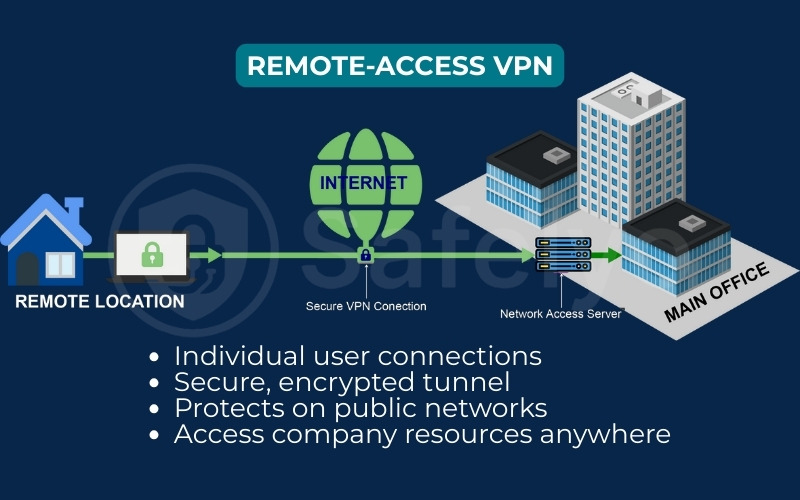
If you have ever worked from home or traveled for business, you have likely used a Remote-access VPN.
This type of VPN allows individual users to connect to a private network (usually a company’s internal network) from a remote location. Even though the employee is sitting in a café or at their kitchen table, the VPN makes their computer act as if it is physically plugged into the office network.
- Who uses it: Remote workers and employees.
- The goal: To safely access internal company files, printers, or intranets that are not available to the public internet.
- How it works: You install the client software on your laptop. When you log in, it creates a secure tunnel back to the company’s main server.
3.2. Site-to-site VPN
This is the heavy lifter of the VPN world, mostly used by large organizations. You will rarely, if ever, need to set this up personally.
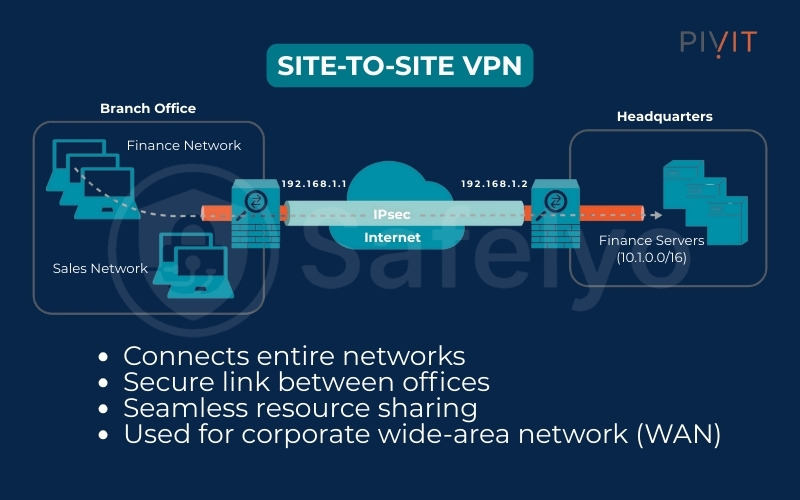
A Site-to-Site VPN connects two distinct networks together permanently. Imagine a large corporation with a headquarters in New York and a branch office in London. Instead of having every employee in London dial into New York individually (like in Remote-access), the companies set up a permanent VPN link between the New York router and the London router.
- Who uses it: Large multinational companies with multiple offices.
- The goal: To merge two separate office networks into one giant, cohesive network.
- How it works: It is usually configured directly on the network routers, not on individual devices. It operates in the background – employees might not even realize it exists.
3.3. Personal VPN (Consumer VPN)
This is the type of VPN we are focusing on in this guide – and the one you are likely looking for. Services like NordVPN, ExpressVPN, or Surfshark fall into this category.
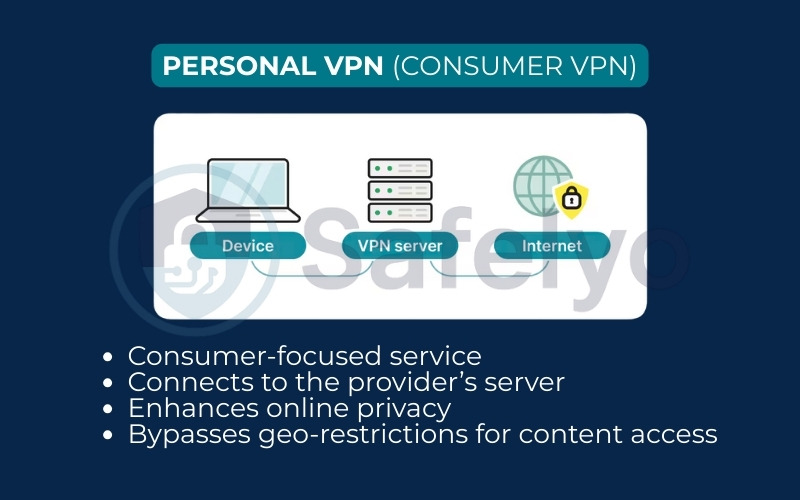
A Personal VPN (also called a Consumer or Commercial VPN) is designed for individual use. Unlike the corporate versions above, you aren’t trying to connect to a private office network. Instead, you are connecting to a server owned by a VPN provider to access the public internet safely.
- Who uses it: Everyday internet users (You!).
- The goal: To hide your identity (IP address), encrypt your personal data, and bypass geo-blocks on websites.
- How it works: You download an app on your phone or computer. The app connects you to the provider’s server bank. Once connected, your traffic is encrypted before it hits the open internet.
Why the distinction matters: When people search for “Best VPN“, they are almost always looking for a Personal VPN. Throughout the rest of this article, when I say “VPN”, I am referring to this consumer-friendly version.
4. VPN protocols explained
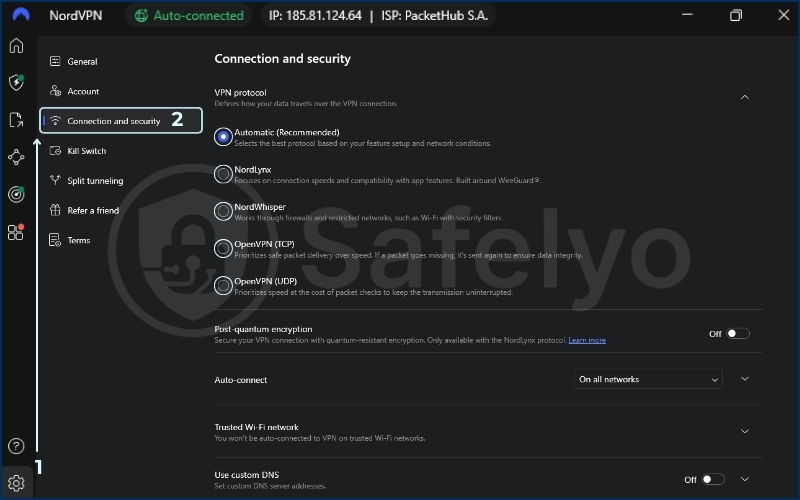
If you dig into the settings menu of any VPN app, you will likely stumble upon a section labeled “Protocol” with options like OpenVPN, WireGuard, or IKEv2. For most beginners, this looks like a confusing alphabet soup.
In simple terms, if the VPN connection is a “tunnel”, the Protocol is the set of rules that determines how your data travels through that tunnel.
You can think of it as choosing a vehicle for a road trip. Do you want a race car (fast but less protection) or an armored tank (slower but invincible)? The protocol you choose dictates the balance between speed, security, and stability.
4.1. What is a VPN protocol?
A VPN protocol is a defined method for transmitting data between your device and the VPN server. It controls exactly how your data is encrypted (locked up) and how it is transported across the internet.
Different protocols were built for different purposes. Some prioritize sheer speed for streaming, while others prioritize heavy-duty encryption for sensitive data transfer. Most modern VPN apps are smart enough to pick the best one for you automatically, but understanding the difference can help you troubleshoot connection issues or boost your speed.
4.2. WireGuard vs OpenVPN vs IKEv2
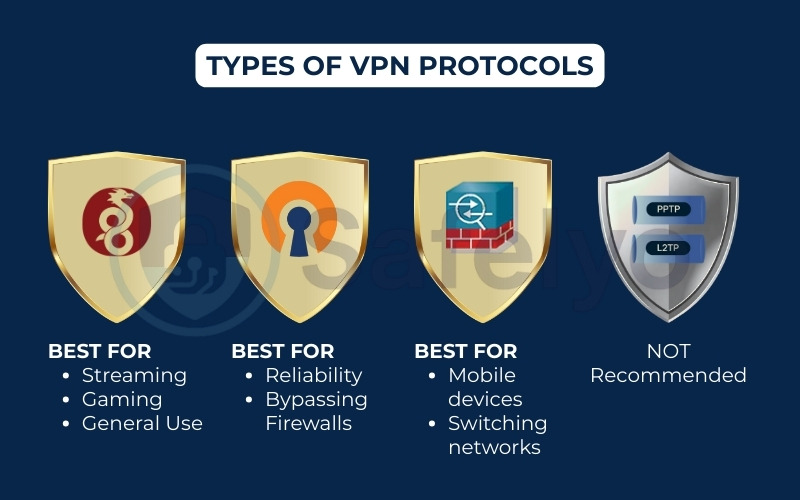
While there are many protocols out there, you really only need to know the “Big Three”. These are the industry standards used by almost every reputable provider today.
Note: You might also see names like PPTP or L2TP/IPsec. These are older, obsolete protocols. Avoid them if possible – they are generally considered insecure by modern standards.
Here is a quick comparison table to help you decide which one fits your needs:
| Protocol | Speed | Security level | Best used for |
| WireGuard | Fastest | High (Modern & Efficient) | Streaming, Gaming, & Everyday browsing. It is lightweight and connects instantly. |
| OpenVPN | Average | Highest (Gold Standard) | Maximum Privacy & Bypassing censorship (e.g., in China/Russia). It is the most “battle-tested”. |
| IKEv2 | Fast | High | Mobile Users. It shines at reconnecting quickly when you switch from Wi-Fi to 4G/5G. |
4.3. Which VPN protocol should you choose?
In most cases, you should leave your VPN app on “Auto” (Automatic Selection). The app is smart enough to pick the best balance for your current network.
However, if you want to tweak it manually, here is my rule of thumb:
- Choose WireGuard for almost everything. If you want the best speeds for Netflix or downloading large files, this is the way to go.
- Choose OpenVPN (TCP/UDP) if you are in a highly restrictive environment (like a school firewall or a strict country) and need maximum stability over speed.
- Choose IKEv2 if you are on a mobile device and moving around a lot, constantly switching between Wi-Fi and mobile data.
5. Why use a VPN?
So, why are millions of people paying for this software every month? It’s not just for tech wizards or people with secrets to hide. In today’s digital landscape, a VPN is a fundamental tool for anyone who owns a smartphone or laptop.
After testing dozens of VPNs over the years, I’ve found that most users fall into one of two camps: Those who want to protect their data, and those who want to access more content. A good VPN does both.
Here are the four main benefits of a VPN, reasons why you should consider using one.
Online privacy & anonymity
The internet is built on tracking. Your Internet Service Provider (ISP) has a log of every website you visit. Advertisers build detailed profiles of your interests based on your browsing history. Even your government might be monitoring your digital footprint.
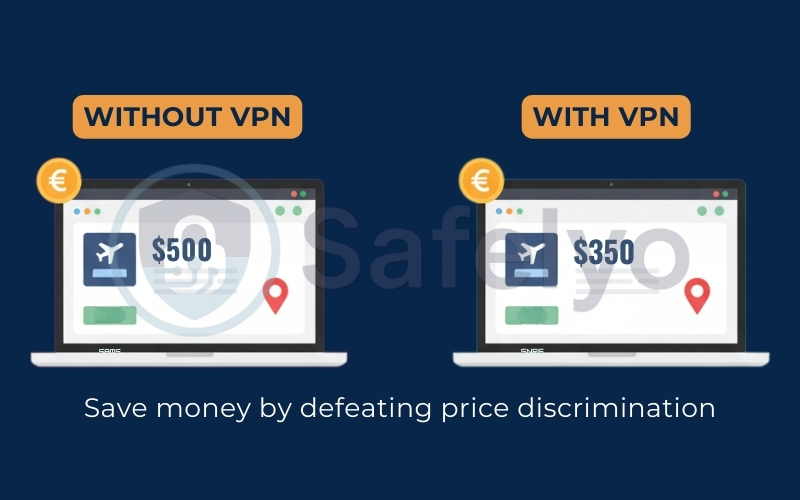
A VPN acts as digital camouflage. By masking your IP address and encrypting your traffic, you stop these third parties from snooping on your activity. You can search for sensitive topics (such as medical advice or financial help) without being immediately bombarded by targeted ads.
Real-world example: If I search for “cheap flights to London” without a VPN, travel sites often track that interest and might hike up prices next time I visit. With a VPN, I start with a clean slate every time.
Security on public Wi-Fi
We all love free Wi-Fi at coffee shops, airports, and hotels. But these networks are notoriously insecure. Hackers can easily sit on the same network and use “packet sniffing” tools to steal passwords or credit card numbers from unsuspecting users.
This is where a VPN shines the brightest. It creates an encrypted tunnel between you and the internet. Even if you are connected to a sketchy, password-free Wi-Fi network at a cafe, a hacker cannot read your data. They might see that you are connected, but your bank login details will look like scrambled code.
My advice: I never connect to airport or hotel Wi-Fi without turning my VPN on first. It’s a simple habit that prevents identity theft.
>> You may also be interested in: Best VPN for public Wi-Fi 2026: Secure, fast & auto-protect
Bypassing geo-restrictions
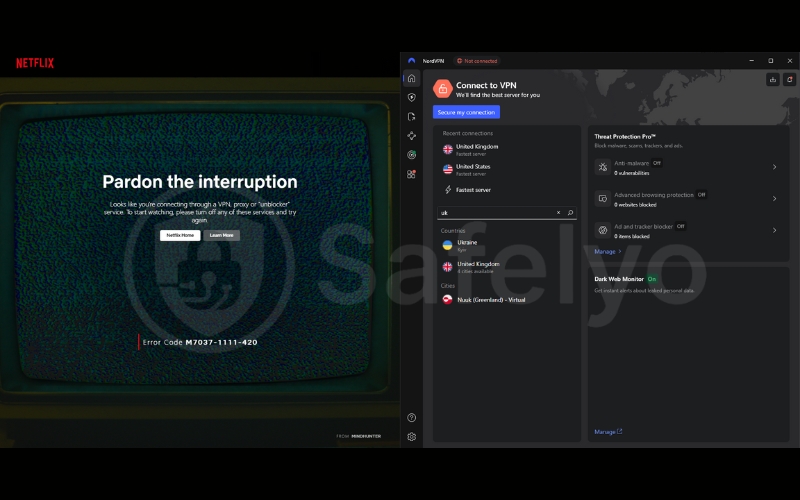
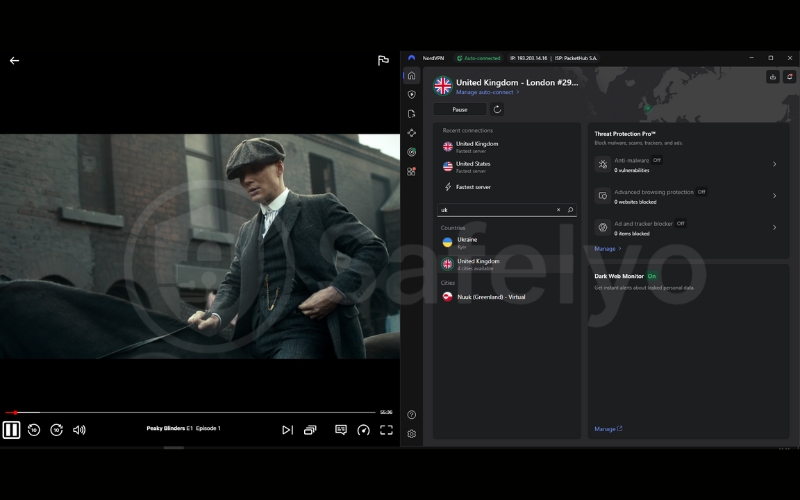
Have you ever tried to watch a YouTube video or a Netflix show only to see the annoying message: “This content is not available in your country”? This is called geo-blocking.
Streaming services and websites often restrict content based on copyright agreements. A VPN lets you virtually teleport to another country to bypass these digital borders.
The benefit: You can unlock a massive library of content.
- Connect to a UK server to watch BBC iPlayer.
- Connect to a US server to access the American Netflix library.
- Access social media apps while traveling in countries with strict censorship.
Secure remote work access
In the era of remote work, security is more important than ever. If you are working from home or a co-working space, you are likely accessing sensitive company data – customer lists, financial reports, or internal strategies.
Many companies now require employees to use a VPN to access their internal servers. It adds an extra layer of protection, ensuring that if a hacker targets your home router, they still can’t get into your company’s files. A VPN ensures that this sensitive business information stays private, even if your home network isn’t perfectly 100% secure.
6. VPN on different devices: How it works across platforms
Gone are the days when a VPN was just a piece of software for your clunky office desktop. Today, the average household has over 10 connected devices, from smartphones to smart fridges.
A robust VPN service usually offers “multi-platform support”, meaning one subscription can protect your laptop, phone, and even your TV simultaneously. However, the experience works slightly differently on each device.
6.1. VPN on computers (Windows & macOS)
This is the most common way to use a VPN. Desktop clients (apps) generally offer the most powerful features because computers have the processing power to handle heavy encryption without breaking a sweat.
- How it works: You install a dedicated app (client). It runs in the background, encrypting all traffic entering or leaving your computer – whether it’s from your web browser, a game, or a torrent client.
- Key features: Desktop versions usually give you granular control. You can choose specific protocols, activate a “Kill Switch” (which cuts the internet if the VPN drops), or use “Split Tunneling” to let some apps bypass the VPN while others stay protected.
- Browser Extensions vs. Apps: Be careful here. Many providers offer a simple Chrome or Edge extension. While convenient, these usually only protect your web browser traffic. Your other apps (like Spotify or Outlook) remain exposed. For full protection, always use the installed app.
6.2. VPN on mobile devices (Android & iPhone)
Since we carry our phones everywhere, they are actually more vulnerable than our computers, especially when connecting to public Wi-Fi networks at cafes or airports.
- How it works: Mobile VPN apps are designed for simplicity. Usually, it’s a big “On/Off” button.
- Battery Life: Modern protocols like WireGuard and IKEv2 are highly efficient, so leaving a VPN on shouldn’t drain your battery noticeably.
- Auto-Connect: A great feature on mobile is “Auto-connect on untrusted Wi-Fi”. You can set the app to automatically turn on the VPN the moment you connect to a network that isn’t your home Wi-Fi.
6.3. VPN on smart TVs & streaming devices
The primary goal of using a VPN for Firestick here is usually streaming – unlocking content libraries from other regions on Netflix, Hulu, or BBC iPlayer on your big screen.
- Android TV & Fire Stick: These are easy. They have app stores (Google Play or Amazon Appstore) where you can download VPN apps directly, just like on your phone.
- Apple TV (tvOS 17+): Good news! As of late 2023, Apple TV finally supports native VPN apps. You can download them directly from the App Store.
- Older Samsung/LG TVs: Most proprietary smart TV operating systems (like Tizen or WebOS) do not support VPN apps directly. To use a VPN on these, you usually need to use a feature called “Smart DNS” or configure the VPN on your router (see below).
6.4. VPN on Gaming Consoles (Xbox & PlayStation)
Gamers use VPNs to protect against DDoS attacks, bypass IP bans, or access game lobbies in different regions (to find easier opponents or play games released early in other time zones).
- The Challenge: Neither Xbox nor PlayStation has native support for VPN apps. You cannot simply go to the store and download “NordVPN” or “ExpressVPN”.
- The Workaround: To protect a console, you have two main options:
- Share the connection: Connect the console to your PC via an Ethernet cable and share the PC’s VPN-protected connection.
- Router installation: Cover the console by installing the VPN on your home router.
>> You may also be interested in: Best VPN for Gaming 2026: Lowest ping, fastest & DDoS-Proof
6.5. VPN on Routers (Whole-Home Protection)
VPN for routers are the “nuclear option” for privacy. Instead of installing an app on every single device, you install the VPN software directly on your Wi-Fi router.
- The benefit: Every single device that connects to your Wi-Fi is instantly protected. This includes devices that can’t run apps, like your smart thermostat, Ring doorbell, or older Smart TVs.
- The trade-off: It can be tricky to set up. Also, it’s harder to turn off quickly. If you want to watch local news on your TV but browse privately on your phone, a router VPN makes everything appear to be in the VPN location.
- Who needs this? I generally recommend this only for advanced users or those who want to protect 20+ devices at once without hitting the device limit on their VPN subscription.
>> Learn more: How to set up a VPN on a router (Easy full guide for 2026)
7. Do VPNs track you? VPN logging explained
Before we talk about safety features, we need to address the elephant in the room. There is an old saying in the cybersecurity world: “When you use a VPN, you are simply shifting your trust from your Internet Service Provider (ISP) to the VPN provider”.
This is technically true. When you turn on a VPN, your ISP goes blind, but the VPN provider now holds the keys to your data tunnel. Understanding Logging Policies is the single most important factor in deciding if a VPN is actually a privacy tool or just a different kind of tracker.
7.1. What VPN providers can see
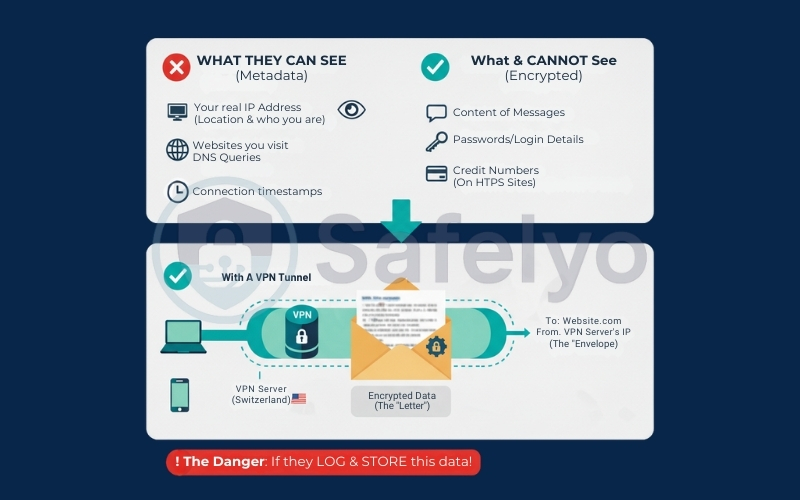
Let’s be technically clear about what a VPN server has the capacity to see. Because you are routing your traffic through their infrastructure, they can technically see:
- Your real IP address: They know who you are and where you are connecting from.
- The websites you visit: They know you requested access to google.com (DNS queries).
- Connection timestamps: They know exactly when you logged on and how long you stayed.
However, it is important to note: They cannot see the specific content of your messages, passwords, or credit card numbers on secure websites (HTTPS). They see the “envelope”, not the “letter” inside. The danger isn’t that they can see this metadata; the danger is if they record (log) it and store it on a hard drive.
7.2. What is a no-logs policy?
A strict No-Logs Policy (or Zero-Logs Policy) is a legally binding promise from the VPN provider that they do not record, store, or share your browsing activity.
If a government agency knocks on their door and demands your data, a true no-logs provider should be able to say: “We can’t give you anything because we don’t have anything”. But be careful – “No Logs” is a marketing term often abused.
- Activity Logs (Bad): Records of websites visited, files downloaded, or search history. Never use a VPN that keeps these.
- Connection Logs (Acceptable): Some providers keep temporary, anonymous data like “Server load is 80%” to maintain network stability. This is usually fine, provided it isn’t linked to your specific user ID.
7.3. How to verify a VPN is truly no-logs
Anyone can write “We care about privacy” on their homepage. As a smart user, you need proof, not promises. Here is how I verify if a VPN is trustworthy:
- Third-party audits: Top-tier VPNs hire independent auditing firms (like PwC, Deloitte, or KPMG) to inspect their servers. The auditors publish a report confirming that the company is actually not saving logs.
- RAM-Only servers: This is a game-changer. Traditional servers store data on hard drives, which retain data until it is overwritten. RAM-only servers run entirely on volatile memory. Every time the server is rebooted (or unplugged), all data is physically wiped instantly.
- Real-world court cases: This is the ultimate test. There have been cases where authorities seized a VPN provider’s servers to find a criminal, only to find the servers were completely empty. That is “proven in court” privacy.
8. Is a VPN safe?
Now that we know how a VPN handles your data privacy (logging), we need to look at technical security. Is the connection itself secure? Can hackers break in?
The short answer is: Yes, high-quality VPNs are safe. But this safety relies on three specific technical pillars. If a VPN lacks any of these, it is not doing its job.
8.1. How VPN encryption keeps you safe
I mentioned encryption earlier, but let’s look at the standard you should expect. A safe VPN uses AES-256 encryption.
To give you an idea of how strong this is: It is the same encryption standard used by the NSA, major banks, and government agencies to protect Top Secret information.
- The reality: It would take a supercomputer billions of years to “brute force” (guess) the key to decrypt AES-256 data.
- The benefit: Even if a hacker intercepts your data stream at a coffee shop, all they have is a pile of useless digital garbage. Your data is effectively unbreakable while inside the VPN tunnel.
8.2. Kill switch explained
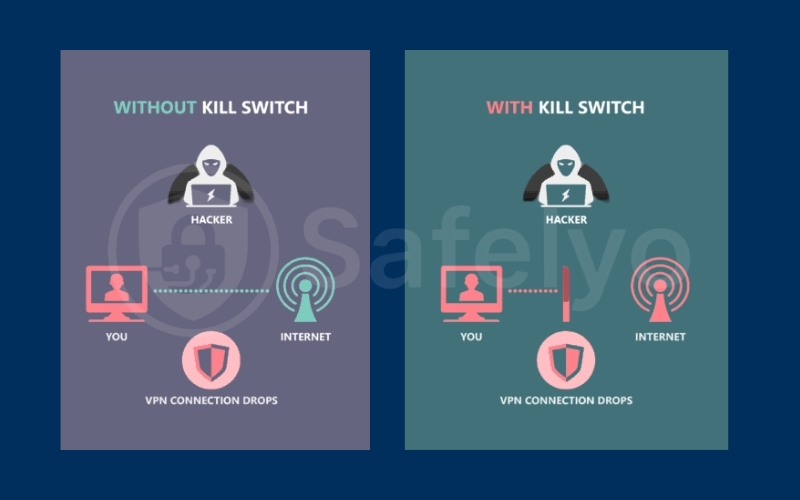
This is a non-negotiable feature. If a VPN app doesn’t have a Kill Switch, do not use it. VPN connections can occasionally drop – maybe your Wi-Fi flickered, or the server got overcrowded.
- Without a Kill Switch: If the VPN disconnects for even a second, your device immediately reverts to your normal, insecure internet connection. Your real IP address is instantly exposed to the website you are visiting.
- With a Kill Switch: It acts like a digital emergency brake. If the VPN connection drops, the Kill Switch instantly cuts your internet access entirely. It ensures that not a single packet of data leaves your device unless it is encrypted.
8.3. DNS & IPv6 leak protection
Sometimes, even with a VPN on, your computer can “leak” information due to the way operating systems act.
- DNS leaks: Normally, your ISP handles the “address book” of the internet (translating names like google.com into numbers). A safe VPN takes over this job. If it fails, your ISP can still see every site you visit.
- IPv6 leaks: Most of the internet uses older IPv4 addresses, but modern devices use IPv6. Some cheap VPNs forget to hide your IPv6 address, leaving you exposed.
→ The solution: Premium VPNs have built-in leak protection that forces all traffic types through the encrypted tunnel.
8.4. When VPNs are NOT safe (Crucial Warning)
To be a truly trustworthy guide, I have to be honest: Using a VPN isn’t a magic shield. Here are scenarios where using a VPN might actually be less safe:
- Free VPNs: As the saying goes, “If you aren’t paying for the product, you are the product”. Many free VPNs make money by tracking your browsing data and selling it to advertisers.
- Malware risks: A VPN hides your data, but it doesn’t scan it (unless it has a specific Threat Protection feature). If you download a virus, the VPN will happily encrypt that virus and deliver it safely to your computer.
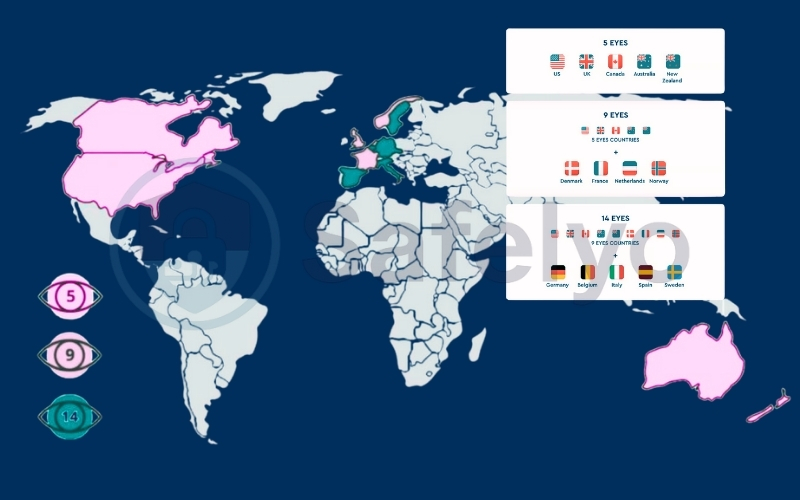
- Bad Jurisdictions: If a VPN company is based in a “14 Eyes” country (like the US, UK, or Australia), it can be legally forced to secretly record user data. Always check where the company is headquartered (Panama and British Virgin Islands are preferred safe havens).
9. VPN vs Proxy vs Tor: What’s the difference?
When researching online privacy, you will often see terms like “Proxy” and “Tor” thrown around alongside VPNs. While they all share a common goal – hiding your identity – they achieve it in very different ways.
Confusing a Proxy with a VPN is a bit like confusing a bicycle with a tank. Both get you moving, but you wouldn’t want to ride a bicycle through a war zone.
VPN vs Proxy
A Proxy server acts as a simple middleman. It hides your IP address, but that is about it.
- The Problem: Proxies usually work only on the “app level” (like your web browser). They generally do not encrypt your traffic. This means your ISP can still analyze your data, but they just can’t see the final destination.
- The Verdict: Good for bypassing a simple website block at school; bad for privacy.
VPN vs Tor
Tor (The Onion Router) is a browser designed for extreme anonymity. It bounces your internet traffic through a random network of volunteer “nodes” around the world.
- The Problem: Security comes at the cost of performance. Because your data takes such a complex route, Tor is painfully slow. It is not suitable for streaming or downloading.
- The Verdict: Great for whistleblowers and activists; too slow for daily use.
Here is how the three tools stack up against each other in a direct comparison:
| Feature | VPN | Proxy | Tor Browser |
|---|---|---|---|
| Encryption | Strong (System-wide). Encrypts all traffic leaving your device. | None / Weak. Only hides IP; data is often visible. | Multi-layered. Traffic is encrypted multiple times between nodes. |
| Speed | Fast. Minimal speed loss (10-20%), suitable for streaming and gaming. | Fast. No encryption overhead, but reliability depends on the proxy server. | Very Slow. Not suitable for video streaming or heavy browsing. |
| Anonymity | High. Depends on trusting the VPN provider’s no-logs policy. | Low. The proxy operator can see your activity. | Extreme. Decentralized routing makes tracing extremely difficult. |
| Coverage | All Apps. Protects browsers, apps, games, and background traffic. | Browser Only. Limited to the app configured with the proxy. | Browser Only. Protection applies only inside Tor Browser. |
| Cost | Paid. Free tiers exist but are usually limited. | Free. Most public proxies cost nothing. | Free. Open-source and community-run. |
Which one should you use?
- Use a Proxy if: You just want to quickly bypass a simple geo-block (like reading a news article from another country) and don’t care about security.
- Use Tor if: You are a journalist, whistleblower, or living in a regime with extreme censorship where anonymity is more important than speed.
- Use a VPN if: You are a normal internet user. You want to stream movies, download files, and browse safely on public Wi-Fi without sacrificing speed. It offers the best balance of performance and protection for daily life.
10. Downsides of using a VPN
I have spent a lot of time praising VPNs in this guide, but I would be lying if I told you they were perfect. Like any technology, using a VPN involves trade-offs. You are essentially trading a bit of convenience and speed for a lot of privacy and security.
Before you commit to a subscription, you need to know exactly what the “catch” is.
10.1. Does VPN slow down the internet?
The short answer is: Yes, it almost always does.
When you use a VPN, your internet traffic has to make an extra stop. It travels from your device → to the VPN server → to the website. Plus, the process of encrypting and decrypting data takes computing power.
- The impact: On a high-quality paid VPN using modern protocols (like WireGuard), the speed drop is usually negligible – often just 10% to 20%. You likely won’t notice it while streaming or browsing.
- The warning: On distant servers (e.g., connecting to Japan from New York) or cheap VPNs, your speed can drop by 50% or more, causing buffering and lag.
>> You may also be interested in: Does VPN slow down the internet? Yes! Here are 10 ways to fix it!
10.2. Can VPNs be blocked?
Yes. Just as VPNs are designed to bypass blocks, network administrators are constantly trying to block VPNs.
- Streaming Services: Netflix, Hulu, and Amazon Prime have sophisticated systems to detect VPN IP addresses. You might see the dreaded “Proxy Error” message. Only the best VPNs can consistently trick these systems.
- Strict Firewalls: Schools, workplaces, and hotel Wi-Fi networks often block the specific “ports” that VPNs use to prevent students or employees from bypassing filters.
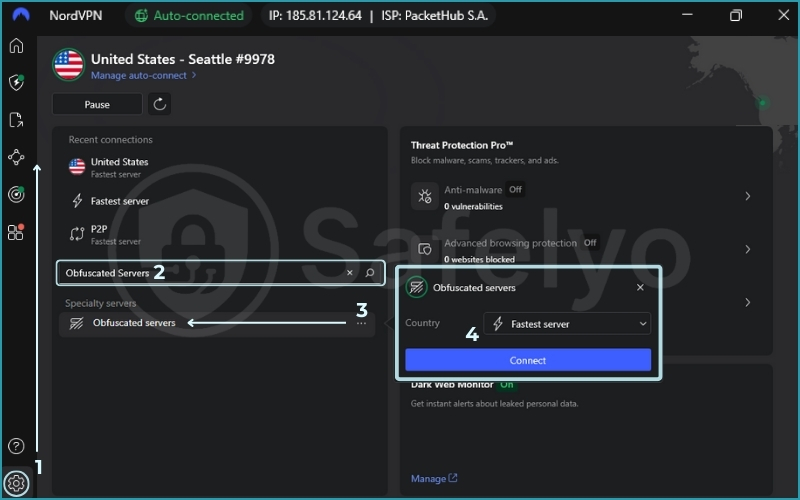
- Obfuscation: Premium VPNs offer “Stealth” or “Obfuscated” servers designed to look like regular internet traffic, helping you slip past these blocks.
>> You may also be interested in: How to bypass VPN blocker: 8 ways that work
10.3. Free VPN risks
I cannot stress this enough: Avoid free VPNs for serious privacy. Running a global network of servers costs millions of dollars. If a company isn’t charging you a subscription fee, they have to make money somewhere else.
- You are the product: Many free VPNs track your browsing data and sell it to third-party advertisers – defeating the entire purpose of using a VPN.
- Malware & Ads: Some free Android VPN apps have been caught injecting malware or bombarding users with aggressive ads.
- Limits: Even “safe” free versions (like Proton VPN Free) restrict you to slow speeds, 1 device, and only 3 server locations.
>> Still wanna try? Check for the best free VPN in 2026: No-cost safety & speed top picks
10.4. Is VPN legal?
In the vast majority of the world (including the US, UK, Canada, Australia, and most of Europe/Asia), using a VPN is 100% legal. You have every right to protect your privacy.
However, there are exceptions:
- Restricted Countries: Nations with heavy censorship (like China, Russia, Iran, UAE, and North Korea) either ban VPNs entirely or only allow government-approved ones (which spy on you).
- Illegal Activity: Important distinction – using a VPN is legal, but doing illegal things with a VPN is still illegal. If you use a VPN to download copyrighted movies or hack a website, you are still breaking the law.
>> You may also be interested in: Is using a VPN illegal? What you must know now
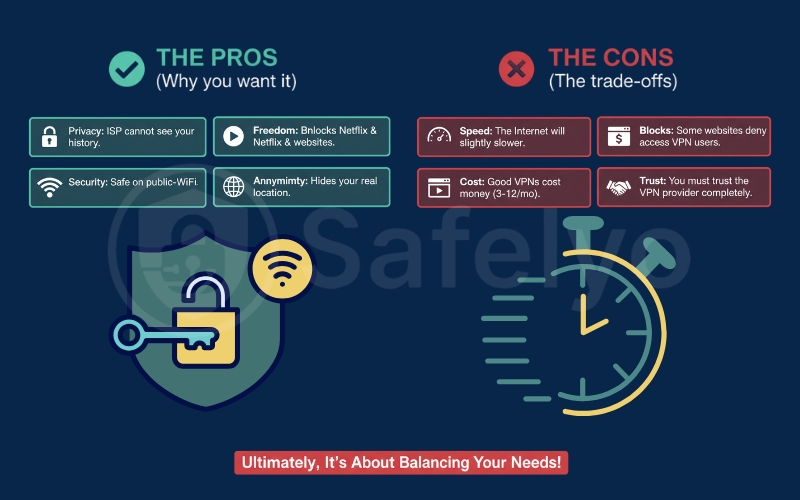
To wrap up this section, here is the honest balance sheet:
THE PROS (Why you want it)
- Privacy: ISP cannot see your history.
- Security: Safe on public Wi-Fi.
- Freedom: Unblocks Netflix & websites.
- Anonymity: Hides your real location.
THE CONS (The trade-offs)
- Speed: The Internet will be slightly slower.
- Cost: Good VPNs cost money (3-12/mo).
- Blocks: Some websites deny access to VPN users.
- Trust: You must trust the VPN provider completely.
11. Common VPN myths and misunderstandings
Marketing campaigns often treat VPNs like a magical “force field” that deflects every digital threat. The reality is more nuanced. While VPNs are powerful privacy tools, they are not a cure-all for every internet danger.
Let’s clear up the four biggest misconceptions I hear from new users.
11.1. VPN vs Antivirus: What’s the difference?
This is the most common confusion. Many people think, “I have a VPN, so I don’t need an antivirus”. This is dangerous thinking.
- The VPN (The Tunnel): It protects your connection. It hides where you are going and encrypts the data while it travels.
- The Antivirus (The Doctor): It protects your device. It scans files for malicious code (viruses, trojans, ransomware).
The critical distinction: If you download a virus-infected file while using a VPN, the VPN will happily encrypt that virus, hide it from your ISP, and deliver it safely to your hard drive. Once the virus is on your computer, the VPN cannot help you. You need both tools for complete protection.
>> Learn more: How does antivirus software work in 3 core detection engines
11.2. Does a VPN make you completely anonymous?
No. A VPN provides privacy, not total anonymity.
- What it hides: It hides your IP address and location from websites and your ISP.
- What it doesn’t hide:
- Cookies & Fingerprinting: Advertisers use browser cookies and device fingerprinting to track you across the web, even if your IP changes.
- Logins: If you log into your Google or Facebook account while using a VPN, those companies know exactly who you are. The VPN cannot hide your identity if you voluntarily hand it over by logging in.
>> Let’s see how to browse the web anonymously in 2026: Easy 4-step guide
11.3. Does a VPN protect you from hackers?
It protects you from specific types of hackers, but not all of them.
- Yes: It protects you from “Man-in-the-Middle” attacks on public Wi-Fi. If a hacker is sitting in a coffee shop trying to intercept your data, the VPN encryption blocks them completely.
- No: It does not protect you from Phishing or Social Engineering. If a hacker sends you a fake email claiming to be your bank, and you click the link and type in your password, a VPN cannot stop you. You are handing the keys to the hacker through an encrypted tunnel.
>> So, can VPN be hacked? 4 things to do with each real-world sign
11.4. Is a VPN enough for full online security?
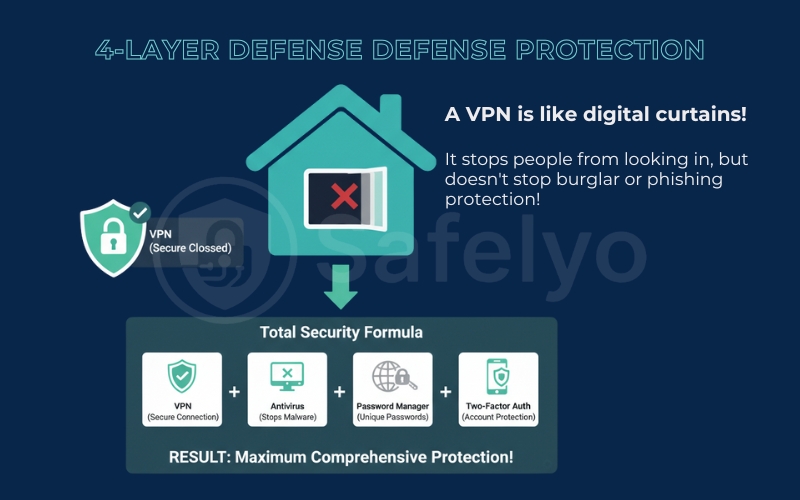
Absolutely not. A VPN is just one layer of your digital defense. Relying only on a VPN is like locking your front door but leaving all the windows open.
For a robust security setup (often called “Defense in Depth”), you need a combination of tools:
- A VPN: To secure your connection and privacy.
- Antivirus: To stop malware and ransomware.
- Password Manager: To ensure you never reuse weak passwords.
- Two-Factor Authentication (2FA): To protect your accounts even if your password is stolen.
The Bottom Line: Think of a VPN as digital curtains. It stops people from looking through your window, but it doesn’t stop a burglar from breaking down the door (viruses) or you inviting a stranger inside (phishing).
12. How to choose a VPN
Now that you understand how a VPN works and what it can (and can’t) do, you might feel a bit overwhelmed by the sheer number of options. There are hundreds of VPN apps on the market, and they all claim to be the “fastest” and “safest”.
Don’t worry. You don’t need to test them all. I have broken down the selection process into four logical steps to help you find the perfect match for your needs.
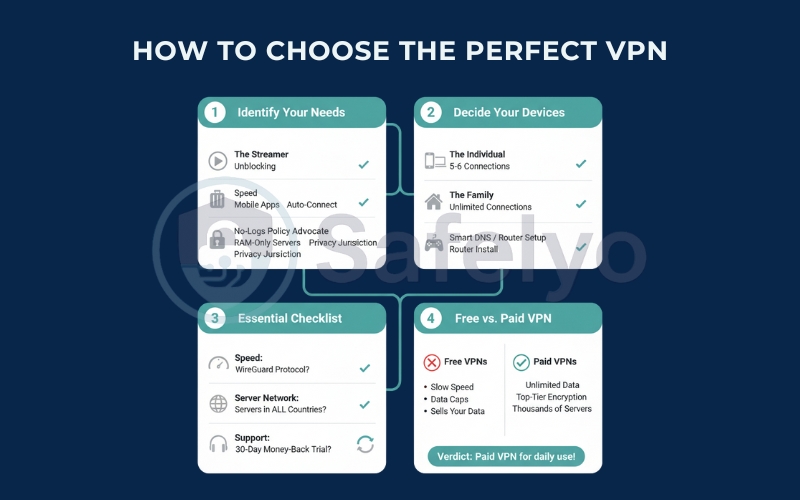
Step 1: Identify why you need a VPN
Not all VPNs are created equal. Some are built for speed, while others are built for paranoia-level security. Your first step is to define your primary goal:
- The streamer: If your main goal is watching Netflix Japan or BBC iPlayer, you need a VPN known for speed and unblocking capabilities. Security is secondary to performance here.
- The traveler: If you work from cafes and airports, you need a VPN with excellent mobile apps and a reliable auto-connect feature for public Wi-Fi.
- The privacy advocate: If you are worried about government surveillance or ISP tracking, you need a VPN with a proven no-logs policy, RAM-only servers, and jurisdiction in a privacy-friendly country (like Panama).
Step 2: Decide which devices you want to protect
Count the number of devices you use daily.
- The individual: If you just have an iPhone and a laptop, almost any standard VPN will work (most allow 5-6 simultaneous connections).
- The family: If you want to protect your kids’ iPads, your spouse’s phone, and the living room TV, look for a provider that offers unlimited simultaneous connections (like Surfshark) or supports router installation.
- The gamer: If you play on Xbox or PlayStation, remember that these consoles don’t support VPN apps directly. You will need a VPN that offers “Smart DNS” or easy router setup guides.
Step 3: What to look for in a good VPN provider
When you are comparing brands, use this quick checklist. If a provider is missing any of these, look elsewhere.
- Speed: Do they support the WireGuard protocol? (It is the modern standard for speed).
- Server network: Do they have servers in the countries you need? (e.g., If you want to watch Australian TV, they must have servers in Australia).
- Customer support: Do they offer 24/7 Live Chat? Trust me, when you can’t connect to a server at 11 PM, you don’t want to wait 24 hours for an email reply.
- Money-back guarantee: A reputable VPN should always offer a 30-day risk-free trial. Never pay for a long-term plan without testing it first.
Step 4: Free VPN vs Paid VPN
This is the final decision. Should you pay for a service or grab a free one?
- The verdict on Free VPNs: Great for a one-time emergency (like quickly accessing a blocked news site). However, they are usually too slow for streaming, have data caps (e.g., 10GB/month), and often sell your data.
- The verdict on Paid VPNs: For the price of a cup of coffee (
3-5/month), you get unlimited data, top-tier encryption, and access to thousands of servers.
My Recommendation: If you plan to use a VPN daily for privacy or streaming, a paid subscription is the only viable option. The performance gap is massive.
13. Do you really need a VPN?
We have covered a lot of ground, from encryption protocols to server networks. But let’s take a step back and ask the most honest question of all: Do you actually need one?
Despite what the aggressive ads on YouTube tell you, a VPN is not oxygen. You can survive without one. However, depending on your digital habits, living without one might be risky or simply inconvenient.
Use this quick checklist table to see where you fit.
13.1. Who should use a VPN?
Instead of a long list, check this table. If you find yourself in the Left Column, a VPN is highly recommended. If you are strictly in the Right Column, you might save your money.
| You NEED a VPN if… | You might NOT need one if… |
| You use Public Wi-Fi: You work from coffee shops, hotels, or airports. (This is the #1 security risk). | You only browse at home: You never connect to outside networks, and your home Wi-Fi is secure. |
| You love streaming: You want to watch Netflix Japan, BBC iPlayer, or sports events blocked in your region. | You stick to Local Content: You are happy watching only the movies and TV shows available in your specific country. |
| You care about Privacy: The idea of your ISP selling your browsing history to advertisers creeps you out. | You don’t care about Tracking: You are indifferent to your ISP or Google knowing which websites you visit. |
| You travel abroad: You visit countries with censorship (China, UAE) and need access to Google/WhatsApp. | You never travel: You stay within your home country where internet access is open and unrestricted. |
| You download files (P2P): You want to keep your IP address hidden from peers and copyright trolls. | You are a Competitive Gamer: You need the absolute lowest ping possible and don’t worry about DDoS attacks. |
13.2. Is VPN worth it in 2026?
In the early days of the internet, VPNs were niche tools for geeks. In 2026, the digital landscape has changed.
- The Argument for “No”: Most websites now use HTTPS (the little padlock icon). This means your passwords and credit card numbers are already encrypted between you and the site, even without a VPN.
- The Argument for “Yes”: While HTTPS protects your data, it does not protect your identity.
- Your ISP still sees every domain you visit (e.g., they know you are on healthline.com looking up a specific disease, even if they can’t see the article text).
- Data harvesting by AI companies and advertisers is at an all-time high.
- Geo-restrictions on streaming content are stricter than ever.
My Verdict: Considering that a premium VPN costs less than a cup of coffee per month, the cost-to-benefit ratio is incredibly high. It is one of the cheapest insurance policies you can buy for your digital life.
14. FAQ about VPN
What does a VPN do exactly?
In short, a VPN does two main things: it encrypts your internet connection (making your data unreadable to hackers/ISPs), and it masks your IP address (hiding your physical location from websites).
Does a VPN hide my browsing history from my ISP?
Yes. When you use a VPN, your Internet Service Provider (ISP) can see that you are connected to a VPN server, but they cannot see what websites you visit, what files you download, or what videos you stream. Your traffic looks like scrambled code to them.
Can a VPN make me 100% anonymous?
No. A VPN gives you privacy, not total anonymity. While it hides your location and encrypts your data, advertisers can still track you using cookies if you accept them. Also, if you log into Facebook or Google while using a VPN, those platforms still know it is you.
Does a VPN use more mobile data?
Yes, slightly. Because of the encryption process (wrapping your data in digital code), a VPN increases data usage by about 5% to 15%. If you have a very limited mobile data plan, you might want to turn it off when not needed.
Is using a VPN legal?
Yes, using a VPN is perfectly legal in the US, UK, Canada, Australia, and most of Europe. However, VPNs are restricted or banned in countries like China, Russia, Belarus, and North Korea.
Note: Using a VPN to do illegal things (like downloading copyrighted movies) is still illegal.
Should I leave my VPN on all the time?
Generally, yes. For maximum privacy, it is best to leave it on (“set it and forget it”). However, you might want to turn it off for:
- Banking apps: Sometimes, banks block VPN IPs for fraud prevention.
- Competitive Gaming: If you need the absolute fastest connection speed possible.
15. Conclusion
Understanding what a VPN is and how it operates is the crucial first step towards actively taking control of your online privacy and security. In summary, a VPN offers several key advantages:
Considering a VPN isn’t just for tech experts; it’s for anyone concerned about protecting their digital footprint in today’s interconnected world. As you continue to explore and choose the best solution for your needs, Safelyo invites you to delve deeper into our other informative Blogs within the VPN Hub.








