AdGuard is undeniably a legend in the ad-blocking world. But stepping into the cutthroat security market raises a valid question: Can a utility tool developer truly build a robust privacy product? With its unfamiliar proprietary protocol and whispers about its origins, this service remains a bit of a mystery to many.
VPN Score:
7,4
|
ADGUARD VPN FEATURES (UPDATED 2026) |
|
| Unique Features | AdGuard VPN Protocol (Stealth via HTTP/2), Integrated Mode (works with AdGuard Ad Blocker), QUIC Support, Custom DNS servers. |
| Unblocking Ability | Works with Netflix (US/UK/JP), Disney+, Hulu. Note: BBC iPlayer & Amazon Prime can be inconsistent. |
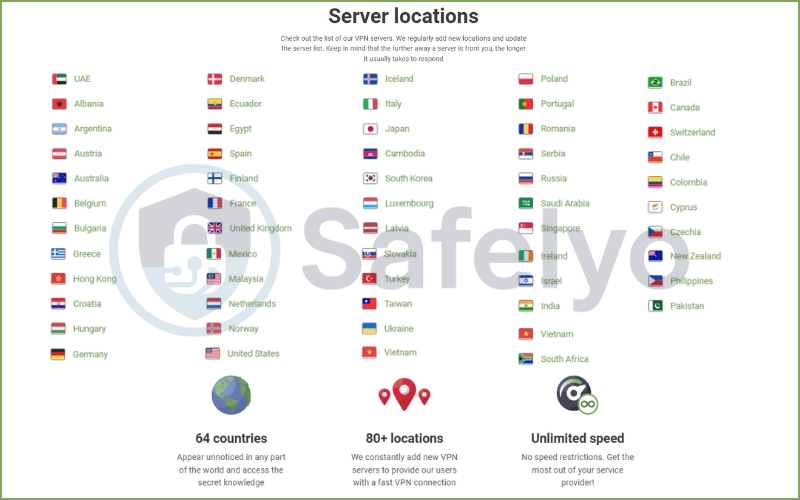
| Server Network | 60+ countries across 80+ locations. |
| Dedicated IP Service | Not available. |
| Support Platforms | Windows, macOS, Android, iOS, Android TV, Linux (CLI), Browser Extensions. (Router support via manual config). |
| Devices | Up to 10 simultaneous connections (Paid Plan) / 2 devices (Free Plan). |
| Security Features | Kill Switch, Split Tunneling (Exclusions), DNS/WebRTC Leak Protection, Zero-Logs Policy (Unaudited). |
| Advanced Protocols | AdGuard VPN Protocol (Default). Note: WireGuard® configurations are available for Routers/3rd-party apps. |
| Performance | Moderate. Optimized for browsing stability and stealth rather than raw speed. Good for 1080p streaming, average for large downloads. |
| Trial & Guarantee | 30-day money-back guarantee (1-Year & 2-Year plans only). Free Starter Plan available (3GB/mo). |
| Customer Support | Email Support (Ticket System). No 24/7 Live Chat. |
BEST FOR: AdGuard VPN is ideal for users who want strong privacy and security combined with an integrated ad and tracker blocking experience.
It’s particularly well-suited for individuals primarily focused on safe browsing, blocking ads across devices, and accessing popular streaming platforms with moderate speed requirements. Its simplicity and cross-platform support make it a convenient choice for families and everyday users seeking reliable online protection without complex configurations.
If you’re looking to protect multiple devices, it’s worth taking a moment to view the current AdGuard VPN premium deals and lock in the best long-term value for comprehensive protection.
In this comprehensive AdGuard VPN review, I’ve rigorously tested its stealth capabilities, browsing speeds, and the signature “Integrated Mode” to help you decide if it’s actually worth your investment. Let’s see if the king of ad-blocking can wear the VPN crown.
The quick verdict: 7.4/10
AdGuard VPN is a promising contender that prioritizes stealth and browsing stability over raw power. While it doesn’t yet rival the speeds or server networks of industry giants, its ability to run alongside the AdGuard Ad Blocker is noteworthy. This makes it a unique “must-have” for existing fans of the ecosystem.
- Best for: Loyal AdGuard users seeking a complete, conflict-free ad-blocking and privacy ecosystem.
- Avoid if: You are a power user requiring top-tier speeds for heavy torrenting or low-latency competitive gaming.
PROS
- Seamless Integration: Works perfectly with AdGuard Ad Blocker via “Integrated Mode”.
- Stealth Protocol: Proprietary protocol masks traffic effectively (hard to detect).
- Solid Free Plan: Offers 3GB/month and decent performance for light use.
CONS
- Speed: Trails behind market leaders like NordVPN or ExpressVPN.
- Network: Smaller server count compared to major competitors.
- Audit Status: No independent public audit of the no-logs policy yet.
Note: All data and figures are current as of January 2026. Results may differ by user location; our long-distance tests were conducted from Vietnam.
Disclaimer
At Safelyo, our reviews are based on real-world testing and human expertise. We may earn a small commission if you purchase through our links, at no extra cost to you. This supports our lab but does not influence our rankings.
1. Key specs & methodology
To give you an honest AdGuard VPN review, I didn’t just read the marketing brochure. I installed the app on my daily drivers (a Windows 11 PC and a Samsung Android device) to test real-world usability and stability. My baseline internet speed was set at a stable ~870 Mbps via fiber optics to accurately measure performance impact.
Beyond just looking at the numbers, I actively used the service for several days. I ran standard DNS leak and IPv6 leak tests to verify security claims and ensure there were no accidental data leaks or compromised features. I also attempted to bypass geo-blocks on major streaming platforms like Netflix US and UK. This was to see if it truly delivers on its promises.
Here is a quick snapshot of the key features AdGuard VPN offers under the hood:
| Feature | Specification |
| Free Plan Limits | 3GB/month data cap, speed limited to 20 Mbps. |
| VPN Protocol | Proprietary AdGuard Protocol (based on HTTP/2). |
| Simultaneous Connections | 10 devices (Paid) / 2 devices (Free). |
| Jurisdiction | Cyprus (Privacy-friendly). |
| Server Network | Servers in 60+ countries. |
| Support | Email customer support (No 24/7 live chat). |
At Safelyo, transparency is our priority. We believe you deserve to know exactly how we reach our conclusions. To understand the full scope of our rigorous evaluation process, please read our complete guide on How We Test and Review VPNs. This guide includes our detailed criteria for privacy audits, encryption standards, speed benchmarking protocols, and security stress tests.
2. How does AdGuard VPN’s protocol work? (HTTP/2 & QUIC)
Most VPN providers take the easy route: They license existing technology like OpenVPN or the industry-standard WireGuard, wrap it in a nice interface with standard features, and call it a day. AdGuard, however, decided to build its own engine from scratch, and this decision is arguably its biggest selling point.
This is where the AdGuard VPN protocol distinguishes itself. Unlike traditional VPN protocols that act like conspicuous armored trucks – secure but easily identifiable by network administrators – AdGuard’s proprietary solution is built on HTTP/2.
Why does this matter to you? In simple terms, it makes your VPN traffic look almost identical to regular web browsing data (HTTPS). When you use standard protocols, sophisticated firewalls at schools, offices, or in restrictive countries can often “fingerprint” the data and block it, effectively saying, “Hey, that’s a VPN connection!”
But because AdGuard uses the same transport method as your web browser, it creates a natural layer of obfuscation. It blends in with the noise of the internet, making it significantly harder to detect and block. This “stealth” capability is a massive advantage if you are trying to bypass strict censorship or workplace firewalls.
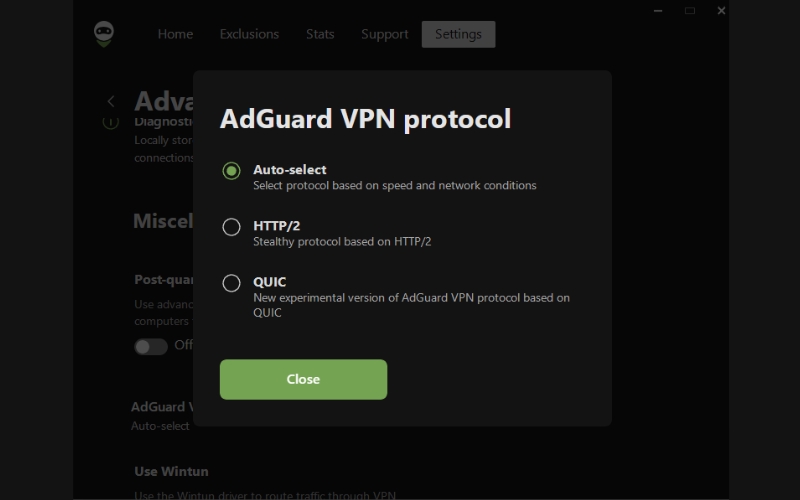
However, this innovation comes with a notable trade-off. Because this is a proprietary, closed-source technology, it hasn’t been battle-tested by the global open-source community like WireGuard.
- With open standards, thousands of security experts are constantly hunting for vulnerabilities to fix.
- With AdGuard, we have to trust their internal team’s expertise.
While their reputation in the software utility space is stellar for privacy purists, a proprietary protocol will always be a slight point of hesitation compared to proven open-source alternatives.
3. Ecosystem advantage: Integrated Mode
If you are a mobile privacy enthusiast, you have likely encountered a frustrating technical wall on Android or iOS: The “one VPN slot” rule.
Mobile operating systems typically allow only one app to establish a VPN connection at a time. This creates a major conflict if you use the standalone AdGuard Ad Blocker (which creates a local VPN tunnel to filter traffic) alongside a standard provider like NordVPN or ExpressVPN.
Usually, turning one on kicks the other off, forcing you to choose between blocking ads or hiding your IP.
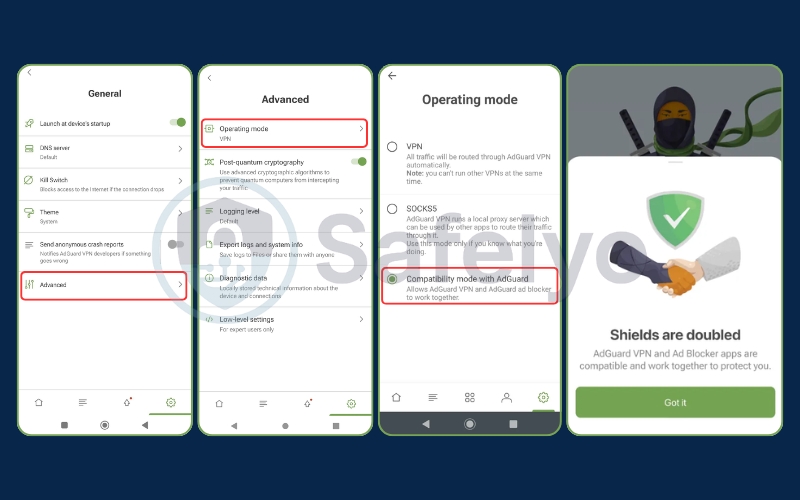
This is where AdGuard plays its ace card: Integrated Mode.
I found this to be the single most compelling reason to choose this service. AdGuard has engineered a “Compatibility Mode” to ensure seamless compatibility that allows their VPN and Ad Blocker apps to shake hands and work in tandem. When configured, your internet traffic is first filtered locally to strip away annoying banners and trackers, and then seamlessly encrypted and tunneled through the VPN server.
The outcome is the best of both worlds – a pristine, ad-free browsing experience combined with location masking. While competitors like NordVPN offer Threat Protection, those are often DNS-based and lack the cosmetic filtering power of a dedicated ad blocker. If you want deep ad-blocking capabilities without sacrificing anonymity on mobile, this ecosystem synergy is currently unbeaten.
4. Is AdGuard VPN safe? (Privacy policy & Russian origins analysis)
When choosing a VPN, you aren’t just buying software; you are buying trust. For AdGuard, that trust is complicated by its history. Let’s address the elephant in the room immediately: AdGuard’s origins.
The company was originally founded in Moscow, and a significant portion of its development team is of Russian origin. In the current geopolitical climate, this raises immediate concerns for many users who are worried about potential government influence or data seizure. However, AdGuard has been refreshingly transparent about this reality rather than trying to hide it.
To mitigate these risks and ensure operational independence, the company officially relocated its headquarters to Limassol, Cyprus. Legally, you are contracting with AdGuard Software Ltd, a company operating under Cypriot law.
Cyprus is a popular jurisdiction for privacy-focused tech companies. It is a member of the EU but is generally considered outside the direct reach of the intrusive “14 Eyes” intelligence-sharing alliance. AdGuard has also explicitly stated that they have shut down physical servers within Russia to prevent any potential coercion to hand over user data.

On paper, the company maintains a strict no-logs policy. Their privacy policy states clearly that they do not record your browsing history, usage of specific DNS servers, DNS queries, or assigned IP addresses. However, in 2026, “trust me, bro” is no longer a sufficient standard for top-tier security tools. This is where AdGuard currently lags behind the industry leaders.
Giants like NordVPN and ExpressVPN have undergone multiple independent security audits. These audits were conducted by “Big Four” firms like PwC or Deloitte. They verify that their server infrastructure truly deletes data as promised. As of this review, AdGuard VPN has not released a comparable large-scale public audit of its no-logs claims.
While AdGuard’s long-standing reputation in the ad-blocking community gives it a significant reservoir of goodwill, the lack of independent audits and third-party verification creates a “trust gap”. For everyday privacy and ad-blocking, I feel secure using them. However, if you are a whistleblower or an activist requiring absolute, proven anonymity, the lack of an independent audit is a notable point of consideration.
5. How fast is AdGuard VPN? AdGuard VPN speed test results
Marketing claims are one thing, but actual performance is another. To see how AdGuard VPN performs under real-world conditions, I put it to the test.
Safelyo’s speed testing methodology: We conducted these tests from our lab in Vietnam using Speedtest.net by Ookla. To ensure a challenging “stress test,” we connected to long-distance servers in the United Kingdom and the United States—two of the most popular locations for accessing content.
- Protocol: AdGuard VPN Protocol (Default).
- Testing Condition: Real-world usage environment (Note: The “Free/Trial” tier restrictions are active, which often impacts raw throughput).
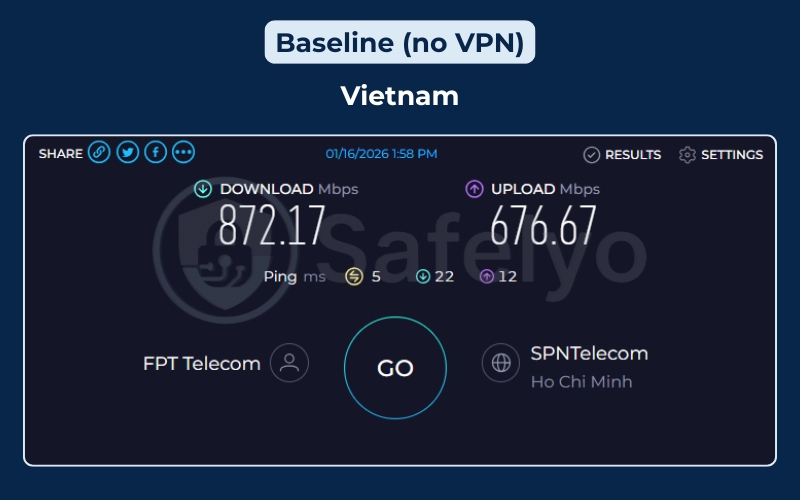
Speed test on the local server
Here is the raw data from our connection sessions:
| Connection Type (Server Location) | Download Speed | Upload Speed | Ping |
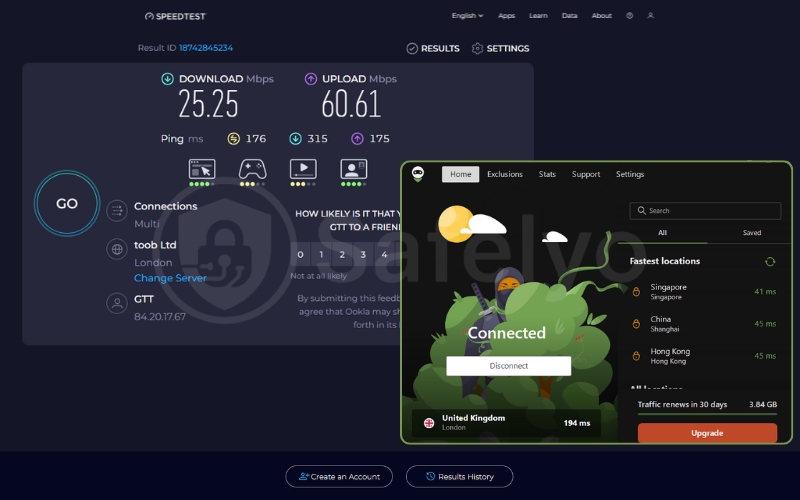
| United Kingdom (London) | 25.25 Mbps | 60.61 Mbps | 176 (ms) |
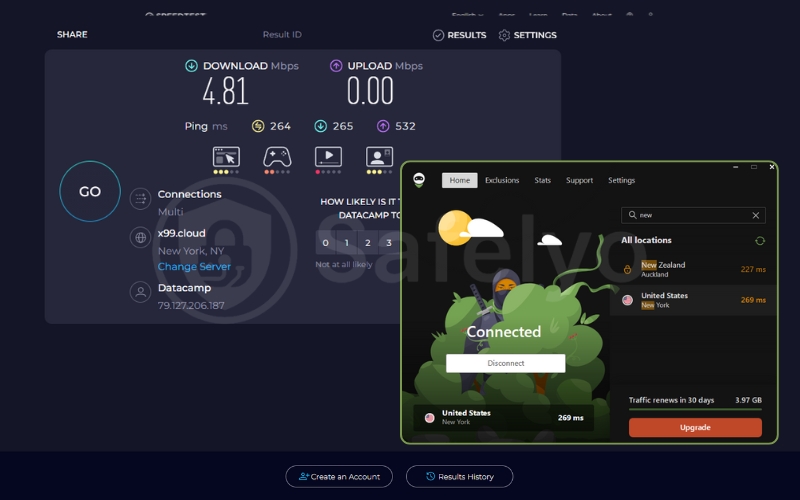
| United States (New York) | 4.81 Mbps | 0.00 (Failed) | 264 (ms) |
Note: These tests reflect a long-distance connection from Southeast Asia to the West, which naturally introduces latency. Users in Europe or the US may experience better speeds due to proximity. However, the speeds recorded were significantly lower than those of top-tier competitors.
Here is the deep dive into what these numbers actually mean for your experience:
5.1. Performance analysis
Our testing revealed a massive inconsistency between host locations.
The UK Server (London): Playable but average
Connecting to London yielded a download speed of 25.25 Mbps.
- The good: Interestingly, the upload speed soared to 60.61 Mbps, vastly outperforming the download speed. This is an unusual anomaly, but useful if you are posting content to social media.
- The bad: While the available bandwidth of 25 Mbps is theoretically enough for 1080p HD streaming, it is a far cry from the high-speed fiber baselines. It feels like a standard “capped” free-tier speed.
The US Server (New York): A major struggle
The connection to New York was disappointing, to say the least. Clocking in at just 4.81 Mbps, this server struggled significantly.
- The issue: The upload test completely failed (0.00 Mbps), indicating extreme packet loss or a firewall issue on the server side during the test.
- User experience: At roughly 5 Mbps, web pages took noticeably longer to load, and video streams were forced to downgrade to 480p or 720p to avoid constant buffering.
5.2. Impact on gaming & latency
If you are a gamer, the “Ping” numbers in the screenshots tell a clear story: AdGuard VPN is not for competitive gaming.
- Ping to UK: 176 ms.
- Ping to US: 264 ms.
Anything above 100ms results in noticeable lag. At 264ms, your character in a game like Call of Duty or League of Legends would be teleporting around the map. This high latency is expected due to the distance (Vietnam → US) and the encryption overhead, but it confirms that this tool is strictly for browsing, not playing.
>> You may also be interested in: Best VPN for Gaming 2026: Lowest ping, fastest & DDoS-Proof
5.3. Speed test verdict
Based on this data, AdGuard VPN’s performance in this specific test cycle was underwhelming.
- For Browsing: The UK server is perfectly fine for reading news, scrolling Reddit, or general research.
- For Streaming: The US server performance (4.81 Mbps) is a bottleneck. You may struggle to watch Netflix US in high definition without patience.
- Stability: The failed upload test on the New York server raises questions about connection stability on their more congested nodes.
Bottom Line: These results align with the behavior of a “Free” or “Budget” service. It gets the job done for basic privacy, but do not expect fiber-optic speeds.
6. Security features & leak tests
A VPN’s fancy interface is meaningless if it leaks your data the moment your Wi-Fi flickers. To verify if AdGuard VPN is as watertight as it claims, I stress-tested its core security features and defenses.
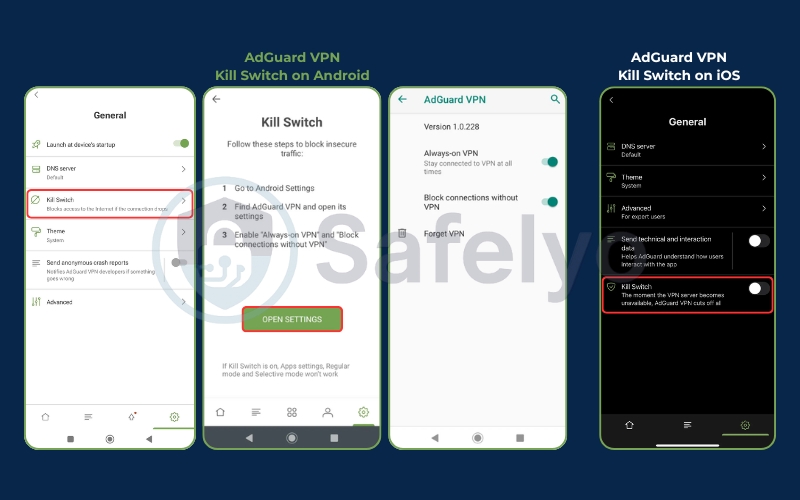
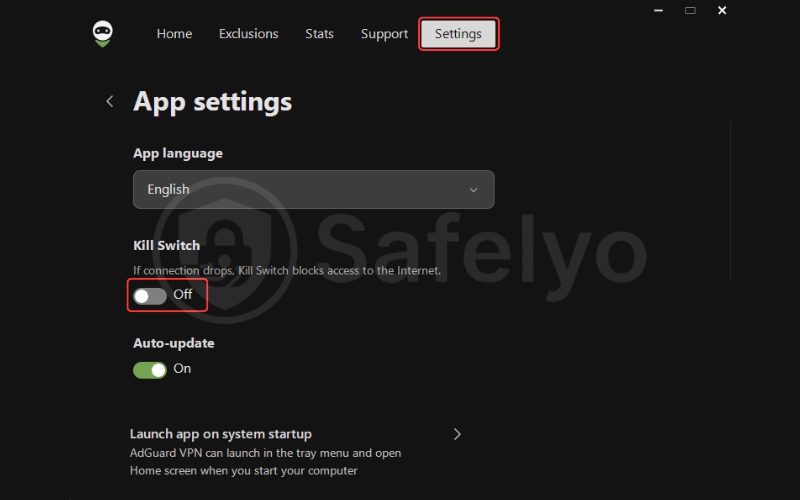
First, the essentials: AdGuard includes a system-wide Kill Switch. This acts as a digital safety net. Furthermore, all data traffic is secured using military-grade AES-256 encryption, ensuring that your online activities remain indecipherable to prying eyes.
It instantly cuts your internet connection if the VPN tunnel drops unexpectedly. This ensures your real IP address is never exposed, even for a split second. During my testing, the Kill Switch engaged reliably when I simulated a server disconnect.
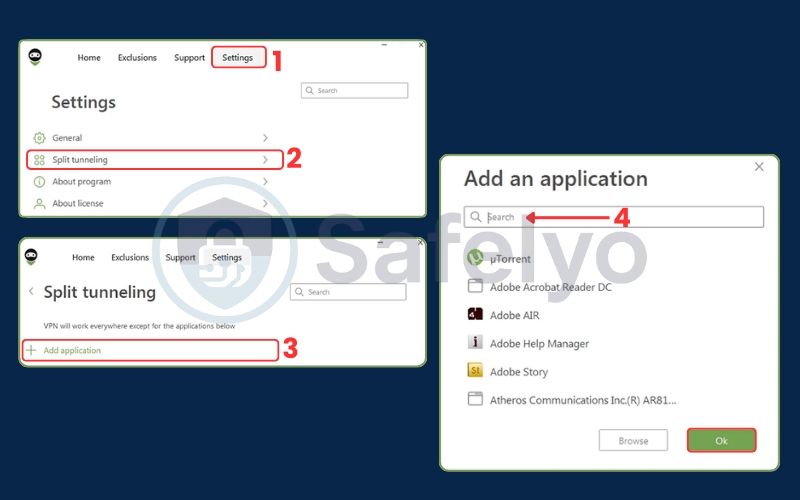
Another highlight is their approach to Split Tunneling, which they label as “Exclusions”. AdGuard offers two distinct modes: “General” (everything goes through the VPN except listed sites) and “Selective” (only listed sites go through the VPN). The interface for managing these split tunneling lists is incredibly intuitive, making it easy to route your banking app through your local connection while keeping your browsing encrypted.
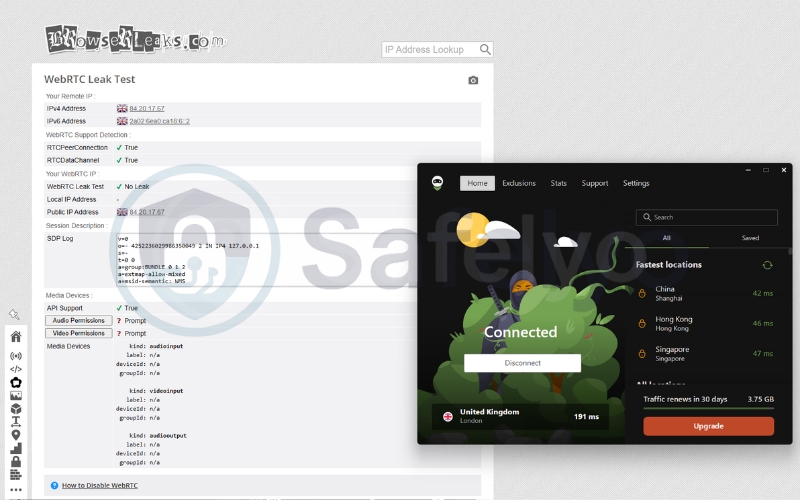
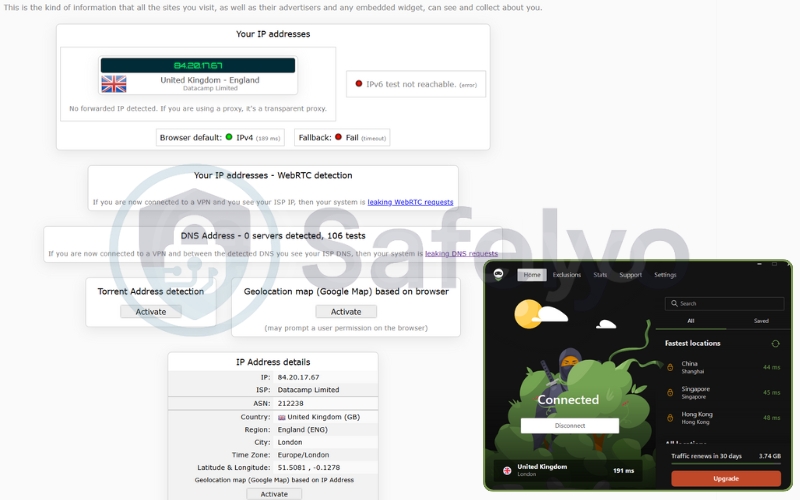
Leak Test Results: I ran the service through multiple rounds of testing using ipleak.net and browserleaks.com.
- DNS Leaks: Passed (No leaks detected).
- IPv6 Leaks: Passed (Traffic was properly blocked or tunneled).
- WebRTC Leaks: Passed.
My real IP address remained hidden throughout the sessions. I also verified that requests were being handled correctly by AdGuard’s private DNS servers rather than my ISP’s default options.
AdGuard VPN WebRTC leaks test
AdGuard VPN IPv6 and DNS leaks test
One interesting advanced feature worth noting is the support for QUIC (Quick UDP Internet Connections). Found in the settings, this experimental protocol can offer better speeds and connection stability on poor mobile networks. However, in my experience, it can occasionally cause connection jitters, so I recommend keeping it disabled unless you are troubleshooting a slow connection.
7. Does AdGuard VPN work with Netflix and other streaming services?
If your primary reason for buying a VPN is to turn your living room into a global cinema, AdGuard VPN is a serviceable backup option. However, it shouldn’t be your main ticket. Unlike dedicated streaming VPNs that invest millions in constantly rotating IP addresses to fool Netflix, AdGuard focuses more on privacy than entertainment.
Netflix Performance
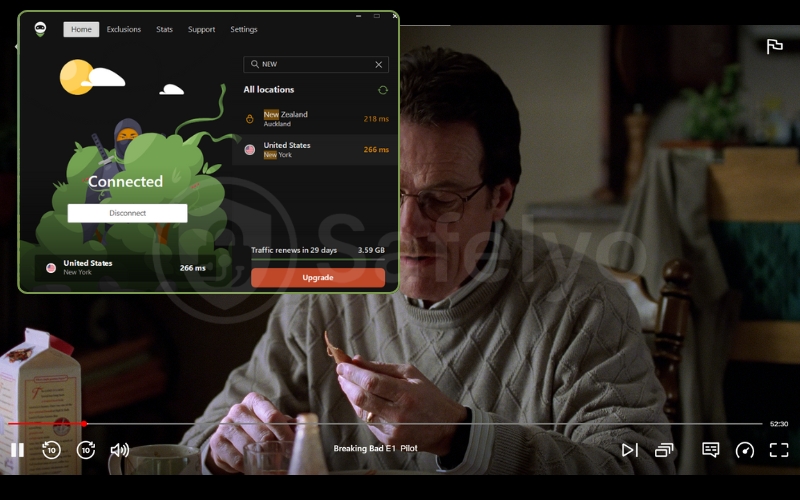
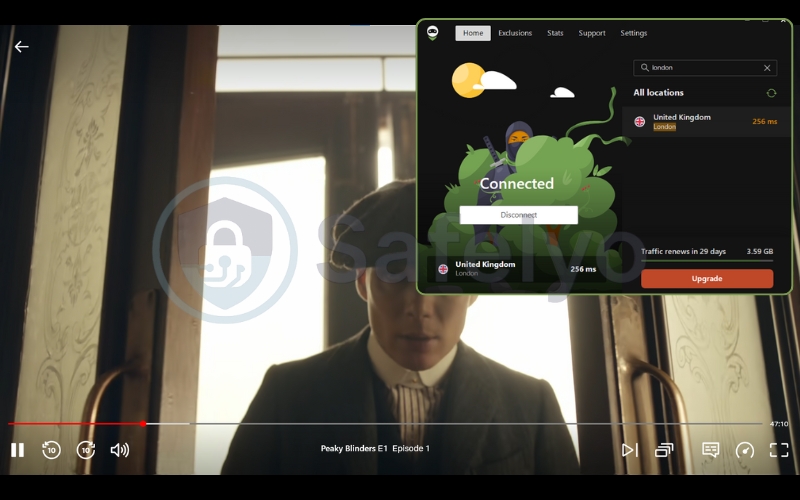
In my tests, I was able to access Netflix US and UK libraries. The proprietary protocol does a decent job of sneaking past the initial geo-block detection. However, access comes with a caveat: speed. While the content eventually loaded, I experienced occasional buffering and quality drops during peak hours. It works, but it doesn’t offer the instant, buffer-free 4K experience you might get with top-tier competitors.
US: Checked for Breaking Bad.
UK: Checked for Peaky Blinders.
Other Platforms
Outside of Netflix, performance becomes a game of roulette.
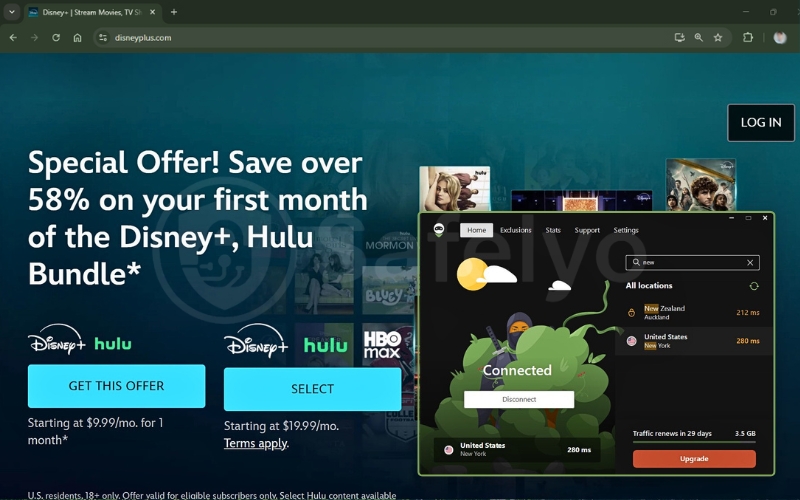
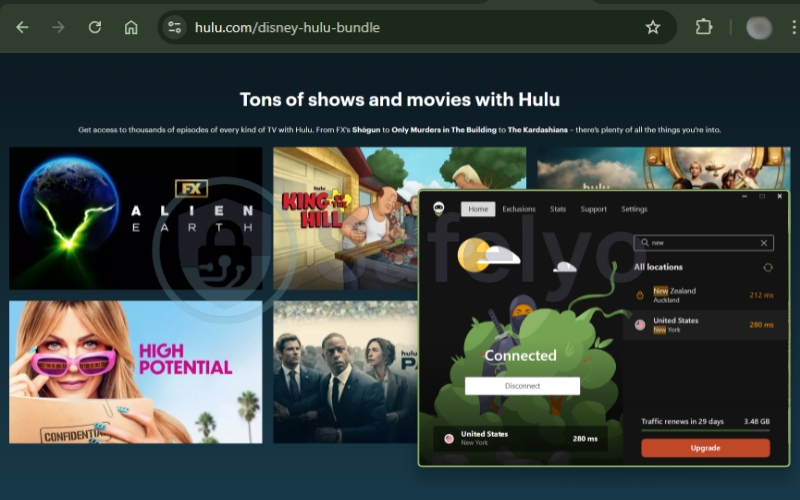
Hulu & Disney+: I had mixed success. Some servers worked fine, while others triggered the dreaded “proxy detected” error screen, forcing me to disconnect and reconnect to a different location.
BBC iPlayer: Accessing this notoriously strict UK platform was hit-or-miss. I often had to cycle through several UK servers before finding one that wasn’t blacklisted.
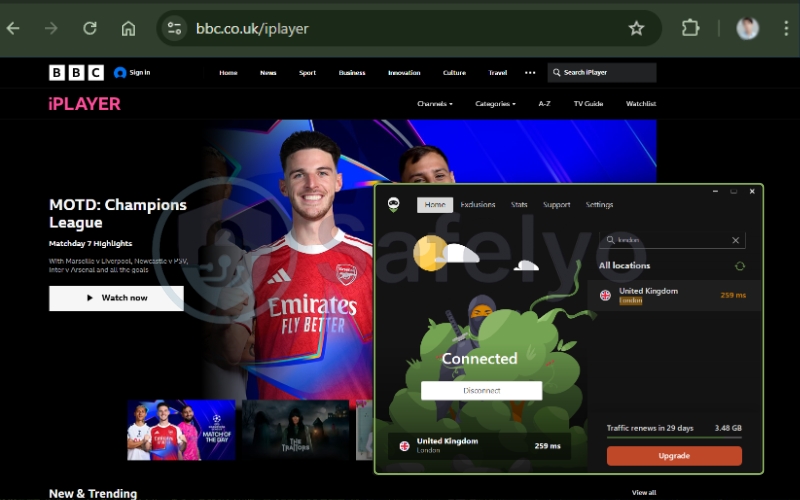
The Verdict: AdGuard is simply “not a streaming-first VPN”. It will help you watch a specific show if you are traveling. However, for a dedicated binge-watcher who wants effortless access to every global library, it lacks the consistency and raw speed required.
>> You may also be interested in: Best VPN for streaming: 5 fast speeds & large servers tested
8. Is AdGuard VPN good for torrenting and P2P??
While AdGuard VPN is surprisingly capable for streaming, its performance for torrenting (P2P) is a different story.
Technically, AdGuard allows P2P traffic on most of its servers. You don’t need to hunt for specialized “P2P-optimized” servers as you do with some competitors; just connect and start downloading. The Kill Switch also plays a crucial role here, ensuring your real IP address isn’t exposed to the swarm if your connection drops mid-download.
However, there are two significant downsides:
- Speed: As noted in our speed tests, the download rates are average. Downloading a 50GB game file will take significantly longer than with NordVPN or ExpressVPN.
- No Port Forwarding: AdGuard VPN does not support port forwarding. This makes it difficult to seed files effectively (uploading to others) and can sometimes result in slower download speeds since you can’t connect to as many peers.
Verdict: It is safe for occasional file sharing, but if you are a heavy “seeder” or download massive files daily, you will find it frustratingly slow.
9. AdGuard VPN ease of use & app experience
If there is one thing AdGuard knows how to do, it is designing clean, user-friendly software packed with essential features.
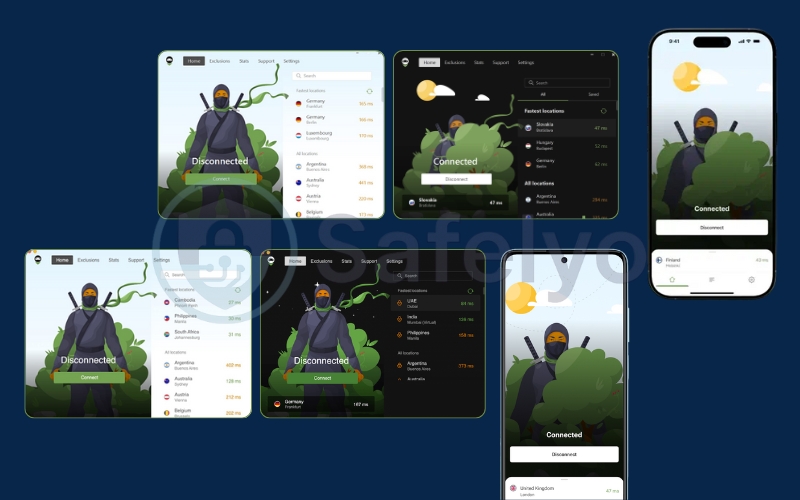
The Interface: AdGuard VPN adopts a modern, user-friendly, and minimalist aesthetic that fits perfectly with Windows 11 and macOS. The interface is clean, featuring their signature green-and-white color scheme (with a solid Dark Mode option).
- Desktop: The dashboard is intuitive. A large “Connect” button sits in the center of the interface. There is also a server list that displays ping times (latency) next to each location. This is a helpful touch for gamers to choose the fastest server quickly.
- Mobile (Android/iOS): The mobile app is practically a clone of the desktop version, which is a compliment. It is responsive and easy to navigate with one thumb.
Platform Support: AdGuard covers all the basics:
- Windows, macOS
- Android, iOS
- Android TV
- Routers
- Linux
- Browser Extensions (Chrome, Firefox, Edge) – Note: These are lightweight proxies, not full VPNs.
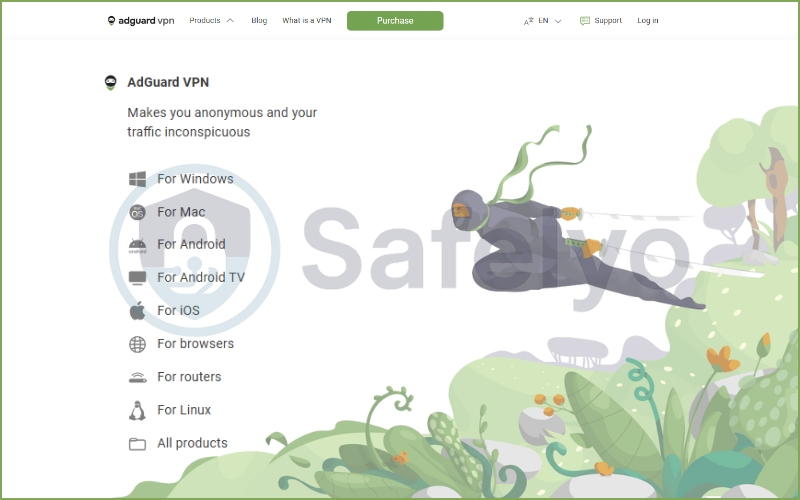
The “Ninja” Touch: A small but delightful detail is their branding. You’ll often see their little “Ninja” mascot popping up during loading screens or empty states. It adds a bit of personality to what is usually a boring utility tool.
10. AdGuard VPN plans & pricing
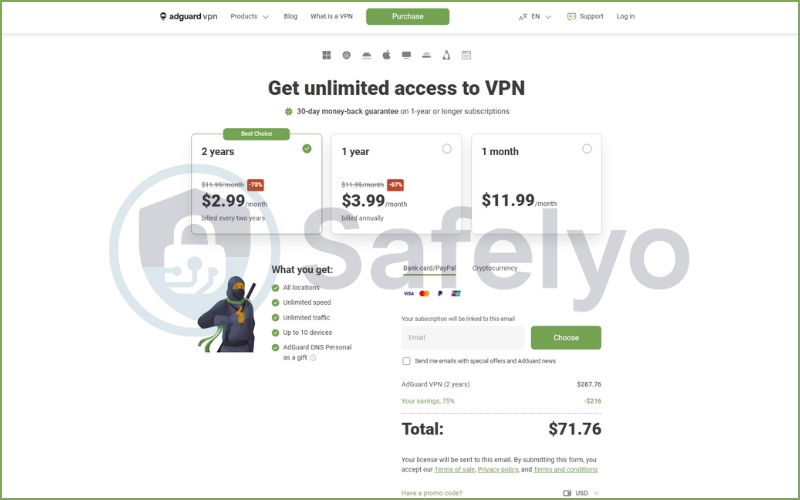
AdGuard VPN’s pricing strategy is aggressive, clearly aiming to undercut the premium giants. They offer a simple structure with three billing cycles. All paid plans include the same features: Unlimited speed, 10 simultaneous connections, and access to all 60+ server locations.
Refund Policy: AdGuard offers a 30-day money-back guarantee for its 1-year and 2-year subscriptions. However, be careful with the monthly plan – their refund policy is less generous for short-term commitments.
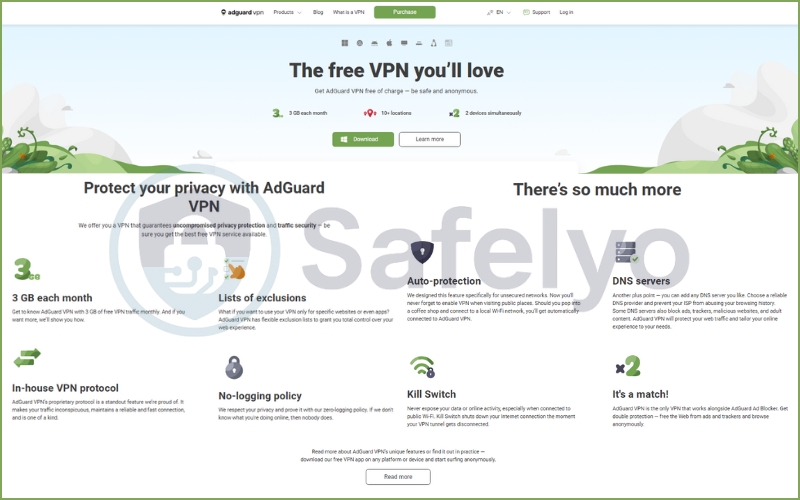
10.1. Free version review (3GB/mo)
In a market flooded with “free” VPNs that secretly sell your data to brokers, AdGuard’s free tier is a breath of fresh air – though it comes with a tight leash. It operates on a “freemium” model, meaning it is safe to use, but heavily restricted to encourage you to upgrade.
Here is the reality of the free version:
- Data Cap: You get a strictly enforced 3GB per month.
- Speed Limit: Your connection is capped at 20 Mbps.
- Server Limits: You only get access to a handful of server locations compared to the full list.
Who is this actually for?
If you are planning to stream Netflix or download large files, this plan is useless; you will burn through the 3GB allowance in about an hour of HD viewing. However, as a digital survival kit, it is excellent. The 20 Mbps speed is more than enough for reading news, checking emails, or securing your connection while using public Wi-Fi at a coffee shop.
Think of the free version not as a permanent solution, but as a generous, never-ending trial. It is the perfect way to test the “Integrated Mode” with the AdGuard Ad Blocker before committing your wallet to a subscription.
10.2. Paid subscription: Pricing & value analysis
If the free version is a “digital survival kit”, the paid version is the full arsenal. Upgrading removes the training wheels – the speed caps, data limits, and server restrictions – transforming AdGuard VPN from a simple utility into a comprehensive privacy tool.
What do you actually get for your money?
Once you upgrade, the experience changes significantly:
- Uncapped speed: The 20 Mbps limit is gone. You get the maximum bandwidth available (essential for streaming).
- Unlimited data: No more watching your data usage meter.
- Full network access: You unlock servers in 65+ locations, opening up global content libraries.
- 10 simultaneous connections: A massive jump from the 2 allowed on the free plan, letting you cover your phone, laptop, tablet, and family devices.
The pricing structure: AdGuard VPN follows the industry standard: Punish the monthly payers and reward the long-term commitments.
| Plan Duration | Approximate Cost | Value Verdict |
| 1-Month Plan | ~$11.99 / mo | Poor Value. Standard pricing, but too high for what is essentially a “lightweight” VPN. |
| 1-Year Plan | ~$3.99 / mo | Decent. A fair middle ground if you aren’t ready to marry the service for two years. |
| 2-Year Plan | ~$2.99 / mo | Best Value. This puts it in direct competition with budget kings like Surfshark. |
(Note: Prices fluctuate based on seasonal promotions and VAT depending on your region.)
Is it worth the price tag?
At $2.99/month (for the 2-year plan), AdGuard VPN is competitively priced. It is cheaper than NordVPN or ExpressVPN, making it an attractive option for budget-conscious users.
However, the real value proposition here isn’t just the VPN itself – it’s the bundle. AdGuard often runs promotions where you can buy the AdGuard Ad Blocker + AdGuard VPN together. If you manage to snag one of these bundles, the value is unbeatable. You are effectively getting a premium ad-blocking suite and a solid VPN for the price of a single coffee per month.
Money-Back Guarantee
AdGuard offers a 30-day money-back guarantee, but there is a catch: it typically applies to 1-year and 2-year subscriptions. If you buy the 1-month plan, getting a refund can be trickier unless there is a technical fault that they cannot fix. Always read the fine print before swiping your card.
10.3. Which AdGuard VPN plan should you choose?
To help you decide if the upgrade is necessary, here is a side-by-side breakdown of the limitations and features.
- Stick to the free plan if: You only need a VPN occasionally to check bank accounts on public Wi-Fi or read a few blocked news articles per month.
- Choose the 2-year plan if: You are already a fan of the AdGuard Ad Blocker. The synergy between the two apps creates a powerful privacy shield that justifies the low monthly cost ($2.99 is less than a cup of coffee).
- Skip it if: You are looking for a monthly “burner” VPN. At $11.99/month, there are better options with faster speeds.
| Feature | Free Starter Plan | Unlimited (Paid) Plan |
| Monthly Data Cap | 3 GB / month (Strict limit) | Unlimited |
| Connection Speed | Capped at 20 Mbps | Uncapped (Max available speed) |
| Ad Blocker Integration | Supported | Supported |
| Server Locations | Limited (~10 locations) | 60+ Countries |
| Simultaneous Devices | 2 Devices | 10 Devices |
| Streaming Support | Not recommended (Buffering + Data cap) | Supported (Works with Netflix/Hulu) |
| Torrenting (P2P) | Allowed but slow | Supported |
| Security & Encryption | Same Military-grade AES-256 Encryption | Same Military-grade AES-256 Encryption |
| Price | $0.00 / Forever | ~$2.99 / mo (2-Year Plan) |
| Best For | Light browsing, reading news, testing the app. | Streaming, gaming, and full daily protection. |
11. AdGuard VPN common issues & fixes
Even good software has hiccups. During my testing and research into user feedback, here are a few common issues you might encounter and how to fix them:
1. "Reconnecting" loop
Sometimes the app gets stuck trying to connect, especially on restrictive Wi-Fi networks.
Fix:
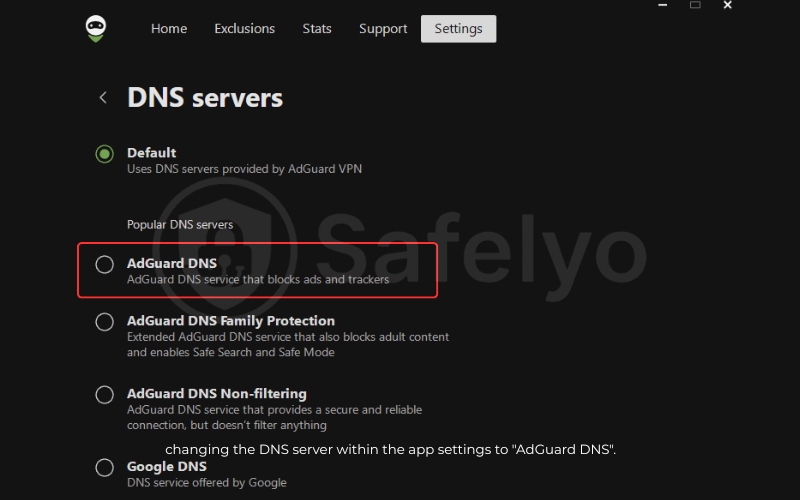
Go to Settings > App settings > Advanced Settings and switch the Logging level to default.
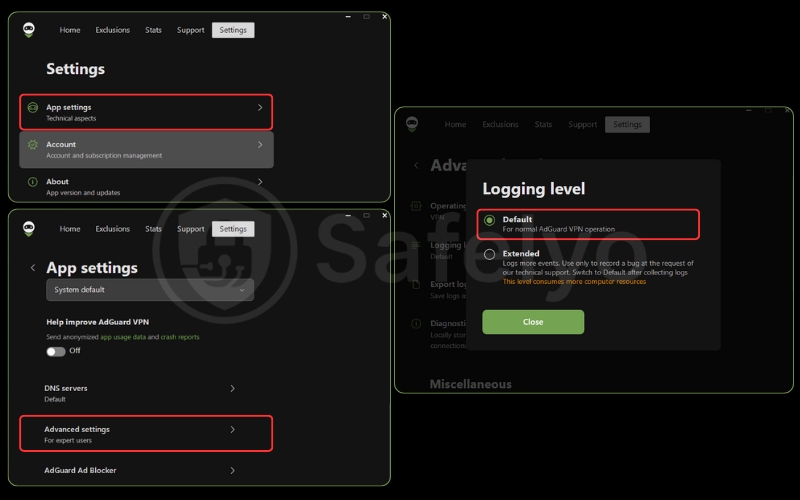
If that fails, try changing the DNS servers within the app settings to “AdGuard DNS”.
2. Constant CAPTCHAs on Google
Because you are sharing an IP address with thousands of other users, Google might mistake you for a bot.
Fix: This is an annoyance with most VPNs. Switching to a less populated server location usually solves it.
3. Streaming services detected the VPN
Netflix or Hulu shows a “Proxy Detected” error.
Fix: Clear your browser’s cache/cookies and restart the browser. If on mobile, force-close the streaming app. If it persists, contact customer support – they can tell you which specific server is currently working for streaming.
12. AdGuard VPN alternatives
AdGuard VPN is a fantastic niche tool, but it isn’t a “do-it-all” powerhouse. If you find the speed limitations or the lack of public audits concerning, here are two industry-leading alternatives that might better suit your needs:
12.1. NordVPN
If you want raw power, NordVPN is the superior choice. Thanks to its NordLynx protocol (based on WireGuard), it offers significantly faster speeds for gaming and downloading than AdGuard’s HTTP/2 solution. It is also far more reliable for unblocking global streaming libraries. Most importantly, NordVPN has undergone multiple independent audits to verify its no-logs policy, offering the peace of mind that AdGuard currently lacks.
NordVPN – The Better All-Rounder
Best for: Speed, heavy streaming, and proven privacy.
12.2. Surfshark
If you are price-sensitive but want more features, Surfshark is the answer. It sits at a similar budget-friendly price point but offers one massive advantage: Unlimited simultaneous connections. While AdGuard caps you at 10 devices, even on paid plans, Surfshark lets you protect every gadget in your house. It also delivers better speeds and a larger server network.
Surfshark – The Better Budget Option
Best for: Families, users with many devices, and bargain hunters.
12.3. Quick comparison: AdGuard VPN vs NordVPN vs Surfshark
(Updated 2026 – Based on public specifications and average real-world test results)
| Feature | AdGuard VPN | NordVPN | Surfshark |
|---|---|---|---|
| Lowest long-term price | ~$2.99/month | ~$3.39/month | ~$2.29/month |
| Free plan | 3GB/month | No | No |
| Server count | ~100+ servers | 6,000+ servers | 3,200+ servers |
| Server locations | ~60 locations | 60+ countries | 100+ countries |
| Primary protocol | Proprietary (HTTP/2 / QUIC) | NordLynx (WireGuard-based) | WireGuard |
| Average download speed* | ~100–130 Mbps | ~250–300 Mbps | ~220–260 Mbps |
| Streaming reliability | Inconsistent | Very reliable | Reliable |
| Torrenting / P2P | Slow | Excellent | Good |
| No-logs audit | Not audited | PwC / Deloitte | Deloitte |
| Simultaneous devices | 2 (Free) / 5 (Paid) | 6 | Unlimited |
| Best use case | Browsing + AdGuard ecosystem | Power users | Budget power users |
* Speeds measured on a 300 Mbps connection using nearby servers. Results may vary depending on location and network conditions.
AdGuard VPN isn’t overpriced, but it clearly lags behind NordVPN and Surfshark in infrastructure, speed, and third-party audits. Its real value lies in the free plan and seamless integration with AdGuard Ad Blocker, not in raw VPN performance.
13. What users say about AdGuard VPN
While our testing reveals the service’s technical capabilities, long-term user feedback paints the most accurate picture of daily reliability. To offer a balanced perspective, we analyzed user feedback on Trustpilot, the App Store, and Google Play (as of January 20, 2026).
Trustpilot Analysis: High Praise for Privacy, Complaints about Speed
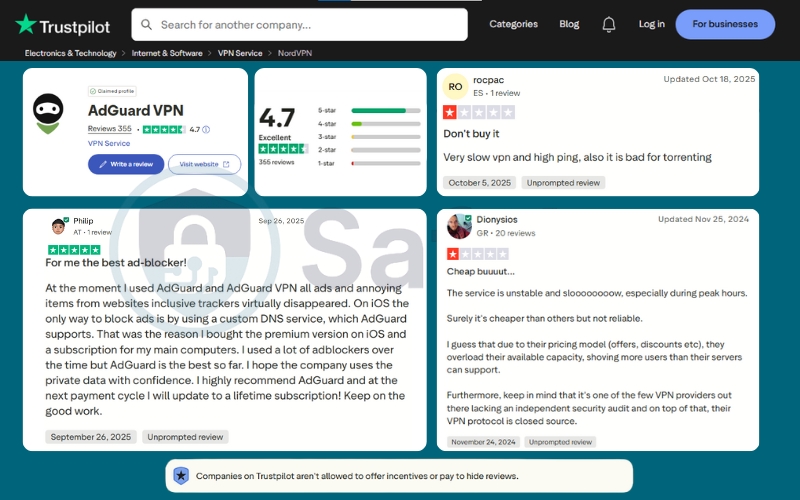
AdGuard VPN currently holds an impressive 4.7-star rating (“Excellent”) on Trustpilot based on 355 reviews. While this sample size is significantly smaller than giants like NordVPN, the high score indicates strong satisfaction among its core user base.
Based on the feedback (as seen in the provided screenshots), users generally fall into two distinct camps:
- The “Ecosystem” Lovers: A large portion of 5-star reviews comes from users who already love the AdGuard Ad Blocker. Reviewers like Philip highlight the seamless synergy, stating, “For me, the best ad-blocker… all ads and annoying items, including trackers, virtually disappeared.” These users value the clean, tracker-free browsing experience over raw speed.
- The “Performance” Critics: On the flip side, the 1-star reviews focus heavily on performance. Users like rocpac and Dionysios bluntly describe the service as “Very slow vpn and high ping” and “unstable during peak hours”. They also point out the unsuitability for torrenting and express concern over the lack of an independent security audit – echoing our own findings.
Mobile Store Performance (Android & iOS)
AdGuard VPN boasts strong ratings across both major mobile platforms, reflecting its “mobile-first” utility roots.
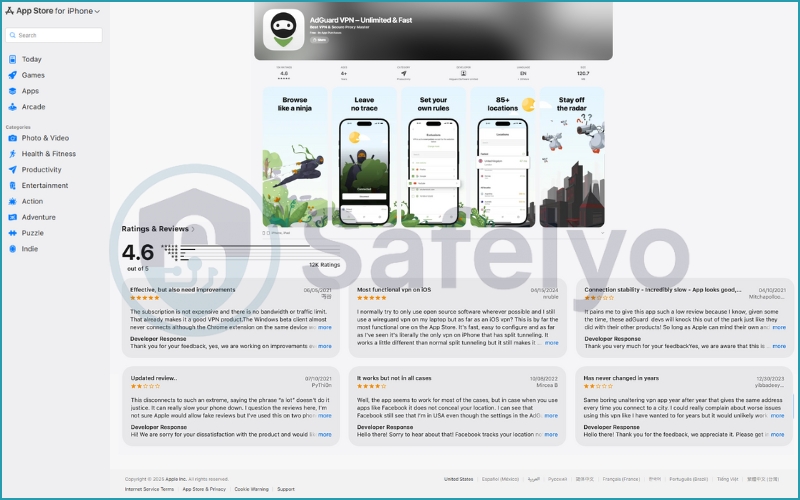
On the App Store (iOS): The app maintains a solid 4.6-star rating from over 12,000 ratings.
iOS users frequently praise the app’s design and functionality. Some even call it “the most functional VPN on iOS”. This is due to its unique ability to handle split tunneling better than many competitors.
However, recent reviews also highlight connectivity issues, with users noting that connection stability can be “incredibly slow” at times. The developer is notably active here, responding to almost every review (both positive and negative), which suggests a dedicated support team.
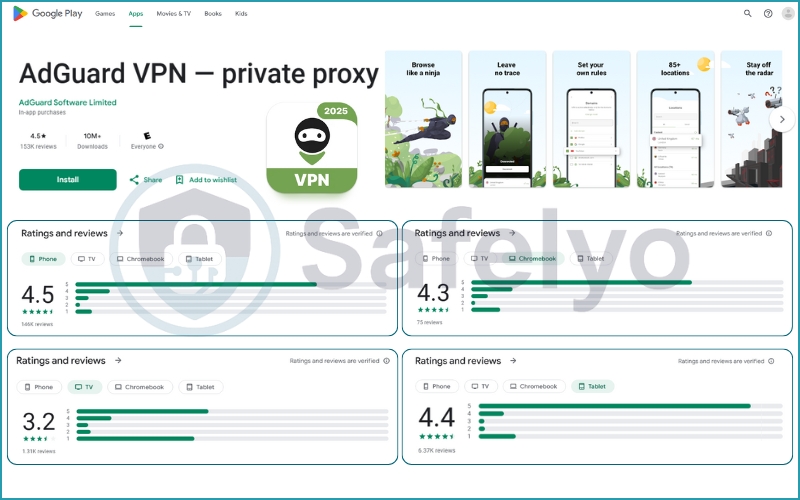
On Google Play (Android): The app is a heavyweight with over 10 million downloads and a 4.5-star rating from 153,000+ reviews.
The high rating suggests that for the vast majority of Android users, the “Integrated Mode” works as advertised, effectively blocking ads and securing connections without battery drain or crashes.
The Bottom Line on User Sentiment:
The consensus is clear: Users love the software (the interface, the ad-blocking features, the ease of use) but have mixed feelings about the infrastructure (server speeds and ping). If you prioritize a clean, ad-free internet, you will likely join the 5-star group. If you prioritize gaming or torrenting, you might echo the complaints about speed.
14. FAQs about AdGuard VPN
Does AdGuard VPN block ads by itself?
Yes, but not as thoroughly as the dedicated app. AdGuard VPN uses its own filtering DNS servers to block connection requests to known ad servers. This stops most ads from loading. However, unlike the standalone AdGuard Ad Blocker app, the VPN cannot perform “cosmetic filtering” (removing the ugly white spaces left behind by blocked ads). For the best results, we recommend using both apps together in “Integrated Mode”.
Is AdGuard VPN good for Android users only?
It shines brightest on Android, but it works everywhere. AdGuard VPN is often called a “mobile-first” solution because its Integrated Mode solves a specific Android limitation (where you usually can’t run a VPN and an Ad Blocker simultaneously). While this makes it arguably the best choice for Android users, the Windows and macOS versions are still sleek and fast. They are perfectly capable for desktop privacy and offer a consistent set of security features.
Is AdGuard VPN free?
Yes, it has a “Free Starter” plan. You get 3GB of data per month, capped at 20 Mbps speed. It is completely free forever and does not require a credit card. It is perfect for light browsing or testing the service, but insufficient for streaming video.
Does AdGuard VPN work in China?
It has a better chance than most. Thanks to its proprietary protocol, which disguises VPN traffic as normal HTTPS web traffic, AdGuard VPN is often effective at bypassing the Great Firewall. However, like all VPNs in China, connectivity can be inconsistent. We recommend having a backup solution just in case.
Is AdGuard VPN safe despite its Russian origins?
We believe it is safe for general use. AdGuard has relocated its headquarters to Cyprus and legally operates under EU frameworks. They have shut down all physical servers in Russia and maintain a strict no-logs policy. However, if you require the highest level of proven anonymity (e.g., you are a political activist), you might prefer a provider with a public audit history like NordVPN.
15. Conclusion
To conclude this AdGuard VPN review, Safelyo views this service as a specialized gem rather than a generic all-rounder. It is the perfect “ecosystem add-on” for existing fans, offering lightweight stealth and unmatched ad-blocking synergy that makes daily browsing a joy.
However, it is not a heavy lifter. If you require raw horsepower for competitive gaming, heavy torrenting, or a massive server network, a dedicated giant like NordVPN remains the superior choice in our VPN Reviews category.
Ultimately, if you want a cleaner, quieter internet, this is the tool for you. Ready to choose? Try the AdGuard VPN free version today for a cleaner web, or check the latest AdGuard VPN discounts for the paid version to unlock unlimited data and more server locations at the best possible price.