VPN passthrough is a router feature that allows legacy VPN protocols like PPTP, L2TP, and IPsec to pass through your router’s NAT system without getting blocked. Modern VPNs no longer need it, but if you are using an older protocol or troubleshooting a connection error, knowing whether to turn VPN passthrough on or off matters.
This guide covers how passthrough works, which protocols require it, when to enable or disable it, and how to fix common issues like Error 619 and Error 809.
Key takeaways:
- VPN passthrough is a router setting that lets PPTP, L2TP, and IPsec traffic cross the NAT barrier.
- It is only needed if you use legacy protocols. Modern protocols like WireGuard, OpenVPN, and IKEv2 bypass NAT natively.
- Most routers have passthrough enabled by default, which you can usually find in the Security or WAN tab of your admin panel.
- You should disable the feature when unused since active PPTP passthrough exposes TCP port 1723, a known attack vector.
- If your VPN connects on mobile data but fails on Wi-Fi, enabling the matching passthrough type is the first fix to try.
1. What is VPN passthrough?
VPN passthrough is a router feature that allows Virtual Private Network (VPN) traffic using older protocols to pass through Network Address Translation (NAT). If you have tried setting up a VPN at home and couldn’t connect despite correct settings, the issue might lie with your router not having this feature enabled. It is important for legacy VPN protocols like PPTP, IPsec, and L2TP, which are not naturally compatible with NAT environments. When passthrough is not enabled, these protocols fail to establish secure tunnels.
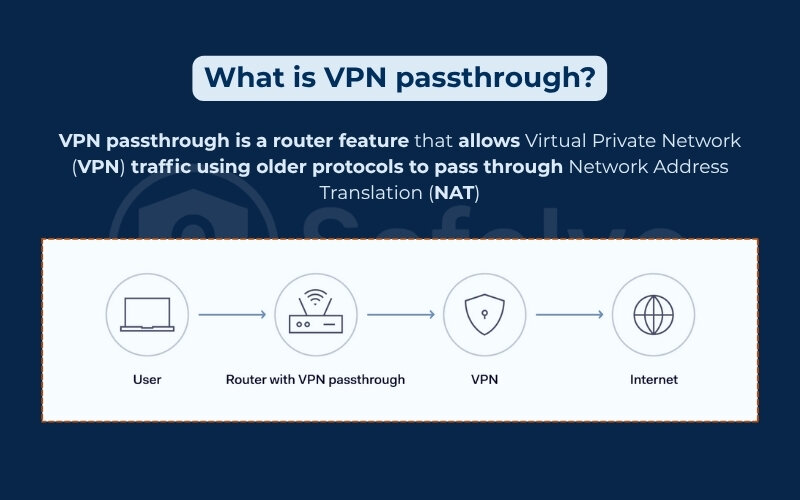
This function addresses limitations in how VPN traffic is handled by consumer-grade routers. Since older VPN protocols rely on specific tunneling methods like ESP (Encapsulating Security Payload) and GRE (Generic Routing Encapsulation), they get blocked by NAT routers that do not understand these protocols or drop packets that lack port information. To resolve this, passthrough acts as an ALG (Application Layer Gateway) that safely identifies and forwards these packets without applying encryption itself.
2. Why VPN passthrough exists: IPv4, NAT, and the origin story
The development of VPN passthrough is directly tied to the historical shortage of internet addresses and the subsequent creation of network translation tools.
2.1. The IPv4 address exhaustion problem
The need for passthrough originated from the limitations of the IPv4 system. IPv4 uses a 32-bit address space, meaning it can only support about 4.3 billion unique IP addresses globally. This number proved insufficient, and the central Internet Assigned Numbers Authority (IANA) officially ran out of IPv4 addresses in 2011.
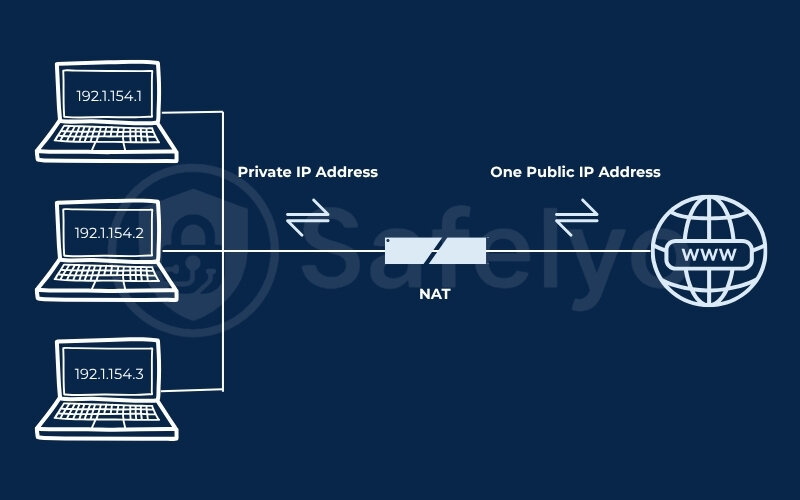
To address this shortage, engineers implemented NAT so that multiple devices could share a single public IP address rather than requiring a unique public IP for every smartphone and computer in a home network.
2.2. How NAT creates the passthrough problem
NAT operates much like a building’s mailroom by receiving data packets, changing the private IP to a public IP, and sending them out. When replies return, NAT uses standard TCP and UDP port numbers to track connections and deliver the data to the correct internal device.
However, this creates a conflict for VPN connections. Protocols like GRE (used by PPTP) and ESP (used by IPsec) do not contain port numbers. Furthermore, PAT (Port Address Translation) works by translating IP addresses to a public IP via unique source port numbers. Because GRE and ESP lack these standard ports, the router does not know which internal device the data belongs to, causing it to drop the packets.
In short, NAT was designed for standard internet traffic, not complex encrypted tunnels. Because NAT alters packet headers and relies on port numbers to function, it naturally breaks older VPN protocols that lack those specific ports, creating the exact roadblock that VPN passthrough was built to bypass.
3. How VPN passthrough works
Most home routers use NAT and PAT to track connections via TCP and UDP port numbers. Legacy VPN protocols like PPTP and IPsec operate differently. Instead of standard ports, they use specific tunneling protocols: GRE (Generic Routing Encapsulation) for PPTP, ESP (Encapsulating Security Payload) for IPsec, and AH (Authentication Header) for IPsec.
Since GRE and ESP lack standard port information, the router blocks the connection. Additionally, AH hashes the entire IP header, including the source IP. When NAT alters the source IP, the AH hash verification fails, making AH incompatible with NAT.
To resolve this conflict, VPN passthrough acts as an Application Layer Gateway, which is a specialized router module designed to handle protocols that do not use standard TCP/UDP ports.
When enabled, the router uses this gateway to monitor outbound traffic for specific GRE or ESP headers. It recognizes these unique packets, tags them, and creates a temporary opening in the firewall. This forwards the traffic without modifying it, allowing the VPN data to bypass standard NAT rules and travel freely. It is important to note that passthrough does not encrypt the data itself, but merely serves as a mechanism to identify and permit the traffic to flow.
4. Types of VPN passthrough
Different legacy protocols interact with NAT in unique ways, requiring specific passthrough mechanisms to function correctly.
4.1. PPTP passthrough
PPTP passthrough allows Point-to-Point Tunneling Protocol traffic to cross the router using TCP port 1723 and an enhanced version of GRE. Because standard GRE does not use ports, this passthrough utilizes the Call ID inside the enhanced GRE version so the NAT can accurately track the session.
While it solves the connectivity issue, PPTP relies on MS-CHAPv2 authentication, which is vulnerable and can be cracked in a matter of hours. The MS-CHAPv2 vulnerability was publicly exposed in 2012, leading Microsoft to officially deprecate the PPTP protocol in 2024, so using it poses security risks.
- Passthrough requirement: Yes (specifically for GRE packets).
- NAT compatibility: Poor without passthrough.
- Security note: Considered insecure due to MS-CHAPv2 vulnerabilities and official deprecation.
4.2. IPsec passthrough
IPsec passthrough enables the router to forward traffic for the Internet Protocol Security standard, which operates using two distinct modes: ESP and AH. AH hashes the entire IP header, meaning any NAT modification causes the hash to fail, making AH incompatible with NAT regardless of passthrough settings.
Conversely, ESP only encrypts the payload and header without hashing the original IP. To bypass NAT, modern setups use NAT-T (NAT Traversal) to encapsulate ESP packets inside UDP port 4500 so the router can track them. If your network lacks NAT-T, you must enable IPsec passthrough to forward the raw ESP traffic.
- Passthrough requirement: Yes, unless NAT-T is implemented.
- NAT compatibility: Low without NAT-T or passthrough.
- Security note: IPsec is an enterprise-grade standard utilizing AES-256 encryption.
4.3. L2TP passthrough
L2TP passthrough allows Layer 2 Tunneling Protocol traffic to function, although L2TP itself does not provide encryption and must be paired with IPsec (L2TP/IPsec) for security. Microsoft officially deprecated L2TP in 2024 alongside PPTP, making it a security risk for modern networks.
If you use it on legacy systems, this combination requires several ports: UDP 500 for the key exchange, UDP 1701 for the L2TP data, UDP 4500 for NAT-T, and ESP for the encrypted payload. If your hardware lacks NAT-T support, L2TP passthrough is necessary to forward the ESP traffic properly.
- Passthrough requirement: Yes, for IPsec ESP traffic.
- NAT compatibility: Moderate with NAT-T; poor without passthrough.
- Security note: Vulnerable due to its 2024 deprecation. Migration is advised.
4.4. Do modern VPNs need passthrough?
Modern VPNs generally do not require passthrough settings because they are built to navigate NAT restrictions natively. Here is a quick compatibility summary of common protocols:
| VPN Protocol | Needs Passthrough? | NAT Compatibility | Notes |
|---|---|---|---|
| PPTP | Yes (GRE) | Poor | Deprecated in 2024 and insecure. Uses TCP 1723. |
| L2TP/IPsec | Yes (ESP) | Moderate | Deprecated in 2024. Uses UDP 500, 1701, 4500. |
| IPsec | Yes (ESP) | Low | Requires passthrough or NAT-T. |
| OpenVPN | No | High | Uses standard ports (UDP or TCP). |
| WireGuard | No | High | Modern, fast, and NAT-friendly. |
| IKEv2 | No | High | Modern, supports NAT-T natively, used by enterprise VPNs. |
5. VPN passthrough vs. VPN router
A VPN passthrough and a VPN router serve different roles in managing secure connections. A VPN passthrough acts as a gatekeeper on your router, recognizing VPN traffic from an individual device (like your laptop) and allowing it to exit the network without blocking it. It does not encrypt your data, meaning you still must install and run a VPN application on your device.
Conversely, a VPN router operates as a dedicated VPN client that encrypts traffic directly at the hardware level. This covers every connected device on the network without requiring individual applications.
Here is a breakdown of the core differences:
| Feature | VPN Passthrough | VPN Router |
| Encrypts traffic? | No (just allows it to pass) | Yes (encrypts data for the whole network) |
| Requires VPN app on device? | Yes | No |
| Covers all network devices? | No | Yes |
| Best use case | Legacy protocol compatibility | Always-on protection for all devices |
| Technical complexity | Low | Medium to high |
If your goal is to support an older protocol on a single device, passthrough is sufficient, but a VPN router is better for network-wide protection.
6. Do you still need VPN passthrough in 2026?
While the networking landscape has evolved, certain hardware and corporate setups still rely on this router feature today.
6.1. When passthrough is still needed
There are a few scenarios where enabling passthrough remains necessary for connectivity.
- Older routers or modems that lack built-in NAT-T capabilities.
- Legacy enterprise VPN clients based on IPsec.
- Maintaining connections on the Windows built-in VPN client for Windows 10 or older Windows 11 builds, which relied on L2TP/IPsec and often triggers the error if blocked.
- On-premises VPN concentrator environments that require backward compatibility.
In these situations, the connection will fail if the appropriate passthrough setting is inactive.
6.2. Modern alternatives that replace passthrough
If you have the flexibility to choose your protocol, several modern solutions eliminate the need for passthrough settings.
- OpenVPN: Connects via standard UDP 1194 or TCP 443 ports, making it NAT-friendly.
- WireGuard: Operates on a single UDP port and provides a lightweight, NAT-friendly connection.
- IKEv2/IPsec with NAT-T: Encapsulates its traffic inside UDP port 4500 to bypass routing conflicts.
- SASE or ZTNA: Secure Access Service Edge and Zero Trust Network Access are enterprise solutions managing access by identity rather than network perimeter, eliminating passthrough needs.
- Tailscale and ZeroTier: These mesh VPN tools bypass NAT automatically using relay servers, making them viable for home users.
CGNAT (Carrier-Grade NAT) presents a unique challenge where your internet service provider places your router behind an additional layer of NAT. This is common with Starlink, 4G, and 5G networks. Standard passthrough cannot bypass CGNAT, requiring tools like Tailscale or WireGuard to establish a successful connection.
6.3. Quick decision guide: Should you enable passthrough?
Use this decision matrix to determine if you need to adjust your settings based on your exact usage context.
| Scenario | Verdict |
| Using modern VPN apps (NordVPN, Surfshark, ExpressVPN) | Disable (Not needed) |
| Troubleshooting connection errors (Error 619, 809) | Enable to Troubleshoot |
| Legacy Windows built-in VPN (Win10/11) | Enable IPsec/L2TP Passthrough temporarily |
| Self-hosted home VPN (using WireGuard) | Disable (Not needed) |
| ISP uses CGNAT (Starlink, 4G/5G) | Passthrough won’t help. Use WireGuard or Tailscale. |
7. VPN passthrough on or off: Security implications
Leaving router ports open can create vulnerabilities, making it essential to evaluate your actual protocol usage.
7.1. Why disabling passthrough improves security
Turning off unused passthrough options strengthens your network’s defense against intrusions.
- PPTP passthrough leaves TCP port 1723 open, providing an entry point for brute-force attacks against weak MS-CHAPv2 encryption.
- IPsec passthrough keeps UDP ports 500 and 4500 active, creating an attack surface if you do not actively use the protocol.
- Leaving all passthrough options enabled simultaneously can confuse the NAT engine, leading to intermittent traffic drops.
- Active passthrough may allow unauthorized devices inside your network to establish external VPN connections, bypassing internal monitoring rules.
Disabling these features when not required acts as a simple security hygiene practice.
7.2. When keeping passthrough enabled is justified
Keeping passthrough active makes sense in specific troubleshooting or legacy compatibility situations.
- Connecting to an older corporate VPN network that mandates IPsec.
- Using legacy hardware that cannot support modern protocols like WireGuard.
- Actively diagnosing connection failures like Error 619 or Error 809.
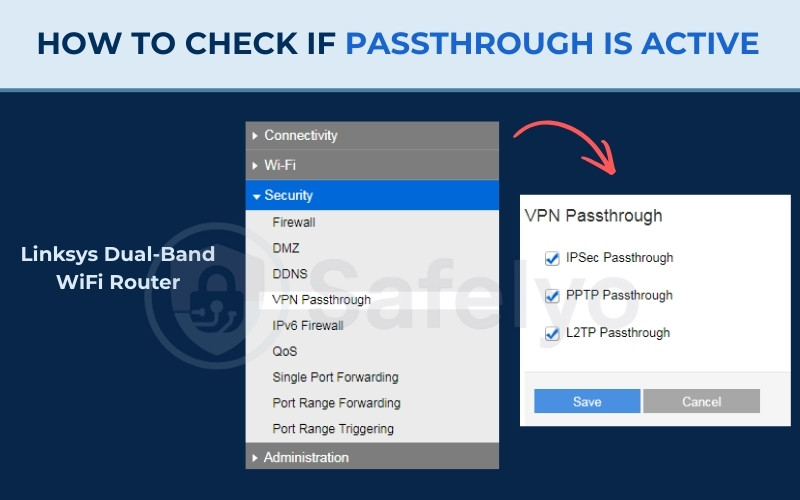
To check if passthrough is currently active on your network:
- Log in to your router’s admin panel using your web browser.
- Navigate to the Security, Advanced, or WAN settings tab.
- Look for active toggles labeled “IPsec Passthrough”, “PPTP Passthrough”, or “L2TP Passthrough”.
Always remember to back up your router configuration before making any changes.
8. How to configure VPN passthrough on your router
Adjusting your router settings is a straightforward process once you locate the administration menu for your specific hardware.
8.1. How to locate passthrough settings by router brand
Finding the correct settings depends on your router manufacturer and current firmware version. We have compiled the typical navigation paths for major brands to help you locate these options:
| Router Brand | Navigation Path to VPN Passthrough |
| TP-Link | Navigate to Security and look for the Basic security sub-tab. |
| Asus | Click Advanced Settings on the left, select WAN, then navigate to the NAT Passthrough tab. |
| Linksys | Navigate to Security and look for the VPN Passthrough sub-tab. |
| D-Link | Go to Features, click Firewall Settings, and click Advanced Settings. |
| Netgear | Go to Advanced, select Advanced Setup, and click on VPN Service. |
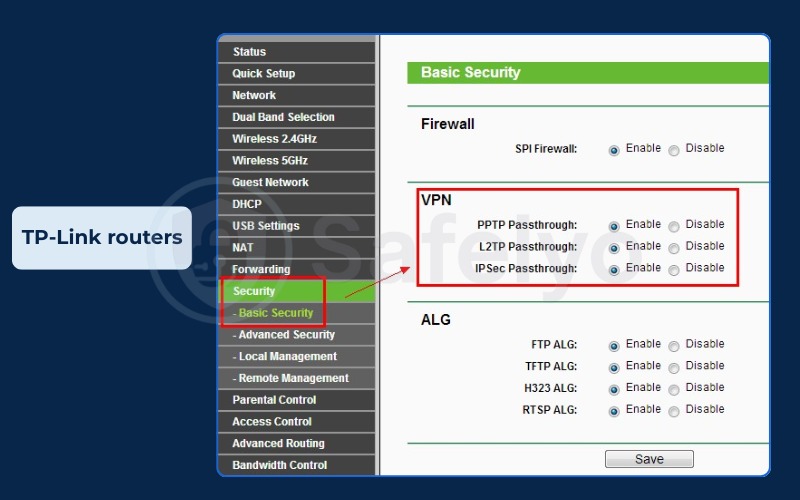
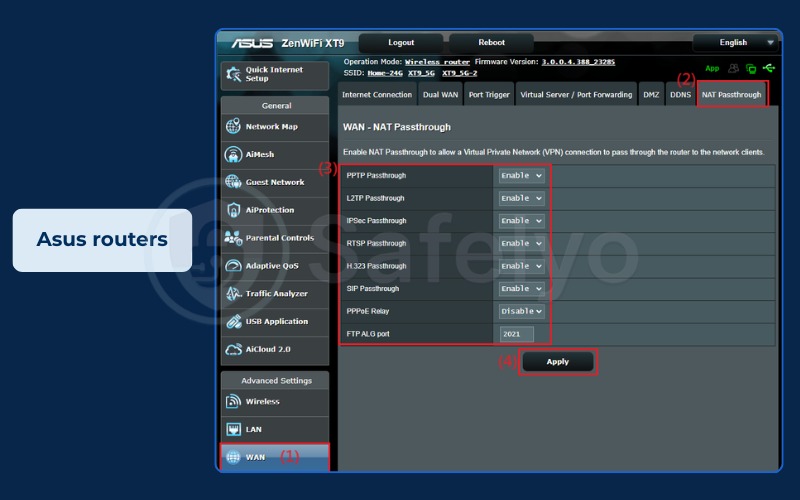
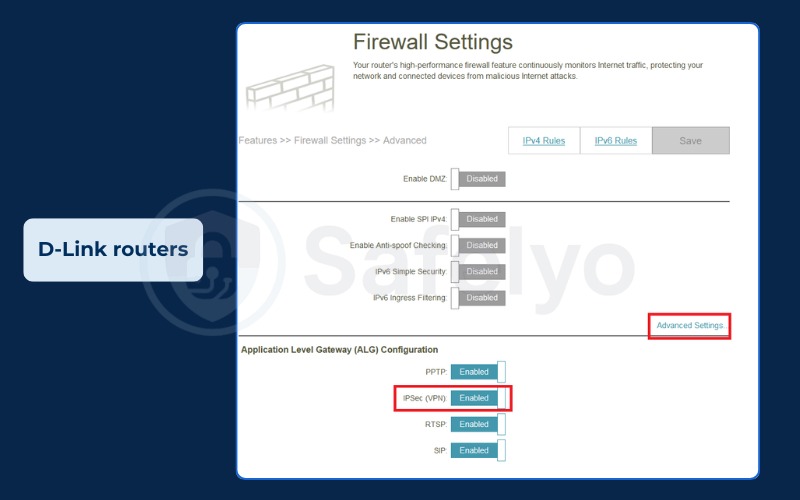
Keep in mind that the exact naming might vary, but the terminology will usually reference passthrough or ALG.
8.2. Which passthrough type to enable (and what to avoid)
You should follow the practice of enabling only the specific passthrough type that corresponds to your active VPN protocol.
- For IPsec connections, enable only IPsec Passthrough.
- For PPTP connections, enable only PPTP Passthrough.
- For L2TP connections, enable only L2TP Passthrough.
Avoid turning on all options simultaneously, as this opens unnecessary ports and invites configuration conflicts. After applying the new configuration, restart your router to ensure the changes take effect properly. If connectivity issues persist, verify your firewall rules and VPN client settings, or consult your network administrator if you are connecting to an enterprise system.
9. Troubleshooting common VPN passthrough errors
Diagnosing connection failures begins by reviewing your VPN client logs to identify specific error codes before adjusting your router. The table below outlines the frequent errors and their solutions.
| Error Code/Message | Likely Cause | Solution |
| Error 619 | PPTP Port Blocked. The router is not allowing GRE packets or TCP Port 1723. | Enable PPTP Passthrough (or PPTP ALG) in router settings. |
| Error 809 | Windows L2TP Error. The router blocks UDP ports required for the connection. | Enable IPsec Passthrough. Ensure UDP ports 500 and 4500 are open. On Windows 10/11, this may require an advanced registry fix. |
| GRE Protocol Error | GRE Packets Dropped. NAT cannot handle the GRE protocol headers. | Enable PPTP Passthrough to allow GRE packets through NAT. |
| Still cannot connect? | Double NAT or CGNAT. Your ISP adds another NAT layer. | Passthrough cannot fix this. Switch to WireGuard or Tailscale. |
When dealing with CGNAT, your internet service provider places your home network behind an additional NAT layer. Because passthrough only modifies your local router, it cannot resolve restrictions applied at the ISP level.
For Windows 10 and 11 users encountering Error 809, the operating system sometimes requires adding a specific registry DWORD (AssumeUDPEncapsulationContextOnSendRule = 2) to restore functionality alongside the passthrough adjustments. Read our detailed VPN port guide for further troubleshooting.
10. FAQs about VPN passthrough
Does VPN passthrough slow down my internet?
No, passthrough does not directly reduce your internet speed. It is simply a router feature allowing traffic to pass through, but the legacy protocols relying on it are generally less efficient than modern alternatives like WireGuard.
Should I enable all passthrough options?
No, you should not enable all passthrough options at once. Turning them all on creates unnecessary attack surfaces and potential network conflicts, so only enable the exact type your current protocol requires.
Is VPN passthrough required for OpenVPN or WireGuard?
No, passthrough is unnecessary for OpenVPN and WireGuard. Both protocols handle NAT traversal natively, meaning they bypass router restrictions without requiring manual configuration changes.
What is the difference between VPN passthrough and IPsec passthrough?
VPN passthrough is the umbrella term for the router feature that allows legacy VPN traffic to cross a NAT barrier. IPsec passthrough is one specific type within that category, designed to forward raw ESP packets when NAT-T is unavailable, using the Security Parameter Index (SPI) to track each session.
Should I enable L2TP passthrough?
You should only enable L2TP passthrough if you are forced to use an older L2TP/IPsec VPN on a router that lacks native NAT-T support. Since L2TP was officially deprecated by Microsoft in 2024, we recommend migrating to IKEv2 or WireGuard whenever possible.
What if my VPN works on mobile data but not on home Wi-Fi?
This typically indicates that your home router’s firewall is blocking the VPN traffic. Try enabling the corresponding passthrough setting on your router. If the problem persists, switch to a NAT-friendly protocol.
IPsec passthrough on or off for gaming?
Keep it off. IPsec passthrough does not impact gaming performance, ping, latency, or your NAT type, so leaving it disabled is the safer choice for your network.
11. Conclusion
To quickly summarize what is VPN passthrough, it is simply a router setting built to support legacy protocols like PPTP and IPsec across modern NAT environments. If you use current protocols like WireGuard or OpenVPN, you do not need to enable it.
You should only turn passthrough on when actively troubleshooting connection issues like Error 619 or Error 809, or when maintaining a required legacy corporate setup. Once the issue is resolved, keep it disabled to avoid exposing unnecessary ports.
For more actionable troubleshooting steps and protocol reviews, head over to the Safelyo homepage and browse our VPN Guides category.