The NordWhisper protocol is a specialized NordVPN connection method that uses web tunnel technology to disguise VPN traffic as regular HTTPS browser traffic. This disguise allows users to securely bypass strict network restrictions at airports, hotels, and offices.
This guide explains NordWhisper’s mechanics, compares it to NordLynx and OpenVPN, and details the setup process.
Key takeaways
- NordWhisper uses web tunnel technology to make VPN traffic appear as normal browser traffic, bypassing network filters that recognize and block standard VPN protocols.
- The protocol is designed specifically for networks that restrict VPN use, such as airport Wi-Fi, hotel networks, office environments, and campus networks.
- NordWhisper maintains strong encryption and DNS leak protection, remaining consistent with other secure NordVPN protocols.
- The connection is slower than NordLynx and OpenVPN on unrestricted networks because of the additional processing required to disguise the traffic.
- NordWhisper is not compatible with Dedicated IP, Meshnet, Obfuscated servers, Onion Over VPN, or P2P VPN servers.
- The feature is available on Windows, macOS, iOS, Android, Android TV, and Linux. Users must select it manually in the application settings.
Disclaimer: This article is based on NordVPN’s official documentation and support pages.
1. What is NordWhisper protocol?
NordWhisper is a specialized protocol developed by NordVPN that allows users to connect to secure servers from networks that typically limit or block traditional VPN traffic. Announced by Nord Security on January 29, 2025, the development team built NordWhisper in response to growing network restrictions in public and heavily managed environments.
NordWhisper solves the critical problem of losing secure internet access when traveling or working remotely. The disguise allows the connection to pass smoothly through strict network filters at airports, hotel Wi-Fi setups, office environments, and campus systems that normally block standard protocols like OpenVPN or WireGuard.
NordVPN Chief Technology Officer Marijus Briedis stated that the primary goal of NordWhisper was to empower people to work, communicate, and access services securely, even in the most restrictive environments.
It is critical to understand the exact boundary of NordWhisper. NordWhisper is designed specifically to bypass local, network-level VPN blocks found on a specific Wi-Fi hotspot, an office router, or a hotel network. NordWhisper is not designed to overcome broader regional or nationwide internet controls. If you are dealing with a local firewall restriction, NordWhisper will help you regain secure access.
2. How does NordWhisper work?
NordWhisper functions by changing how your internet traffic looks to outside network administrators, prioritizing intelligent disguise over raw speed.
2.1. Web tunnel technology explained
NordWhisper relies on web tunnel technology to wrap your VPN traffic so it closely resembles standard HTTPS traffic produced by a regular web browser. This disguise makes your secure connection blend in seamlessly with everyday internet activity.
Standard VPN protocols like OpenVPN and WireGuard produce highly identifiable traffic patterns. These patterns include specific packet sizes, predictable connection behaviors, and known port usages that firewalls and content filters easily detect. Even networks dealing with some basic obfuscation techniques can still filter out these traditional signatures in strict environments.
Instead of just masking these VPN-specific patterns, NordWhisper mimics the actual traffic behavior of everyday web browsing. This fundamental shift in behavior prevents network filters from identifying and blocking the connection.
Please note that this method targets local network filtering. For bypassing strict nationwide internet censorship, you must rely on NordVPN’s dedicated Obfuscated Servers feature rather than NordWhisper.
2.2. Security and encryption
Despite altering the outward appearance of the traffic, NordWhisper strictly upholds the same security standards as other NordVPN protocols. The disguise mechanism does not weaken the underlying protection of your data.
Your internet traffic is secured with strong encryption, ensuring that all data remains completely unreadable to third parties. Additionally, NordWhisper includes full DNS leak protection. This protection keeps all your DNS requests firmly inside the encrypted VPN tunnel, preventing your local network provider from seeing your browsing activity.
This setup ensures a consistent privacy model across the entire NordVPN ecosystem. Users receive the same foundational security approach found in NordLynx and OpenVPN. While the outward traffic signature changes, NordVPN consistently employs advanced AES-256 encryption to secure these underlying connections.
3. NordWhisper vs. NordLynx vs. OpenVPN: Which protocol fits your situation?
Choosing the right connection method depends entirely on the specific restrictions present on your current local network. Here is how NordWhisper compares to the standard alternatives.
3.1. NordWhisper vs. NordLynx
NordLynx is NordVPN’s WireGuard-based protocol, built primarily for speed and modern encryption efficiency. This option serves as the recommended default for everyday browsing, streaming, and file downloading on unrestricted networks.
NordWhisper, by contrast, is not optimized for speed. The developers built NordWhisper exclusively for situations where NordLynx fails to connect because the local network actively filters out VPN traffic.
You will experience a clear tradeoff when switching between NordLynx and NordWhisper. NordLynx delivers maximum speed on open networks, while NordWhisper sacrifices some of that speed to guarantee connectivity reliability in restricted environments.
To understand the real-world performance, we conducted speed tests from our baseline connection in Vietnam. We compared both protocols using a nearby server in Singapore and a distant connection in the US.
| Protocol | Nearby server (Singapore) | Long-distance server (US) |
|---|---|---|
| NordLynx | 475.75 Mbps | 398.08 Mbps |
| NordWhisper | 474.65 Mbps | 345.73 Mbps |
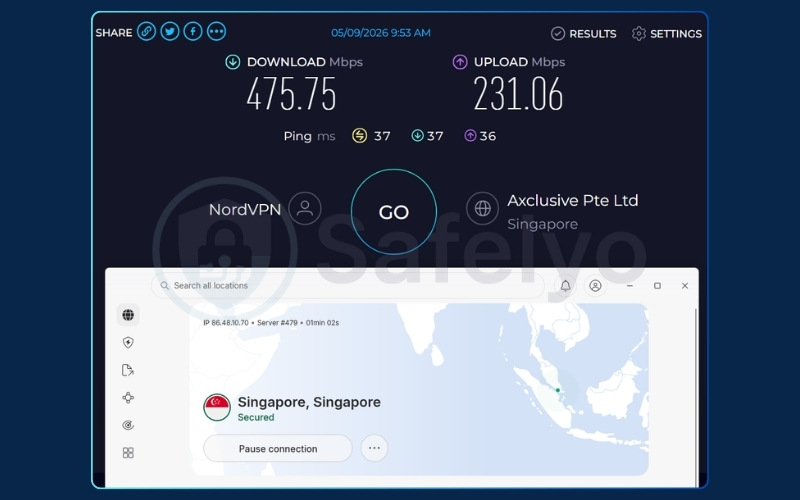
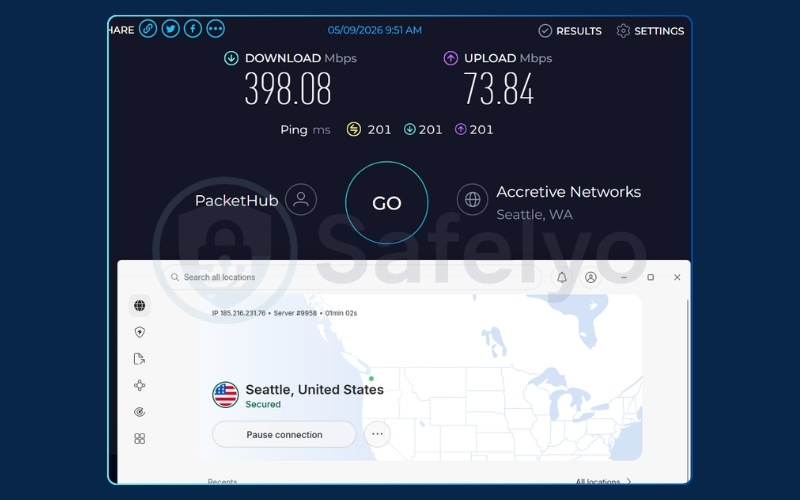
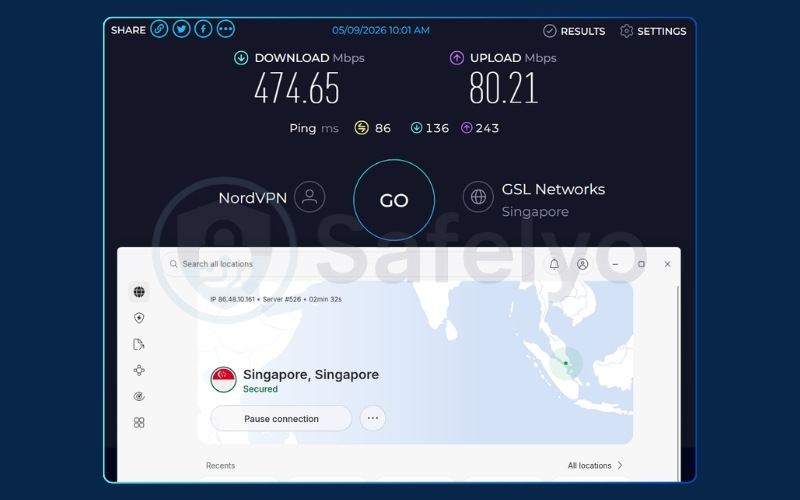
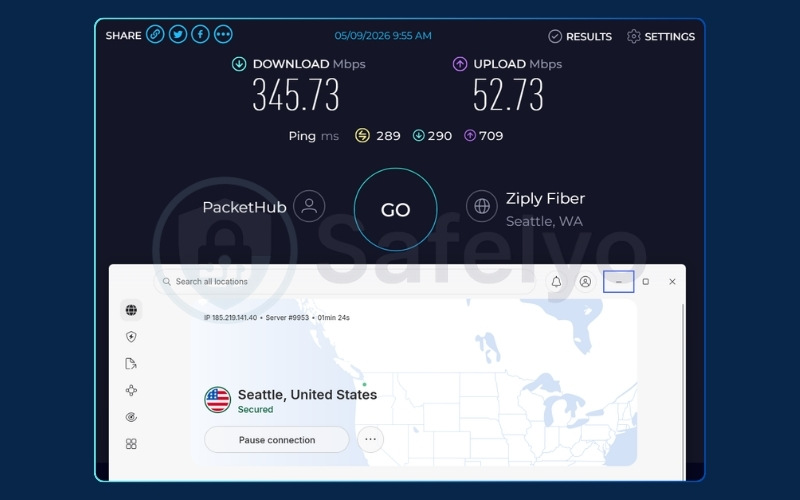
As the data illustrates, the speed difference is practically indistinguishable on nearby servers. Both protocols easily maintained speeds above 470 Mbps, ensuring blazing-fast performance for any standard task.
However, the web tunnel technology requires extra processing power to disguise your traffic. This overhead becomes apparent on long-distance routes. When connecting to the US, NordWhisper dropped to 345.73 Mbps, whereas NordLynx maintained a robust 398.08 Mbps.
Despite this reduction, NordWhisper remains incredibly fast. The resulting speed easily exceeds the 40 Mbps threshold needed for smooth 4K video streaming without buffering.
According to NordVPN, users should stick to NordLynx for everyday use and only switch to NordWhisper when facing tough network roadblocks. Both options will maintain a fully secure connection.
Review how the two compare directly regarding their features:
| Feature | NordLynx | NordWhisper |
|---|---|---|
| Primary purpose | Speed-optimized everyday use | Connectivity on restricted networks |
| Based on | WireGuard framework | Web tunnel technology |
| Performance on open networks | Fast | Slower (by design) |
| Works on filtered networks | Limited (may be blocked) | Yes (primary use case) |
| Manual selection required | No (can be set to auto) | Yes |
3.2. NordWhisper vs. OpenVPN
OpenVPN is a widely trusted, highly stable protocol suitable for most standard, unrestricted environments. However, its distinct traffic patterns are easily recognizable to modern network filters. Because of this visibility, local administrators can block OpenVPN in the exact same environments where you would need to use NordWhisper.
To bypass these roadblocks, NordWhisper utilizes completely different traffic behavior to avoid detection where OpenVPN typically fails. The web tunnel technology prevents the network from categorizing the connection as a VPN entirely.
If you are on an unrestricted network, OpenVPN generally offers noticeably faster performance than NordWhisper. Both protocols consistently use strong encryption and rigorously follow NordVPN’s core security standards.
Review this three-protocol summary to understand your options:
| Protocol | Primary strength | Best for | Works on restricted networks? |
|---|---|---|---|
| NordLynx | Speed | Everyday browsing, streaming | Limited |
| OpenVPN | Stability and compatibility | General use, most environments | Limited |
| NordWhisper | Connectivity in restricted environments | Blocked VPN networks | Yes |
4. NordWhisper vs. Obfuscated servers: Understanding the difference
Both NordWhisper and Obfuscated servers help bypass internet blocks, but they target completely different types of firewalls. It is easy to confuse the two, so understanding their specific use cases will save you a lot of time.
Obfuscated servers are heavy-duty tools designed to bypass strict, nationwide internet censorship. If you travel to a country that heavily restricts internet access globally, this is the tool you need. It completely strips away VPN metadata to evade advanced government firewalls.
NordWhisper, however, is a much lighter tool built specifically for local network restrictions. It disguises your connection as standard web traffic to bypass filters on a specific Wi-Fi hotspot, such as an office or university network. It will not work effectively against nationwide censorship.
Here is a quick summary to help you choose the right option:
| Feature | NordWhisper | Obfuscated servers |
|---|---|---|
| Target firewall | Local (Office, School, Hotel) | National (Country-wide censorship) |
| Technology | Web tunnel (HTTPS disguise) | Advanced obfuscation algorithms |
| Speed impact | Moderate | High |
5. When should you switch to NordWhisper?
You should switch to NordWhisper only when your current network environment actively prevents standard VPN connections from establishing. Follow these specific scenarios to guide your decision.
Use NordWhisper when:
- Other VPN protocols like NordLynx or OpenVPN fail to connect, and you strongly suspect the local network is actively filtering VPN traffic.
- You connect to a public Wi-Fi network equipped with aggressive security filtering, such as those found at airports, cafes, or conference venues.
- You log onto a hotel network where administrators restrict or heavily throttle traditional VPN connections.
- You operate on an office or campus network that enforces strict content filtering policies explicitly designed to block VPN traffic.
When NOT to use NordWhisper:
- Do not use NordWhisper on a regular home network or an unrestricted mobile data connection. In these open environments, you should use NordLynx to achieve much better speed and overall performance.
- Do not use NordWhisper when you require access to specialized NordVPN features. NordWhisper does not support Dedicated IP, Meshnet, Obfuscated servers, Onion Over VPN, or P2P VPN servers. You must switch back to a compatible protocol to use these tools.
Note: NordWhisper may be slower than NordLynx and OpenVPN due to the extra processing required to disguise traffic. NordVPN recommends returning to another protocol once you are on an unrestricted network.
6. Pros and cons of NordWhisper
Before choosing to use NordWhisper, it helps to weigh its advantages against its deliberate design tradeoffs.
The following table summarizes the core strengths and limitations.
Pros
Bypasses strict local network filters
Maintains advanced AES-256 encryption
Available across most major platforms
Cons
Slower connection speeds
Requires manual selection
Incompatible with P2P, Meshnet, and Dedicated IP
6.1. Pros of NordWhisper
The primary advantage of NordWhisper is its ability to restore secure internet access in highly restrictive environments.
- Bypasses strict firewalls: By disguising your traffic to look like standard HTTPS web browsing, NordWhisper consistently bypasses local firewalls at airports, offices, and hotels that typically block standard VPN connections.
- Maintains advanced privacy: Despite changing the outward appearance of the traffic, NordWhisper does not compromise on privacy. Users retain the exact same advanced AES-256 encryption and strict DNS leak protection found in traditional options.
- Broad platform support: NordVPN provides NordWhisper across all major operating systems, including Windows, macOS, Android, iOS, and Linux, ensuring broad accessibility for nearly any device.
6.2. Cons of NordWhisper
NordWhisper prioritizes connectivity over comprehensive feature support, leading to several deliberate operational restrictions:
- Slower speeds: NordWhisper requires additional processing power and time to disguise your VPN traffic as regular web activity. This disguise process creates a noticeable speed reduction compared to the performance of NordLynx and OpenVPN. Due to the computational overhead of the web tunnel, users typically experience a moderate drop in speed depending on their baseline connection.
- Manual selection: The NordVPN application will not automatically select NordWhisper, even when your other connections fail. You must physically navigate to the settings menu and select NordWhisper manually each time you need it.
- Feature incompatibilities: NordWhisper does not work with Dedicated IP, Meshnet, Obfuscated servers, Onion Over VPN, or P2P VPN servers. If your workflow relies on any of these specific features, you must switch back to a compatible protocol when the network restrictions are no longer active.
7. Does NordWhisper drain your phone?
NordWhisper requires slightly more battery and processing power than standard protocols like NordLynx. Because web tunnel technology actively disguises VPN traffic as regular web browsing, your device must perform extra computational work.
To optimize power efficiency, we recommend using this feature primarily when necessary. Once you leave the restricted network, simply switch back to NordLynx to conserve your device’s battery life.
For a broader understanding of power management, check out our complete analysis: Does VPN drain battery?
8. How to enable NordWhisper on your device
You must select NordWhisper manually across all supported platforms, as the application does not feature an automatic switching mechanism for NordWhisper. Once you manually select it, the protocol remains active until you physically change the settings back. Remember to switch your settings back to NordLynx as soon as you return to a standard, unrestricted network.
Note: Setup steps generally remain consistent, but app UI and menu labels can change slightly with version updates.
8.1. How to enable NordWhisper on Windows and macOS
Follow these steps to configure your desktop application:
- Open the NordVPN app, click the profile icon, then choose Settings.
- Click “Connection and security” (Windows) or “General” (macOS).
- Click “VPN protocol” to open the list.
- Select “NordWhisper”.
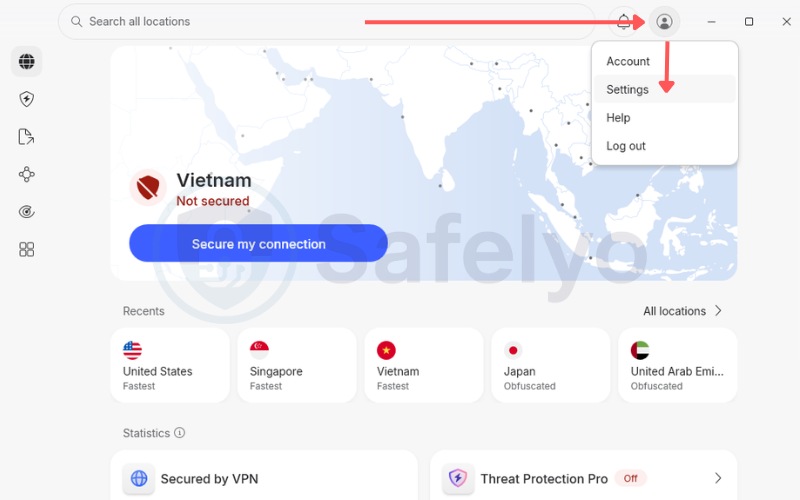
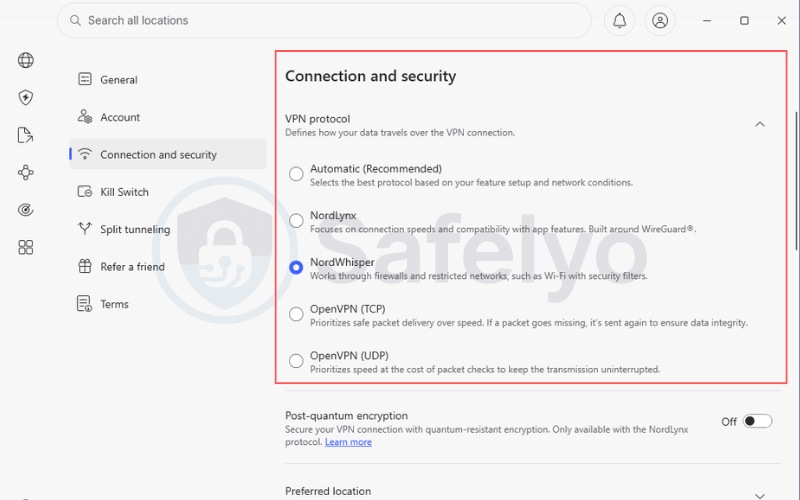
The navigation menu label differs slightly depending on your desktop operating system. Windows users will find the options under the “Connection and security” tab. Meanwhile, macOS users must look under the “General” tab to locate the exact same dropdown list.
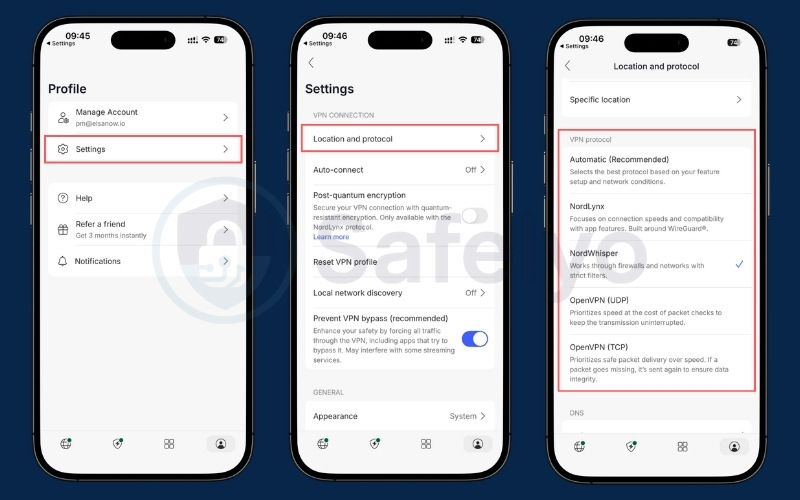
8.2. How to enable NordWhisper on Android, iOS, and Android TV
Follow these steps to configure your mobile devices running Android or iOS:
- Open the NordVPN app and tap the profile icon.
- Tap “Settings”.
- Tap “Location and protocol”.
- Tap “NordWhisper”.
If you are using a television interface, the process requires different navigation:
- On the main screen, scroll left to the cogwheel icon and open “Settings”.
- Select “Protocol”.
- Select “NordWhisper”.
Android TV uses a completely different navigation path compared to the standard Android mobile application. You must use the left-hand scroll menu on the television interface to access the main configuration area.
8.3. How to enable NordWhisper on Linux (GUI and CLI)
Follow these steps if you are using the graphical interface on Linux:
- Open the NordVPN GUI app and click the settings icon.
- Click “VPN connection”.
- Click “NordWhisper”.
If you prefer using the terminal, execute these commands:
- Open a terminal window (Ctrl + Alt + T).
- Run the following command: nordvpn set technology NORDWHISPER
After setting the technology, you must subsequently execute the nordvpn connect command to actually establish the secure connection to a server.
9. Troubleshooting: What to do if NordWhisper fails to connect
If NordWhisper cannot establish a connection, the local network might be employing unusually strict traffic analysis, or your app simply needs a quick refresh. Follow these practical steps to resolve the issue:
- Switch to a different server: Sometimes the specific IP address you are trying to reach is blocked by the network administrator. Try connecting to a different city or country location.
- Restart the NordVPN application: A simple app restart often clears temporary software glitches that prevent the web tunnel from forming properly on your device.
- Temporarily disable the Kill Switch: If your connection drops completely, the Kill Switch might be aggressively blocking your local network access. Disable it briefly to see if the connection establishes, then turn it back on.
- Check for software updates: NordVPN frequently updates its protocols to outsmart new network filters. Ensure you are running the most recent version of the app for optimal connectivity.
10. NordWhisper’s impact on the VPN industry
NordWhisper represents a significantly different design priority for modern VPN protocols. Rather than optimizing strictly for maximum speed like NordLynx or focusing on broad legacy compatibility like OpenVPN, NordWhisper focuses entirely on connectivity reliability under active detection.
NordVPN states that deploying web tunnel technology is a direct response to the rapid evolution of network filtering, which has become increasingly common in public and heavily managed environments.
The growing deployment of strict filtering systems in public spaces suggests a rising consumer demand for protocols that adapt to tighter network detection.
NordVPN has publicly noted that NordWhisper may heavily influence the future direction of general VPN development. The company believes the industry will need to build smarter, more flexible tools that focus on reliable access in highly restrictive real-world conditions.
11. FAQs about NordWhisper protocol
Does NordWhisper work in countries with nationwide internet censorship?
No. The developers designed NordWhisper specifically for local, network-level VPN blocks, such as those found on airport Wi-Fi systems and managed office networks. It is not built to overcome broader regional or nationwide internet restrictions. You must switch to NordVPN’s dedicated Obfuscated Servers to bypass strict country-level firewalls.
Which NordVPN protocol should I use for everyday browsing?
NordLynx is the recommended default option for everyday use on unrestricted networks. It operates on the WireGuard framework and offers significantly faster speeds than NordWhisper. You should only switch your settings to NordWhisper when standard connections completely fail.
Does NordWhisper slow down my connection?
Yes, NordWhisper is noticeably slower than NordLynx and OpenVPN on normal, unrestricted networks. The extra processing required to disguise your secure VPN traffic as standard web traffic naturally creates a speed reduction. Expect a noticeable dip in performance due to the web tunnel overhead.
What features are unavailable when using NordWhisper?
NordWhisper does not support Dedicated IP, Meshnet, Obfuscated servers, Onion Over VPN, or P2P VPN servers. NordWhisper prioritizes basic connectivity over advanced feature support. If your daily workflow requires any of these specific features, you must switch back to a fully compatible protocol.
Is NordWhisper available on all platforms?
NordWhisper is currently available on Windows, macOS, iOS, Android, Android TV, and Linux operating systems. However, users must navigate to the settings menu and select NordWhisper manually on each individual platform. Currently, there are no additional supported platforms, but users should keep their applications updated for future compatibility.
Do I need to switch back to another protocol after using NordWhisper?
Yes. The application will not automatically deselect NordWhisper when you leave a restricted network and return home. You need to open your settings menu and manually switch back to NordLynx or OpenVPN to regain optimal browsing speed.
Does NordWhisper provide the same level of encryption as NordLynx?
Yes. NordWhisper utilizes the exact same strong AES-256 encryption standards and DNS leak protection mechanisms found in other secure NordVPN protocols. The disguise mechanism only changes how the traffic looks externally, without weakening the internal encryption securing your data.
Can NordWhisper be used on a router?
No, NordWhisper is not designed for direct router configuration. For full-network protection on your home router hardware, NordVPN officially recommends setting up a standard OpenVPN connection.
12. Conclusion
NordWhisper protocol serves a very specific and highly practical purpose within the NordVPN ecosystem. It is the company’s dedicated solution for users trapped on local networks that actively block standard VPN protocols. By utilizing web tunnel technology to disguise internet traffic, NordWhisper intentionally sacrifices some raw speed to maintain a secure connection in heavily restricted environments.
Your daily decision logic should remain straightforward. Keep NordLynx or OpenVPN active as your default choice for maximum performance. Switch your settings to NordWhisper only when your primary protocols fail to connect. Remember to manually revert your settings as soon as you return to an unrestricted network environment.
The performance tradeoff is both real and intentional, but the reliability gained is essential. For frequent travelers and remote workers navigating managed office environments, having NordWhisper available ensures you will rarely be locked out of your secure connection.
For more detailed reviews and troubleshooting tips, explore our VPN Guides category or visit the Safelyo homepage to discover the best tools for your digital privacy.