NordVPN is the best VPN for Singapore, backed by 70+ dedicated Singapore servers, advanced privacy features, and exceptional tested speeds of over 450 Mbps on Singapore servers. Its annual Deloitte audits, Panama jurisdiction, and Double VPN capability make it a comprehensively verified option for anyone who needs reliable protection in Singapore’s closely regulated internet environment.
Singapore’s internet rules include an IMDA-enforced blocked website list and the Online Safety Act 2022, requiring ISPs like Singtel, StarHub, and M1 to restrict specific content. A VPN helps manage these access limitations.
To find the right VPN for your exact situation, we tested dozens of providers to select the top 5 leading services below. We ran speed tests, checked streaming unblocking, verified privacy audits, and compared pricing across all major plan tiers.
Top VPNs for Singapore:
- NordVPN (Best overall): Recorded fast speeds of over 450 Mbps on the Singapore server in our tests. With a Panama jurisdiction, Double VPN, 70+ Singapore servers, and annual Deloitte audits, NordVPN is a comprehensively verified privacy option that leads our rankings.
- Surfshark (Best value): Supports unlimited simultaneous connections from $2.49/mo on a 2-year plan, while delivering fast speeds over 450 Mbps on its 40+ Singapore servers and unblocking 28+ Netflix libraries for extensive streaming access.
- Proton VPN (Best for privacy-first routing): Features a permanent free tier with no data cap and no credit card required. Its Plus plan utilizes 30 Singapore servers and recorded fast speeds of over 450 Mbps.
- ExpressVPN (Best for reliable connectivity): With dedicated Singapore servers across three geo-redundant locations (CBD, Jurong, Marina Bay) and a fast Singapore download speed of over 450 Mbps at low ping in our tests, ExpressVPN delivers a strong combination of streaming reach and independently audited security.
- IPVanish (Best for large households): Delivers unlimited simultaneous connections and excellent long-distance speeds (over 450 Mbps on US servers). Its $2.19/mo starting price and recent independent audits make IPVanish a practical high-bandwidth choice.
Here is a side-by-side comparison of all five providers:
| VPN | Starting price | SG download | SG servers | Obfuscation | Simultaneous connections | Free trial | Money-back guarantee |
|---|---|---|---|---|---|---|---|
| NordVPN | $3.49/mo | Fast (>450 Mbps) | 70+ | Yes | 10 | 3-day (Android) | 30 days |
| Surfshark | $2.49/mo | Fast (>450 Mbps) | 40+ | Yes | Unlimited | 7-day | 30 days |
| Proton VPN | $2.99/mo | Fast (>450 Mbps) | 30 | Yes | 10 (1 on free) | Permanent free plan | 30 days |
| ExpressVPN | $2.49/mo | Fast (>450 Mbps) | Unlisted | Automatic | Up to 14 | 3-day (iOS/Android) | 30 days |
| IPVanish | $2.19/mo | Fast (~367 Mbps) | 29 | Yes | Unlimited | Yes (Mobile) | 30 days |
Disclaimer: This guide is for informational purposes only. Information regarding speeds (based on our tests conducted in 2026), unblocking capabilities, pricing, and promotional offers may change over time depending on your geographic location or new platform updates. Verify current details on each provider’s official website before purchasing. This article is for informational purposes only and does not constitute legal advice. Please use VPNs responsibly and legally.
1. How we tested and selected the best VPNs for Singapore
All network and performance tests for this review were conducted from a base location in Vietnam on a wired 1 Gbps connection using a Windows 11 PC. We used the fastest modern protocol recommended by each provider. This included NordLynx for NordVPN, WireGuard for Surfshark, Proton VPN, and IPVanish, and Lightway for ExpressVPN. We tested speeds on Singapore servers to measure regional performance, and on US servers specifically to represent the experience of routing traffic globally for streaming.
Our testing covered the following criteria:
- Speedtest.net: Used for raw download/upload speed and ping across Singapore and US servers.
- ipleak.net and browserleaks.com: Used to verify DNS leaks, WebRTC leaks, and IPv6 leak protection on each VPN.
- Manual streaming test: Each VPN was connected to its Singapore server to verify access to Netflix, Disney+, BBC iPlayer, meWATCH, Viu, and Catchplay.
- Privacy audit verification: Each provider’s most recent independent audit report was reviewed for date, auditor identity, and scope of verification.
For the overall feature tables in our reviews below, the listed Average Speeds (Download, Upload, and Latency) are calculated as the mean performance between the Singapore and US servers. Since our baseline testing was conducted from Vietnam, this combined metric provides a realistic expectation of the VPN’s performance for both regional connections within Southeast Asia and long-distance transcontinental routing.
2. Best VPNs for Singapore: Top 5 picks for every user
The five VPNs below were selected for their combination of Singapore server availability, independently verified no-logs policies, speed performance, and streaming unblocking reliability. Each review covers speeds, unblocking, and privacy on consistent terms so you can compare them directly.
2.1. NordVPN: Best overall VPN for Singapore
NordVPN operates through Nord Security, headquartered in Panama, a jurisdiction outside all 5, 9, and 14 Eyes alliances with no mandatory data retention legislation. Its 9,500+ servers span 149 countries and run exclusively on RAM-only infrastructure. This architecture ensures all server data is wiped permanently on every reboot.
NordVPN includes two standout privacy tools. Double VPN chains two separate servers in sequence to significantly complicate traffic correlation. NordWhisper is a proprietary obfuscation protocol that disguises VPN traffic as standard web browsing. Both are directly relevant for Singapore users who need to reduce ISP-level detection by Singtel or StarHub.
Deloitte has independently verified NordVPN’s no-logs policy annually since 2022, with four consecutive audits completed through 2025. The majority of its servers are owned and colocated rather than rented, giving NordVPN stronger physical control over its infrastructure than providers that rely on third-party data centers.
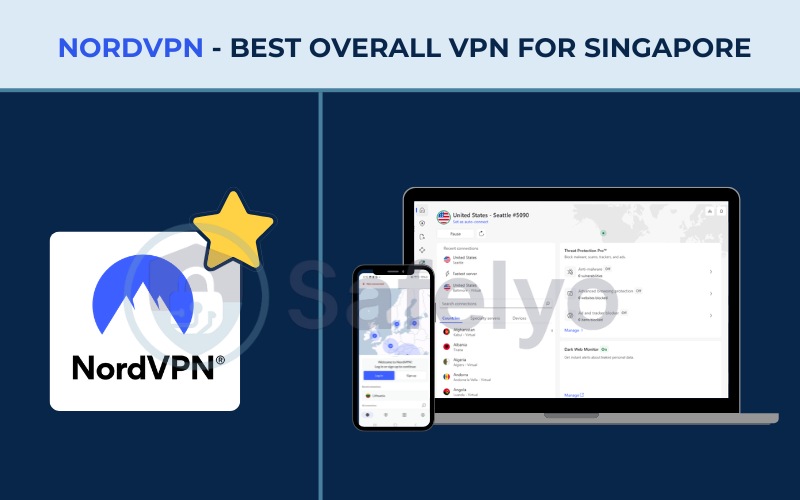
The table below provides a full overview of NordVPN’s features and specifications:
| Features | Information |
|---|---|
| Best for | Users who need verified no-logs, advanced security features, and exceptional speeds |
| Starting price | $3.49/mo (Basic, 2-year + 3 months plan) |
| Company | Nord Security |
| Jurisdiction | Panama |
| Independent audit | Yes (PricewaterhouseCoopers AG Switzerland: 2018, 2020; Deloitte: 2022, 2023, 2024, 2025) |
| No-logs policy | Yes |
| RAM-only servers | Yes |
| Servers | 9,500+ |
| Countries | 149 |
| Avg. download speed | 451.65 Mbps (SG & US) |
| Avg. upload speed | 142.19 Mbps (SG & US) |
| Avg. latency | 121 ms (SG & US) |
| Protocols | NordLynx, OpenVPN (UDP/TCP), IKEv2/IPSec, NordWhisper |
| Kill switch | Yes |
| Obfuscation | Yes (Obfuscated servers, NordWhisper protocol) |
| Port forwarding | No |
| Dedicated IP | Yes |
| Simultaneous connections | 10 |
| Netflix regions | 26+ (US, UK, JP, and more) |
| Disney+ | Yes |
| BBC iPlayer | Inconsistent |
| Torrent / P2P | Yes |
| Win/Mac/iOS/Android | Yes |
| Linux | Yes |
| Browser extension | Yes (Chrome, Firefox, Edge) |
| Router support | Yes |
| Live chat 24/7 | Yes |
| Refund policy | 30-day money-back guarantee |
| Free trial | Yes (3-day free trial on Android) |
| Overall positioning | Feature-rich, privacy-first VPN with 149 countries of coverage, Double VPN, post-quantum encryption, and Onion Over VPN. |
| Official website | https://nordvpn.com |
A summary of what works well and where NordVPN falls short:
Pros
Exceptional Singapore download speeds
149 countries of global coverage
Double VPN and Onion Over VPN for maximum anonymity
NordWhisper obfuscation for bypassing restrictive networks
Post-quantum encryption available
Panama jurisdiction outside all Eyes alliances
Cash payment accepted (prepaid NordVPN card)
Cons
BBC iPlayer access can be inconsistent
No port forwarding
Higher starting price ($3.49/mo)
2.1.1. Speed and performance
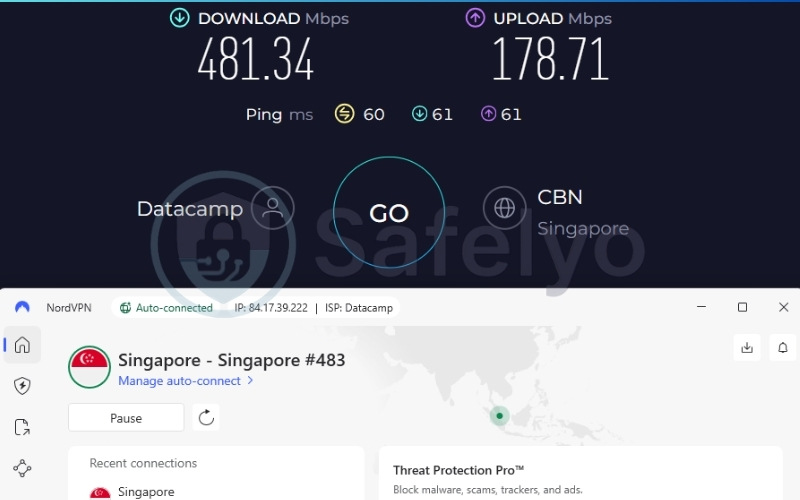
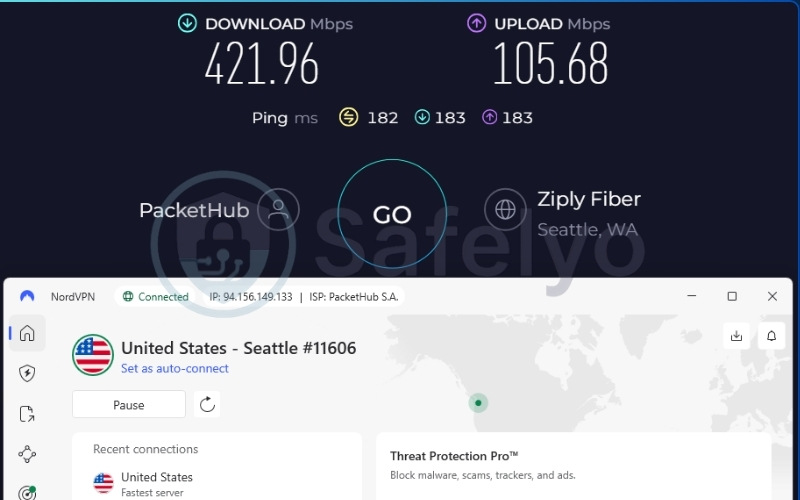
NordVPN recorded the following speeds using the NordLynx protocol across our two test server locations:
| Server location | Download (Mbps) | Upload (Mbps) | Ping (ms) |
|---|---|---|---|
| Singapore | 481.34 | 178.71 | 60 |
| US | 421.96 | 105.68 | 182 |
At 481.34 Mbps, the Singapore server provides enough throughput for simultaneous 4K streaming, large file downloads, and parallel browsing across multiple devices without noticeable degradation. The 60ms latency falls in a range suited to web browsing and casual gaming. Even when routing traffic across the Pacific, the US server maintained 421.96 Mbps, keeping high-bandwidth tasks smooth regardless of the geographic distance involved.
2.1.2. Streaming and unblocking
NordVPN unblocks 26+ Netflix regions and Disney+. BBC iPlayer access requires some flexibility. The service works on certain servers but fails on others, meaning users may need to switch servers before finding a reliable connection.
NordVPN’s SmartPlay technology handles streaming DNS queries automatically in the background, so you do not need to configure smart DNS settings manually.
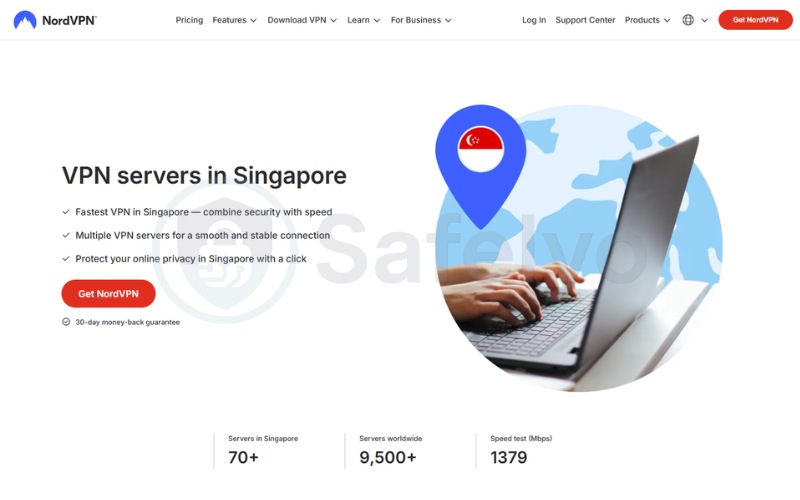
The 70+ Singapore servers provide consistent access to platforms domestic to Singapore including meWATCH, Viu, and Catchplay, which is particularly useful for expats abroad wanting to connect back to Singapore content.
2.1.3. Privacy and security
NordVPN provides verified no-logs across four consecutive annual audits. Combined with RAM-only server infrastructure, this means no user activity data survives between sessions.
The Double VPN feature routes traffic through two servers in sequence, making traffic analysis and correlation significantly harder. This serves as a meaningful differentiator for users with elevated privacy requirements.
The NordWhisper obfuscation protocol hides VPN traffic from deep packet inspection, a practical safeguard given the traffic monitoring capabilities of Singtel and StarHub. Both the ChaCha20 cipher and AES-256 encryption passed our DNS, WebRTC, and IPv6 leak tests cleanly. Post-quantum encryption is also available for forward-proof protection.
Best for: Singapore residents and expats who prioritize independently verified privacy, maximum jurisdictional protection, and exceptional Singapore speeds.
2.2. Surfshark: Best value VPN for Singapore
Surfshark is a Netherlands-based VPN that operates independently despite its parent holding company merging with Nord Security. Its defining commercial proposition is unlimited simultaneous connections with no per-device cap, making it especially practical for households, students, and small teams.
The network runs on 100% RAM-only infrastructure and features Nexus, a proprietary routing technology. This enables two advanced options: IP Rotator, which changes your IP address every 5 to 10 minutes without dropping the connection, and Dynamic MultiHop, which lets you manually choose both your entry and exit servers for customized routing.
Surfshark also provides a 7-day free trial on both mobile and desktop platforms, which is unusually broad compared to the iOS or Android-only trials offered by most competitors. The Starter plan begins at $2.49/mo on a 2-year commitment, making it a highly affordable entry point for a premium VPN with obfuscation.
Here is a full overview of Surfshark’s features and specifications:
| Features | Information |
|---|---|
| Best for | Households, families, and multi-device users who need unlimited simultaneous connections at a competitive price |
| Starting price | $2.49/mo (Surfshark Starter, 2-year plan) |
| Company | Surfshark B.V. (Operates independently under Nord Security holding company) |
| Jurisdiction | The Netherlands (9 Eyes alliance member) |
| Independent audit | Yes (Cure53 2021, Deloitte 2023 & 2025, SecuRing 2025) |
| No-logs policy | Yes |
| RAM-only servers | Yes (100% RAM-only network) |
| Servers | 4,500+ |
| Countries | 100 |
| Avg. download speed | 422.04 Mbps (SG & US) |
| Avg. upload speed | 138.94 Mbps (SG & US) |
| Avg. latency | 163.5 ms (SG & US) |
| Protocols | WireGuard, OpenVPN, IKEv2, Dausos (macOS) |
| Kill switch | Yes |
| Obfuscation | Yes (Obfuscated servers, NoBorders mode) |
| Port forwarding | No |
| Dedicated IP | Yes (Available in 20 locations) |
| Simultaneous connections | Unlimited |
| Netflix regions | 28+ |
| Disney+ | Yes |
| BBC iPlayer | Yes |
| Torrent / P2P | Yes |
| Win/Mac/iOS/Android | Yes |
| Linux | Yes |
| Browser extension | Yes (Chrome, Firefox, Edge) |
| Router support | Yes |
| Live chat 24/7 | Yes |
| Refund policy | 30-day money-back guarantee |
| Free trial | Yes (7-day free trial) |
| Overall positioning | Unlimited-device VPN with high per-device value and proprietary Nexus network technology for IP rotation and custom routing. |
| Official website | https://surfshark.com |
A summary of Surfshark’s strengths and limitations:
Pros
Unlimited simultaneous connections
28+ Netflix libraries
7-day free trial available on both mobile and desktop
Dynamic MultiHop allows manual entry/exit server pairing
IP Rotator changes IP every 5-10 minutes without disconnecting
Post-quantum encryption available
Cons
Netherlands jurisdiction is within the 9 Eyes intelligence alliance
No port forwarding
2.2.1. Speed and performance
Using the WireGuard protocol, Surfshark delivered the following results across both test locations:
| Server location | Download (Mbps) | Upload (Mbps) | Ping (ms) |
|---|---|---|---|
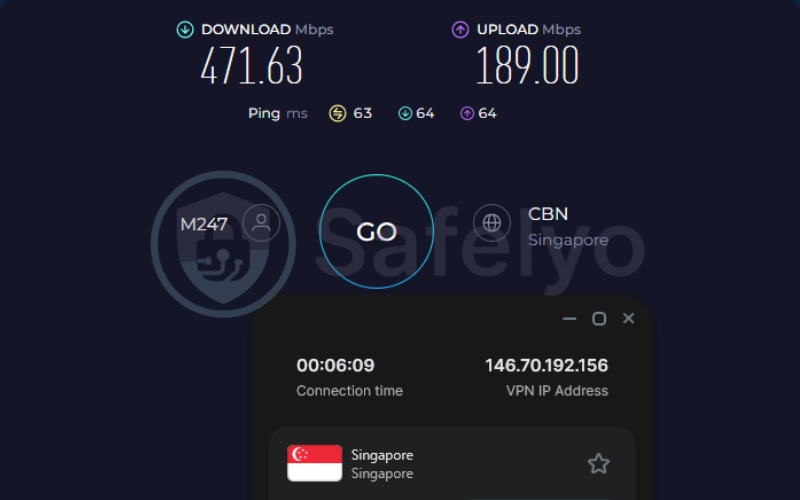
| Singapore | 471.63 | 189.00 | 63 |
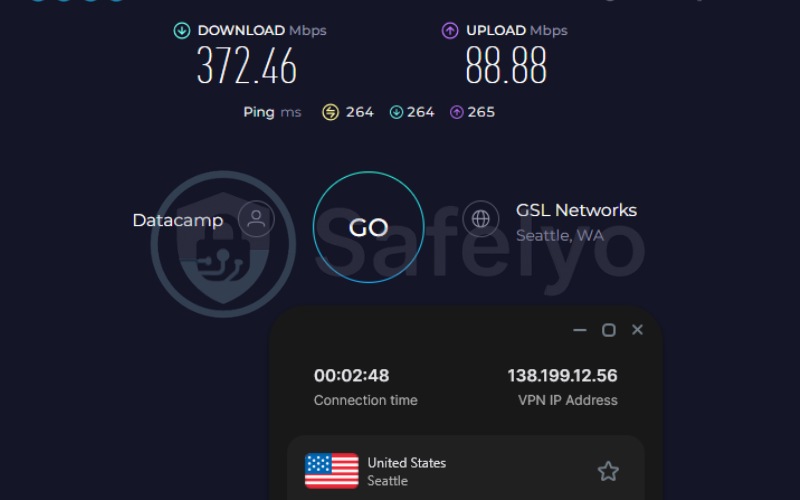
| US | 372.46 | 88.88 | 264 |
At 471.63 Mbps on the Singapore server, Surfshark is fully sufficient for multi-device simultaneous 4K streaming and large file transfers. The 63ms latency holds up well for streaming and general web browsing. Switching to the US server, speeds dropped to 372.46 Mbps. This level handles high-bandwidth streaming and downloading comfortably, though the higher 264ms latency makes it less suitable for any tasks requiring real-time responsiveness.
2.2.2. Streaming and unblocking
Surfshark successfully unblocked 28+ Netflix libraries in our tests, achieving the broadest Netflix reach of any VPN in this comparison. Both Disney+ and BBC iPlayer worked without issues during our session.
CleanWeb, Surfshark’s integrated content blocker, removes ads, trackers, and malicious links during browsing. This is a practical quality-of-life addition for streaming-heavy users.
The 40+ Singapore servers provide reliable access to Singapore domestic platforms including meWATCH, Viu, and Catchplay, so expats streaming Singapore content from abroad can do so consistently.
2.2.3. Privacy and security
The Netherlands is a 9 Eyes member, which is the most notable jurisdiction concern for Surfshark. In practice, however, Surfshark’s 100% RAM-only server network, independently verified no-logs policy, and Dynamic MultiHop routing substantially reduce the practical risk. No user data is logged that could be shared even under a legal request.
Obfuscated servers running in NoBorders mode disguise VPN traffic as standard HTTPS. This is a directly useful feature for Singapore users concerned about ISP-level VPN detection by Singtel or StarHub. Post-quantum encryption is supported, and all leak tests returned clean results across DNS, WebRTC, and IPv6 vectors.
Best for: Households, students, and users who need VPN protection across many devices simultaneously, and for streaming-focused users who want the broadest Netflix library access.
2.3. Proton VPN: Best for privacy-first routing in Singapore
Proton VPN is built by Proton AG, the Swiss company also responsible for ProtonMail. Switzerland sits outside the 5, 9, and 14 Eyes alliances and is not subject to the DMCA, giving Proton VPN one of the most legally robust operating environments available for a VPN provider. Proton VPN also offers a permanent free tier with no credit card required and no data cap.
Rather than using RAM-only servers, Proton VPN relies on full-disk encryption as its infrastructure security approach. This setup provides comparable protection through a different technical method.
A full overview of Proton VPN’s features and specifications is below:
| Features | Information |
|---|---|
| Best for | Privacy-first users who want a verified Swiss VPN, and users looking for a free plan without data caps |
| Starting price | $2.99/mo (24-month plan); Permanent free plan available (no credit card required) |
| Company | Proton AG |
| Jurisdiction | Switzerland (outside 5/9/14 Eyes alliances, not subject to DMCA) |
| Independent audit | Yes (4 audits; latest by Securitum, September 2025) |
| No-logs policy | Yes (independently verified) |
| RAM-only servers | No (full-disk encryption utilized instead) |
| Servers | 20,000+ |
| Countries | 145+ |
| Avg. download speed | 426.55 Mbps (SG & US) |
| Avg. upload speed | 120.36 Mbps (SG & US) |
| Avg. latency | 159.5 ms (SG & US) |
| Protocols | WireGuard, IKEv2, Stealth |
| Kill switch | Standard and Advanced (Windows/Linux; Apple service limits apply) |
| Obfuscation | Yes (Stealth protocol) |
| Port forwarding | Yes (paid plans only) |
| Dedicated IP | Yes (Business plans only) |
| Simultaneous connections | 10 (paid), 1 (free) |
| Netflix regions | 25+ (including US, UK) |
| Disney+ | Yes |
| BBC iPlayer | Yes |
| Torrent / P2P | Yes (dedicated P2P servers on paid plans only; not available on free tier) |
| Win/Mac/iOS/Android | Yes |
| Linux | Yes |
| Browser extension | Chrome and Firefox |
| Router support | Yes |
| Live chat 24/7 | No (available 9AM-12AM CET for paid plan users only) |
| Refund policy | 30-day money-back guarantee |
| Free trial | Permanent free plan (no credit card required) |
| Overall positioning | Switzerland-based privacy service with a large server network, a permanent free tier, and Secure Core double-hop routing. |
| Official website | protonvpn.com |
A summary of Proton VPN’s strengths and limitations:
Pros
Offers a permanent free plan with no data cap and no credit card required
Extremely fast speeds on the Plus plan
20,000+ servers globally
Switzerland jurisdiction: outside all Eyes alliances
Secure Core double-hop routing via privacy-friendly countries
Port forwarding available on paid plans
Stealth obfuscation protocol
Cons
Dedicated IP available only on Business plans
Live chat available only for paid users during limited hours
Free plan limited to 1 device and auto-select server locations
2.3.1. Speed and performance
Running on the WireGuard protocol, Proton VPN’s Plus plan produced the following results:
| Server location | Download (Mbps) | Upload (Mbps) | Ping (ms) |
|---|---|---|---|
| Singapore (Plus) | 482.98 | 143.44 | 46 |
| US (Plus) | 370.13 | 97.29 | 273 |
With 482.98 Mbps on the Singapore server, Proton VPN’s Plus plan delivered the highest Singapore download speed of any VPN in our tests. The 46ms ping was stable throughout and well-suited for video streaming and casual gaming. Switching to the distant US server, Proton VPN reached 370.13 Mbps, comfortably handling streaming and downloading across the long geographic span.
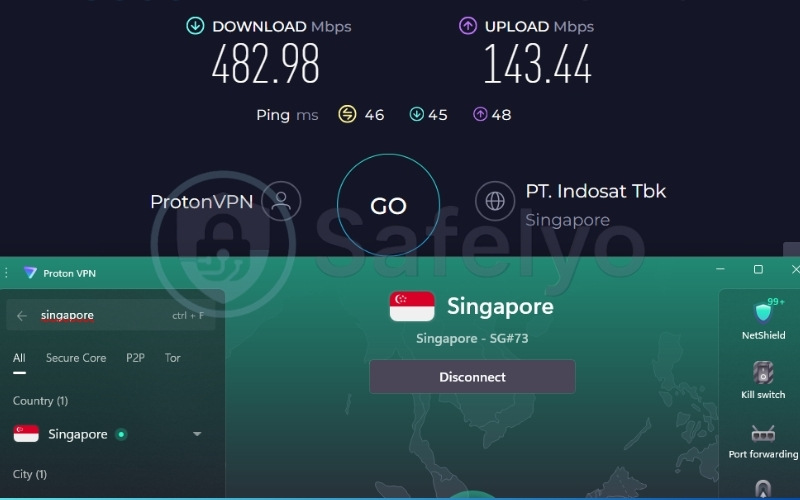
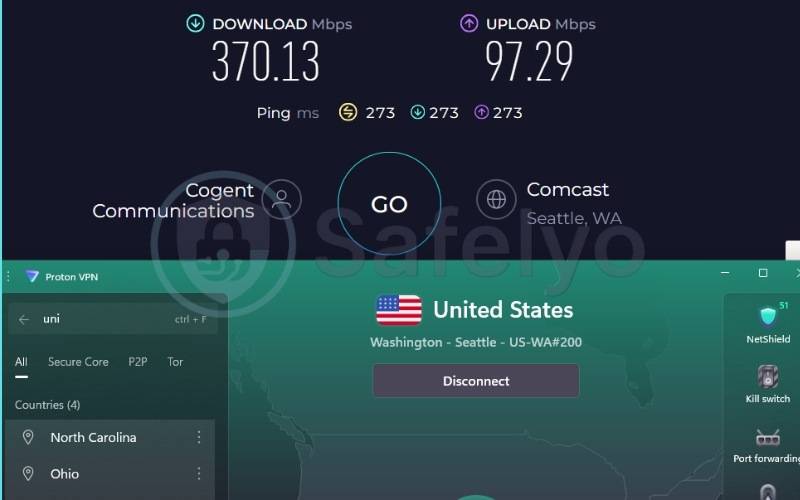
The free tier’s speed also warrants mention. Our free-tier Singapore tests consistently exceeded 450 Mbps, which reflects Proton VPN’s stated policy of applying no artificial throttling to free users. If you want to use the free tier on a Singapore server, reconnecting until you land on a Singapore node is the practical approach.
2.3.2. Streaming and unblocking
Proton VPN supports 25+ Netflix regions and consistently unblocked both Disney+ and BBC iPlayer in our tests.
With 30 dedicated Singapore servers on the Plus plan, Proton VPN has sufficient infrastructure to manage traffic and reliably bypass regional blocks for platforms like meWATCH, Viu, and Catchplay.
One important limitation applies to the free tier. It does not support streaming services. Users who want to access geo-restricted content will need the Plus subscription to access these unblocking capabilities.
2.3.3. Privacy and security
Switzerland’s Federal Act on Data Protection sets stringent data processing requirements and provides a strong legal foundation for Proton VPN’s no-logs commitments. Proton VPN has no known history of data breaches or law enforcement disclosures.
Secure Core adds a second encryption layer by routing outgoing traffic through Switzerland, Iceland, or Sweden before it exits to the target server, making traffic correlation attacks significantly harder.
The Stealth protocol obfuscates VPN traffic as standard HTTPS, a practical advantage for Singapore users whose ISPs are capable of deep packet inspection.
Our leak tests confirmed no DNS, WebRTC, or IPv6 leaks during testing. Furthermore, if you are looking for a VPN with port forwarding, the paid plans make Proton VPN a strong choice for advanced peer-to-peer users.
Best for: Privacy-first users who value Swiss jurisdiction, Secure Core routing, and advanced encryption, as well as users looking for a free plan without data limits.
2.4. ExpressVPN: Best for reliable connectivity in Singapore
ExpressVPN is a premium, full-service VPN owned by Kape Technologies and headquartered under British Virgin Islands jurisdiction. It has operated since 2009 and is one of the most consistently audited VPNs on the market, with annual independent security reviews carried out from 2018 through 2026 by firms including KPMG, PwC Switzerland, Cure53, Praetorian, and F-Secure.
Its TrustedServer infrastructure ensures all server data is RAM-only and wiped on every reboot. ExpressVPN has also added post-quantum protection via ML-KEM, providing forward-proof encryption against emerging cryptographic threats.
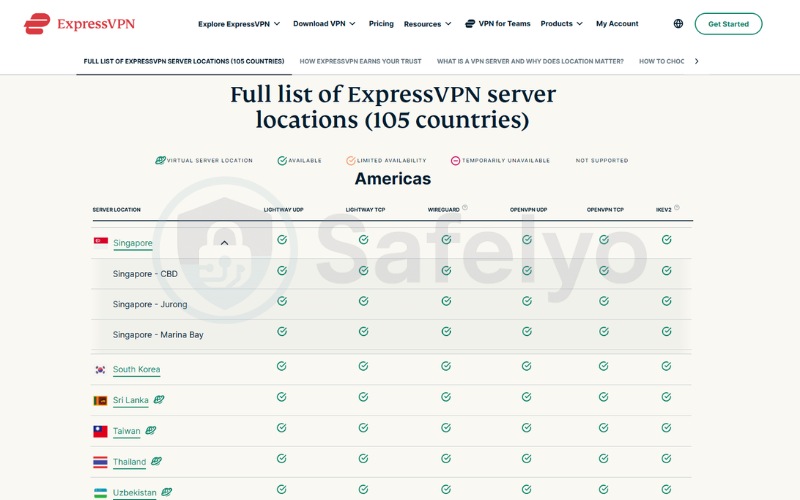
One geographic detail sets ExpressVPN apart for Singapore users specifically. It operates servers across three distinct geo-redundant Singapore locations: the CBD, Jurong, and Marina Bay areas. This distribution reduces server congestion at peak hours and provides more stable connections than a single-location server cluster.
A full overview of ExpressVPN’s features and specifications:
| Features | Information |
|---|---|
| Best for | Heavy streamers, travelers, and users who prioritize stable, multi-location connectivity |
| Starting price | $2.49/mo (Basic tier, 2-year + 4 months plan) |
| Company | ExpressVPN (Part of Kape Technologies) |
| Jurisdiction | British Virgin Islands |
| Independent audit | Yes (KPMG, PwC Switzerland, Cure53, Praetorian, F-Secure; 2018-2026) |
| No-logs policy | Yes |
| RAM-only servers | Yes (TrustedServer technology) |
| Servers | Unlisted |
| Countries | 105 |
| Avg. download speed | 445.18 Mbps (SG & US) |
| Avg. upload speed | 191.39 Mbps (SG & US) |
| Avg. latency | 120.5 ms (SG & US) |
| Protocols | Lightway (UDP/TCP), OpenVPN (UDP/TCP), WireGuard, IKEv2 |
| Kill switch | Yes (Network Lock: Windows, Mac, Linux, routers, iOS, Android) |
| Obfuscation | Yes (Automatic on every server) |
| Port forwarding | Yes (router only) |
| Dedicated IP | Yes (Available in 20+ countries, 28 specific locations) |
| Simultaneous connections | Up to 14 (Basic: 10, Advanced: 12, Pro: 14) |
| Netflix regions | 25+ (US, UK, JP, and more) |
| Disney+ | Yes |
| BBC iPlayer | Yes |
| Torrent / P2P | Yes |
| Win/Mac/iOS/Android | Yes |
| Linux | Yes |
| Browser extension | Yes (Chrome, Firefox, Edge, Brave) |
| Router support | Yes (Aircove, Asus, D-Link, DD-WRT, Linksys, Netduma, Sabai, Tomato, TP-LINK) |
| Live chat 24/7 | Yes (Multilingual) |
| Refund policy | 30-day money-back guarantee |
| Free trial | Yes (3-day on iOS and Android) |
| Overall positioning | Premium full-service VPN with three Singapore server locations, nine years of continuous independent audits, and a growing privacy-focused product ecosystem. |
| Official website | expressvpn.com |
A summary of ExpressVPN’s strengths and limitations:
Pros
Singapore servers spread across 3 geo-redundant locations (CBD, Jurong, Marina Bay)
Automatic obfuscation on every server
Nine consecutive years of annual independent audits (2018-2026)
Post-quantum encryption (ML-KEM) provides forward-proof security
Cons
Exact server count not disclosed
No Multi-Hop (Double VPN) feature
2.4.1. Speed and performance
Using the Lightway protocol, ExpressVPN returned the following results across our two test server locations:
| Server location | Download (Mbps) | Upload (Mbps) | Ping (ms) |
|---|---|---|---|
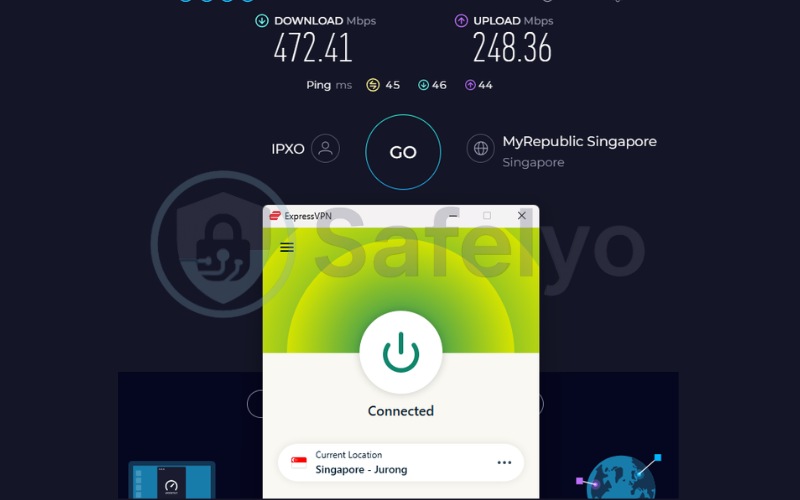
| Singapore | 472.41 | 248.36 | 45 |
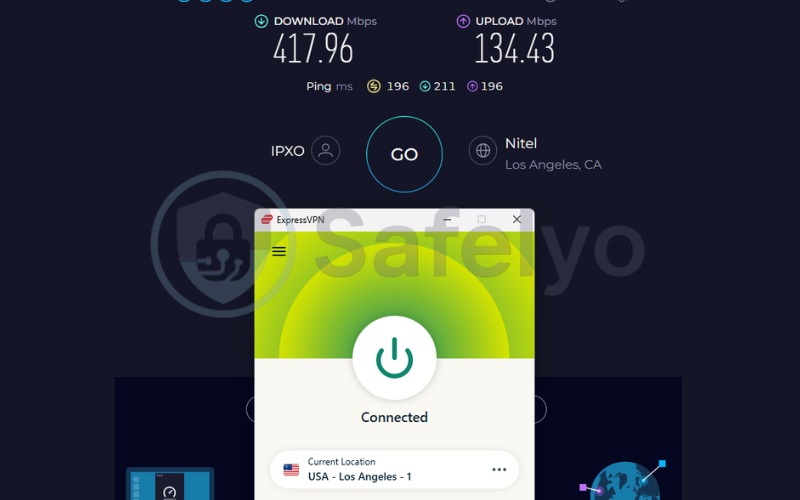
| US | 417.96 | 134.43 | 196 |
The Singapore server delivered 472.41 Mbps download and 248.36 Mbps upload, the highest upload speed of any VPN in our test group. This makes ExpressVPN well-suited for video conferencing, live streaming, and large uploads alongside standard 4K viewing. The 45ms ping remained reliably low throughout our testing, appropriate for casual gaming and rapid page loading. The US server maintained 417.96 Mbps despite the standard latency increase that comes with cross-Pacific routing.
2.4.2. Streaming and unblocking
ExpressVPN unblocked 25+ Netflix libraries, Disney+, and BBC iPlayer in our tests.
The three Singapore server locations across CBD, Jurong, and Marina Bay distributed traffic effectively and provided consistent access to meWATCH, Viu, and Catchplay without buffering during peak hours.
Automatic obfuscation operates on every server without requiring any settings adjustment, which also helps prevent streaming services from flagging VPN traffic.
ExpressVPN’s Threat Manager blocks known trackers and advertising domains during sessions, adding a layer that reduces fingerprinting attempts.
2.4.3. Privacy and security
The British Virgin Islands sits outside the 5, 9, and 14 Eyes alliances and has no mandatory data retention laws, meaning ExpressVPN has no legal compulsion to log or hand over user data. TrustedServer ensures all server content is wiped on every reboot, leaving no residual data between sessions.
The audit cadence from 2018 through 2026 represents nine consecutive years of independent verification, the most sustained record among the VPNs in this comparison.
The 256-bit AES encryption paired with post-quantum protection via ML-KEM guards against both present and emerging cryptographic threats. Crucially, obfuscation is active on every server by default rather than being an opt-in feature, meaning every connection automatically reduces ISP detectability without any manual configuration.
Best for: Singapore residents and travelers who need a reliable all-around VPN, particularly for streaming multiple services and maintaining stable connections across multiple Singapore server locations.
2.5. IPVanish: Best for large households in Singapore
IPVanish operates under Ziff Davis, Inc., headquartered in the United States. Its primary value proposition centers on providing unlimited simultaneous device connections. IPVanish underwent independent audits by Leviathan Security Group in 2022 and Schellman Compliance in 2025 to verify its zero-logs policy. This auditing is particularly relevant given a historical 2016 incident where the provider, under previous ownership, handed over user data to US authorities.
The provider utilizes a hybrid server infrastructure, actively transitioning its 3,400+ servers to a 100% RAM-only network by 2027. For users concerned about detection, IPVanish includes an OpenVPN Scramble feature. This obfuscation tool disguises encrypted VPN traffic as standard HTTPS web traffic, helping bypass network restrictions from ISPs like Singtel or StarHub.
A full overview of IPVanish’s features and specifications is below:
| Features | Information |
|---|---|
| Best for | Large households and power users who need high transcontinental download speeds |
| Starting price | $2.19/mo (Essential 2-year plan) |
| Company | IPVanish (Ziff Davis, Inc.) |
| Jurisdiction | USA (5 Eyes member) |
| Independent audit | Yes (Leviathan 2022, Schellman 2025) |
| No-logs policy | Yes |
| RAM-only servers | Transitioning (Expected 100% RAM-only by 2027) |
| Servers | 3,400+ |
| Countries | 150+ locations |
| Avg. download speed | 411.05 Mbps (SG & US) |
| Avg. upload speed | 72.36 Mbps (SG & US) |
| Avg. latency | 128 ms (SG & US) |
| Protocols | WireGuard, OpenVPN (UDP/TCP), IKEv2, IPSec |
| Kill switch | Yes |
| Obfuscation | Yes (OpenVPN Scramble feature) |
| Port forwarding | No |
| Dedicated IP | No (Uses 56,000+ Shared IPs) |
| Simultaneous connections | Unlimited |
| Netflix regions | US, UK, Japan, South Korea, India, Germany |
| Disney+ | Yes |
| BBC iPlayer | Inconsistent |
| Torrent / P2P | Yes |
| Win/Mac/iOS/Android | Yes |
| Linux | Yes |
| Browser extension | Yes (Chrome, Firefox, Edge) |
| Router support | Yes |
| Live chat 24/7 | Yes |
| Refund policy | 30-day money-back guarantee |
| Free trial | Yes (iOS and Android apps only) |
| Overall positioning | A fast, budget-friendly household VPN offering exceptional WireGuard speeds. |
| Official website | https://www.ipvanish.com |
A summary of IPVanish’s strengths and limitations:
Pros
Unlimited simultaneous connections
Exceptional long-distance US download speeds
OpenVPN Scramble feature for obfuscation
Affordable $2.19/mo starting price
Cons
United States jurisdiction (5 Eyes alliance member)
Historical 2016 data logging incident
Inconsistent access to BBC iPlayer
2.5.1. Speed and performance
Using the WireGuard protocol, IPVanish returned the following speed results across our test locations:
| Server location | Download (Mbps) | Upload (Mbps) | Ping (ms) |
|---|---|---|---|
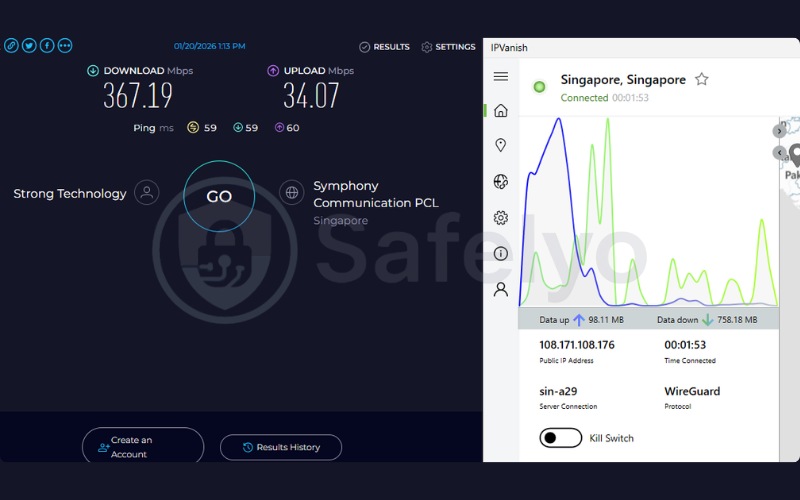
| Singapore | 367.19 | 34.07 | 59 |
| US | 454.91 | 110.66 | 197 |
At 367.19 Mbps on the Singapore server, IPVanish easily supports multiple users performing heavy tasks simultaneously. The 59ms ping is responsive enough for casual gaming and web browsing. Interestingly, the distant US server outperformed the Singapore node in download speed, reaching an impressive 454.91 Mbps. This transcontinental speed retention makes IPVanish highly capable for retrieving large files from North American data centers.

2.5.2. Streaming and unblocking
IPVanish effectively unblocks six major Netflix regions, including the US, UK, and Japan. Disney+ also loaded smoothly during our testing session. However, IPVanish access to BBC iPlayer is inconsistent. British television fans may find that the BBC’s detection systems occasionally identify and block IPVanish connections, requiring server switching. For Singapore access, its network of 29 dedicated Singapore servers handles platforms like meWATCH and Viu effectively without bottlenecking
2.5.3. Privacy and security
The United States jurisdiction places IPVanish inside the 5 Eyes intelligence-sharing alliance. Coupled with the 2016 logging incident, privacy purists must weigh these factors carefully. To rebuild trust, IPVanish now maintains verified zero-logs audits and publishes transparency reports detailing government data requests.
While these audits secure your data on the backend, the provider also protects your active connection from local monitoring. The OpenVPN Scramble feature provides necessary obfuscation for bypassing deep packet inspection.
Best for: Large households and power users who need unrestricted simultaneous connections combined with high transcontinental download speeds.
3. Which VPN for Singapore is right for you?
Not every user in Singapore needs the same combination of features. The table below matches common use cases to the VPN that addresses them best, so you can reach your answer without reading every full review:
| I am a… | Best pick | Why |
|---|---|---|
| Resident concerned about ISP monitoring | NordVPN or ExpressVPN | Double VPN privacy (NordVPN) or automatic obfuscation and consistent audits (ExpressVPN) |
| Tourist or short-term visitor | Surfshark | 7-day free trial on mobile and desktop; unlimited devices |
| Gamer | ExpressVPN or Proton VPN | Delivered the lowest ping times in our tests, ensuring minimal delay for latency-sensitive tasks |
| Streamer or heavy downloader | Surfshark or IPVanish | 28+ Netflix libraries (Surfshark) or high transcontinental download speeds (IPVanish) |
| Remote worker or privacy-first user | Proton VPN | Swiss jurisdiction, Secure Core routing, and robust independent audits |
| Expat abroad wanting Singapore content | NordVPN | 70+ Singapore servers for high availability when connecting back to a Singapore IP |
| Free VPN user | Proton VPN | A permanent, no-credit-card, uncapped free plan |
4. Why you need a VPN in Singapore
Singapore presents a specific combination of advanced connectivity and structured internet regulation that makes a VPN more relevant here than in many other countries. The sections below cover the three most practical reasons Singapore users typically turn to a VPN.
4.1. Bypassing IMDA censorship and blocked websites
The Infocomm Media Development Authority (IMDA) enforces Singapore’s Internet Code of Practice and maintains an active list of websites that all ISPs are required to block. The regulatory framework has grown progressively more restrictive over time, following this timeline:
- 1996: IMDA establishes the Internet Code of Practice, creating the first formal framework for ISP-enforced content restrictions.
- 2014: The Copyright Act is amended to allow rights holders to apply for court orders requiring ISPs to block infringing websites, resulting in ongoing blocks for torrent platforms.
- 2022: The Gambling Control Act prohibits access to unlicensed remote gambling platforms. The Online Safety Act 2022 separately grants IMDA authority to order major social media platforms to remove harmful content, with ISP-level blocking as a backstop if platforms refuse to comply.
The categories of content currently subject to blocking or restriction include pornographic material, unlicensed gambling platforms, content flagged as harmful under the Online Safety Act, and copyright-infringing sites such as The Pirate Bay and KickassTorrents.
A VPN routes your traffic through a server outside Singapore, replacing your local IP address with a foreign one, so your connection bypasses ISP-enforced blocks. Using a VPN to access blocked content for personal use remains legal in Singapore. Engaging in conduct that is illegal under Singapore law while using a VPN does not remove your criminal liability.
4.2. Hiding your activity from Singtel, StarHub, and M1
Singapore’s three major ISPs, Singtel, StarHub, and M1, operate under IMDA licensing and are subject to regulatory directives that can include requests to monitor, restrict, or report on user activity. Without a VPN, your ISP has full visibility into every domain you visit, the timing of your connections, and the volume of data you transfer.
A VPN encrypts your outgoing traffic so that Singtel, StarHub, and M1 see only an encrypted tunnel rather than your browsing destinations. Obfuscation features, offered by NordVPN, Surfshark, Proton VPN, IPVanish, and ExpressVPN, go a step further by disguising VPN traffic as standard HTTPS. This makes it harder for ISPs to identify that you are using a VPN at all.
Public Wi-Fi in Singapore, including networks at hawker centres, MRT stations, Changi Airport, and hotels, presents an additional layer of exposure. On these unencrypted networks, a VPN encrypts your connection end-to-end, protecting sensitive communications, financial logins, and work traffic from interception.
4.3. Does a VPN bypass ISP throttling in Singapore?
ISP throttling occurs when Singtel, StarHub, or M1 deliberately reduces connection speeds for specific traffic types, most commonly video streaming, P2P downloads, or traffic directed at certain overseas data centers. Because a VPN encrypts all outgoing traffic before it leaves your device, the ISP cannot identify what type of traffic it is carrying.
Without visibility into traffic content, the ISP cannot apply content-specific throttling rules, meaning a VPN can effectively neutralize category-based speed reductions. The WireGuard protocol’s lower CPU overhead is particularly relevant here. It introduces less connection overhead than older protocols like OpenVPN, which minimizes the speed reduction that the VPN itself adds while helping prevent ISP-imposed slowdowns.
5. Are VPNs legal in Singapore?
Yes, using a VPN for personal privacy in Singapore is legal. No Singapore law explicitly prohibits the use of a VPN for personal internet use. The Computer Misuse Act governs unauthorized access to computer systems, and the Personal Data Protection Act (PDPA) regulates how organizations handle personal data. Neither law restricts an individual from encrypting their own internet connection using a VPN.
Note: A VPN encrypts your connection and changes your visible IP address. It does not grant legal immunity. Activities that are illegal in Singapore without a VPN are equally illegal with one.
6. VPN for gaming in Singapore: Latency and ping tested
Singapore has one of the most developed esports and gaming infrastructures in Southeast Asia, hosting international tournaments and serving as a regional hub for competitive play.
For gaming, ping is the primary performance variable. A lower ping means less delay between your input and the server’s response. The table below summarizes how each VPN performed on Singapore servers in our tests, along with a practical assessment of what each ping range supports:
| VPN | Ping on SG server | Best for |
|---|---|---|
| ExpressVPN | 45ms | Casual gaming, HD streaming, conferencing |
| Proton VPN | 46ms | Casual gaming, video streaming |
| IPVanish | 59ms | Casual gaming, web browsing |
| NordVPN | 60ms | Web browsing, slow-paced gaming |
| Surfshark | 63ms | Web browsing, streaming |
These results reflect the distance from our testing location in Vietnam to the Singapore server. If you are gaming from within Singapore to a game server situated there, your actual in-game ping will typically be under 20ms.
Conversely, connecting to a distant US or European game server through a VPN will produce significantly higher latency. Modern protocols like WireGuard, NordLynx, or Lightway are recommended for gaming because their lower CPU overhead translates directly to reduced latency compared to older options like OpenVPN or IKEv2.
Console gamers who want VPN protection can configure a supported router with a VPN at the network level, which covers all connected devices without requiring individual app installations.
7. VPN for Singapore streaming: meWATCH, Viu, Catchplay, and more
Most VPN streaming coverage focuses on Netflix and Disney+, but Singapore has a distinct set of local platforms that are geo-locked to Singapore IP addresses. There are two practical use cases: expats or travelers abroad maintaining access to Singapore content from outside the country by bypassing geo-blocks, and local users avoiding ISP throttling while streaming high-definition content at home.
The table below summarizes the key Singapore streaming services and how each scenario applies:
| Service | What it is | VPN unblocking capability from abroad |
|---|---|---|
| meWATCH | Mediacorp’s free streaming platform: local news, dramas | Premium VPNs like NordVPN and Surfshark successfully bypass blocks |
| Viu | Korean, Chinese, and SE Asian dramas | Broadly accessible with Singapore servers from premium providers |
| Catchplay | Hollywood and Taiwanese content | Works smoothly with secure VPNs |
| iQIYI | Chinese content: short dramas, variety | Easily accessible via premium VPN servers |
| StarHub TV+ | StarHub’s cable and streaming hybrid platform | Strict IP enforcement; dedicated Singapore nodes perform best |
All five platforms require a Singapore IP address when accessed from outside the country. For expats in Australia, the UK, or elsewhere who want to maintain access to local content, NordVPN’s 70+ Singapore servers and Surfshark’s 40+ provide the most options. Smart DNS, offered by NordVPN as SmartPlay, is worth noting for smart TV users who cannot install a VPN app directly. It routes only DNS queries through the VPN infrastructure, which unblocks geo-restricted content without encrypting the full data stream.
8. VPN for expats: How to get a Singapore IP address from abroad
Expats who have left Singapore often discover that banking apps (DBS/POSB, OCBC) trigger security alerts when accessed from foreign IP addresses, or that Singapore-locked streaming platforms like meWATCH are no longer available. Connecting to a Singapore VPN server resolves both issues by presenting a Singapore IP to the service.
Follow these steps to get a Singapore IP address from anywhere in the world:
- Choose a VPN with Singapore servers. NordVPN has 70+, Surfshark has 40+, Proton VPN has 30, IPVanish provides active local nodes, and ExpressVPN covers 3 specific geo-redundant locations across the CBD, Jurong, and Marina Bay areas.
- Subscribe and download the VPN app for your device from the provider’s official website or your device’s official app store.
- Open the app and search for “Singapore” in the server list to filter available Singapore nodes.
- Connect. Your visible IP address will now appear as a Singapore address to all websites and services.
- Access Singapore-locked content or banking services as normal. If a session is still flagged, disconnect and reconnect to a different Singapore server to get a fresh IP assignment.
Higher server counts generally mean lower congestion per server, which produces more stable connections. This matters most for banking sessions, where a dropped connection mid-transaction can cause complications. Always review your bank’s specific terms of service regarding VPN use before relying on this method regularly for financial access.
9. Best free VPNs for Singapore
When it comes to free VPNs that actually offer servers in Singapore, Proton VPN Free is the strongest option in this category. It provides unlimited data with no artificial speed throttling, requires no credit card to register, and is backed by the same independently audited no-logs infrastructure as the paid Plus plan.
The free tier connects to auto-assigned servers across 10 countries. Singapore nodes are available in the server pool, and reconnecting until you land on a Singapore node is feasible, though not as straightforward as the manual selection available on paid plans.
On the other hand, if you are currently located in Singapore and simply need a secure, no-cost connection to route your traffic overseas (such as to the US or Europe), Windscribe and PrivadoVPN are excellent choices, despite not offering Singapore servers. Both provide generous 10GB monthly data limits and strong privacy protections for international routing without compromising your security.
For a complete breakdown of safe and reliable no-cost options, check out our dedicated guide to the best free VPNs.
10. Limitations and privacy concerns of certain free VPNs in Singapore
The Singapore market contains a number of free VPNs circulating on the Google Play Store and App Store that present meaningful privacy and security concerns. Three specific services deserve careful evaluation before use:
- Singapore VPN – VPN Master lacks meaningful transparency around its data collection practices. Its privacy policy uses broad, vague language that does not clearly describe what user data is collected, retained, or shared with third parties. This absence of specificity is a practical risk for anyone using it to protect sensitive browsing activity.
- Urban VPN operates largely as a peer-to-peer proxy network. Your device may contribute bandwidth to other users on the network rather than routing your traffic through dedicated, secure VPN infrastructure. The P2P architecture fundamentally differs from a standard VPN and provides substantially weaker isolation between users.
- UFO VPN suffered a documented 2020 incident in which user data was exposed despite the service publicly claiming a strict no-logs policy at the time. The exposure demonstrated that the no-logs claim was inaccurate, making it difficult to trust subsequent policy statements without independent audit verification.
Before using any free VPN in Singapore, check for the following warning signs:
- No independently verified no-logs policy.
- No named parent company or jurisdiction clearly disclosed.
- Requests for excessive app permissions (contacts, microphone, location access) that have no functional relationship to VPN service.
- A peer-to-peer or bandwidth-sharing network architecture.
- No integrated kill switch.
The safest free VPN for Singapore users is Proton VPN’s free tier, which is permanently free, independently audited, and backed by a company with transparent data practices.
11. FAQs about VPN for Singapore
Which VPN works in Singapore?
NordVPN, Surfshark, ProtonVPN, ExpressVPN, and IPVanish all function reliably in Singapore based on our tests
Do I need a VPN for Singapore?
A VPN is worth considering if you are concerned about ISP monitoring by Singtel, StarHub, or M1, or if you want to access content blocked under IMDA’s website list. For expats, a VPN provides consistent access to Singapore-based streaming services and banking portals from abroad.
How to set VPN to Singapore?
Download a VPN from our list above, install the app, open the server browser, and search for “Singapore.” Connect to any Singapore server. Your visible IP address will then appear as a Singapore address to all external services.
Will my ISP know I’m using a VPN in Singapore?
Your ISP can see that you are connected to a VPN server, but cannot see which websites you are accessing or what data you are transmitting. Obfuscation features available in NordVPN, Surfshark, ProtonVPN, IPVanish, and ExpressVPN conceal VPN usage entirely, making the connection appear as standard HTTPS traffic to Singtel, StarHub, or M1.
Can I use a VPN for online banking in Singapore?
Yes, generally. Connecting to a Singapore VPN server typically does not trigger security flags from DBS/POSB or OCBC because your visible IP remains Singapore-based. Connecting to a foreign server before accessing your bank may trigger location-based verification prompts. Always review your bank’s specific terms regarding VPN use before relying on it regularly for financial transactions.
What is the cheapest VPN for Singapore?
IPVanish provides a highly affordable entry point at $2.19/mo on its 2-year plan. Surfshark and ExpressVPN are highly competitive on their respective long-term plans at $2.49/mo. ProtonVPN offers a permanent free tier with no data cap.
Does a VPN slow down internet speed in Singapore?
A VPN adds some overhead to any connection. In our tests, most premium VPNs maintained fast speeds well over 350 Mbps on Singapore servers, which is sufficient for any standard use case including 4K streaming and large downloads. Using WireGuard or a WireGuard-based protocol minimizes the speed reduction by reducing protocol overhead compared to older options like OpenVPN.
12. Conclusion
Here is a quick summary of our findings before you choose your VPN for Singapore:
- NordVPN: Leads our rankings with fast Singapore server speeds, 70+ servers, four consecutive Deloitte audits, and a Panama jurisdiction.
- Surfshark: Provides outstanding value with unlimited simultaneous connections and 28+ Netflix libraries at a highly competitive long-term price.
- Proton VPN: Brings the strongest privacy foundation through its Swiss jurisdiction and Secure Core routing, alongside the only permanently free plan with no data cap.
- ExpressVPN: Stands apart for users who need consistent connectivity, with three geo-redundant Singapore locations and nine years of continuous independent audits.
- IPVanish: Best for large households requiring unlimited connections and high transcontinental speeds.
Before choosing, match your use case to the right provider. Choose NordVPN or ExpressVPN for privacy-conscious residents, Surfshark for multi-device households and tourists, Proton VPN for privacy-first remote workers, and IPVanish for large households requiring unlimited connections and high transcontinental speeds.
For more top-rated privacy tools and comprehensive reviews, explore our Best VPN category on Safelyo.