Choosing the best VPN for Apple TV in 2026 significantly improves your daily streaming experience. NordVPN currently leads the market. It pairs highly reliable SmartPlay unblocking with the true convenience of a native tvOS application.
Other top providers also excel. VPN providers like ExpressVPN, Surfshark, Proton VPN, and PIA deliver highly unique features for different setups. Options range from unlimited device sharing to open-source privacy.
We carefully tested these services to help you find the perfect match for your home.
Summary of the best VPNs for Apple TV
- NordVPN (Best overall): Reached 481.34 Mbps on our Singapore server test and unblocks 26+ Netflix regions through its built-in SmartPlay feature, making it the most capable all-around option for streaming.
- ExpressVPN (Best for ease of setup): Bypasses tedious remote typing by logging you into Apple TV via a simple QR code scan. It reached 472.41 Mbps on the Singapore server and unblocks 25+ Netflix regions alongside BBC iPlayer and Disney+.
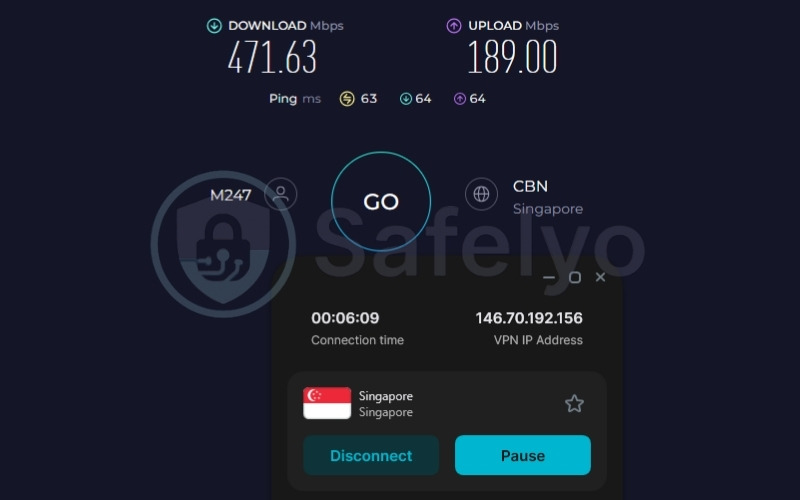
- Surfshark (Best for households): Covers unlimited devices simultaneously at a competitive $2.49/mo on the 2-year Starter plan. It reached 471.63 Mbps on the Singapore server and unblocks 28+ Netflix regions.
- Proton VPN (Best for privacy): Headquartered in Switzerland with four independent audits completed between 2022 and September 2025. The paid Plus plan reached a fast 482.98 Mbps on our Singapore server test, and a permanent free tier is also available.
- PIA (Best for power users): Offers advanced technical features absent from most competitors, including port forwarding, unlimited simultaneous connections, and a fully open-source client. Pricing starts at $1.33/mo on the 3-year plan.
- Proton VPN Free (Best free VPN for Apple TV): The only free VPN with no monthly data cap. It reached 454.30 Mbps on our Singapore server test but is limited to 1 device and 10 country locations, and it strictly blocks streaming traffic.
- Privado VPN Free (Free VPN runner-up): Offers 10 GB of free data per month across 13 server locations and actively supports streaming. The free tier recorded 456.63 Mbps on the US server in our test.
Quick comparison table
| VPN | Starting Price | Native tvOS App | Netflix Regions | Smart DNS | Free Plan |
|---|---|---|---|---|---|
| NordVPN | $3.49/mo | Yes | 26+ | Yes (SmartPlay) | No (3-day trial on Android) |
| ExpressVPN | $2.49/mo | Yes | 25+ | Yes | No (3-day trial, iOS/Android) |
| Surfshark | $2.49/mo | Yes | 28+ | No | No (7-day trial) |
| Proton VPN (Free & Paid) | $2.99/mo | Yes | 25+ | No | Yes (unlimited data, 1 device) |
| PIA | $1.33/mo | Yes | 21+ | Yes | No (7-day trial, iOS/Android) |
| Privado VPN (Free) | $0 | Yes | Yes (Multiple) | Yes (Smart DNS) | Yes (10 GB/mo, 13 locations) |
Disclaimer: This guide is for informational purposes only. Information regarding speeds (based on our tests conducted in 2026), unblocking capabilities, pricing, and promotional offers may change over time depending on your geographic location or new platform updates.
1. How we tested and selected the best VPNs for Apple TV
Our approach to evaluating tvOS VPNs is grounded in empirical, hands-on testing to ensure dependable real-world performance. Over an intensive four-week trial period in 2026, we installed and rigorously tested each VPN directly on Apple TV. To maintain strict data integrity, all performance benchmarks were gathered from our testing lab in Vietnam over a high-speed 1 Gbps wired connection.
Given our specific geographical location, users should note that ping and latency to long-distance servers (such as those in the US) will inherently be higher. This is a standard limitation of global network routing over vast distances, not a reflection of poor VPN quality.
To capture the absolute maximum speed potential of each service, we standardized our benchmarks using the industry’s most efficient modern protocols, specifically WireGuard, NordLynx (for NordVPN), and Lightway (for ExpressVPN).
We base our recommendations on the following six criteria:
- Speed testing: We conducted all tests from Vietnam using Ookla-standard measurements on a US server and a Singapore server (representing the nearest major regional hub for our location). Raw results for each provider appear in the dedicated sections below.
- Streaming unblocking: We tested each VPN against Netflix, BBC iPlayer, Disney+, and Hulu, documenting pass or fail results to verify regional unblocking capabilities.
- tvOS app availability: We verified that a native tvOS app exists in the App Store, as all five paid VPNs in this article offer a native installation process.
- Privacy verification: We cross-referenced no-logs claims with independent audit records. We prioritize VPNs with at least one completed audit from a recognized firm like PwC, Deloitte, Securitum, or Cure53.
- Ease of setup: We noted the login method as a key usability difference on tvOS. Providers offering QR code logins hold a distinct advantage because typing emails and passwords with an Apple TV remote is notoriously slow and frustrating.
- Pricing transparency: All prices listed are introductory rates. We explicitly note that renewal prices typically increase after the initial term.
2. Best VPN for Apple TV 2026: Top 5 picks for streaming, privacy, and value
This section breaks down the five top-performing paid VPNs. We evaluate each provider based on local speed tests, verified streaming access, confirmed privacy audits, and the practical Apple TV setup experience.
2.1. NordVPN: Best overall VPN for Apple TV
Operated by Nord Security and registered in privacy-friendly Panama, NordVPN covers the core requirements you likely need for daily streaming. Its native tvOS app is available directly from the App Store and features SmartPlay. This tool combines VPN encryption with Smart DNS technology to automatically bypass strict geographical blocks.
To support this streaming capability, NordVPN offers a massive network of 9,500+ servers across 149 countries. The service utilizes RAM-only server infrastructure and maintains a strict no-logs policy that was audited by Deloitte in 2022, 2023, and 2024.
The starting price of $3.49/mo on the 2-year plan accurately reflects the cost of maintaining this extensive, high-performance network.
| Features | Details |
|---|---|
| Best For | Streaming, all-around Apple TV performance |
| Starting Price | $3.49/mo (2-year plan) |
| Company | Nord Security |
| Jurisdiction | Panama |
| Independent Audit | Yes |
| No-Logs Policy | Yes |
| RAM-Only Servers | Yes |
| Servers | 9,500+ |
| Countries | 149 |
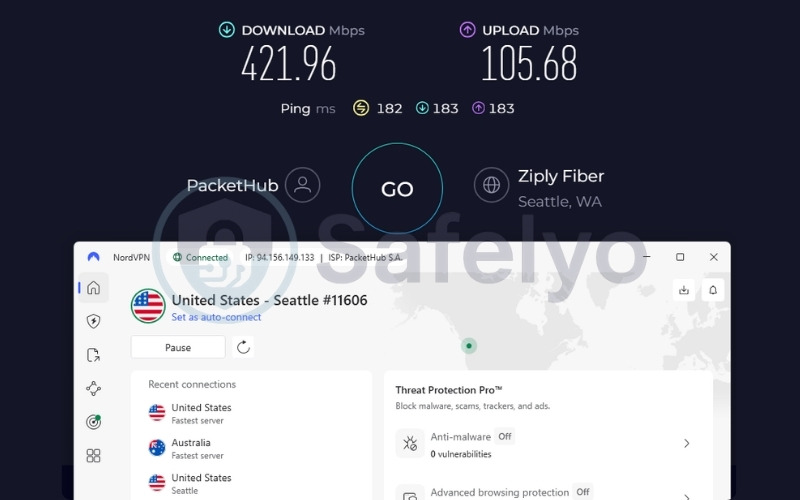
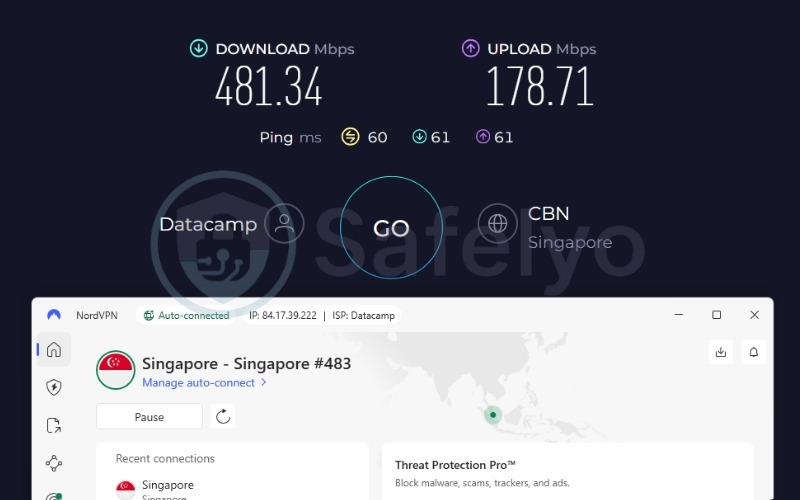
| Avg. Download Speed | 421.96 Mbps (US) / 481.34 Mbps (Singapore) |
| Avg. Upload Speed | 105.68 Mbps (US) / 178.71 Mbps (Singapore) |
| Avg. Latency | 182ms (US) / 60ms (Singapore) |
| Protocols | NordLynx, OpenVPN (UDP/TCP), IKEv2/IPSec, NordWhisper |
| Kill Switch | Yes |
| Obfuscation | Yes (Obfuscated servers, NordWhisper) |
| Port Forwarding | No |
| Dedicated IP | Yes |
| Simultaneous Connections | 10 |
| Netflix Regions | 26+ (US, UK, JP, and others) |
| Disney+ | Yes |
| BBC iPlayer | Inconsistent/Unstable |
| Torrent / P2P | Yes |
| Win/Mac/iOS/Android | Yes |
| Linux | Yes |
| Browser Extension | Yes (Chrome, Firefox, Edge) |
| Router Support | Yes |
| Live Chat 24/7 | Yes |
| Refund Policy | 30-day money-back guarantee |
| Free Trial | Yes (3-day free trial on Android) |
| Overall Positioning | Best overall VPN for Apple TV 2026 |
| Official Website | https://nordvpn.com |
Here are the main advantages and drawbacks of choosing NordVPN.
Pros
QR code login support on tvOS bypasses the need for tedious manual typing.
SmartPlay activates automatically in the background, changing your DNS routing to match the streaming platform’s region without requiring manual configuration.
Deloitte audited the no-logs policy in 2022, 2023, and 2024, providing three consecutive independent verifications.
A network of 9,300+ servers across 137 countries gives you a wide range of exit locations to find faster connection speeds.
RAM-only server infrastructure ensures that session data is wiped completely the moment a server restarts.
Cons
BBC iPlayer access is unstable and works inconsistently, which limits reliability if you primarily target UK content.
Port forwarding is not available, which may disappoint you if you want to host specific server applications.
Speed & performance
| Server | Download (Mbps) | Upload (Mbps) | Ping (ms) |
|---|---|---|---|
| US | 421.96 | 105.68 | 182 |
| Singapore | 481.34 | 178.71 | 60 |
Both tested servers exceeded 100 Mbps, providing more than enough bandwidth for multiple devices to stream 4K video simultaneously. The Singapore server registered a ping of 60ms, which is perfectly suitable for general web browsing.
The US server maintained a fast 421.96 Mbps download speed. The higher US ping of 182ms is standard for trans-Pacific routing. This latency does not impact streaming, as video playback relies entirely on steady download bandwidth rather than instant server responses.
Streaming
NordVPN includes SmartPlay by default in the tvOS app, removing the need to configure separate DNS settings to bypass regional blocks. When you connect to a country, SmartPlay automatically routes your streaming requests through the appropriate servers in the background.
NordVPN currently unblocks 26+ Netflix regions, including the US, UK, and Japan, alongside reliable access to Disney+. However, our data confirms that NordVPN provides unstable access to BBC iPlayer. The connection works inconsistently, meaning if you primarily want to stream UK television, you might experience occasional blocks.
Privacy & security
On the security front, NordVPN keeps user data legally protected by operating from Panama, safely outside the 14 Eyes intelligence alliance. The provider utilizes RAM-only servers to prevent long-term data storage on physical hard drives, a claim verified by Deloitte during three consecutive audits.
While NordVPN experienced an isolated server breach in 2018, there is no evidence that any user data was ever compromised during that incident. Today, the service secures connections with AES-256 and ChaCha20 encryption and provides the NordWhisper protocol to effectively hide VPN traffic from network administrators.
Apple TV experience
The NordVPN tvOS app provides a highly convenient user experience starting right from the login screen. Because the app supports QR code authentication, you can bypass the clunky on-screen keyboard entirely and scan the code with your smartphone camera to log in instantly.
Once inside, the SmartPlay feature functions seamlessly on all plan tiers. You simply select a country from the menu, and the app handles the complex network routing required to start streaming immediately.
Best for: Apple TV owners looking for a highly reliable, all-around streaming solution with an effortless SmartPlay setup to unblock international content.
2.2. ExpressVPN: Best VPN for Apple TV ease of setup
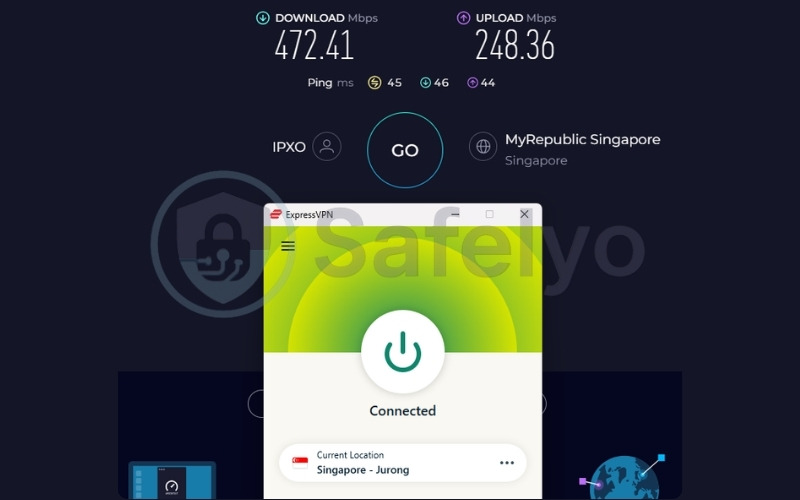
ExpressVPN is the best choice if you want the most intuitive and fastest setup experience. When you open the native tvOS app, you are greeted with a QR code that logs you in instantly when scanned with your smartphone. In terms of performance, ExpressVPN delivered a solid 472.41 Mbps in Singapore and successfully unblocked 25+ Netflix regions, along with Disney+ and BBC iPlayer.
The provider is based in the British Virgin Islands and uses its proprietary TrustedServer technology, which ensures all servers run on RAM and are wiped clean every time they are rebooted. ExpressVPN has a long history of independent audits, with verifications from firms like KPMG and PwC through 2026. While it starts at a slightly higher price point of $2.49/mo, the reliability and ease of use make it a favorite for beginners.
| Features | Details |
|---|---|
| Best For | Beginners, simple tvOS login and setup |
| Starting Price | $2.49/mo (Basic tier, 2-year+4-month plan) |
| Company | ExpressVPN (part of Kape Technologies) |
| Jurisdiction | British Virgin Islands |
| Independent Audit | Yes |
| No-Logs Policy | Yes |
| RAM-Only Servers | Yes (TrustedServer technology) |
| Servers | Thousands |
| Countries | 105 (170+ locations) |
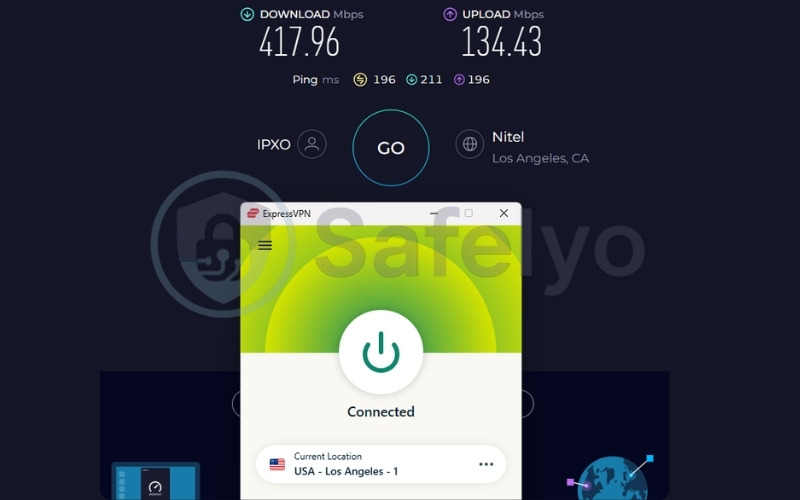
| Avg. Download Speed | 417.96 Mbps (US) / 472.41 Mbps (Singapore) |
| Avg. Upload Speed | 134.43 Mbps (US) / 248.36 Mbps (Singapore) |
| Avg. Latency | 196ms (US) / 45ms (Singapore) |
| Protocols | Lightway (UDP/TCP), OpenVPN (UDP/TCP), WireGuard, IKEv2 |
| Kill Switch | Yes (Network Lock) |
| Obfuscation | Yes (automatic on every server) |
| Port Forwarding | Yes (router only) |
| Dedicated IP | Yes (20+ countries) |
| Simultaneous Connections | Up to 14 (Basic: 10, Advanced: 12, Pro: 14) |
| Netflix Supported | 25+ (US, UK, JP, and others) |
| Disney+ | Yes |
| BBC iPlayer | Yes |
| Torrent / P2P | Yes |
| Win/Mac/iOS/Android | Yes |
| Linux | Yes |
| Browser Extension | Yes (Chrome, Firefox, Edge, Brave) |
| Router Support | Yes (Aircove, Asus, D-Link, Linksys, TP-LINK, and others) |
| Live Chat 24/7 | Yes |
| Refund Policy | 30-day money-back guarantee |
| Free Trial | Yes (3-day free trial on iOS and Android) |
| Overall Positioning | Best for users who prioritize ease of setup on Apple TV |
| Official Website | https://expressvpn.com |
Here is a breakdown of what ExpressVPN does well and where it falls short.
Pros
QR code login functionality bypasses the tedious process of typing credentials with the Siri Remote.
Obfuscation activates automatically on every server to disguise your traffic without requiring manual settings.
TrustedServer infrastructure has undergone annual independent audits from 2018 through 2026 to verify no data is stored.
Successfully unblocks strictly protected streaming platforms like BBC iPlayer and Disney+.
Server infrastructure features 10 Gbps and 40 Gbps connections to maintain high bandwidth during peak traffic hours.
Cons
ExpressVPN does not offer a multi-hop feature if you want to route traffic through two distinct countries simultaneously.
A SOCKS5 proxy is not included in the standard application suite.
Speed & performance
| Server | Download (Mbps) | Upload (Mbps) | Ping (ms) |
|---|---|---|---|
| US | 417.96 | 134.43 | 196 |
| Singapore | 472.41 | 248.36 | 45 |
Both the US and Singapore servers delivered exceptional download speeds. The Singapore ping of 45ms provides quick responsiveness for browsing streaming libraries.
On the distant US server, the massive 417.96 Mbps bandwidth easily overpowers the 196ms physical latency. This ensures that 4K movies load immediately and run without buffering interruptions throughout the viewing session.
Streaming
If you want immediate access to global content without manual server hunting, ExpressVPN is an ideal solution. Unlike some providers that require you to test multiple specific streaming-optimized servers, ExpressVPN optimizes all its servers for streaming by default.
Our data confirms that the service successfully unblocks BBC iPlayer and Disney+ without friction. Additionally, ExpressVPN consistently supports 25+ major Netflix libraries, including the US, UK, and Japan, making it a highly reliable tool for international media consumption.
Privacy & security
ExpressVPN protects user data through its proprietary TrustedServer technology, which ensures the entire network runs strictly on RAM. Because RAM requires continuous power to hold data, every server is completely wiped during standard reboot cycles.
The British Virgin Islands jurisdiction further protects users by providing a legal environment completely outside the 14 Eyes alliance. ExpressVPN backs these privacy claims with a heavily documented audit history from top-tier firms. It secures traffic using AES-256 encryption and recently integrated post-quantum protection to defend against future computing threats.
Apple TV experience
The defining feature of ExpressVPN on Apple TV is its fast, frustration-free setup. When you first open the native tvOS app (available on tvOS 17 and later), you are greeted with a QR code.
Scanning this code with your smartphone logs you in instantly, completely removing the need to navigate the Apple TV keyboard. If you are operating older Apple TV hardware that cannot install apps, ExpressVPN provides a Smart DNS service called MediaStreamer, which is accessible directly through the web account dashboard.
Best for: Beginners and users who prioritize a fast, frustration-free setup process with guaranteed access to strictly protected streaming platforms.
2.3. Surfshark: Best VPN for Apple TV households
Surfshark operates as an independent entity under the same holding company as Nord Security, maintaining its own infrastructure, audits, and development team from the Netherlands. Its primary advantage in the Apple TV ecosystem is the provision of unlimited simultaneous connections, allowing you to secure every device in your household on a single subscription.
To support this heavy usage, Surfshark maintains a 100% RAM-only server network across 4,500+ servers in 100 countries. Independent firms Deloitte and SecuRing verified this infrastructure through multiple audits completed in 2025. With the ability to unblock 28+ Netflix regions, Surfshark offers immense value, starting at a competitive $2.49/mo on the 2-year Starter plan.
| Features | Details |
|---|---|
| Best For | Households, unlimited simultaneous devices |
| Starting Price | $2.49/mo (Starter plan, 2-year) |
| Company | Surfshark B.V. (under Nord Security holding) |
| Jurisdiction | The Netherlands |
| Independent Audit | Yes |
| No-Logs Policy | Yes |
| RAM-Only Servers | Yes (100% RAM-only) |
| Servers | 4,500+ |
| Countries | 100 |
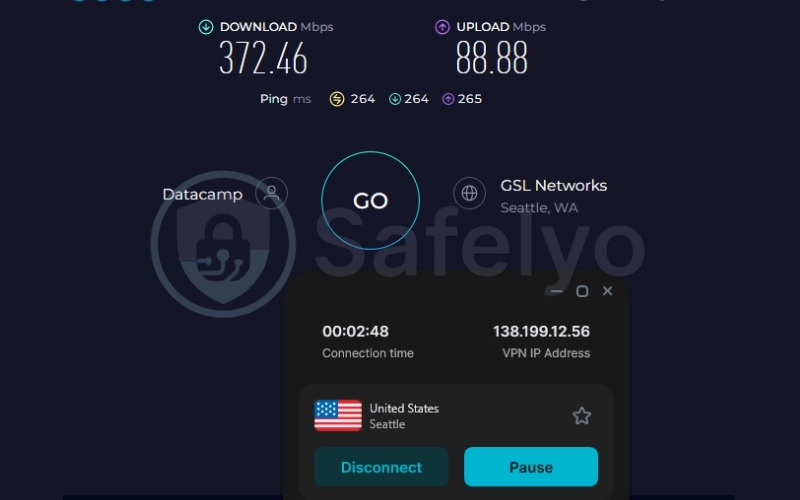
| Avg. Download Speed | 372.46 Mbps (US) / 471.63 Mbps (Singapore) |
| Avg. Upload Speed | 88.88 Mbps (US) / 189.00 Mbps (Singapore) |
| Avg. Latency | 264ms (US) / 63ms (Singapore) |
| Protocols | WireGuard, OpenVPN, IKEv2, Dausos (macOS) |
| Kill Switch | Yes |
| Obfuscation | Yes (Obfuscated servers, NoBorders) |
| Port Forwarding | No |
| Dedicated IP | Yes (20 locations) |
| Simultaneous Connections | Unlimited |
| Netflix Regions | 28+ |
| Disney+ | Yes |
| BBC iPlayer | Yes |
| Torrent / P2P | Yes |
| Win/Mac/iOS/Android | Yes |
| Linux | Yes |
| Browser Extension | Yes (Chrome, Firefox, Edge) |
| Router Support | Yes |
| Live Chat 24/7 | Yes |
| Refund Policy | 30-day money-back guarantee |
| Free Trial | Yes (7-day free trial) |
| Overall Positioning | Best value VPN for multi-device households |
| Official Website | https://surfshark.com |
Consider the following strengths and limitations before committing to Surfshark.
Pros
QR code login functionality provides a fast, frustration-free setup on your television.
Unlimited simultaneous connections allow you to secure every television, phone, and computer in your home simultaneously.
Unblocks 28+ Netflix regions, which gives you the widest variety of international content catalogs in this article.
Deloitte and SecuRing completed three separate independent audits in 2025 alone to verify data safety.
The IP Rotator feature automatically assigns you a new IP address every few minutes to maximize anonymity without dropping your internet connection.
Cons
The Netherlands jurisdiction places Surfshark firmly inside the 9 Eyes intelligence-sharing alliance.
Port forwarding is not supported on any plan, preventing you from hosting dedicated local servers.
Smart DNS was officially discontinued in February 2026, meaning older Apple TV models require a router-level installation.
The introductory price increases significantly at renewal, typically jumping higher after the initial 2-year term.
Speed & performance
| Server | Download (Mbps) | Upload (Mbps) | Ping (ms) |
|---|---|---|---|
| US | 372.46 | 88.88 | 264 |
| Singapore | 471.63 | 189.00 | 63 |
Recording 471.63 Mbps in Singapore and 372.46 Mbps in the US proves Surfshark can confidently handle its unlimited device promise. Even with the higher 264ms ping on the US connection, the raw download speed provides enough overhead for multiple family members to watch ultra-high-definition content simultaneously across different televisions and tablets without congesting the network.
Streaming
Beyond its generous device allowance, Surfshark stands out by offering the highest regional access in this list. By successfully unblocking 28+ Netflix regions alongside BBC iPlayer and Disney+, Surfshark proves exactly why it is often recommended as the best VPN for Netflix.
However, if you run an older Apple TV model, you must note a specific technical limitation. Surfshark officially discontinued its Smart DNS service in February 2026. Because of this, if you own an older Apple TV that cannot run native tvOS apps, you must configure the VPN directly on your Wi-Fi router to access global content.
Privacy & security
In terms of data protection, Surfshark operates a 100% RAM-only infrastructure to ensure data is never written to persistent hard drives. The company backs its no-logs claims with a solid audit record, completing multiple verifications with Deloitte and SecuRing in 2025.
It is important to note that Surfshark’s registration in the Netherlands places it within the 9 Eyes alliance, obligating the company to comply with certain regional data requests. However, because no data is stored, there are no known breaches on its record.
Surfshark secures data using AES-256-GCM encryption and includes a Dynamic MultiHop feature to manually construct custom routing paths.
Apple TV experience
The Surfshark tvOS app integrates smoothly into the Apple ecosystem, supporting tvOS 17+. The login process is simple and fast thanks to QR code authentication, which saves you from wrestling with the Siri Remote keyboard.
The true value emerges in daily use: because Surfshark permits unlimited simultaneous connections, you can run the VPN on multiple Apple TVs, smartphones, and laptops at the exact same time without encountering device limits or forced logouts.
Best for: Large households seeking a budget-friendly way to secure unlimited simultaneous devices, from Apple TVs to smartphones, on a single subscription.
2.4. Proton VPN: Best VPN for Apple TV privacy
Headquartered in Switzerland, Proton VPN benefits from specific legal privacy protections that exist entirely outside the 5/9/14 Eyes intelligence-sharing alliances. The provider maintains a highly transparent, security-first profile, having undergone four independent audits since 2022, with the most recent verification completed by Securitum in September 2025.
To support its strict privacy infrastructure, Proton VPN operates a massive network of 20,000+ servers across 145+ countries. The paid Plus plan, which unlocks full streaming capabilities, starts at $2.99/mo on a 24-month commitment. If you want to test the service’s basic security features, Proton VPN also offers a permanent free tier with no data cap, which is detailed in the dedicated free VPN section below.
| Features | Details |
|---|---|
| Best For | Privacy, audited no-logs policy, large server network |
| Starting Price | $2.99/mo (24-month plan) |
| Company | Proton AG |
| Jurisdiction | Switzerland |
| Independent Audit | Yes (4 audits; latest by Securitum, Sept 2025) |
| No-Logs Policy | Yes (independently verified) |
| RAM-Only Servers | No (full-disk encryption used instead) |
| Servers | 20,000+ |
| Countries | 145+ |
| Avg. Download Speed | 370.13 Mbps (US) / 482.98 Mbps (Singapore) |
| Avg. Upload Speed | 97.29 Mbps (US) / 143.44 Mbps (Singapore) |
| Avg. Latency | 273ms (US) / 46ms (Singapore) |
| Protocols | WireGuard, IKEv2, Stealth |
| Kill Switch | Yes (Standard and Advanced) |
| Obfuscation | Yes (Stealth protocol) |
| Port Forwarding | Yes (paid plans only) |
| Dedicated IP | Yes (Business plans only) |
| Simultaneous Connections | 10 (paid), 1 (free) |
| Netflix Regions | 25+ (including US, UK) |
| Disney+ | Yes |
| BBC iPlayer | Yes |
| Torrent / P2P | Yes (paid plans; dedicated P2P servers) |
| Win/Mac/iOS/Android | Yes |
| Linux | Yes (GUI app and CLI) |
| Browser Extension | Yes (Chrome, Firefox) |
| Router Support | Yes |
| Live Chat 24/7 | No (9AM–12AM CET, paid plans only) |
| Refund Policy | 30-day money-back guarantee |
| Free Trial | Permanent free plan (no credit card required) |
| Overall Positioning | Best privacy-focused VPN; Swiss jurisdiction |
| Official Website | https://protonvpn.com |
Here are the primary benefits and limitations of using Proton VPN.
Pros
Securitum completed the latest of four independent audits in September 2025, confirming the network remains strictly no-logs.
The Swiss jurisdiction ensures your online activity is protected by strong privacy laws outside major intelligence-sharing alliances.
A massive network of 20,000+ servers in 145+ countries provides unmatched global reach for unblocking international content.
Secure Core routes your traffic through privacy-hardened servers located in underground bunkers in Switzerland, Iceland, or Sweden before exiting to the final destination.
A permanent free tier with no data cap allows you to test the core interface and speeds without entering a credit card.
Cons
Live chat support is restricted to European business hours (9AM–12AM CET) and is entirely unavailable for free users.
Dedicated IP addresses are exclusive to expensive Business plan subscribers.
Speed & performance
| Server | Download (Mbps) | Upload (Mbps) | Ping (ms) |
|---|---|---|---|
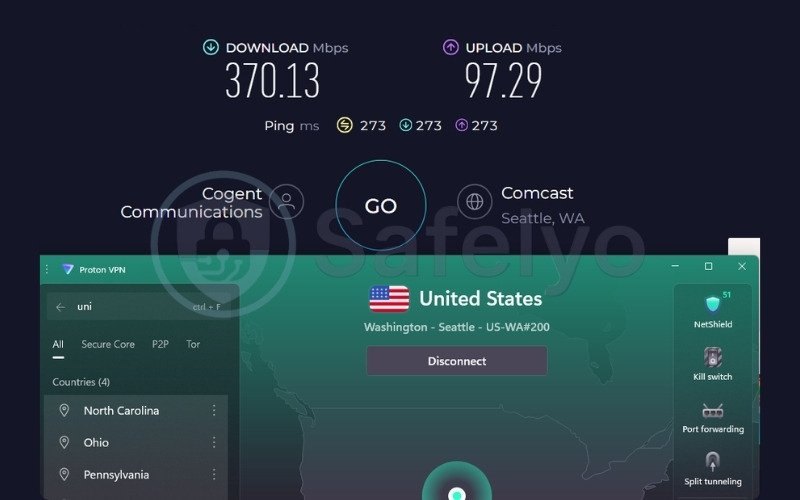
| US | 370.13 | 97.29 | 273 |
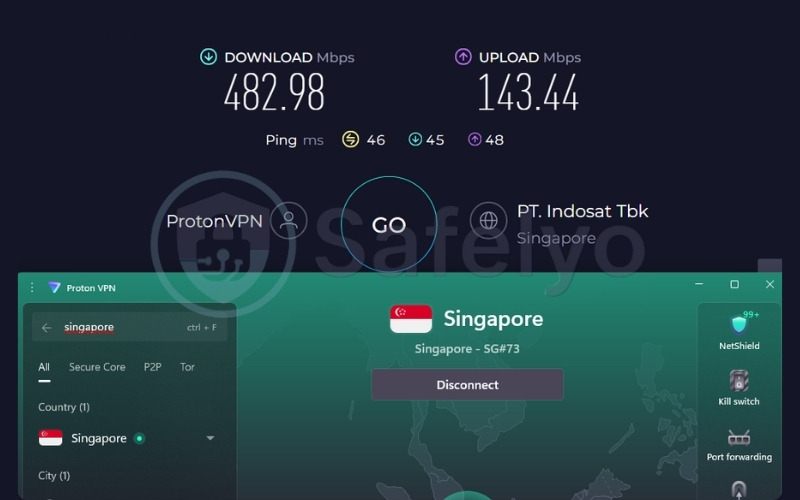
| Singapore | 482.98 | 143.44 | 46 |
The Singapore server reached an impressive 482.98 Mbps. Its low 46ms latency makes UI navigation incredibly snappy when browsing app catalogs.
The US server maintained a strong 370.13 Mbps download rate. At this high speed tier, the elevated 273ms ping becomes a non-issue for media consumption, as the connection is fast enough to securely pre-load high-resolution video chunks ahead of playback.
Streaming
When it comes to bypassing regional blocks, Proton VPN reliably accesses geo-restricted content on its paid Plus plan. The service successfully unblocks 25+ Netflix regions alongside Disney+ and BBC iPlayer.
However, one crucial operational detail is that Proton VPN does not include a Smart DNS feature. This means if you operate an older Apple TV model that lacks native app support, you cannot simply change your network DNS settings to bypass regional blocks. To stream on older hardware, you must configure Proton VPN directly within your Wi-Fi router settings.
Privacy & security
Proton VPN differs from its competitors by securing its network with full-disk encryption rather than RAM-only servers. If a government or third party physically seizes a Proton VPN server, full-disk encryption ensures that the hard drives remain completely locked and unreadable without specific decryption keys.
While RAM-only servers erase data the moment power is cut, full-disk encryption provides an equally robust method to protect stored data from unauthorized physical access. The company’s no-logs policy underwent four rigorous audits between 2022 and 2025, and the service includes a Secure Core multi-hop feature to further route traffic through privacy-hardened jurisdictions.
Apple TV experience
Although it does not use a QR code, Proton VPN provides a fast login process via a short code authentication system. You simply enter the code on a web browser using your mobile device or computer, entirely bypassing the need to type your email and password manually with the Siri Remote.
Despite this initial setup friction, the native app installs easily from the App Store on tvOS 17+. Once logged in, paid Plus plan subscribers receive 10 simultaneous connections to spread across their household devices. Because the service lacks a Smart DNS feature, owners of older Apple TV units must rely exclusively on a complex router-level VPN installation.
Best for: Privacy-focused users who require a heavily audited, highly secure network backed by Swiss jurisdiction to protect their daily streaming habits.
2.5. PIA: Best VPN for Apple TV power users
Private Internet Access (PIA) is the only US-based VPN featured in this article. While being located within the 5 Eyes jurisdiction is often a concern for strict privacy advocates, PIA’s no-logs policy carries immense credibility because it was successfully tested in federal court proceedings involving FBI requests.
If you consider yourself a technical power user, PIA stands out as a VPN with port forwarding that also offers unlimited simultaneous connections and a fully open-source client available for public inspection on GitHub. With a massive network independently estimated at over 35,000 servers, PIA pricing starts at an affordable $1.33/mo on the 3-year plan.
| Features | Details |
|---|---|
| Best For | Power users, port forwarding, unlimited devices |
| Starting Price | $1.33/mo (3-year plan) |
| Company | PIA Private Internet Access, Inc. |
| Jurisdiction | United States (Denver, Colorado) |
| Independent Audit | Yes (by Deloitte Audit Romania) |
| No-Logs Policy | Yes (confirmed in court proceedings) |
| RAM-Only Servers | Yes |
| Servers | 35,000+ (independently estimated) |
| Countries | 90 |
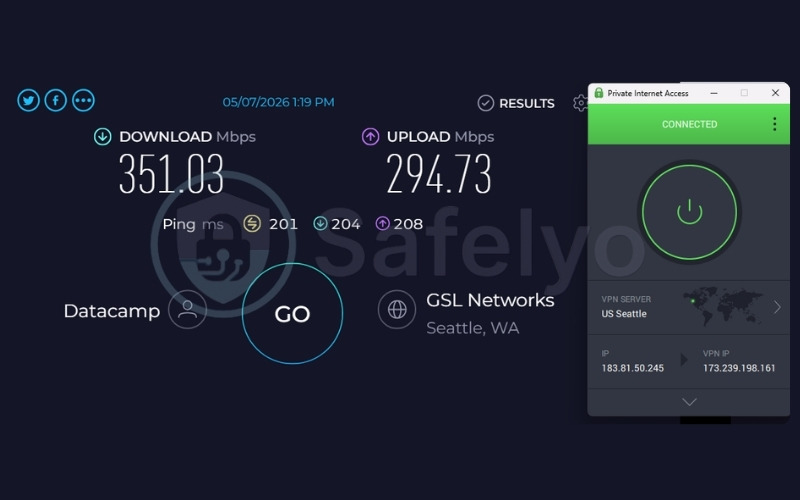
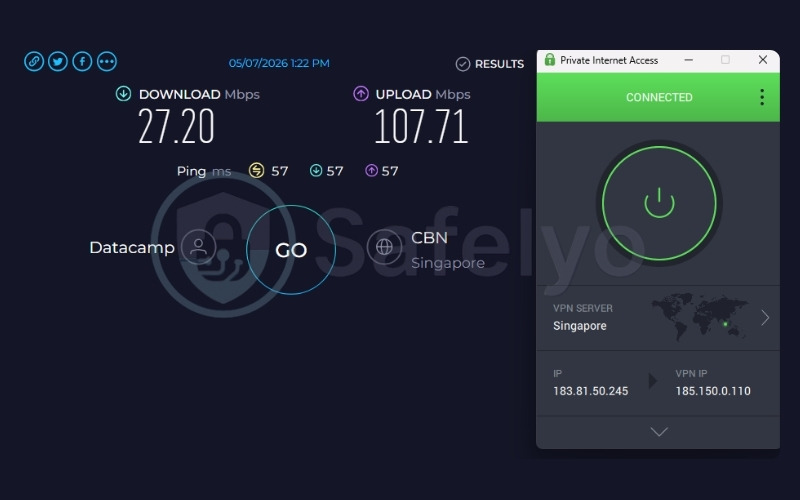
| Avg. Download Speed | 351.03 Mbps (US) / 27.20 Mbps (Singapore) |
| Avg. Upload Speed | 294.73 Mbps (US) / 107.71 Mbps (Singapore) |
| Avg. Latency | 201ms (US) / 57ms (Singapore) |
| Protocols | OpenVPN, WireGuard, IKEv2/IPSec |
| Kill Switch | Yes (advanced, firewall-based) |
| Obfuscation | Yes (Multi-Hop Obfuscation) |
| Port Forwarding | Yes |
| Dedicated IP | Yes (multiple global locations) |
| Simultaneous Connections | Unlimited |
| Netflix Regions | 21+ (US, UK, JP and others) |
| Supported Streaming | BBC iPlayer, Hulu, HBO Max, Disney+ |
| Torrent / P2P | Yes |
| Win/Mac/iOS/Android | Yes |
| Linux | Yes |
| Browser Extension | Yes (Chrome, Firefox, Opera) |
| Router Support | Yes |
| Live Chat 24/7 | Yes |
| Refund Policy | 30-day money-back guarantee |
| Free Trial | Yes (7-day free trial for iOS and Android) |
| Overall Positioning | Best for technical users who need port forwarding |
| Official Website | https://www.privateinternetaccess.com |
Below are the key pros and cons of using Private Internet Access.
Pros
Supports QR code login on tvOS for a fast, user-friendly setup without typing credentials manually.
Port forwarding is included natively, allowing you to host dedicated servers or improve P2P file sharing connections.
Unlimited simultaneous connections secure all household devices under one standard account.
The no-logs policy was tested in federal court proceedings, providing concrete proof that PIA physically cannot produce user data.
The client source code is publicly accessible on GitHub, allowing independent developers to inspect the software for security vulnerabilities.
MACE blocks ads, trackers, and malware efficiently by intercepting malicious domains at the DNS level.
Cons
The US jurisdiction legally subjects PIA to US government demands, though court records confirm no data has ever been produced.
The Singapore server download speed dropped heavily to 27.20 Mbps during our tests, lagging significantly behind competitors.
PIA does not publish an official server count, leaving the 35,000+ figure as an independent estimate rather than a confirmed fact.
Speed & performance
| Server | Download (Mbps) | Upload (Mbps) | Ping (ms) |
|---|---|---|---|
| US | 351.03 | 294.73 | 201 |
| Singapore | 27.20 | 107.71 | 57 |
The US server reached a highly capable 351.03 Mbps, providing plenty of bandwidth for 4K streaming. Conversely, the Singapore server recorded only 27.20 Mbps.
While 27.20 Mbps remains technically adequate for a single 4K stream, it provides very little headroom. If someone else in your household starts downloading a large file on another device, your Apple TV will likely experience buffering on this specific server route.
Streaming
Despite its focus on technical features, PIA provides solid streaming utility across major platforms. In our tests, we confirmed that it successfully supports Netflix, BBC iPlayer, Hulu, HBO Max, and Disney+, meaning you can reliably access popular entertainment catalogs without complex configurations.
If you operate an older Apple TV model, PIA includes a highly versatile Smart DNS feature. Unlike the geographically limited options from some competitors, PIA’s Smart DNS covers multiple international locations, making it a powerful tool for global streaming on hardware that cannot run native VPN applications.
Privacy & security
Operating from the United States means PIA falls under the intelligence-sharing jurisdiction of the 5 Eyes alliance. However, the service has proven its commitment to privacy in actual federal court. Because PIA retains absolutely no connection or usage logs, it successfully demonstrated that it had no user data to hand over during official FBI investigations.
Deloitte Audit Romania verified this infrastructure independently. Furthermore, PIA utilizes RAM-only servers, allows you to configure AES-128 or AES-256 encryption, and includes the built-in MACE feature to intercept requests to known advertising and malware servers.
Apple TV experience
PIA balances its advanced technical features with a highly accessible Apple TV experience. The tvOS app supports QR code login, making the initial setup fast and frustration-free by entirely skipping the on-screen keyboard.
Because PIA offers unlimited connections, you can simultaneously cover multiple Apple TVs, tablets, and phones without facing annoying forced logouts. For enhanced anonymity, PIA also uses a token-based Dedicated IP system, which cryptographically ensures that a purchased static IP address cannot be traced back to your main user account.
Best for: Technical power users who require advanced features like port forwarding and open-source clients alongside unlimited simultaneous connections.
3. Free VPN for Apple TV: Best options and honest limits
If you are not ready to commit to a paid subscription, two free options in this list provide working tvOS apps: Proton VPN Free and Privado VPN Free. Both providers maintain published no-logs policies and do not monetize free accounts by selling your data to advertisers.
While neither is robust enough to replace a premium plan for daily heavy streaming, both serve specific, functional use cases.
3.1. Proton VPN Free: Best no-cap free VPN for Apple TV
Often regarded as the best free VPN, Proton VPN Free is unique because it provides a permanent free plan with no data caps and requires no credit card for activation. To balance this generous data allowance, the free tier restricts you to one simultaneous connection and permits access to 10 country locations via an auto-select function. Importantly, Proton VPN does not artificially throttle your download speeds on this tier to force an upgrade.
| Server | Download (Mbps) | Upload (Mbps) | Ping (ms) |
|---|---|---|---|
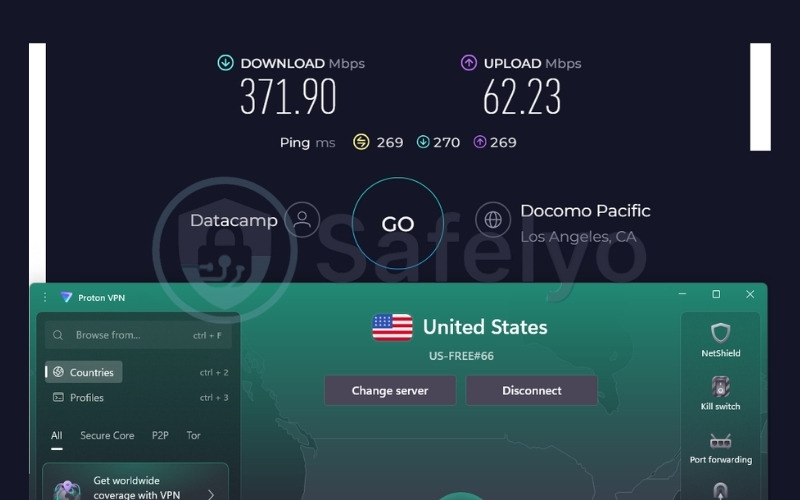
| US | 371.90 | 62.23 | 269 |
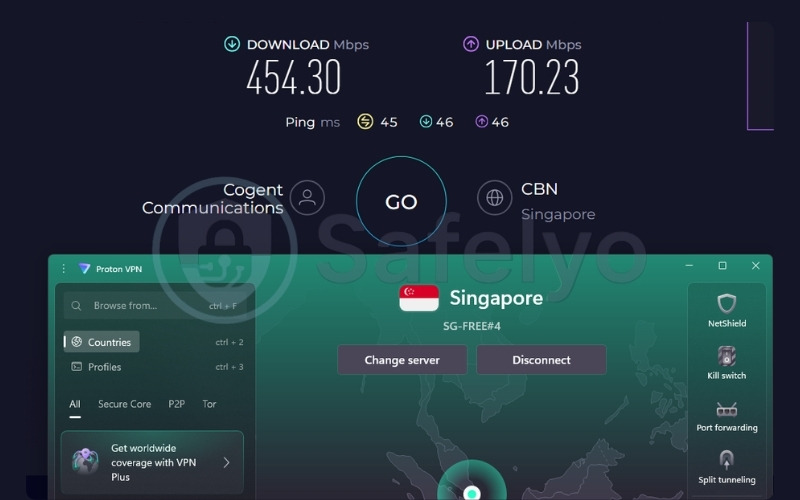
| Singapore | 454.30 | 170.23 | 45 |
The free tier reached 454.30 Mbps on the Singapore server, a result perfectly comparable to the premium paid options in this list. The US server achieved an equally strong 371.90 Mbps.
While these speeds are technically excellent for high-definition video, Proton VPN deliberately blocks all streaming apps and P2P traffic on the free tier. If you try to open Netflix, the connection will simply fail to load the video. Therefore, Proton VPN Free functions best as a tool to test the tvOS app interface before upgrading, or for maintaining general privacy on a public network.
Best for: Privacy-conscious users who want unlimited secure web browsing on a free tier and do not care about unblocking streaming services.
3.2. Privado VPN Free: Best data-capped free VPN for Apple TV
Unlike Proton VPN Free, Privado VPN actively supports streaming on its free tier, allowing you to access geo-restricted content on Netflix, Hulu, BBC iPlayer, Disney+, ESPN, and Max. However, this streaming access comes with a strict 10 GB free data cap per month across 13 server locations, supporting exactly one simultaneous connection.
Operating out of Switzerland, Privado VPN benefits from strong legal privacy protections, though it has not yet completed a confirmed independent privacy audit to verify its internal policies.
| Server | Download (Mbps) | Upload (Mbps) | Ping (ms) |
|---|---|---|---|
| UK | 398.17 | 71.18 | 233 |
| US | 456.63 | 105.08 | 186 |
Both the UK and US servers delivered speeds well above 100 Mbps, which easily supports 4K streaming without buffering.
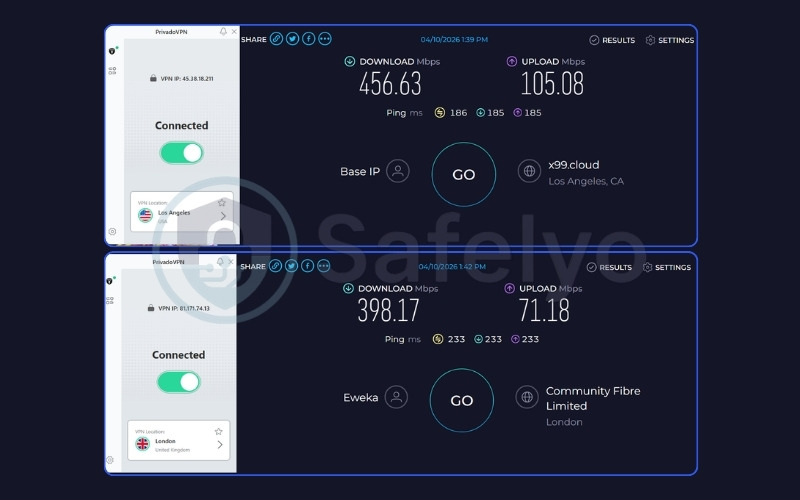
The primary constraint, however, is the 10 GB monthly data cap. This allowance covers approximately 1.5 hours of 4K streaming or roughly 3 hours of standard HD streaming. Once you hit this limit, the service stops.
Thanks to its QR code login support, Privado VPN provides a smooth initial TV setup, making it a viable choice strictly for occasional streaming sessions.
If you test the free version and find that its streaming performance works well for your setup, you can easily remove the data limits by upgrading to Privado VPN Premium. It is incredibly affordable, costing just $1.11/mo on the 2-year plan.
Best for: Users who need a free, no-cost tool strictly for occasional, short-term streaming sessions due to the monthly 10 GB data limit.
4. Which Apple TV models support a VPN app?
Installing a VPN app directly on Apple TV requires the device to run tvOS 17 or later. Fortunately, all five paid VPNs in this list, along with Proton VPN Free and Privado VPN Free, offer native tvOS apps in the App Store.
Apple originally released tvOS 17 in September 2023. Note that Apple unified its OS version numbering in 2025, jumping from tvOS 18 directly to tvOS 26 to align with the 2025–2026 release cycle, meaning there is no tvOS 19 through 25.
The current version as of May 2026 is tvOS 26.5 (released May 11, 2026), and it is fully supported by Apple TV HD and all versions of the Apple TV 4K.
| Apple TV Model | Year Released | Current tvOS Support | Native VPN App? | Alternative Setup |
|---|---|---|---|---|
| Apple TV HD (4th gen) | 2015 | tvOS 26 (supported) | Yes | N/A |
| Apple TV 4K (1st gen) | 2017 | tvOS 26 (supported) | Yes | N/A |
| Apple TV 4K (2nd gen) | 2021 | tvOS 26 (supported) | Yes | N/A |
| Apple TV 4K (3rd gen) | 2022 | tvOS 26 (supported) | Yes | N/A |
| Apple TV 3rd gen and earlier | 2012 and older | tvOS not supported | No | Smart DNS only |
To check your software version, go to Settings, select System (or General on older firmware), navigate to Software Update (or About), and find Software Version. If the number starts with 17 or higher (including 26), you can open the App Store and install a VPN directly.
Note: Apple TV (3rd gen, 2012) and earlier models do not run tvOS and cannot install native VPN apps. If you own one of these older models, you should use Smart DNS or a router-level VPN, which we explain in the setup section below.
5. How to set up a VPN on Apple TV (3 methods)
You have three primary ways to route your Apple TV traffic through a VPN. The correct method depends entirely on your specific Apple TV hardware version and whether you prioritize encryption or pure streaming speed.
5.1. Method 1: Install the VPN app directly on Apple TV (tvOS 17+)
This straightforward method requires an Apple TV HD or any Apple TV 4K model running tvOS 17 or higher.
- Open the App Store on your Apple TV.
- Search for your chosen VPN by name.
- Select Get and install the app.
- Open the app and sign in. For NordVPN, ExpressVPN, Surfshark, PIA, and Privado VPN, you can simply scan the QR code on the screen with your smartphone.
- Select a server location and tap Connect.
The login experience differs slightly depending on the provider you choose. Services offering a QR code method provide the fastest entry on a television screen because they completely bypass the Siri Remote. Typing credentials manually takes a few extra seconds, but fortunately, it is only required once during the initial setup.
5.2. Method 2: Configure Smart DNS on Apple TV (all models)
Smart DNS works on any Apple TV model. This method changes your apparent streaming location by rerouting specific DNS queries, but it does not encrypt your internet connection data.
- Log in to your VPN account on a computer or phone.
- Find the Smart DNS or MediaStreamer section in your account settings.
- Copy the specific DNS server IP address provided by the service.
- On your Apple TV, go to Settings, select Network, select Wi-Fi, click your network name, choose Configure DNS, and change it to Manual.
- Enter the provided DNS IP address and save the configuration.
- Restart your Apple TV.
Most providers in this list include Smart DNS functionality. NordVPN integrates it seamlessly via SmartPlay, while ExpressVPN, PIA, and Privado VPN also support diverse international locations.
Note that Surfshark officially discontinued its Smart DNS service in February 2026, and Proton VPN does not offer the feature at all. Users with older hardware running these specific providers must rely on router setups.
Note: Smart DNS provides no encryption or privacy protection. It only changes your apparent streaming location. Use it when speed is critical or when your older Apple TV model does not support native VPN apps.
5.3. Method 3: Set up a VPN on your router (all models)
Installing a VPN at the router level covers every connected device in your home simultaneously, including any Apple TV model.
- Log in to your VPN account and locate the router setup section in the dashboard settings.
- Follow the provider’s specific router configuration guide designed for your exact router model.
- Once configured, connect your Apple TV to the router’s Wi-Fi network.
- All traffic from the Apple TV routes through the encrypted VPN tunnel automatically.
Router setup remains the most effective approach for older Apple TV models that cannot run newer tvOS versions. While this method requires more technical effort than downloading a simple app, it thoroughly protects the entire home network. ExpressVPN even sells a proprietary Aircove router that comes pre-configured for immediate use without technical tinkering.
6. Why your VPN might not work on Apple TV (even when it shows connected)
Sometimes a VPN app displays a successful connection, yet streaming services still block access. Understanding exactly how streaming platforms track data helps resolve these frustrating errors.
6.1. A VPN changes your IP address, but not your device location
Streaming services use multiple data signals to determine a user’s location, rather than relying solely on the IP address. A VPN successfully replaces your visible IP address, but streaming applications can also read the Wi-Fi network’s registered region, local DNS data, and device-level location settings.
For example, if Apple TV Location Services remain active, an app like Hulu can request the device’s physical GPS or Wi-Fi location independently of the VPN tunnel. When the platform detects a mismatch, where your VPN IP address says you are in the United States, but your Apple TV’s internal location data says you are in another country, it triggers an immediate block.
6.2. Device location services can override the VPN
Apple TV includes a dedicated Location Services setting built directly into the operating system. When this feature is enabled, individual apps completely bypass the VPN tunnel and request location coordinates directly from the hardware. You can disable this by navigating to Settings, selecting Privacy, choosing Location Services, and toggling it to Off.
Note: Certain regional sports apps and services like DirecTV Stream rely heavily on device-level location as a strict anti-circumvention measure. Disabling Location Services resolves the conflict for many platforms, but it is not a guaranteed universal fix for every application.
6.3. What to do when the VPN is connected but streaming is blocked
Follow these exact troubleshooting steps to regain access to blocked streaming content:
- Disable location services on your Apple TV by navigating to Settings, Privacy, and toggling Location Services to Off.
- Switch to a different server located in the same target country. Most providers offer multiple city-level servers that cycle through fresh IP addresses.
- Sign out of the streaming app, delete it from the Apple TV entirely, reinstall it, and sign back in while the VPN remains connected.
- Try using the Smart DNS method instead of the full VPN app. Smart DNS sends different traffic markers and frequently avoids standard VPN block lists.
- Contact your provider’s live chat support and ask for the specific server currently optimized for the streaming service you want to watch.
If none of these steps resolve the issue, the provider’s current IP range has likely been added to the streaming platform’s block list. In this scenario, contacting support or waiting for the provider to rotate its server IP addresses to unblocked ones remains the only viable option.
7. VPN vs. Smart DNS for Apple TV: Which one should you use?
Choosing between a full VPN app and a Smart DNS setup depends on whether you prioritize secure encryption or pure streaming speed on your Apple TV.
| Criteria | VPN | Smart DNS |
|---|---|---|
| Changes streaming location | Yes | Yes |
| Encrypts your connection | Yes | No |
| Protects privacy | Yes | No |
| Works on older Apple TV models | Requires router setup | Yes (manual DNS entry) |
| Speed impact | Some (encryption overhead) | Minimal |
| Works with all streaming services | Most, not all | Depends on provider |
You should use a full VPN app when you require absolute privacy protection alongside location-changing capabilities. It makes sense if you own an Apple TV running tvOS 17 or higher, allowing you to install the app natively to hide your data from your internet service provider. A VPN is also the correct choice if you connect your Apple TV to a shared or public Wi-Fi network where encryption is necessary to stop network snooping.
Conversely, you should use Smart DNS when your older Apple TV model cannot install native apps. Smart DNS is highly effective when streaming speed is your absolute priority and you do not care about data encryption, as it completely bypasses the processing overhead of a VPN tunnel.
8. FAQs about VPN for Apple TV
Can I use a VPN on Apple TV?
Yes, depending on your exact hardware model. Apple TV HD and all Apple TV 4K models running tvOS 17 or later allow you to install VPN apps directly from the App Store. Older models from 2012 and earlier cannot install apps natively and require a Smart DNS or router-level configuration to bypass regional blocks.
How do I get a VPN on Apple TV?
On devices running modern tvOS versions, open the App Store, search for the provider, install the app, and sign in. For older Apple TV models, you must manually configure Smart DNS in your network settings using an IP address provided by the service, or install the VPN directly on your Wi-Fi router.
Is there a free VPN for Apple TV?
Yes. Proton VPN provides a permanent free tier with no data limits and a native tvOS app, but it completely blocks streaming services. Privado VPN offers 10 GB of free data per month across 13 locations and actively supports streaming on its free tier, making it suitable for occasional viewing.
Which VPN unblocks the most Netflix regions on Apple TV?
Based on our verified testing data, Surfshark unblocks 28+ Netflix regions. NordVPN unblocks 26+ regions via its SmartPlay feature, and Proton VPN Plus unblocks 25+ regions. ExpressVPN also reliably supports 25+ major regions, including the US, UK, and Japan.
Why is my VPN not working on Apple TV?
Streaming platforms frequently block known VPN IP addresses. Additionally, your Apple TV Location Services might be exposing your real physical location outside the encrypted tunnel, creating a data mismatch. To fix this, disable Location Services in the privacy settings, switch to a different server in the same country, or reinstall the streaming app while connected.
Does using a VPN slow down streaming on Apple TV?
Our testing from Vietnam showed that NordVPN, ExpressVPN, Surfshark, and Proton VPN all delivered speeds above 370 Mbps on US servers and above 470 Mbps on Singapore servers. These speeds effortlessly support 4K streaming without buffering. High-tier providers rarely cause noticeable streaming delays, despite minor latency increases.
What is the cheapest VPN for Apple TV?
Privado VPN Premium offers the lowest introductory price at $1.11/mo on its 24-month plan. PIA follows at $1.33/mo, and Surfshark / ExpressVPN starts at $2.49/mo. If you require a zero-cost option, Proton VPN provides a permanent free tier. Always check the provider’s website, as all listed promotional rates increase upon renewal.
9. Conclusion
The best VPN for Apple TV depends entirely on your specific household needs and technical requirements. NordVPN covers the broadest range of streaming services and operates as the most capable overall choice due to its integrated SmartPlay infrastructure.
ExpressVPN and Surfshark both provide extremely clean setup experiences with QR code logins, making them ideal for beginners and large households. Meanwhile, Proton VPN delivers an uncompromised, heavily audited privacy infrastructure with full-disk encryption, while PIA serves technical users who require port forwarding and an open-source client.
If you are looking for free alternatives, Proton VPN Free remains the only option with no data cap, though it blocks streaming traffic entirely. Privado VPN Free covers 10 GB of streaming data per month, making it a viable occasional tool. If you operate older hardware that cannot run newer tvOS firmware, configuring Smart DNS or installing the service at the router level are the only viable paths forward.
To get started, you can test any of the premium providers risk-free, as all the paid options discussed above offer a standard 30-day money-back guarantee. This window allows you to confirm that the service successfully unblocks your preferred content before fully committing to your chosen VPN for Apple TV.
For more expert reviews and detailed setup guides, explore our Best VPN category and visit the Safelyo homepage to discover the optimal tools for your digital privacy journey.