You are staring at a blocked access screen during your free period instead of catching up on YouTube, TikTok, or Discord. Network administrators strictly lock down academic Wi-Fi networks to block entertainment and social media applications.
Finding a reliable VPN for school solves that exact problem immediately. A solid virtual private network wraps your internet traffic in an encrypted tunnel, hiding your activity from the network filters and allowing you to access restricted platforms seamlessly.
Here are the top 5 VPNs for school:
- NordVPN (Best overall VPN for school): NordVPN features the NordWhisper obfuscation protocol to hide traffic from network admins and delivered 481.34 Mbps download speeds on our test servers.
- ProtonVPN (Best for unlimited free data): ProtonVPN is the only secure option with a permanent free tier that does not cap your data, paired with a low 46 ms ping for casual gaming on nearby servers.
- Surfshark (Best for sharing on a tight budget): Surfshark offers unlimited simultaneous connections for $2.49/mo, perfect for splitting the cost with classmates while utilizing its NoBorders obfuscation.
- Windscribe (Best free plan for obfuscation): Windscribe provides 10GB of free data and includes specialized stealth protocols (Wstunnel and Stealth) to bypass the heaviest network restrictions.
- PIA (Best for extreme budgets & multitasking): PIA costs just $1.33/mo with unlimited simultaneous connections for sharing, and features advanced Split Tunneling to keep school portals accessible while unblocking entertainment apps.
Below is a quick comparison table to help you spot the core differences between our top recommendations.
| VPN | Starting Price | Free Version | Obfuscation Protocol | Simultaneous Connections | Chrome Extension |
|---|---|---|---|---|---|
| NordVPN | $3.49/mo | No | Obfuscated servers, NordWhisper | 10 | Yes |
| ProtonVPN | $2.99/mo | Yes (Unlimited) | Stealth | 10 (Paid) / 1 (Free) | Yes |
| Surfshark | $2.49/mo | No | Camouflage Mode, NoBorders | Unlimited | Yes |
| Windscribe | $3.00/mo | Yes (10GB) | Stealth, Wstunnel, Circumvent Censorship | Unlimited | Yes |
| PIA | $1.33/mo | No | Multi-Hop Obfuscation | Unlimited | Yes |
Disclaimer: This guide is for informational purposes only. Information regarding speeds, unblocking capabilities, pricing, and promotional offers may change over time depending on your geographic location or new platform updates. Last verified: May 2026.
1. How we selected the best VPNs for school
When evaluating VPN for academic environments, we look at practical, everyday usage rather than extreme technical benchmarks. A VPN must be able to bypass common network filters while remaining affordable and easy to install on student devices. We evaluated these VPNs based on four core criteria:
- Obfuscation technology: The service must offer stealth features to bypass Deep Packet Inspection (DPI), which is the primary tool schools use to block encrypted connections.
- Free plan availability: We prioritize providers that offer secure, reliable free tiers to accommodate students with zero budget.
- Chromebook and mobile compatibility: The application must run smoothly on personal Chromebooks via browser extensions and on standard smartphones.
- Speed and ping retention: The connection must remain fast enough for video streaming and casual gaming during free periods.
2. Why do schools block websites?
Schools actively block specific websites to manage limited bandwidth and maintain network speeds for academic purposes. If hundreds of students simultaneously stream high-definition videos on the campus Wi-Fi, the entire infrastructure slows down significantly for everyone. Network administrators restrict heavy entertainment applications to prevent this congestion.
Administrators also implement these restrictions to prevent distractions during class time. Keeping focus on educational materials requires minimizing access to gaming hubs and social media platforms. Furthermore, institutions must comply with strict government regulations regarding internet safety. For instance, laws like the Children’s Internet Protection Act in the United States force publicly funded schools to filter out explicit or harmful online content completely.
3. VPN for school: Top 5 picks to bypass firewalls
We evaluated these VPNs based on their ability to bypass standard network firewalls and maintain stable speeds. We checked obfuscation protocols to see which VPNs could effectively hide the VPN traffic from network administrators without requiring complex manual configurations.
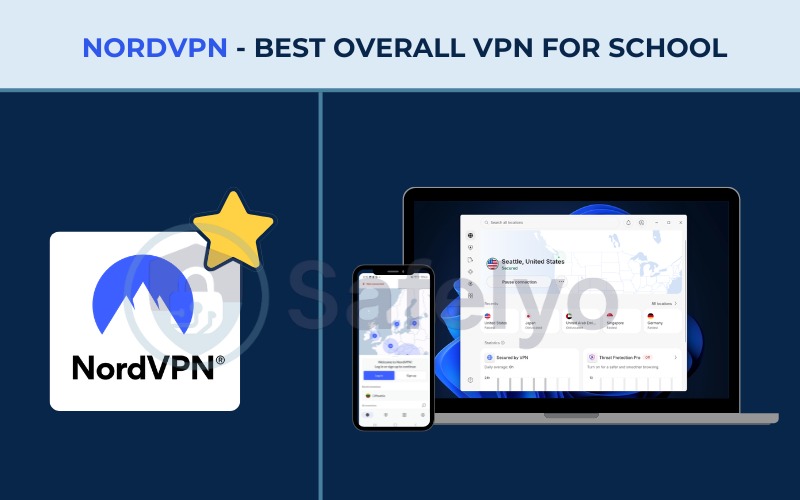
3.1. NordVPN: Best overall VPN for school
NordVPN is a premium VPN known for its high-speed infrastructure and advanced privacy tools. NordVPN is heavily focused on providing robust security features, making it highly effective at bypassing aggressive network restrictions.
| Features | Details |
|---|---|
| Best For | Best overall VPN for school |
| Starting Price | $3.49/mo (Basic 2-year plan) |
| Company | Nord Security |
| Jurisdiction | Panama |
| Independent Audit | Yes (PwC, Deloitte) |
| No-Logs Policy | Yes |
| RAM-Only Servers | Yes |
| Servers | 9,500+ |
| Countries | 149 |
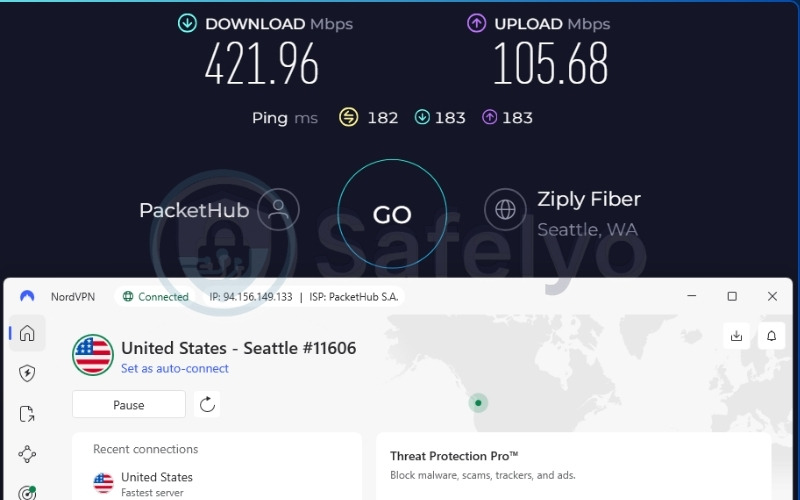
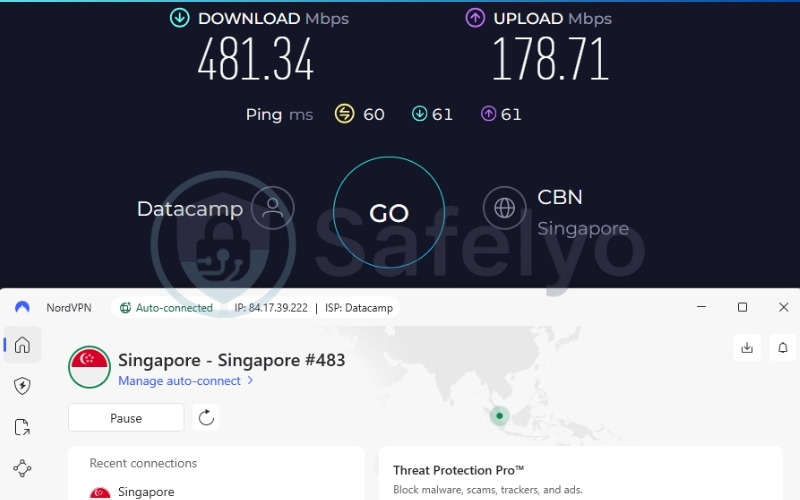
| Avg. Download Speed | 421.96 Mbps (US) / 481.34 Mbps (Singapore) |
| Avg. Upload Speed | 105.68 Mbps (US) / 178.71 Mbps (Singapore) |
| Avg. Latency | 182 ms (US) / 60 ms (Singapore) |
| Protocols | NordLynx, OpenVPN, IKEv2/IPSec, NordWhisper |
| Kill Switch | Yes |
| Obfuscation | Yes (Obfuscated servers, NordWhisper) |
| Port Forwarding | No |
| Dedicated IP | Yes |
| Simultaneous Connections | 10 |
| Netflix Regions | 26+ |
| Disney+ | Yes |
| BBC iPlayer | No |
| Torrent / P2P | Yes |
| Win/Mac/iOS/Android | Yes |
| Linux | Yes |
| Browser Extension | Yes (Chrome, Firefox, Edge) |
| Router Support | Yes |
| Live Chat 24/7 | Yes |
| Refund Policy | 30-day money-back guarantee |
| Free Trial | 3-day free trial on Android |
| Overall Positioning | Fastest VPN in 2026 |
| Official Website | nordvpn.com |
Before deciding if this service fits your needs, review these specific advantages and drawbacks.
Pros
Features NordWhisper protocol to disguise VPN traffic as regular HTTPS.
Retained blazing fast speeds on most servers.
Includes a dedicated Chrome extension perfect for Chromebooks.
Cons
No permanent free tier available for students on a budget.
Price increases significantly upon renewal after the first term.
Why we picked it for school
NordVPN utilizes specialized Obfuscated Servers and the newly developed NordWhisper protocol to solve the problem of strict network monitoring. This technology actively hides the fact that a VPN is being used by making the encrypted data look like standard web traffic.
Masking the connection entirely prevents school network administrators from using DPI software to detect and block your session. This makes NordVPN incredibly reliable on campuses that aggressively hunt down proxy users.
Speed & Performance
During our evaluation, the Singapore servers delivered an outstanding 481.34 Mbps download speed alongside a low 60 ms ping. This exceptional speed is best for multi-player gaming, 4K video streaming, and huge file downloads without experiencing lag.
Furthermore, the 60 ms latency response is highly consistent and remains well-suited for slow-paced gaming and web browsing during breaks between classes. Even when routing traffic further away, the distant US server maintained a fast 421.96 Mbps download speed.
Here is the server performance data we recorded:
| Server | Download (Mbps) | Upload (Mbps) | Ping (ms) |
|---|---|---|---|
| US | 421.96 | 105.68 | 182 |
| Singapore | 481.34 | 178.71 | 60 |
Ease of Use & Device Support
NordVPN supports up to 10 simultaneous connections on a single account. NordVPN includes a highly rated Chrome extension that allows students to bypass blocks directly from a personal Chromebook browser without needing administrator privileges to install desktop software. Additionally, installing the NordVPN app on an Android phone is an incredibly simple process requiring no technical configuration.
Verdict: Best for students facing advanced network blocks who are willing to pay for a premium, high-speed solution.
3.2. ProtonVPN: Best for unlimited free data
ProtonVPN is a privacy-first VPN based in Switzerland, widely recognized for its transparency and open-source applications. ProtonVPN stands out in the industry by offering a permanent free tier that does not restrict data usage.
| Features | Details |
|---|---|
| Best For | Unlimited free data |
| Starting Price | $2.99/mo (24-Month plan) |
| Company | Proton AG |
| Jurisdiction | Switzerland |
| Independent Audit | Yes (Securitum) |
| No-Logs Policy | Yes |
| RAM-Only Servers | No (Uses Full-disk encryption) |
| Servers | 20,000+ |
| Countries | 145+ |
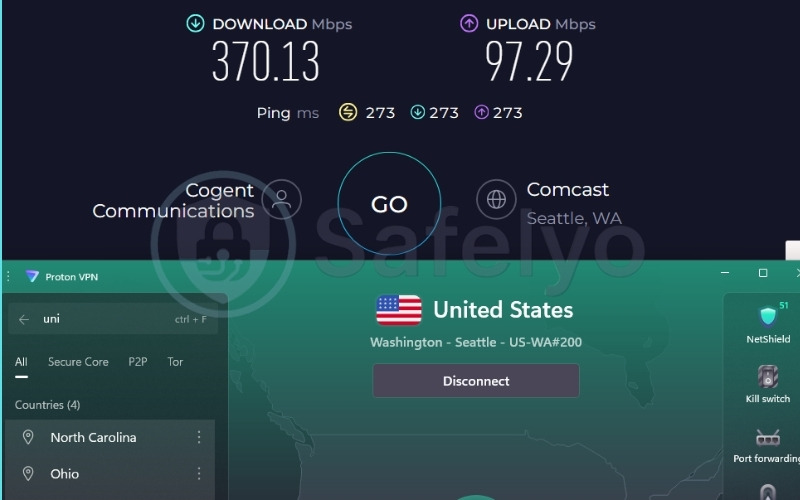
| Avg. Download Speed | 370.13 Mbps (US) / 482.98 Mbps (Singapore) |
| Avg. Upload Speed | 97.29 Mbps (US) / 143.44 Mbps (Singapore) |
| Avg. Latency | 273 ms (US) / 46 ms (Singapore) |
| Protocols | WireGuard, IKEv2, Stealth |
| Kill Switch | Yes (Standard and Advanced) |
| Obfuscation | Yes (Stealth protocol) |
| Port Forwarding | Yes (Paid plans) |
| Dedicated IP | Yes (Business plans only) |
| Simultaneous Connections | 10 (Paid) / 1 (Free) |
| Netflix Regions | 25+ |
| Disney+ | Yes |
| BBC iPlayer | Yes |
| Torrent / P2P | Yes (Paid plans only) |
| Win/Mac/iOS/Android | Yes |
| Linux | Yes |
| Browser Extension | Yes (Chrome, Firefox) |
| Router Support | Yes |
| Live Chat 24/7 | No (Only 9AM to 12AM CET for paid plans) |
| Refund Policy | 30-day money-back guarantee |
| Free Trial | Permanent free plan |
| Overall Positioning | Open source and privacy-focused |
| Official Website | protonvpn.com |
Before deciding if this service fits your needs, review these specific advantages and drawbacks.
Pros
Offers a 100% free plan with absolutely no data caps.
Includes the Stealth protocol to bypass network firewalls.
Chrome extension is available for free users.
Cons
The free tier limits you to 1 device connection at a time.
Free tier restricts server choices and does not support streaming/P2P.
Why we picked it for school
Finding a completely free VPN that does not enforce a strict data limit is incredibly rare in the current market. ProtonVPN offers unlimited bandwidth on its free tier, making it ideal for daily campus use where students might watch lectures for hours or use it as the best VPN for Spotify to stream high-quality audio without hitting annoying data caps.
ProtonVPN also includes the powerful Stealth protocol. This feature masks your encrypted data to mimic standard web traffic, allowing you to easily slip past basic academic Wi-Fi filters that normally block known VPN ports.
Speed & Performance
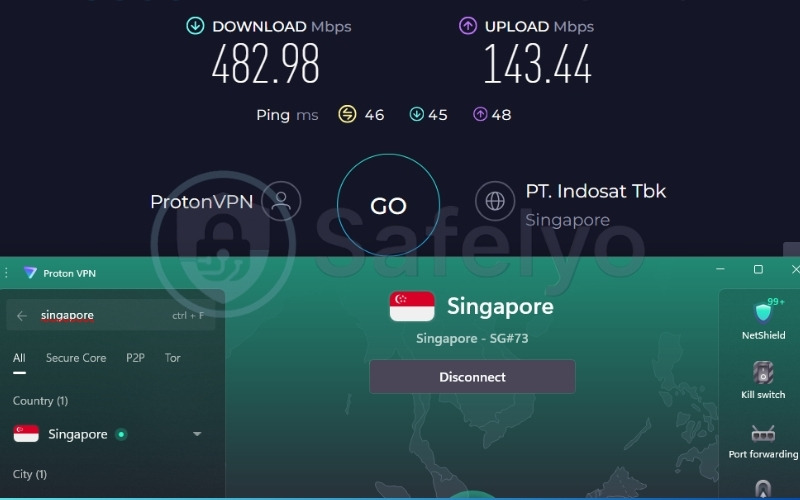
We analyzed both the paid Plus tier and the free version of ProtonVPN. On the paid tier, the Singapore server yielded an impressive 482.98 Mbps download speed and a low 46 ms ping. This makes it perfect for multi-player gaming, flawless 4K video streaming, and huge file downloads without any noticeable lag.
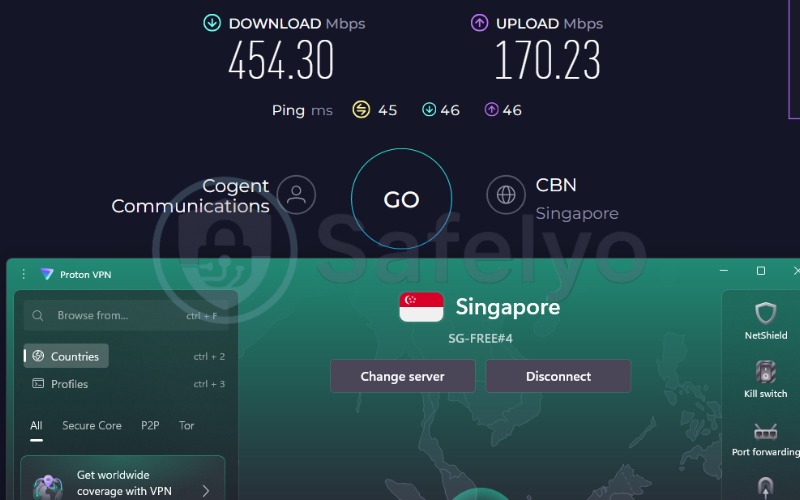
Surprisingly, ProtonVPN’s permanent free tier held up incredibly well. The free connection delivered 454.30 Mbps download speeds and a 45 ms ping on the same Singapore routing. This handles demanding tasks efficiently and ensures highly reliable connections for casual gaming, seamless video streaming, and social media.
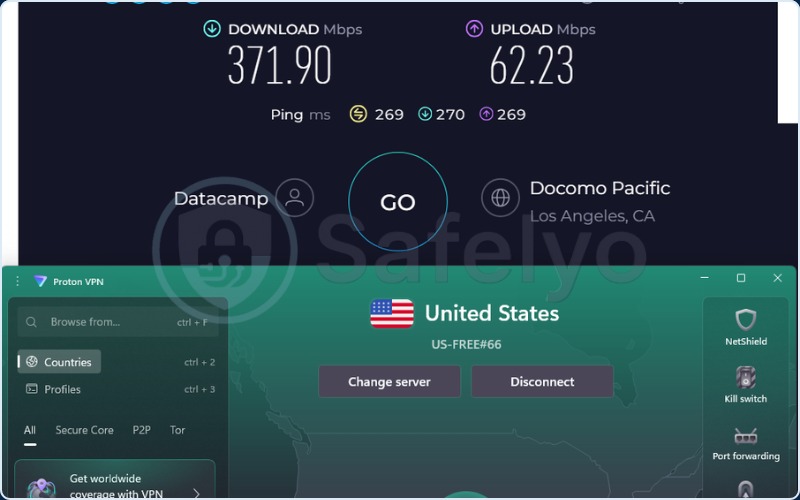
Even when evaluating the distant US server on the free tier, ProtonVPN maintained a highly capable 371.90 Mbps download speed. This proves you can bypass global restrictions without sacrificing the bandwidth necessary for high-definition streaming.
Here is the server performance data we recorded for the paid Plus tier:
| Server | Download (Mbps) | Upload (Mbps) | Ping (ms) |
|---|---|---|---|
| US | 370.13 | 97.29 | 273 |
| Singapore | 482.98 | 143.44 | 46 |
Here is the server performance data we recorded for the Free tier:
| Server | Download (Mbps) | Upload (Mbps) | Ping (ms) |
|---|---|---|---|
| US | 371.90 | 62.23 | 269 |
| Singapore | 454.30 | 170.23 | 45 |
Ease of Use & Device Support
ProtonVPN provides a dedicated Chrome extension for all free users. This makes it incredibly simple to bypass administrative blocks on a personal laptop directly from the browser window. You no longer need to download and install heavy desktop software to gain basic access to blocked websites. The ProtonVPN mobile apps for iOS and Android are similarly streamlined, featuring a simple one-click connection interface.
Verdict: Best for students who consume high bandwidth but have zero budget to spend.
3.3. Surfshark: Best for sharing on a tight budget
Surfshark is a highly competitive VPN that focuses on maximizing value. Surfshark is one of the only premium VPNs that allows an unlimited number of devices to connect simultaneously under a single subscription.
| Features | Details |
|---|---|
| Best For | Sharing with classmates |
| Starting Price | $2.49/mo (Starter 2-year plan) |
| Company | Surfshark B.V. |
| Jurisdiction | The Netherlands |
| Independent Audit | Yes (Deloitte, Cure53) |
| No-Logs Policy | Yes |
| RAM-Only Servers | Yes (100%) |
| Servers | 4,500+ |
| Countries | 100 |
| Avg. Download Speed | 372.46 Mbps (US) / 471.63 Mbps (Singapore) |
| Avg. Upload Speed | 88.88 Mbps (US) / 189.00 Mbps (Singapore) |
| Avg. Latency | 264 ms (US) / 63 ms (Singapore) |
| Protocols | WireGuard, OpenVPN, IKEv2, Dausos |
| Kill Switch | Yes |
| Obfuscation | Yes (Camouflage Mode, NoBorders) |
| Port Forwarding | No |
| Dedicated IP | Yes |
| Simultaneous Connections | Unlimited |
| Netflix Regions | 28+ |
| Disney+ | Yes |
| BBC iPlayer | Yes |
| Torrent / P2P | Yes |
| Win/Mac/iOS/Android | Yes |
| Linux | Yes |
| Browser Extension | Yes (Chrome, Firefox, Edge) |
| Router Support | Yes |
| Live Chat 24/7 | Yes |
| Refund Policy | 30-day money-back guarantee |
| Free Trial | 7-day free trial (Mobile) |
| Overall Positioning | Best value for unlimited devices |
| Official Website | surfshark.com |
Before deciding if this service fits your needs, review these specific advantages and drawbacks.
Pros
Allows unlimited simultaneous connections on a single account.
Features “NoBorders” mode specifically designed for restricted networks.
Extremely affordable on long-term plan
Cons
No free tier available.
High latency on distant servers (e.g., 264 ms to the US).
Why we picked it for school
Surfshark integrates unique anti-blocking tools named NoBorders and Camouflage Mode into its core app. These settings automatically detect heavy network restrictions and connect you to the most effective server to bypass them without requiring manual protocol adjustments.
Furthermore, Surfshark allows unlimited simultaneous connections on one account. This means a large group of friends can split the $2.49/mo subscription cost, making it highly economical for students.
Speed & Performance
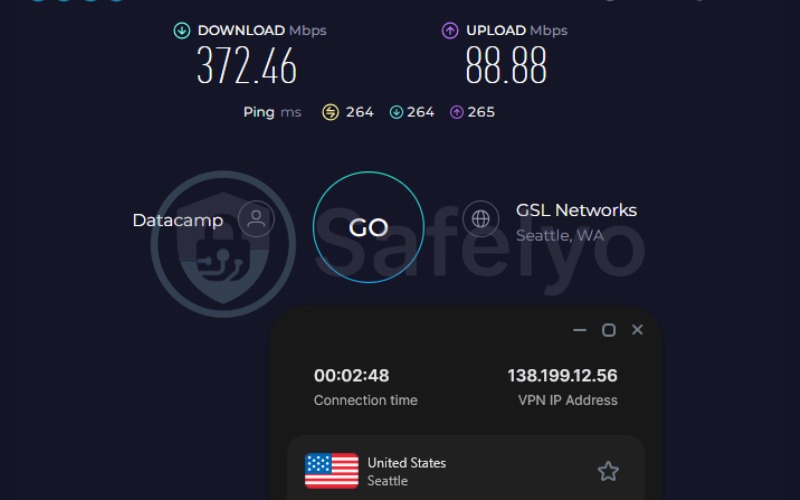
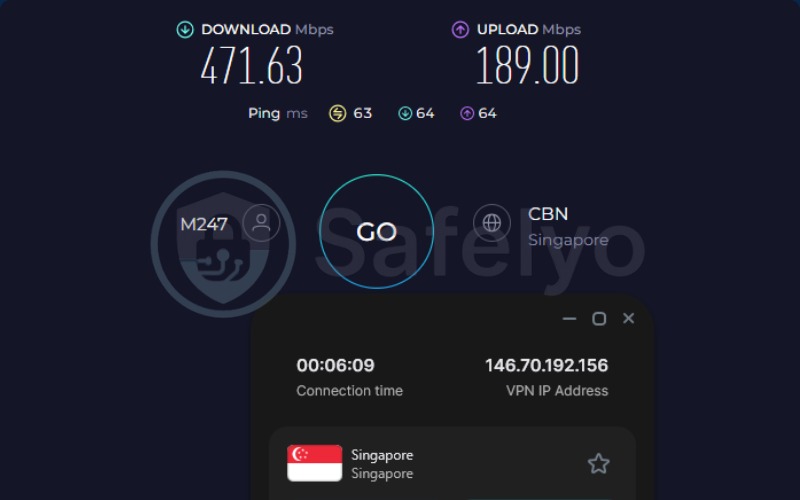
Our localized Singapore test recorded a high download speed of 471.63 Mbps combined with a 63 ms ping. This high-capacity speed handles multi-player gaming and huge file downloads effectively. Although the ping rises significantly on distant servers, the 63 ms response on regional connections remains fully acceptable for slow-paced gaming and web browsing between classes.
Here is the server performance data we recorded:
| Server | Download (Mbps) | Upload (Mbps) | Ping (ms) |
|---|---|---|---|
| US | 372.46 | 88.88 | 264 |
| Singapore | 471.63 | 189.00 | 63 |
Ease of Use & Device Support
Surfshark provides clean, highly responsive browser extensions for both Chrome and Edge. A notable advantage is the Bypasser split tunneling feature available in the main app.
This tool allows students to route only restricted applications (like Discord or Spotify) through the encrypted tunnel while keeping official school-related portals running on the regular, unencrypted campus network. This prevents school portals from locking you out due to unrecognized IP addresses.
Verdict: Best for budget-conscious students who want to split a premium subscription with roommates or classmates.
3.4. Windscribe: Best free plan for deep obfuscation
Windscribe is a highly technical, customizable VPN that excels in providing anti-censorship tools. Windscribe offers a generous free tier combined with a flexible pricing model for users who want to build their own plans.
| Features | Details |
|---|---|
| Best For | Bypassing deep network blocks for free |
| Starting Price | $3.00/mo (Build A Plan) |
| Company | Windscribe Limited |
| Jurisdiction | Canada |
| Independent Audit | Yes |
| No-Logs Policy | Yes |
| RAM-Only Servers | Yes |
| Servers | Not disclosed |
| Countries | 69+ |
| Avg. Download Speed | 187.66 Mbps (US) / 452.56 Mbps (Hong Kong) |
| Avg. Upload Speed | 91.75 Mbps (US) / 47.76 Mbps (Hong Kong) |
| Avg. Latency | 188 ms (US) / 46 ms (Hong Kong) |
| Protocols | WireGuard, OpenVPN, IKEv2, Stealth, Wstunnel, AmneziaWG |
| Kill Switch | Yes (Firewall) |
| Obfuscation | Yes (Stealth, Wstunnel, Circumvent Censorship) |
| Port Forwarding | Yes |
| Dedicated IP | No (Offers Static IP instead) |
| Simultaneous Connections | Unlimited |
| Netflix Regions | Yes |
| Disney+ | Yes |
| BBC iPlayer | Yes |
| Torrent / P2P | Yes |
| Win/Mac/iOS/Android | Yes |
| Linux | Yes |
| Browser Extension | Yes |
| Router Support | Yes |
| Live Chat 24/7 | No (Bot only) |
| Refund Policy | 7-day money-back guarantee (Under 10GB used) |
| Free Trial | 10GB/month free plan |
| Overall Positioning | Highly customizable technical VPN |
| Official Website | windscribe.com |
Before deciding if this service fits your needs, review these specific advantages and drawbacks:
Pros
Generous 10GB/month free plan.
Massive array of obfuscation tools (Wstunnel, Stealth, AmneziaWG).
“Build a Plan” allows custom pricing starting at $3.00/mo.
Cons
Free plan limits server locations and requires email confirmation.
No 24/7 human live chat support.
Why we picked it for school
Windscribe features a comprehensive anti-censorship toolkit designed to navigate strict firewalls. If a school utilizes advanced blocking methods to shut down standard protocols, Windscribe offers the Wstunnel feature, which seamlessly wraps your data traffic inside a WebSocket.
Combining this with the dedicated Circumvent Censorship toggle cuts right through restrictions where traditional protocols routinely fail. This makes Windscribe an invaluable VPN for students dealing with highly restrictive IT departments.
Speed & Performance
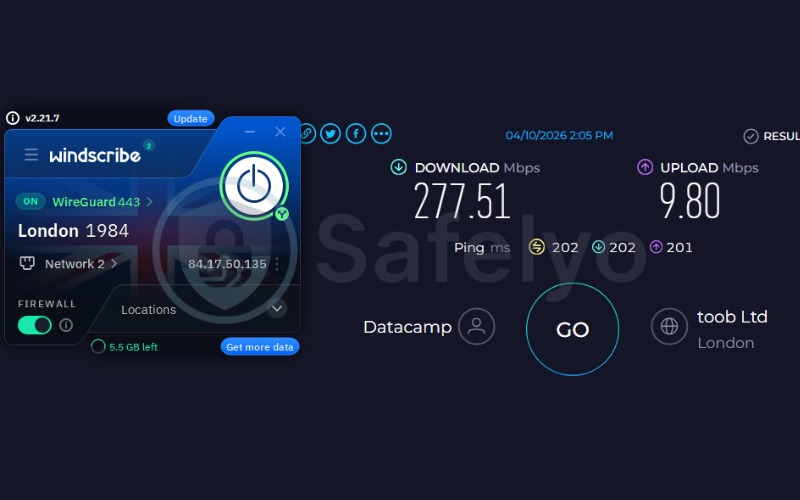
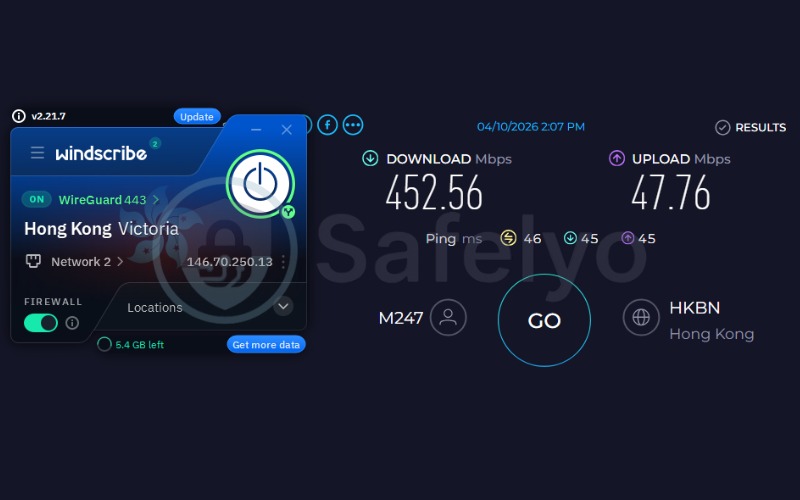
During testing via the Hong Kong location, Windscribe delivered a 452.56 Mbps download rate and a tight 46 ms ping. This performance level is best for 4K video streaming and multi-player gaming, ensuring that your connection will not drop during heavy multimedia consumption in your free time. The UK server also held up well, providing a reliable 277.51 Mbps download speed.
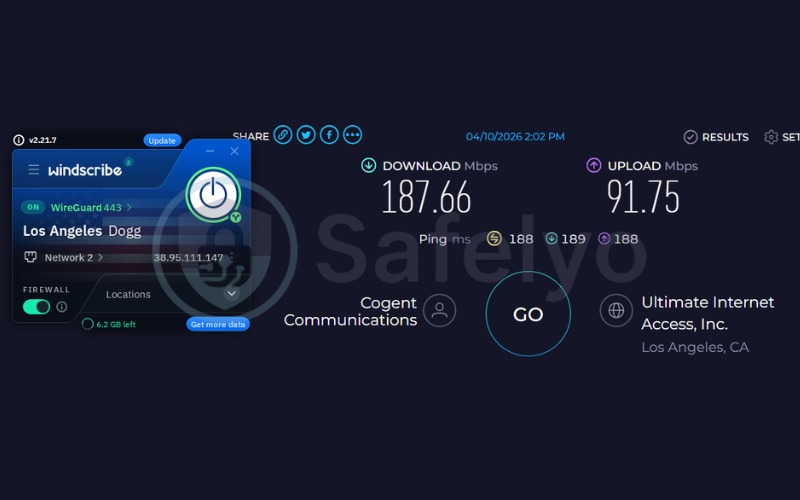
Here is the server performance data we recorded:
| Server | Download (Mbps) | Upload (Mbps) | Ping (ms) |
|---|---|---|---|
| US | 187.66 | 91.75 | 188 |
| UK | 277.51 | 9.80 | 202 |
| Hong Kong | 452.56 | 47.76 | 46 |
Ease of Use & Device Support
Windscribe includes a powerful server-side ad-blocking tool called R.O.B.E.R.T. that actively cleans up your browsing experience. A major benefit is that free users still gain full access to Windscribe’s excellent browser extensions. This means you can bypass blocks on your school Chromebook directly from Chrome without needing administrative rights to install the full desktop client.
Verdict: Best for students who need a reliable free VPN with deep obfuscation to bypass stubborn school Wi-Fi blocks.
3.5. PIA (Private Internet Access): Best for extreme budgets & multitasking
Private Internet Access (PIA) is a long-standing VPN known for its open-source transparency and highly configurable apps. PIA focuses heavily on providing extreme affordability and massive server availability.
| Features | Information |
|---|---|
| Best For | Extreme budgets and multitasking |
| Starting Price | $1.33/mo (3 Years + 3 Months plan) |
| Company | PIA Private Internet Access, Inc. |
| Jurisdiction | United States (Denver, CO) |
| Independent Audit | Yes (Deloitte Audit Romania) |
| No-Logs Policy | Yes |
| RAM-Only Servers | Yes |
| Servers | 35,000+ (estimated) |
| Countries | 90 |
| Avg. Download Speed | 351.03 Mbps (US) / 27.20 Mbps (Singapore) |
| Avg. Upload Speed | 294.73 Mbps (US) / 107.71 Mbps (Singapore) |
| Avg. Latency | 201 ms (US) / 57 ms (Singapore) |
| Protocols | OpenVPN, WireGuard®, IKEv2/IPSec |
| Kill Switch | Yes (Advanced, firewall-based) |
| Obfuscation | Yes (Multi-Hop Obfuscation) |
| Port Forwarding | Yes |
| Dedicated IP | Yes |
| Simultaneous Connections | Unlimited devices |
| Netflix Regions | Yes (Netflix, BBC iPlayer, Hulu, HBO Max) |
| Disney+ | Unverified |
| BBC iPlayer | Yes |
| Torrent / P2P | Yes |
| Win/Mac/iOS/Android | Yes |
| Linux | Yes |
| Browser Extension | Yes (Chrome, Firefox, Opera) |
| Router Support | Yes |
| Live Chat 24/7 | Yes |
| Refund Policy | 30-day money-back guarantee |
| Free Trial | 7-day free trial for iOS and Android |
| Overall Positioning | 100% Open Source Transparency |
| Official Website | privateinternetaccess.com |
Before deciding if this service fits your needs, review these specific advantages and drawbacks.
Pros
Incredibly cheap at $1.33/mo with unlimited device connections.
Advanced Split Tunneling allows simultaneous school portal and entertainment app access.
100% open-source apps ensure high transparency.
Cons
Based in the United States (part of the 5-Eyes alliance).
Slower download speeds on certain Asian servers (27.20 Mbps in Singapore tests).
Why we picked it for school
PIA directly solves the core problem of a strict student budget. PIA offers an incredibly low price of just $1.33/mo and couples it with unlimited simultaneous connections, making it extremely easy to share a single account with your roommates to save maximum money.
Furthermore, PIA includes advanced Split Tunneling logic. This feature lets students unlock entertainment apps like TikTok or Discord while routing internal academic portals through the regular unencrypted network to prevent disruptive IP-related login errors.
Speed & Performance
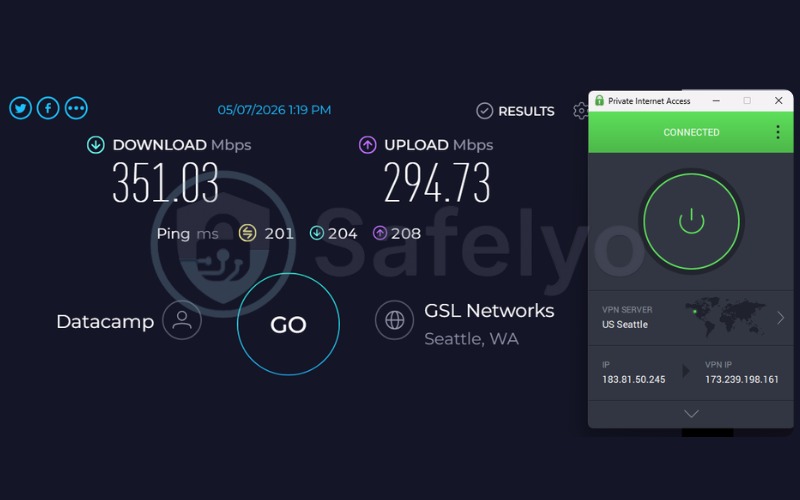
Testing the US connection yielded a robust 351.03 Mbps download rate with a 201 ms ping. This US connection speed is best for multi-player gaming, 4K video streaming, and huge file downloads.
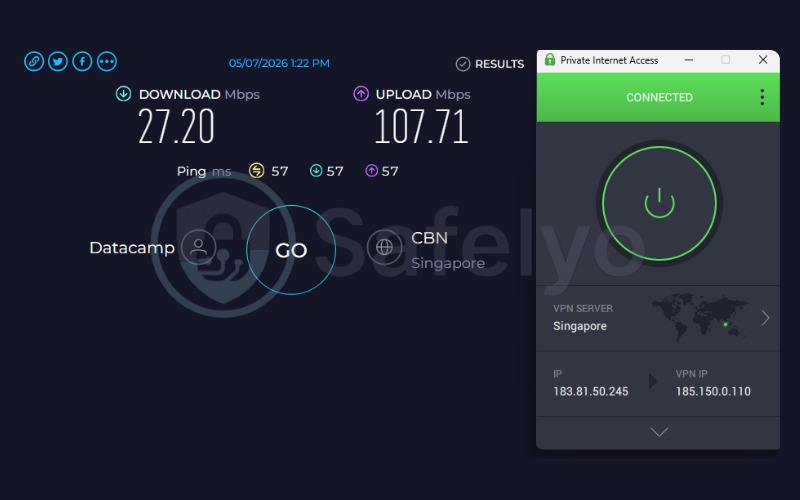
Conversely, the Singapore server recorded a much lower 27.20 Mbps download rate alongside a 57 ms ping. The 57 ms ping maps well to slow-paced gaming, web browsing, and checking emails.
The 27.20 Mbps capacity is still best for 4K video streaming and online gaming, providing enough baseline bandwidth for consistent media viewing, even if PIA falls behind competitors in raw speed tests.
Here is the server performance data we recorded:
| Server | Download (Mbps) | Upload (Mbps) | Ping (ms) |
|---|---|---|---|
| US | 351.03 | 294.73 | 201 |
| Singapore | 27.20 | 107.71 | 57 |
Ease of Use & Device Support
PIA provides a robust Chrome extension that integrates perfectly into a standard Chromebook workflow. PIA also bundles the MACE ad-blocker directly into the client. The MACE tool effectively prevents annoying banners and tracking scripts from loading, which helps keep your browsing fast and clean on campus.
Verdict: Best for students on a tight budget who need to share an account and utilize split-tunneling for seamless access to school portals.
4. Best free VPNs for school
If you are on a tight budget, finding a reliable free VPN can help you access restricted websites without a monthly subscription. Note that you should generally avoid using the Tor Browser on campus networks.
While Tor is free, it tends to be slow, is often blocked by default, and is associated with dark web browsing. Using it might unnecessarily flag your connection to school IT administrators. Instead, consider these two practical free alternatives:
- Proton VPN Free: ProtonVPN offers permanent unlimited data with absolutely no advertisements. The included Stealth protocol successfully masks your traffic to beat common Wi-Fi filters without forcing you to upgrade for basic access.
- Windscribe Free: Windscribe sets a 10GB monthly data cap but balances it by offering deep obfuscation protocols. Features like Wstunnel are specifically designed to push through the toughest institutional firewalls that block standard encryption methods.
5. Student hack: The “refund cycle” trick for free premium VPNs
Students can utilize the standard 30-day money-back guarantee offered by premium VPN providers to effectively use top-tier services for free throughout an entire semester.
Instead of paying a long-term subscription upfront, you purchase a one-month plan from a premium provider like NordVPN. You use the service securely on campus for 29 days. Before the 30-day window closes, you contact their customer support via live chat, cancel the subscription, and request a full refund.
Once the first provider refunds your money, you immediately sign up for a different premium service, such as Surfshark or PIA. You repeat this cancellation and refund cycle with multiple providers sequentially. This method legally grants you months of premium, high-speed access without permanently spending your limited budget.
Keep track of your purchase dates meticulously on a calendar. Missing the cancellation deadline by even one day completely invalidates the refund policy, leaving you locked into the payment. Also, note that providers only allow you to claim this refund once per account.
If you want to learn more about how to safely use these money-back guarantees or find other providers offering them, check out our full guide on the best VPN free trial options available this year.
While this workaround can help you save money, we highly encourage you to pay for a subscription to support these VPN providers if you can afford it. Maintaining high-speed servers, top-tier security infrastructure, and 24/7 customer support is expensive.
We do not advocate for abusing the refund policy; rather, this is shared purely as a temporary solution for students on extremely tight budgets. If you find a service genuinely valuable and reliable, please consider purchasing a long-term plan to support the developers!
6. VPN for school Chromebook: Step-by-step setup guide
Many students rely completely on school-issued Chromebooks, requiring a different approach to bypass administrative blocks effectively, since desktop applications cannot be installed.
6.1. Can you install a VPN on a school-issued Chromebook?
A Chromebook managed by your school’s Google Workspace administrator operates under strict technical constraints. Administrators can completely block the installation of third-party Chrome Extensions and restrict access to the Google Play Store.
If your specific device is locked down via Mobile Device Management (MDM) software, a standard VPN extension simply will not install, and you will see a restriction error when attempting to add it from the store.
6.2. Best free VPNs available on the Chrome Web Store
If your device is unlocked or you are using a personal Chromebook on the school network, both ProtonVPN and Windscribe offer lightweight browser extensions available directly on the Chrome Web Store. These plugins install in seconds and provide immediate proxy protection without requiring complex network configurations.
6.3. How to install a VPN extension on Chromebook
Follow these four steps to secure your browser connection instantly:
- Open the Chrome Web Store.
- Search for your chosen VPN (e.g., ProtonVPN or Windscribe).
- Click ‘Add to Chrome’.
- Pin the extension to your toolbar, log in, and connect.
Using a browser extension is incredibly efficient, but you must remember that it only proxies your active browser traffic. It does not secure or unblock traffic from separate Android apps running natively on your Chromebook hardware.
7. How to choose a school VPN
To choose a school VPN, you must prioritize strong obfuscation features to bypass firewalls, fast speeds to prevent buffering, and device compatibility for your specific laptop or smartphone.
- Look for obfuscation protocols: Standard VPN traffic is easily detected by campus firewalls. You need stealth protocols like Wstunnel or Stealth mode to mask your connection.
- Check device limits and compatibility: Ensure the provider offers a dedicated Chrome extension if you use a Chromebook. Verify that the service allows enough simultaneous connections for your phone, tablet, and laptop.
- Evaluate the speed impact: VPN encryption naturally slows down your internet. Pick a provider that maintains speeds above 20 Mbps so you can stream video content smoothly during your breaks.
- Review the privacy policy: Your school cannot see your traffic, but the VPN provider can. Always choose a service with an independently audited no-logs policy to ensure your browsing history remains completely private.
- Consider your budget: Students usually have tight budgets. Look for affordable long-term plans, generous free tiers, or utilize a reliable money-back guarantee to test the service risk-free.
8. School-issued device vs. your own device: A critical difference
Understanding device ownership defines exactly why your bypass attempts might be failing and exposes significant privacy implications regarding who monitors your activity.
8.1. What is MDM and why it matters for VPN users
Mobile Device Management software allows an institution to exert root-level control over the laptops or iPads they issue to students. If the school owns the device, the administration dictates the core software environment.
This means IT staff can track installed applications, view screen activity remotely, and completely override VPN encryption by installing custom root certificates. A VPN protects data in transit, but it cannot protect you from monitoring software installed directly on the operating system.
8.2. How to check if your device is managed
You can easily verify the management status of your Chromebook in two simple steps:
- Click on the time display located at the bottom right corner of the screen.
- Look for a small building icon accompanied by the text “Managed by your organization” at the top of the menu panel. If that icon is present, the school fully controls the hardware.
9. What happens if your school catches you using a VPN?
Before deciding to bypass academic network filters, it helps to understand the potential consequences.
9.1. How schools detect VPN traffic
Many schools use Deep Packet Inspection (DPI) to monitor network traffic. Instead of just looking at where data is going, DPI analyzes the metadata and structural patterns of the data packets themselves.
Even though your actual browsing content remains encrypted, DPI software can easily recognize the unique digital signatures of standard VPN protocols and automatically block the connection. To get around this, obfuscation features scramble these signatures, making your VPN traffic look exactly like regular HTTPS web browsing so it can pass through the firewall undetected.
9.2. School policy vs. legal consequences
Using a VPN is generally legal, as you are simply encrypting your personal data. However, bypassing the campus firewall often violates a school’s Acceptable Use Policy.
If administrators detect unauthorized VPN use, it can lead to disciplinary actions such as a warning, temporary loss of Wi-Fi privileges, or device confiscation. It is a good idea to review your school’s specific guidelines before attempting to bypass their network restrictions.
10. FAQs about VPN for school
What VPN can I use at school?
You should choose NordVPN to break through heavy firewalls, ProtonVPN for free unlimited data, or PIA to accommodate extreme student budgets and device sharing.
Is it legal to use a VPN in school?
Yes, it is entirely legally sound to encrypt your data. However, bypassing local network restrictions directly breaks most academic Acceptable Use Policies.
What VPN works at school for free?
ProtonVPN and Windscribe are the two most reliable free services capable of handling strict institutional firewalls without logging your data.
Can schools see if you use a VPN?
Network administrators can clearly see that your device is connected to a known VPN server IP address unless you utilize an obfuscation protocol. They cannot, however, see what specific websites you are actively browsing inside the encrypted tunnel.
Can I use a VPN on a school Chromebook?
You can install the software only if the network administrator has not actively locked down access to the Chrome Web Store via device management controls.
11. Conclusion
Finding the right VPN depends entirely on your specific academic environment and personal budget constraints. NordVPN remains the ultimate premium choice for crushing through heavy firewalls with high-speed reliability. If you need to share costs with friends, Surfshark delivers excellent value. Meanwhile, ProtonVPN holds the title for the most generous free option by providing unlimited data without imposing restrictive caps.
Try out our top recommendations risk-free by utilizing their standard 30-day money-back guarantees to ensure they work smoothly on your campus network. By matching the right VPN to your specific restrictions, you can effortlessly implement a secure VPN for school and reclaim your digital freedom.
For more detailed reviews, check out our Best VPN category or return to the Safelyo homepage for the latest cybersecurity guides.