Proton VPN is the best VPN with port forwarding in 2026. It is the only mainstream provider combining an independently audited no-logs policy (4 audits, the most recent by Securitum in September 2025), Swiss jurisdiction, and a one-click port forwarding toggle available directly in its paid desktop apps.
Finding a reliable port forwarding VPN has become significantly harder in recent years. Many providers, such as Mullvad, have discontinued port forwarding support, while popular brands like NordVPN and Surfshark simply do not offer this feature.
In this article, we will thoroughly analyze the top VPNs that still actively support port forwarding, evaluating their security, performance, and ease of use.
Top VPNs with port forwarding feature:
- Proton VPN (Best overall VPN with port forwarding): The only option in this list combining 4 independent audits (latest: Securitum, September 2025), Swiss jurisdiction, and a one-click port forwarding toggle activated directly in its paid desktop apps.
- Private Internet Access (Best for torrenting with port forwarding): Offers port forwarding across 90 countries with unlimited simultaneous connections, backed by a Deloitte-audited no-logs policy.
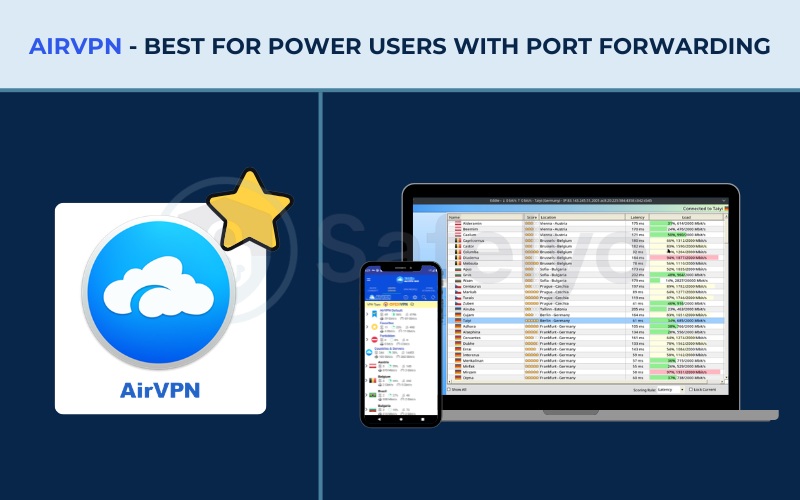
- AirVPN (Best for power users with port forwarding): Supports port forwarding on all 255 servers with up to 5 simultaneous ports and Remote Port Forwarding, with no dedicated servers blocked from P2P.
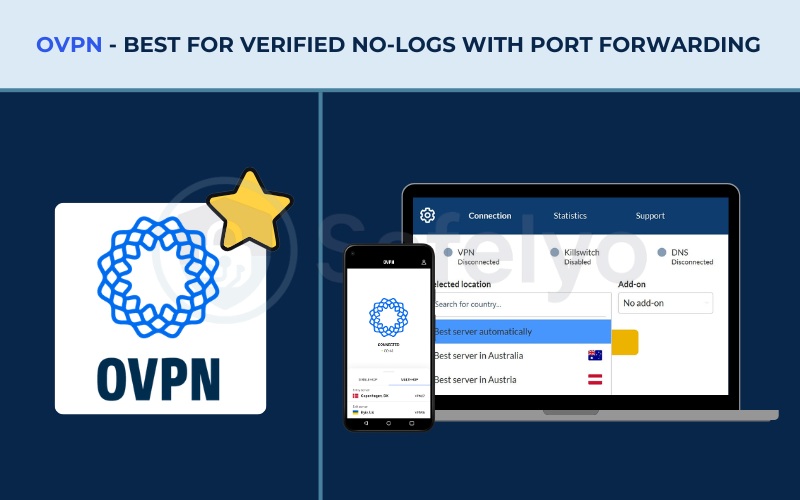
- OVPN (Best for verified no-logs with port forwarding): Its no-logs policy was tested in a Swedish court of law in 2020, not just claimed on paper, while running 100% diskless RAM-only bare-metal servers. Port forwarding allows up to 7 TCP/UDP ports simultaneously.
- PrivateVPN (Best for ease of setup with port forwarding): Assigns a port automatically from the app without manual configuration, and offers direct access to in-house developers via live chat for remote desktop assistance.
- PureVPN (Best budget add-on for port forwarding): Port forwarding is available as a low-cost optional add-on starting at $1.49/mo, allowing users to forward up to 15 ports simultaneously, paired with 4 consecutive independent audits and ISO 27001 certification.
The table below summarizes the core port forwarding specifications across all six providers:
| VPN | Port forwarding type | Max simultaneous ports | OS support for port forwarding | Starting price | No-logs audit |
|---|---|---|---|---|---|
| Proton VPN | Dynamic (NAT-PMP) | 1 | Windows, macOS, Linux | $2.99/mo (24-month) | Yes (4 audits, Securitum 2025) |
| PIA | Dynamic (session-based) | 1 | Windows, macOS, Linux, Android | $1.33/mo (3-year + 3 months) | Yes (Deloitte) |
| AirVPN | Static (fixed) | 5 | All platforms via web panel | €2.75/mo ~ $3.13/mo (3-year) | No |
| OVPN | Static (fixed) | 7 | All platforms | €4.22/mo ~ $4.81/mo (3-year) | Court-verified (2020) |
| PrivateVPN | Automatic assignment | 1 | Windows, macOS, Linux | $2.00/mo (36-month) | No |
| PureVPN | Static (paid add-on) | 15 | All platforms | $2.15/mo + $1.49/mo add-on | Yes (KPMG, 4 times) |
Prices and features are subject to change. Always verify current plans before purchasing. This article is for informational purposes only.
1. How we tested and selected the best VPNs with port forwarding
Speed test data referenced in this article was collected from a physical location in Vietnam using a Windows 11 PC on each provider’s fastest available protocol, typically WireGuard. Testing was conducted to reflect real-world conditions rather than controlled laboratory measurements.
For port forwarding specifically, we applied a focused evaluation framework built around these criteria:
- Port forwarding implementation: We assessed whether each provider uses static (fixed) ports suitable for server hosting or dynamic (session-based) ports suited for torrenting, and whether the assignment process is manual or automatic.
- Maximum simultaneous ports: We evaluated the port limit per user, which ranges from a single-port assignment to multi-port setups supporting up to 15 simultaneous ports for power users hosting multiple services.
- Security and port fail protection: We verified whether each provider’s infrastructure is built to mitigate the “port fail” vulnerability and whether it includes robust kill switches and leak protection as complementary safeguards.
- Operating system compatibility: We confirmed exactly which platforms support the port forwarding feature natively through the app versus through a web dashboard configuration, since this distinction directly affects which providers work on iOS and Android.
- P2P and torrenting support: We confirmed whether port forwarding is restricted to specialty server groups or available across the entire network to maximize peer connection flexibility.
If you want to know the specific details of how we evaluate each individual VPN, you can read our full article on how we test and review VPNs.
2. Best VPNs with port forwarding: Top 6 options for torrenting, gaming, and server hosting
The six providers below each deliver port forwarding through different technical models, serving different user needs. If you are unfamiliar with terms like “Static”, “Dynamic”, or “NAT-PMP” mentioned in these reviews, we highly recommend jumping down to Section 5 (Dynamic vs. static port forwarding) to understand which setup fits your exact goal before making a purchase.
2.1. Proton VPN: Best overall VPN with port forwarding
Proton VPN is built by Proton AG, the Swiss company behind the encrypted email service ProtonMail, which gives it a verifiable institutional track record in consumer privacy rather than just stated policy. Proton VPN holds 4 independent security audits, the most recent completed by Securitum in September 2025, a permanent free tier with no credit card required, and a server network of 20,000+ servers across 148+ countries.
What really makes Proton VPN stand out for this guide is how effortless port forwarding is on its paid plans. The provider makes it a simple one-click toggle. You can activate it directly inside the client interface whenever you connect to the P2P server lists.
| Feature | Details |
|---|---|
| Best for | Overall port forwarding; privacy-focused users; torrenting |
| Starting price | $2.99/mo (24-month) |
| Company | Proton AG |
| Jurisdiction | Switzerland (outside 5/9/14 Eyes) |
| Independent audit | Yes (4 audits; latest by Securitum, September 2025) |
| No-logs policy | Yes (independently verified across 4 audits) |
| RAM-only servers | No (full-disk encryption utilized instead) |
| Servers | 20,000+ |
| Countries | 148+ |
| Protocols | WireGuard, IKEv2, Stealth |
| Kill switch | Yes (Standard and Advanced; Windows, macOS, Linux) |
| Obfuscation | Yes (Stealth protocol) |
| Port forwarding | Yes (paid plans) |
| Dedicated IP | Yes (Business plans only) |
| Simultaneous connections | 10 (paid); 1 (free) |
| Torrent / P2P | Yes (dedicated P2P servers on paid plans) |
| Win/Mac/iOS/Android | Yes (all platforms) |
| Linux | Yes (GUI app and CLI) |
| Browser extension | Chrome and Firefox |
| Router support | Yes |
| Live chat 24/7 | No (live chat available 9 AM to 12 AM CET for paid plans only) |
| Refund policy | 30-day money-back guarantee |
| Free trial | Permanent free plan (no credit card required) |
| Overall positioning | Privacy-first Swiss VPN with the largest audited server network offering port forwarding |
| Official website | https://protonvpn.com |
Pros
4 independent audits with the most recent in September 2025
Swiss jurisdiction, outside 5/9/14 Eyes
Exceptional speed performance
20,000+ servers across 148+ countries
AES-256 (IKEv2) and ChaCha20 (WireGuard) encryption
Cons
Not RAM-only servers (uses full-disk encryption instead)
Live chat restricted to 9 AM to 12 AM CET
No port forwarding support on iOS
Dedicated IP only on Business plans
2.1.1. Why we picked it
Proton VPN’s audit track record is the most consistent in this comparison. Securitum audited the platform in 2022, 2023, 2024, and 2025, making it four consecutive years at a frequency no other provider in this list has matched. Beyond the audit cadence, Swiss jurisdiction means Proton VPN is not subject to 14 Eyes data-sharing agreements and carries no DMCA exposure.
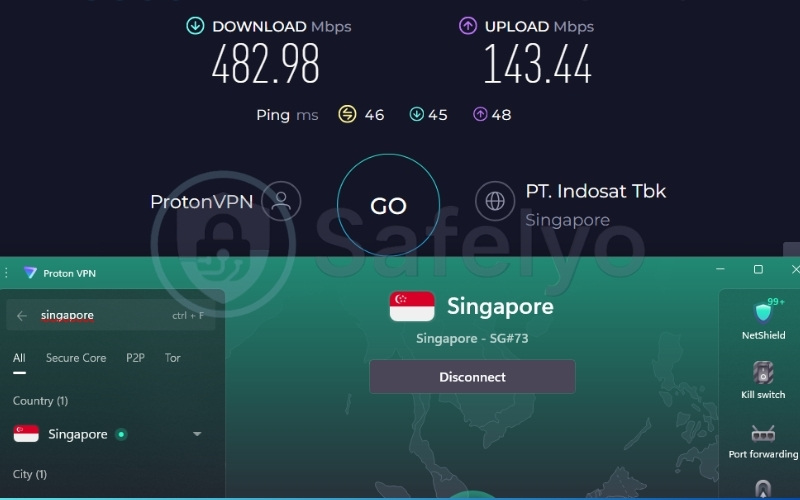
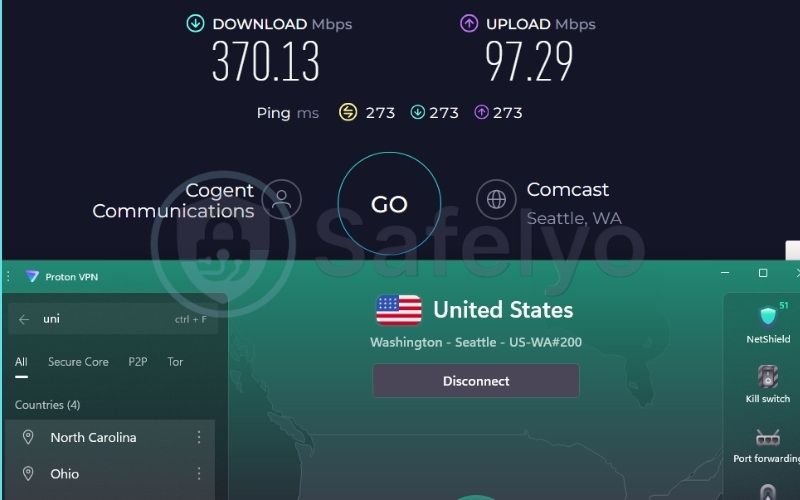
In performance tests we conducted from Vietnam, Proton VPN delivered 482.98 Mbps on Singapore servers and 370.13 Mbps on US servers, making it capable of handling 4K streaming, multiplayer gaming, and large file transfers without meaningful speed degradation.
Encryption runs through AES-256 with IKEv2 for compatibility and ChaCha20 with WireGuard for peak performance, two modern approaches covering both priorities. DNS leak tests via ipleak.net returned clean results, and Proton VPN includes WebRTC and IPv6 leak protection across its browser extension, Windows, Linux GUI, and Android clients.
2.1.2. Port forwarding implementation and safety
Port forwarding on Proton VPN is available on paid plans and is activated directly from within the desktop app, with no web dashboard required. The implementation uses the NAT-PMP protocol to assign ports dynamically per session, meaning one active forwarded port is available at a time.
The port number changes on each VPN reconnection. This suits torrenting scenarios well, but it is not appropriate for server hosting where external clients require a consistent port address.
Where Proton VPN distinguishes itself is in its security layer. The company has engineered port forwarding rules at the firewall level to isolate forwarded ports from other users on the same server. This directly addresses cross-user port fail vulnerabilities.
The native port forwarding toggle is available on Windows, macOS, and Linux desktop clients. It is not supported on iOS.
Best for: Privacy-first users who want port forwarding built into their paid plan without extra cost, particularly on desktop operating systems.
2.2. Private Internet Access (PIA): Best for torrenting with port forwarding
Private Internet Access (PIA) is operated by PIA Private Internet Access, Inc., based in Denver, Colorado, placing it within US jurisdiction. However, PIA has produced verifiable court evidence that it held no user data when subpoenaed by the FBI, and its no-logs policy was independently audited by Deloitte Audit Romania.
The entire server network runs on RAM-only infrastructure. For torrenting specifically, PIA stands out with the largest estimated server network of any provider in this list (35,000+ servers across 90 countries). It offers unlimited simultaneous connections and built-in port forwarding paired with a dedicated MACE ad and tracker blocker.
| Feature | Details |
|---|---|
| Best for | Torrenting, P2P file sharing, budget-conscious users |
| Starting price | $1.33/mo (3-year + 3 months) |
| Company | PIA Private Internet Access, Inc. |
| Jurisdiction | United States (Denver, Colorado), 14 Eyes country |
| Independent audit | Yes (Deloitte Audit Romania) |
| No-logs policy | Yes (court-verified by FBI case records + Deloitte audit) |
| RAM-only servers | Yes |
| Servers | 35,000+ (independent estimate; PIA does not officially confirm this count) |
| Countries | 90 |
| Protocols | OpenVPN, WireGuard, IKEv2/IPSec |
| Kill switch | Yes (Advanced, firewall-based) |
| Obfuscation | Yes (Multi-Hop Obfuscation) |
| Port forwarding | Yes |
| Dedicated IP | Yes (token-based, available in multiple countries) |
| Simultaneous connections | Unlimited |
| Torrent / P2P | Yes (torrenting-optimized servers across the network) |
| Win/Mac/iOS/Android | Yes |
| Linux | Yes |
| Browser extension | Chrome, Firefox, Opera |
| Router support | Yes |
| Live chat 24/7 | Yes |
| Refund policy | 30-day money-back guarantee |
| Free trial | 7-day free trial (iOS and Android only) |
| Overall positioning | High-volume, budget-first VPN with court-tested no-logs, RAM-only servers. |
| Official website | https://www.privateinternetaccess.com |
Pros
Unlimited simultaneous connections
RAM-only server network
Court records prove no data was shared with law enforcement
Lowest starting price among paid options in this list ($1.33/mo)
Cons
US jurisdiction (14 Eyes country)
Port assignment is dynamic (changes each session, requires torrent client reconfiguration)
No independent audit for security infrastructure (only logging policy audited)
2.2.1. Why we picked it
The Deloitte Audit Romania review confirmed PIA’s logging policy. Real FBI court case records also document that PIA had no user data to produce when legally compelled to do so. That combination of an audited policy and a court-tested outcome is highly meaningful for a US-based provider operating in a 14 Eyes jurisdiction.
The RAM-only infrastructure ensures no persistent data survives a server power cycle. Additionally, PIA’s 10 Gbps colocated server architecture supports high-throughput P2P activity across 90 countries.
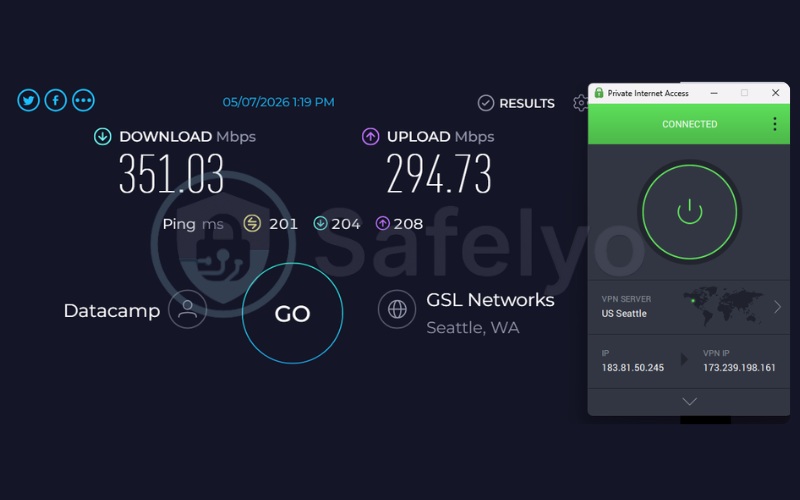
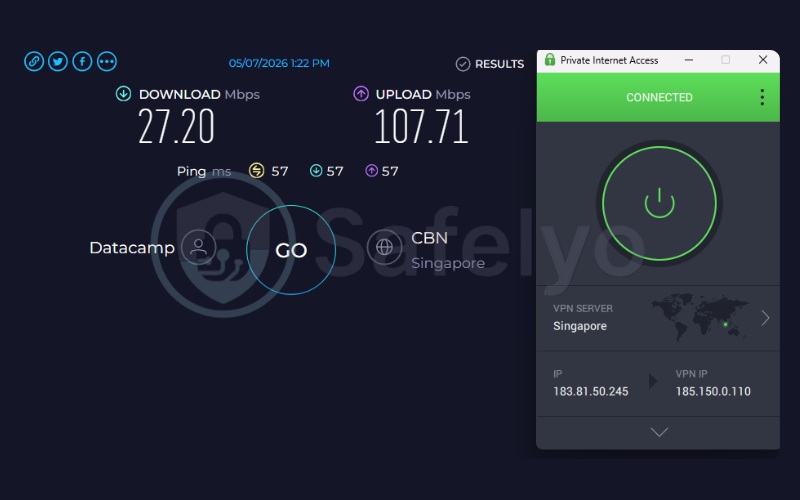
In performance tests from Vietnam, PIA achieved 351.03 Mbps on US servers, handling large file transfers without difficulty. However, Singapore servers dropped to 27.20 Mbps in testing, indicating some regional inconsistency worth noting for Asia-Pacific users.
PIA’s client source code is publicly available on GitHub. This gives technically inclined users the ability to independently inspect the software. The built-in MACE feature also blocks ads, trackers, and malware at the DNS level across all connected devices.
2.2.2. Dynamic port forwarding for torrenting
PIA uses a session-based dynamic port forwarding system that opens one port per session. Each time the VPN reconnects, a new port number is assigned. While the port changes every time you connect, this is surprisingly easy to manage for torrenting.
You simply copy the newly assigned port number into your BitTorrent client before you start downloading. Taking this extra ten seconds ensures you still get the massive speed boost from incoming peer connections.
PIA supports port forwarding across its Windows, macOS, Linux, and Android apps. This offers solid platform flexibility for desktop and mobile torrenters. One critical complement is PIA’s Advanced firewall-based kill switch. This prevents accidental real IP exposure if the VPN tunnel drops mid-download, directly protecting port-forwarding users during active P2P sessions.
Best for: Torrenters who want unlimited device connections and the widest server footprint at the lowest monthly price.
2.3. AirVPN: Best for power users with port forwarding
AirVPN is operated by Air di Paolo Brini, an Italy-based provider explicitly built and maintained by privacy activists and hacktivists. AirVPN is not targeting a mass-market consumer audience. The interface and web panel are highly technical.
AirVPN delivers a network where every server supports port forwarding simultaneously. There is no server tier required, no upgrade needed, and no P2P restrictions.
This is combined with OpenVPN over SSH, SSL, and Tor for deep obfuscation. AirVPN also utilizes a strict RAM-only infrastructure across all servers.
| Feature | Details |
|---|---|
| Best for | Power users; server hosting; maximum protocol flexibility |
| Starting price | €2.75/mo ~ $3.13/mo (3-year) |
| Company | Air di Paolo Brini |
| Jurisdiction | Italy (EU/GDPR framework) |
| Independent audit | No |
| No-logs policy | Yes |
| RAM-only servers | Yes |
| Servers | 255 |
| Countries | 23 |
| Protocols | OpenVPN (UDP/TCP), WireGuard, OpenVPN over SSH, OpenVPN over SSL, OpenVPN over Tor |
| Kill switch | Yes (“Network Lock”) |
| Obfuscation | Yes (OpenVPN over SSH, SSL, Tor; alternative ports) |
| Port forwarding | Yes (up to 5 ports simultaneously; Remote Port Forwarding) |
| Dedicated IP | No |
| Simultaneous connections | 5 |
| Torrent / P2P | Yes (supported on all servers without discrimination) |
| Win/Mac/iOS/Android | Yes (also ChromeOS) |
| Linux | Yes |
| Browser extension | No |
| Router support | Yes (DD-WRT, Tomato, AsusWRT, pfSense) |
| Live chat 24/7 | No (ticket and community forums only) |
| Refund policy | 30-day money-back guarantee |
| Free trial | Yes (3-day free trial plan) |
| Overall positioning | Privacy activist-operated VPN with unrestricted P2P, Remote Port Forwarding on all servers, and deep protocol obfuscation |
| Official website | https://airvpn.org |
Pros
Port forwarding available on all servers, no restriction by server type
Remote Port Forwarding with up to 5 simultaneous ports
RAM-only servers
GDPR-compliant Italian jurisdiction
Cons
No independent third-party security audit
No live chat support
No dedicated IP option
Technical setup is not beginner-friendly
2.3.1. Why we picked it
AirVPN’s port forwarding covers every server in the network without exception. Each of the 255 servers supports port forwarding and torrenting simultaneously, requiring no specialty upgrade. The encryption stack is particularly robust, featuring 4096-bit RSA and DH keys combined with AES-256-GCM and ChaCha20-Poly1305 cipher suites.
Italian and EU jurisdiction under GDPR means that data requests originating outside the EU require a formal legal process. However, the central trust gap is the absence of a third-party audit. AirVPN’s stated no-logs policy is not independently verified.
This is a material limitation for journalists, activists, or anyone facing targeted surveillance. For users who require audit-verified no-logs, Proton VPN or OVPN are stronger choices in this list.
AirVPN’s 3-day free trial is the most accessible entry point in this comparison. It offers genuine cost-free access to test the service before any financial commitment. Native IPv6 leak protection is handled efficiently through IPv6 Unique Local Address support inside the tunnel.
2.3.2. Remote port forwarding and server hosting
AirVPN’s Remote Port Forwarding feature allows users to map up to 5 static ports simultaneously via the web panel. Because these are static allocations, port numbers persist across server reconnections and device restarts.
This is exactly the right configuration for hosting Plex libraries or game servers. It is also ideal for maintaining stable SSH endpoints where external clients require a consistent destination port.
Port management handled through the web dashboard means port forwarding is inherently supported across all operating systems connecting through the Eddie client or standard OpenVPN/WireGuard files. This covers Windows, macOS, Linux, iOS, and Android.
AirVPN maintains proper routing table management to prevent port fail scenarios. This ensures a highly secure environment for users hosting outward-facing services.
Best for: Advanced users who want maximum port forwarding flexibility on every server without streaming prioritization.
2.4. OVPN: Best for verified no-logs with port forwarding
OVPN operates as a dual-entity structure. It is incorporated in the United States but headquartered and operated from Sweden. Its no-logs claim is unique in one specific respect: it was formally challenged in court.
In 2020, Swedish film companies filed an information injunction demanding OVPN hand over user data. OVPN presented their server architecture to the Patent and Market Court, demonstrating that a diskless RAM-only system cannot retain logs by technical design.
OVPN won the case, and no user data was produced. This is a documented legal outcome, not a simple marketing statement.
| Feature | Details |
|---|---|
| Best for | Privacy-first users; anonymous server hosting; court-verified no-logs |
| Starting price | €4.22/mo ~ $4.81/mo (3-year) |
| Company | OVPN Inc. / OVPN Integritet AB |
| Jurisdiction | United States (incorporated) / Sweden (operations and headquarters) |
| Independent audit | No |
| No-logs policy | Yes (court-verified) |
| RAM-only servers | Yes (100% diskless; Alpine Linux fetched via encrypted iPXE into RAM) |
| Servers | 96 bare-metal servers |
| Countries | 20 (across 32 cities) |
| Protocols | OpenVPN (UDP/TCP), WireGuard |
| Kill switch | Yes |
| Obfuscation | Yes (Stealth VPN via Shadowsocks) |
| Port forwarding | Yes (up to 7 TCP/UDP ports simultaneously) |
| Dedicated IP | Yes (Public IPv4 add-on, €4.00/month) |
| Simultaneous connections | 4 (1-month plan), 5 (1-year plan), 7 (3-year plan) |
| Torrent / P2P | Yes (allowed on all servers, no bandwidth limits) |
| Win/Mac/iOS/Android | Yes |
| Linux | Yes (Ubuntu, Fedora, openSUSE) |
| Browser extension | Chrome, Firefox, Edge |
| Router support | Yes (AsusWrt, DD-WRT, OpenWrt, Tomato, EdgeOS, pfSense, Vilfo, GL.iNet) |
| Live chat 24/7 | No |
| Refund policy | 10-day money-back guarantee |
| Free trial | No |
| Overall positioning | Small, technically rigorous VPN with court-proven diskless architecture and the highest port limit per session in this list |
| Official website | https://www.ovpn.com |
Pros
Court-proven no-logs (legal evidence, not just a claim)
100% RAM-only, bare-metal servers (no virtual machines)
Allows up to 7 simultaneous ports
Dynamic Multihop included at no extra cost
DMCA refusal on record (Rights Alliance 2020)
Cons
Live chat availability not consistent 24/7
Only 96 servers across 20 countries
No free trial
2.4.1. Why we picked it
The 2020 court case is the specific differentiator that sets OVPN apart from all other providers in this comparison. Film companies from The Rights Alliance filed for an information injunction. OVPN’s defense demonstrated to the Swedish court that their RAM-only diskless architecture made it technically impossible to store user connection data.
The court ruled in OVPN’s favor, with no user data produced. This goes beyond a standard audit because it represents genuine legal scrutiny under adversarial conditions rather than a scheduled review process.
The 100% bare-metal, diskless setup is also architecturally distinct from partial RAM-only implementations. Every server fetches Alpine Linux via encrypted iPXE directly into RAM on boot, leaving absolutely nothing stored on persistent media.
The Shadowsocks-based Stealth VPN disguises VPN traffic as ordinary HTTPS. Additionally, the Dynamic Multihop feature lets users select both their entry server and exit server manually. This provides more granular control than standard multi-hop implementations found in other providers.
One important clarification is that OVPN has no traditional cybersecurity firm audit. The court verification is legally significant, but it does not replace the kind of application-level encryption audit that Proton VPN has undergone with Securitum.
2.4.2. Multi-port configuration capabilities
OVPN’s port forwarding system supports up to 7 simultaneous static TCP/UDP ports. This is the highest port limit in this comparison. It is specifically useful for users hosting multiple services concurrently, such as a dedicated game server running alongside a web server and a Plex instance.
Port assignments are managed through the OVPN web dashboard and tied to the user account. As a result, static ports remain persistent across reconnections. This setup supports every operating system capable of connecting to OVPN, covering Windows, macOS, Linux, iOS, and Android.
To mitigate port fail risks, OVPN’s bare-metal infrastructure relies on strict iptables rules. These rules completely isolate inbound port traffic to the specific user account each port is mapped to, effectively preventing cross-user leakage at the routing level.
Best for: Technical users who require legally verified no-logs and want maximum simultaneous port control for hosting multiple services.
2.5. PrivateVPN: Best for ease of setup with port forwarding
PrivateVPN is operated by PrivateVPN Global AB in Sweden. This is a jurisdiction outside the 14 Eyes surveillance alliance and governed by GDPR-aligned Swedish privacy law. PrivateVPN has not undergone a third-party security audit, which is its most significant trust limitation.
What distinguishes PrivateVPN from the other options in this list is the simplicity of its port forwarding implementation. A port is automatically assigned to each connection directly from within the app, with no web panel configuration required at all.
PrivateVPN also offers a unique technical assistance option. If you experience complex setup issues during configuration, you can request remote desktop support from their in-house developers via TeamViewer.
| Feature | Details |
|---|---|
| Best for | Beginner-to-intermediate users; streaming; automatic port forwarding |
| Starting price | $2.00/mo (36-month) |
| Company | PrivateVPN Global AB |
| Jurisdiction | Sweden (outside 14 Eyes; EU/GDPR) |
| Independent audit | No |
| No-logs policy | Yes (Zero Data Logging Policy stated) |
| RAM-only servers | No |
| Servers | 200+ |
| Countries | 63 |
| Protocols | OpenVPN (UDP/TCP), WireGuard, L2TP, IPsec, PPTP, IKEv2 |
| Kill switch | Yes (System-wide VPN Kill Switch) |
| Obfuscation | Yes (Stealth VPN, capable of bypassing Great Firewall) |
| Port forwarding | Yes (at least 1 open port assigned automatically) |
| Dedicated IP | Yes (dynamic dedicated IPs available from app list) |
| Simultaneous connections | 10 |
| Torrent / P2P | Yes (unlimited P2P on HQN servers) |
| Win/Mac/iOS/Android | Yes |
| Linux | Yes |
| Browser extension | No |
| Router support | Yes |
| Live chat 24/7 | Yes (direct access to in-house developers, no outsourced support) |
| Refund policy | 30-day money-back guarantee |
| Free trial | No |
| Overall positioning | Easy-entry VPN with automatic port assignment, strong streaming track record, and unique remote desktop customer support |
| Official website | https://privatevpn.com |
Pros
Live chat connects directly to in-house developers (not scripted agents)
Remote desktop support via TeamViewer
Swedish jurisdiction outside 14 Eyes
SOCKS5 and HTTP proxy available on the server network
Cons
No independent security audit
Not RAM-only servers
Port count limited to 1 dynamic port
2.5.1. Why we picked it
PrivateVPN’s SOCKS5 proxy support is a P2P-relevant feature that neither Proton VPN nor OVPN offer natively, giving torrenters an additional routing option beyond the primary VPN tunnel.
However, there are two limitations that warrant explicit mention. The refund policy requires a stated reason and excludes Bitcoin and crypto purchases, making it conditional rather than unconditional. Additionally, PPTP is listed as a supported protocol but is deprecated and cryptographically broken. If you use PrivateVPN, select WireGuard or OpenVPN instead and ignore PPTP entirely.
The absence of any independent third-party audit means the no-logs policy is entirely self-reported, a material gap for high-risk users such as journalists or activists.
2.5.2. Automatic port assignment and ease of use
PrivateVPN’s core advantage in this context is its frictionless port forwarding setup. Through dynamic assignment, the PrivateVPN app allocates an open port automatically over OpenVPN. This completely removes the need for users to navigate a web panel or configure routing rules manually.
For users who are technically capable but time-constrained, this meaningfully reduces setup effort. It maps an inbound port seamlessly across Windows, macOS, and Linux.
If a beginner struggles with the initial setup, PrivateVPN provides an option to request remote assistance. Their technical team can connect via TeamViewer to help guide you through the port forwarding configuration, which is a helpful fallback for less experienced users.
Best for: Users who want port forwarding with minimal setup complexity and the option of direct developer support.
2.6. PureVPN: Best budget add-on for port forwarding
PureVPN is operated by GZ Systems and has been in operation since 2007. This makes it one of the oldest providers in this comparison. PureVPN relocated its corporate headquarters from Hong Kong to the British Virgin Islands (BVI) between 2020 and 2021.
The BVI is not part of any Five, Nine, or Fourteen Eyes agreement and has no mandatory data retention laws. PureVPN has completed 4 consecutive KPMG audits and holds ISO 27001 certification for its Information Security Management System.
However, port forwarding is not included in any base plan. It is a separate paid add-on starting at $1.49/mo that allows users to forward up to 15 simultaneous ports.
| Feature | Details |
|---|---|
| Best for | Budget-conscious users who need a large port count as an add-on |
| Starting price | $2.15/mo (Standard, 2-year + 3 months); add $1.49/mo for port forwarding |
| Company | GZ Systems / PureVPN |
| Jurisdiction | British Virgin Islands (BVI) |
| Independent audit | Yes (4 consecutive, audited by KPMG; ISO 27001 certified) |
| No-logs policy | Yes (always-on audit certification) |
| RAM-only servers | No |
| Servers | 6,000+ |
| Countries | 65+ (across 80+ locations) |
| Protocols | WireGuard, OpenVPN (UDP/TCP), IKEv2/IPSec, L2TP/IPSec, SSTP, PPTP |
| Kill switch | Yes (Internet Kill Switch) |
| Obfuscation | Yes (obfuscated servers to mask VPN traffic as HTTPS) |
| Port forwarding | Yes (paid add-on at $1.49/mo; up to 15 ports simultaneously) |
| Dedicated IP | Yes (paid add-on; available in US, UK, Germany, Australia, Singapore, etc.) |
| Simultaneous connections | 10 (expandable to 50+ via Multi-login add-on; up to 1,000 via Teams plan) |
| Torrent / P2P | Yes (optimized P2P servers) |
| Win/Mac/iOS/Android | Yes (also Amazon Fire Stick, Android TV) |
| Linux | Yes |
| Browser extension | Chrome, Firefox |
| Router support | Yes |
| Live chat 24/7 | Yes |
| Refund policy | 31-day money-back guarantee (not applicable to auto-renewals or special accounts; in-app purchases non-refundable) |
| Free trial | Yes (7-day trial) |
| Overall positioning | Long-established, audited VPN with high port count available as a modular add-on at a low monthly cost |
| Official website | https://www.purevpn.com |
Pros
Highest port count in this list (up to 15 ports)
4 consecutive independent audits by KPMG + ISO 27001 certification
BVI jurisdiction, no mandatory data retention laws
6,000+ servers across 65+ countries
Quantum-resistant encryption keys via Quantinuum partnership
Cons
Port forwarding is not included in base plans, requires a separate add-on purchase
Not RAM-only servers
2.6.1. Why we picked it
PureVPN’s 4 consecutive KPMG audits and ISO 27001 certification represent the strongest institutional audit credentials in this article. Comparing audit types is highly useful here. ISO 27001 covers organizational security management processes, while Securitum’s audits of Proton VPN focus on application and code-level security.
The quantum-resistant encryption keys partnership with Quantinuum is largely forward-looking protection. However, it signals deliberate investment in long-term cryptographic resilience beyond current industry standards. The 6,000+ server network gives PureVPN an incredibly broad coverage footprint.
One limitation to state directly is that the refund policy exclusions are material. Auto-renewals are not refundable, and purchases through the App Store or Google Play are processed under Apple’s or Google’s own terms rather than PureVPN’s policy.
If you purchase the port forwarding add-on directly via PureVPN’s website, it falls under the 31-day guarantee. External billing, however, removes that protection entirely.
2.6.2. Add-on modularity and port limits
The primary reason to choose PureVPN in this comparison is a need for a high port count with audit-verified no-logs. This is ideal if you prefer paying for port forwarding only when you actually need it. Activating the add-on allows configuration of up to 15 simultaneous static ports.
By decoupling port forwarding from the base subscription, PureVPN effectively separates high-inbound-traffic users from the general server population. This separation reduces port fail overlap risk for the broader user base.
At the same time, it gives users who genuinely need many simultaneous ports the static infrastructure required to support multiple hosted services at once.
Best for: Users who want audited no-logs and a high port count but prefer a pay-as-needed model for port forwarding.
3. What is a VPN with port forwarding?
A VPN with port forwarding is a service that opens a specific inbound connection channel through the VPN server’s NAT firewall, allowing external traffic to reach a designated device or application on your local network.
Most VPNs place all user traffic behind NAT (Network Address Translation), which blocks all unsolicited inbound traffic by default. Port forwarding carves out an exception to that rule for a specific port number, instructing the VPN server to listen on that port and redirect matching traffic to your device.
The practical use cases for this capability are concrete. A VPN with port forwarding is useful for situations including:
- Increasing torrent download speeds by allowing peers to initiate inbound connections rather than relying only on outbound seeding
- Hosting a game server (Minecraft, Valheim, or similar) that external players can connect to directly
- Running a personal media server such as Plex or Jellyfin that is accessible from outside your home network
- Establishing a remote desktop connection to a home machine via an SSH tunnel
Without port forwarding, your device remains reachable only for traffic it initiates outward through the VPN tunnel. Enabling it via the VPN server’s NAT-PMP or static NAT assignment allows external clients to connect inbound while your real IP address remains hidden behind the VPN server’s IP, preserving the core privacy benefit of the tunnel.
4. How port forwarding works through a VPN
When you connect to a standard VPN, your device sits behind two layers of NAT. These include your router’s NAT and the VPN provider’s NAT. This dual-layer setup is highly effective for privacy because it blocks all unsolicited inbound traffic.
Port forwarding instructs the VPN server to listen on a specific port. It then redirects any traffic arriving on that port through the encrypted tunnel to your device, bypassing the NAT firewall for that port only.
A simplified flow works like this. An external device sends traffic to the VPN server IP on a specified port, and the VPN server’s firewall accepts traffic on that port. The server then routes it through the encrypted tunnel to your device, and your application receives the inbound connection.
Three distinct types of port forwarding exist, each serving a completely different purpose.
4.1. Local port forwarding
Local port forwarding redirects traffic arriving on a local port of your machine to a destination on a remote server. It functions as an SSH tunnel that makes a remote service appear to be running locally. A typical use case is accessing a database or internal tool on a remote server as if it were running on your local machine.
This type is less common in the consumer VPN context and is primarily used in enterprise or development workflows rather than torrenting or gaming scenarios.
4.2. Remote port forwarding
Remote port forwarding allows an external machine to connect inbound through the VPN server to a service running on your local device. This is the primary use case for media server hosting (Plex, Jellyfin), game server hosting, and improving torrent seeding performance by accepting more inbound peer connections.
When AirVPN labels its feature “Remote Port Forwarding”, this specific type is what it refers to: external clients connecting inbound through the VPN server to reach a service hosted on your local machine behind the tunnel.
4.3. Dynamic port forwarding
Dynamic port forwarding uses a SOCKS5 proxy to route all application traffic through a flexible channel without specifying a single fixed port number. This creates a full tunneled proxy where the application handles port selection internally. Technical users configure this directly in their browser or torrent client settings.
One important clarification is necessary here: “dynamic” in the context of SOCKS5 routing describes flexible multi-port proxy behavior, which is entirely different from PIA’s “dynamic” port assignment model, where a single inbound port number rotates with each VPN session. These two uses of the word “dynamic” describe unrelated mechanisms and are frequently confused by users new to port forwarding configuration.
5. Dynamic vs. static port forwarding: Which type do you need?
The practical decision comes down to one question: does your use case require a port that stays the same across multiple sessions, or is a rotating port number acceptable? The answer to that question determines which providers in this list are appropriate for your situation.
5.1. Session-based dynamic ports (Proton VPN & PIA models)
Rather than a fixed address, providers like Proton VPN and PIA utilize session-based dynamic port assignments. This means a new port number is generated via NAT-PMP or specific firewall rules each time you reconnect to the VPN. As mentioned earlier, this represents a manageable workflow for torrenting rather than a fundamental problem. At the start of each session, you just update the incoming port setting in your BitTorrent client.
The speed benefit of additional inbound peer connections is fully realized, and the extra step adds under a minute to your session setup. The limitation only becomes significant in a completely different scenario.
If you want to run a Plex media server or host a game server, external clients bookmark your port number. A changing port breaks those connections with every reconnect unless you manually update every external client’s configuration each time.
5.2. Static/fixed ports (AirVPN/OVPN model): Best for server hosting
AirVPN and OVPN both assign fixed port numbers that persist across reconnections and device restarts. This is the correct configuration for hosting a Plex library, a game server, or an SSH endpoint where external clients need a predictable destination address.
Once assigned in the respective web dashboard, the port remains constant regardless of which server you connect to. It stays the same no matter how many times you reconnect between sessions.
OVPN allows up to 7 simultaneous static ports per account, and AirVPN allows up to 5. For users managing multiple hosted services at once, these two providers are the appropriate choices. Static IP port forwarding and NAT type strict gaming configurations both benefit massively from this persistence model.
6. VPN port forwarding OS compatibility: What works on your device
Port forwarding availability varies not just by VPN provider but also by operating system. A VPN that supports port forwarding natively on its desktop client may offer absolutely no support on its mobile app. This drastically affects users who assume features are consistent across platforms.
6.1. Port forwarding OS support across all 6 VPNs
The table below maps out exactly which operating systems are compatible with each provider’s port forwarding feature. We have compiled this matrix to help you quickly identify the right fit for your specific devices.
| VPN | Windows | macOS | Linux | Android | iOS |
|---|---|---|---|---|---|
| Proton VPN | Yes | Yes | Yes | No | No |
| PIA | Yes | Yes | Yes | Yes | No |
| AirVPN | Yes | Yes | Yes | Yes | Yes |
| OVPN | Yes | Yes | Yes | Yes | Yes |
| PrivateVPN | Yes | Yes | Yes | No | No |
| PureVPN | Yes | Yes | Yes | Yes | Yes |
6.2. Why port forwarding is rarely supported on mobile operating systems (iOS)
Important note for iOS users: Neither Proton VPN nor PIA support port forwarding natively on iOS. This is not an oversight by those providers. The iOS networking ecosystem restricts background network socket management in ways that make per-session inbound port forwarding impractical to implement reliably in a native app.
If you need port forwarding on an iOS device, AirVPN and OVPN are the two most practical options in this list. Both manage port assignments through a web panel or web dashboard approach that applies the port rule server-side before the connection is even established.
Any device connecting through an OpenVPN or WireGuard configuration file, including iOS devices, benefits from the port assignment without requiring app-level implementation. This server-side approach is exactly what enables cross-platform compatibility in those two providers.
7. When you actually need port forwarding
Port forwarding is not a universal requirement. Many VPN users will never need it. The feature becomes relevant in four specific scenarios, and knowing which applies to you is the most direct path to selecting the right provider.
7.1. Torrenting and P2P file sharing
Without port forwarding, a torrent client can only make outbound connections to peers. Inbound connection attempts from peers trying to connect to your client are blocked entirely by the VPN’s NAT firewall. The result is much slower download and seeding speeds because fewer peers can reach your client directly.
Enabling port forwarding through a VPN opens an inbound channel, allowing other torrent clients to connect to yours and increasing the number of active peer connections. PIA is the absolute strongest fit for this specific use case.
Its dynamic port assignment works well for torrenting, and unlimited device connections let you seed from multiple machines simultaneously. The session-based port rotation is just a manageable one-step reconfiguration at the start of each session.
7.2. Hosting game servers and fixing NAT type
When you host a multiplayer game server behind a VPN, the VPN’s NAT firewall blocks all inbound connection attempts by default. Port forwarding assigns an open port that game traffic can reach through the VPN tunnel, finally allowing external players to connect.
Beyond direct server hosting, port forwarding also resolves NAT Type Strict problems in console gaming. Strict NAT limits the number of peers you can match with in peer-to-peer multiplayer modes. Opening a port through the VPN shifts your effective NAT type toward Moderate or Open.
For this use case, a static port assignment from AirVPN or OVPN is highly preferable. Players connecting to your hosted server absolutely need a consistent port address between sessions to avoid constant disconnections.
7.3. Remote desktop access
If you run a remote desktop service on a machine connected through a VPN, external clients cannot reach that machine’s listening port without port forwarding enabled. Enabling it instructs the VPN server to forward traffic on a specific port directly to your machine’s RDP or SSH port.
This allows you to connect to your home or office machine from any location. Meanwhile, the VPN layer keeps your real IP address completely hidden from the public internet.
Static ports are absolutely essential for this scenario. Remote desktop clients must connect to the same port on every single session, making AirVPN and OVPN the appropriate choices for consistent remote access configurations.
7.4. Running a personal media server (Plex, Jellyfin)
Plex and Jellyfin both require inbound connections from external clients when streaming from outside your home network. Without port forwarding, external access typically routes traffic through the media platform’s relay servers.
This relay process introduces significant additional latency and strict bandwidth limitations. Port forwarding opens a direct inbound channel to your media server through the VPN, enabling direct client connections without relay dependency.
Static port allocation from AirVPN or OVPN is the most appropriate fit here. Plex and Jellyfin clients need to reconnect to the exact same external address and port number on every single viewing session.
8. How to enable port forwarding on your VPN
The setup process differs significantly between providers. The steps below cover the three primary configuration approaches used in the industry, illustrated by Proton VPN (in-app toggle), PIA (settings checkbox), and AirVPN (server-side web panel).
You won’t see PrivateVPN listed below because its system assigns ports automatically without user intervention, while OVPN and PureVPN follow a web-dashboard approach nearly identical to AirVPN’s.
8.1. How to enable port forwarding on Proton VPN (Windows, macOS, Linux)
Follow these steps to activate port forwarding in the Proton VPN desktop app:
- Open the Proton VPN app on Windows, macOS, or Linux, and log in to your paid account.
- In the sidebar, navigate to the P2P list.
- Connect to any country, city, or server from the list.
- Click Port forwarding on the right sidebar.
- Toggle the Port forwarding switch on. Click Apply
- Once connected, a port number will appear in the connection details panel. Record this number.
- Enter that port number into your torrent client’s incoming port settings, or into your Plex or game server configuration.
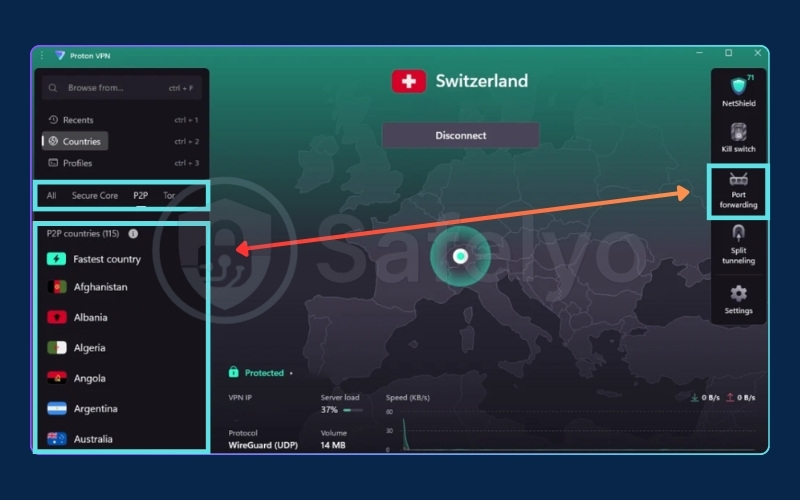
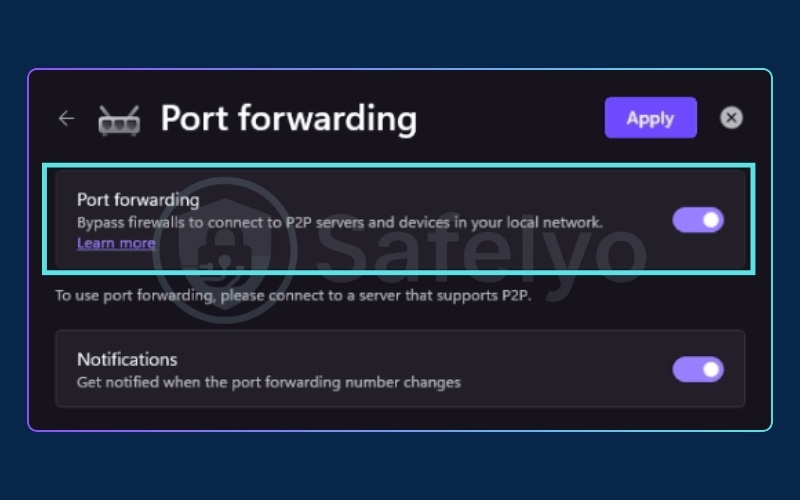
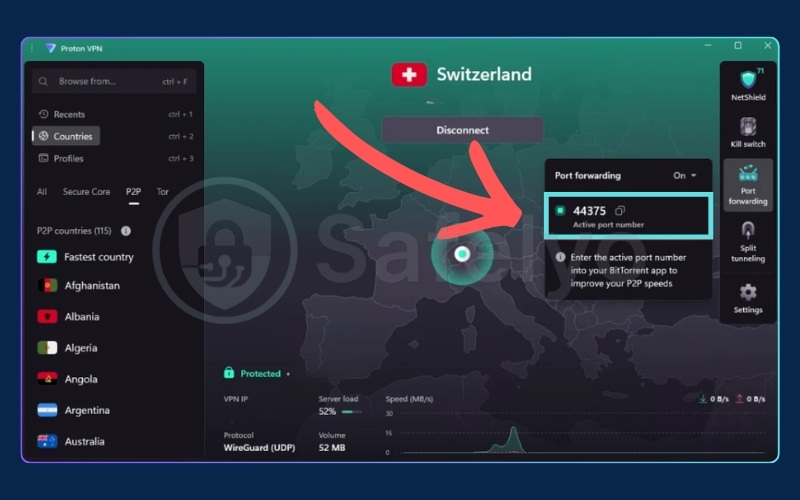
Note the desktop-only scope of this feature: Proton VPN port forwarding is supported on Windows, macOS, Linux natively. iOS is not supported. Because Proton VPN uses NAT-PMP dynamic assignment, each new session will produce a different port number. Update your application’s incoming port setting at the start of each new session.
8.2. How to enable port forwarding on PIA (Windows, macOS, Linux, Android)
Follow these steps to activate PIA’s Request Port Forwarding feature:
- Open the PIA app and navigate to Settings.
- Select the Network tab.
- Enable the “Request Port Forwarding” checkbox.
- Connect to a PIA server. PIA assigns a port number dynamically upon establishing the connection.
- Copy the assigned port number and paste it into the incoming port field of your application.
- Each time you reconnect, PIA assigns a new port. Update your application’s incoming port setting at the start of every new session.
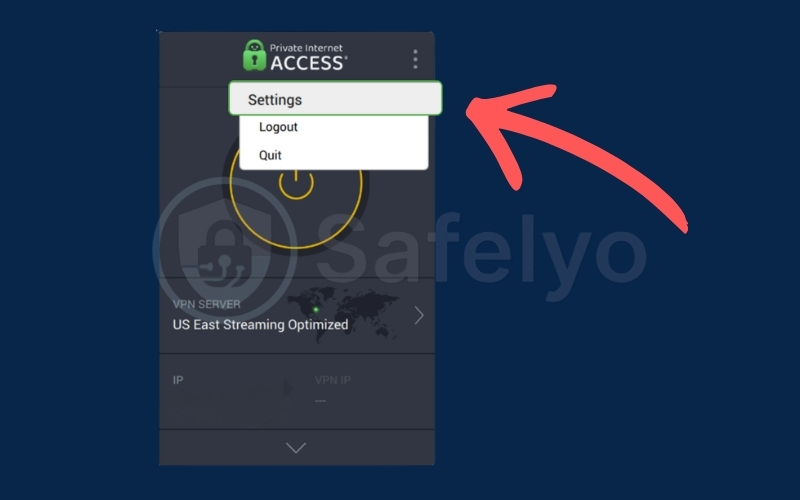
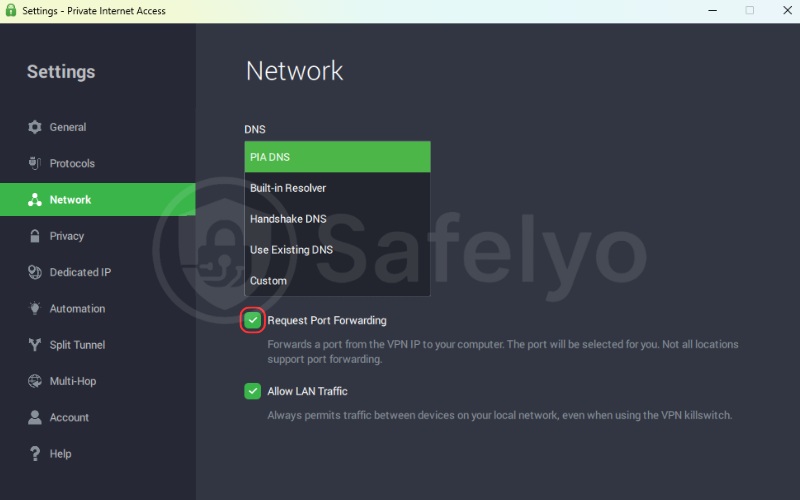
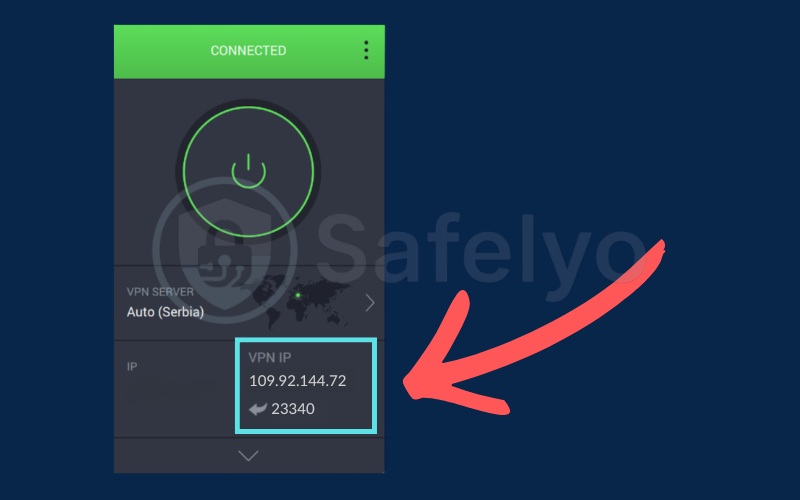
PIA port forwarding is supported on Windows, macOS, Linux, and Android. It is not available on iOS. The session-based dynamic assignment works well for torrenting but is not suitable for hosting applications that require a persistent and predictable port address between sessions.
8.3. How to configure port forwarding on AirVPN (via web panel)
AirVPN’s web panel approach is more technical than Proton VPN’s in-app toggle but provides persistent static port assignment that does not reset on reconnection. Follow these steps:
- Log in to your AirVPN account at the web panel available at airvpn.org.
- Navigate to the “Ports” section in your account dashboard (Client Area).
- Click “Add a port” and select the protocol (TCP, UDP, or both). You can enter a specific port number or allow the system to assign one automatically.
- Save the configuration. AirVPN maps this port to your VPN tunnel on the server side.
- Connect to any AirVPN server using the Eddie client or via an OpenVPN/WireGuard configuration file. The port forwarding rule applies globally, not to a specific server, so it follows your session regardless of which server you connect through.
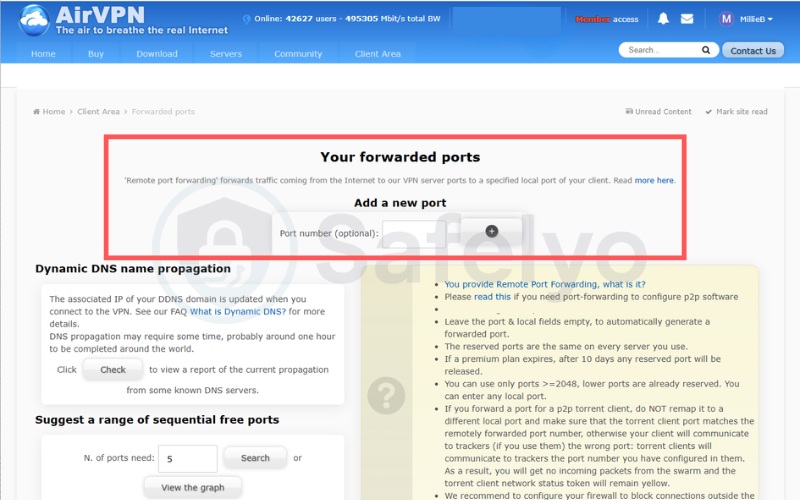
Because port management happens server-side before the connection is established, this configuration applies to all platforms including iOS and Android, making it the most universally compatible setup method among the providers in this list.
9. The “port fail” attack: The hidden security risk
Port forwarding through a VPN introduces a specific attack vector that most major providers have chosen to eliminate by removing the feature entirely. Understanding what a port fail attack is explains why Mullvad, NordVPN, Surfshark, and other mainstream providers dropped port forwarding and why verifying your chosen VPN’s mitigation approach matters before you enable it.
9.1. How port fail can expose your real IP address
The port fail vulnerability is a routing flaw that occurs on shared VPN servers. When one user has port forwarding enabled, and another user connects to the exact same server without port forwarding, a privacy risk emerges.
Because both users share the same network infrastructure, the VPN’s routing logic can become confused. Under specific conditions, the second user’s actual IP address might leak through the first user’s forwarded port.
This means someone could observe the real IP address of a user who never even turned on port forwarding. This hidden exposure is a major reason why many large VPN companies decided to shut down the feature completely.
Warning: If you enable port forwarding on a VPN that lacks proper network isolation, you risk exposing your IP address. Always choose a provider that actively protects against this specific vulnerability.
9.2. Which VPNs protect against port fail (and how to verify)
AirVPN and OVPN use strict iptables rules and dedicated NAT segmentation that block cross-port leakage at the infrastructure level. This completely isolates each user’s port allocation from other accounts on the same server.
Proton VPN and PIA have deployed custom firewall isolation parameters specifically designed to block port fail vectors at the server firewall level. This proactive defense is confirmed in their official infrastructure documentation.
To verify your own setup after enabling port forwarding, visit ipleak.net or browserleaks.com immediately after connecting. If the result displays your real ISP IP address rather than the VPN server’s IP, a potential port fail exposure may be present.
A clean result showing only the VPN server’s IP confirms the traffic routing is isolated correctly. Always perform this check to ensure maximum safety.
10. Is VPN port forwarding safe?
Port forwarding with a reputable VPN is safe when used with an audited no-logs provider and with accurate awareness of the specific risks detailed below. The risks here are distinct from port fail, which is covered in section 9 above.
10.1. Risks to understand before you enable it
The opened port creates a potential entry point for targeted attacks on the specific application listening on that port. If a game server or media server application has an unpatched vulnerability, an inbound connection through the forwarded port can exploit it.
Port forwarding selectively increases your network attack surface by making one port reachable from the internet. This is much riskier than keeping your device fully protected behind NAT.
A second risk involves an improperly configured kill switch. If the VPN connection drops without a kill switch engaged, the forwarded port may temporarily remain accessible via your regular ISP connection.
This exposes your real IP to any client connected through that port at the exact moment of dropout. Proton VPN’s Standard and Advanced Kill Switch modes on Windows, macOS, and Linux address this specifically by halting all traffic the moment the VPN tunnel fails.
10.2. How to port forward safely
Following these steps before and after enabling port forwarding reduces the risk profile significantly:
- Enable port forwarding only on a VPN with an audited no-logs policy. From this list, Proton VPN, PIA, OVPN, and PureVPN are the audited options.
- Immediately after enabling port forwarding, visit ipleak.net and confirm the displayed IP is the VPN server’s IP address, not your ISP’s.
- Activate your VPN’s kill switch before enabling port forwarding. This prevents accidental exposure if the tunnel drops.
- Only forward ports for services you are actively running and monitoring. Close forwarded ports you are not using.
- Combine port forwarding with a local firewall rule that restricts inbound traffic to the specific forwarded port only, rather than leaving broader access open.
11. Why most VPNs don’t offer port forwarding
The field of VPNs that support port forwarding has narrowed significantly in recent years. Most providers have chosen to remove or avoid the feature due to four main reasons:
- The port fail vulnerability: As explained earlier, mixing port-forwarding and regular users on shared servers creates IP leakage risks. Fixing this requires complex network isolation that many providers cannot maintain at scale.
- Increased abuse surface: Open inbound ports make shared servers more vulnerable. They can be exploited for port scanning or targeted attacks, which negatively impacts the performance and security of everyone sharing that server.
- Legal and copyright pressure: Inbound connections make it easier to associate specific traffic with individual users. This creates a larger legal burden for VPN providers operating in strict DMCA jurisdictions.
- High infrastructure costs: Managing per-session dynamic ports or maintaining static port allocations requires expensive technical upkeep and dedicated customer support. Many providers simply find that the cost outweighs the benefit for a niche feature.
Because of these significant challenges, finding a secure and reliable port forwarding VPN requires careful selection.
12. Can you use a free VPN with port forwarding?
In practice, no. The only meaningful free option in this list is Proton VPN’s permanent free tier, and Proton VPN’s free plan explicitly does not support port forwarding. Port forwarding, P2P access, and streaming are all restricted to paid plans.
The closest viable “free access” option for testing port forwarding specifically is AirVPN’s 3-day free trial, which does support port forwarding across all 255 servers during the trial period. PIA also offers a 7-day free trial on iOS and Android, though port forwarding is not available on iOS regardless of the plan type.
Free VPNs that claim to support port forwarding in general typically fail on the fundamentals: they lack audited no-logs policies, frequently throttle bandwidth in ways that eliminate any speed benefit from port forwarding, and introduce additional IP exposure risk without the NAT isolation architecture that a properly managed paid provider maintains.
If you want to test port forwarding before committing financially, AirVPN’s 3-day trial or PIA’s 7-day mobile trial are the most practical starting points among the options in this list.
13. FAQs about VPN with port forwarding
Does port forwarding work with a VPN?
Yes, when using a VPN that explicitly supports the feature. A VPN with port forwarding instructs its server to forward inbound traffic on a specified port to your device. The feature is not universally available: most major providers have removed it. See the comparison table at the top of this article for the six providers that currently offer working port forwarding implementations.
Does NordVPN offer port forwarding?
No. NordVPN removed port forwarding from its service. The port fail vulnerability and the resulting abuse surface concerns are the most commonly cited technical factors in VPN security discussions surrounding that decision. For users who previously relied on NordVPN for this feature, Proton VPN, PIA, and AirVPN are the primary alternatives covered in this article.
Does port forwarding slow down my VPN?
Port forwarding itself does not measurably slow down a VPN connection. The primary speed factor in any VPN session is the encryption overhead from the VPN tunnel, which applies regardless of whether port forwarding is enabled. In torrenting scenarios specifically, enabling port forwarding typically improves download speeds by allowing more inbound peer connections to reach your client, rather than reducing throughput.
Is port forwarding legal?
Yes, port forwarding is legal in most jurisdictions. It is a standard networking practice. What determines legality is how the forwarded port is used. Hosting legal services such as a Plex media server, a game server, or an SSH remote access endpoint through a forwarded port is legal. Hosting illegal content or participating in infringing file-sharing remains illegal regardless of the VPN layer involved.
Do I need a static IP address for port forwarding?
Not necessarily. Dynamic port forwarding as used by PIA works without a static IP for torrenting scenarios where the port number changing between sessions is acceptable. For server hosting where external clients need a predictable and consistent address, a static port assignment from AirVPN or OVPN provides the reliability that dynamic models cannot.
What is the default port for a VPN?
Default ports vary by protocol. WireGuard uses UDP port 51820 by default. OpenVPN uses UDP port 1194 or TCP port 443. IKEv2 uses UDP ports 500 and 4500. These are the VPN tunnel ports used to establish the encrypted connection, and they are distinct from the inbound port forwarding ports assigned to user accounts.
Port forwarding ports are typically random numbers above 1024 and are assigned either dynamically per session or statically per account depending on the provider’s implementation.
14. Conclusion
Of the six VPN with port forwarding options we evaluated, Proton VPN is the most complete choice for the majority of users. Proton VPN combines audit credibility across 4 consecutive independent reviews, Swiss jurisdiction outside 5/9/14 Eyes, and the simplest in-app activation of any provider in this comparison.
For torrenting at scale, PIA is the stronger alternative: unlimited device connections, the broadest server network in this list, and the lowest starting price make it the practical choice for high-volume P2P activity where session-based port rotation is an acceptable workflow.
For users with multi-service hosting requirements, AirVPN (all-server P2P access with Remote Port Forwarding across all 255 servers) and OVPN (court-verified no-logs with 7-port static assignment) address scenarios requiring verified privacy and simultaneous port control across game servers, media servers, and SSH endpoints.
If you are ready to get started, work through these steps in order:
- Choose the VPN that matches your specific use case using the comparison table at the top of this article.
- Download and install the app, then enable your kill switch before activating port forwarding.
- Test your connection at ipleak.net to confirm no IP address leak is present.
- Configure your forwarded port in your application (torrent client, Plex, game server, or SSH endpoint) and verify the connection completes successfully.
For more top-tier recommendations across different categories, explore our Best VPN and discover more secure digital practices on Safelyo.