If you have ever searched for “best VPN” on Google, you have definitely seen the name ExpressVPN – omnipresent, highly praised, and yes, undeniably expensive. But in 2026, with competitors like Surfshark and NordVPN offering incredible features for the price of a cup of coffee, this ExpressVPN review will answer whether the “premium” price tag of ExpressVPN still makes sense.
VPN Score:
9.0
ExpressVPN Review: Fast, Secure, and Premium
| EXPRESSVPN FEATURES (UPDATED 2026) | |
| Unique Features | Lightway protocol (in-house), TrustedServer (RAM-only infrastructure), independently audited no-logs policy, Threat Manager (DNS-level blocking). |
| Unblocking Ability | Reliably unblocks Netflix (multiple libraries), BBC iPlayer, Disney+, Hulu, HBO Max, and YouTube TV. Amazon Prime Video works on selected servers. |
| Server Network | 105 countries across 170+ locations |
| Dedicated IP Service | Not available. |
| Support Platforms | Standard OS: Windows, macOS, Linux, Android, iOS. Devices: Firestick, PlayStation, Xbox, Nintendo Switch (via router), Apple TV, Android TV, Chromecast, Smart TVs. Browsers: Chrome, Firefox extensions. |
| Simultaneous Connections | Up to 14 devices per subscription. |
| Security Features | AES-256 encryption, Kill Switch (Network Lock), DNS & IPv6 leak protection, split tunneling, and an audited no-logs policy. |
| Advanced Protocols | Lightway (UDP/TCP), OpenVPN, IKEv2. |
| Performance | Consistently high speeds with low latency. Optimized for 4K streaming, gaming, and VoIP. |
| Trial & Guarantee | 30-day money-back guarantee. Credit Card, PayPal, Google Pay, Apple Pay, Crypto. |
| Customer Support | 24/7 Live Chat & Email support. |
BEST FOR: ExpressVPN is best for users who want a premium, hassle-free VPN with top-tier privacy, consistently fast speeds, and reliable streaming. It’s ideal for privacy-focused users, frequent travelers, and beginners who value stability and ease of use over advanced customization or low pricing.
I have spent the last few weeks living with ExpressVPN installed on every device I own – from my Windows desktop and MacBook to my iPhone and Android TV. In this ExpressVPN review, I will show you real-world speed tests using their proprietary Lightway protocol, push their “no-logs” claims to the limit, and frankly discuss the elephant in the room: Their ownership under Kape Technologies. If you want to know if you should subscribe or look elsewhere, you are in the right place.
Disclaimer
At Safelyo, our reviews are based on real-world testing and human expertise. We may earn a small commission if you purchase through our links, at no extra cost to you. This supports our lab but does not influence our rankings.
1. ExpressVPN review: Overview
ExpressVPN is not trying to be the “Swiss Army Knife” of VPNs with a million confusing settings. Instead, it positions itself as the “Apple of VPNs” – a premium, polished product that just works the moment you turn it on.
Founded in 2009 and based in the British Virgin Islands (a privacy-friendly jurisdiction), ExpressVPN has built its reputation on two pillars: Speed and Simplicity. While other VPNs might bombard you with complex configurations, ExpressVPN offers a “zero-hassle” experience. You press one big button, and you are secure. It is designed to be invisible.
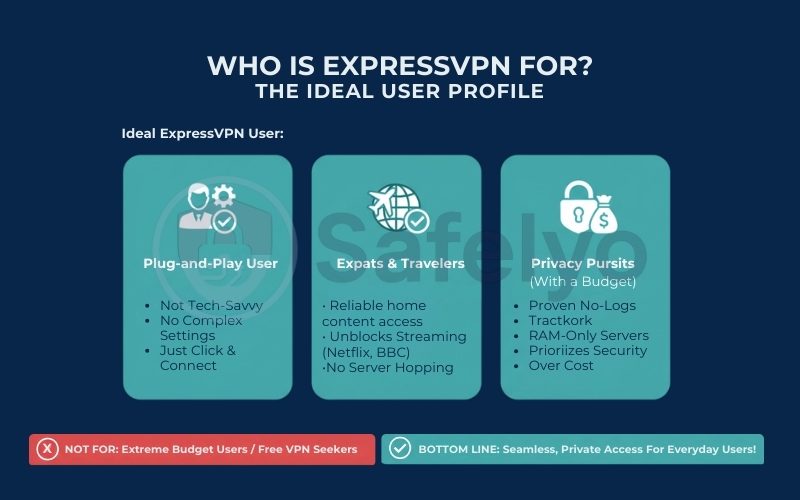
Who is this VPN actually for? Based on my testing, ExpressVPN isn’t for everyone. It is specifically built for:
- The “plug-and-play” user: If you are not tech-savvy and the thought of configuring “DNS servers” or “tunneling protocols” scares you, this is your best friend.
- Expats and Travelers: People who need reliable access to home content (like Netflix US or BBC iPlayer) without constantly switching servers to find one that works.
- Privacy Purists with a budget: Users who prioritize a proven track record (like real-world server seizures that yielded zero data) over saving a few dollars a month.
If you want the absolute smoothest, most frustration-free VPN experience available in 2026, ExpressVPN is still the undisputed king. However, you pay a “luxury tax” for that simplicity – so if you are a budget-hunter, you might want to keep reading before pulling out your credit card.
2. ExpressVPN speed test: Real-world benchmarks
Let’s be honest: Nobody wants a VPN that turns their fiber optic internet into a dial-up connection. Security is important, but if pages take ten seconds to load, you are going to turn that VPN off.
To get the truth, I put ExpressVPN through a rigorous stress test using its proprietary Lightway protocol. My testing location is in Vietnam, and I connected to servers across four major continents to see how the infrastructure holds up.
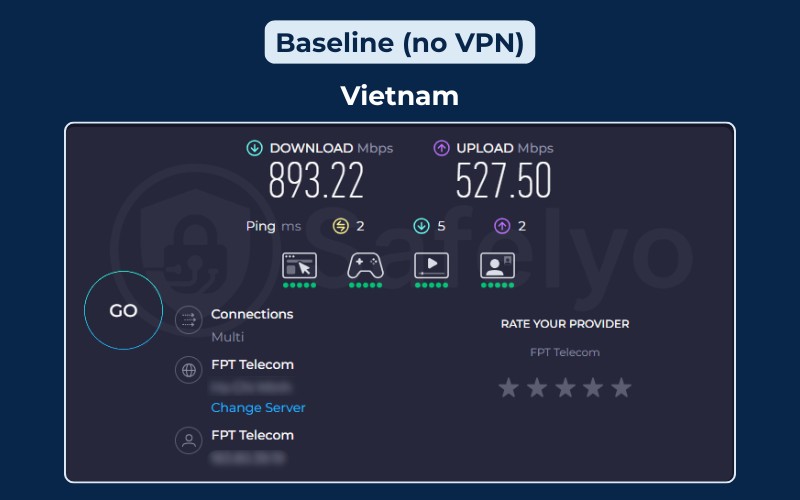
Here is the raw data from my session: ExpressVPN speed test results
| Server Location | Download Speed | Upload Speed | Ping (Latency) | Performance Verdict |
|---|---|---|---|---|
| Japan (Tokyo) | 434.89 Mbps | 453.71 Mbps | 79 ms | Blazing Fast |
| Australia (Sydney) | 369.42 Mbps | 69.30 Mbps | 220 ms | Excellent |
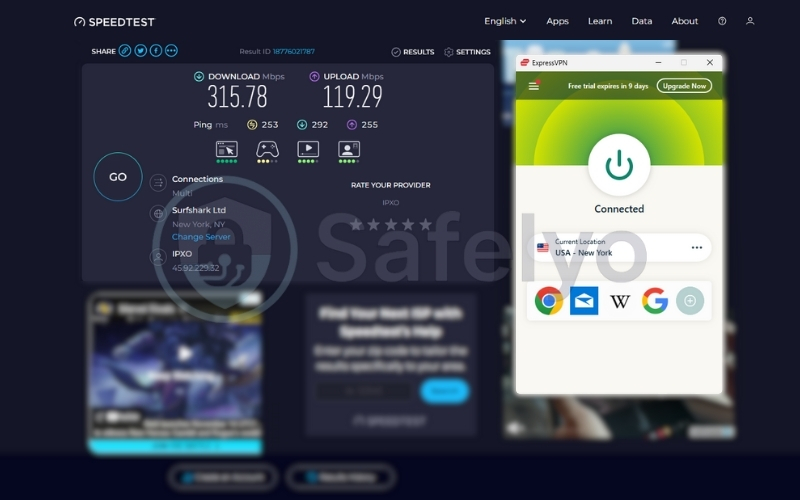
| USA (New York) | 315.78 Mbps | 119.29 Mbps | 253 ms | Very Good |
| UK (London) | 27.65 Mbps | 125.62 Mbps | 218 ms | Mixed |
2.1. Detailed analysis
1. The "local" champion: Japan (Tokyo)
Result: This was the star performer. With a download speed of 434.89 Mbps and a symmetrical upload of 453.71 Mbps, the VPN was virtually invisible.
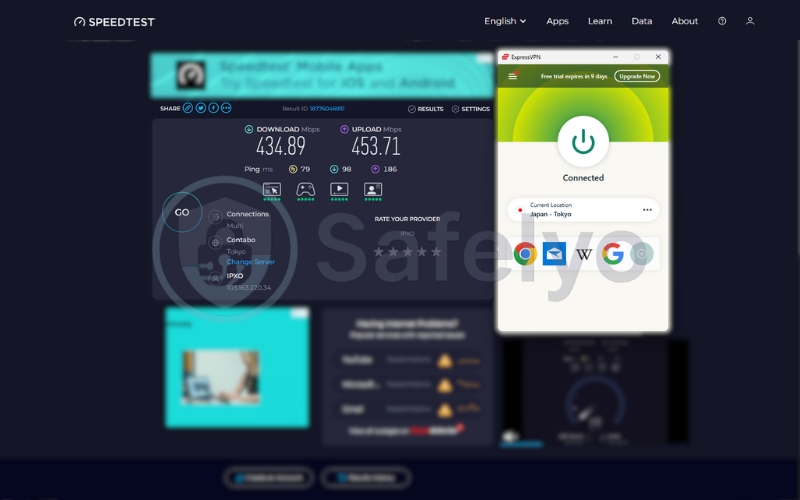
Experience: The 79ms ping is impressive for an international hop. I could play fast-paced games and stream 4K content without a single frame drop. This proves that when you connect to a nearby ExpressVPN server (like Tokyo, Singapore, or Hong Kong), you lose almost zero performance.
2. The long-distance heavyweights: USA & Australia
Usually, the speed tanks when you cross an ocean. Not here.
USA (New York): Despite a high ping of 253ms (simple physics due to the distance from Vietnam to New York), the download speed remained a massive 315.78 Mbps. This is more than enough to stream ten 4K Netflix movies simultaneously.
Australia (Sydney): Similarly, clocking in at 369.42 Mbps is outstanding.
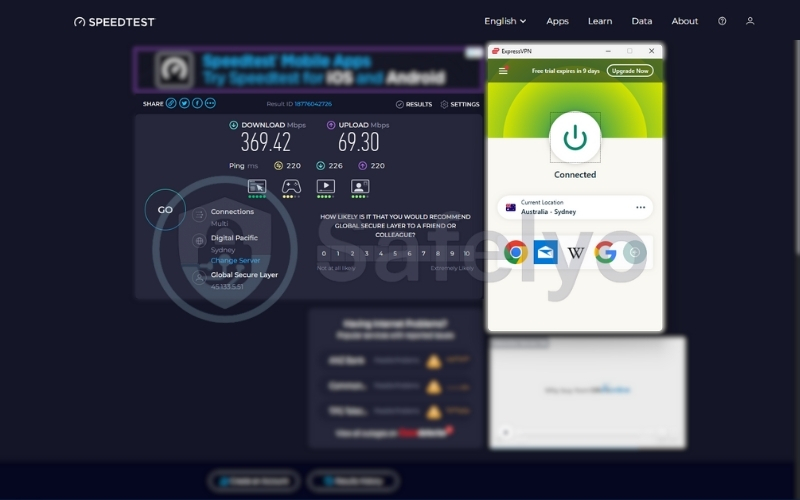
Takeaway: ExpressVPN’s infrastructure is optimized for throughput. If you want to download large files or stream content from the US, the distance won’t slow down your transfer rates.
3. The real-world fluctuation: UK (London)
Result: This test provided a realistic “hiccup”. While the upload speed was strong (125 Mbps), the download speed dipped to 27.65 Mbps.
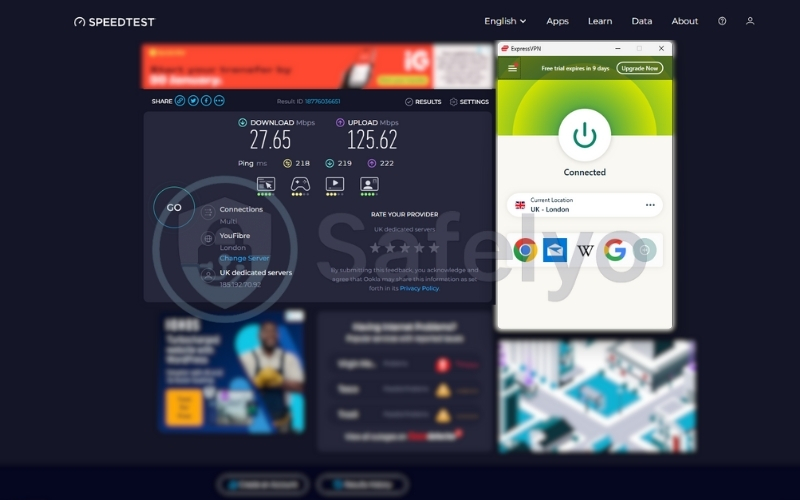
Analysis: Since the upload was fast, the tunnel itself was stable. This dip was likely due to temporary congestion on that specific London server or a routing bottleneck at the time of testing.
Impact: 27 Mbps is still enough for HD streaming, but it’s a reminder that even the best VPNs can have variable performance on specific servers.
2.2. Everyday browsing vs. heavy usage: How does it feel?
Numbers are one thing, but how does it actually feel to use?
Everyday browsing (Social Media, News, Email)
Even when connected to the USA server with a high ping (253ms), web browsing felt snappy. Because the download bandwidth is so huge (315 Mbps), images and videos on Facebook or Instagram load instantly, and you won’t feel the latency unless you are clicking through pages very rapidly.
Verdict: Seamless
Streaming (Netflix, YouTube 4K)
With speeds consistently over 300 Mbps in the US, Japan, and Australian servers, the buffering wheel was non-existent. I scrubbed through a 4K video on YouTube connected to New York, and it played instantly.
Note: Even the slower UK result (27 Mbps) is technically enough for 4K streaming (which requires roughly 25 Mbps), but you might experience a slight delay at the start.
Verdict: Flawless (mostly)
Heavy usage (Gaming & Torrenting)
- Torrenting: Excellent. The consistent high speeds mean large files download fast.
- Gaming: This is the only caveat.
- Japan Server (79ms): Playable. I could play League of Legends or CS:GO with acceptable responsiveness.
- US/UK/AU Servers (200ms+): Do not game here. The latency is too high for competitive gaming. Your character will rubber-band. Stick to local servers for gaming, and use the long-distance ones only for unlocking movies or downloading files.
>> Dive in:
3. ExpressVPN security & privacy test
I spent considerable time probing ExpressVPN’s security defenses to see if they are actually bulletproof or just marketing fluff. If a VPN leaks your IP address even for a second, it is useless.
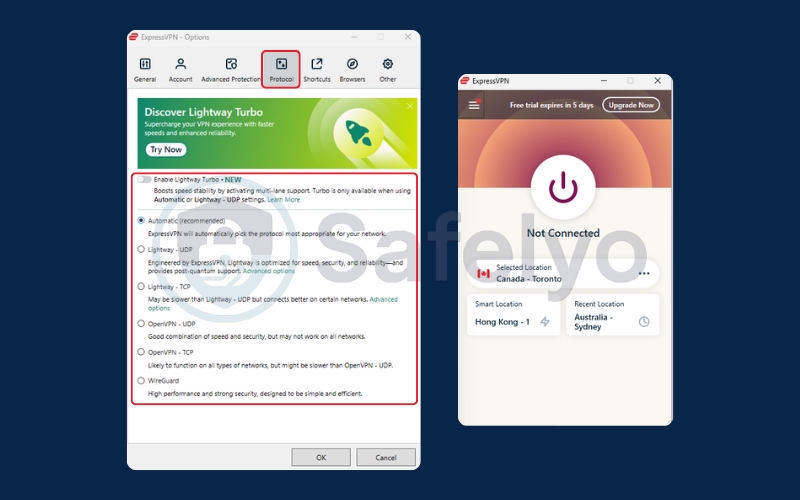
3.1. Encryption & protocols
ExpressVPN uses AES-256-GCM encryption by default. To put that in perspective, this is the same encryption standard used by banks and militaries. It would take a supercomputer billions of years to brute-force a single key.
If you switch to the Lightway protocol, it utilizes the WolfSSL cryptographic library (often using ChaCha20/Poly1305), which is incredibly secure and optimized for mobile devices. I found that Lightway drained significantly less battery on my iPhone compared to the traditional OpenVPN protocol.
3.2. Network Lock (The Kill Switch)
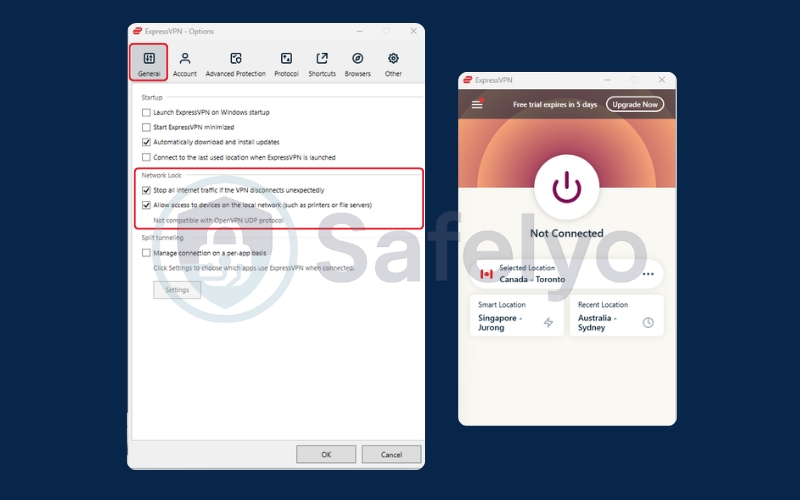
A Kill Switch is your safety net. If your VPN connection drops unexpectedly, the kill switch cuts your internet access instantly to prevent your real IP from leaking.
- My Test: I simulated a network crash by forcibly disabling the VPN process in my Windows Task Manager while downloading a file.
- The Result: The internet was cut off immediately. Zero traffic leaked. The app then displayed a clear warning that the Network Lock was active. It worked exactly as advertised.
3.3. Leak protection (DNS, WebRTC, IPv6)
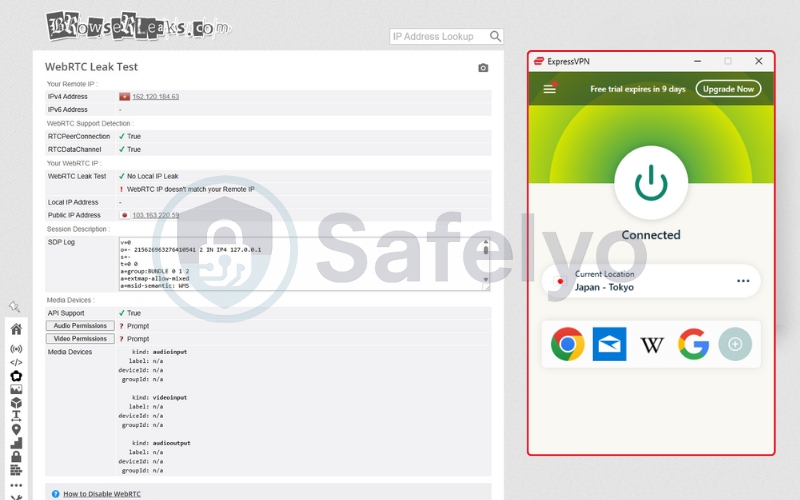
I ran ExpressVPN through a gauntlet of leak tests using third-party tools (like IPLeak.net and BrowserLeaks).
- DNS Leaks: Passed. The VPN forces your device to use ExpressVPN’s own private, encrypted DNS servers. My Internet Service Provider (ISP) had no idea what websites I was visiting.
- IPv6 Leaks: Passed. Even though my ISP supports IPv6, ExpressVPN successfully blocked IPv6 traffic to prevent leaks (a common vulnerability in cheaper VPNs).
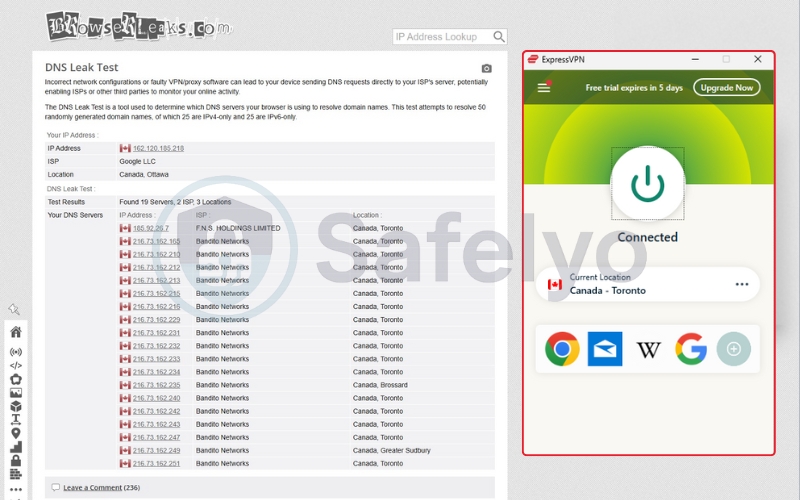
- WebRTC Leaks: Passed.
3.4. TrustedServer technology (RAM-only servers)
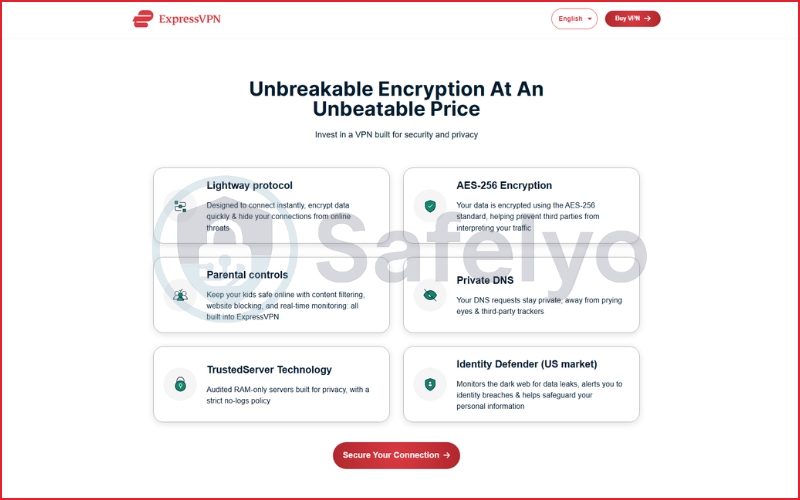
This is one of ExpressVPN’s biggest selling points. Most VPNs store data on hard drives. If a government seizes the physical server, it might be able to recover data. ExpressVPN uses TrustedServer technology, which means its servers run entirely on RAM (Volatile Memory).
Why it matters: RAM requires power to hold data. The moment the server is rebooted (or if the plug is pulled), every single byte of data is instantly wiped. Nothing is written to a hard drive. This isn’t just a software setting; it’s a physical hardware guarantee.
4. Lightway Turbo & Post-Quantum Encryption Explained
Most VPN reviews describe Lightway as simply “fast.” That’s technically true – but it’s also incomplete.
Lightway is ExpressVPN’s proprietary VPN protocol, designed not just for raw speed, but for connection stability in real-world conditions, where networks are often congested, unstable, or constantly changing. Below is what actually matters about Lightway in practice.
4.1. Lightway Turbo: Why ExpressVPN feels more stable than most VPNs
Lightway Turbo is an enhancement layer built on top of the core Lightway protocol. Its main purpose isn’t to chase benchmark numbers – it’s to keep connections stable when network conditions degrade.
In real-world use, Lightway Turbo dynamically adapts how data packets are handled by:
- Monitoring packet loss, latency spikes, and jitter in real time.
- Adjusting retransmission behavior based on network quality.
- Reducing connection drops when switching networks (Wi-Fi → mobile data).
This makes a noticeable difference in situations where many VPNs struggle, such as:
- Hotel and airport Wi-Fi.
- Public networks with aggressive traffic shaping.
- Long-distance server connections.
- Video calls and live streaming sessions.
The key takeaway: Lightway Turbo doesn’t always make ExpressVPN the fastest VPN on paper, but it makes it one of the most consistent VPNs in everyday use – especially on unreliable networks.
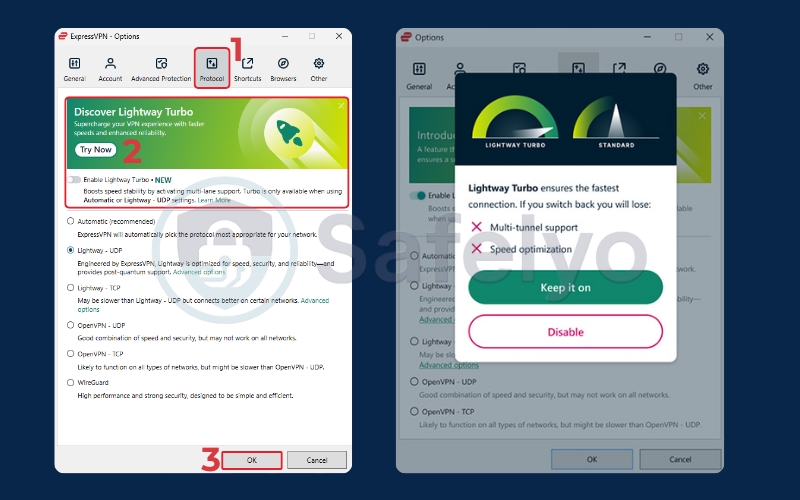
Lightway vs WireGuard: A practical comparison
WireGuard is widely regarded as the fastest modern VPN protocol, and in ideal network conditions, that reputation is well-deserved. However, Lightway takes a slightly different approach:
- WireGuard prioritizes minimal overhead and raw throughput
- Lightway (with Turbo) prioritizes connection resilience and stability
In practice, WireGuard often wins speed benchmarks; Lightway tends to feel smoother during long sessions, roaming, or unstable connections. Neither approach is objectively “better” – they’re optimized for different use cases. ExpressVPN’s choice reflects its focus on reliability over peak performance numbers.
Safelyo takeaway: WireGuard often delivers higher peak speeds in controlled conditions, but Lightway (especially with Turbo enabled) prioritizes connection resilience and long-term security, making it better suited for everyday, unpredictable network environments.
| Criteria | Lightway | WireGuard |
| Core goal | Connection stability & real-world reliability | Maximum speed & minimal overhead |
| Performance in ideal networks | Very fast | Extremely fast (often wins benchmarks) |
| Performance on unstable networks | More consistent, fewer drops (Lightway Turbo) | Can fluctuate under packet loss |
| Roaming (Wi-Fi ↔ mobile) | Smooth, handles network switching well | Less adaptive by default |
| Protocol complexity | Lightweight, custom-built | Extremely minimal, standardized |
| Privacy design | No static IPs, RAM-only servers | Requires careful implementation to avoid metadata retention |
| Post-quantum protection | Yes (hybrid key exchange) | Not implemented natively |
| Best for | Streaming, remote work, travel, public Wi-Fi | Speed tests, stable home networks |
4.2. Post-Quantum Encryption: Preparing for tomorrow’s threats
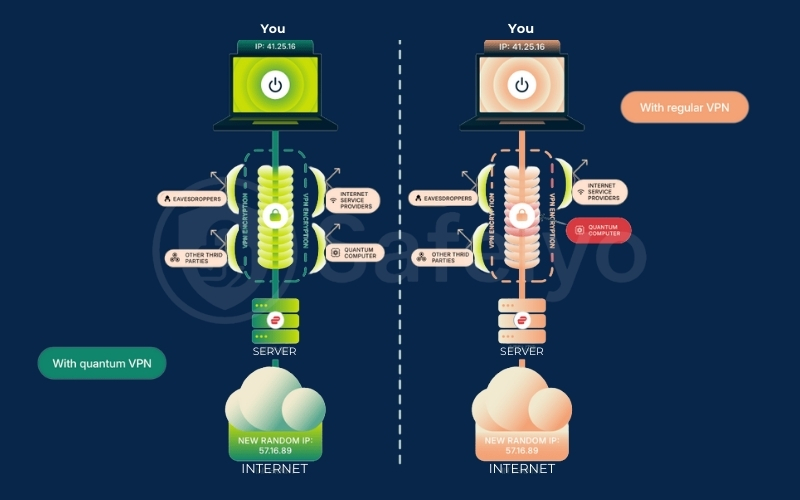
One of the more forward-looking aspects of Lightway is ExpressVPN’s implementation of post-quantum protection during the key exchange process. This addresses a long-term security concern known as:
“Harvest now, decrypt later”
Attackers collect encrypted data today and attempt to decrypt it in the future using more powerful (potentially quantum) computers.
To mitigate this, ExpressVPN uses a hybrid key exchange model that combines:
- Classical encryption methods
- Quantum-resistant cryptographic algorithms
This approach ensures that data encrypted today remains secure even if encryption standards evolve, and no single cryptographic method becomes a single point of failure.
It’s important to clarify
This is not “full quantum encryption” – no VPN currently offers that. Instead, it’s a pragmatic, industry-recommended step toward future-proofing encrypted traffic.
Why does this matter, and why don’t many VPNs do it yet? Most VPN providers have not implemented post-quantum protection for a simple reason: It’s complex, expensive, and doesn’t provide an immediate marketing advantage.
ExpressVPN’s decision to adopt it early suggests a focus on:
- Long-term privacy protection
- High-risk users such as journalists, activists, and remote professionals
- Security architecture designed beyond short upgrade cycles
For everyday users, this won’t make browsing faster – but it reduces long-term privacy risk. If you value consistent performance and future-proof security over chasing the highest benchmark speeds, Lightway is one of ExpressVPN’s strongest technical advantages.
5. Is ExpressVPN safe after the Kape acquisition?
We need to address the elephant in the room. In 2021, ExpressVPN was acquired by Kape Technologies for roughly $1 billion.
Why is this controversial? Kape Technologies was formerly known as Crossrider, a company that, in its early days, was associated with distributing software bundles that often included adware. For privacy purists, this raised a massive red flag: “Can we trust a privacy company owned by a former ad-tech player?”
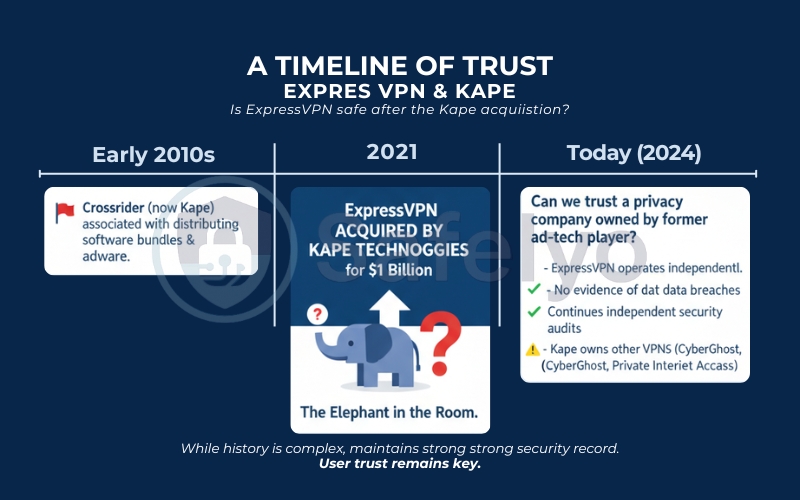
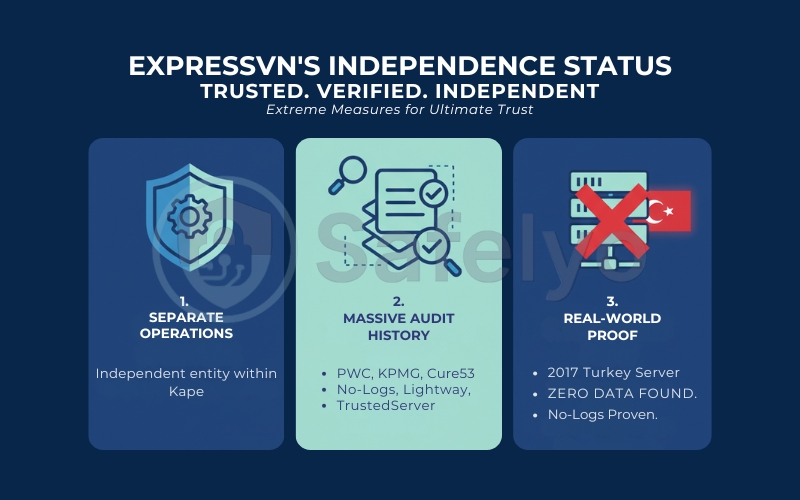
I have followed this story closely, and here is where things stand in 2026. While the concern is valid, ExpressVPN has taken extreme measures to prove its independence:
- Separate operations: ExpressVPN operates as an independent entity within Kape.
- Massive audit history: To counter the skepticism, ExpressVPN has become one of the most audited companies in the industry. They have brought in heavy hitters like PwC, KPMG, and Cure53 to audit their no-logs policy, their Lightway protocol, and their TrustedServer architecture.
- Real-world proof: In a famous incident (before the acquisition, but relevant to their architecture), Turkish authorities seized an ExpressVPN server to investigate the assassination of Andrei Karlov. They found zero data. Nothing. This proved their no-logs policy wasn’t just marketing text; it was technically enforced.
The verdict on trust: Is ExpressVPN safe? Yes.
Despite the parent company’s history, ExpressVPN’s code, infrastructure, and legal track record suggest they are cleaner than ever. They know the world is watching, so they are spending millions on audits to ensure they remain trustworthy. If you can look past the corporate ownership structure, the product itself is rock-solid secure.
6. ExpressVPN for China: Does it beat the Great Firewall?
This is the ultimate stress test. Most VPNs crumble when faced with the Great Firewall of China. If you are an expat in Shanghai or a traveler heading to Beijing, you don’t care about “AES-256 encryption” – you just want to know if you can access Google, WhatsApp, and Instagram.
In 2026, China’s censorship technology is more advanced than ever. So, does ExpressVPN still work as one of the best VPN for China?
The short answer: Yes (but with a caveat)
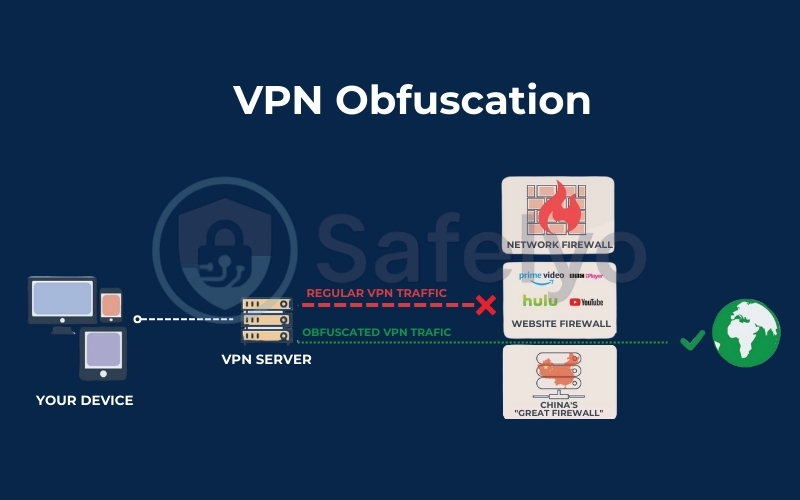
ExpressVPN remains one of the only major commercial VPNs that consistently works in China. While competitors like NordVPN or Surfshark often require you to perform complex manual configurations or connect to specific “Obfuscated Servers“, ExpressVPN handles this differently.
Automatic obfuscation (Stealth Mode)
The genius of ExpressVPN is that it doesn’t have a “Stealth Mode” button. Instead, obfuscation is built into the protocol automatically. When the app detects “Deep Packet Inspection” (DPI) – the method China uses to identify and block VPN traffic – it automatically disguises your VPN traffic as regular HTTPS web traffic.
- To the Chinese censors, it looks like you are just browsing a secure shopping site.
- To you, it looks like an open internet.
6.1. Tips for using ExpressVPN in China (2025–2026)
If you are planning a trip, keep these three rules in mind:
- Download BEFORE you go: The ExpressVPN website is blocked inside China. You must download and install the apps on all your devices before your flight takes off. If you are already there, you will need to use a “mirror link” (you can email support@expressvpn.com to get a working URL).
- Use “Automatic” Protocol: While I love the Lightway protocol for speed, in China, it is often best to set your protocol to “Automatic”. This allows the app to cycle through protocols to find the one that can punch through the firewall at that specific moment.
- The “cat and mouse” game: Be aware that during sensitive political events (like the National Congress), connectivity might become spotty. This happens to all VPNs. ExpressVPN is famous for having the fastest engineering response time – usually pushing out a server update to bypass new blocks within 24 hours.
6.2. Best servers for China
Based on user reports and testing from within the mainland, these are the most reliable server locations:
- Hong Kong: Fastest speeds (lowest latency), but technically still under Chinese jurisdiction (though ExpressVPN servers there are secure).
- Yokohama (Japan): Excellent balance of speed and stability.
- Los Angeles – Santa Monica (USA): surprisingly reliable if you need a US IP address.
Verdict: If your primary reason for buying a VPN is to survive the digital restrictions of China, Russia, or Iran, ExpressVPN is one of the best VPN for censorship bypass. It dedicates more resources to fighting censorship than any other provider.
7. What’s new in ExpressVPN (2025–2026)
For years, ExpressVPN was known for being “just a VPN” – a great one, but one that refused to add extra bells and whistles. That philosophy has completely changed in 2025 and 2026. ExpressVPN has evolved from a simple privacy tool into a comprehensive digital security suite, introducing tiered pricing and features that fans have requested for over a decade.
Before we dive into the details, here is a quick snapshot of the major updates:
| Feature | The update | Why it matters |
| Dedicated IP | New Add-on (Launched late 2024) | You get a static IP address unique to you. Helps avoid CAPTCHAs and access banking apps without triggering fraud alerts. |
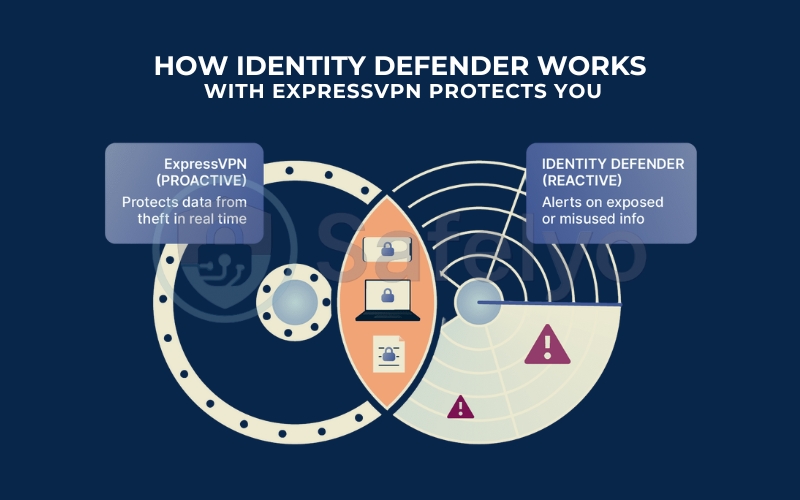
| Identity Defender | New Feature (Advanced Plan) | Monitors the dark web for your leaked data and includes a password manager (ExpressVPN Keys). |
| Device Limits | Increased | Now supports 10 devices on Standard plans and 14 devices on Advanced plans. |
| Advanced Protection | Upgrade | Native ad-blocking, tracker blocking, and malware protection built directly into the app. |
| eSIM (Trial) | New Feature (Advanced Plan) | Offers a 3-day global eSIM trial for international travelers (currently limited to specific iPhones). |
| Infrastructure | 10Gbps Servers | Massive server upgrades in popular locations to support faster Lightway speeds. |
7.1. The arrival of Dedicated IP
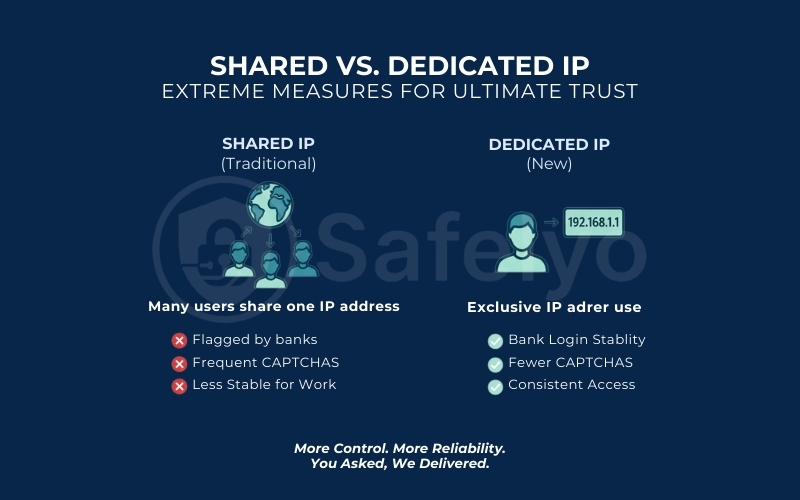
For the longest time, ExpressVPN argued that shared IP addresses were better for anonymity. However, the market demanded otherwise. As of late 2024 and moving into 2025, ExpressVPN finally rolled out Dedicated IPs.
- What it is: You can now purchase an IP address that only you use.
- The Benefit: This is a lifesaver for remote workers. It stops you from being flagged by your bank for “logging in from a new location” every five minutes and drastically reduces those annoying “Verify you are human” Google CAPTCHAs.
>> You may also be interested in: VPN with Dedicated IP in 2025: 5 that give you a personal IP
7.2. The “Advanced Plan” ecosystem & Identity Defender
ExpressVPN has introduced a new tier called the Advanced Plan in Sep 2025, which positions the service as a direct competitor to security suites like Aura or Norton.
- ExpressVPN Keys: A fully integrated password manager that syncs across your devices, included at no extra cost in the higher tiers.
- Identity Defender: This isn’t just a VPN anymore. The app now actively monitors the dark web. If your email or passwords are leaked in a data breach, ExpressVPN alerts you immediately.
7.3. Advanced protection: Ad & malware blocking
In 2026, a VPN that doesn’t block ads is falling behind. ExpressVPN has beefed up its “Threat Manager” into a full Advanced Protection suite. It works at the DNS level (on the server side). It filters out requests to known ad servers, malicious sites, and adult content.
My Experience: It’s not as aggressive as a dedicated browser extension like uBlock Origin, but it does a great job of speeding up browsing on mobile apps by killing tracking scripts before they load.
7.4. Global eSIM (Experimental)
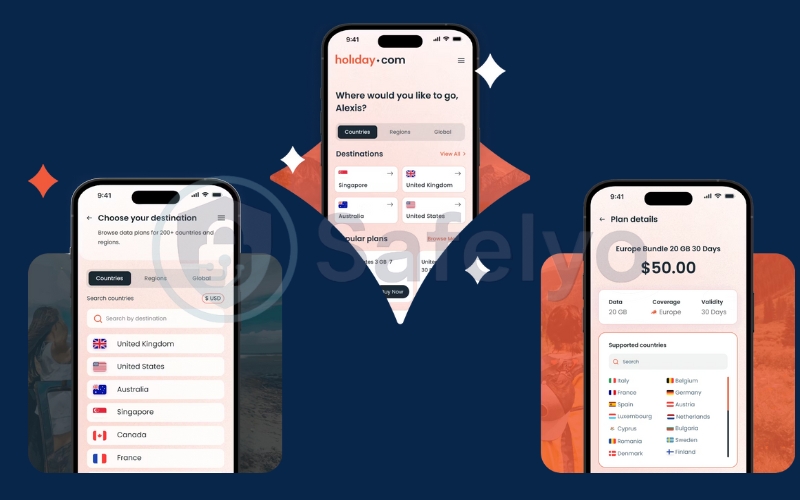
This is arguably the most practical “non-VPN” feature ExpressVPN has ever added. Recognizing that their users are often travelers who need both security and connectivity, ExpressVPN has partnered with holiday.com to offer a seamless global internet solution.
Instead of hunting for a local SIM card kiosk at the airport or paying extortionate roaming fees to your home carrier, you can now sort out your connection before you even pack your bags.
The Partnership: By collaborating with holiday.com, ExpressVPN provides access to digital eSIMs covering 150+ countries. This allows you to maintain a local connection almost anywhere in the world without swapping physical SIM cards.
How it works (The 3-Step Process):
- Purchase & Activate: You visit the holiday.com website or download their app (available on iOS & Android).
- Install: You download the eSIM profile directly to your compatible smartphone.
- Connect: The moment you land in a new country, the eSIM automatically connects to the best local network. You get instant internet access for maps, ride-hailing apps, and calls (depending on the specific package).
The “Killer Feature” for ExpressVPN Subscribers: Here is why this matters for you. If you subscribe to the ExpressVPN Advanced or Pro plans, you aren’t just getting a recommendation; you get real value.
- Exclusive Discount: Subscribers receive a special discount code.
- Unlimited Data Upgrade: This code unlocks special Unlimited Data packages on holiday.com. This is a game-changer, as it frees you from worrying about data caps while navigating foreign cities or video calling home.
My Take: This transforms ExpressVPN from just a security tool into a complete “Travel Kit”. You get the connection via holiday.com and the protection via ExpressVPN, all in one ecosystem.
7.5. Increased connection limits
The old 5-device limit is history.
- Basic Plan: Now supports at least 10 simultaneous connections.
- Advanced Plan: Bumps this up to 12 simultaneous connections.
- Pro Plan: Up to 14 simultaneous connections.
If you have a smart home, the Aircove Router (ExpressVPN’s proprietary hardware) allows you to protect every single device in your house (from your smart fridge to your PlayStation), counting as just one connection.
8. ExpressVPN for streaming
For many users, encryption is just a bonus. The real reason they buy a VPN is to access the “hidden” menu of Netflix or watch sports from back home.
Streaming services have declared war on VPNs in recent years, implementing sophisticated detection tools to block proxy traffic. So, does ExpressVPN still hold the crown as the best VPN for streaming in 2026? I spent a weekend binge-watching content across different platforms to find out.
8.1. Does ExpressVPN work with Netflix?
Netflix is notoriously aggressive in banning VPN IP addresses.
During my best VPN for Netflix testing, I focused on the most sought-after regions to see if ExpressVPN Netflix libraries were actually accessible. I tested ExpressVPN against major Netflix libraries: US, UK, Canada, Japan, Korea, India, and Australia. Here is the breakdown of my results:
US: Checked for Stranger Things.


UK: Checked for Black Mirror.


Japan: Checked for Attack on Titan.


Korea: Checked for Train to Busan.


India: Checked for Money Heist.


Australia: Checked for Instant Hotel Australia.


Canada: Checked for Schitt’s Creek.


The Result: It passed with flying colors. Unlike competitors that force you to pick specific “Streaming Optimized” servers (which can be confusing), ExpressVPN treats every server as a streaming server. You just pick a country, and its backend obfuscation technology handles the rest.
8.2. Does ExpressVPN work with BBC iPlayer, Disney+, and Hulu?
While Netflix is the headline act, other platforms can be even tougher to crack.

BBC iPlayer: This is often the final boss for VPNs because the BBC actively blocks non-UK traffic aggressively. ExpressVPN’s London and Docklands servers worked flawlessly. I watched Doctor Who live without a hiccup.

Disney+ & Hulu: Both worked seamlessly on US servers.


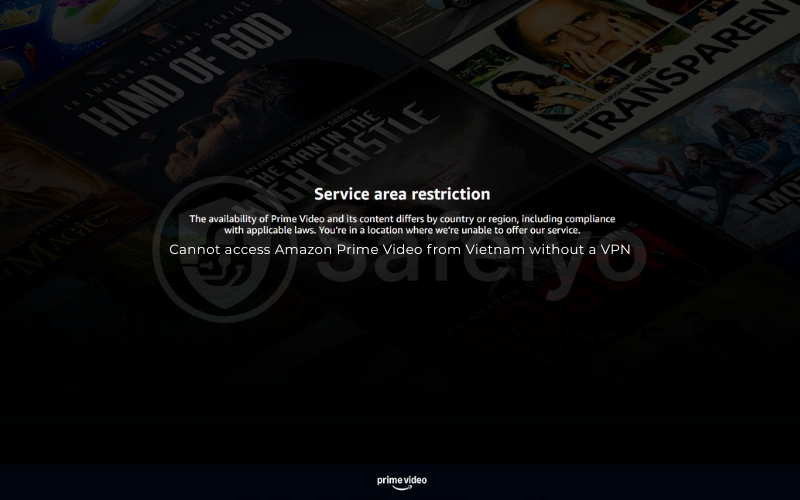
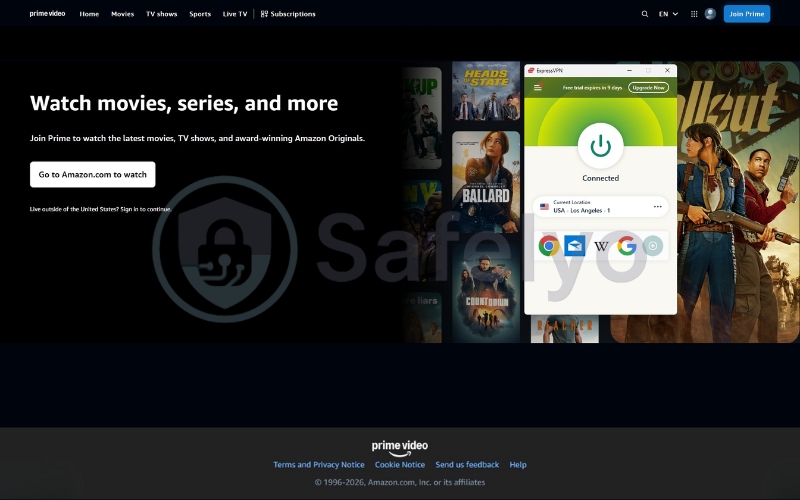
Amazon Prime Video: This was the only platform where I hit a minor snag. One US server was detected, and I got the dreaded “proxy error”. However, switching to a different US city (from New York to Los Angeles) fixed the issue immediately.
8.3. Smart DNS (MediaStreamer)
What if you want to watch US Netflix on your old Samsung Smart TV or PlayStation, which doesn’t support VPN apps? ExpressVPN includes a feature called MediaStreamer. It is a SmartDNS service that spoofs your location without encrypting your data (which keeps speeds maximum).
My Experience: Setting this up took about 5 minutes. I registered my IP on the ExpressVPN website, entered the DNS numbers into my Apple TV (before the native app was released), and it tricked the device into thinking I was in the USA.
Verdict on streaming: ExpressVPN remains the most consistent streaming VPN I have tested. It doesn’t just “unblock” sites; it maintains high enough speeds to stream in 4K/UHD without the dreaded loading spinner. While you might occasionally need to switch servers if Netflix blacklists a specific IP, ExpressVPN refreshes its IP pool faster than almost anyone else in the game.
9. ExpressVPN for torrenting
If you are downloading files via BitTorrent, using a VPN isn’t just a recommendation; it is mandatory. Without one, your IP address is broadcast to every other peer in the swarm, making you an easy target for copyright trolls and ISP throttling.
I tested ExpressVPN for torrenting with clients like qBittorrent and uTorrent to see if it balances speed with the anonymity you need.
9.1. The “Any Server” advantage
This is where ExpressVPN beats many competitors. Most VPNs (like NordVPN or Proton VPN) force you to connect to specific “P2P Optimized” servers. If you accidentally torrent on a standard server, they might disconnect you or throttle your speed.
ExpressVPN is different. It allows P2P traffic on every single one of its servers across 105 countries. You don’t need to hunt for a special server. You just connect to the fastest location (usually the one closest to you) and start downloading. It is truly plug-and-play.
9.2. Speed and anonymity
Thanks to the Lightway protocol, my download speeds remained consistently high. I downloaded a 5GB copyright-free Linux ISO file in under 3 minutes. The connection was stable enough that I didn’t see the “download speed fluctuation” (the sawtooth pattern) common with cheaper VPNs.
Network Lock (Kill Switch) is non-negotiable for torrenters. I tested this mid-download. When I forcibly killed the VPN connection, the torrent client immediately stopped all traffic. Zero data leaked to my ISP. With their headquarters in the British Virgin Islands and the RAM-only TrustedServer technology, your download history vanishes the moment the server reboots.
A note for hardcore seeders (Port Forwarding)
I have to be objective here: ExpressVPN is not the best choice if you are a “hardcore” seeder who obsessively manages your upload ratio on private trackers.
- The Limitation: ExpressVPN does not support Port Forwarding (except essentially on their dedicated router app).
- Why? They argue that port forwarding introduces security vulnerabilities.
- The Impact: For 99% of users just downloading files, this doesn’t matter. But if you need to open specific ports to maximize upload speeds for seeding, you might prefer a service like Private Internet Access (PIA) or Proton VPN.
Verdict: For the average user who just wants to download movies or software safely without configuring complex settings, ExpressVPN is excellent. It shields your activity completely. However, power users who need port forwarding should look elsewhere.
10. ExpressVPN features breakdown
For a long time, ExpressVPN was criticized for being too simple. Power users often complained, “Where are the settings?”. In 2025 and 2026, the app has finally found a balance between that signature simplicity and the advanced tools that modern users expect.
Here is a breakdown of the features you will actually use, and a look at what is still missing.
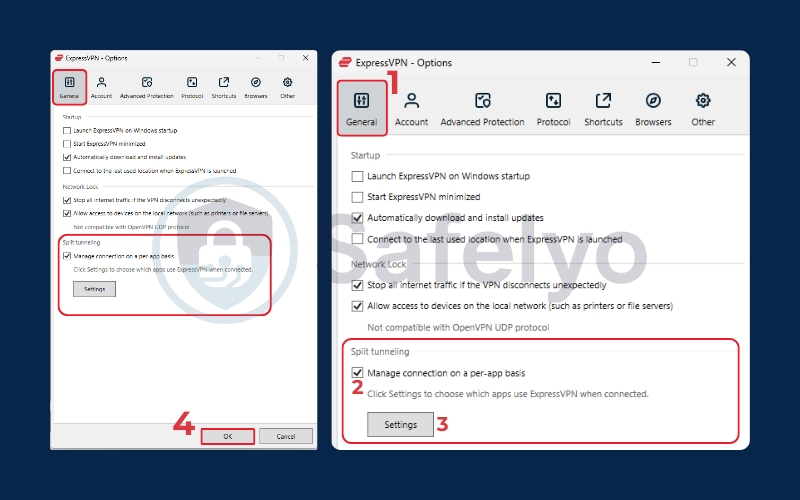
10.1. Split Tunneling
This is one of my absolute favorite features. Split Tunneling allows you to choose which apps go through the VPN and which stay on your regular internet connection.
Why I use it: I set my torrent client and web browser to go through the VPN (for privacy), while letting my banking app and Slack use my normal internet. This prevents my bank from freezing my account because I suddenly “logged in” from Switzerland, and it keeps my local printer connection working. It works flawlessly on Windows, Android, and macOS.
Note: Due to Apple’s restrictions, split tunneling on macOS has historically been tricky for all VPNs, but ExpressVPN’s implementation is one of the most stable.
10.2. Advanced Protection (Threat Manager)
This feature has undergone a massive evolution in 2025. What started as a simple “Threat Manager” to block hidden trackers has expanded into a comprehensive Advanced Protection suite. It’s ExpressVPN’s answer to the growing demand for a “cleaner” internet, integrated directly into the VPN app.
How it works
Unlike browser extensions (like AdBlock Plus) that hide ads by modifying the code of a webpage after it loads, ExpressVPN’s Advanced Protection works at the DNS level.
Think of it as a bouncer at the club door. When your phone tries to load a webpage, the VPN server checks a “blacklist” of known bad domains (ad servers, malware hosts, trackers). If a request matches the list, the server blocks it instantly, before it ever reaches your device.
The three pillars of protection:
1. Ad Blocker:
- The Good: It effectively strips out annoying banner ads, pop-ups, and those intrusive “sticky” videos on news sites. This creates a noticeably faster browsing experience, especially on mobile, because your phone isn’t wasting data downloading heavy ad images.
- The Limit: Be realistic. Since it works via DNS, it cannot block “first-party” ads (like sponsored posts on Instagram) or YouTube video ads (which are served from the same domain as the video itself).
2. Threat Manager (Anti-Tracker):
This is the privacy hero. I tested this by opening several “heavy” apps known for harvesting data. The VPN actively blocked connections to third-party data brokers. It prevents apps on your phone from secretly phoning home to tell advertisers where you are or what you are buying.
3. Parental Controls (Adult Site Blocker):
A new addition for 2026. You can toggle a switch to block explicit content. This is fantastic if you are handing your iPad to a child; it applies the filter system-wide, so it works on Safari, Chrome, and within apps.
Performance Impact: I noticed a significant speed boost on my iPhone when browsing ad-heavy sites (like recipe blogs or news outlets). Pages that usually stuttered snapped open instantly because the “junk” was filtered out at the server level.
Verdict: Is it as powerful as NordVPN’s “Threat Protection Pro” (which actually scans downloaded files for malware)? No. ExpressVPN’s solution is lighter. It won’t scan your hard drive for viruses, but as a first line of defense to keep your browsing clean and private, it is excellent – especially because it works on iOS and Android, where traditional ad-blockers often fail.
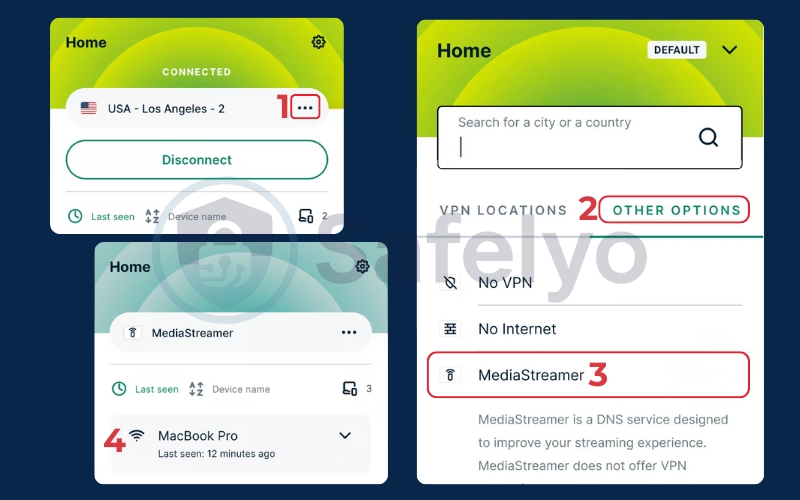
10.3. MediaStreamer & Smart DNS
This is one of ExpressVPN’s most misunderstood features, but it is a critical tool for home entertainment. MediaStreamer is a Smart DNS service included for free with every subscription. It is designed specifically for devices that cannot run VPN apps – such as Samsung Smart TVs, LG WebOS TVs, older Apple TVs (Gen 3 and earlier), and gaming consoles like the PlayStation 5 or Xbox Series X.
How it works
Unlike a VPN, MediaStreamer does not encrypt your traffic or hide your IP address. Instead, it changes your device’s DNS (Domain Name System) settings.
When your TV asks, “Where is Netflix.com?”, MediaStreamer intercepts that request and routes it through a US-based server. This tricks the streaming service into thinking you are in New York, even though you are physically in Vietnam or Germany.
The Advantage (Speed)
Because there is no heavy encryption (AES-256) wrapping your data, there is zero speed loss. This makes MediaStreamer the absolute best option for streaming 4K HDR content on a big screen where buffering is unacceptable.
The Trade-off (Security)
Since there is no encryption, your ISP can still see what you are doing (e.g., that you are watching Netflix). It is strictly for unlocking content, not for privacy.
My setup experience: It requires a bit more elbow grease than the “one-click” VPN app.
- I had to log in to the ExpressVPN website and “register” my IP address (so they know it’s me).
- I entered the two specific DNS IP addresses provided by ExpressVPN into my PS5’s network settings.
Result: Instantly unlocked Hulu and BBC iPlayer on my console.
Note: If you have the newest Apple TV 4K (tvOS 17+), you don’t need this anymore – you can just download the native ExpressVPN app. But for essentially every other Smart TV, MediaStreamer is essential.
10.4. ExpressVPN Keys (Password Manager)
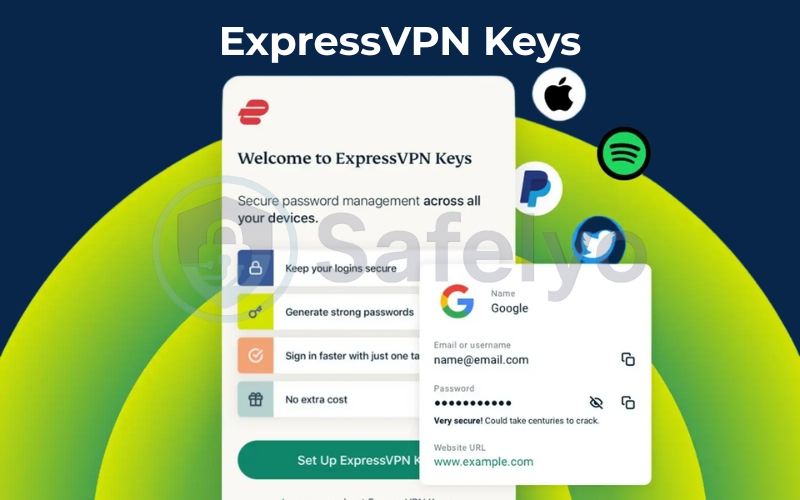
Most VPNs throw in a “password manager” as a cheap marketing gimmick – usually a basic, clunky add-on that nobody uses. ExpressVPN Keys is surprisingly different. It is a fully-featured security tool built directly into the iOS and Android apps (and available as a browser extension for Chrome, Edge, and Brave).
Zero-Knowledge Architecture: First and foremost, it is secure. Keys utilizes zero-knowledge encryption. This means ExpressVPN literally cannot see your passwords. Your data is encrypted locally on your device before it ever reaches their servers. Only you hold the master key.
More than just storage: During my testing, I found two features that make Keys a genuine competitor to standalone apps like LastPass or Bitwarden:
- Built-in Authenticator (2FA): It doesn’t just store passwords; it generates Time-based One-Time Passwords (TOTP). This means you don’t need a separate app like Google Authenticator. You can autofill both your password and your 2FA code in one click.
- Password Health Checker: It actively scans your vault and flags vulnerable passwords – those that are too weak, used more than once, or (crucially) found in known data breaches.
The Verdict: Is it better than the best password managers for a power-user like 1Password? Not quite (it lacks secure file storage or complex family sharing permissions). But considering it is included for free with your subscription, it is fantastic. It eliminates the need to pay another 3–5/month for a separate password manager.
10.5. Best-in-class router support (The Aircove Ecosystem)
This is, without a doubt, ExpressVPN’s “ace in the hole”. While other VPNs force you to mess with complex OpenVPN configuration files and risky firmware flashing, ExpressVPN offers a streamlined hardware and software solution.
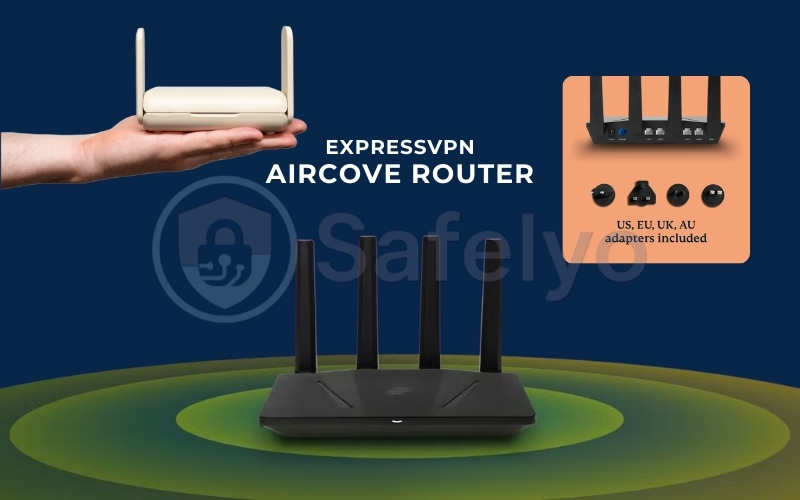
- Aircove & Aircove Go (Hardware): ExpressVPN launched Aircove, the industry’s first and only Wi-Fi 6 router with VPN protection built into the hardware.
- Why it’s a game-changer: You don’t need to install software on your devices. Any device that connects to the Aircove’s Wi-Fi (your Smart Fridge, Xbox, Roku, or generic smart bulbs) is instantly protected.
- Performance: I tested the Aircove with over 20 devices connected. Thanks to the high-performance quad-core CPU and the efficiency of the Lightway protocol, I didn’t experience the bottlenecking usually associated with router-based VPNs.
- The “Device Groups” Feature (Software Magic): This is the best feature of the router app, period. Most router VPNs are “all or nothing” – either every device is in New York, or none are.
ExpressVPN allows you to create Device Groups with a simple drag-and-drop interface:- Group A (Apple TV): Connected to “USA – Los Angeles” (for streaming).
- Group B (Work Laptop): Connected to “No VPN” (to access local printers and company portals).
- Group C (Personal Phone): Connected to “Japan – Tokyo” (for privacy).
- Group D (Smart Home): Connected to “Smart Location” (for general security).
This capability allows you to manage your entire digital household from a single browser tab. It effectively bypasses the device limit, as the router counts as just one connection regardless of how many gadgets are behind it.
11. What is ExpressVPN still missing?
Despite its premium status, ExpressVPN is not perfect. It intentionally omits certain advanced features to keep the app simple. However, for specific types of users, these omissions are dealbreakers. Here is a critical look at what is missing and who should avoid ExpressVPN because of it.
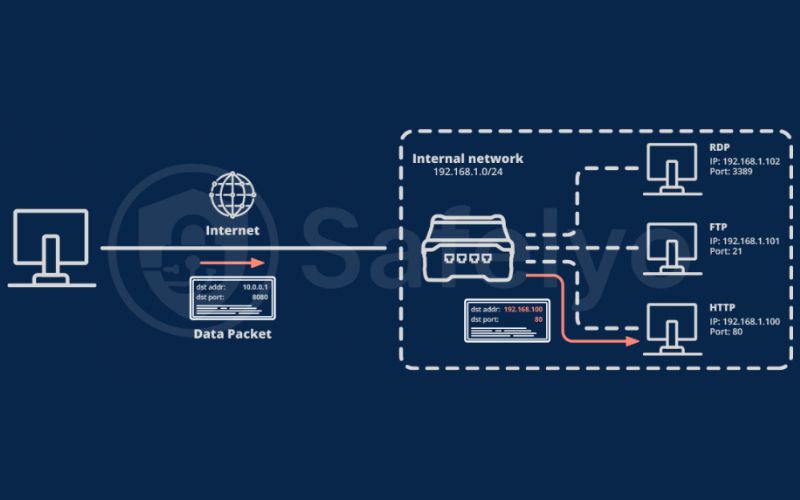
11.1. No Port Forwarding
ExpressVPN blocks port forwarding on its standard apps to close potential security loopholes. This is a major downside for hardcore torrenters.
If you use private torrent trackers that require you to maintain a high upload ratio (seeding), ExpressVPN is not the best choice for you. Without port forwarding, your upload speeds will be severely limited, and you cannot connect to as many peers.
Alternative: Private Internet Access (PIA) or Proton VPN (both offer excellent port forwarding support).
11.2. No “Double VPN” (Multi-Hop) toggle
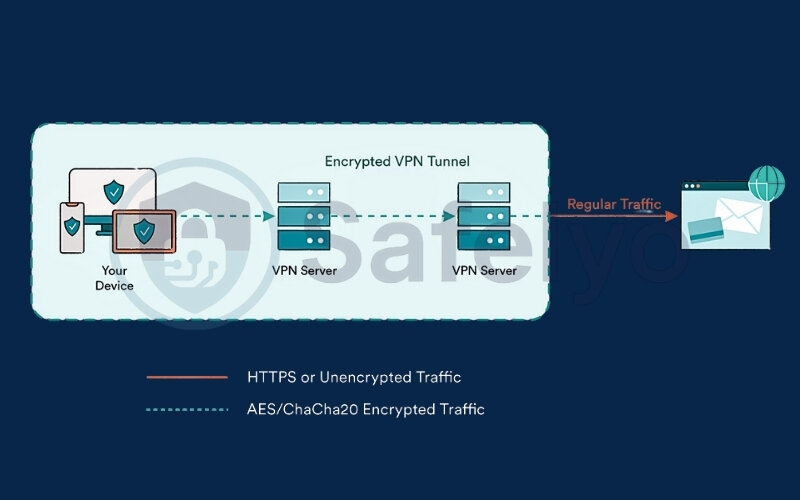
Competitors like NordVPN and Surfshark allow you to route your traffic through two different servers (e.g., exiting via New York but entering via London) with a single click. ExpressVPN argues that their TrustedServer tech makes Double VPN unnecessary, but the option simply isn’t there in the UI. It lacks that extra layer of “paranoid” physical security.
So, who is this NOT for? Activists, journalists, or political dissidents living in high-surveillance regimes (like China or Iran) who want the peace of mind of double encryption.
Alternative: NordVPN (Double VPN is built in and easy to use).
11.3. No customizable encryption levels
ExpressVPN forces you to use the highest security standard (AES-256). You cannot “downgrade” to AES-128 or tweak connection packets to squeeze out faster speeds on slow networks.
Who is this “Apple-like” philosophy that limits control NOT for? Tech tinkerers and developers. If you want to see “under the hood”, tweak MTU settings, or manually configure config files to optimize performance on a very old device, you will feel restricted by ExpressVPN’s locked-down interface.
Alternative: AirVPN or TorGuard (highly customizable).
11.4. No Dedicated IP in the Standard Plan
While ExpressVPN now offers Dedicated IPs (as of late 2024), it is a paid add-on. You pay extra for what some offer for less. Some competitors include static IPs or have a larger pool of shared IPs that trigger fewer CAPTCHAs.
Who is this NOT for? Remote workers on a budget. If you are tired of filling out Google CAPTCHAs or need a consistent IP for bank logins but don’t want to pay an extra fee on top of an already expensive subscription, this might sting.
Alternative: CyberGhost (Often offers cheaper dedicated IP packages).
12. ExpressVPN ease of use & app experience
This is where ExpressVPN truly earns its premium price tag. While competitors like NordVPN or CyberGhost try to dazzle you with world maps, complex dashboards, and endless setting menus, ExpressVPN takes a page straight out of Apple’s design philosophy: Less is more.
I have installed ExpressVPN on everything from a high-end gaming PC to a sluggish 5-year-old Android tablet. Here is how the experience stacks up.
If you’re setting ExpressVPN up for the first time, here’s a quick step-by-step guide on how to log in to ExpressVPN (including common sign-in issues).
12.1. The “One-Button” interface
When you open ExpressVPN on Windows or macOS, you aren’t greeted by a confusing list of IP addresses or technical jargon. You see one thing: A massive power button.
- How it works: You click the button. The ring turns green. You are safe. That’s it.
- Smart Location: By default, it selects the server that will give you the fastest speed. If you want to change it, you click the three dots, and a clean list of countries appears.
It is arguably the cleanest interface in the industry. It doesn’t clutter your screen or hog your system resources. It sits quietly in the corner, doing its job.
12.2. Mobile apps: Consistency is key
A common frustration with VPNs is that the mobile app often feels like a “lite” version of the desktop app. Not here.
- iOS & Android: The interface on my iPhone 15 and Pixel 8 is virtually identical to the desktop version. The same power button, the same settings menu, and the same Lightway protocol.
- Haptic Feedback: On mobile, when you press the connect button, you get a satisfying little vibration (haptic feedback) when the connection is secure. It’s a small detail, but it makes the app feel polished and responsive.
- Shortcuts: A feature I love on Android is the “App Shortcuts”. Once connected, a toolbar appears with shortcuts to my most-used apps (like Chrome or Netflix), saving me a few taps.
12.3. Browser extensions: Remote control, not just a proxy
Most VPN browser extensions (like the ones from Surfshark or PIA) are just simple HTTPS proxies. They only protect your browser traffic, leaving your other apps exposed.
ExpressVPN’s extension is different. It acts as a remote control for the main desktop app. When you click “Connect” in Chrome, it activates the system-wide VPN on your computer. This ensures everything (your Spotify, your email client, your Slack) is encrypted, not just your web browsing.
The "Grandparent Test"
I often judge software by a simple metric: Could I explain this to my grandmother over the phone?
With ExpressVPN, the answer is a resounding yes. There are no “servers to ping”, no “load percentages” to analyze, and no “protocol selection” required (unless you want to). It is the most beginner-friendly VPN I have ever tested.
13. ExpressVPN plans & pricing (January 2026 updated)
For over a decade, ExpressVPN was known as the “premium, expensive option”, rarely dropping below $6.67/month. That has completely changed in 2026.
ExpressVPN has introduced a new 3-tier system (Basic, Advanced, Pro) and a 2-year subscription option that brings the entry price down to a historic low of $2.79/month. This is an aggressive move to compete directly with lower-priced rivals.
13.1. The 3 new pricing tiers: What is the difference?
Instead of just one plan, you now choose based on features and device limits:
1. ExpressVPN Basic (The “Essentials” Plan)
- Best for: Most individual users.
- Device Limit: 10 simultaneous connections.
- Features: Full VPN access (105 countries), high-speed Lightway protocol, and “Lite” protection (blocks ads & malicious sites).
- Missing: No tracker blocking, no password manager, no eSIM trial.
2. ExpressVPN Advanced (The “Best Value” Plan)
- Best for: Families and privacy-conscious users.
- Device Limit: 12 simultaneous connections.
- Features: Everything in Basic, plus Advanced Protection (blocks trackers & adult sites), Password Manager, and a 3-day global eSIM trial (via holiday.com).
3. ExpressVPN Pro (The “Power User” Plan)
- Best for: Remote workers and heavy travelers.
- Device Limit: 14 simultaneous connections.
- Features: Everything in Advanced, plus a 5-day global eSIM trial and, crucially, a Dedicated IP is included (saving you ~$4/month).
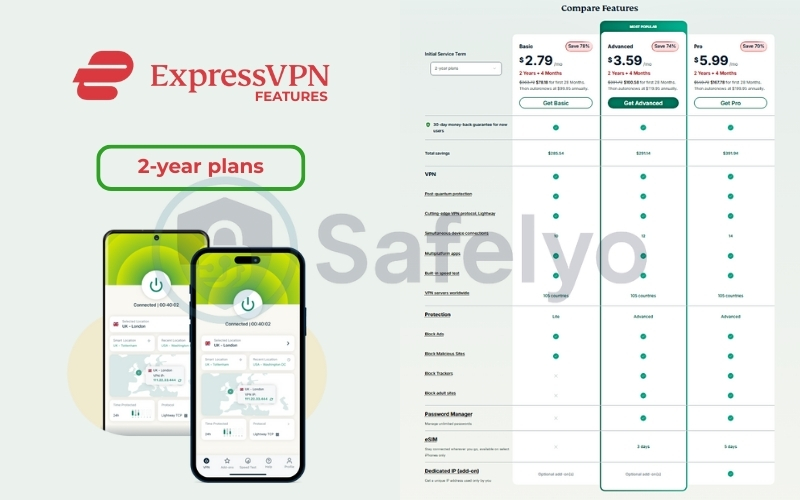
13.2. Detailed ExpressVPN price breakdown
Here is exactly what you will pay depending on how long you commit.
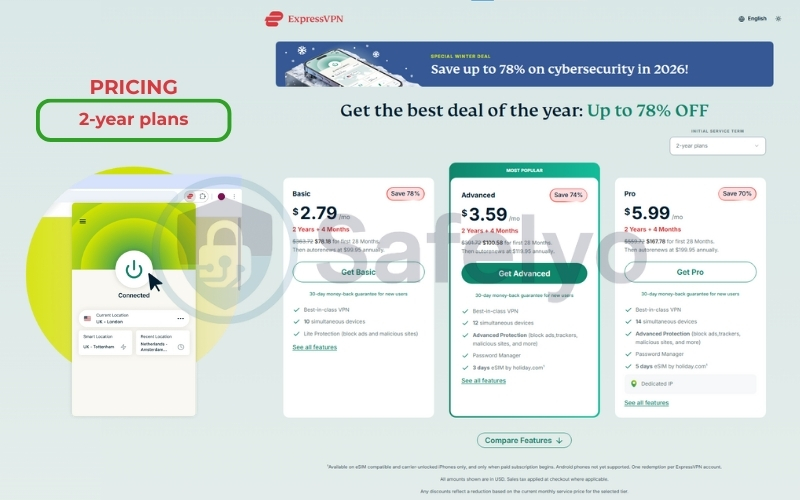
Option A: The 2-Year Plan (Cheapest & Recommended)
Includes 4 extra months for free.
| Plan Tier | Monthly Cost | Total Billed (First 28 months) |
| Basic | $2.79 /mo | ~$78.18 |
| Advanced | $3.59 /mo | ~$100.58 |
| Pro | $5.99 /mo | ~$167.78 |
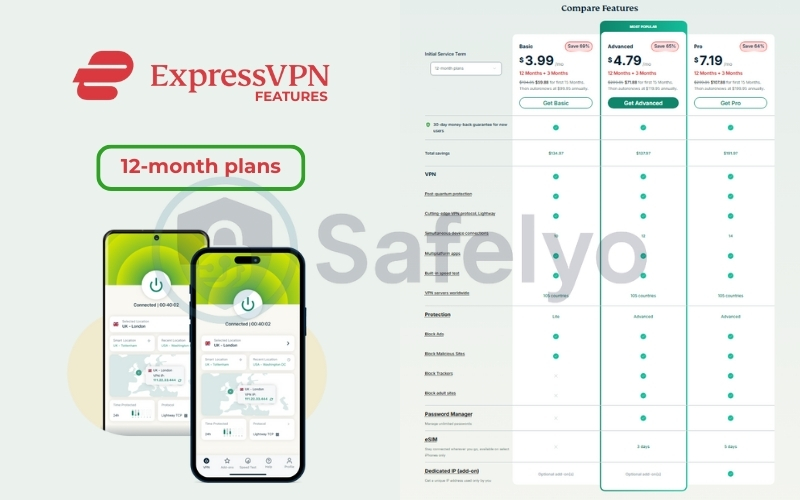
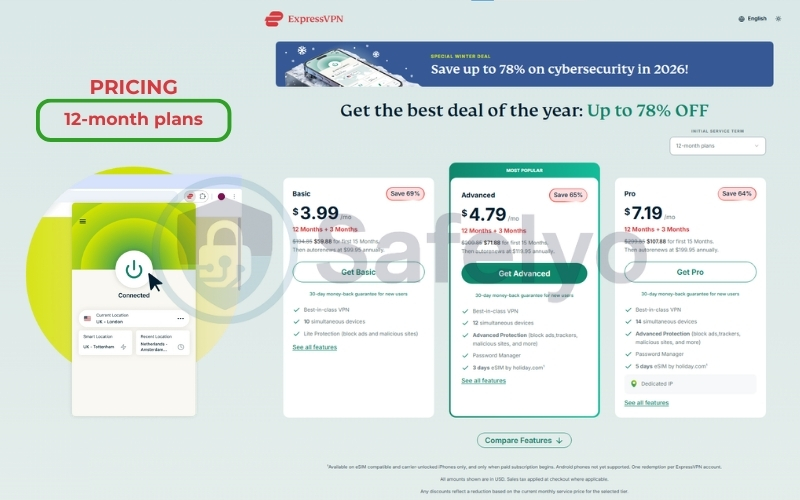
Option B: The 12-Month Plan
Includes 3 extra months for free.
| Plan Tier | Monthly Cost | Total Billed (First 15 months) |
| Basic | $3.99 /mo | ~$59.88 |
| Advanced | $4.79 /mo | ~$71.88 |
| Pro | $7.19 /mo | ~$107.88 |
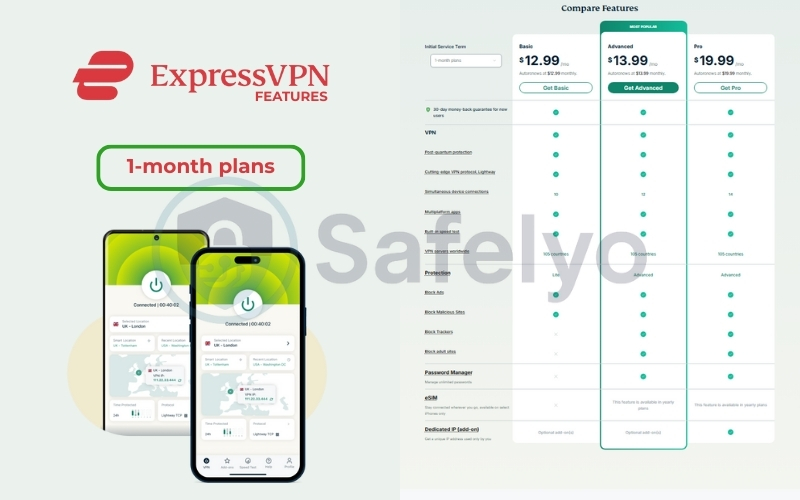
Option C: The 1-Month Plan (Most Expensive)
Billed every month. No commitment.
| Plan Tier | Monthly Cost |
| Basic | $12.99 /mo |
| Advanced | $13.99 /mo |
| Pro | $19.99 /mo |

13.3. ExpressVPN Add-ons and fine print
To ensure there are no surprises at checkout, here is a breakdown of the optional extras and key policy details you should be aware of.
- Dedicated IP: If you choose the Basic or Advanced plan, you can add a Dedicated IP at checkout for $3.99/month. (Remember, this is included for free in the Pro plan.)
- 30-Day Money-Back Guarantee: This applies to all plans. You can try the 2-year plan, and if you don’t like it within the first month, you get a full refund of your ~$78.
- Payment Methods: They accept Credit Cards (Visa, Mastercard, Amex, Discover), PayPal, Google Pay, and various cryptocurrencies for anonymity.
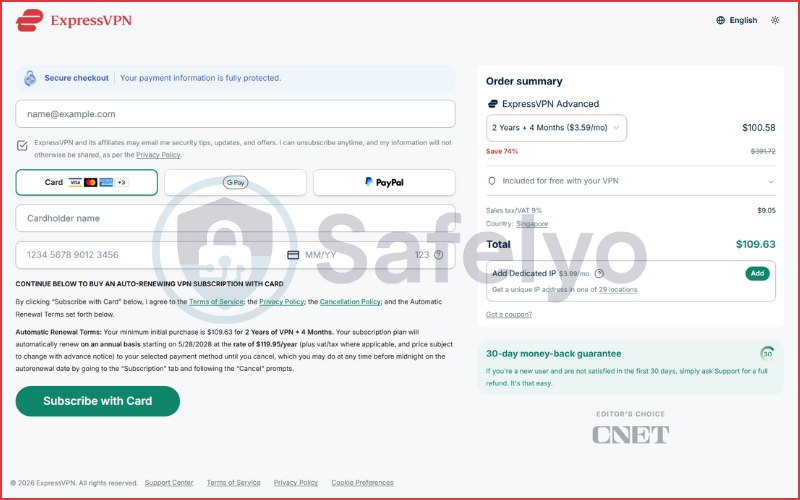
My Verdict on Pricing: The new $2.79/month Basic plan is a game-changer. ExpressVPN is finally offering its premium infrastructure at a budget-friendly price. Unless you absolutely need a Dedicated IP (Pro plan) or the Password Manager (Advanced plan), the Basic tier offers the best “bang for your buck” we have ever seen from this company.
14. Which ExpressVPN plan should you choose?
With the new three-tier system (Basic, Advanced, Pro), the choice isn’t just about how long you sign up for, but what features you actually need. Here is my honest recommendation to help you get the best value without overpaying.
14.1. The “no-brainer” choice: Basic (2-Year Plan)
At $2.79/mo, this is historically cheap for ExpressVPN. If you just want a VPN to unblock Netflix, secure your Wi-Fi, and download torrents, the Basic Plan is all you need.
You get the exact same speed, encryption, and server access as the Pro plan. Don’t pay extra for the “Advanced” tier unless you specifically need a password manager (there are better free standalone ones) or aggressive tracker blocking. 10 devices are plenty for most households.
14.2. The “Remote Worker” choice: Pro (2-Year Plan)
If you need a static IP to avoid CAPTCHAs and bank lockouts, upgrading to Pro is actually cheaper than buying the add-on separately.
- Who is this for? People who need a Dedicated IP (Remote workers, frequent travelers who need to access banking apps).
- The Math Trick: Do the math before you buy.
- If you buy the Basic Plan ($2.79) and add a Dedicated IP($3.99) separately, you pay $6.78/mo.
- The Pro Plan includes a dedicated IP and costs $5.99/mo.
14.3. The “vacation” choice: Basic (1-Month)
Are you traveling to a high-censorship country (like China or the UAE) for less than a month? Don’t lock yourself into a 2-year contract just for a 2-week trip. Pay the $12.99 once, enjoy unrestricted internet, and cancel when you get home. It’s cheaper than a single day of roaming fees.
14.4. Who should buy the “Advanced” Plan?
Honestly? Most people can skip this. The “Advanced” tier ($3.59/mo) sits in an awkward middle ground. It adds the Password Manager and Tracker Blocking.
My take: Unless you absolutely need to connect 12 devices simultaneously (instead of 10) or you don’t already have a password manager like Bitwarden, you are better off saving money with the Basic plan.
15. ExpressVPN alternatives (2025–2026)
ExpressVPN is fantastic, but it is not the only fish in the sea. In 2026, the VPN market is a battlefield, and competitors are offering incredible value.
When should you choose a cheaper alternative?
| Your Priority / Need | ExpressVPN Status | Better Alternative |
| Dedicated IP | Paid add-on (Basic/Advanced) or included only in expensive Pro plan. | CyberGhost or NordVPN (Often bundle this cheaper). |
| Double VPN (Multi-Hop) | No built-in “one-click” setting for routing through two locations. | NordVPN or Surfshark (Easy one-click setup). |
| Tight Budget | Premium price. Even with the new deal, it costs more over time. | Paid add-on (Basic/Advanced) or included only in the expensive Pro plan. |
If the price tag of ExpressVPN makes you hesitate, here are the two best alternatives you should consider.
15.1. ExpressVPN vs. NordVPN
The Verdict: NordVPN is the better choice for power users and speed freaks.
- Price: NordVPN is almost always cheaper (usually around $3.00 – $3.99/month vs. ExpressVPN′s $6.67+).
- Speed: NordVPN’s NordLynx protocol (based on WireGuard) often benchmarks slightly faster than ExpressVPN’s Lightway in raw peak speed tests.
- Features: NordVPN offers Threat Protection Pro, which acts more like a real antivirus, whereas ExpressVPN’s protection is lighter and DNS-based.
Why pick ExpressVPN instead? The app is simpler. NordVPN’s map interface can feel cluttered and laggy on older computers. ExpressVPN is cleaner and feels more “native” to the OS.
15.2. ExpressVPN vs. Surfshark
The Verdict: Surfshark is the better choice for families on a strict budget.
- Price: Surfshark is the value king, often dipping below $2.00/month.
- Devices: Surfshark allows Unlimited Simultaneous Connections. You can share one account with your entire extended family. ExpressVPN caps you at 10 or 12.
Why pick ExpressVPN instead? Consistency. Surfshark is great, but its speeds can fluctuate more than ExpressVPN’s. If you need a connection that never drops (e.g., for work calls), ExpressVPN is the more reliable workhorse.
>> Check out the ExpressVPN VS Surfshark 2026 comparison
16. Common ExpressVPN issues & fixes
Even the “King of VPNs” isn’t immune to bugs. While my testing was largely smooth, here are the most common issues users face in 2025 and how to fix them in seconds.
16.1. “Unable to Connect”
Sometimes the connection wheel just spins forever.
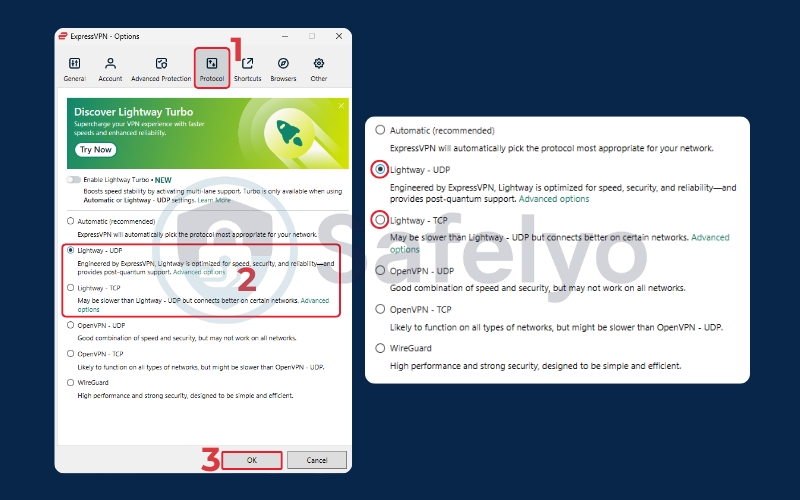
The Fix: 90% of the time, this is a protocol handshake issue.
Go to Settings > Protocol and switch from “Automatic” to Lightway – UDP (or TCP if you are on an unstable network).
If that fails, try OpenVPN.
16.2. Slow speeds on specific servers
You connect to “USA – New York”, and suddenly, YouTube starts buffering.
The Fix: Don’t be stubborn about the city. Disconnect and run the built-in Speed Test feature (in the “Help & Support” menu). It will ping all servers and tell you exactly which one is fastest right now. Often, “USA – New Jersey” or “USA – Washington DC” will be lightning fast even if New York is congested.
15.3. Netflix says, “You seem to be using a proxy”
This is rare with ExpressVPN, but Netflix updates its blocklist weekly.
The Fix:
- Clear your browser cache/cookies (or open an Incognito window).
- Connect to a different city (e.g., switch from London to East London).
Pro Tip: Open the Live Chat on ExpressVPN’s website. Ask the bot (or human): “Which server works with Netflix US right now?” They have a live list and will tell you the exact server name to use.
16.4. Internet cuts out when VPN disconnects
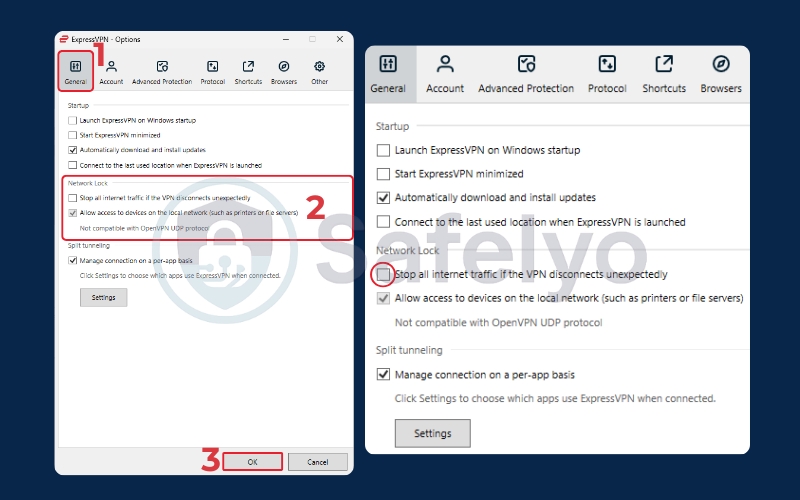
This isn’t a bug; it’s the Network Lock (Kill Switch) doing its job to protect you.
The Fix: If you find this annoying (e.g., you are just gaming and don’t care about a momentary IP leak), go to Options > General and uncheck “Stop all internet traffic if the VPN disconnects unexpectedly”. (Note: I do not recommend this for torrenting!)
17. What users say about ExpressVPN
While my testing confirms the technical prowess of ExpressVPN in a controlled environment, long-term reliability is best judged by the people using it every day. To give you a balanced perspective, I analyzed thousands of user feedback points on Trustpilot, the App Store, and Google Play (as of January 27, 2026).
17.1. Trustpilot Analysis: Superior Support vs. Hardware Headaches
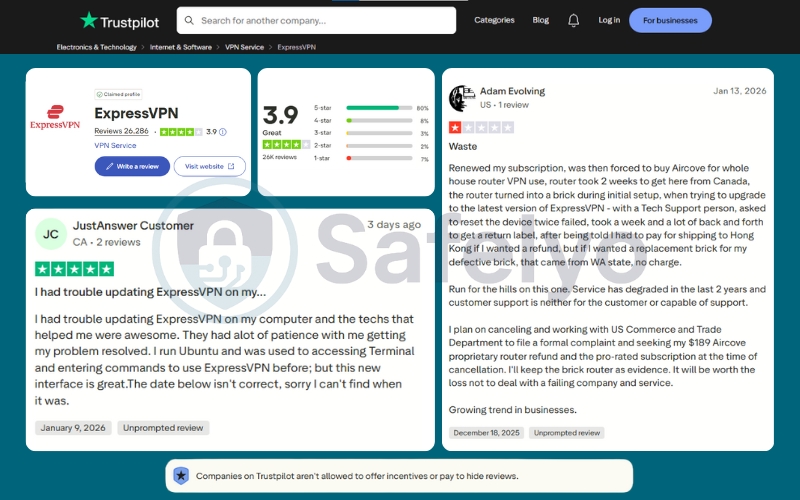
ExpressVPN currently holds a 3.9-star rating (“Great”) on Trustpilot based on over 26,000 reviews. While this is a respectable score, it is slightly lower than some competitors who maintain a 4.5+ average.
Looking closer at the feedback (as seen in the screenshots), users fall into two distinct camps:
- The “support” fans: The 5-star reviews frequently cite the 24/7 customer support. Users like JustAnswer Customer praised the tech support for being “awesome” and having “a lot of patience” when helping resolve complex issues on Linux (Ubuntu). This aligns with ExpressVPN’s reputation for having actual humans, not bots, manning their chat.
- The “hardware” critics: The lower ratings often stem from logistics and hardware rather than the app itself. A notable 1-star review from Adam Evolving highlights a nightmare scenario with the Aircove Router – citing shipping delays, a “bricked” device after an update, and a complicated return process to Hong Kong.
Key Takeaway: The software service is highly rated, but be cautious when ordering physical hardware (Aircove) if you live in a region with complex shipping logistics.
17.2. Mobile Store Performance (Android & iOS)
This is where ExpressVPN truly shines. On mobile platforms, the satisfaction ratings are significantly higher, reflecting its “mobile-first” design philosophy.
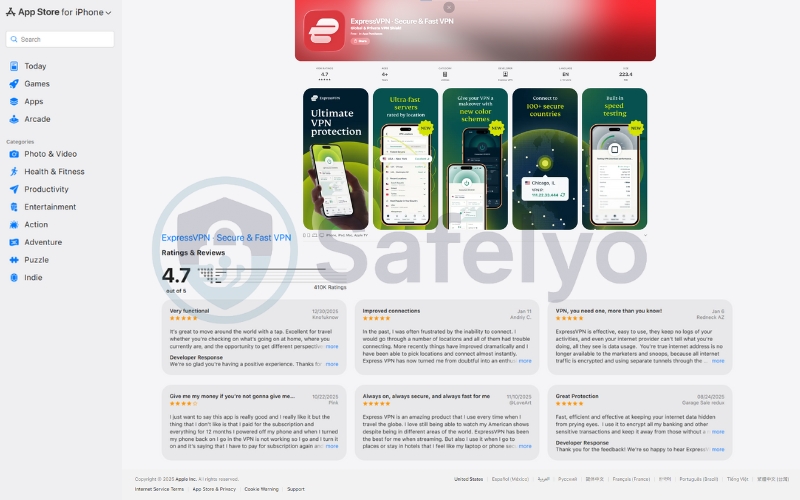
On the App Store (iOS): The app maintains a stellar 4.7-star rating from a massive 410,000+ ratings. iOS users consistently praise the stability. Recent reviews from 2026 highlight that connection issues from the past have been resolved, with users calling it “Always on, always secure” and excellent for travel.
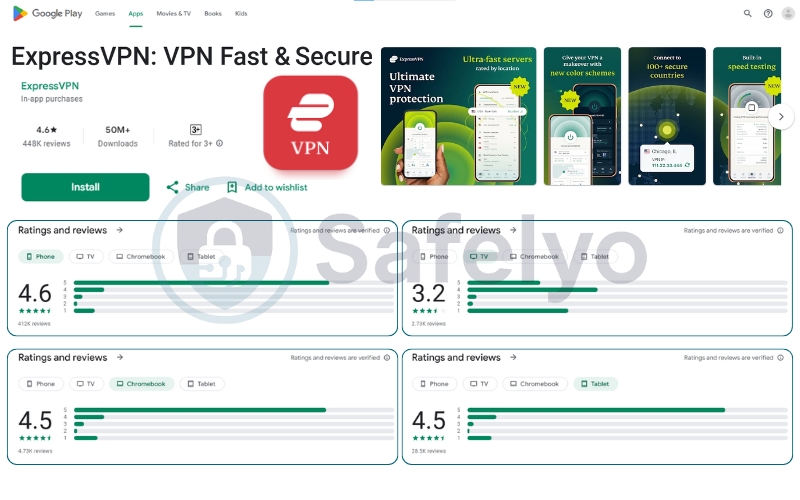
On Google Play (Android): The app is a heavyweight with over 50 million downloads and a 4.6-star rating.
- The “hidden” issue: While the phone app is rated 4.6/5, if you look closely at the device breakdown in the data, the TV rating drops to 3.2 stars.
- What this means: While ExpressVPN works flawlessly on Android phones, the experience on Android TV (smart TVs and boxes) seems to be less stable, with users likely encountering interface glitches or connection drops that phone users don’t see.
The bottom line on user sentiment
The consensus is clear: If you are using the ExpressVPN software on your phone or computer, you are likely to join the happy 5-star majority who love the simplicity and speed. However, frustration tends to spike when dealing with physical hardware returns or the specific Android TV app.
18. FAQs about ExpressVPN
Is ExpressVPN really worth the price?
Absolutely. In the past, it was expensive, but with the new 2026 pricing of $2.79/month for the 2-year plan, it is now one of the best value-for-money VPNs on the market. You get premium speed and security for the price of a budget VPN.
Is ExpressVPN safe after the Kape acquisition?
Yes. Since the acquisition, ExpressVPN has undergone multiple independent audits by PwC and KPMG to verify its “no-logs” policy and TrustedServer architecture. They have proven that they operate independently of Kape’s management structure regarding user data.
Does ExpressVPN work with Netflix?
Yes, consistently. During my tests, it unlocked Netflix US, UK, Japan, and Canada without issues. It is one of the few VPNs that can access Netflix without constantly triggering the proxy error.
Is ExpressVPN good for beginners?
It is arguably the best VPN for beginners. The interface is incredibly simple – just one big button. It handles all the complex configuration (like choosing the best protocol) automatically in the background.
19. Conclusion
ExpressVPN has managed to pull off a rare feat in the tech world: It improved its product while lowering its price. For years, it was the “luxury” option that many people admired but couldn’t justify paying for. Now, with the new tier structure and the $2.79 entry point, there is very little reason not to choose it. It offers the best balance of speed, security, and simplicity in the industry.
Whether you are a digital nomad needing a dedicated IP, a family wanting to protect 10+ devices, or just someone who wants to watch US Netflix without buffering, ExpressVPN is the gold standard for 2026. Ready to secure your digital life? Get ExpressVPN Risk-Free (30-Day Money-Back Guarantee). Check out the latest 2026 deals and save up to 78%.
For more expert comparisons and alternative options, head over to the dedicated VPN Reviews category of Safelyo to ensure you make the right choice.