To find the best VPN for Android TV in 2026, we tested multiple services to see which ones provide smooth remote control navigation and fast speeds for 4K video. Whether you want to unblock global Netflix catalogs or just secure your connection for free, we narrowed down the most effective options.
We also included standard Play Store and manual APK setup steps just in case an app is hidden in your region.
Best VPNs for Android TV:
- Surfshark (Best overall for Android TV): Delivers consistently high speeds and low latency on Asian servers. Featuring unlimited simultaneous device connections, four independent audits, and access to 28+ Netflix libraries at a starting price of $2.49/mo, Surfshark covers the most ground for smart TV users.
- NordVPN (Best for speed): Recorded the highest download result in our paid infrastructure tests. Its 9,500+ servers across 149 countries operate under Panama jurisdiction, placing the provider outside the intelligence-sharing agreements of the 5/9/14 Eyes alliances.
- Proton VPN (Best for privacy): Independently audited four times, most recently by Securitum in September 2025, and headquartered in Switzerland. The provider maintains strong throughput across its 20,000+ servers in 145+ countries.
- ExpressVPN (Best for streaming reliability): Provides the lowest latency in our testing parameters and features excellent upload capacity. It maintains a strong security record with annual audits from 2018 through 2026 by firms like KPMG, PwC Switzerland, Cure53, Praetorian, and F-Secure.
- Best free VPNs for Android TV: Proton VPN Free offers unlimited data with no speed throttling for secure browsing. PrivadoVPN features a native Android TV app and provides access to streaming servers with a data limit. Windscribe allows unlimited simultaneous devices and provides solid speeds on nearby servers.
Use the table below to compare the starting prices, streaming capabilities, and connection limits of our top picks.
| VPN | Starting Price | Android TV App | Netflix | Simultaneous Connections | Free Plan |
|---|---|---|---|---|---|
| Surfshark | $2.49/mo | Yes | 28+ regions | Unlimited | No |
| NordVPN | $3.49/mo | Yes | 26+ regions | 10 | No |
| Proton VPN | $2.99/mo | Yes | 25+ regions (Paid tier) | 1 free / 10 paid | Yes |
| ExpressVPN | $2.49/mo | Yes | 25+ regions | Up to 14 | No |
| PrivadoVPN | $0 / $1.11/mo | Yes | US, UK,… | 1 free / 10 paid | Yes |
| Windscribe | $0 / $3.00/mo | Yes | US, UK,… | Unlimited | Yes |
Performance & pricing disclaimer: Speed test results reflect our specific testing conditions in 2026. Your actual speeds will vary by location, device, and network. VPN providers also frequently update their pricing and trial terms. Always verify the latest details directly on the provider’s website before purchasing.
1. How we tested and selected the best VPNs for Android TV
Our evaluation process relies on verifiable data collection to establish an objective baseline. Over the course of four weeks, we conducted extensive hands-on tests by installing and running each VPN directly on the newest version of Android TV. To ensure accuracy, all speed and latency tests in this guide were conducted from Vietnam using a 1 Gbps wired connection.
Because of this specific testing location, ping and latency to distant servers, such as those in the US or UK, will naturally be quite high. This is a physical limitation of network routing across the globe, rather than a performance flaw of the VPN services themselves.
During these tests, we utilized the fastest available modern protocol for each provider, specifically WireGuard, NordLynx for NordVPN, and Lightway for ExpressVPN. This technical context applies to all speed test results presented in this article.
For the actual measurements, we utilized Ookla Speedtest to record download, upload, and ping data, while ipleak.net verified DNS leak, WebRTC leak, and IPv6 leak protection.
Our evaluation focused on the following core metrics:
- Speed: Download, upload, and latency performance across multiple global servers.
- Android TV app: The availability of a native Play Store listing versus manual APK sideloading, along with remote control usability.
- Streaming: The technical capability to unblock Netflix, Disney+, and BBC iPlayer.
- Security: Encryption standards, protocol options, kill switch behavior, and third-party audit history.
- Privacy: Corporate jurisdiction, 5/9/14 Eyes status, and server infrastructure hardware such as RAM-only versus full-disk encryption.
- Pricing: Introductory rates, renewal rates, simultaneous device limits, and free plan conditions.
We evaluate paid and free VPNs separately due to their fundamentally different use cases and bandwidth limitations.
2. Best VPNs for Android TV: Top picks for 2026
This section covers the four most effective paid VPNs in full detail. All providers listed here were tested thoroughly for Android TV app availability and streaming performance.
2.1. Surfshark: Best overall VPN for Android TV
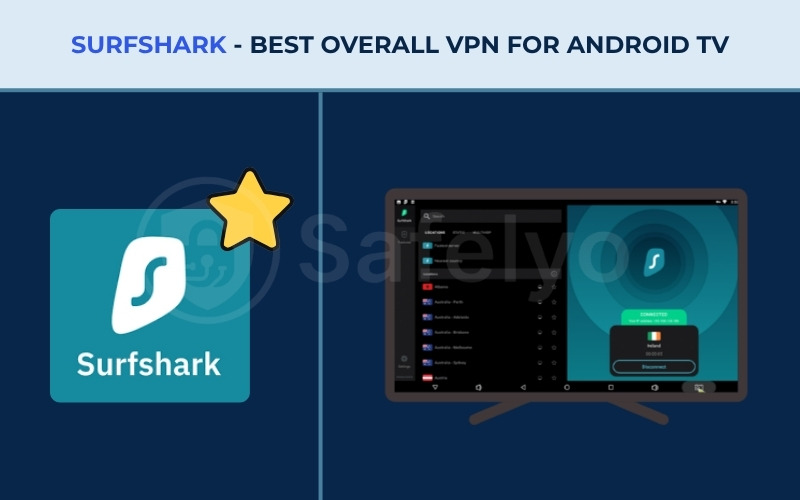
Surfshark provides an effective balance of speed, price, and streaming access for smart TV users. For Android TV users, it stands out by offering a polished, native application that is fully optimized for remote control navigation.
Beyond just a user-friendly interface, Surfshark packs enterprise-grade security features. It includes an independently audited no-logs policy and a network running entirely on volatile RAM. This infrastructure ensures that whether you are streaming international content or browsing securely, your digital footprint remains private.
Review the table below for a comprehensive look at Surfshark’s technical specifications.
| Feature | Details |
|---|---|
| Best For | Fast speeds, online privacy, and covering unlimited devices simultaneously |
| Starting Price | $2.49/mo (Starter, 2-year plan) |
| Company | Surfshark B.V. |
| Jurisdiction | The Netherlands |
| Independent Audit | Yes (Deloitte 2023, 2025; Cure53 2021; SecuRing 2025) |
| No-Logs Policy | Yes |
| RAM-Only Servers | Yes (100% RAM-only network) |
| Servers | 4,500+ |
| Countries | 100 |
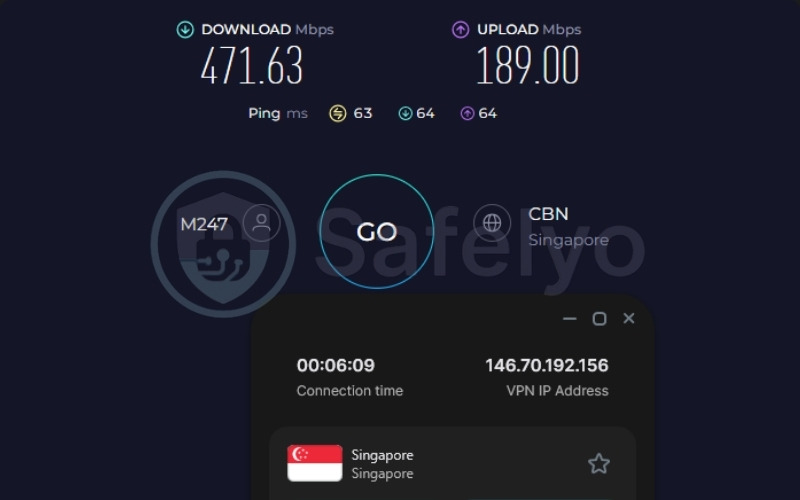
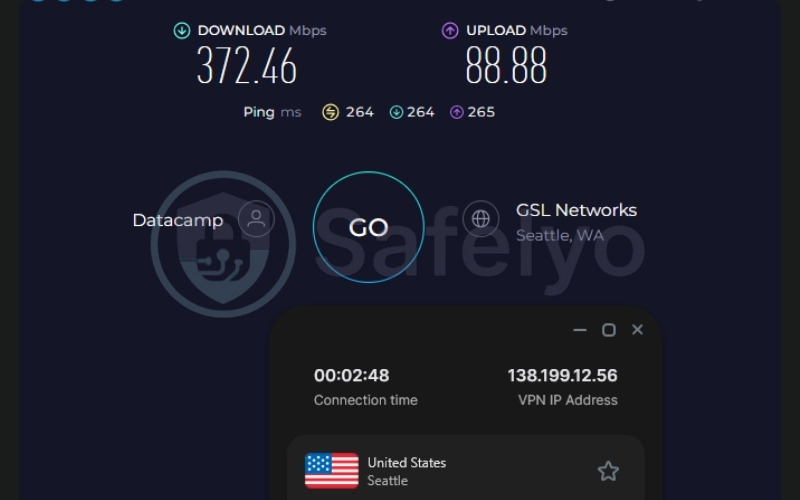
| Avg. Download Speed | Singapore: 471.63 Mbps / US: 372.46 Mbps |
| Avg. Upload Speed | Singapore: 189.00 Mbps / US: 88.88 Mbps |
| Avg. Latency | Singapore: 63ms / US: 264ms |
| Protocols | WireGuard, OpenVPN, IKEv2, Dausos (macOS) |
| Kill Switch | Yes |
| Obfuscation | Yes (Obfuscated servers, NoBorders mode) |
| Port Forwarding | No |
| Dedicated IP | Yes (20 locations) |
| Simultaneous Connections | Unlimited |
| Netflix Regions | 28+ |
| Disney+ | Yes |
| BBC iPlayer | Yes |
| Torrent / P2P | Yes |
| Win/Mac/iOS/Android | Yes |
| Linux | Yes |
| Browser Extension | Yes (Chrome, Firefox, Edge) |
| Router Support | Yes |
| Live Chat 24/7 | Yes |
| Refund Policy | 30-day money-back guarantee |
| Free Trial | Yes (7-day on iOS and Android) |
| Overall Positioning | Best overall VPN for Android TV |
| Official Website | https://surfshark.com |
Consider these primary advantages and drawbacks before committing to a subscription.
Pros
Unlimited simultaneous device connections
100% RAM-only server network
Four independent audits (Deloitte 2023, 2025; Cure53 2021; SecuRing 2025)
28 Netflix libraries confirmed in testing
Consistently fast download speeds suitable for 4K streaming
Highly affordable starting price on the 2-year plan
Dynamic MultiHop and NoBorders obfuscation included
Native Android TV app on the Google Play Store
Cons
The Netherlands falls within the 9 Eyes alliance
Renewal price increases significantly after the introductory term
Speed & performance
Surfshark handles heavy bandwidth demands consistently. Here are the exact speed metrics recorded during our evaluation.
| Server Location | Download (Mbps) | Upload (Mbps) | Ping (ms) |
|---|---|---|---|
| US | 372.46 | 88.88 | 264 |
| Singapore | 471.63 | 189.00 | 63 |
Both download results exceed 100 Mbps, making them highly capable for 4K video streaming, large file downloads, and simultaneous multi-device use. Alongside these fast download speeds, the Singapore ping of 63ms is suitable for casual gaming, video streaming, and social media navigation.
Even when routing traffic further away, the distant US latency of 264ms maintained a stable connection. This distant server is better suited for HD/4K streaming rather than low-latency interactive tasks.
Beyond standard downloads, the upload capacity on nearby servers is strong. This high upload rate is relevant for video calling or smart home device use running concurrently with Android TV.
To further optimize connections, Surfshark’s Nexus technology includes an IP Rotator that changes the user’s IP every 5 to 10 minutes without dropping the connection. This frequent rotation helps reduce detection risk during extended streaming sessions.
Privacy & security
Surfshark utilizes AES-256-GCM encryption on its WireGuard and IKEv2 protocols, alongside ChaCha20. Post-quantum encryption is also available via the Dausos protocol on macOS devices. To support this strong encryption safely, the provider runs a 100% RAM-only server network. Because no data is written to physical hard disks, all server data wipes completely upon reboot, ensuring your activity cannot be extracted later.
Validating these security measures, Surfshark boasts four independent audits by different firms, including Cure53 in 2021, Deloitte in 2023 and 2025, and SecuRing in 2025. This multi-firm approach is more rigorous than relying on single-firm repeat audits. The service also includes DNS, WebRTC, and IPv6 leak protection built directly into the client.
For users needing extra anonymity, Dynamic MultiHop allows pairing custom entry and exit servers for an additional routing layer. Furthermore, NoBorders obfuscation enables connections in regions that aggressively block standard VPN protocols.
Regarding jurisdiction, the Netherlands is a 9 Eyes member. However, the RAM-only infrastructure and audited no-logs policy mean there is no stored user activity for Surfshark to disclose to authorities.
Streaming performance
Surfshark successfully accesses 28+ Netflix libraries globally, making it one of the best VPN for Netflix in our testing. During our evaluation, we specifically noted high success rates when connecting to the US, UK, Japan, and Canada. The service also reliably unblocks BBC iPlayer and Disney+.
Instead of isolating streaming to specific labeled servers, Surfshark optimizes its infrastructure globally for streaming. This network-wide optimization makes the connection process simpler for TV users. Additionally, the CleanWeb feature blocks ads and trackers within apps, which potentially improves the streaming interface experience on Android TV.
Here is a summary of the streaming results during our tests:
| Service | Unblocked | Quality |
|---|---|---|
| Netflix | Yes (28+ regions) | 4K / No buffering |
| BBC iPlayer | Yes | 4K / No buffering |
| Disney+ | Yes | 4K / No buffering |
Android TV experience
Surfshark features a native Android TV app available directly on the Google Play Store, meaning no manual sideloading is required. The native app is intuitive with clear D-pad navigation, ensuring remote control inputs register smoothly. The one-click connect feature is prominent, and standard servers load quickly without needing a keyboard or mouse.
Because Surfshark allows unlimited simultaneous connections, a household running Android TV, phones, laptops, and a tablet can cover all devices on one account without any additional fees or configuration. To customize this experience further, the Bypasser feature, which acts as split tunneling, is accessible within the Android TV app interface. This allows users to route specific streaming apps through the VPN while leaving other local network applications unaffected.
Pricing
Surfshark offers a competitive introductory rate on its longest plans. Review the table below for exact pricing tiers.
| Plan | Monthly Price | Total Billed (First Term) | Renewal Price |
|---|---|---|---|
| 1-Month Starter | $16.45/mo | $16.45 | $16.45/mo |
| 1-Year Starter | $3.39/mo | $50.85 | $79.00/yr |
| 2-Year Starter | $2.49/mo | $67.23 | $79.00/yr |
| 1-Year One | $3.59/mo | $53.85 | $99.00/yr |
| 2-Year One | $2.79/mo | $75.33 | $99.00/yr |
For Android TV users, the Starter plan is sufficient. The One and One+ bundles add identity protection tools not directly relevant to TV streaming use. A 30-day money-back guarantee applies to all plans.
You must note that after the two-year introductory term, the Starter plan renews at $79.00 per year. Planning for this renewal increase is essential before committing long-term.
Best for: Android TV users who need to cover unlimited devices on a single plan, want reliable streaming across 28+ Netflix libraries, and require a four-times-audited service at the low introductory price in this paid comparison.
2.2. NordVPN: Best for speed and global server coverage on Android TV
NordVPN is widely recognized as an industry heavyweight, and its reputation is built on a massive global infrastructure designed for high speed and reliable security. Android TV users will appreciate its seamless integration into the smart TV ecosystem, complete with a native app that requires zero technical expertise to navigate.
By combining its proprietary NordLynx protocol with a fleet of 10 Gbps servers across 149 countries, the provider ensures that 4K streaming remains buffer-free. Furthermore, its continuous commitment to transparency, demonstrated through five independent audits, makes it a highly secure choice for privacy enthusiasts.
The table below outlines NordVPN’s technical specifications and features.
| Feature | Details |
|---|---|
| Best For | Speed-focused users and those needing the widest global server coverage |
| Starting Price | $3.49/mo (Basic, 2-year plan) |
| Company | Nord Security |
| Jurisdiction | Panama (outside 5/9/14 Eyes) |
| Independent Audit | Yes (PwC Switzerland 2018, 2020; Deloitte 2022, 2023, 2024) |
| No-Logs Policy | Yes |
| RAM-Only Servers | Yes |
| Servers | 9,500+ |
| Countries | 149 |
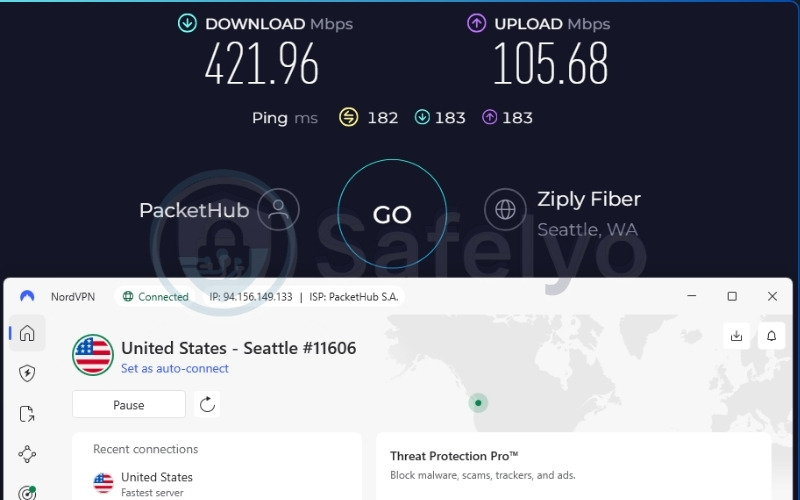
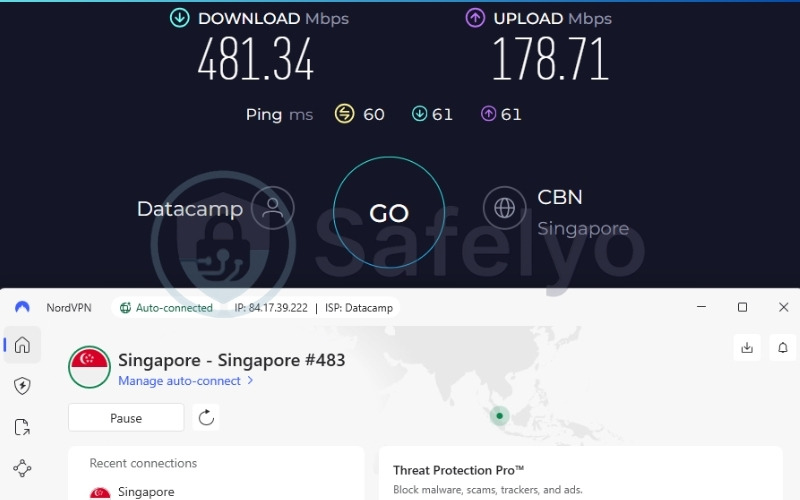
| Avg. Download Speed | Singapore: 481.34 Mbps / US: 421.96 Mbps |
| Avg. Upload Speed | Singapore: 178.71 Mbps / US: 105.68 Mbps |
| Avg. Latency | Singapore: 60ms / US: 182ms |
| Protocols | NordLynx, OpenVPN (UDP/TCP), IKEv2/IPSec, NordWhisper |
| Kill Switch | Yes |
| Obfuscation | Yes (obfuscated servers, NordWhisper) |
| Port Forwarding | No |
| Dedicated IP | Yes |
| Simultaneous Connections | 10 |
| Netflix Regions | 26+ (US, UK, JP, and others) |
| Disney+ | Yes |
| BBC iPlayer | Inconsistent |
| Torrent / P2P | Yes |
| Win/Mac/iOS/Android | Yes |
| Linux | Yes |
| Browser Extension | Yes (Chrome, Firefox, Edge) |
| Router Support | Yes |
| Live Chat 24/7 | Yes |
| Refund Policy | 30-day money-back guarantee |
| Free Trial | Yes (3-day on Android) |
| Overall Positioning | Best for speed and global server coverage |
| Official Website | https://nordvpn.com |
Review the following pros and cons to see if NordVPN fits your specific network environment.
Pros
Excellent speeds across global servers, ideal for 4K streaming
Five independent audits (PwC Switzerland 2018, 2020; Deloitte 2022, 2023, 2024)
Proprietary NordLynx and NordWhisper protocols
Panama jurisdiction placed outside 5/9/14 Eyes
Double VPN, Onion over VPN, obfuscated servers
Threat Protection Pro for ad and tracker blocking
Native Android TV app on the Google Play Store
Cons
Renewal price increases significantly after intro period
10-device simultaneous connection limit
BBC iPlayer access can be inconsistent
Speed & performance
NordVPN delivers top-tier throughput across vast distances. Here are the precise speeds recorded during our testing.
| Server Location | Download (Mbps) | Upload (Mbps) | Ping (ms) |
|---|---|---|---|
| US | 421.96 | 105.68 | 182 |
| Singapore | 481.34 | 178.71 | 60 |
NordVPN recorded the highest single-server download in our paid VPN tests with 481.34 Mbps in Singapore. Moving across the globe, the US result is also strong at 421.96 Mbps. Both locations easily exceed 100 Mbps and are fully capable of handling 4K streaming, multi-device use, and large file transfers concurrently.
Beyond standard downloads, the latency on nearby servers is suitable for casual gaming and video streaming. Distant servers naturally show expected ping increases, making them better suited for HD/4K streaming rather than real-time interactive tasks. The proprietary NordLynx protocol utilizes a WireGuard foundation, which explains this consistent throughput. Furthermore, the 10 Gbps colocated server infrastructure contributes heavily to NordVPN’s overall speed stability.
Privacy & security
NordVPN secures traffic with AES-256, ChaCha20, and post-quantum encryption. To support these encryption standards safely, the service utilizes RAM-only servers, ensuring no data persists after a server reboot. The provider has completed five total independent audits across PwC Switzerland in 2018 and 2020, and Deloitte in 2022, 2023, and 2024.
For users seeking advanced routing, Double VPN sends traffic through two servers for increased anonymity. Onion over VPN adds a Tor network layer for highest-risk users, while the proprietary NordWhisper obfuscation protocol is built specifically for bypassing restrictive networks. Additionally, Threat Protection Pro offers DNS-level ad, tracker, and malware blocking.
In 2018, a third-party datacenter server used by NordVPN was accessed without authorization. NordVPN states no user data was compromised, as no activity logs were stored. Independent Deloitte audits from 2022 onward have since verified the no-logs policy, and this event predates all current infrastructure, which is now entirely RAM-only and colocated. Finally, Panama jurisdiction places NordVPN outside all major intelligence-sharing alliances, and no mandatory data retention laws apply.
Streaming performance
NordVPN accesses 26+ Netflix libraries including the US, UK, and Japan. BBC iPlayer access, however, is inconsistent. While it can work, users may occasionally face proxy blocks and need to switch servers manually. Disney+ access is highly reliable.
To streamline the viewing experience, the SmartPlay feature handles streaming server selection automatically without manual configuration. This is highly relevant for Android TV users who prefer a one-tap experience without digging into DNS settings.
Here is a breakdown of the unblocking capabilities during our review:
| Service | Unblocked | Quality |
|---|---|---|
| Netflix | Yes (26+ regions) | 4K / No buffering |
| BBC iPlayer | Inconsistent | Varies |
| Disney+ | Yes | 4K / No buffering |
Android TV experience
NordVPN offers a native Android TV app on the Google Play Store, so no manual installation is required. The interface is adapted exceptionally well for TV screens, ensuring menu navigation is smooth with standard remotes. SmartPlay works automatically in the background without needing deep configuration from the user.
If a household has multiple Android TV units plus phones and a laptop, the 10-device cap is generally manageable. However, if the household exceeds 10 concurrent devices, you will need to log out of an active device to make room for a new connection.
Pricing
NordVPN provides varied tiers depending on the extra cybersecurity tools required. See the table below for full pricing details.
| Plan | Monthly Price | Total Billed (First Term) | Renewal Price |
|---|---|---|---|
| 1-Month Basic | $14.99/mo | $14.99 | $14.99/mo |
| 1-Year Basic | $5.49/mo | $65.88 | $139.08/yr |
| 2-Year Basic | $3.49/mo | $94.23 | $139.08/yr |
| 2-Year Complete | $4.49/mo | $121.23 | $219.48/yr |
| 2-Year Prime | $7.49/mo | $202.23 | $296.28/yr |
For Android TV users, the Basic 2-year plan at $3.09 per month covers full VPN access on 10 devices. The higher tiers add identity protection and cybersecurity tools not directly relevant to TV streaming. Please note that after the two-year introductory term, the Basic plan renews at $139.08 per year, which is an effective $14.99 per month.
Best for: Android TV users who prioritize the highest tested download speeds, the widest server network (149 countries), and Panama-jurisdiction privacy with five independent audits, and can manage within a 10-device simultaneous connection limit.
2.3. Proton VPN: Best privacy-focused VPN for Android TV
Developed by the scientists behind Proton Mail, Proton VPN is engineered with a profound commitment to digital privacy and anti-censorship. While many VPNs focus purely on entertainment, Proton VPN brings enterprise-level security to your Android TV, operating out of the privacy-friendly jurisdiction of Switzerland.
The service offers a highly intuitive native Android TV app that grants users access to a vast network of over 20,000 servers. With its transparent open-source applications and consistently audited no-logs infrastructure, it is a strong choice for users who demand both top-tier streaming capabilities and data protection.
Review the technical data for Proton VPN in the table below.
| Feature | Details |
|---|---|
| Best For | Privacy-focused users, journalists, and users in regions with strict internet censorship |
| Starting Price | $2.99/mo (24-month plan) |
| Company | Proton AG |
| Jurisdiction | Switzerland (outside 5/9/14 Eyes) |
| Independent Audit | Yes (4 audits, most recent by Securitum September 2025) |
| No-Logs Policy | Yes (independently verified) |
| RAM-Only Servers | No (full-disk encryption used instead) |
| Servers | 20,000+ |
| Countries | 145+ |
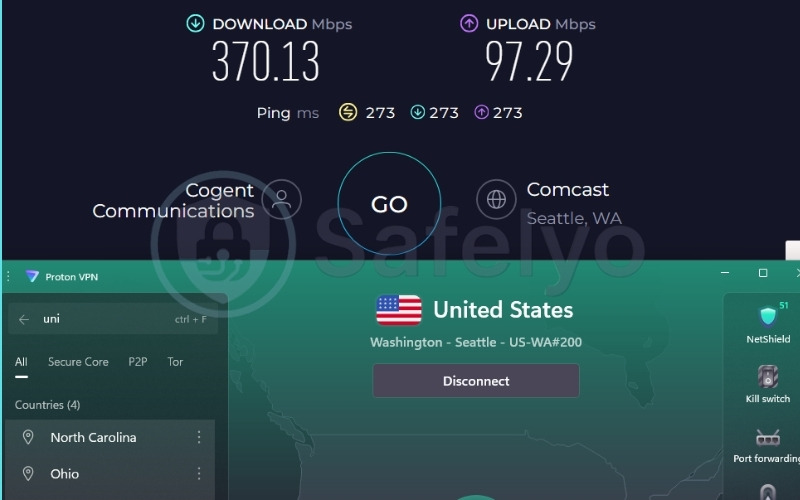
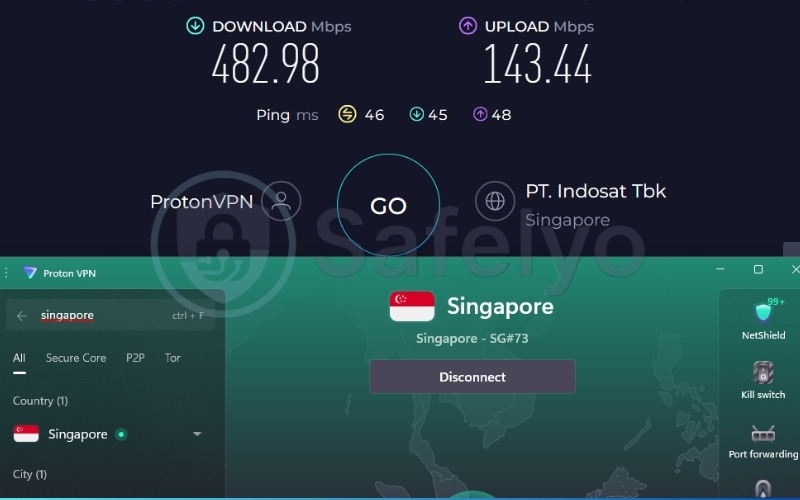
| Avg. Download Speed | Singapore: 482.98 Mbps / US: 370.13 Mbps (Plus plan) |
| Avg. Upload Speed | Singapore: 143.44 Mbps / US: 97.29 Mbps (Plus plan) |
| Avg. Latency | Singapore: 46ms / US: 273ms (Plus plan) |
| Protocols | WireGuard, IKEv2, Stealth |
| Kill Switch | Yes (Standard and Advanced) |
| Obfuscation | Yes (Stealth protocol) |
| Port Forwarding | Yes (paid plans only) |
| Dedicated IP | Yes (Business plans only) |
| Simultaneous Connections | 10 (paid), 1 (free) |
| Netflix Regions | 25+ (including US and UK) |
| Disney+ | Yes |
| BBC iPlayer | Yes |
| Torrent / P2P | Yes (dedicated P2P servers, paid plans only) |
| Win/Mac/iOS/Android | Yes |
| Linux | Yes (GUI app and CLI) |
| Browser Extension | Chrome, Firefox |
| Router Support | Yes |
| Live Chat 24/7 | No (available 9AM to 12AM CET for paid plans only) |
| Refund Policy | 30-day money-back guarantee |
| Free Trial | Permanent free plan |
| Overall Positioning | Best for privacy |
| Official Website | https://protonvpn.com |
Examine these pros and cons to determine if Proton VPN aligns with your specific needs.
Pros
20,000+ servers across 145+ countries (largest network in this comparison)
Switzerland jurisdiction (strong privacy laws)
Four independent audits, most recently September 2025 (Securitum)
Permanent free plan (no credit card required)
Secure Core and Stealth protocol included
Native Android TV app on the Google Play Store
Cons
10-device limit on paid plans
Dedicated IP available on Business plans only
Speed & performance
Proton VPN maintains exceptional speeds on its premium tier. The table below displays our findings.
| Server Location | Download (Mbps) | Upload (Mbps) | Ping (ms) |
|---|---|---|---|
| US | 370.13 | 97.29 | 273 |
| Singapore | 482.98 | 143.44 | 46 |
Performance on nearby servers is outstanding, ranking among the best for seamless video streaming, conferencing, and casual gaming without lag. When connecting further away, distant servers retain strong throughput well-suited for 4K streaming.
Latency naturally increases over longer distances, ruling out fast-paced real-time tasks on US servers, but both results still exceed 100 Mbps comfortably. Note that these specific speed test results are for the paid Plus plan.
Privacy & security
Proton VPN protects your connection with AES-256 (IKEv2) and ChaCha20 (WireGuard) encryption. Unlike other providers on this list, Proton VPN does not use RAM-only servers. Instead, it utilizes full-disk encryption to actively protect data written to the disk.
RAM-only eliminates data extraction risks upon hardware confiscation because nothing writes to disk, while full-disk encryption safeguards the data that is actively stored. The service has undergone four independent audits, with the most recent conducted by Securitum in September 2025.
To further enhance privacy, Secure Core adds an extra hop through hardened servers in privacy-friendly nations before reaching the exit server. In restricted regions, the Stealth protocol obfuscates VPN traffic to bypass deep packet inspection. Finally, Switzerland jurisdiction places the provider outside the 5/9/14 Eyes alliances and enforces strong data protection laws globally recognized for user privacy.
Streaming performance
Proton VPN unblocks 25+ Netflix libraries, including the US and UK. Access to these streaming-optimized servers is exclusive to the paid Plus plan. The service also works reliably with BBC iPlayer and Disney+. Beyond basic unblocking, the Stealth protocol is particularly relevant for Android TV users in countries where VPN traffic is aggressively blocked by internet service providers.
Here is a summary of the streaming results during our tests:
| Service | Unblocked | Notes | Quality |
|---|---|---|---|
| Netflix | Yes (25+ regions) | Plus plan required | 4K / No buffering |
| BBC iPlayer | Yes | Highly reliable | 4K / No buffering |
| Disney+ | Yes | Plus plan required | 4K / No buffering |
Android TV experience
Proton VPN maintains a native Android TV app directly on the Google Play Store. The TV app interface is clean and uncluttered, making it simple to navigate. The built-in profiles feature makes switching between optimized server types, such as Secure Core versus Standard, very easy using a standard remote control. The 10-device limit on paid plans is highly suitable for most households running standard smart home setups.
Pricing
Proton VPN structures its pricing to favor longer-term commitments. Review the cost breakdown below.
| Plan | Monthly Price | Total Billed (First Term) | Renewal Price |
|---|---|---|---|
| 1-Month | $9.99/mo | $9.99 | $9.99/mo |
| 12-Month | $3.99/mo | $47.88 | $83.88/yr |
| 24-Month | $2.99/mo | $71.76 | $83.88/yr |
The 24-month plan at $2.99 per month provides the best long-term value. However, the 24-month plan renews at approximately $83.88 per year. A permanent free plan is also available, which will be detailed in the free VPN section below.
Best for: Privacy-conscious Android TV users who want the most frequently audited VPN in this comparison, Swiss jurisdiction, the largest server network (20,000+, 145+ countries), and BBC iPlayer access.
2.4. ExpressVPN: Best for streaming reliability on Android TV
ExpressVPN has long been the standard for users who prioritize rock-solid streaming reliability and seamless circumvention of network blocks. Its custom-built Lightway protocol is designed to establish connections in fractions of a second, which is perfectly suited for the dynamic environment of an Android TV.
What truly sets ExpressVPN apart is its automatic obfuscation technology, which effortlessly bypasses deep packet inspection without requiring manual configuration from the user. Coupled with a rigorously audited TrustedServer network, it delivers a premium streaming experience for viewers demanding consistent performance.
Review the table below for a complete look at ExpressVPN’s capabilities.
| Feature | Details |
|---|---|
| Best For | Streaming reliability and users who need automatic obfuscation on every connection |
| Starting Price | $2.49/mo (Basic, 2-year plan) |
| Company | ExpressVPN (part of Kape Technologies) |
| Jurisdiction | British Virgin Islands |
| Independent Audit | Yes (KPMG, PwC Switzerland, Cure53, Praetorian, F-Secure; annual audits 2018 to 2026) |
| No-Logs Policy | Yes |
| RAM-Only Servers | Yes (TrustedServer technology) |
| Servers | 3,000+ |
| Countries | 105 (170+ locations) |
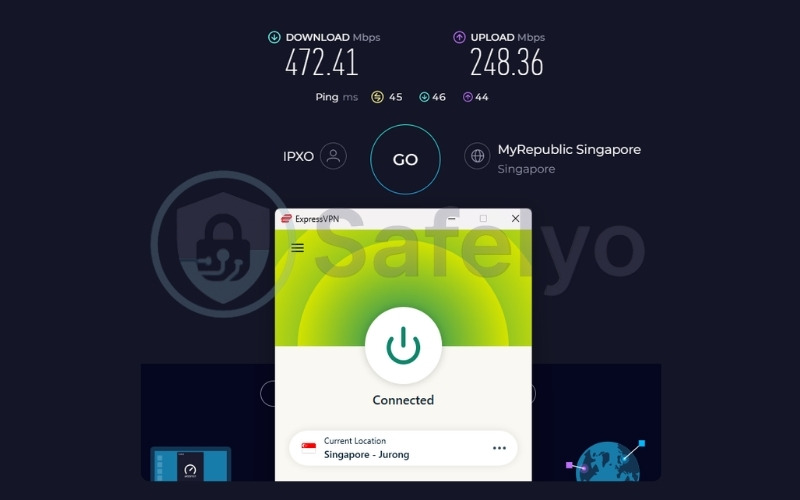
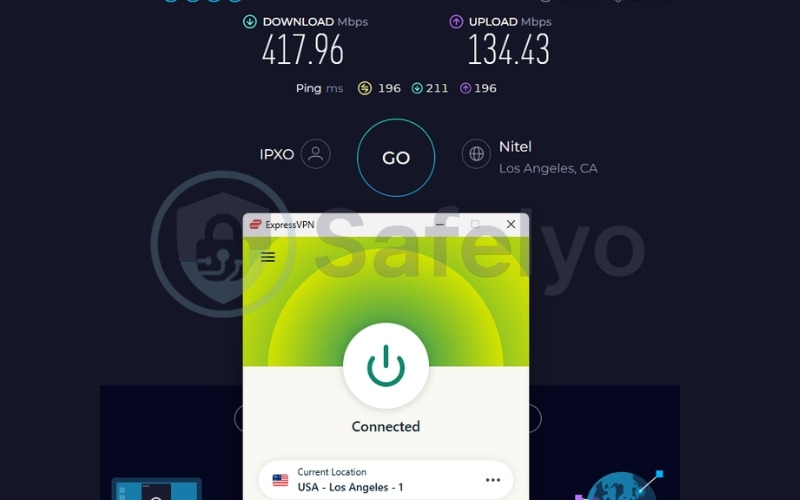
| Avg. Download Speed | Singapore: 472.41 Mbps / US: 417.96 Mbps |
| Avg. Upload Speed | Singapore: 248.36 Mbps / US: 134.43 Mbps |
| Avg. Latency | Singapore: 45ms / US: 196ms |
| Protocols | Lightway (UDP/TCP), OpenVPN (UDP/TCP), WireGuard, IKEv2 |
| Kill Switch | Yes (Network Lock) |
| Obfuscation | Yes (automatic on every server) |
| Port Forwarding | Yes (router-level only) |
| Dedicated IP | Yes (20+ countries, 28 specific locations) |
| Simultaneous Connections | Up to 14 (10 Basic, 12 Advanced, 14 Pro) |
| Netflix Regions | 25+ |
| Disney+ | Yes |
| BBC iPlayer | Yes |
| Torrent / P2P | Yes |
| Win/Mac/iOS/Android | Yes |
| Linux | Yes |
| Browser Extension | Chrome, Firefox, Edge, Brave |
| Router Support | Yes (Aircove, Asus, D-Link, DD-WRT, Linksys, Netduma, Sabai, Tomato, TP-LINK) |
| Live Chat 24/7 | Yes |
| Refund Policy | 30-day money-back guarantee |
| Free Trial | Yes (3-day on iOS and Android) |
| Overall Positioning | Best for streaming reliability |
| Official Website | https://expressvpn.com |
Consider these pros and cons to see if ExpressVPN matches your specific viewing habits.
Pros
Automatic obfuscation on every server, meaning no manual server selection is required
Annual audits 2018 to 2026 by KPMG, PwC Switzerland, Cure53, Praetorian, and F-Secure
TrustedServer RAM-only technology
Proprietary Lightway protocol for fast connections
ISO/IEC 27001, ISO 9001, ioXt Alliance certified
Native Android TV app on the Google Play Store
Cons
Port forwarding available at router level only, not in-app
No SOCKS5 proxy
No Multi-Hop / Double VPN
High price
Speed & performance
ExpressVPN proves highly capable of fast uploads and low latency. Review our speed test findings below.
| Server Location | Download (Mbps) | Upload (Mbps) | Ping (ms) |
|---|---|---|---|
| US | 417.96 | 134.43 | 196 |
| Singapore | 472.41 | 248.36 | 45 |
ExpressVPN provides the lowest latency recorded in our entire test set, making the connection feel highly responsive. The upload result of 248.36 Mbps on the Singapore server is the highest upload speed in this comparison. This robust upload capacity is highly relevant for households that use Android TV alongside video calls, cloud backups, or connected smart home devices.
Both server results exceed 100 Mbps, ensuring zero bottlenecks for 4K video streaming and multi-device use. Furthermore, the Lightway protocol is designed for fast connection establishment. On streaming devices like Android TV, this lightweight code execution helps maintain consistent session performance.
Privacy & security
ExpressVPN secures connections with AES-256 encryption accompanied by post-quantum protection (ML-KEM). To ensure this encrypted data is never stored, the provider’s TrustedServer technology runs entirely on RAM, meaning data is never written to physical disks.
The service boasts annual third-party audits from 2018 through 2026. This is the longest and most multi-firm audit track record in this comparison. Automatic obfuscation is applied dynamically on every server. Users in restricted regions do not need to switch to a special server, as any server already applies it effectively.
ExpressVPN was acquired by Kape Technologies in 2021. ExpressVPN operates independently under British Virgin Islands jurisdiction, maintains an annually audited no-logs policy, and runs RAM-only TrustedServer infrastructure. Readers who factor corporate ownership into their decision should weigh these structural safeguards accordingly.
Streaming performance
ExpressVPN unlocks 25+ Netflix libraries seamlessly. It also successfully accesses BBC iPlayer and Disney+. Obfuscation remains active on every server, which benefits users in countries where streaming platforms aggressively detect and block VPN traffic. For households using an ExpressVPN Aircove router, all devices on the home network, including Android TV units, receive VPN protection automatically without needing the app installed directly on the television.
Here are the unblocking results for major streaming platforms:
| Service | Unblocked | Quality |
|---|---|---|
| Netflix | Yes (25+ regions) | 4K / No buffering |
| BBC iPlayer | Yes | 4K / No buffering |
| Disney+ | Yes | 4K / No buffering |
Android TV experience
ExpressVPN provides a native Android TV app on the Google Play Store. The minimalist design is perfect for Android TV viewing. It is highly responsive to D-pad inputs and connects in seconds thanks to the Lightway protocol.
Pricing
ExpressVPN offers long-term plans with a higher initial cost but strong reliability. See the table below for full pricing.
| Plan | Monthly Price | Total Billed (First Term) | Renewal Price |
|---|---|---|---|
| 1-Month Basic | $12.99/mo | $12.99 | $12.99/mo |
| 1-Year Basic | $3.99/mo | $59.85 | $99.95/yr |
| 2-Year Basic | $2.49/mo | $69.72 | $99.95/yr |
| 2-Year Advanced | $2.99/mo | $83.72 | $119.95/yr |
| 2-Year Pro | $5.49/mo | $153.72 | $199.95/yr |
For most Android TV users, the Basic 2-year plan at $2.49 per month is adequate. The higher tiers offer identity protection and password management tools. The 2-year Basic plan renews at $99.95 per year.
Best for: Android TV users who want automatic obfuscation on every server, the most comprehensively audited no-logs policy in this comparison (annual, 2018 to 2026), and industry-leading upload performance.
3. Best free VPNs for Android TV: Top picks for 2026
You can find a capable free VPN for Android TV by focusing on reputable companies. While free plans do have rules like monthly data caps or fewer server locations, they provide secure connections and sometimes unblock streaming services. The three providers below all offer paid plans and maintain clear privacy policies, making their free apps a dependable choice for your television.
3.1. Proton VPN Free: Best free VPN for unlimited data
Finding a free VPN that does not compromise your privacy or bombard you with intrusive advertisements is notoriously difficult, but Proton VPN Free sets a high standard. It is a reliable free service that offers unlimited data without artificially capping your connection speeds.
For Android TV users, this means you can secure your daily browsing and utilize local applications without constantly monitoring a bandwidth meter. Backed by the same Swiss privacy laws and independent audits as its premium counterpart, it provides a transparent zero-cost security solution.
Review the technical capabilities of Proton VPN Free in the table below.
| Feature | Details |
|---|---|
| Best For | Users needing unlimited free data with no speed throttling |
| Starting Price | $0.00/mo (Permanent Free Tier) |
| Company | Proton AG |
| Jurisdiction | Switzerland |
| Independent Audit | Yes (Applies to overall infrastructure) |
| No-Logs Policy | Yes |
| RAM-Only Servers | No (Full-disk encryption) |
| Countries | 10 countries |
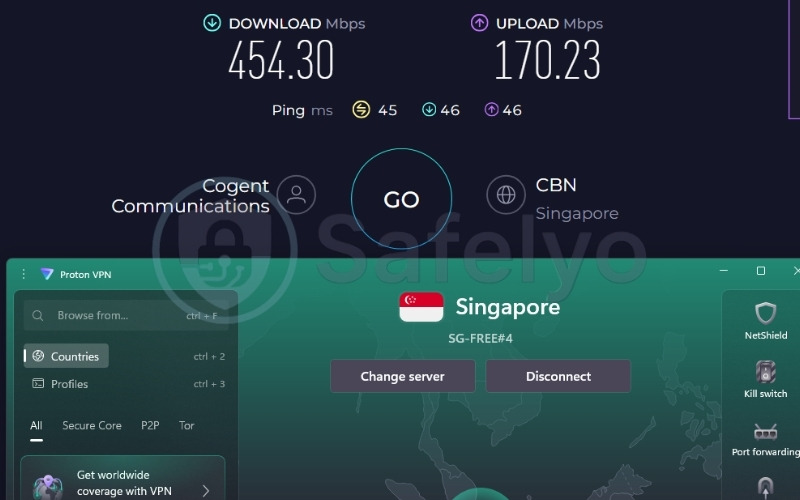
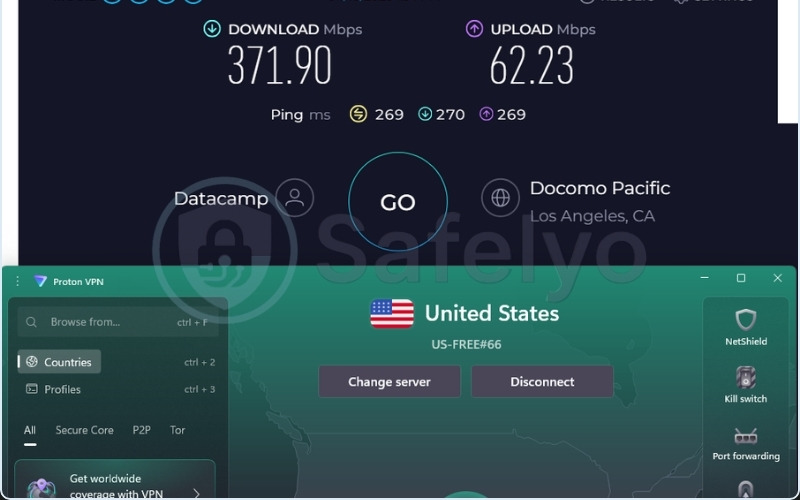
| Avg. Download Speed | Singapore: 454.30 Mbps / US: 371.90 Mbps |
| Avg. Upload Speed | Singapore: 170.23 Mbps / US: 62.23 Mbps |
| Avg. Latency | Singapore: 45ms / US: 269ms |
| Protocols | WireGuard, IKEv2, Stealth |
| Kill Switch | Yes |
| Obfuscation | Yes (Stealth) |
| Port Forwarding | No |
| Dedicated IP | No |
| Simultaneous Connections | 1 |
| Netflix Regions | No |
| Disney+ | No |
| BBC iPlayer | No |
| Torrent / P2P | No |
| Win/Mac/iOS/Android | Yes |
| Linux | Yes |
| Browser Extension | Chrome, Firefox |
| Router Support | No (Paid tier only) |
| Live Chat 24/7 | No |
| Refund Policy | N/A |
| Free Trial | N/A (Permanent Free) |
| Overall Positioning | Best free VPN for unlimited data |
| Official Website | https://protonvpn.com |
Consider the specific limitations of the free tier before downloading.
Pros
100% free with truly unlimited data
No speed throttling
Switzerland jurisdiction and independent audits
Clean Android TV app with no ads
Excellent free-tier speeds
Cons
Does not unblock streaming services (Netflix, etc.)
Limited to 10 server countries
Only 1 device connection allowed
Speed & performance
Proton VPN Free does not artificially restrict bandwidth, allowing it to achieve exceptional speeds for a zero-cost service. Review the specific metrics recorded during our free tier tests below.
| Server Location | Download (Mbps) | Upload (Mbps) | Ping (ms) |
|---|---|---|---|
| US | 371.90 | 62.23 | 269 |
| Singapore | 454.30 | 170.23 | 45 |
Proton VPN Free delivered an impressive 454.30 Mbps on the Singapore server. This is exceptionally fast for a free service, matching many paid competitors and easily handling high-bandwidth tasks. With latency at a low 45ms, Android TV apps load their interfaces immediately, and background updates download rapidly.
Even on the distant US server, the 371.90 Mbps download rate proves that Proton VPN provides robust infrastructure for its free users, completely avoiding the sluggish performance typical of free tiers.
Privacy & security
Even free users benefit from Proton’s Swiss privacy laws, open-source apps, and audited no-logs policy. Crucially, the provider does not inject ads into the free app interface, which means they are not monetizing your usage data. Furthermore, the Stealth protocol is available for free users, ensuring that even on restricted networks, you can bypass censorship and connect securely.
Streaming & limitations
Proton VPN Free explicitly does not support streaming unblocking. Netflix, Disney+, and BBC iPlayer will detect the VPN or only show the global library. Therefore, this free tier is for securing your Android TV traffic, such as hiding YouTube activity from an internet service provider or securing a hotel Wi-Fi connection, rather than unlocking international content.
Furthermore, the free app randomly selects your server, meaning you cannot choose specific countries or regions to bypass targeted geo-blocks.
Android TV experience
The app is directly available on the Play Store, meaning installation is seamless. The free version interface is identical to the paid version, offering a polished, easy-to-navigate layout designed for TV remotes. However, it restricts server choices to just 10 countries and limits you to a single device connection at a time.
Best for: Android TV users who want dependable privacy and unlimited data for secure browsing without paying a dime, provided they do not need to unblock geo-restricted streaming content.
3.2. PrivadoVPN Free: Best free VPN for streaming on Android TV
PrivadoVPN Free distinguishes itself in the crowded free VPN market by offering something highly useful: the ability to unblock major streaming platforms without requiring a paid subscription. Android TV users who occasionally need to bypass geographic restrictions to catch a specific show will find its native, remote-friendly application helpful.
While it does impose a monthly data cap, the inclusion of Swiss-based privacy protections, zero-log policies, and access to premium-grade servers in key regions makes it an outstanding tool for targeted, short-term streaming and secure browsing sessions.
The table below outlines PrivadoVPN Free’s core specifications.
| Feature | Details |
|---|---|
| Best For | Users who want to access streaming libraries on a free plan |
| Starting Price | $0.00/mo (Free tier) / $1.11/mo (Premium) |
| Company | Privado Networks |
| Jurisdiction | Switzerland |
| Independent Audit | No public third-party audit confirmed |
| No-Logs Policy | Yes |
| RAM-Only Servers | No |
| Servers | Access to specific free servers |
| Countries | 10 |
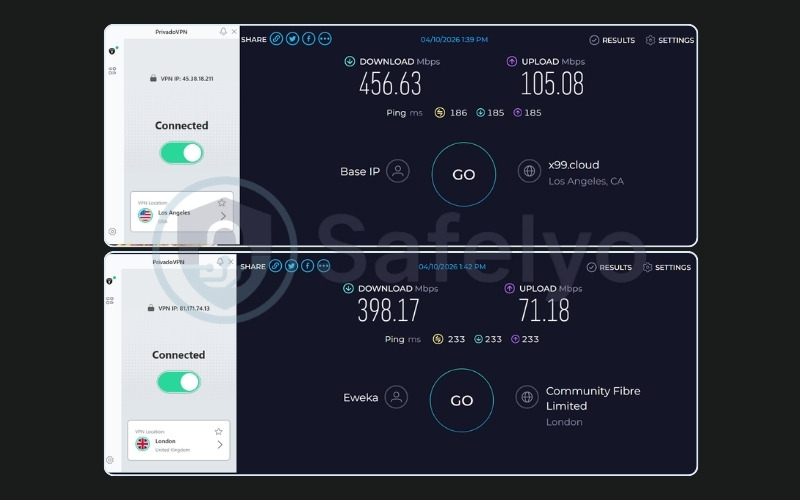
| Avg. Download Speed | UK: 398.17 Mbps / US: 456.63 Mbps |
| Avg. Upload Speed | UK: 71.18 Mbps / US: 105.08 Mbps |
| Avg. Latency | UK: 233ms / US: 186ms |
| Protocols | WireGuard, OpenVPN, IKEv2 |
| Kill Switch | Yes |
| Obfuscation | No |
| Port Forwarding | No |
| Dedicated IP | No |
| Simultaneous Connections | 1 |
| Netflix Regions | Yes (Limited reliable access) |
| Disney+ | Yes (Limited) |
| BBC iPlayer | Yes |
| Torrent / P2P | Yes |
| Win/Mac/iOS/Android | Yes |
| Linux | No |
| Browser Extension | No |
| Router Support | No |
| Live Chat 24/7 | No |
| Refund Policy | N/A |
| Free Trial | N/A (Permanent Free) |
| Overall Positioning | Best free VPN for streaming |
| Official Website | https://privadovpn.com |
Review the primary pros and cons of using PrivadoVPN Free.
Pros
Actually unblocks streaming services on the free tier
Strong download speeds on US and UK servers
Swiss jurisdiction
Native Android TV app available
Cons
10GB per month data cap
Lacks an independent third-party audit
Speed & performance
PrivadoVPN Free maintains high throughput, ensuring video loads quickly once connected. Review the specific speeds recorded during our free tier evaluation below.
| Server Location | Download (Mbps) | Upload (Mbps) | Ping (ms) |
|---|---|---|---|
| US | 456.63 | 105.08 | 186 |
| UK | 398.17 | 71.18 | 233 |
The US server tested at an outstanding 456.63 Mbps, showing that PrivadoVPN does not aggressively throttle its free users. The UK speeds are also highly capable at 398.17 Mbps. These metrics mean that when you do use your free data allowance, the connection easily handles 4K video resolution without buffering, allowing you to maximize the quality of your limited viewing time.
Privacy & security
The service is protected by Swiss privacy laws and maintains a zero-log policy, ensuring your browsing habits remain private. However, it is important to note that PrivadoVPN lacks the extensive multi-firm independent audits seen in Proton VPN or ExpressVPN, meaning users must trust the provider’s internal privacy claims.
Streaming & limitations
Unlike Proton VPN, PrivadoVPN allows free users to access streaming-optimized servers. It successfully unblocks US Netflix and BBC iPlayer. The major catch is the 10GB monthly data limit. This strict cap equates to only about three hours of HD streaming, or barely one hour of 4K streaming. Once exhausted, speeds are throttled to unusable levels until the next month, making this a highly tactical tool rather than a daily streaming solution.
Android TV experience
The service is available natively on the Android TV Play Store, ensuring easy installation and smooth remote navigation. The app is straightforward to use and clearly displays your data usage limits on the main dashboard. This transparency helps users track their 10GB cap efficiently so they do not run out of data mid-movie.
Best for: Android TV users who occasionally need to bypass a geo-block to watch a specific show or movie and can manage within a 10GB monthly data limit.
3.3. Windscribe Free: Best free VPN for unlimited devices
Windscribe Free is a versatile service designed for users who want reliable security across a wide array of devices without spending money. It provides a substantial 10GB monthly data allowance and, uniquely for a free tier, permits an unlimited number of simultaneous connections.
This flexibility makes it an excellent choice for outfitting your Android TV alongside your smartphones and laptops. Furthermore, with independent audits, a RAM-only server infrastructure, and built-in malware blocking, Windscribe delivers premium-level privacy and consistent speeds on nearby servers.
Examine the technical details of Windscribe Free in the table below.
| Feature | Details |
|---|---|
| Best For | Covering multiple devices on a single free account |
| Starting Price | $0.00/mo (Free tier) |
| Company | Windscribe Limited |
| Jurisdiction | Canada (5 Eyes) |
| Independent Audit | Yes (Packetlabs, Leviathan Security) |
| No-Logs Policy | Yes |
| RAM-Only Servers | Yes |
| Servers | Access to specific free servers |
| Countries | 10 |
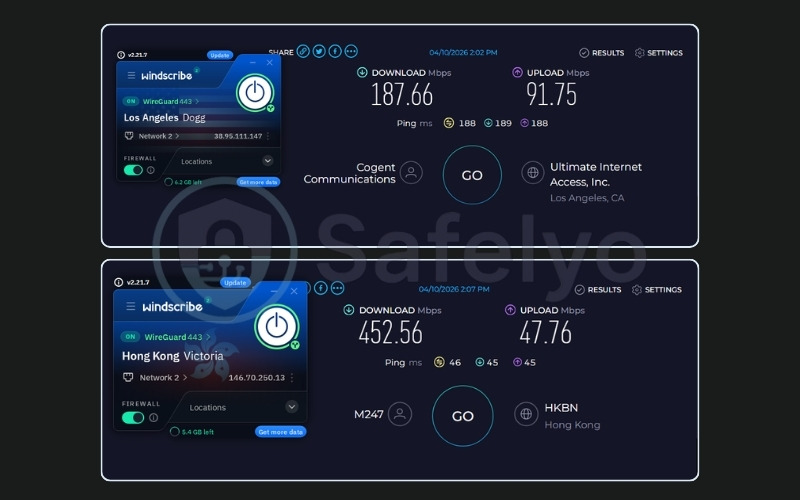
| Avg. Download Speed | Hong Kong: 452.56 Mbps / US: 187.66 Mbps |
| Avg. Upload Speed | Hong Kong: 47.76 Mbps / US: 91.75 Mbps |
| Avg. Latency | Hong Kong: 46ms / US: 188ms |
| Protocols | WireGuard, OpenVPN, IKEv2, Stealth |
| Kill Switch | Yes (Firewall) |
| Obfuscation | Yes |
| Port Forwarding | No |
| Dedicated IP | No |
| Simultaneous Connections | Unlimited |
| Netflix Regions | Limited |
| Disney+ | Limited |
| BBC iPlayer | Limited |
| Torrent / P2P | Yes |
| Win/Mac/iOS/Android | Yes |
| Linux | Yes |
| Browser Extension | Yes (Chrome, Firefox, Edge) |
| Router Support | No |
| Live Chat 24/7 | No (Garry Bot) |
| Refund Policy | N/A |
| Free Trial | N/A |
| Overall Positioning | Best free VPN for unlimited devices |
| Official Website | https://windscribe.com |
Pros
Unlimited simultaneous connections on a free account
Independently audited no-logs policy
Solid speeds on nearby servers
RAM-only infrastructure ensures privacy
Cons
10GB per month data cap
Canada jurisdiction (5 Eyes alliance)
No 24/7 live human support
Streaming access is inconsistent on free tier
Speed & performance
Windscribe delivers reliable speeds, especially when connecting within your general geographical region. See the specific free tier test results below.
| Server Location | Download (Mbps) | Upload (Mbps) | Ping (ms) |
|---|---|---|---|
| US | 187.66 | 91.75 | 188 |
| Hong Kong | 452.56 | 47.76 | 46 |
Nearby servers in Hong Kong provide excellent speeds at 452.56 Mbps and low latency at 46ms, making the Android TV interface highly responsive for quick browsing or downloading background app updates. Distant servers in the US are slower at 187.66 Mbps due to the geographical distance, but they remain functional for basic tasks and loading media without severe lag.
Privacy & security
Windscribe is rigorously audited by Packetlabs and Leviathan Security Group. It uses RAM-only servers, which effectively mitigates concerns about its Canadian jurisdiction within the 5 Eyes intelligence-sharing alliance, as no data can be physically extracted. Additionally, the R.O.B.E.R.T. feature blocks malware and trackers at the DNS level, keeping your Android TV safe from background telemetry.
Streaming & limitations
Free data is capped at 10GB per month, provided you confirm an email address upon registration. Unlike PrivadoVPN, streaming access on the free tier is inconsistent and not a guaranteed feature. Netflix or BBC iPlayer may occasionally work, but users should not rely on Windscribe Free as a primary unblocking tool.
Android TV experience
Windscribe features a native Android TV app available directly on the Google Play Store, making installation quick and simple. The interface is specifically designed for television screens, allowing seamless navigation with a standard remote control. Because Windscribe allows unlimited simultaneous connections, you can secure your Android TV alongside all the mobile phones and laptops in your household using just one free account.
Best for: Households that want a secure, independently audited free VPN to protect multiple standard devices seamlessly through official apps.
4. List of VPNs with an Android or Google TV app
Beyond our meticulously tested top picks detailed above, the growing demand for secure streaming has pushed many other providers to develop dedicated apps for smart TVs.
Having a native application on the Google Play Store significantly improves the overall user experience. It ensures that the interface is fully optimized for D-pad remote controls. This optimization allows you to navigate menus, switch server locations, and adjust settings without needing to attach a separate Bluetooth mouse or keyboard. Furthermore, native applications receive automatic updates directly through the television’s operating system, which keeps security protocols current and patches vulnerabilities seamlessly.
If you want to explore alternative options that offer this level of convenience, the following providers also maintain official Android TV or Google TV applications:
- CyberGhost
- ExpressVPN
- Hide.me
- HideMyAss
- Hotspot Shield
- IPVanish
- NordVPN
- Perfect Privacy
- PrivadoVPN
- Private Internet Access
- PrivateVPN
- Proton VPN
- PureVPN
- Surfshark
- Windscribe
- VyprVPN
- X-VPN
- Planet Free VPN
- VeePN
- VPN4TV
5. How to install a VPN on Android TV (including APK sideloading)
Most major VPNs, including Surfshark, NordVPN, Proton VPN, ExpressVPN, PrivadoVPN, and Windscribe, feature native Android TV apps directly on the Google Play Store. A native TV app is always the optimal choice because it is perfectly adapted for remote control navigation.
Occasionally, certain niche providers or specific unreleased app versions might require APK sideloading.
5.1. Method 1: Install a VPN on Android TV via Google Play Store
Follow these instructions to install a VPN on your Android TV via the Google Play Store:
- On your Android TV, open the Google Play Store from the home screen.
- Navigate to the Search field and type the VPN name.
- From the results, select the app.
- Select Install and wait for the download to complete.
- Open the VPN app, and sign in with your account credentials.
- Select a server location and tap Connect.
If the VPN does not appear in the Play Store search, or only shows a mobile phone version, use Method 2 (APK sideloading) instead.
5.2. Method 2: Sideload a VPN on Android TV via APK
Only download APK files from the VPN provider’s official website. APKs from third-party sources or unauthorized file-sharing sites may contain malware. Sideloading installs the standard Android phone app, so you may need a Bluetooth mouse to interact with the interface.
Execute these steps to sideload the file safely:
Step 1: Install Downloader
Open the Google Play Store on your Android TV, search for Downloader, and install it.
Step 2: Enable unknown apps
Go to Settings → Device Preferences → Security & Restrictions, then turn on Install unknown apps or Allow installation from unknown sources for the app you will use to install the APK.
Note: On Google TV, you may also need to enable Developer Mode first. Go to your avatar in the top-right corner, open Settings → System → About, then repeatedly select the build version until you see “You are now a developer!”
Step 3: Open Downloader
Launch Downloader on your Android TV.
Step 4: Enter the APK link
Type or paste the direct download URL of the VPN APK from the provider’s official website into Downloader, then tap Go.
Step 5: Download and install
Wait for the APK to finish downloading. When the installation prompt appears, tap Install. If prompted, go to Settings, grant install permission, then return and tap Install again.
Step 6: Finish setup
Once installed, tap Done, then open the VPN app, sign in, and connect to a server.
If you do not want to use Downloader, there are a few other options:
- Send Files to TV: Send the APK from your phone to the TV wirelessly, then open it and install it.
- USB drive: Copy the APK to a USB drive, plug it into the TV, and install it using a file manager.
- Google Drive or other cloud storage: Upload the APK from your phone or computer, then download it on the TV.
- File manager app: If the APK is already on the TV, just open it with a file manager and install it directly.
6. Free vs. paid VPN for Android TV: Which should you choose?
The core trade-off between free and paid services is features versus cost, not safety versus danger. All free options in this guide are from reputable providers that prioritize data security.
Review the primary differences between the two models below to make an informed decision.
| Feature | Free VPN | Paid VPN |
|---|---|---|
| Data limit | 10GB/month (PrivadoVPN, Windscribe) or unlimited (Proton VPN Free) | Unlimited |
| Speed throttling | None on Proton VPN Free; varies by provider | Generally unrestricted |
| Device limit | Usually 1 (Windscribe: unlimited) | 10 to unlimited |
| Streaming unblocking | Not available on most free plans | Full library access on all paid plans tested |
| P2P / Torrenting | Not available on most free plans | Available on all paid plans |
| Server access | 5 to 10 countries depending on provider | 49 to 149 countries |
| Independent audits | Available on Proton VPN Free and Windscribe | Available on all paid options |
| Monthly cost | $0 | $2.49 to $3.49/mo on best long-term plans |
Stay on a free plan if your primary use case on Android TV is secure browsing and basic privacy on public or hotel Wi-Fi. Proton VPN Free is the strongest option here due to its unlimited data allowance, four independent audits, and Swiss jurisdiction. Windscribe covers unlimited devices on a single free account, making it highly effective if your household has multiple connected devices.
Consider upgrading if you want to access international Netflix libraries, BBC iPlayer, or Disney+ directly on your Android TV. All four paid VPNs in this guide support robust streaming unblocking without data caps. PrivadoVPN offers an inexpensive upgrade path from its free plan at $1.11 per month, which is the lowest paid starting price in this comparison.
If you want to understand these limits in more detail, check out our guide on free vs paid VPN comparison to see exactly how they differ.
7. Is it legal to use a VPN on Android TV?
VPNs are legal in most countries. A small number of governments restrict or prohibit them entirely, including China, Russia, UAE, North Korea, Iraq, and Belarus. You should verify the current legality list before traveling, as regional internet regulations change.
Using a VPN to access geo-restricted content may violate the Terms of Service of the specific streaming platform. This is a civil matter, typically resulting in an account suspension in worst-case scenarios, not a criminal offense in most jurisdictions. The legal status of VPN use varies by country. This article is for informational purposes only and does not constitute legal advice.
8. FAQs about VPN for Android TV
What is the best VPN for Android TV in 2026?
Surfshark is the top overall pick. It provides consistently high speeds, unlimited device connections, accesses 28+ Netflix libraries, and features a $2.49/mo starting price. For privacy as the primary goal, Proton VPN is the stronger choice with four audits and Swiss jurisdiction.
Can I use a free VPN on Android TV?
Yes, but with meaningful limitations. Proton VPN Free offers unlimited data and has no throttling, but it does not support streaming unblocking. PrivadoVPN and Windscribe cap their free data at 10GB per month.
How do I install a VPN on Android TV without a Play Store app?
Use the APK sideloading method outlined in the installation guide above.
Does a VPN slow down Android TV streaming?
Speed reduction depends heavily on server distance and protocol. In our tests, all four paid VPNs returned over 400 Mbps on nearby servers. This is completely sufficient for 4K streaming on any plan. Choosing a geographically closer server minimizes the latency impact significantly.
Which free VPN for Android TV has no data limit?
Proton VPN Free offers unlimited bandwidth on its free plan and is highly security-verified. It boasts four audits and Swiss jurisdiction. Note that Proton VPN Free does not support streaming unblocking.
Will a VPN unblock Netflix on Android TV?
All four paid VPNs in this guide unblock multiple Netflix libraries reliably. Surfshark unblocks 28+, NordVPN 26+, Proton VPN 25+, and ExpressVPN 25+. On free plans, Netflix access is not available with Proton VPN Free. PrivadoVPN’s free plan grants access to streaming servers, though its 10GB data cap limits viewing time severely.
Is it safe to use a VPN on Android TV?
Yes, provided you choose a provider with an independently verified no-logs policy. Among the paid VPNs in this guide, Surfshark has four audits, NordVPN has five, Proton VPN has four, and ExpressVPN has annual audits from 2018 to 2026. Windscribe and Proton VPN Free are the most security-verified free options.
Can I use a VPN on Android TV for gaming?
Yes. Latency is the critical factor for gaming. In our tests, nearby servers across all paid VPNs returned 45 to 63ms, which is sufficient for casual gaming and video streaming. ExpressVPN had the lowest latency at 45ms. For competitive gaming, where sub-20ms is preferred, connecting to the absolute closest available server is essential.
9. Conclusion
Finding the right VPN for Android TV ultimately depends on whether you prioritize streaming access or secure browsing on a budget.
Surfshark is the strongest all-around choice. NordVPN suits speed-first users needing vast global coverage. Proton VPN serves privacy-first users with extensive audits. ExpressVPN is the choice for automatic obfuscation and streaming reliability.
Proton VPN Free is the best free VPN for unlimited browsing. PrivadoVPN is the right free option for users who want to test streaming access on a free plan before paying. Finally, Windscribe covers households needing unlimited free device connections.
If you are still deciding, it can also help to look at services that offer a best VPN free trial so you can test streaming performance and app usability before making a longer commitment.
For more detailed breakdowns and insights, head over to the Best VPN category on the Safelyo homepage.