NordVPN obfuscated servers are specialized connection points that disguise your VPN traffic to look like regular HTTPS web browsing. They are designed to help you bypass Deep Packet Inspection (DPI) firewalls on heavily restricted networks.
In this guide, we will explain how these servers work, provide step-by-step instructions to enable them on your devices, and show you how to troubleshoot common connection errors on restricted networks.
Key Takeaways:
- NordVPN has upgraded its obfuscated servers to the proprietary NordWhisper protocol, replacing the legacy OpenVPN requirement with a faster, custom-built solution for bypassing firewalls.
- Obfuscated servers are designed to bypass Deep Packet Inspection (DPI) firewalls on strict networks, but they do not bypass IP blacklists used by streaming platforms.
- While obfuscation successfully bypasses firewalls, our speed tests show it causes a noticeable drop in download speeds on distant servers compared to the standard NordLynx protocol.
This article is for informational purposes only and does not constitute legal advice. Please use VPNs responsibly and legally.
1. What are NordVPN obfuscated servers?
NordVPN obfuscated servers are specialized network tools designed to hide the fact that you are using a virtual private network. They work by masking the standard VPN fingerprint from your data.
Standard VPN traffic has a highly recognizable shape that network administrators can often detect. Strict network firewalls, like those at schools, corporate offices, or in highly censored countries, use a system called Deep Packet Inspection (DPI) to spot this fingerprint and block the VPN traffic from passing through the network.
To solve this problem, these specific servers scramble your data and disguise it to mimic everyday, secure web browsing (HTTPS). Because the restrictive firewall interprets the data as normal internet traffic, it allows the connection to pass through without interference.
2. Obfuscated servers upgrade: Shifting from OpenVPN to NordWhisper
Historically, to access obfuscated servers and bypass strict firewalls, users relied on the OpenVPN (TCP/UDP) protocol. While effective, OpenVPN is a heavy, legacy protocol that often resulted in sluggish speeds and limited server choices.
NordVPN has now upgraded its obfuscated servers to run natively on its custom NordWhisper protocol, completely replacing the outdated OpenVPN requirement for modern devices and making the connection process seamless.
- The old standard: Users previously relied on OpenVPN to disguise their traffic, which caused significant performance drops when using obfuscated servers.
- The NordWhisper advantage: Built specifically to power obfuscated connections on heavily filtered networks, NordWhisper mimics regular web traffic much more efficiently. It uses less processing power than OpenVPN, yielding a faster, more stable connection and a wider choice of obfuscated server locations.
Warning: If you are currently using a Dedicated IP or Onion Over VPN, the obfuscated servers feature will not work. These specialty features are incompatible and cannot be run simultaneously.
3. Speed comparison: NordVPN normal servers vs. NordVPN obfuscated servers
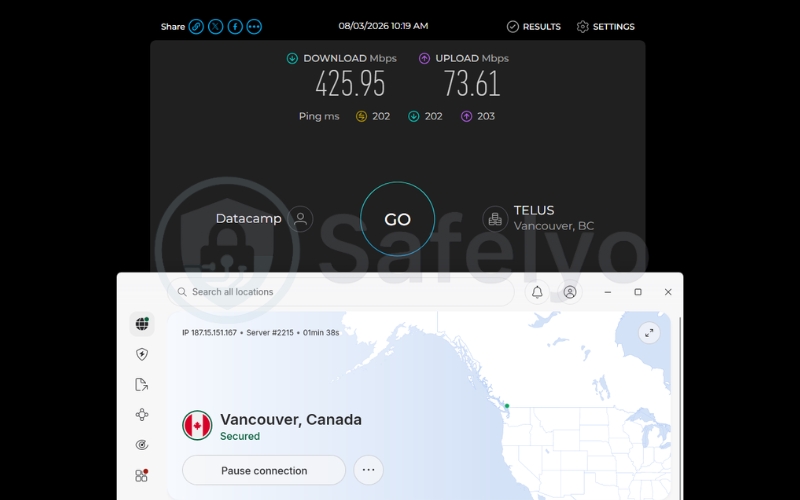
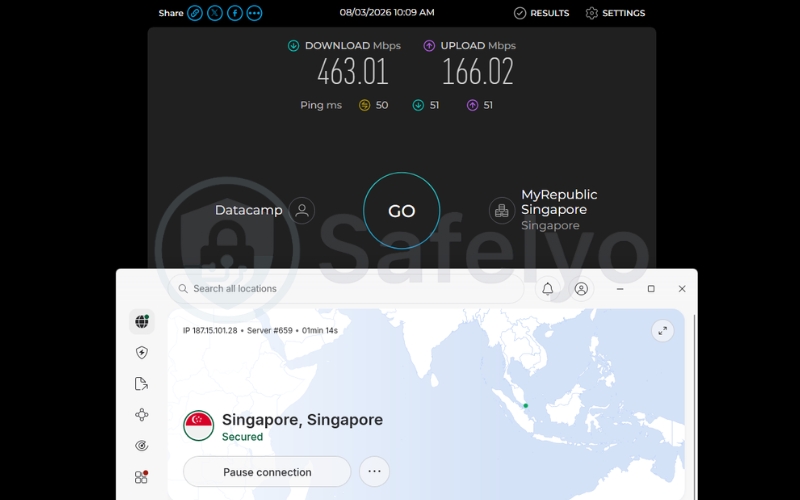
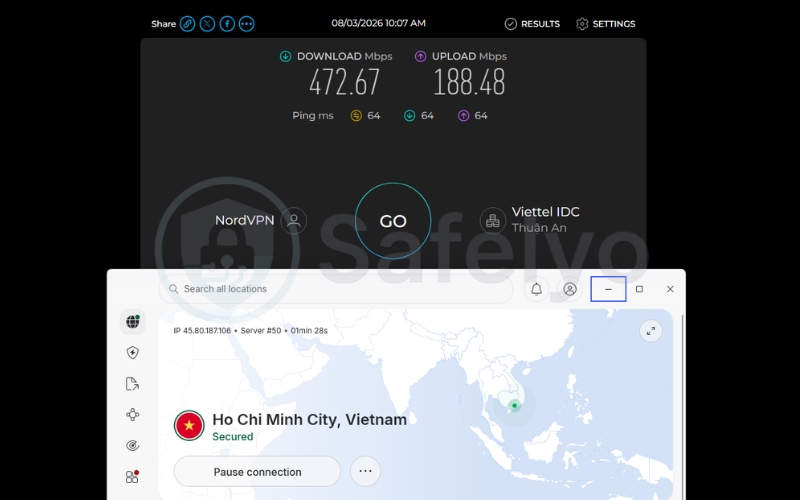
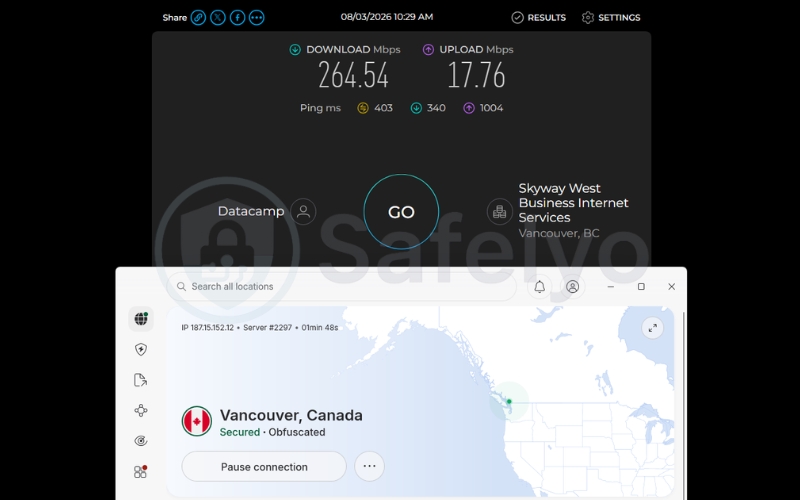
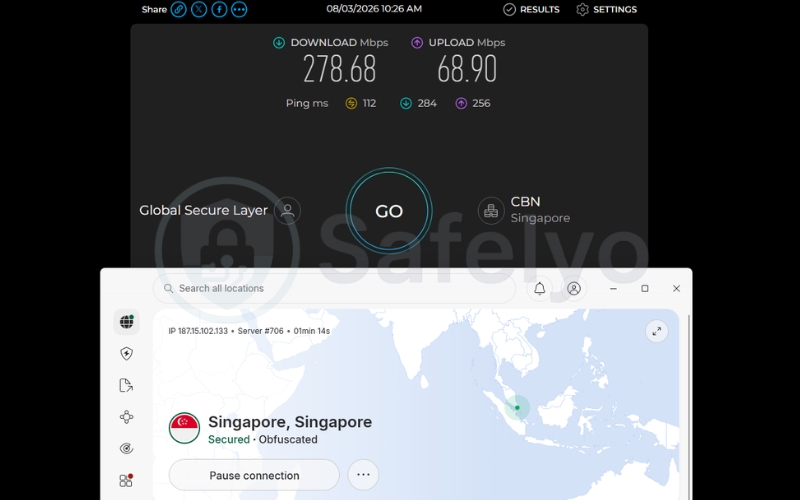
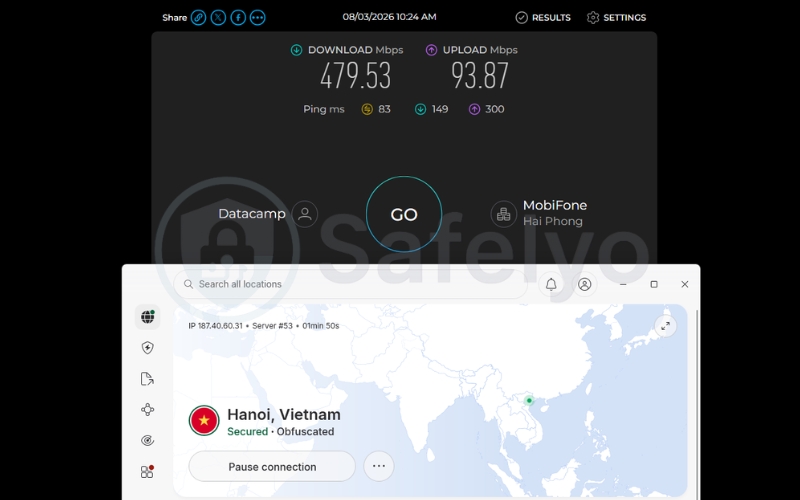
To understand the real-world performance impact of disguising your traffic, we conducted a series of speed tests comparing standard servers against obfuscated ones. The goal of this test is to evaluate how much the extra cryptographic overhead affects daily browsing, streaming, and latency.
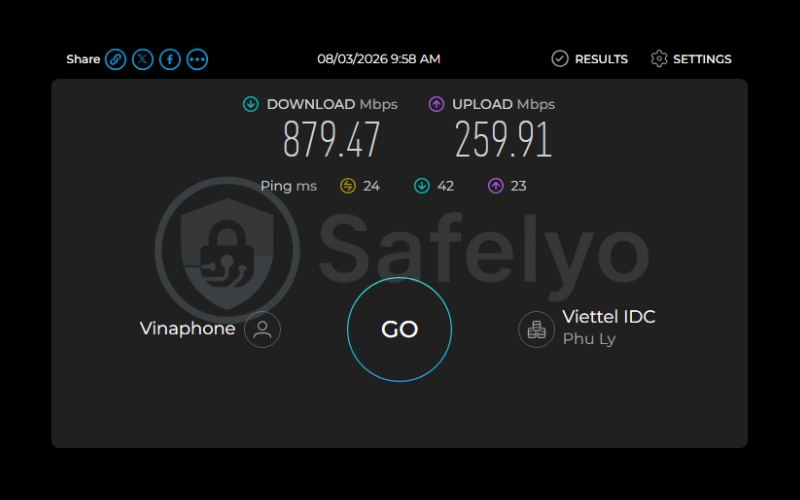
We tested the performance of NordVPN using a strict baseline environment. The tests were conducted from a physical location in Vietnam using a Windows 11 PC and Ookla speed measurements. Our baseline speed without a VPN was 879.47 Mbps download, 259.91 Mbps upload, and 24 ms ping.
| Server Location | Protocol Type | Download (Mbps) | Upload (Mbps) | Ping (ms) |
|---|---|---|---|---|
| Local (Vietnam) | Normal (NordLynx) | 472.67 | 188.48 | 64 |
| Local (Vietnam) | Obfuscated (NordWhisper) | 479.53 | 93.87 | 83 |
| Nearby (Singapore) | Normal (NordLynx) | 463.01 | 166.02 | 50 |
| Nearby (Singapore) | Obfuscated (NordWhisper) | 278.68 | 68.90 | 112 |
| Distant (Canada) | Normal (NordLynx) | 425.95 | 73.61 | 202 |
| Distant (Canada) | Obfuscated (NordWhisper) | 264.54 | 17.76 | 403 |
When analyzing local connections in Vietnam, the download speeds remain highly comparable across both protocols, hovering around 470 Mbps.
However, routing traffic through obfuscated servers using NordWhisper causes a noticeable drop in both download and upload speeds on nearby Singapore and long-distance Canada servers compared to standard NordLynx servers. This happens because the extra encryption steps required to disguise the data naturally slow down the entire connection.
Despite these speed drops on distant servers, a result of 264.54 Mbps is still more than capable of handling heavy bandwidth tasks like 4K video streaming and large file downloads.
The main concern is the latency spike, which reached up to 403 ms on distant servers. This high latency makes obfuscated servers unsuitable for competitive gaming or fast-paced video calls. We recommend sticking to normal servers unless a firewall is actively blocking your access.
4. How to enable obfuscated servers on NordVPN
Depending on the device you are using, the setup process for accessing these specialized servers will vary slightly. Modern platforms like Windows and mobile devices benefit from an automated process, while Linux users still require a manual approach using the command line.
4.1. Easy steps for Windows, Mac, Android, and iOS
Activating this feature on mainstream desktop and mobile operating systems is now incredibly simple thanks to recent app updates. Follow these steps to bypass restrictions quickly:
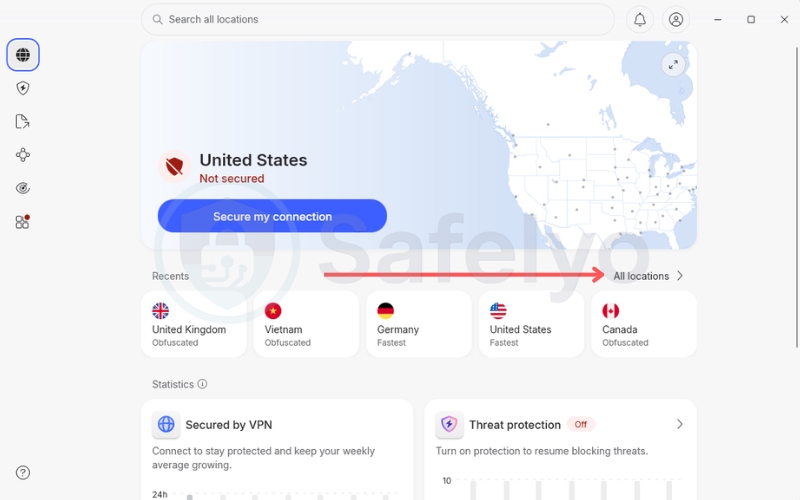
- Open the NordVPN app and look at the vertical menu on the left edge of the screen (or the main screen on mobile).
- Click or tap on the All locations section.
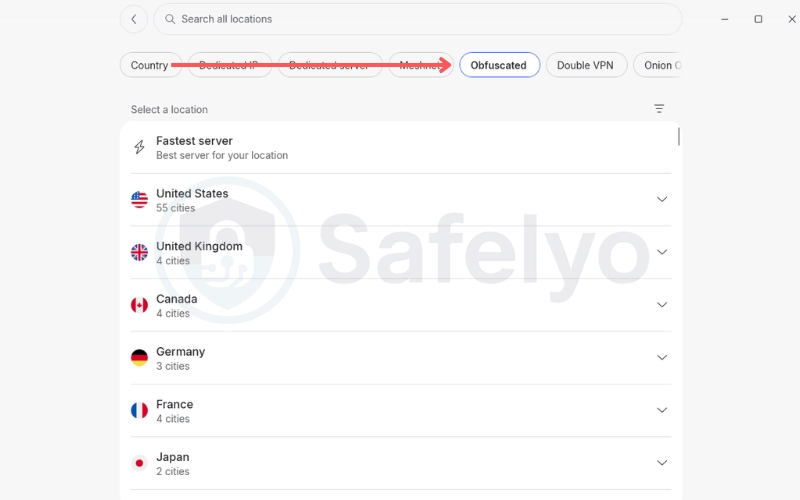
- Look at the very top of the list, where you will see the Obfuscated category.
- Select the specific country you want to connect to, or simply click the “Fastest” auto-connect button to let the app choose the best routing for you.
- A small pop-up window will appear asking if you want to change to the appropriate connection protocol. Simply click Connect (or tap Connect). The system will automatically switch to the NordWhisper network to run.
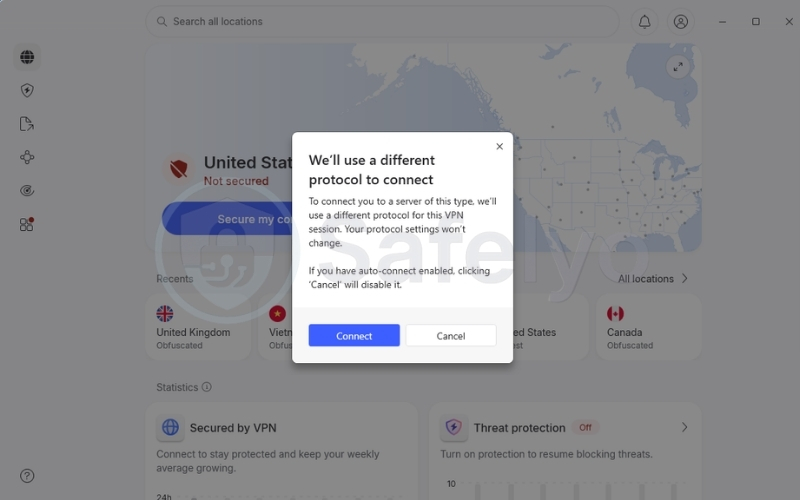
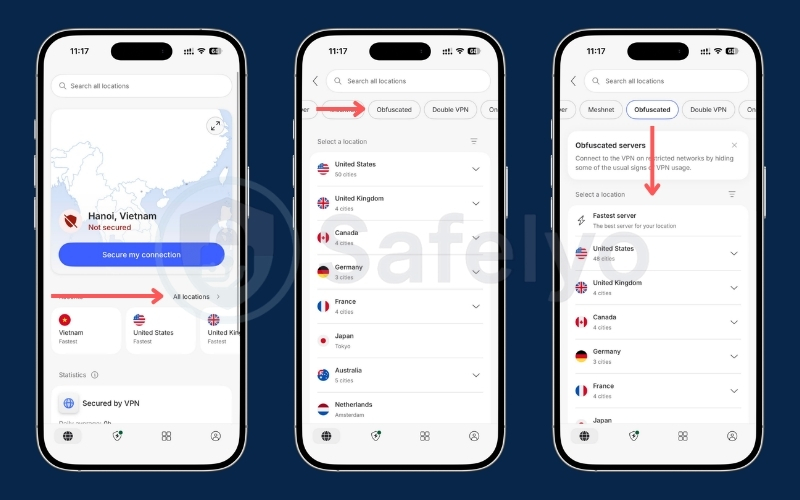
Tip: If you leave your default protocol setting on Automatic, the app will automatically connect using the appropriate protocol without showing the pop-up. This allows you to seamlessly switch between normal and obfuscated servers without needing to confirm it every time.
4.2. Command line guide for Linux
The Linux app does not yet support NordWhisper for obfuscation. It exclusively requires OpenVPN.
To enable obfuscation on Linux, open your terminal and type the following commands:
nordvpn set technology openvpnnordvpn set obfuscate onnordvpn connectTo disable obfuscated servers and disconnect, type:
nordvpn set obfuscate offnordvpn disconnect5. Advanced troubleshooting: Fixing connection drops and network bugs
Even with the new protocol upgrades, you might occasionally run into connection errors or hardware limitations on strict networks. We have identified the most common community friction points and provided verified solutions to get you back online.
5.1. The Threat Protection domain bug
Users often successfully establish an obfuscated connection, but find that specific domains like YouTube or Google fail to load or time out. This frustrating issue usually happens because the aggressive domain filtering of Threat Protection Pro conflicts with the obfuscated IP routing.
Threat Protection acts as an advanced DNS filter to block malware and ads, but it occasionally over-blocks legitimate traffic on these disguised routes.
To fix this functionally, open your NordVPN app, navigate to the security settings menu, and manually toggle off Threat Protection Pro. Disabling this feature clears the DNS conflict and allows sites to load properly.
5.2. Router compatibility warnings for Asus vpnmgr
If you are attempting to configure obfuscated servers at the router level to protect your entire home network, you need to be aware of strict hardware limitations. Advanced custom scripts, such as Asuswrt-Merlin’s vpnmgr, do not currently support NordVPN’s unique obfuscated connection parameters.
These router scripts lack the specific software integration required to handle the complex traffic disguising mechanism. Because this specific setup is currently unsupported, it will fail to connect.
You will need to rely on installing the VPN application directly on your individual computers or smartphones instead of trying to route it through these custom Asus firmware setups.
6. DPI firewalls vs. IP blacklists: Knowing when obfuscation actually works
Corporate networks, schools, and strict regimes use DPI Firewalls to analyze your traffic signature. Obfuscation fixes this by hiding the signature and forcing the firewall to accept the data as normal web traffic.
Streaming platforms like Netflix and YouTube use IP Blacklisting. They simply block the server’s IP address from accessing their platform, regardless of how the traffic is disguised. Obfuscation does not fix this problem.
The simple diagnostic rule: If the app spins endlessly and refuses to connect, you are likely facing a DPI firewall; enable obfuscation to bypass it. Conversely, if the app connects successfully but Netflix displays a proxy error, you have hit an IP blacklist. Obfuscation will not solve this; you must disable it and switch to another server.
7. How to prepare your NordVPN for highly restricted countries
Attempting to download the NordVPN application or configuration files after arriving in China is highly difficult. You need to configure your devices before crossing the border.
7.1. Manual configuration fallbacks (IKEv2/IPSec and root certificates)
If the main app fails, you will need to rely on manual configurations.
- iOS/macOS: You need to download the NordVPN IKEv2 certificate (root.der) via Safari and install the profile manually through system settings prior to travel.
- Android: You need to download the strongSwan VPN client (version 2.6.2 or later), install the root.der certificate, and set the MTU of the VPN tunnel device exactly to 1280. IPv6 traffic needs to be blocked in the settings.
- Linux: You need to install the strongswan package, edit your ipsec.secrets file, and download the NordVPN RSA certificate via terminal before arriving.
7.2. Windows app blocking in China
According to official NordVPN support documentation, both the NordVPN Windows app and manual server configurations are currently experiencing connectivity issues and are actively being blocked in China.
NordVPN developers have officially acknowledged the issue on their status page and are working on a solution. Until a patch is deployed, we strongly recommend relying on macOS, iOS, or Android devices equipped with manual IKEv2/IPSec profiles for your primary connection inside the country.
Surviving the Great Firewall requires top-tier privacy tools. To see how NordVPN’s anti-censorship features stack up against another privacy heavyweight, check out our full NordVPN vs Proton VPN breakdown.
8. FAQs about NordVPN obfuscated servers
Why is Netflix or YouTube blocking my NordVPN obfuscated server?
Streaming platforms like Netflix and YouTube actively block obfuscated servers because they use IP blacklisting, rather than deep packet inspection. If the specific server IP is banned by the platform, obfuscation cannot hide it.
Can my employer or school know if I am using an obfuscated VPN?
They will see that you are connected to an IP and using bandwidth on Port 443, but they cannot see the contents of your traffic or easily flag it as a VPN signature.
Are obfuscated servers slower?
Yes, our speed tests show that the extra layer of data repackaging generally reduces upload and download speeds on distant servers and increases ping latency, though they remain fast enough for standard browsing.
Is NordVPN banned in China, and how do I connect?
The main website is blocked. You need to manually install the root.der certificate and use native IKEv2 profiles (for Apple devices) or the strongSwan app (for Android/Linux) before arriving.
What is the NordVPN Threat Protection bug?
A known issue where Threat Protection Pro over-filters domains on obfuscated servers, causing sites like YouTube to fail to load. Disabling the feature fixes it.
9. Conclusion
NordVPN obfuscated servers are designed to help you bypass strict network firewalls by disguising your traffic. NordVPN recently improved this feature by shifting to the custom NordWhisper protocol, which offers a more stable connection on restricted networks compared to older methods.
Because this data repackaging adds extra processing steps, you will likely experience increased latency and reduced download speeds on distant servers.
We recommend reserving obfuscated servers for environments with active DPI firewalls and relying on standard servers for your daily browsing.
If you need more help optimizing your digital privacy, explore our VPN Guides category or head over to the Safelyo homepage for more expert tutorials.