For beginners, an ideal VPN must offer a frictionless interface, reliable default security, and a simple setup process that requires zero technical jargon. Based on interface design, official pricing, and our hands-on tests, VPNs like ExpressVPN, Surfshark, NordVPN, Proton VPN, and TunnelBear prioritize novice-friendly experiences.
In this guide, we will break down the top test-verified options, explore essential features, and clarify common misconceptions to help you find the best easy-to-use VPNs for your daily browsing needs.
Top easy-to-use VPNs for beginners:
- ExpressVPN (Best for absolute beginners with a one-click interface): Eliminates all tech jargon with a simple dashboard that secures your connection instantly with a single tap.
- Surfshark (Best for households and multiple devices): Offers unlimited simultaneous connections, allowing you to protect every phone, tablet, and PC in your home under one affordable plan.
- NordVPN (Best for a modern interface): Combines top-tier speeds with a clean, highly modernized design that is incredibly easy to navigate.
- Proton VPN (Best for a safe free version without data caps): Provides a permanently free, risk-free tier with unlimited bandwidth and no intrusive ads.
- TunnelBear (Best for a friendly, approachable design): Uses a highly visual, non-intimidating bear theme to make learning and using a VPN fun and stress-free for first-timers.
Quick Comparison Table:
| VPN | Starting Price | Simultaneous Connections | Server Countries | Interface Style | Setup Difficulty | Free Version / Trial |
|---|---|---|---|---|---|---|
| ExpressVPN | $2.49/mo | Up to 14 | 105 | One-Click Button | Extremely Easy | 30-day money-back |
| Surfshark | $2.49/mo | Unlimited | 100 | Clean & Minimalist | Easy | 30-day money-back |
| NordVPN | $3.49/mo | 10 | 149 | Modern & Streamlined | Easy | 30-day money-back |
| Proton VPN | $2.99/mo | 10 (1 on Free) | 145+ | Minimalist | Easy | Free plan (unlimited data) |
| TunnelBear | $3.33/mo | Unlimited | 47 | Gamified Map | Extremely Easy | Free plan (2GB/month) |
1. How we tested and selected the best easy-to-use VPNs
To ensure these VPN recommendations actually work for complete novices, we discarded generic spec sheets and focused entirely on real-world usability.
- Testing baseline and environment: All real-world speed and unblocking tests were conducted from a physical location in Vietnam using a standard Windows 11 PC. The baseline internet connection before applying any encryption was roughly 800 Mbps for downloads, and measurements were captured directly using Ookla. To guarantee maximum performance and fair comparisons across the board, we conducted these speed evaluations using the fastest default protocol for each provider: Lightway for ExpressVPN, NordLynx for NordVPN, and WireGuard for Surfshark, Proton VPN, and TunnelBear.
- Setup time and UX (Stopwatch test): We evaluated the initial installation process and literally timed the core user flow, from launching the installed application to establishing a fully encrypted connection. Options with convoluted menus, mandatory manual configurations, or hidden setup steps were immediately excluded from our list.
- Interface clarity: We prioritized services featuring a giant, intuitive “Connect” button on the primary home screen. Keeping advanced settings hidden by default is crucial to prevent beginner confusion and accidental misconfigurations.
- Background performance: A beginner-friendly option must run silently without causing streaming platforms to buffer or web pages to freeze. We evaluated speed retention strictly based on our 800 Mbps baseline tests to ensure seamless daily use.
- Customer support accessibility: We checked for straightforward, jargon-free 24/7 support structures. New users must be able to get help instantly from a real human to explain their problem.
2. Easy-to-use VPNs: Top 5 picks for beginners
If you are setting up a VPN for the very first time, the interface design and default settings are just as important as the connection speed. The following five VPNs have been carefully selected because they prioritize a frictionless user experience, removing complex manual configurations and letting you connect to a secure server with just a few clicks.
2.1. #1. ExpressVPN: Best for absolute beginners with a one-click interface
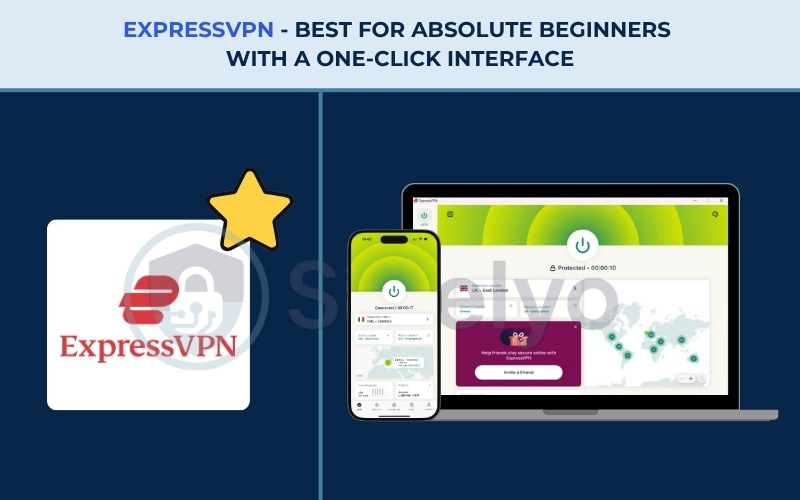
ExpressVPN holds a long-standing reputation as a premium provider owned by Kape Technologies. ExpressVPN has optimized its entire identity around frictionless, stress-free use.
Its core value proposition is identical cross-platform consistency. The interface looks and behaves exactly the same on a Windows PC as it does on an iPhone, which drastically reduces the learning curve for anyone new to using a VPN.
| Feature | Details |
|---|---|
| Best For | Absolute beginners looking for a foolproof, one-click experience |
| Starting Price | $2.49/mo |
| Company | ExpressVPN (Kape Technologies) |
| Jurisdiction | British Virgin Islands |
| Independent Audit | Yes (KPMG, PwC Switzerland, Cure53, Praetorian, F-Secure) |
| No-Logs Policy | Yes (strict no-logs policy) |
| RAM-Only Servers | Yes (TrustedServer technology) |
| Servers | Thousands |
| Countries | 105 |
| Avg. Download Speed | 445.18 Mbps |
| Avg. Upload Speed | 191.39 Mbps |
| Avg. Latency | 120.5 ms |
| Protocols | Lightway, OpenVPN, WireGuard, IKEv2 |
| Obfuscation | Yes (automatic on every server) |
| Port Forwarding | Yes (router only) |
| Dedicated IP | Yes (available in 20+ countries) |
| Simultaneous Connections | Up to 14 |
| Netflix Regions | 25+ |
| Disney+ | Yes |
| BBC iPlayer | Yes |
| Torrent / P2P | Yes |
| Win/Mac/iOS/Android | Yes |
| Linux | Yes |
| Browser Extension | Yes (Chrome, Firefox, Edge, Brave) |
| Router Support | Yes |
| Live Chat 24/7 | Yes |
| Refund Policy | 30-day money-back guarantee |
| Free Trial | Yes (3-day on iOS and Android) |
| Official Website | https://expressvpn.com |
Pros
Minimalist design with a massive one-click connect button.
Cross-platform consistency means learning the interface once works for all devices.
Automatic obfuscation turns on instantly without digging through settings.
Highly responsive 24/7 live chat support for immediate troubleshooting.
Cons
Lacks a permanent free tier for users wanting to test without a credit card.
2.1.1. Setup speed and interface simplicity
The desktop app opens in compact mode by default, featuring a large circular “Connect” button located right in the center, a signature ExpressVPN design element. A major early 2026 redesign introduced a clearer left navigation menu, a visual server map, a separate protocol selector, and quick access to favorite locations.
Users can even customize the interface with 5 color themes: Midnight, Sand, Sky, Twilight, and System. Add-ons are presented cleanly as cards, while Advanced Protection and Dedicated IP settings have been visually refreshed. It also boasts improved accessibility features, including better keyboard navigation and screen reader support. This layout ensures you can access built-in tools like speed tests and Smart Location effortlessly.
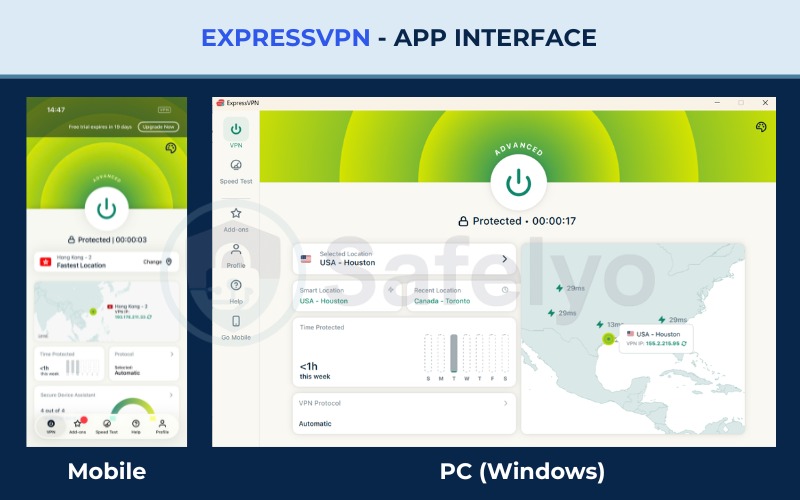
Under the hood, ExpressVPN uses the proprietary Lightway protocol. This technology establishes a secure connection in mere fractions of a second, delivering blazing-fast speeds for all your heavy streaming and downloading needs. Because of the strict cross-platform consistency, once a user learns this simple layout on their phone, they automatically know how to use ExpressVPN on their computer.
2.1.2. Unblocking capability and background performance
| Server Location | Download (Mbps) | Upload (Mbps) | Ping (ms) |
|---|---|---|---|
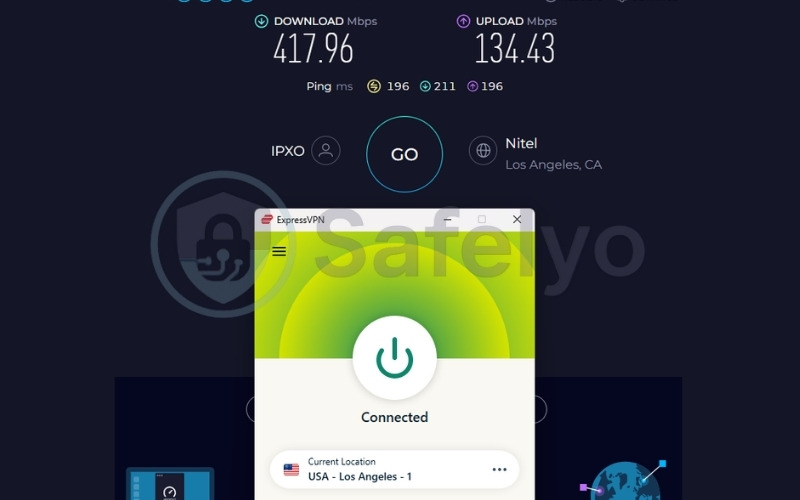
| US | 417.96 | 134.43 | 196 |
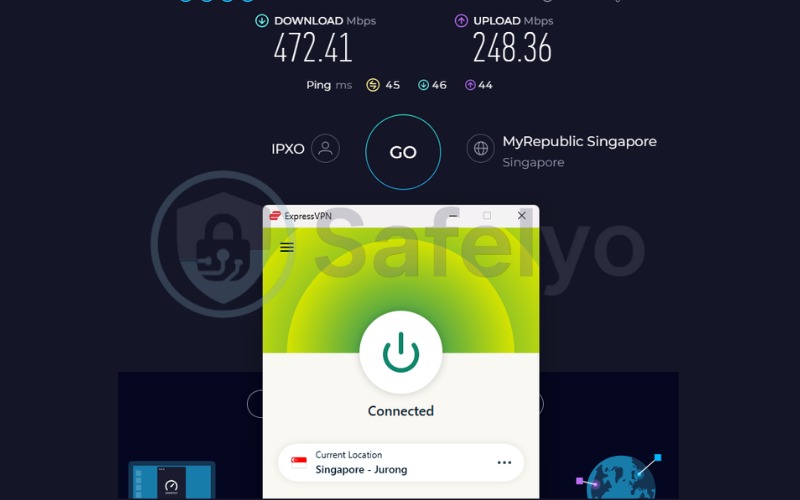
| Singapore | 472.41 | 248.36 | 45 |
ExpressVPN achieved an impressive 445.18 Mbps average download speed against our 800 Mbps baseline. Retaining this much bandwidth provides a seamless, high-performance experience that easily handles simultaneous 4K streaming without buffering or stuttering.
When running securely in the background, the application is incredibly lightweight and does not freeze your web pages or cause your computer to lag.
Furthermore, ExpressVPN reliably bypasses geo-blocks for over 25 Netflix regions and BBC iPlayer automatically. You do not need to manually configure settings, change DNS numbers, or jump through technical hoops to achieve this unblocking capability. The smart routing system works instantly out of the box, ensuring that even complete beginners can watch their favorite international shows without facing annoying proxy error messages.
2.1.3. Customer support and peace of mind
ExpressVPN provides strong financial and technical safety nets that completely alleviate beginner anxiety. The unconditional 30-day money-back guarantee allows you to test the service without any financial risk.
Additionally, the highly responsive 24/7 live chat assures beginners that expert human help is always just a click away. If you ever get stuck, the support agents explain solutions in simple, friendly terms instead of using confusing technical jargon.
For those who prefer self-help, the provider offers a massive library of video tutorials and step-by-step setup guides that are incredibly easy to follow. Furthermore, their strict independently audited no-logs policy ensures your browsing history is never recorded, giving you absolute peace of mind that your personal digital footprint remains completely invisible to third parties.
Best for: Absolute beginners looking for a foolproof, install-and-forget VPN setup.
2.2. #2. Surfshark: Best for households and multiple devices
Surfshark entered the market as a highly aggressive disruptor based in the Netherlands. Its core value proposition is delivering premium features at a good price point of just $2.49 per month. The standout benefit of Surfshark is its allowance for unlimited simultaneous connections. This makes it the perfect install-once, share-with-everyone solution for large families.
| Feature | Details |
|---|---|
| Best For | Families and households needing protection for multiple devices |
| Starting Price | $2.49/mo |
| Company | Surfshark B.V. |
| Jurisdiction | Netherlands |
| Independent Audit | Yes (Cure53, Deloitte, SecuRing) |
| No-Logs Policy | Yes (strict) |
| RAM-Only Servers | Yes (100% RAM-only network) |
| Servers | 4,500+ |
| Countries | 100 |
| Avg. Download Speed | 422.04 Mbps |
| Avg. Upload Speed | 138.94 Mbps |
| Avg. Latency | 163.5 ms |
| Protocols | WireGuard, OpenVPN, IKEv2, Dausos |
| Obfuscation | Yes (obfuscated servers, NoBorders mode) |
| Port Forwarding | No |
| Dedicated IP | Yes (available in 20 locations) |
| Simultaneous Connections | Unlimited |
| Netflix Regions | 28+ |
| Disney+ | Yes |
| BBC iPlayer | Yes |
| Torrent / P2P | Yes |
| Win/Mac/iOS/Android | Yes |
| Linux | Yes |
| Browser Extension | Yes (Chrome, Firefox, Edge) |
| Router Support | Yes |
| Live Chat 24/7 | Yes |
| Refund Policy | 30-day money-back guarantee |
| Free Trial | Yes (7-day free trial) |
| Official Website | https://surfshark.com |
Pros
Unlimited simultaneous connections to protect every device in the house.
CleanWeb feature blocks malicious ads and pop-ups automatically.
Excellent value at $2.49/mo for the initial term.
Easily bypasses geo-blocks with access to 28+ Netflix regions.
Cons
The settings menu has slightly more toggles than ExpressVPN, which might overwhelm absolute novices.
Does not support port forwarding.
2.2.1. Setup speed and interface simplicity
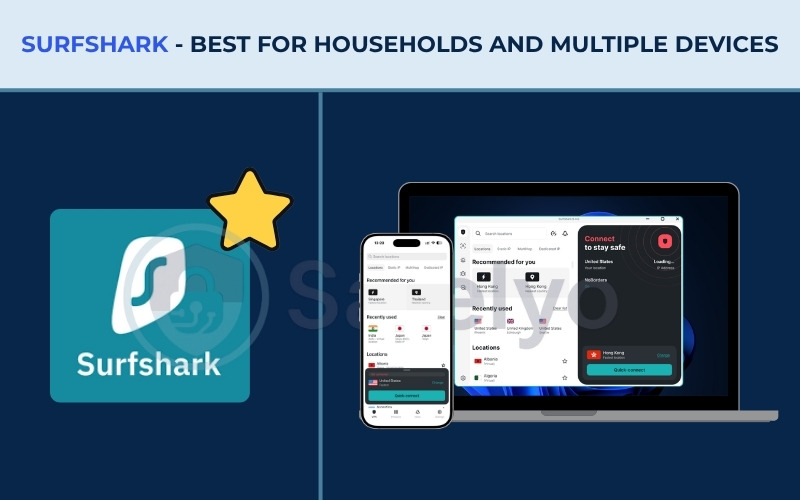
Surfshark divides its application into three main areas: a left menu bar, a middle server list, and a right connect button. The left sidebar cleanly organizes VPN, Alternative ID, Alert, Antivirus, Search, and Settings, keeping the main interface uncluttered while clearly showing your protection status. The central list provides access to over 3,200 servers across 100 countries. The process is a simple “login, select, connect” flow that takes only seconds, complete with an auto-connect option.
Under the main menu, four expanded tabs house Locations, Static IP, MultiHop, and Dedicated IP. The Dynamic MultiHop feature even lets you mix and match entry and exit servers manually. The overall design is incredibly easy to navigate.
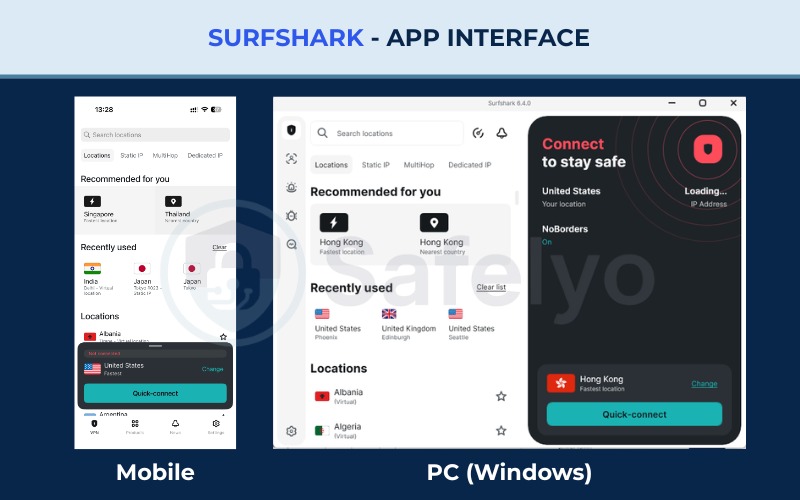
The standout feature of Surfshark is undoubtedly its unlimited simultaneous connections. Users never have to count their active devices or log out of their tablet just to secure their smart TV or a spouse’s phone. This completely removes a major point of friction for families, allowing you to install Surfshark on every piece of hardware you own without worrying about hitting an arbitrary account limit.
2.2.2. Unblocking capability and background performance
| Server Location | Download (Mbps) | Upload (Mbps) | Ping (ms) |
|---|---|---|---|
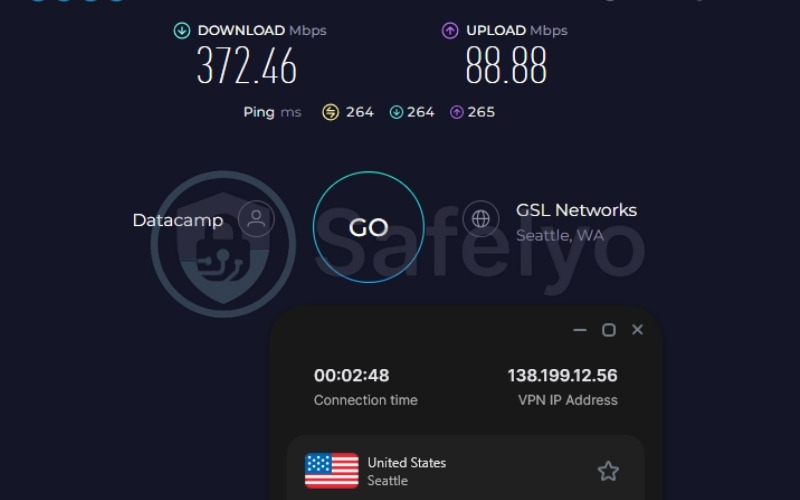
| US | 372.46 | 88.88 | 264 |
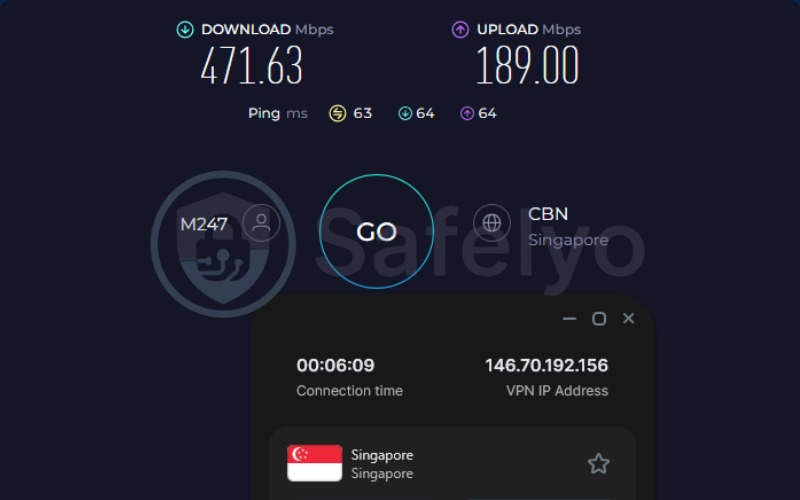
| Singapore | 471.63 | 189.00 | 63 |
Surfshark smoothly unblocks 28+ Netflix libraries and Disney+ with zero manual configuration required. During our intensive testing, we recorded a highly impressive 422.04 Mbps average download speed.
Retaining such high baseline bandwidth guarantees that even with multiple family members streaming 4K video, downloading heavy files, and browsing concurrently on the same network, there will be no noticeable lag or buffering.
The software operates incredibly quietly in the background, meaning it will not interrupt your daily workflow or slow down your operating system. Because it is optimized for high-demand streaming, beginners will never have to worry about constantly toggling the service off just to get a web page to load properly, ensuring a truly frictionless entertainment experience.
2.2.3. Customer support and peace of mind
Surfshark provides strong financial safety nets, specifically a reliable 30-day money-back guarantee and a highly responsive 24/7 live chat availability. This ensures that any technical setup issues are resolved quickly by a friendly human agent rather than a frustrating automated bot, giving complete novices total peace of mind before committing to a long-term plan.
Beyond direct support, Surfshark includes a highly valuable feature called CleanWeb. Toggling this feature acts as an automatic, network-wide ad and tracker blocker. This built-in function saves beginners the headache of hunting down and installing separate, potentially sketchy browser extensions to stop annoying pop-ups. You can simply turn it on and trust that your family’s devices are fully protected from malicious links and intrusive marketing trackers.
Best for: Families or individuals with many devices who want budget-friendly, comprehensive coverage.
2.3. #3. NordVPN: Best for a modern interface
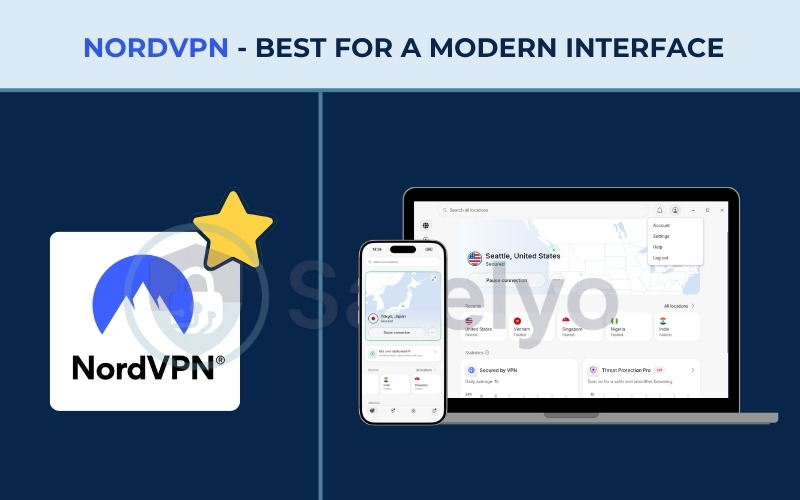
NordVPN operates out of Panama and stands as one of the most recognizable brands in the industry. Its core value proposition revolves around delivering ultra-high-speed infrastructure combined with a highly modernized, sleek interface. This clean design makes navigating its massive network of 9,500+ servers incredibly straightforward for any user.
| Feature | Details |
|---|---|
| Best For | Users who want a sleek, modern app backed by elite speeds |
| Starting Price | $3.49/mo |
| Company | Nord Security |
| Jurisdiction | Panama |
| Independent Audit | Yes (PwC, Deloitte) |
| No-Logs Policy | Yes (strict) |
| RAM-Only Servers | Yes |
| Servers | 9,500+ |
| Countries | 149 |
| Avg. Download Speed | 451.65 Mbps |
| Avg. Upload Speed | 142.19 Mbps |
| Avg. Latency | 121 ms |
| Protocols | NordLynx, OpenVPN, IKEv2, NordWhisper |
| Obfuscation | Yes (NordWhisper stealth protocol) |
| Port Forwarding | No |
| Dedicated IP | Yes |
| Simultaneous Connections | 10 |
| Netflix Regions | 26+ |
| Disney+ | Yes |
| BBC iPlayer | Yes |
| Torrent / P2P | Yes |
| Win/Mac/iOS/Android | Yes |
| Linux | Yes |
| Browser Extension | Yes (Chrome, Firefox, Edge) |
| Router Support | Yes |
| Live Chat 24/7 | Yes |
| Refund Policy | 30-day money-back guarantee |
| Free Trial | Yes (3-day on Android) |
| Official Website | https://nordvpn.com |
Pros
Exceptionally fast connection speeds powered by the NordLynx protocol.
Highly modern app design that is visually pleasing and easy to navigate.
Massive server network (9,500+) ensuring you can always find an uncrowded connection.
Cons
Starting price ($3.49/mo) is slightly higher than immediate budget competitors.
Renewals can see significant price hikes after the initial subscription period.
2.3.1. Setup speed and interface simplicity
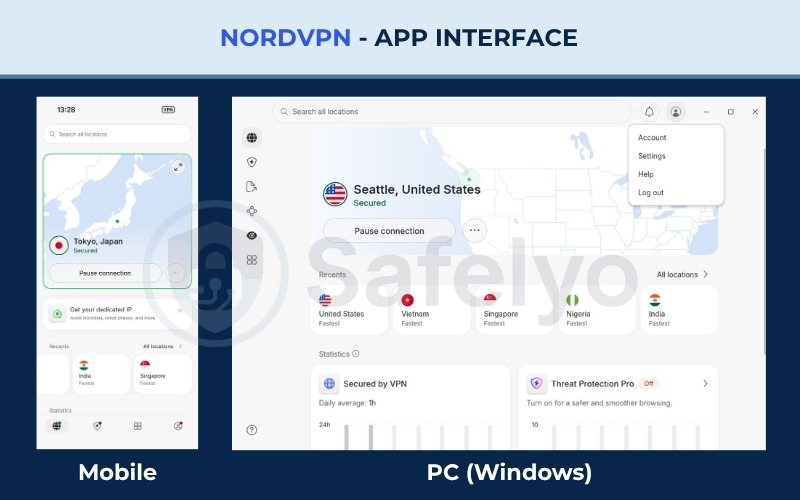
Upon opening NordVPN, a suggested server immediately appears, displaying the city and country for clear information. If you set a preferred location during your initial setup, it will always appear as your main server upon startup. A small three-dot menu allows you to quickly view your current IP, server number, and connection time, which effectively reduces clutter on the main screen.
The biggest highlight is the completely redesigned server map. By default, it displays a compact view of your current region, but you can expand it to full screen to navigate globally. On the expanded map, server locations appear as pins, allowing you to tap directly to connect instantly.
Additionally, NordVPN consolidated all connection options into a single search bar. You can filter by categories, specific locations, Meshnet devices, or directly type a server number, like United Kingdom #1442, for a fast, precise connection.
2.3.2. Unblocking capability and background performance
| Server Location | Download (Mbps) | Upload (Mbps) | Ping (ms) |
|---|---|---|---|
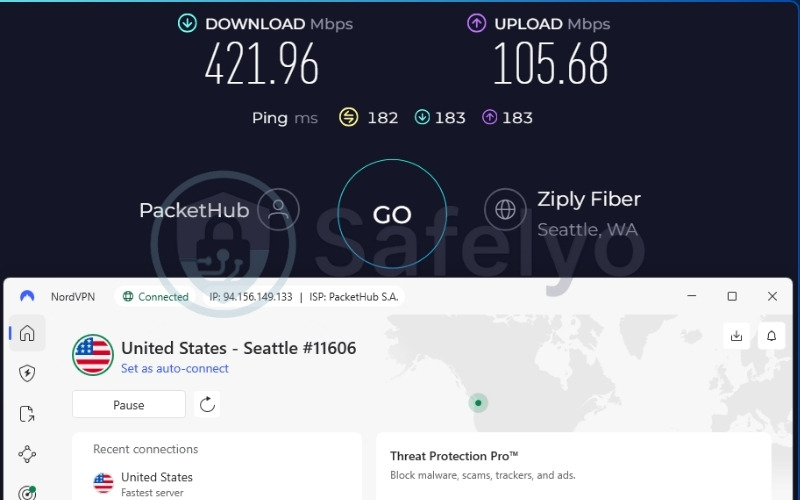
| US | 421.96 | 105.68 | 182 |
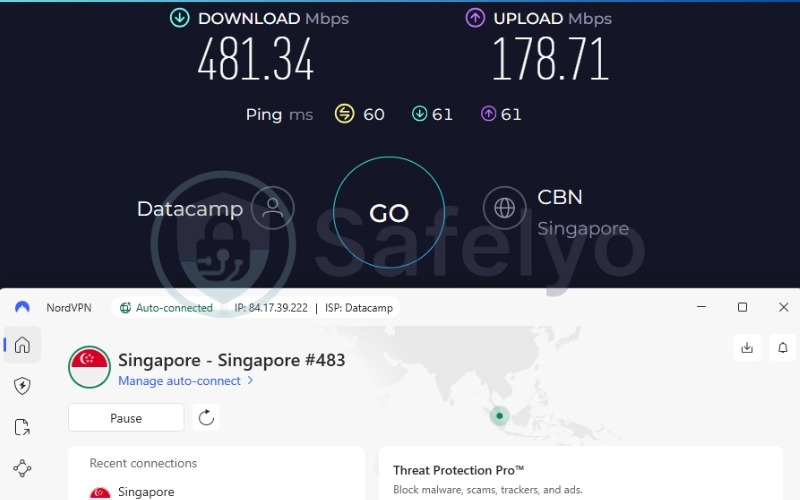
| Singapore | 481.34 | 178.71 | 60 |
NordVPN recorded an outstanding average download speed of 451.65 Mbps across our global test locations (US and Singapore). Driven by the proprietary NordLynx protocol, it delivers one of the most stable and high-bandwidth experiences in our lineup, effortlessly outperforming standard streaming demands even on long-distance connections.
This impressive speed ensures flawless, buffer-free 4K streaming across its 26+ supported Netflix regions, allowing you to watch global content without facing frustrating loading screens.
The application also uses built-in smart routing technology to automatically bypass strict geo-restrictions, meaning beginners do not have to manually tweak any network settings to access foreign content. The software runs flawlessly in the background without hogging your computer’s memory, guaranteeing that your daily browsing, gaming, and streaming activities remain incredibly smooth and completely uninterrupted.
2.3.3. Customer support and peace of mind
NordVPN operates on a strict 100% RAM-only server network. Because these servers run entirely on volatile memory, all user session data is physically wiped upon every single server reboot. This mathematical guarantee of total privacy ensures that absolutely no data can be stored, saved, or seized by third parties.
NordVPN reassures beginners further with the inclusion of reliable 24/7 live chat support and a risk-free 30-day refund window. If you ever struggle with finding the right server or understanding a feature, their customer support team is always available to help you navigate the platform without using confusing terminology. They also provide a massive, easily searchable knowledge base filled with simple visual guides, ensuring you always have access to quick answers.
Best for: Users who want a sleek, modern layout backed by elite speeds and advanced background security.
2.4. #4. Proton VPN: Best for a safe free version without data caps
Proton VPN was developed by the highly respected team in Switzerland behind ProtonMail. Proton VPN positions itself as the absolute best starting point for hesitant beginners. It is one of the only reputable companies to offer a permanently free tier with absolutely no data caps, allowing novices to test a premium VPN risk-free without constantly watching a data meter.
Because of this permanent, unmetered access, Proton VPN is widely considered the best free VPN for users who want strong security without any financial commitment.
| Feature | Details |
|---|---|
| Best For | First-time users seeking a safe, free trial without data caps |
| Starting Price | $2.99/mo |
| Company | Proton AG |
| Jurisdiction | Switzerland |
| Independent Audit | Yes (Securitum) |
| No-Logs Policy | Yes (independently verified) |
| RAM-Only Servers | No (full-disk encryption utilized instead) |
| Servers | 20,000+ |
| Countries | 145+ |
| Avg. Download Speed | 413.10 Mbps |
| Avg. Upload Speed | 116.23 Mbps |
| Avg. Latency | 157 ms |
| Protocols | WireGuard, IKEv2, Stealth |
| Obfuscation | Yes (Stealth protocol) |
| Port Forwarding | Yes (paid plans only) |
| Dedicated IP | Yes (Business plans only) |
| Simultaneous Connections | 10 (paid) / 1 (free) |
| Netflix Regions | 25+ |
| Disney+ | Yes |
| BBC iPlayer | Yes |
| Torrent / P2P | Yes (dedicated P2P servers on paid plans) |
| Win/Mac/iOS/Android | Yes |
| Linux | Yes (GUI app and CLI) |
| Browser Extension | Yes (Chrome, Firefox) |
| Router Support | Yes |
| Customer Support | Live Chat (Paid only, limited hours) & Email Ticket |
| Refund Policy | 30-day money-back guarantee |
| Free Trial | Free plan (unlimited data) |
| Official Website | https://protonvpn.com |
Pros
The free tier offers unlimited data, a rarity in the VPN market.
Strong Swiss jurisdiction and an independently verified no-logs policy.
Fast average speeds across both Plus and Free tiers.
Cons
The free tier is restricted to 1 device and does not support streaming unblocking.
Live chat is not truly 24/7 and is reserved only for paid subscribers.
2.4.1. Setup speed and interface simplicity
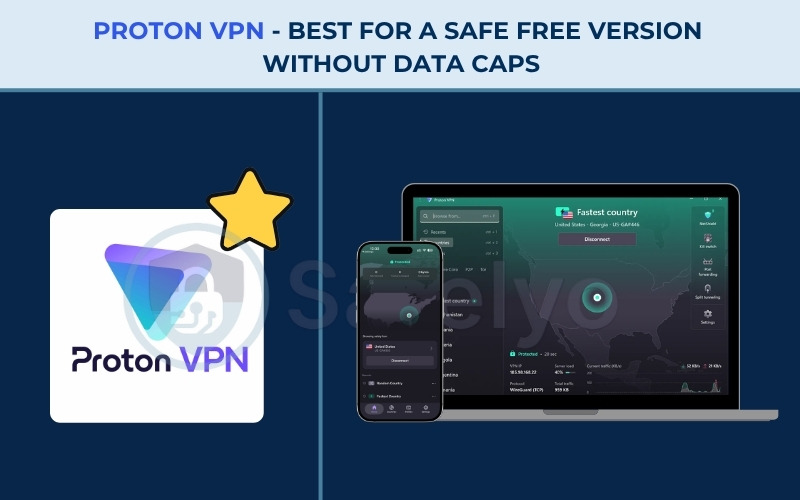
Proton VPN utilizes a highly minimalist, easy-to-use layout. After logging in, the main screen focuses on a large “Connect” button that automatically selects the fastest, closest server. Once connected, the interface clearly displays your new IP address and connection status so you can easily confirm your protection.
You can tap a country directly or use the top search bar to find a specific nation, state, or city. When viewing by city, the list expands to show specific locations, like Miami, allowing you to choose precisely where to connect. Advanced security settings, such as split tunneling or protocol selection, are tucked away in a separate Settings menu to avoid clutter. This consistent logic applies across mobile apps as well, and the Chrome extension allows for an instant Quick Connect with just one click.
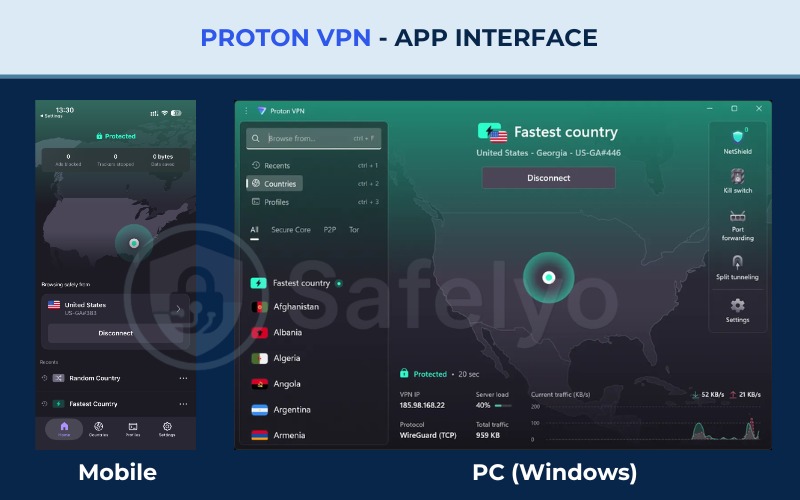
Setting up the free version requires only an email address, meaning absolutely no credit card information is needed, which instantly alleviates scam-related anxiety for beginners. Because of these incredibly accessible features, Proton VPN is routinely celebrated as the best free VPN on the market.
2.4.2. Unblocking capability and background performance
| Server Location | Download (Mbps) | Upload (Mbps) | Ping (ms) |
|---|---|---|---|
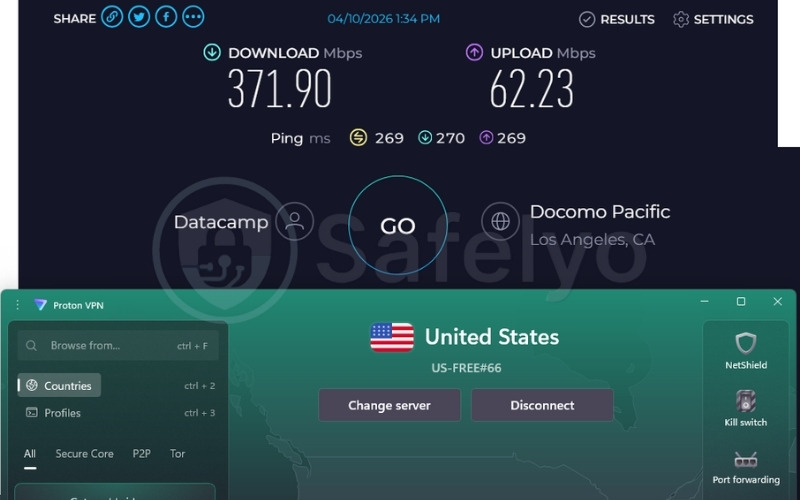
| US | 371.90 | 62.23 | 269 |
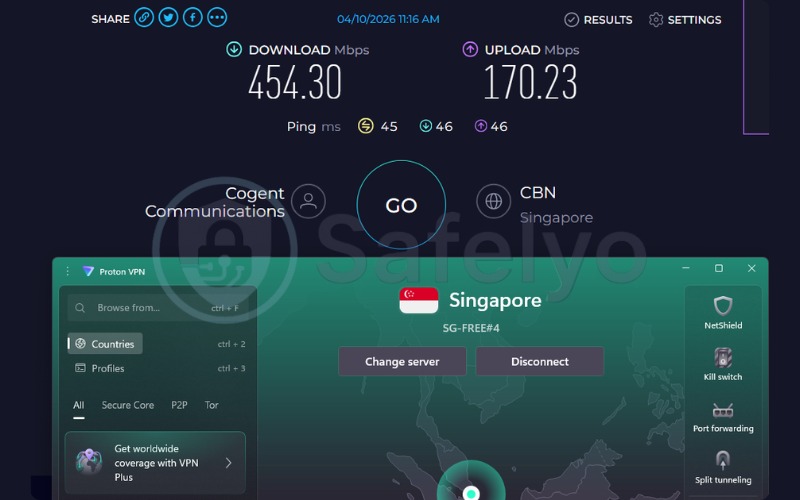
| Singapore | 454.30 | 170.23 | 45 |
A clear divide exists between the paid and free tiers regarding capabilities for major streaming platforms. While the paid Plus plan easily unblocks international content libraries and premium video services, the free plan does not support streaming unblocking.
However, Proton VPN does not artificially restrict or throttle your background speeds on the free tier. The free servers simply lack the advanced obfuscation tools and specific optimization required to successfully bypass strict geo-blocking firewalls.
Despite this limitation, Proton VPN delivers an impressive overall average speed of 413.10 Mbps across our US and Singapore tests on the free tier. This proves that users still get incredible bandwidth for fast file downloads, heavy web browsing, and stable background performance without paying a single cent.
2.4.3. Customer support and peace of mind
Proton VPN includes a highly capable proprietary Stealth protocol. This technology actively masks your encrypted traffic to look like regular, unencrypted internet data. This disguise allows users to slip past restrictive firewalls at school, at work, or in strictly censored regions seamlessly.
A notable limitation for beginners is that instant live chat support is reserved exclusively for paid plans, though the email ticket system remains highly reliable and responsive for free users.
Furthermore, the company is based in Switzerland, which offers some of the strongest privacy laws in the world. Their independently audited no-logs policy guarantees that even on the free tier, your digital privacy is fully protected, never monitored, and never sold to third parties.
Best for: First-time users who want a totally free, unlimited-data trial without handing over credit card information.
2.5. #5. TunnelBear: Best for a friendly, approachable design
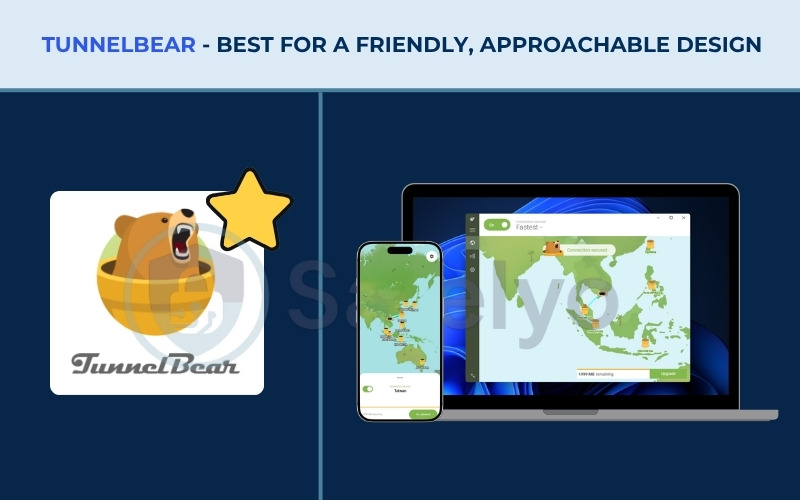
TunnelBear is owned by McAfee and based in Canada. TunnelBear was built from the ground up to eliminate tech intimidation. Its core value proposition is its delightful, bear-themed layout that turns the complex act of encrypting network traffic into a fun, gamified experience. This unique design choice makes it universally praised as the most approachable VPN for absolute beginners.
| Feature | Details |
|---|---|
| Best For | Novices who want a fun, visual, and highly approachable design |
| Starting Price | $3.33/mo |
| Company | TunnelBear (owned by McAfee) |
| Jurisdiction | Canada |
| Independent Audit | Yes (annual independent audit published publicly) |
| No-Logs Policy | Yes |
| RAM-Only Servers | No |
| Servers | 8000+ servers |
| Countries | 45+ countries |
| Avg. Download Speed | 460.08 Mbps |
| Avg. Upload Speed | 193.17 Mbps |
| Avg. Latency | 52 ms |
| Protocols | WireGuard, OpenVPN, IKEv2 |
| Obfuscation | Yes (GhostBear) |
| Port Forwarding | No |
| Dedicated IP | Not available |
| Simultaneous Connections | Unlimited |
| Netflix Regions | US (paid tier) |
| Disney+ | Yes (paid tier) |
| BBC iPlayer | Yes (paid tier) |
| Torrent / P2P | Yes |
| Win/Mac/iOS/Android | Yes |
| Linux | No |
| Browser Extension | Yes (Chrome) |
| Router Support | No |
| Live Chat 24/7 | No (24/7/365 email ticketing support) |
| Refund Policy | 30-day money-back guarantee |
| Free Trial | Free plan (2GB/month) |
| Official Website | https://www.tunnelbear.com/ |
Pros
Extremely engaging, non-threatening design that simplifies connection.
Excellent average download speeds (460.08 Mbps) on nearby servers.
Transparent, publicly published annual independent audits.
Cons
The free plan is heavily restricted with a 2GB/month data limit.
No 24/7 live chat available (relies on email ticketing).
2.5.1. Setup speed and interface simplicity
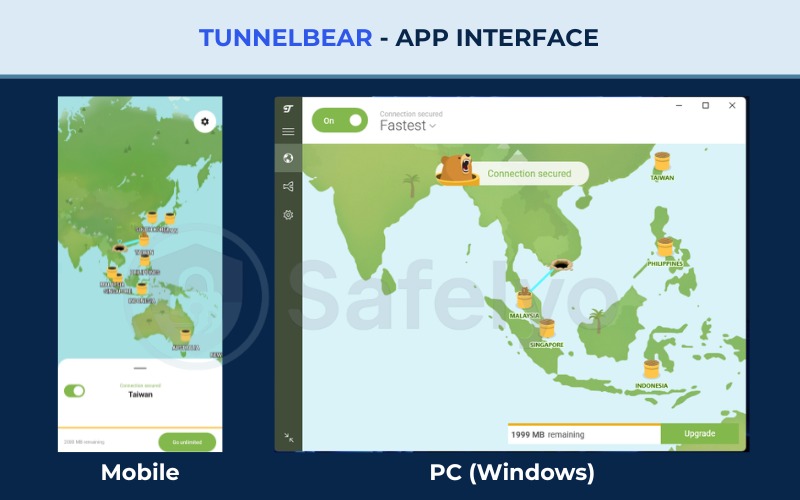
TunnelBear centers its entire application around a large, interactive world map. Above the map is a dropdown menu to select your desired country, alongside a simple protection toggle switch. When you switch it to “On,” an animated bear visually “digs a tunnel” across the map to your chosen location, turning a complex security process into a fun, easy-to-understand visual effect.
You can choose a server via the dropdown or by tapping directly on the map. TunnelBear supports up to 47 locations, and while it lacks a search bar or technical info like server load and ping, this omission actually keeps the interface perfectly simple for novices. The app also allows you to configure automatic connections to trusted servers.
On Android, a convenient home screen widget provides one-tap protection, and the lightweight Chrome extension supports easy connections to 20 countries with a simple click on the bear icon.
2.5.2. Unblocking capability and background performance
| Server Location | Download (Mbps) | Upload (Mbps) | Ping (ms) |
|---|---|---|---|
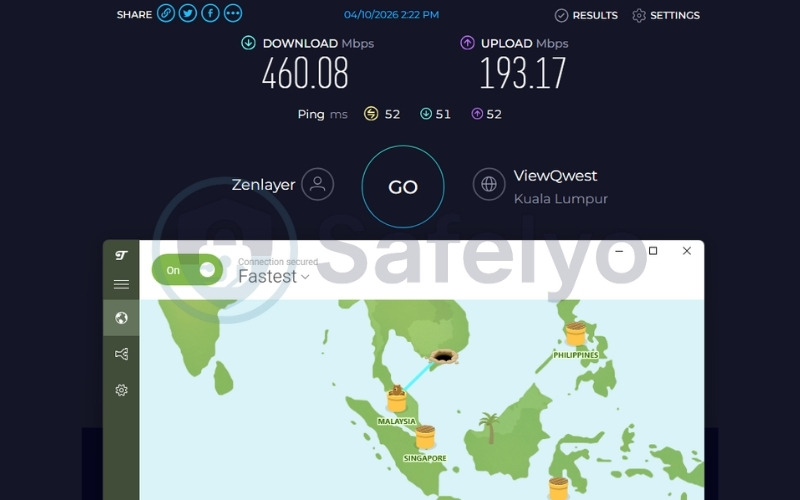
| Malaysia | 460.08 | 193.17 | 52 |
TunnelBear clearly separates unblocking capabilities between its paid and free tiers. On the paid tier, TunnelBear successfully supports access to major streaming platforms, allowing you to watch international movies and television shows without facing restricted content errors.
Because the free tier does not allow manual server selection, the application automatically routed our connection to a nearby Malaysia server. Baseline background performance is excellent, as evidenced by the 460.08 Mbps download speed and low 52 ms ping recorded on this randomly assigned Malaysia server during our free tier tests. This metric guarantees a seamless, highly responsive, and buffer-free browsing experience for users testing the service.
The application runs extremely lightly on your system, ensuring that it will not drain your computer’s memory or cause other applications to crash while it quietly encrypts your data in the background.
2.5.3. Customer support and peace of mind
TunnelBear integrates specific safety tools designed to give complete novices total peace of mind. The GhostBear feature provides vital obfuscation, actively disguising your encrypted traffic to look like normal everyday data. This ensures that internet service providers or local network administrators cannot detect and block your connection.
Beginners should be warned that customer support relies entirely on an email ticket system rather than an instant live chat feature. However, their support team is notoriously friendly and operates 24/7/365 to resolve any setup issues.
Despite the lack of live chat, TunnelBear publishes annual independent security audits publicly, providing absolute transparency and proving that their no-logs claims are authentic, which builds immense trust for first-time users.
Best for: Users who are highly intimidated by VPNs and want a fun, visual, click-and-go experience.
3. UI face-off: Which app connects the fastest?
Standard VPNs often overwhelm users with complex dashboards full of server load percentages, ping numbers, and protocol dropdowns. To solve this exact pain point, our evaluation prioritized VPNs featuring streamlined layouts where the core security functions are immediately accessible without digging through menus.
We conducted strict stopwatch tests from a standard Windows desktop to validate which service is truly the fastest and easiest to deploy. We measured the exact time and input required to go from launching the application to establishing a fully encrypted connection.
While all five of our top picks impressively require just a single click to secure your network, ExpressVPN completely dominated in pure speed, establishing a tunnel in exactly 14 seconds. TunnelBear and Surfshark stand as incredibly close runners-up, as they also offer brilliant, one-click pathways that require absolutely no technical configuration to get started.
Setup Speed Comparison Table:
| VPN | Time to Connect | Clicks to Connect | Primary Interface Feature |
|---|---|---|---|
| ExpressVPN | 14 seconds | 1 click | Massive central power button |
| TunnelBear | 15 seconds | 1 click | Animated map with visual feedback |
| Surfshark | 16 seconds | 1 click | Clean, minimalist sidebar menu |
| NordVPN | 18 seconds | 1 click | Modern Quick Connect feature |
| Proton VPN | 20 seconds | 1 click | Minimalist layout with top search bar |
4. How to set up your first VPN (A 3-step guide)
Setting up a VPN for the first time is simpler than you might expect. By avoiding manual configurations and sticking to the provided default applications, you can establish a secure connection in just a few straightforward steps. Here is how to get your connection running smoothly without touching a single technical setting:
- Sign up and download: Always grab the installation file directly from the provider’s official website rather than relying on third-party download stores. This guarantees that you receive the authentic, malware-free version of the VPN.
- Install and log in: Open the downloaded file, follow the basic prompts to install the program onto your device, and enter the simple email credentials you created during the signup process.
- Click connect: Ignore the advanced settings menu entirely. Simply hit the large central power button on the main screen to let the VPN automatically select the fastest and most secure server available for you.
For a more comprehensive walkthrough across different devices, check out our detailed guide on how to set up a VPN.
5. The hard truth: Do you actually need a VPN at home?
Aggressive marketing tactics often mislead beginners into believing their home networks are constantly under attack. Validating insights from the community reveals a much calmer reality.
IT professionals agree that you do not need to leave a VPN running 24/7 at home just to browse standard HTTPS websites or play online games. Running a VPN constantly on a secure home network only adds unnecessary encryption overhead and slight speed drops without providing significant practical benefits. You strictly need a VPN when securing public Wi-Fi at coffee shops, bypassing geo-blocks to watch international streaming content, or hiding torrenting activity from a snoopy internet service provider.
6. Free vs. paid VPNs: What should beginners choose?
Navigating the market requires avoiding subscription traps and dangerous scam applications disguised as free tools.
Downloading random free VPNs from app stores is incredibly dangerous, as these shadowy companies often harvest your personal data and serve malicious, intrusive ads to make a profit. A verified “freemium” model is the only safe way to browse for free. Services like Proton VPN (unlimited data) or TunnelBear (2GB monthly cap) offer safe, restricted free versions heavily subsidized by their paying customers.
If you decide to upgrade to a paid plan, you must watch out for automatic renewals. We highly recommend that immediately after subscribing to services like NordVPN or Surfshark, you navigate to your account dashboard on the provider’s website and explicitly toggle off auto-renewal. This simple step protects you from unexpected, steeper year-two price hikes. For a deeper dive into the exact differences, risks, and limitations, explore our full comparison on free vs paid VPNs.
7. Essential VPN terms translated for beginners (Jargon-Buster)
Understanding basic VPN concepts does not require deep technical knowledge. Here are the core features translated into simple analogies:
- Kill Switch: A digital safety net that instantly cuts your internet if the VPN connection drops unexpectedly, ensuring your real IP address is never accidentally exposed to your provider.
- Split Tunneling: A feature that lets you choose which apps go through the secure VPN tunnel and which connect directly to your normal internet (for example, routing Netflix through the VPN while playing a local video game normally).
- No-logs Policy: A strict guarantee that the VPN company acts like a digital shredder, keeping zero records of the websites you visit, the messages you send, or the files you download.
- AES-256 Encryption: Putting your internet data inside a digital armored truck, it is the exact same lock-and-key mathematical system used by global banks and militaries to protect sensitive files.
8. FAQs about easy-to-use VPNs
What’s the easiest VPN to use overall?
ExpressVPN takes the top spot due to its massive one-click interface and strict cross-platform consistency. Once you learn how to use it on your phone, you instantly know how to use it on your computer.
Are free VPNs safe for beginners?
Only verified services like Proton VPN or TunnelBear are safe. Random free VPNs found on app stores are highly dangerous because they often harvest your private data and sell it to advertisers to make a profit.
What is the best free VPN with no data limit?
Proton VPN is the best option because its permanent free tier provides unlimited bandwidth without any data caps, allowing you to browse securely without watching a restrictive data meter.
Will a VPN slow down my home network?
Yes, you will experience a slight speed drop due to the encryption overhead required to secure your data. This is exactly why a VPN is best used only when necessary, rather than leaving it on 24/7 for basic home browsing.
Does a VPN drain my phone battery?
Yes, running a VPN continuously on your mobile device can consume more battery due to the constant encryption process running in the background. It is highly recommended to turn it on primarily when connecting to unsecured public Wi-Fi networks.
Can I use a VPN on my smart TV?
Yes, many top providers like ExpressVPN and Surfshark offer dedicated apps for smart TVs that are just as easy to install as on a phone. Alternatively, you can configure it directly on your home router for full-house coverage.
9. Conclusion
Finding a stress-free entry into digital privacy is entirely possible when you choose a VPN designed specifically for novices. Here is a final recap of our top recommendations:
- ExpressVPN remains the absolute best choice for eliminating tech anxiety, offering a massive one-click button that bypasses complex menus entirely.
- Surfshark provides the ideal budget alternative, delivering unlimited connections for busy households without breaking the bank.
- NordVPN delivers blazing-fast speeds wrapped in a highly modern, polished interface that makes finding the right server effortless.
- Proton VPN stands out as the ultimate risk-free trial, offering a permanently free plan with unlimited data.
- TunnelBear offers the most approachable, gamified design, turning a complex security process into a fun, visual experience.
Take advantage of their 30-day refund windows as a financial safety net to test these easy-to-use VPNs completely risk-free. For more insights and detailed breakdowns of top-tier privacy tools, explore the broader Best VPN category on the Safelyo homepage today.