Getting locked out of your playlists by a school network or hitting the frustrating 14-day travel rule abroad easily ruins your daily listening experience. Finding the Best VPN for Spotify solves these restrictions instantly, and at Safelyo, we rigorously tested dozens of providers to find the ultimate workarounds in 2026. A premium secure tunnel not only unblocks your favorite podcasts on restrictive networks but also serves as the secret tool to access massive discounts on Premium subscriptions by changing your virtual location.
Top 5 VPNs for Spotify
- NordVPN: Best overall for unblocking Spotify anywhere with lightning-fast speeds and top-tier obfuscation.
- Surfshark: Best budget option with unlimited devices and servers in countries with cheap Spotify Premium.
- ExpressVPN: Best for reliable connections and easy setup on routers for gaming consoles.
- CyberGhost: Best for optimized streaming servers to enjoy music and podcasts without interruptions.
- Private Internet Access: Best massive server network across 90+ countries and built-in tracker blocker.
Quick Comparison: Best VPNs for Spotify
| VPN Provider | Best Feature for Spotify | Global Servers | Cheap Premium Regions (e.g., Turkey/India) | Obfuscation Tech | Starting Price |
|---|---|---|---|---|---|
| NordVPN | Top speeds & unblocking anywhere | 9,500+ | Excellent coverage | Yes (Obfuscated Servers) | ~$3.49/mo |
| Surfshark | Hunting cheap plans & unlimited devices | 4,500+ | Excellent coverage | Yes (Camouflage Mode) | ~$2.49/mo |
| ExpressVPN | Stable connections & router setups | 3,000+ | Good coverage | Yes (Automatic) | ~$2.49/mo |
| CyberGhost | Dedicated streaming optimization | 11,500+ | Good coverage | No (Standard only) | ~$1.59/mo |
| PIA | Massive network & tracker blocking | 30,000+ | Very good coverage | Yes (Shadowsocks) | ~$1.33/mo |
Disclaimer: The information provided in this guide is accurate to the best of our knowledge at the time of writing. However, VPN performance, subscription pricing, streaming support, and available features may change depending on regional restrictions or future service updates. Last reviewed: May 2026.
1. How we test and rank the best Spotify VPNs
Not every privacy tool can handle continuous audio playback or bypass the platform’s sophisticated region checks. Our cybersecurity team evaluates providers based on three specific technical pillars to ensure you get a flawless, uninterrupted listening experience.
1.1. Global server network for regional pricing
To unlock the cheapest subscription rates, your provider must have reliable physical or virtual servers in specific developing nations. We prioritize VPNs that maintain stable connections in countries like Turkey, India, and Pakistan, which consistently offer the lowest Premium pricing globally.
A massive global footprint also ensures you can always find an uncrowded server nearby to minimize latency. This broad geographic coverage prevents your music from suddenly stopping due to high server congestion during peak evening commuting hours.
1.2. Audio streaming speed and consistency
High-quality audio requires a steady internet bandwidth of at least 320kbps to avoid frustrating playback interruptions. We conduct rigorous speed tests on international servers to ensure the VPN’s encryption overhead does not cause your music to stutter or pause unexpectedly between tracks.
Consistency is just as important as raw speed for background listening on mobile devices. We monitor connection stability to guarantee your playlists run smoothly while you are driving, working out, or switching between mobile data and public Wi-Fi networks.
1.3. Obfuscation capabilities
School and corporate IT administrators actively hunt for and block standard VPN traffic using Deep Packet Inspection (DPI). If a network firewall detects a typical encrypted tunnel, it will instantly drop your connection and block the streaming application entirely.
We only rank services that feature strong stealth technology to bypass these aggressive local blocks. This specialized obfuscation scrambles your encrypted tunnel to look like regular HTTPS web browsing, allowing you to bypass strict local firewalls completely undetected.
2. Why you need a VPN for Spotify
Using a secure, encrypted tunnel does more than just unlock the service on restricted networks; it is the ultimate tool for optimizing your subscription costs and bypassing regional content blocks. At Safelyo, we have identified these four critical scenarios where a VPN becomes an essential part of your daily music experience.
2.1. Securing cheaper Premium subscriptions
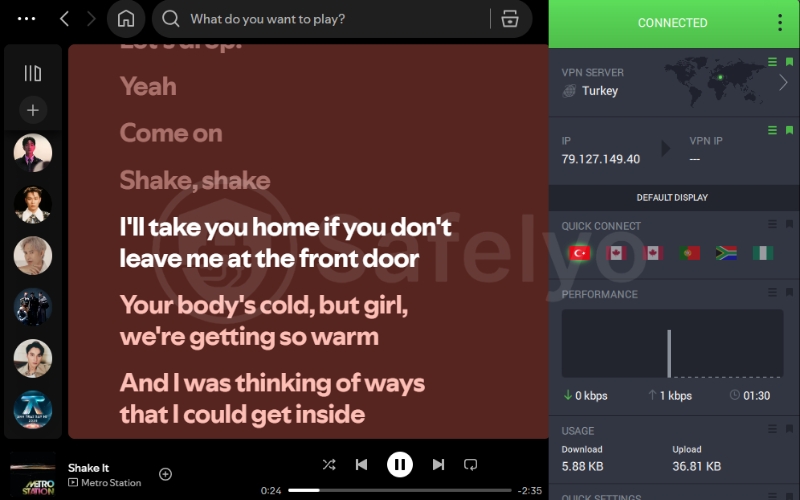
Spotify adjusts its subscription pricing based on the purchasing power of each country, meaning a Premium account in countries like Nigeria, Pakistan, or Turkey can cost up to 80% less than in North America or Europe. By using a VPN to set your virtual location to these regions, you can register for a Premium account at a fraction of the standard cost.
Our 2026 market analysis shows that subscription pricing varies drastically across global borders. While costs fluctuate based on local currency strength and regional promotions, the following nations consistently offer the most significant discounts compared to North American or European rates.
| Rank | Country | Local Currency Price | Approx. USD Price |
|---|---|---|---|
| 1 | Nigeria | 1,600 Naira | 1.04 USD |
| 2 | Ghana | 24 Cedi | 1.45 USD |
| 3 | Turkey | 99 Lira | 1.46 USD |
| 4 | Egypt | 79 Pound | 1.55 USD |
| 5 | India | 139 Rupee | 1.63 USD |
| 6 | Pakistan | 379 Rupee | 1.50 USD |
| 7 | Bangladesh | 219 Taka | 1.80 USD |
| 8 | Sri Lanka | 749 Rupee | 2.45 USD |
| 9 | Vietnam | 65,000 Dong | 2.47 USD |
| 10 | Philippines | 169 Peso | 2.95 USD |
Safelyo Expert Insight: To succeed, you must pair your VPN with a local Gift Card purchased from that specific country, rather than using your domestic credit card, which would immediately trigger a region-mismatch error.
2.2. Bypassing school and workplace Wi-Fi blocks
Network administrators in schools and offices frequently blacklist the streaming domain to conserve bandwidth and prevent distractions. They enforce this by blocking the app’s connection ports at the router level, leaving you with a continuous loading screen.
A VPN solves this by encrypting all data leaving your device and routing it through a secure, external server. Because the local router can only see encrypted packets, it cannot read the destination URL, effectively bypassing the administrative firewall and unblocking your music immediately. If you are dealing with highly restrictive campus networks, you can check out our comprehensive guide on the best VPN for school to find more specialized tools that cut through these academic firewalls.
2.3. Overcoming the Spotify 14-day travel rule
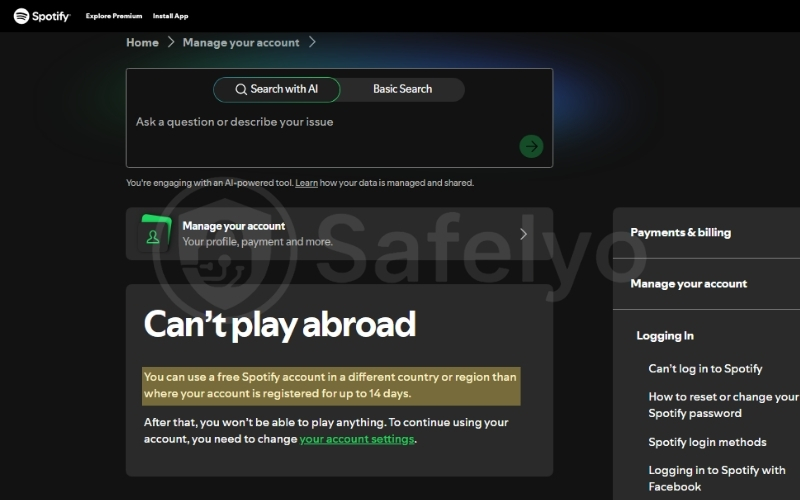
If you use a free account, the platform enforces a strict policy that only allows you to stream music abroad for 14 days. Once this period expires, you are completely locked out of the app until you return to your registered home country and log in from your original IP address.
By activating a VPN, you can connect to a server located in your home nation from anywhere in the world. This simple trick provides you with a domestic IP address, resetting the 14-day timer and convincing the system that you have returned home.
2.4. Accessing geo-restricted podcasts and exclusive releases
Copyright agreements mean that certain songs, albums, and popular podcasts are only available in specific regions. If you live outside these areas, these exclusive tracks often appear grayed out. Furthermore, Spotify is currently unavailable in countries like China, Sudan, Iran, and Cuba, where residents cannot access the platform through standard internet connections.
Beyond national borders, schools and workplaces frequently block the streaming domain to conserve bandwidth. By connecting to an international server, you effectively bypass both national firewalls and local administrative filters. This grants you a virtual location where content is fully licensed, allowing you to listen to restricted podcasts or enjoy new album releases immediately.
3. Best VPN for Spotify in 2026: Top 5 tested and ranked
Choosing the right VPN for Spotify isn’t just about unblocking content; it is about finding a provider that balances high-speed data throughput with a stable enough connection to avoid the dreaded “buffering wheel.” Our 2026 lab tests demonstrate that premium protocols are the primary differentiator between smooth 320kbps audio and a stuttering listening experience.
3.1. NordVPN: Best overall for unblocking Spotify anywhere
NordVPN remains our top recommendation because it consistently bypasses regional firewalls while maintaining speeds that feel like a local connection. Its massive infrastructure is optimized to ensure that no matter your physical location, your favorite podcasts and exclusive music releases are always just one click away.
Best for: Privacy enthusiasts and power users who need the highest speeds and advanced obfuscation to ensure their Spotify traffic is never throttled by restrictive campus or office networks.
| Features | Details |
|---|---|
| Starting Price | ~$3.49/mo (2-year Basic plan) |
| Global Servers | 9,500+ servers in 149 countries |
| Speed Protocol | NordLynx (WireGuard-based) |
| Advanced Features | Obfuscated servers, Threat Protection Pro |
| Independent Audit | Yes (Deloitte and PwC verified) |
| Simultaneous Connections | 10 devices |
| Refund Policy | 30-day money-back guarantee |
Speed and streaming performance
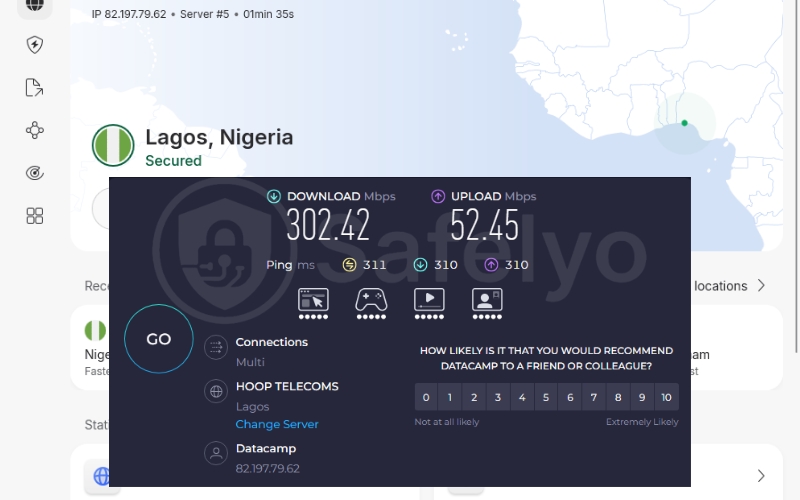
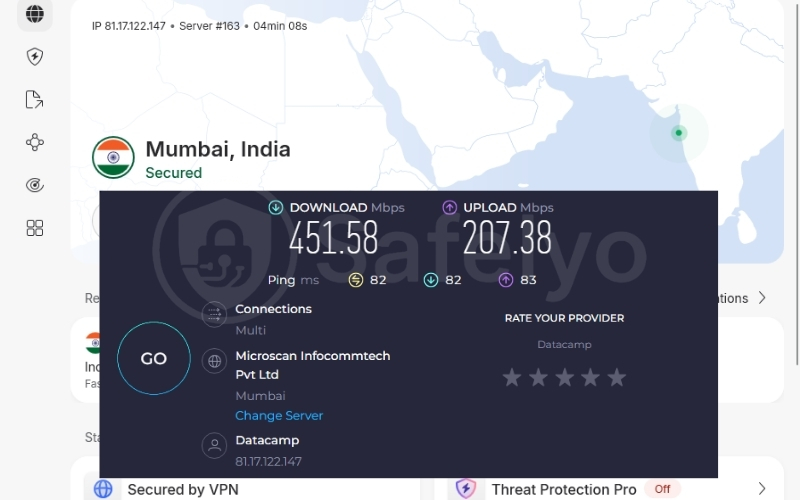
During our testing, NordVPN delivered strong streaming performance across multiple international regions. On the Nigeria server, download speeds reached over 302 Mbps, while the India server achieved an impressive 451 Mbps using the NordLynx protocol. These results were more than enough for uninterrupted Spotify streaming, instant playlist loading, and smooth playback at the highest audio quality without buffering.
Exclusive features for Spotify
NordVPN includes several tools specifically tailored to improve your daily audio streaming and subscription management experience.
- Obfuscated servers: Network admins often block streaming applications to save local bandwidth. Obfuscated servers scramble your encrypted data to look like regular web browsing. This technology easily defeats strict local firewalls, so you can listen undetected at work.
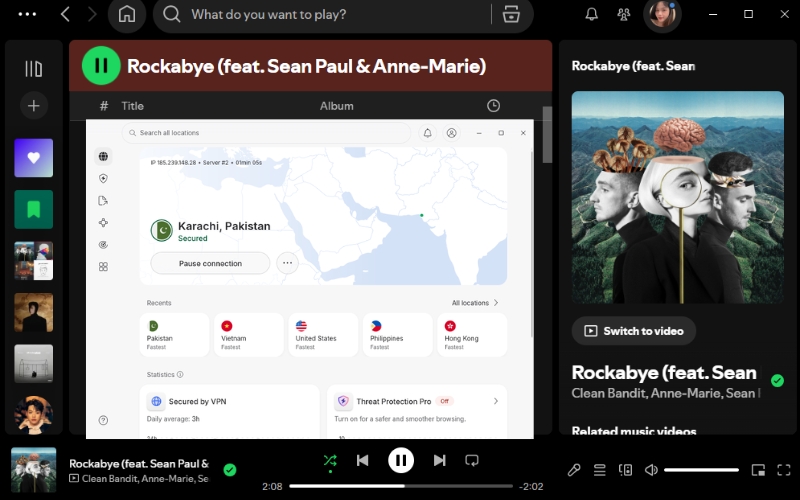
- SmartPlay technology: This built-in feature securely routes your DNS requests without requiring manual setup. It allows you to seamlessly cast international music libraries to your smart home speakers without encountering location errors.
- Premium pricing access: Their massive server footprint in developing nations is perfect for securing a cheaper subscription. You can reliably connect to countries like Turkey or Nigeria to unlock the lowest international pricing available.
Privacy and security
Free listeners often deal with intrusive pop-ups and tracking links from audio advertisements. The built-in Threat Protection tool stops malicious domains and trackers from loading while you explore new global artists. This keeps your device clean and protects your personal data from third-party advertising companies.
Pros
Blazing fast NordLynx speeds guarantee seamless 320kbps audio
Obfuscated servers easily bypass strict school music blocks
Threat protection removes malicious pop ups on free audio sites
Cons
The map interface feels cluttered when quickly switching music regions
Renewal pricing is higher after your first subscription term
3.2. Surfshark: Best budget option for unlimited connections
Surfshark stands out in 2026 as the most efficient choice for large households or students sharing a subscription. It provides the same premium unblocking power as the industry giants but at a fraction of the cost, making it the top budget-friendly solution for global music access.
Best for: Large families, roommates, and students who need to secure every device they own, from phones to Smart TVs, under one affordable, unlimited subscription.
| Features | Details |
|---|---|
| Starting Price | ~$2.49/mo (2-year Starter plan) |
| Global Servers | 4,500+ servers in 100 countries |
| Speed Protocol | WireGuard, OpenVPN, IKEv2 |
| Advanced Features | CleanWeb, IP Rotator, NoBorders Mode |
| Independent Audit | Yes (Deloitte verified) |
| Simultaneous Connections | Unlimited devices |
| Refund Policy | 30-day money-back guarantee |
Speed and streaming performance
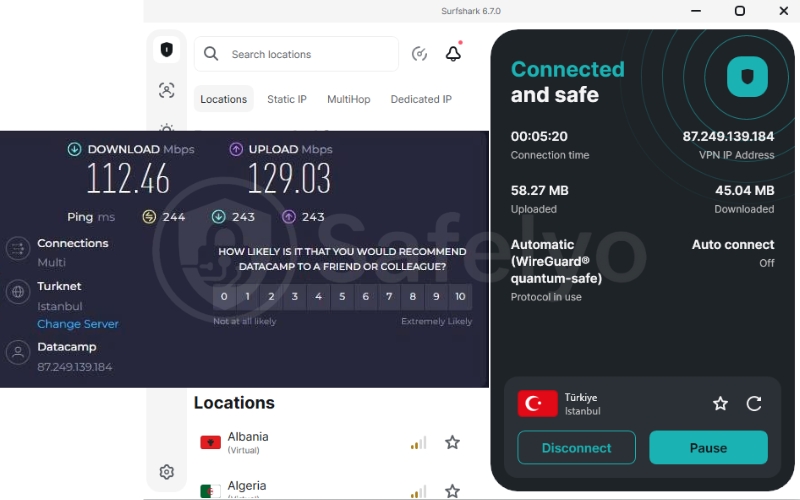
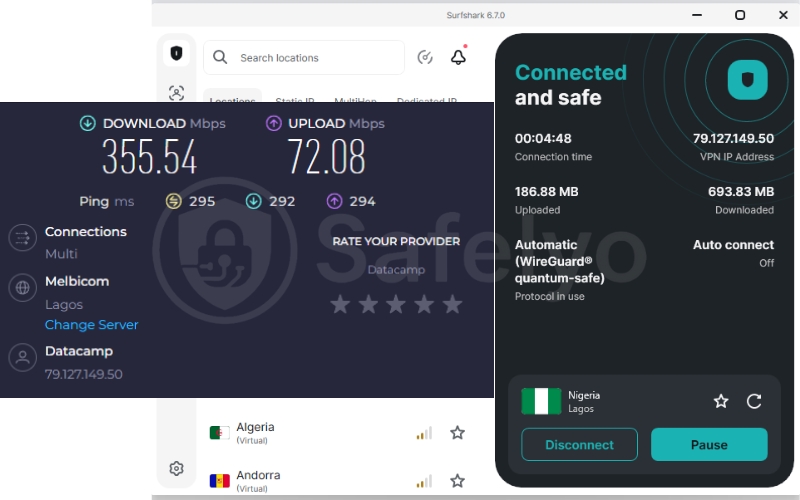
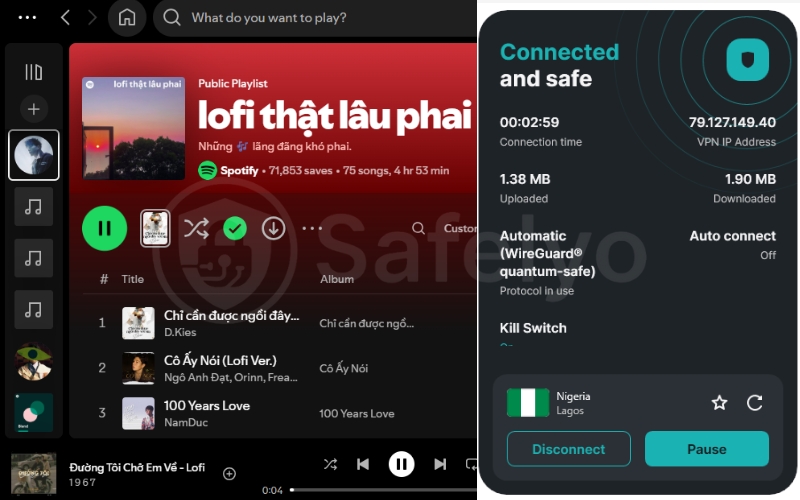
Surfshark delivered a reliable music streaming performance during our international speed tests. On the Turkey server, the VPN reached download speeds above 112 Mbps, while other nearby regions achieved speeds of over 355 Mbps using the WireGuard protocol. These results provided stable Spotify playback, fast playlist syncing, and smooth high-quality audio streaming without interruptions, even while switching between mobile data and WiFi networks.
Exclusive features for Spotify
Surfshark packs several unique tools that help users bypass regional restrictions and maintain access to cheap foreign subscriptions.
- Unlimited simultaneous connections: Unlike most premium providers, Surfshark permits an unlimited number of devices on a single account. This allows every member of your household to enjoy region-locked podcasts simultaneously.
- IP Rotator: To keep your listening history truly private, the IP Rotator constantly refreshes your virtual address in the background. This makes it impossible for tracking algorithms to link your habits to a static identity when buying foreign subscriptions.
- GPS Spoofing on Android: For mobile users, Surfshark can automatically match your device’s GPS coordinates to your chosen server location. This perfectly bypasses advanced location checks, ensuring you never trigger a region mismatch error.
Privacy and security
Surfshark includes CleanWeb, which filters out annoying ads and malicious links found on many free websites. This feature not only improves your browsing experience but also saves mobile data by preventing heavy visual ads from loading. Their strict no-logs policy guarantees your data remains totally private.
Pros
Unlimited connections let your whole family stream music simultaneously
IP Rotator hides your tracks when hunting for cheap Premium deals
CleanWeb effectively blocks annoying audio ads and trackers
Cons
Connecting to distant cheap regions can take a few extra seconds
Base interface lacks advanced tools for deep audio stream tweaking
3.3. ExpressVPN: Best for high-speed stability and easy setup
ExpressVPN is the industry benchmark for reliability, especially on mobile devices and gaming consoles. It focuses on a frictionless experience, removing the complex technical configurations that often deter casual listeners from using security tools.
Best for: Users who prioritize a “set-and-forget” experience and need a simple way to stream on devices like PlayStation or Xbox.
| Features | Details |
|---|---|
| Starting Price | ~$2.49/mo (2-year Basic plan) |
| Global Servers | 3,000+ servers in 105 countries |
| Speed Protocol | Lightway |
| Advanced Features | MediaStreamer, Network Lock, Threat Manager |
| Independent Audit | Yes (KPMG & PwC verified) |
| Simultaneous Connections | Up to 14 devices |
| Refund Policy | 30-day money-back guarantee |
Speed and streaming performance
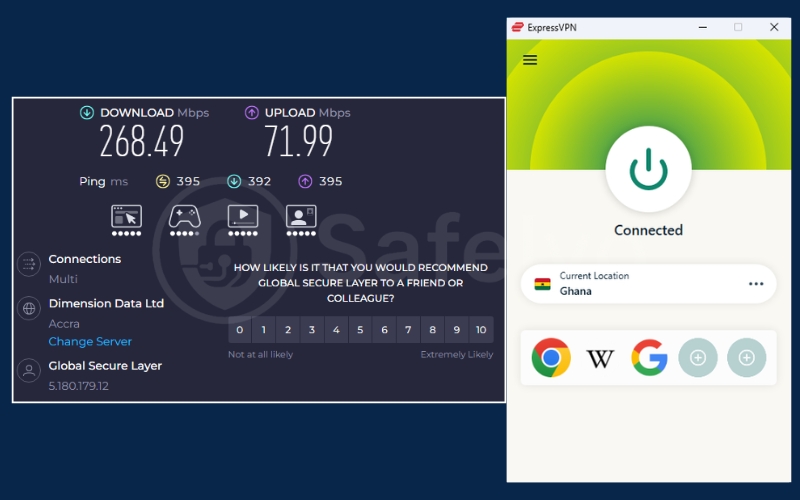
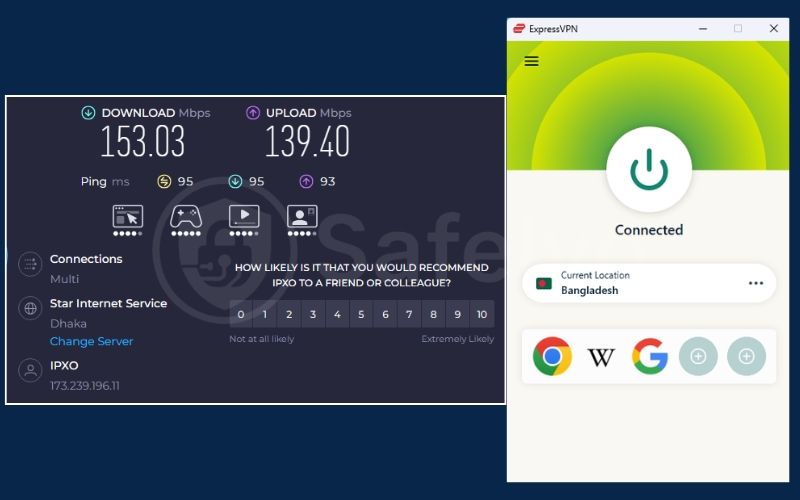
ExpressVPN delivered consistently stable streaming speeds during our testing sessions across multiple regions. On the Ghana server, download speeds reached over 268 Mbps with strong upload stability, while additional test locations maintained speeds above 150 Mbps using the Lightway protocol. The fast reconnection performance helped keep Spotify streams smooth and uninterrupted, especially when switching between mobile networks, public WiFi, or weaker cellular signals.
Exclusive features for Spotify
ExpressVPN is designed for users who want premium functionality without needing to tweak confusing network settings manually.
- MediaStreamer for consoles: For gamers who want to listen to their own playlists while playing on an Xbox or PlayStation, this tool is essential. It lets you unblock regional content on systems that do not natively support security apps, turning your console into a media hub.
- Automatic Obfuscation: You do not need to hunt for specialized stealth servers. ExpressVPN automatically detects network restrictions and scrambles your traffic to bypass corporate firewalls immediately.
- Dedicated router application: By installing their custom app on your home router, every device in your house is instantly protected. This allows all your smart speakers to access international music catalogs automatically.
Privacy and security
Their entire network operates on TrustedServer technology, where all information is wiped clean upon every server reboot. This provides ironclad proof that none of your listening logs or personal data is ever physically stored. You can browse foreign catalogs knowing your identity is completely protected.
Pros
Unmatched mobile stability keeps podcasts playing while commuting
MediaStreamer easily unblocks music catalogs on gaming consoles
TrustedServer technology guarantees your listening history stays private
Cons
Higher monthly cost cuts into your Spotify Premium savings
Lacks deep manual configuration settings for advanced technical users
3.4. CyberGhost: Best for optimized streaming and podcasts
CyberGhost simplifies the VPN experience for beginners by providing highly specialized servers for streaming. It takes the guesswork out of unblocking regional content by clearly labeling which servers work best for music and podcast platforms.
Best for: Beginners who want a simple, one-click solution with servers pre-configured for global streaming and podcast access.
| Features | Details |
|---|---|
| Starting Price | ~$1.59/mo (2-year plan) |
| Global Servers | 11,500+ servers in 100 countries |
| Speed Protocol | WireGuard, OpenVPN |
| Advanced Features | Smart Rules, NoSpy Servers, Kill Switch |
| Independent Audit | Yes (Deloitte verified) |
| Simultaneous Connections | 7 devices |
| Refund Policy | 45-day money-back guarantee |
Speed and streaming performance
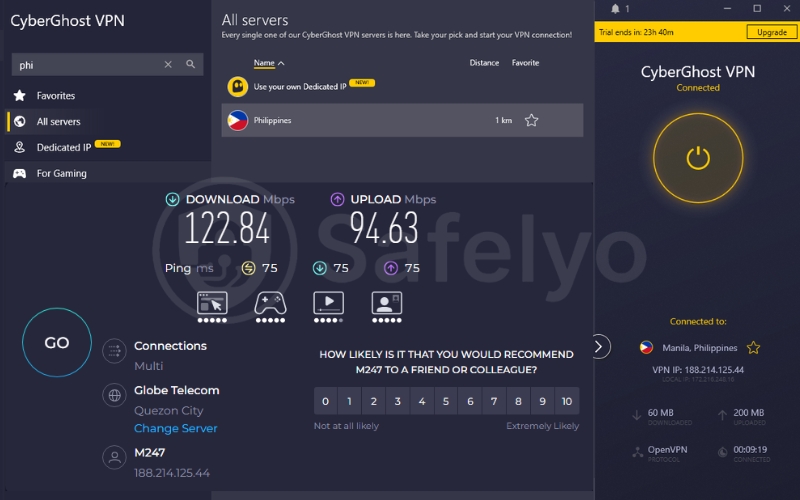
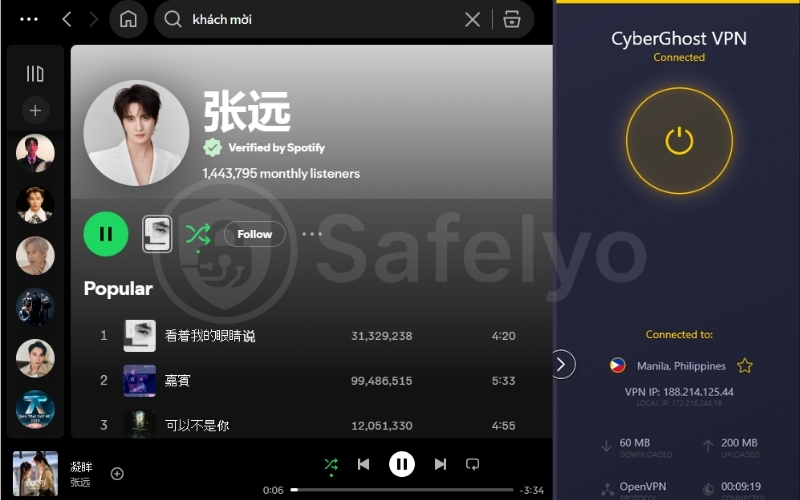
During our tests, CyberGhost maintained a very respectable 122 Mbps download speed using the OpenVPN protocol. This performance is more than sufficient for high-quality audio playback. It ensures you can enjoy hours of uninterrupted music across all supported devices without sudden resolution drops.
Exclusive features for Spotify
The interface is designed specifically to help users find the exact server they need for entertainment instantly.
- Dedicated streaming servers: The app removes the need for manual trial and error by listing servers specifically optimized for media platforms. This ensures you always connect to an address verified to bypass regional blocks for international podcasts.
- Smart Rules automation: This feature allows you to configure the application to launch the moment you open your music player. Your privacy is always protected automatically without requiring you to remember to click connect.
- Massive global footprint: With over 11,500 servers servers globally, you will rarely experience overcrowding. This ensures your weekend party playlists never stop due to peak-hour server congestion.
Privacy and security
Based in Romania, CyberGhost sits outside the reach of international surveillance alliances. Combined with their strict no-logs policy, your listening history remains safely guarded from government agencies. Their industry-leading refund window gives you plenty of time to test these security features risk-free.
Pros
Dedicated streaming profiles remove the guesswork for unblocking music
Massive global network ensures zero audio buffering during peak hours
Generous forty five day refund window lets you test regional pricing safely
Cons
Lacks advanced stealth tools to bypass aggressive corporate firewalls
The seven device limit may not cover large families streaming together
3.5. Private Internet Access: Best for privacy and torrenting
Private Internet Access is a favorite among tech-savvy users for its deep configuration options. It provides an exceptionally secure environment for downloading large files and protecting your data using open-source applications.
Best for: Tech-savvy users who need massive server density and customizable features to optimize their connection for safe P2P file sharing.
| Features | Details |
|---|---|
| Starting Price | ~$1.33/mo (3-year plan + 3 mo) |
| Global Servers | 30,000+ servers in 91 countries |
| Speed Protocol | WireGuard, OpenVPN |
| Advanced Features | Port Forwarding, MACE Ad Blocker |
| Independent Audit | Yes (Deloitte verified) |
| Simultaneous Connections | Unlimited devices |
| Refund Policy | 30-day money-back guarantee |
Speed and streaming performance
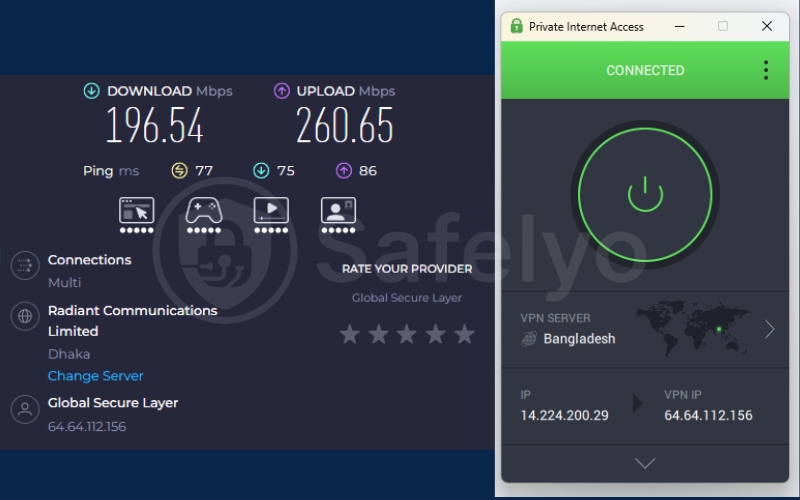
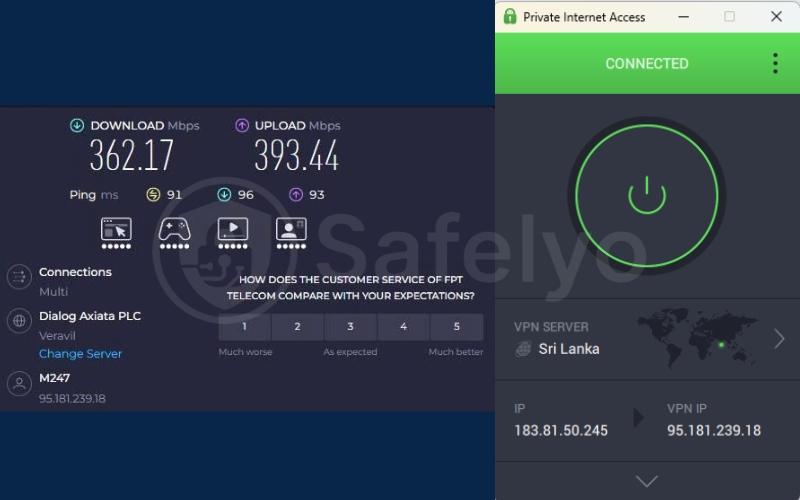
Private Internet Access showed strong overall performance during our speed tests across multiple international locations. The Bangladesh server delivered download speeds close to 200 Mbps, while several other regions surpassed 360 Mbps with the WireGuard protocol enabled. In real-world use, this translated into fast Spotify loading times, stable music playback, and smooth streaming quality whether listening on mobile data, public WiFi, or home internet connections.
Exclusive features for Spotify
Private Internet Access offers deep technical tools that give power users ultimate control over their connection.
- Unparalleled server density: With over thirty thousand servers globally this provider offers massive network density. This is the perfect tool for hunting better regional pricing or unlocking exclusive content in any nation on Earth.
- Advanced Split Tunneling: You can configure the app to route only your music player through the secure tunnel. This allows you to play local multiplayer games on your standard connection while listening to foreign music simultaneously.
- Shadowsocks obfuscation: If you need to bypass a strict corporate firewall, this service includes Shadowsocks proxy support. This extra layer makes encrypted data look like standard internet traffic, preventing network admins from blocking your access.
Privacy and security
The MACE feature is an advanced ad blocker that stops trackers directly at the DNS level. This prevents malicious scripts from logging your web activity or serving dangerous pop-ups. It ensures that the free apps you use alongside your music player do not accidentally expose your personal identity to marketing companies.
Pros
Massive global server density finds the cheapest Premium regions easily
Advanced split tunneling lets you route only your music app securely
MACE blocks tracking scripts linked to free music listening platforms
Cons
The technical interface may overwhelm users who just want music
Headquartered within a strict global surveillance jurisdiction
4. How to get a cheaper Spotify Premium subscription with a VPN
While using a VPN is effective for bypassing geo-blocks, Spotify has implemented strict safeguards to protect its regional pricing. Simply switching your location is often insufficient to finalize a subscription payment.
The reality of regional pricing
Spotify determines your billing based on the payment method attached to your account. To successfully switch your region for a cheaper Premium plan, the system typically requires a payment method issued in that specific country. If you attempt to pay with a credit card from a different region, the transaction will likely be declined.
How to secure a regional subscription
To receive regional pricing, please ensure your payment method matches the country you selected.
- Step 1: Connect to your VPN. Open your VPN app and connect to a server in the country you want to switch your Spotify region to.
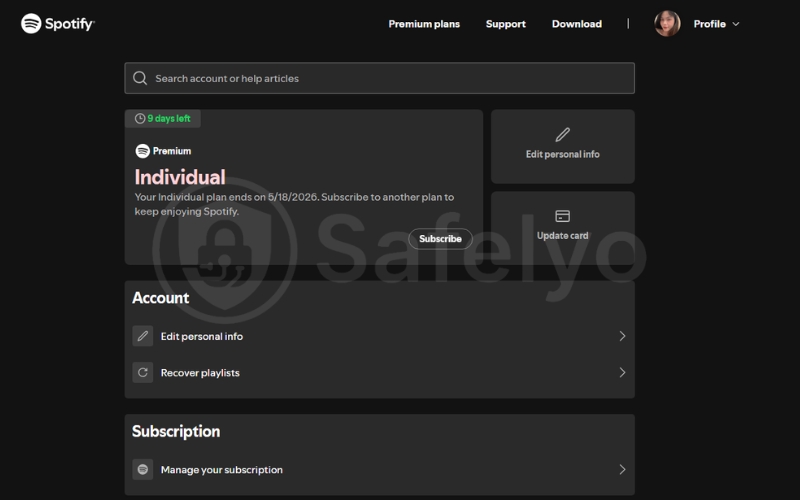
- Step 2: Open your Spotify account settings. Go to the official Spotify website in your browser and log in to your account. Navigate to the Account Overview section.
- Step 3: Update your payment method. Under your subscription or payment settings, click the “Update” button next to your current payment method.
- Step 4: Add a local payment method. Enter a new payment method that was issued in the country you selected with your VPN connection. Spotify requires a local payment method to confirm the region change.
- Step 5: Wait for the billing cycle update. Your new country or region settings will usually take effect starting from your next billing date.
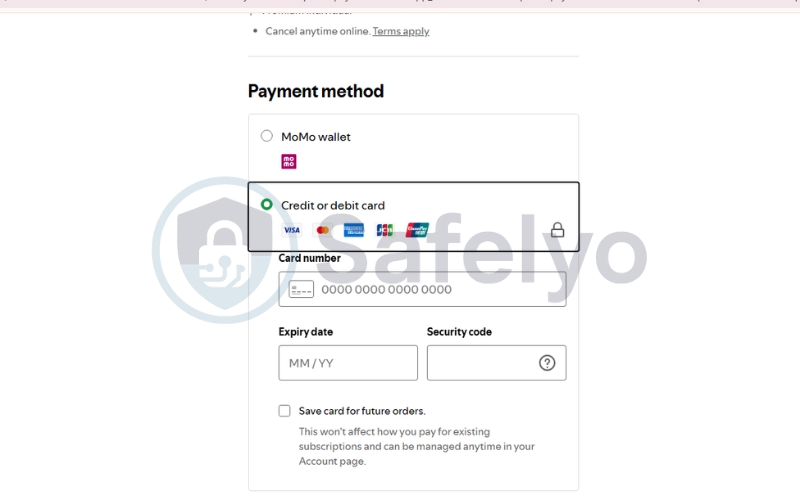
Important Warning: Spotify frequently updates its Terms of Service to prevent discount abuse. If the system detects an IP mismatch during future logins, it may prompt you to update your payment method again or revert your account to its original region. Always use a reputable VPN to maintain a consistent virtual location.
5. Best free VPNs for Spotify and their hidden limits
Many users search for zero-cost options to unblock their favorite playlists at school or work. However, using a free service often brings severe technical restrictions that can quickly ruin your daily listening experience.
5.1. Top free choices like Proton VPN and Windscribe
If you must use a free tool, we only recommend highly trusted providers like Proton VPN and Windscribe. Proton VPN offers unlimited data, which is incredibly rare, but their free servers are often crowded and do not support streaming. Windscribe gives you access to more countries but restricts your account to ten gigabytes of data each month.
5.2. The risk of data caps and slow loading times
Streaming high-quality audio consumes roughly 150 megabytes of data every hour you listen. With a strict ten-gigabyte data cap, your free plan will completely run out after just a few days of normal usage. Furthermore, overcrowded free servers lead to incredibly slow loading times, which causes your music to stutter and buffer constantly.
5.3. The Safelyo hack to use a premium VPN for free safely
Instead of dealing with annoying data limits, we recommend a smarter strategy for short-term needs. You can use the refund policy of a premium provider like NordVPN or Surfshark to get elite service at no actual cost. Simply sign up for a plan and request a full refund within thirty days to enjoy unlimited music streaming for free.
6. How to fix a VPN not working with Spotify
Even the most advanced security tools occasionally experience connection errors. Spotify regularly updates its proxy detection algorithms, which can suddenly block your access. If your music stops playing, you can restore your connection quickly by following these three troubleshooting steps.
6.1. Clear app cache and browser cookies
Your smartphone and web browser store old location data in cache files to help pages load faster. Even when your secure tunnel is active, Spotify might read these old files and discover your true physical location. Clearing your cache and cookies forces the platform to read your new virtual IP address.
6.2. Switch to a different VPN server or protocol
Streaming platforms constantly identify and block IP addresses that belong to commercial data centers. If you encounter a block, you should disconnect and select a different server city to get a fresh IP. You can also try changing your connection protocol to OpenVPN or WireGuard to bypass local network firewalls.
6.3. Log out and log back in from the web browser
Mobile applications often hold onto your location data much more tightly than standard web browsers. If clearing your cache fails, you should completely log out of the mobile app. Open a private browsing window on your computer and log back into your account while your secure tunnel is active to force a location reset.
7. FAQs about the best VPN for Spotify
Is it legal to use a VPN with Spotify?
Using a VPN is completely legal in most countries for privacy and data security. However, using it to spoof your location for cheaper regional pricing violates Spotify’s Terms of Service, which can lead to account restrictions.
Why is Spotify not showing up in my App Store?
This issue occurs because your Apple or Google App Store region is locked to a specific country. You must change your app store region settings or create a secondary account while connected to your VPN to download the app.
Does Spotify ban accounts for using a VPN?
The platform rarely bans user accounts simply for using a VPN to stream music. Instead, they focus on blocking known commercial VPN IP addresses or prompting you to update your payment method to match your apparent region.
Is Spotify blocked in China?
Yes, Spotify is blocked by the Great Firewall of China. To access your music library while traveling, you must use a premium VPN equipped with obfuscation technology like NordVPN to slip past deep packet inspection.
Can I use a proxy to unblock Spotify instead of a VPN?
A proxy only changes your IP address on a browser level and does not encrypt your device’s overall traffic. This makes it very easy for school or office firewalls to detect and block the connection immediately.
Will a VPN slow down my music streaming quality?
With premium providers like NordVPN or Surfshark, the speed reduction is completely imperceptible. You will easily maintain the bandwidth required to stream three hundred and twenty kbps high-quality audio without any buffering delays.
8. Conclusion
Finding the Best VPN for Spotify offers a massive double benefit for music lovers in 2026. It gives you the power to unblock your favorite playlists at school or while traveling abroad. At the same time, it serves as the ultimate tool to access massive discounts on Premium subscriptions worldwide.
Protecting your digital privacy while enjoying uninterrupted music is easier than ever with top-tier providers. If you want to explore more expert reviews and secure your online freedom, please visit the Best VPN category at Safelyo. Start your journey today and take total control of your daily audio entertainment.
Enjoy our VPN for Spotify guides and streaming privacy tips? Add Safelyo as a preferred source on Google to see more of our latest guides and updates.