NordVPN is the best VPN for travelers in 2026, combining the broadest independently audited server network with NordWhisper, a stealth protocol built specifically to bypass restrictive hotel and airport Wi-Fi.
Picking the right travel VPN is essential. A single blocked login page or a frozen bank account can derail a trip faster than a missed flight. We tested the five providers below on real international routes to ensure they deliver reliable security and seamless connectivity on the road.
In this guide, we will break down the five verified picks for speed and streaming, explore setup and legality by country, and clarify the hotel Wi-Fi, banking, and streaming problems that catch travelers off guard.
Top VPNs for travelers:
- NordVPN (best overall for travelers): Backed by five completed independent audits (PricewaterhouseCoopers Switzerland, Deloitte) and coverage across 149 countries, it pairs the broadest network on this list with NordWhisper, a stealth protocol built for restrictive hotel and airport networks.
- ExpressVPN (best for streaming abroad): Confirmed BBC iPlayer access, Disney+ support, and 25+ Netflix regions in testing, featuring automatic obfuscation running on every server.
- Proton VPN (best free VPN for travelers): Stands out by offering a genuine, permanent free tier with no data limits, operating under Swiss jurisdiction with four completed independent audits from Securitum.
- Surfshark (best for unlimited devices): Unlimited simultaneous connections on a 100% RAM-only network, providing a highly practical solution for travelers carrying a phone, laptop, and tablet on the same plan.
- Private Internet Access (best budget pick): Starting at $1.33 a month with unlimited connections and fully open-source client code, it offers the lowest entry price of the five.
Quick Comparison Table:
| VPN | Starting price | Jurisdiction | Simultaneous connections | Kill switch | Streaming unblocking | Avg. download speed |
|---|---|---|---|---|---|---|
| NordVPN | $3.49/mo (2-year + 3-month plan) | Panama | 10 | Yes | Netflix, Disney+, BBC iPlayer | 451.65 Mbps |
| ExpressVPN | $2.49/mo (2-year + 4-month plan) | British Virgin Islands | 14 | Yes | Netflix, Disney+, BBC iPlayer | 445.19 Mbps |
| Proton VPN | Free or $2.99/mo (2-year plan) | Switzerland | 10 (paid) / 1 (free) | Yes | Netflix, Disney+, BBC iPlayer (paid tier) | 413.10 Mbps |
| Surfshark | $2.49/mo (2-year plan) | Netherlands | Unlimited | Yes | Netflix, Disney+, BBC iPlayer | 422.05 Mbps |
| Private Internet Access | $1.33/mo (3-year + 3-month plan) | United States | Unlimited | Yes | Netflix, Disney+, BBC iPlayer | 189.12 Mbps |
Disclaimer: Prices and information are subject to change. Readers should check before purchasing. This article is for informational purposes only and does not constitute legal advice. Please use VPNs responsibly and legally.
1. How we tested and selected the best VPN for travelers
We evaluated each VPN for travelers against five criteria chosen specifically for how these tools perform during actual trips.
- Real-world speed on international routes: We tested connections from Vietnam on a Windows 11 PC using Ookla against a baseline connection of roughly 800 Mbps. To ensure peak performance, we configured each application to use its fastest WireGuard-based or proprietary protocol (such as NordLynx or Lightway). We connected to both a nearby regional server (Singapore) and a long-haul server (US) to accurately reflect what a traveler experiences.
- Streaming reliability: We confirmed Netflix, Disney+, and BBC iPlayer access per provider to ensure you can actually watch your favorite shows abroad.
- Public Wi-Fi security fundamentals: We evaluated kill switch behavior, independent no-logs audit history, and RAM-only server infrastructure to guarantee your privacy on shared networks.
- Resilience on restrictive networks: We prioritized obfuscation and stealth protocol availability. Hotel, airport, and international ISP networks behave unpredictably, and these features keep you connected.
- Practical value for occasional travelers: We analyzed pricing transparency, device allowances, refund windows, and free-trial availability so you can confidently test a plan before a big trip.
2. VPN for travelers: Top 5 picks for speed, streaming, and Wi-Fi reliability
Each entry below stands on its own merits, measured against absolute industry benchmarks like audit history, encryption strength, and network size. The five VPNs cover distinct travel priorities, ranging from an audited all-rounder to the lowest price point in the group.
2.1. NordVPN: Best overall for travelers
NordVPN operates under Nord Security and is based in Panama. This jurisdiction sits comfortably outside the 5/9/14 Eyes surveillance alliances, offering strong legal privacy protections. Two separate audit firms have reviewed its no-logs claims five times since 2018. These independent reviewers include PricewaterhouseCoopers in Switzerland (2018 and 2020) and Deloitte (2023, 2024, and 2025).
Its network spans 9,500+ servers across 149 countries. This massive footprint delivers broad international coverage for travelers moving frequently between regions. That combination makes NordVPN an audited, always-on default choice for anyone wanting a reliable set-and-forget solution for every trip.
| Feature | Details |
|---|---|
| Starting price | $3.49/mo |
| Company | Nord Security |
| Jurisdiction | Panama |
| Independent audit | Yes (PwC Switzerland 2018, 2020; Deloitte 2023, 2024, 2025) |
| No-logs policy | Yes (strict) |
| RAM-only servers | Yes |
| Servers | 9,500+ |
| Countries | 149 |
| Protocols | NordLynx, OpenVPN (UDP/TCP), IKEv2/IPSec, NordWhisper |
| Kill switch | Yes |
| Obfuscation | Yes (obfuscated servers, NordWhisper stealth protocol) |
| Port forwarding | No |
| Dedicated IP | Yes |
| Simultaneous connections | 10 |
| Netflix regions | 26+ (US, UK, JP+) |
| Disney+ | Yes |
| BBC iPlayer | Yes |
| Torrent / P2P | Yes |
| Win/Mac/iOS/Android | Yes |
| Linux | Yes |
| Browser extension | Yes (Chrome, Firefox, Edge) |
| Router support | Yes |
| Live chat 24/7 | Yes |
| Refund policy | 30-day money-back guarantee |
| Free trial | Yes (3-day on Android) |
Here is a breakdown of the primary advantages and drawbacks we found during our evaluation:
Pros
Audited five times by two separate firms since 2018.
Widest country coverage of the five picks (149 countries).
Confirmed BBC iPlayer, Disney+, and Netflix access.
NordWhisper stealth protocol designed specifically for restrictive networks.
Cons
High price.
2.1.1. Speed and streaming performance abroad
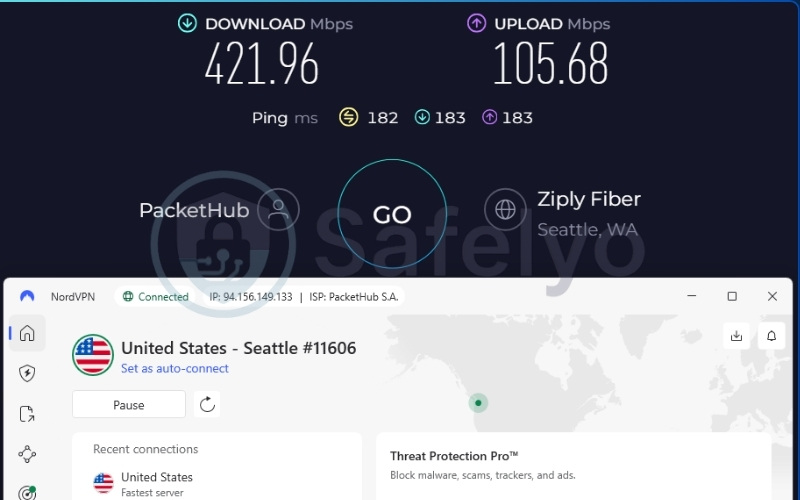
During our international route testing, NordVPN maintained a highly stable average of 451.65 Mbps. This throughput easily guarantees lag-free 4K streaming and smooth Zoom calls for remote workers on hotel Wi-Fi. That US connection returned a slower 182 ms ping, which is perfectly fine for browsing and standard streaming but not ideal for real-time gaming.
Here are the specific speed metrics recorded during our testing:
| Server | Download (Mbps) | Upload (Mbps) | Ping (ms) |
|---|---|---|---|
| US | 421.96 | 105.68 | 182 |
| Singapore | 481.34 | 178.71 | 60 |
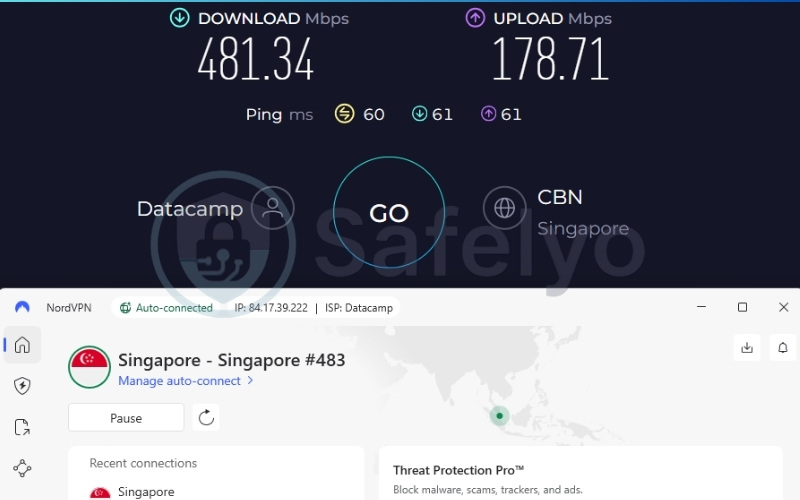
On the streaming side, NordVPN successfully unblocked Netflix across more than 26 regional libraries. Beyond Netflix, it consistently bypassed geo-restrictions on Disney+ and BBC iPlayer during our tests, ensuring travelers can easily keep up with US and UK content wherever they go.
2.1.2. Security and privacy on public networks
NordVPN’s strict no-logs policy has been confirmed across five completed third-party audits. Its servers operate on RAM-only architecture, wiping data on every reboot to ensure your browsing history is never stored. If local authorities ever seize a server in a foreign country, your data remains completely inaccessible.
Traffic is encrypted with AES-256, ChaCha20, and post-quantum protection. For travelers, this level of encryption means your private messages and credit card details are locked away from local network snoops. Panama’s jurisdiction further protects users by keeping NordVPN entirely outside the 5/9/14 Eyes surveillance alliances.
2.1.3. Hotel and airport Wi-Fi compatibility
NordWhisper is NordVPN’s answer to networks that throttle or block standard VPN traffic, a common problem on restrictive hotel and airport connections. It works alongside the standard obfuscated-server option, hiding your VPN traffic so you can bypass strict hotel or airport firewalls.
If a hotel connection drops mid-session, the always-on kill switch cuts internet access immediately to protect your browsing activity and DNS queries from being logged or monitored by an unsecured café Wi-Fi network.
2.1.4. Pricing and value for travelers
NordVPN offers substantial savings for users willing to commit to longer terms, though renewal prices do increase. The plan covers 10 simultaneous devices, providing enough capacity for a phone, laptop, and a travel router running at once. A 30-day refund window and a 3-day free trial on Android give travelers plenty of room to test the service before a trip.
Here is a breakdown of the available subscription plans and their corresponding costs:
| Plan | Term | Monthly Equivalent | Total Billed |
|---|---|---|---|
| Basic | 2 Years + 3 Months | $3.49 | $94.23 |
| Basic | 1 Year | $5.49 | $65.88 |
| Basic | 1 Month | $14.99 | $14.99 |
Best for: Business travelers and remote workers who need the absolute highest speeds for video calls, paired with rigorous security for working on hotel Wi-Fi.
2.2. ExpressVPN: Best for streaming abroad
ExpressVPN operates under Kape Technologies and is based in the British Virgin Islands. This jurisdiction enforces no mandatory data-retention laws, providing a strong privacy foundation.
Its TrustedServer architecture keeps every server running on RAM only, wiping data with each reboot. Five separate firms, including KPMG, PwC Switzerland, Cure53, Praetorian, and F-Secure, have thoroughly audited its infrastructure and no-logs claims.
| Feature | Details |
|---|---|
| Starting price | $2.49/mo |
| Company | ExpressVPN (Kape Technologies) |
| Jurisdiction | British Virgin Islands |
| Independent audit | Yes (KPMG, PwC Switzerland, Cure53, Praetorian, F-Secure) |
| No-logs policy | Yes (no activity logs, no connection logs, no DNS queries) |
| RAM-only servers | Yes (TrustedServer technology) |
| Servers | Thousands |
| Countries | 105 |
| Protocols | Lightway, OpenVPN, WireGuard, IKEv2 |
| Kill switch | Yes (Network Lock) |
| Obfuscation | Yes (automatic on every server) |
| Port forwarding | Yes (router only) |
| Dedicated IP | Yes (available in 20+ countries) |
| Simultaneous connections | Up to 14 |
| Netflix regions | 25+ |
| Disney+ | Yes |
| BBC iPlayer | Yes |
| Torrent / P2P | Yes |
| Win/Mac/iOS/Android | Yes |
| Linux | Yes |
| Browser extension | Yes (Chrome, Firefox, Edge, Brave) |
| Router support | Yes |
| Live chat 24/7 | Yes |
| Refund policy | 30-day money-back guarantee |
| Free trial | Yes (3-day on iOS and Android) |
Here is a breakdown of the primary advantages and drawbacks we found during our evaluation:
Pros
Automatic obfuscation on all servers requires no manual tweaking in censored regions.
Reliably unblocks BBC iPlayer, Disney+, and 25+ Netflix regions.
RAM-only TrustedServer architecture is audited by five separate firms.
Cons
Lacks a multi-hop or Double VPN option for extra routing control.
2.2.1. Speed and streaming performance abroad
When measuring performance on global connections, ExpressVPN delivered a strong 445.19 Mbps average. This throughput proves plenty fast enough for 4K streaming without buffering. The Singapore server returned 472.41 Mbps with a notably strong 248.36 Mbps upload speed. This high upload capacity is incredibly useful for travelers transferring large photo or video files while abroad.
Here are the specific speed metrics recorded during our testing:
| Server | Download (Mbps) | Upload (Mbps) | Ping (ms) |
|---|---|---|---|
| US | 417.96 | 134.43 | 196 |
| Singapore | 472.41 | 248.36 | 45 |
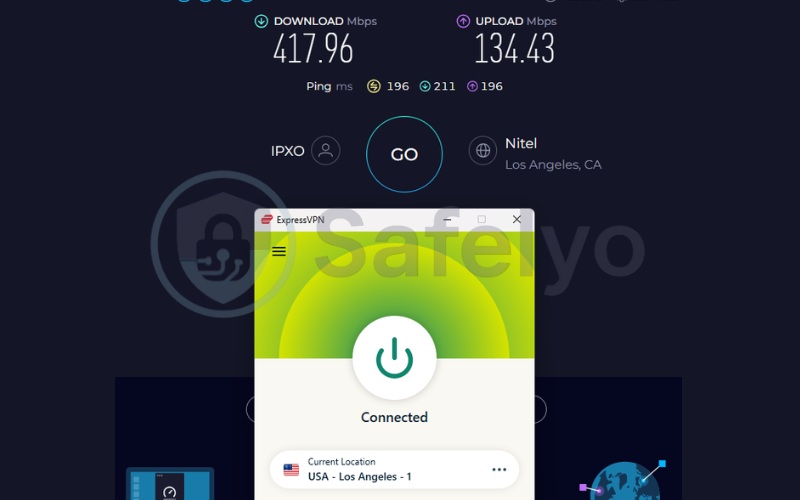
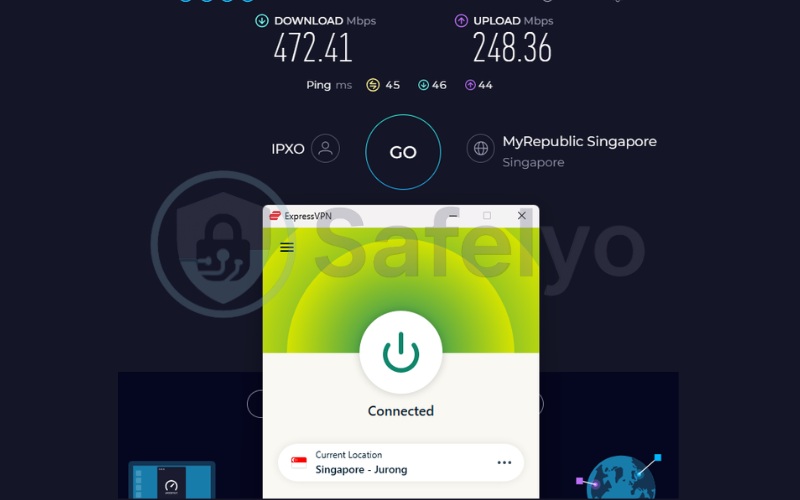
ExpressVPN reliably bypasses geo-blocks for 25+ international Netflix catalogs. In addition, it easily unlocks Disney+ and BBC iPlayer, ensuring you can stream your favorite series smoothly without running into frustrating location errors.
Because obfuscation runs automatically on every server, ExpressVPN is the definitive pick for travelers who want to stream global content on heavily restricted networks without manually configuring stealth settings.
2.2.2. Security and privacy on public networks
ExpressVPN’s TrustedServer technology runs every server on RAM only, ensuring no hard drives store your data. This setup guarantees that even if local authorities seize a server in a foreign country, your browsing history remains completely inaccessible. Traffic is protected with robust 256-bit AES encryption paired with post-quantum ML-KEM protection.
Its no-logs claims have held up across five separate independent audits. This wide set of reviewers provides an extra layer of verifiable trust. British Virgin Islands jurisdiction keeps ExpressVPN outside mandatory data-retention regimes, which is crucial for travelers connecting through networks in countries with looser privacy protections.
2.2.3. Hotel and airport Wi-Fi compatibility
Obfuscation runs automatically on every ExpressVPN server. With automatic obfuscation bypassing network blocks and broad server coverage supporting high-bandwidth video, ExpressVPN ensures you can stream your favorite series without manually tweaking settings.
Network Lock, ExpressVPN’s kill switch, cuts the connection the moment a hotel or airport Wi-Fi signal drops, preventing unencrypted data from leaking onto public channels.
2.2.4. Pricing and value for travelers
ExpressVPN’s Basic plan starts at $2.49 a month on the 2-year-plus-4-month term, totaling $69.72 upfront. For short trips, the no-commitment plan costs $12.99 a month. Advanced and Pro US subscribers also get access to Identity Defender and the holiday.com eSIM service, covering 150+ destinations. These additions sit neatly alongside the core VPN subscription.
A 30-day money-back guarantee and a 3-day free trial on iOS and Android give travelers a low-risk way to test the service extensively before a trip.
Here is a breakdown of the available subscription plans and their corresponding costs:
| Plan | Term | Monthly Equivalent | Total Billed |
|---|---|---|---|
| Basic | 2 Years + 4 Months | $2.49 | $69.72 |
| Basic | 1 Year + 3 Months | $3.99 | $59.85 |
| Basic | 1 Month | $12.99 | $12.99 |
Best for: Non-tech-savvy travelers who want plug-and-play streaming in heavily censored regions (like China or the UAE), thanks to its automatic obfuscation.
2.3. Proton VPN: Best free VPN for travelers
Proton VPN is built by Proton AG, a Swiss company operating under some of the strongest privacy laws in Europe. It is the only provider in this roundup featuring a genuine, permanent free tier that requires no credit card.
Its no-logs claims have been rigorously verified across four completed Securitum audits between 2022 and 2025. For travelers who want backup coverage or are hesitant to commit to a paid plan before a trip, Proton VPN functions as a legitimately free, highly secure safety net.
| Feature | Details |
|---|---|
| Starting price | $2.99/mo |
| Company | Proton AG |
| Jurisdiction | Switzerland |
| Independent audit | Yes (Securitum 2022, 2023, 2024, 2025) |
| No-logs policy | Yes (independently verified) |
| RAM-only servers | No (full-disk encryption utilized instead) |
| Servers | 20,000+ |
| Countries | 145+ |
| Protocols | WireGuard, IKEv2, Stealth |
| Kill switch | Yes (Standard and Advanced) |
| Obfuscation | Yes (Stealth protocol) |
| Port forwarding | Yes (paid plans only) |
| Dedicated IP | Yes (Business plans only) |
| Simultaneous connections | 10 (paid) / 1 (free) |
| Netflix regions | 25+ |
| Disney+ | Yes |
| BBC iPlayer | Yes |
| Torrent / P2P | Yes (dedicated P2P servers on paid plans) |
| Win/Mac/iOS/Android | Yes |
| Linux | Yes (GUI app and CLI) |
| Browser extension | Yes (Chrome, Firefox) |
| Router support | Yes |
| Live chat 24/7 | Paid only (limited hours) |
| Refund policy | 30-day money-back guarantee |
| Free trial | Permanent free plan |
Here is a breakdown of the primary advantages and drawbacks we found during our evaluation:
Pros
Permanent, unlimited-data free tier acts as a perfect zero-cost safety net.
Secure Core routing adds an excellent security layer on untrusted public Wi-Fi.
Stealth protocol actively disguises traffic to bypass corporate or national firewalls.
Operates under strong Swiss privacy laws with four independent audits.
Cons
Live chat support reserved for paid subscribers.
Uses full-disk encryption rather than RAM-only infrastructure.
2.3.1. Speed and streaming performance abroad
While most free VPNs severely throttle your speed or cap your data, Proton VPN’s free tier stands out by offering unlimited bandwidth with zero artificial speed limits. In our international route testing, the auto-assigned free servers delivered incredibly high performance.
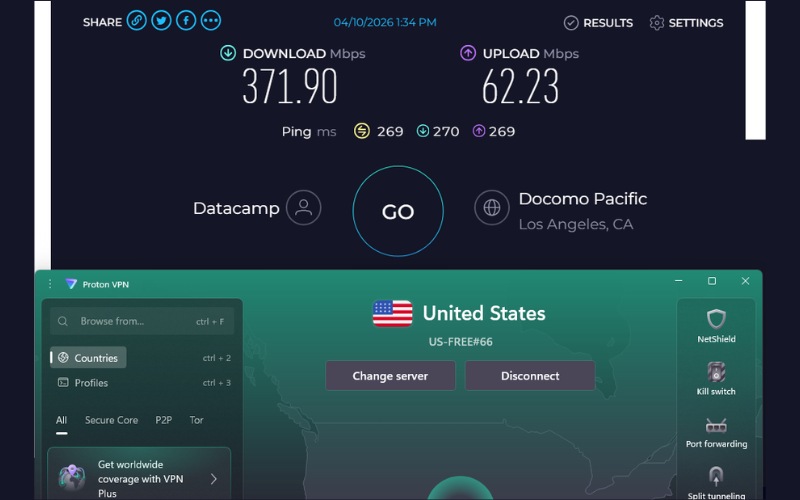
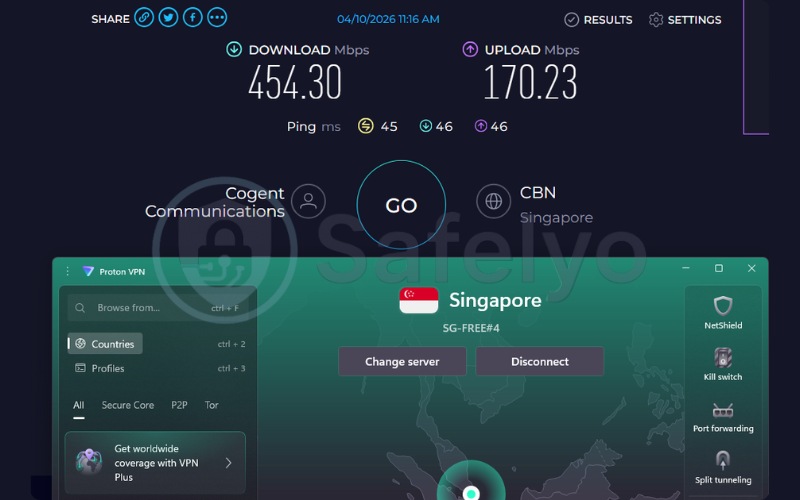
The nearby Singapore server hit a blazing 454.30 Mbps, while the long-haul US route maintained a highly stable 371.90 Mbps. These speeds easily rival the paid plans of many competitors, ensuring crystal-clear Zoom calls, fast file uploads, and seamless browsing on hotel Wi-Fi.
Here are the specific speed metrics recorded during our testing on the free plan:
| Server (Free Tier) | Download (Mbps) | Upload (Mbps) | Ping (ms) |
|---|---|---|---|
| US | 371.90 | 62.23 | 269 |
| Singapore | 454.30 | 170.23 | 45 |
However, there is a strict trade-off for travelers who want entertainment. Despite having more than enough speed for 4K video, the free tier lacks the capability to support streaming and P2P traffic. It cannot be used to bypass geo-blocks for Netflix, Disney+, or BBC iPlayer.
If you want to unlock global streaming catalogs alongside these high speeds, you will need to upgrade to Proton VPN’s paid Plus plan. But for pure, high-speed Wi-Fi security on the road, the free tier is unmatched.
2.3.2. Security and privacy on public networks
Securitum has independently audited Proton VPN’s no-logs policy four times, spanning 2022, 2023, 2024, and 2025. Swiss privacy law adds another firm layer of protection outside the 5/9/14 Eyes alliances.
Secure Core, Proton’s multi-hop routing option, passes traffic through hardened servers in Switzerland, Iceland, and Sweden before it reaches the open internet. This mechanism adds an excellent extra layer of security, shielding your sensitive communications on untrusted public networks.
2.3.3. Hotel and airport Wi-Fi compatibility
Proton VPN’s Stealth protocol is designed to disguise VPN traffic on networks that actively block it. This allows travelers to maintain privacy even behind aggressive national or corporate firewalls. It pairs perfectly with a Standard or Advanced kill switch on Windows and Linux to prevent accidental data leaks. Even the free tier, limited to auto-selected servers in 10 countries, can still get a traveler securely online in a pinch if a paid plan is not an option.
2.3.4. Pricing and value for travelers
Proton VPN’s permanent free plan is the ultimate zero-cost safety net. It requires no credit card and serves perfectly as a backup tool for strict Wi-Fi security. If you find the free tier’s limitations (one device, auto-assigned routing, no streaming) too restrictive during your trip, upgrading to the Plus plan costs $2.99 a month on a 24-month term, or $9.99 for a single-month commitment.
Best for: Backpackers on a strict budget who need genuine, unlimited Wi-Fi security without entering a credit card.
2.4. Surfshark: Best for unlimited devices
Surfshark B.V. is based in the Netherlands and operates independently under the Nord Security holding group. It runs a 100% RAM-only server network to guarantee data privacy. Its standout feature is unlimited simultaneous connections on a single subscription, a rare allowance among budget-friendly, feature-dense VPNs.
That makes Surfshark the clearest pick for travelers bringing multiple devices, or for families and groups sharing one comprehensive plan across an entire trip.
| Feature | Details |
|---|---|
| Starting price | $2.49/mo |
| Company | Surfshark B.V. (operates independently under Nord Security holding group) |
| Jurisdiction | Netherlands |
| Independent audit | Yes (Cure53 2021, Deloitte 2023 and 2025, SecuRing 2025) |
| No-logs policy | Yes (strict) |
| RAM-only servers | Yes (100% RAM-only network) |
| Servers | 4,500+ |
| Countries | 100 |
| Protocols | WireGuard, OpenVPN, IKEv2, Dausos |
| Kill switch | Yes |
| Obfuscation | Yes (obfuscated servers, NoBorders mode) |
| Port forwarding | No |
| Dedicated IP | Yes (available in 20 locations) |
| Simultaneous connections | Unlimited |
| Netflix regions | 28+ |
| Disney+ | Yes |
| BBC iPlayer | Yes |
| Torrent / P2P | Yes |
| Win/Mac/iOS/Android | Yes |
| Linux | Yes |
| Browser extension | Yes (Chrome, Firefox, Edge) |
| Router support | Yes |
| Live chat 24/7 | Yes |
| Refund policy | 30-day money-back guarantee |
| Free trial | Yes (7-day free trial) |
Here is a breakdown of the primary advantages and drawbacks we found during our evaluation:
Pros
Unlimited simultaneous connections on one subscription.
100% RAM-only network.
Confirmed Netflix, Disney+, and BBC iPlayer access.
Four independent audits completed since 2021 (including Cure53, Deloitte, and SecuRing).
Cons
Country footprint (100 countries) is smaller than many industry-leading providers’ 140+ country networks.
2.4.1. Speed and streaming performance abroad
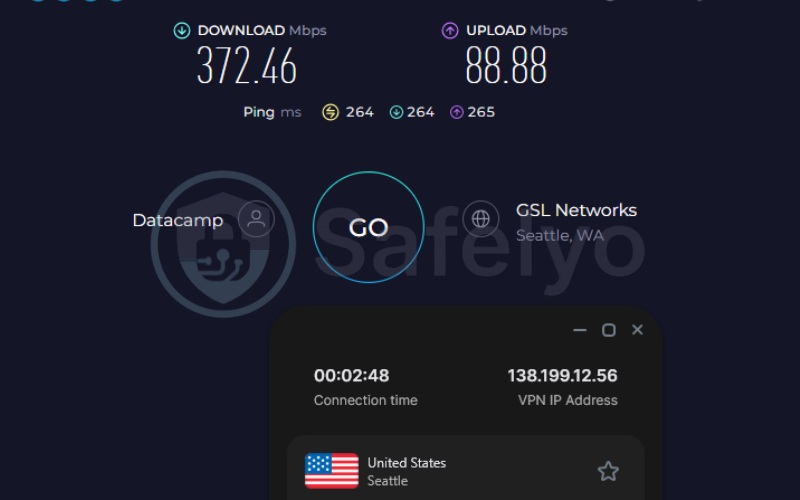
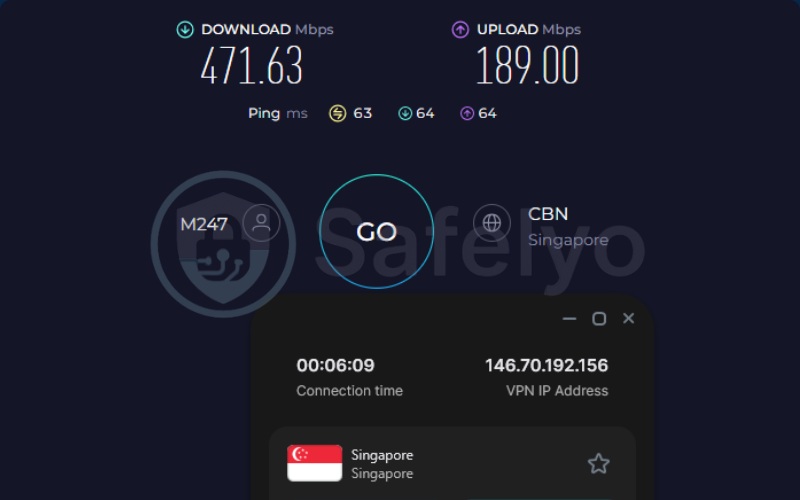
On long-distance routing, Surfshark recorded a robust 422.05 Mbps average. This speed ensures HD and 4K streaming remains smooth on multiple devices running at once. Its Singapore server returned 471.63 Mbps with a fast 63 ms ping, and the US route held steady at 372.46 Mbps.
Here are the specific speed metrics recorded during our testing:
| Server | Download (Mbps) | Upload (Mbps) | Ping (ms) |
|---|---|---|---|
| US | 372.46 | 88.88 | 264 |
| Singapore | 471.63 | 189.00 | 63 |
Streaming access proved highly reliable. We achieved seamless access to over 28 different Netflix libraries worldwide, and consistently bypassed geo-blocks on Disney+ and BBC iPlayer.
2.4.2. Security and privacy on public networks
Surfshark’s entire network runs on RAM-only servers, ensuring all session data is wiped continuously. Traffic is encrypted with AES-256-GCM, ChaCha20, and post-quantum protection, hiding your financial app usage and exact browsing habits from local network administrators on open hotel Wi-Fi.
Four independent audits completed since 2021 provide verifiable proof of their privacy claims. Dynamic MultiHop allows travelers to manually pair their entry and exit servers, adding a highly customizable layer of routing control on networks they don’t fully trust.
2.4.3. Hotel and airport Wi-Fi compatibility
NoBorders mode and Surfshark’s obfuscated servers are built precisely for restrictive network conditions. Surfshark provides a unique GPS Override feature on Android devices. It automatically synchronizes your phone’s GPS coordinates with your selected VPN server location, seamlessly bypassing mobile fraud-detection triggers on banking apps.
Surfshark’s Nexus-powered IP Rotator feature changes your public IP address every 5 to 10 minutes without dropping the connection, preventing websites and tracking scripts from building a consistent profile of your browsing habits across different browsing sessions.
2.4.4. Pricing and value for travelers
Surfshark’s Starter plan runs roughly $2.49 a month on the 2-year term. For short-term needs, a no-commitment 1-month plan is available for $16.45. Unlimited simultaneous connections serve as the practical differentiator here. A couple, family, or small group can comfortably cover every phone, laptop, and tablet on the trip from one single subscription.
Here is a breakdown of the available subscription plans and their corresponding costs:
| Plan | Term | Monthly Equivalent | Total Billed |
|---|---|---|---|
| Starter | 2 years + 3 months | ~$2.49 | ~$67.23 |
| Starter | 1 Year + 3 months | ~$3.39 | ~$50.85 |
| Starter | 1 Month | $16.45 | $16.45 |
Best for: Families, tour groups, or tech enthusiasts traveling with multiple laptops, phones, and tablets on a single subscription.
2.5. Private Internet Access: Best budget pick for travelers
Private Internet Access, or PIA, is based in the United States and owned by Kape Technologies. It holds the lowest starting price in this roundup at $1.33 a month, backed by fully open-source client code that anyone can thoroughly inspect on GitHub.
PIA’s no-logs claims have reportedly held up under real court proceedings involving law enforcement requests. It pairs unlimited simultaneous connections with a properly audited, feature-complete service, making it an excellent pick for cost-conscious travelers.
| Feature | Details |
|---|---|
| Starting price | $1.33/mo |
| Company | PIA Private Internet Access, Inc. (Kape Technologies) |
| Jurisdiction | United States |
| Independent audit | Yes (Deloitte Audit Romania) |
| No-logs policy | Yes (verified by real FBI court cases) |
| RAM-only servers | Yes |
| Servers | Undisclosed (35,000+ estimated) |
| Countries | 90 |
| Protocols | OpenVPN, WireGuard, IKEv2/IPSec |
| Kill switch | Yes (advanced, firewall-based) |
| Obfuscation | Yes (Multi-Hop Obfuscation) |
| Port forwarding | Yes |
| Dedicated IP | Yes (token-based) |
| Simultaneous connections | Unlimited |
| Netflix regions | 21+ (US, UK, and others) |
| Disney+ | Yes |
| BBC iPlayer | Yes |
| Torrent / P2P | Yes |
| Win/Mac/iOS/Android | Yes |
| Linux | Yes |
| Browser extension | Yes (Chrome, Firefox, Opera) |
| Router support | Yes |
| Live chat 24/7 | Yes |
| Refund policy | 30-day money-back guarantee |
| Free trial | Yes (7-day free trial on iOS and Android) |
Here is a breakdown of the primary advantages and drawbacks we found during our evaluation:
Pros
Lowest starting price of the five picks ($1.33/mo).
Unlimited simultaneous connections.
Fully open-source client code, publicly auditable on GitHub.
Token-based dedicated IP system that can’t be traced back to a specific account.
Cons
Headquartered in the United States, a Five Eyes jurisdiction.
Server count is undisclosed by the company.
2.5.1. Speed and streaming performance abroad
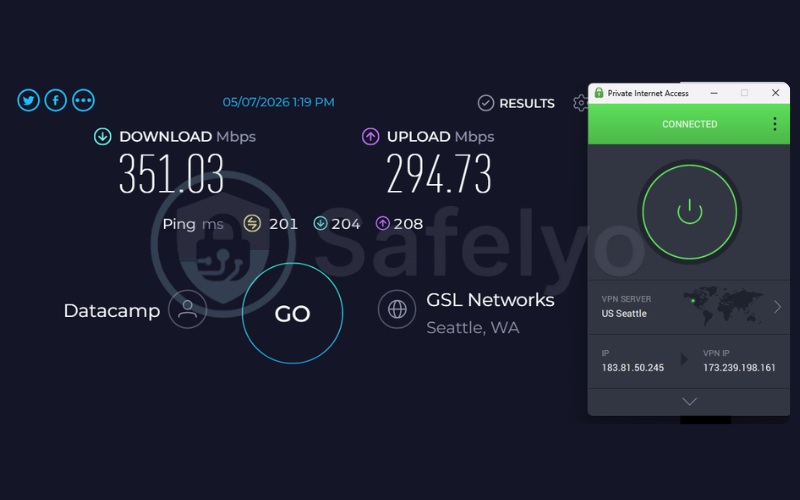
Network tests for Private Internet Access yielded a 189.12 Mbps average. This was the slowest result in this roundup, driven down by an unusually low 27.20 Mbps Singapore download figure against a strong 351.03 Mbps US result.
However, even this 27.20 Mbps outlier remains comfortably above the 15 Mbps threshold required for HD streaming. This ensures that while PIA might not win raw speed benchmarks, it still provides more than enough bandwidth for buffer-free entertainment and clear video calls.
Here are the specific speed metrics recorded during our testing:
| Server | Download (Mbps) | Upload (Mbps) | Ping (ms) |
|---|---|---|---|
| US | 351.03 | 294.73 | 201 |
| Singapore | 27.20 | 107.71 | 57 |
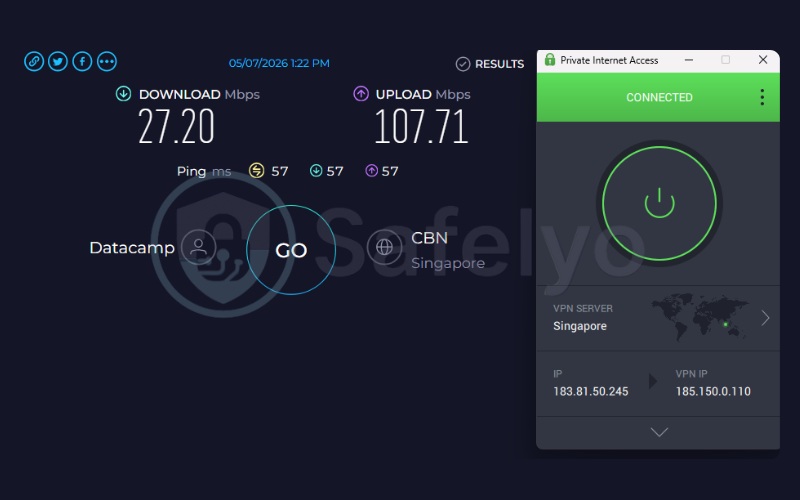
Streaming access held up beautifully despite the overall speed gap, reliably bypassing geo-blocks for 21+ international Netflix catalogs, plus Disney+ and BBC iPlayer.
2.5.2. Security and privacy on public networks
PIA’s advanced, firewall-based kill switch cuts internet access immediately if the VPN connection drops. This guarantees that your true IP address will never slip out while transitioning between mobile networks and hotel Wi-Fi. Deloitte’s Romania office has independently audited the service, providing assurance of its data practices.
2.5.3. Hotel and airport Wi-Fi compatibility
Multi-Hop Obfuscation is PIA’s answer to restrictive networks. It routes traffic through an additional server to disguise VPN activity, paired with the same firewall-based kill switch that protects against dropped hotel connections. Smart DNS support extends coverage to smart TVs, a highly practical bonus for travelers wanting to stream geo-blocked content on an entire entertainment setup inside their hotel room.
2.5.4. Pricing and value for travelers
PIA’s 3-year-plus-3-month plan runs $1.33 a month, totaling $51.87 upfront. A no-commitment 1-month plan is also available for $11.95.
Unlimited simultaneous connections and a bundled email breach monitor add real value at the lowest price point in this roundup. This makes PIA incredibly useful for cost-conscious travelers desiring an audited, no-logs service.
Here is a breakdown of the available subscription plans and their corresponding costs:
| Plan | Term | Monthly Equivalent | Total Billed |
|---|---|---|---|
| Standard | 3 Years + 3 Months | $1.33 | $51.87 |
| Standard | 1 Year | $3.33 | $39.95 |
| Standard | 1 Month | $11.95 | $11.95 |
Best for: Budget-conscious travelers who want unlimited device connections and trust open-source, legally proven software.
3. What is a travel VPN, and do you actually need one?
Yes, you need a VPN for travelers if you plan to use public Wi-Fi or want uninterrupted access to your home-country banking and streaming accounts, though it is not a legal requirement in most destinations. A travel VPN secures connections on unfamiliar networks, like hotel, airport, or café Wi-Fi, while routing traffic back through a home-country server for streaming and banking continuity.
Public Wi-Fi networks rarely encrypt traffic between your device and the router. While modern HTTPS encryption protects your passwords and payment details on websites, a public Wi-Fi administrator or a bad actor on the same network can still see which websites or apps you are visiting. A VPN wraps your entire connection in an encrypted tunnel, closing off this visibility leak and preventing local network operators from throttling or profiling your traffic.
Beyond security, a travel VPN also keeps your home-country apps working as expected. Streaming platforms and banking apps often restrict or alter access based on the country your IP address appears to be in. Connecting through a server in your home country keeps your usual Netflix library, banking app, and other region-locked services behaving normally while you are away.
4. Why your VPN won’t connect to hotel or airport Wi-Fi (and how to fix it)
An always-on VPN routinely blocks a hotel or airport Wi-Fi login page from ever loading, since the captive portal can’t complete its handshake through an active tunnel. Bypassing this issue requires a brief workaround, primarily because your VPN’s kill switch is actively doing its job. To force the login screen to appear, we recommend following these quick steps:
- Disconnect the VPN and temporarily disable your app’s “Kill Switch” feature (otherwise, it will block the login page from loading).
- Connect to the Wi-Fi network and let the captive portal or login page load to complete your sign-in.
- Re-enable your kill switch and reconnect the VPN once you have full internet access.
If a captive portal won’t appear on its own, manually visiting a plain, non-HTTPS address is necessary, as modern browsers tightly secure HTTPS connections and will display a hard error instead of redirecting you to the local network’s login page.
To force the trigger, open your browser and type a safe HTTP URL strictly designed for this purpose, like http://neverssl.com or http://captive.apple.com. This will reliably push the network to display its login screen without triggering strict SSL (HSTS) errors.
5. Will a VPN get your bank account frozen abroad?
Using a VPN to check your bank balance on public Wi-Fi is a smart security habit, but it can occasionally cause some friction with your banking app. Many banks use automated fraud-detection systems to monitor where login requests come from. If you check your app using hotel Wi-Fi in one country and then connect to a VPN server halfway across the world shortly after, the system might view this rapid location change as unusual activity.
Additionally, because standard VPN servers share the same IP address among many users, banks sometimes recognize these data-center IPs and may temporarily restrict access just to be safe.
If you frequently manage finances while traveling, you might want to consider using a “Dedicated IP.” Offered as an add-on by providers like NordVPN, ExpressVPN, Surfshark, and PIA, a Dedicated IP provides a static address that isn’t shared with anyone else. By presenting a more consistent connection history, it often helps reduce the chances of triggering those automated security alerts.
However, keep in mind that mobile banking apps tend to check your phone’s physical GPS location alongside your IP address. If your VPN routes your connection through New York but your GPS shows you are in Paris, the app might still notice the discrepancy.
To solve this, Surfshark offers a unique GPS Override (Spoofer) feature on Android. It automatically synchronizes your phone’s GPS coordinates with your selected VPN server location, seamlessly bypassing mobile fraud-detection triggers. Calling the bank’s international line before a big trip to flag upcoming travel adds a final layer of necessary protection.
6. Fixing “You seem to be using a VPN” errors on Netflix and other streaming apps
This message is almost always a server-level block, identified on Netflix specifically as error M7111-5059. In our testing experience, a blocked connection rarely means the entire VPN service has failed. Before troubleshooting further, taking the following steps will usually clear the error and restore access:
- Switch to a different server in the same country.
- Clear the streaming app’s cache and data in your phone or tablet settings.
- Restart your device and relaunch the streaming app to force a fresh connection.
Hitting a temporary block on a specific regional server is a concrete example of when this applies. A server switch is usually the very first thing worth trying when encountering a geo-block.
7. VPN vs. eSIM for China and other heavily censored countries
A VPN with obfuscation, like NordWhisper, Stealth, or NoBorders mode from the providers above, is built to disguise VPN traffic on networks that actively detect and block it. An eSIM sidesteps the local ISP completely by using a different country’s cellular data network. ExpressVPN’s holiday.com service, offering eSIM provisioning across 150+ destinations, is a concrete example of how the two approaches now sit side by side in the same product ecosystem.
Obfuscation improves the odds of a VPN working in heavily censored environments like China’s Great Firewall, but it doesn’t guarantee it. Enforcement methods evolve continuously on the other side.
8. How to set up and use a VPN while traveling
Setting up a travel VPN is a straightforward process, but preparing your device before departure is critical for ensuring seamless security on the road. Here is the recommended sequence:
- Download and install the app before departure, since some app stores or networks abroad make it harder to download VPN software upon arrival.
- Log in and select a server in your desired country.
- Enable the kill switch (Optional).
- Turn on obfuscation or stealth mode if traveling to a restrictive-network destination.
- Test the connection on home Wi-Fi before relying on it abroad.
9. Where VPNs are legal, restricted, or banned
VPNs are fully legal for personal use in the vast majority of countries, including the US, UK, EU, and most of Asia. However, if your itinerary includes certain borders, you need to be aware of three distinct regulatory tiers:
- Fully banned: Using any VPN is strictly illegal in countries like North Korea, Belarus, Iraq, and Turkmenistan.
- Heavily restricted: China and Russia actively block outside providers, theoretically only allowing government-approved VPNs (which monitor your data). Meanwhile, the UAE allows VPNs for corporate use but imposes heavy fines if individuals use them to access blocked content or VoIP apps like WhatsApp calls.
- Data-logging mandates: Using a VPN in India is perfectly legal, but local laws require providers with physical servers in the country to log user data. To protect your privacy while visiting, top providers like NordVPN and ExpressVPN removed their physical hardware and now route your traffic through secure “virtual” Indian servers located in privacy-friendly countries like Singapore.
10. Are free VPNs safe to use while traveling?
Yes, but a free VPN’s safety depends entirely on the provider behind it. Proton VPN’s free plan is the prime example worth pointing to specifically, since it is independently audited and carries no ads or data-selling model. The honest tradeoffs are real: one device, auto-selected servers in 10 countries only, and no streaming or P2P unlock. None of these are deal-breakers for basic Wi-Fi security, but they are limitations worth knowing.
For free VPNs in general, the detail worth checking is whether the provider publishes an independent audit and a clear no-logs policy, providing verifiable proof of their privacy claims.
11. FAQs about VPN for travelers
Which VPN is best for travel?
NordVPN is the strongest all-around pick from this testing round, with Proton VPN standing out as the best free option and Surfshark as the best pick for covering multiple devices on one plan.
Is there a free VPN for travel?
Yes. Proton VPN offers a genuine, permanent, independently audited free tier. It is, however, limited to one device and 10 auto-selected server countries.
Will a VPN slow down hotel Wi-Fi?
Some speed loss compared to an unprotected connection is normal due to encryption overhead. During our baseline tests on a high-speed 800 Mbps connection, we observed a 44 to 76% drop. However, when traveling, your real bottleneck will be the hotel or airport Wi-Fi itself, which often caps at 10-20 Mbps. A premium VPN ensures that whatever bandwidth you do have is used securely, and its fast servers won’t act as an additional bottleneck.
Can a VPN help me find cheaper flights and hotels?
Yes, but it is not a guaranteed magic trick. Airlines and booking sites sometimes adjust prices based on your geographical location (IP address) and browsing history. By clearing your browser cookies and connecting to a VPN server in a lower-income country or the airline’s home country, you might bypass regional price markups.
However, modern booking platforms use sophisticated pricing algorithms, so you should treat this as a helpful tactic to check for better rates rather than a sure thing.
Will leaving a VPN on all day drain my phone battery?
Yes, running a VPN continuously in the background will consume some extra battery power due to the constant data encryption process.
However, the impact depends heavily on the protocol you use. To minimize battery drain while navigating a new city, go into your VPN app settings and choose a modern, lightweight protocol like WireGuard (such as NordLynx for NordVPN or Lightway for ExpressVPN). These are significantly more battery-efficient than older protocols like OpenVPN.
12. Conclusion
Across five tested providers, NordVPN remains the default recommendation for most travelers, providing unmatched peace of mind thanks to its audit history, its 149-country network, and NordWhisper’s ability to seamlessly work on restrictive hotel connections.
If a completely free, privacy-first option matters more than raw speed, Proton VPN is the one provider here that delivers a genuinely usable, independently audited free tier.
For travelers covering an entire group or carrying multiple devices, both Surfshark and Private Internet Access offer unlimited simultaneous connections, with Surfshark edging out on speed and PIA taking the crown for the lowest budget.
Whichever pick fits your trip, NordVPN’s discounted 2-year-plus-3-month plan, backed by a 30-day refund window, is a low-risk way to test a VPN for travelers before you embark on your journey.
For more provider breakdowns, visit our Best VPN category, or head back to the Safelyo homepage for the rest of our travel security coverage.