Unblocking global streaming libraries on a big screen requires a VPN for Smart TV with precise hardware compatibility to bypass locked ecosystems like Samsung Tizen and LG WebOS.
Based on our hands-on tests and native OS support, NordVPN, ExpressVPN, and Surfshark provide the most reliable Smart TV experiences.
In this guide, we will break down the top test-verified options and provide exact installation fixes to help you find the VPN for Smart TV for your setup.
Top VPNs for Smart TV:
- NordVPN (Best overall for global 4K streaming): Delivers consistently high 10 Gbps speeds for seamless 4K playback and provides comprehensive native app support across all major platforms, including Android TV and Amazon Vega OS.
- ExpressVPN (Best for router and Smart Home integration): Offers the proprietary Aircove router setup, routing all home traffic without needing individual television apps.
- Surfshark (Best for multi-device households): Allows unlimited simultaneous connections and successfully unblocks 28+ Netflix regions on a budget.
- IPVanish (Best native interface for Fire TV): Provides a highly intuitive, remote-friendly UI with a dedicated kill switch optimized for low-RAM streaming sticks.
- PrivadoVPN (Best 100% free streaming option): Delivers a secure freemium tier that successfully unblocks US Netflix, capped at a firm 10GB monthly limit.
| VPN | Starting Price | Native Android/Fire App | Smart DNS | Simultaneous Connections | Netflix Libraries |
|---|---|---|---|---|---|
| NordVPN | $3.49/mo | Yes | Yes | 10 | 26+ |
| ExpressVPN | $2.49/mo | Yes | Yes (MediaStreamer) | Up to 14 | 25+ |
| Surfshark | $2.49/mo | Yes | Yes | Unlimited | 28+ |
| IPVanish | $2.19/mo | Yes | No | Unlimited | US, UK, JP, etc. |
| PrivadoVPN | $1.11/mo (Free tier available) | Yes | No | 10 (Premium) / 1 (Free) | US, UK (on Free tier) |
Disclaimer: Prices and information are subject to change based on promotions and region. Readers should check before purchasing. This article is for informational purposes only and does not constitute legal advice. Please use VPNs responsibly and legally.
1. How we tested and selected the best VPN for Smart TV
All network and performance tests were conducted from a physical location in Vietnam using a standard Windows 11 PC and Ookla. Our baseline connection provided roughly 800 Mbps download bandwidth. We utilized modern protocols like WireGuard, NordLynx, and Lightway to ensure optimal streaming performance data.
We applied the following comprehensive evaluation criteria to rank these providers:
- Native OS compatibility: We prioritized providers offering stable, remote-friendly applications for Android TV, Google TV, and Amazon Vega OS.
- Speed retention for 4K streaming: We tested the percentage of speed loss across international servers to ensure the VPN maintains the minimum 25 Mbps required for buffer-free UHD playback.
- Reliable platform unblocking: We verified access across major libraries, checking Netflix (US, UK, DE, JP, CAN, AUS, FR), BBC iPlayer, Amazon Prime Video, Disney+, HBO Max, Paramount+, Hulu, ESPN+, YouTube TV, CBC Gem, Crunchyroll, 9Now, 10Play, ITV, Channel 4, JioHotstar, and Kayo Sports.
- Router and Smart DNS workarounds: For locked operating systems like Tizen and WebOS, we evaluated the ease of router flashing and Smart DNS deployment.
2. VPN for Smart TV: Top 5 options for 4K streaming and native OS support
Smart TVs suffer from low RAM and highly fragmented software. A VPN must be lightweight and universally adaptable to make the cut.
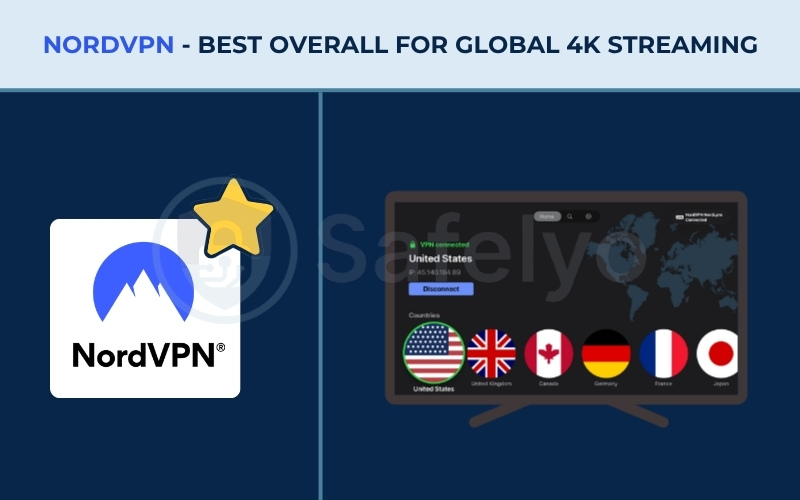
2.1. #1. NordVPN: Best overall for global 4K streaming
NordVPN dominates the streaming sector by leveraging a massive global server network and robust infrastructure that easily handles 4K streaming.
It offers comprehensive and user-friendly native apps for all major TV operating systems, including Android TV, Google TV, and Amazon’s Linux-based Vega OS, ensuring broad compatibility for nearly any living room setup.
| Feature | Specification |
|---|---|
| Starting Price | $3.49/mo (2 Years + 3 Months) |
| Company | Nord Security |
| Jurisdiction | Panama |
| Independent Audit | Yes (Deloitte 2024, 2025) |
| No-Logs Policy | Yes (verified) |
| RAM-Only Servers | Yes |
| Servers | 9,500+ |
| Countries | 149 |
| Avg. Download Speed | 451.46 Mbps |
| Avg. Upload Speed | 129.88 Mbps |
| Avg. Latency | 147 ms |
| Protocols | NordLynx, OpenVPN (UDP/TCP), IKEv2/IPSec, NordWhisper |
| Kill Switch | Yes |
| Obfuscation | Yes (obfuscated servers, NordWhisper stealth protocol) |
| Port Forwarding | No |
| Dedicated IP | Yes |
| Simultaneous Connections | 10 |
| Netflix Regions | 26+ (US, UK, JP+) |
| Disney+ | Yes |
| BBC iPlayer | Yes |
| Torrent / P2P | Yes |
| Win/Mac/iOS/Android | Yes |
| Linux | Yes |
| Browser Extension | Yes (Chrome, Firefox, Edge) |
| Router Support | Yes |
| Live Chat 24/7 | Yes |
| Refund Policy | 30-day money-back guarantee |
| Free Trial | Yes (3-day on Android) |
| Overall Positioning | Premium Performance & OS Adaptability |
| Official Website | https://nordvpn.com |
Pros
Comprehensive native app support across Smart TV ecosystems, including Amazon Vega OS.
Blazing-fast NordLynx protocol ensures buffer-free 4K streaming globally.
RAM-only server architecture physically prevents data retention upon reboot.
Cons
Smart DNS feature only unblocks Netflix Originals, limiting access to full regional catalogs on non-Android TVs.
Renewal price jumps significantly after the initial 2-year term.
2.1.1. Smart TV compatibility and streaming access
The native NordVPN application layout for Android TV is meticulously optimized for effortless remote control navigation. Instead of forcing users to use a clunky virtual mouse, the interface features large, high-contrast tiles that respond instantly to directional D-pad clicks.
When evaluating its unblocking volume, NordVPN proves to be a powerhouse. It successfully accesses an incredible 26+ Netflix regions, effortlessly bypassing geo-blocks for highly sought-after libraries in the US, UK, and Japan. Furthermore, it flawlessly unlocks Disney+, Amazon Prime Video, HBO Max, Hulu, and BBC iPlayer without triggering proxy errors.
However, you must be aware of a specific limitation regarding its Smart DNS tool, which is critical for users who do not have an Android-based television. The NordVPN Smart DNS feature is hardcoded to only unblock “Netflix Originals”.
This means it completely fails to access the full, licensed regional catalogs on non-Android televisions. If you own a Samsung Tizen or LG WebOS television, relying on the Smart DNS tool will severely limit your viewing options, forcing you to utilize a dedicated router setup or purchase a secondary Android dongle to enjoy the full content library.
2.1.2. Speed, performance, and 4K reliability
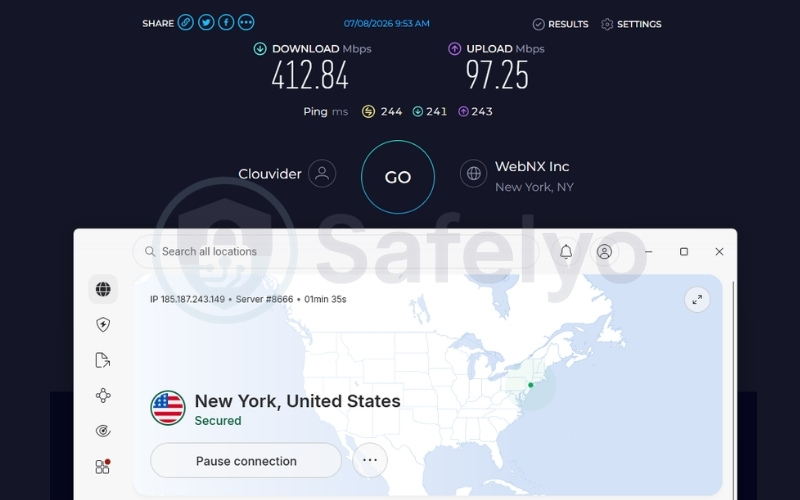
NordVPN delivers incredible performance on international connections, completely eliminating the dreaded buffering wheel. During our tests, the speed retention was phenomenal. On distant US servers, NordVPN recorded an impressive 412.84 Mbps download, 97.25 Mbps upload, and a 244 ms ping.
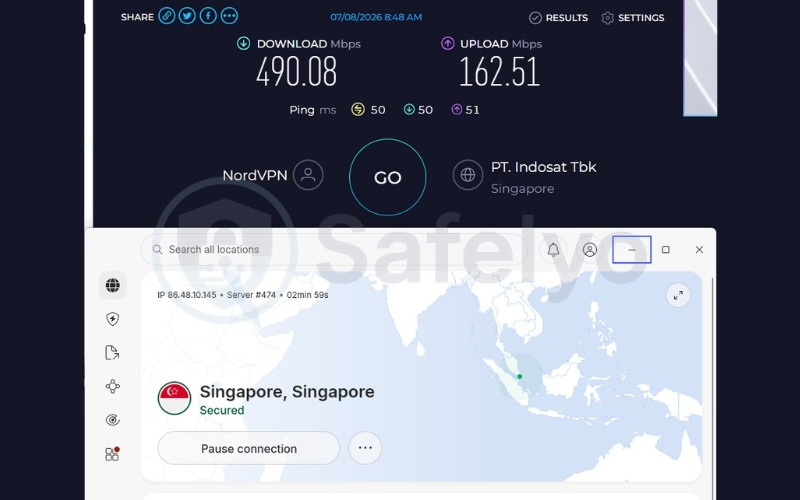
On closer Singapore servers, it reached 490.08 Mbps download, 162.51 Mbps upload, and a 50 ms ping. This colossal bandwidth across both regional and overseas connections guarantees a seamless high-bandwidth experience.
Powered by the lightweight NordLynx protocol, the VPN easily supports multiple 4K streams on a single network without any resolution drops. You can actively scrub back and forth through a movie timeline, and the video will instantly snap into UHD quality.
| Server Location | Download (Mbps) | Upload (Mbps) | Ping (ms) |
|---|---|---|---|
| US | 412.84 | 97.25 | 244 |
| Singapore | 490.08 | 162.51 | 50 |
2.1.3. Hardware integrations and security
NordVPN utilizes a massive network of over 9,500 servers, heavily emphasizing 10 Gbps colocated infrastructure. Owning these servers directly entirely eliminates third-party data center interference, ensuring consistent hardware maintenance, continuous streaming uptime, and maximum privacy.
Furthermore, NordVPN operates exclusively on RAM-only servers. This means all user data, including your streaming history and connection logs, is physically wiped every time the server reboots.
Operating securely under a Panamanian jurisdiction, the company is legally protected from mandatory data retention laws, keeping your viewing habits entirely anonymous.
Best for: Streaming enthusiasts who demand peak 4K performance and broad unblocking capabilities across global content libraries.
2.2. #2. ExpressVPN: Best for router and Smart Home integration
ExpressVPN maintains a long legacy of premium hardware integration. The provider focuses heavily on its custom Aircove router and proprietary Lightway protocol, allowing every device in your home to connect to a secured network without relying on individual device operating systems.
| Feature | Specification |
|---|---|
| Starting Price | $2.49/mo (2 Years + 4 Months) |
| Company | ExpressVPN (Kape Technologies) |
| Jurisdiction | British Virgin Islands |
| Independent Audit | Yes (KPMG, PwC Switzerland, Cure53) |
| No-Logs Policy | Yes (no activity logs, no connection logs) |
| RAM-Only Servers | Yes (TrustedServer technology) |
| Servers | Thousands |
| Countries | 105 |
| Avg. Download Speed | 445.18 Mbps |
| Avg. Upload Speed | 191.39 Mbps |
| Avg. Latency | 120.5 ms |
| Protocols | Lightway, OpenVPN, WireGuard, IKEv2 |
| Kill Switch | Yes (Network Lock) |
| Obfuscation | Yes (automatic on every server) |
| Port Forwarding | Yes (router only) |
| Dedicated IP | Yes (available in 20+ countries) |
| Simultaneous Connections | Up to 14 |
| Netflix Regions | 25+ |
| Disney+ | Yes |
| BBC iPlayer | Yes |
| Torrent / P2P | Yes |
| Win/Mac/iOS/Android | Yes |
| Linux | Yes |
| Browser Extension | Yes (Chrome, Firefox, Edge, Brave) |
| Router Support | Yes |
| Live Chat 24/7 | Yes (multilingual) |
| Refund Policy | 30-day money-back guarantee |
| Free Trial | Yes (3-day on iOS and Android) |
| Overall Positioning | Best for Hardware/Router Integration |
| Official Website | https://expressvpn.com |
Pros
Industry-leading router support with the pre-flashed Aircove hardware.
Proprietary Lightway protocol minimizes overhead for instantaneous video loading times.
Reliably unblocks 25+ Netflix regions and major international platforms.
Cons
Lacks support for Amazon’s new Vega OS.
MediaStreamer (Smart DNS) requires manual IP refreshes if your ISP uses dynamic routing.
2.2.1. Smart TV compatibility and streaming access
ExpressVPN provides an enormous ecosystem footprint, effortlessly bypassing heavy geo-restrictions to unblock 25+ Netflix regions, Paramount+, ESPN+, YouTube TV, and BBC iPlayer. The native Android TV application is exceptionally polished, providing a seamless visual experience that mirrors their desktop clients.
However, it is vital to note that while ExpressVPN flawlessly unblocks platforms on Android TV and older Fire Sticks, it currently lacks compatibility with Amazon’s brand new Linux-based Vega OS. If you purchase a 2026 Fire TV model, you will not find the application available in the store.
For users dealing with locked ecosystems like Samsung and LG, ExpressVPN offers the MediaStreamer feature, which acts as a Smart DNS workaround. While highly effective, MediaStreamer comes with a frustrating caveat regarding dynamic IP addresses.
Most internet service providers periodically change your home IP address. Because MediaStreamer relies on IP whitelisting to grant access, whenever your ISP changes your IP, the Smart TV connection will break unexpectedly.
Users must then periodically open the ExpressVPN application on a smartphone connected to the same Wi-Fi network to automatically re-register the new dynamic IP and restore streaming access to the television.
2.2.2. Speed, performance, and 4K reliability
The proprietary Lightway protocol delivers excellent metrics across distant locations, specifically engineered to reduce cryptographic overhead and prevent your router from overheating during heavy streaming sessions.
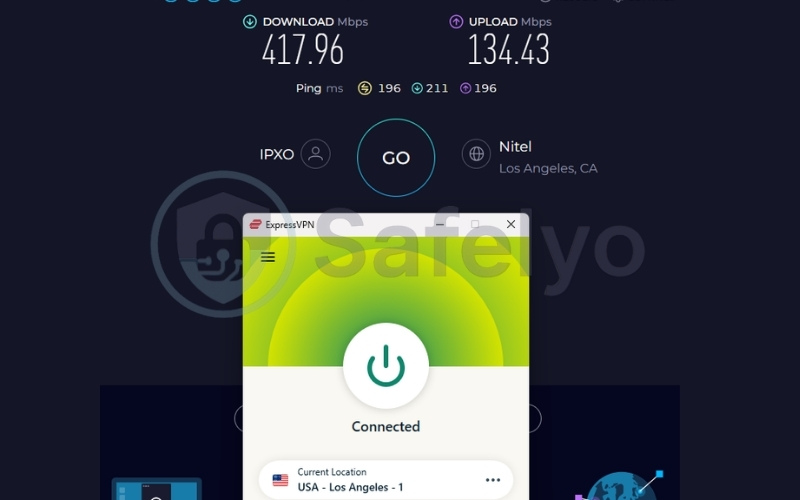
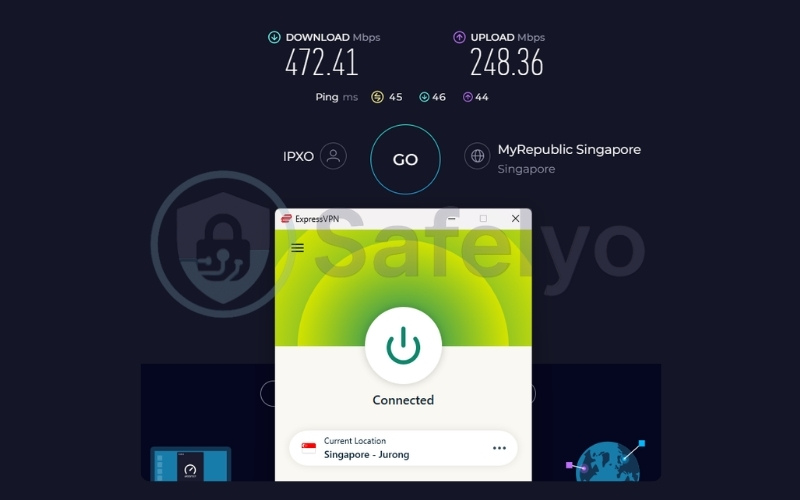
On US servers, ExpressVPN delivered 417.96 Mbps download, 134.43 Mbps upload, and a 196 ms ping. On Singapore servers, it recorded a blazing 472.41 Mbps download, 248.36 Mbps upload, and a 45 ms ping.
This rock-solid stability across both halves of the globe ensures instant 4K playback and rapid scrubbing through video timelines. By minimizing the initial buffering screen typical of distant international servers, ExpressVPN ensures that your television displays crisp, maximum-resolution video the second you hit the play button.
| Server Location | Download (Mbps) | Upload (Mbps) | Ping (ms) |
|---|---|---|---|
| US | 417.96 | 134.43 | 196 |
| Singapore | 472.41 | 248.36 | 45 |
2.2.3. Hardware integrations and security
Deploying an ExpressVPN Aircove router manages the VPN tunnel directly at the hardware level, securing all connected TVs, gaming consoles, and IoT devices simultaneously. Because the router automatically handles the cryptographic connection, users do not need to install or run the VPN software directly on their television’s limited internal storage.
On the backend, ExpressVPN secures your traffic using their independently audited TrustedServer technology. These RAM-only servers guarantee that no activity logs or DNS queries are ever written to a hard drive, providing total anonymity alongside seamless Smart Home integration.
Best for: Samsung and LG TV owners who prefer setting up a dedicated VPN router to cover their entire home theater setup.
2.3. #3. Surfshark: Best for multi-device households
Surfshark is the premier budget-friendly powerhouse for streaming. Its unlimited device policy makes it the perfect fit for households with multiple Smart TVs, gaming consoles, and mobile devices streaming simultaneously without requiring users to log out of specific hardware.
| Feature | Specification |
|---|---|
| Starting Price | ~$2.49/mo (2 Years) |
| Company | Surfshark B.V. |
| Jurisdiction | Netherlands |
| Independent Audit | Yes (Deloitte 2025, SecuRing 2025) |
| No-Logs Policy | Yes (verified) |
| RAM-Only Servers | Yes (100% RAM-only network) |
| Servers | 4,500+ |
| Countries | 100 |
| Avg. Download Speed | 422.04 Mbps |
| Avg. Upload Speed | 138.94 Mbps |
| Avg. Latency | 163.5 ms |
| Protocols | WireGuard, OpenVPN, IKEv2, Dausos |
| Kill Switch | Yes |
| Obfuscation | Yes (obfuscated servers, NoBorders mode) |
| Port Forwarding | No |
| Dedicated IP | Yes (available in 20 locations) |
| Simultaneous Connections | Unlimited |
| Netflix Regions | 28+ |
| Disney+ | Yes |
| BBC iPlayer | Yes |
| Torrent / P2P | Yes |
| Win/Mac/iOS/Android | Yes |
| Linux | Yes |
| Browser Extension | Yes (Chrome, Firefox, Edge) |
| Router Support | Yes |
| Live Chat 24/7 | Yes |
| Refund Policy | 30-day money-back guarantee |
| Free Trial | Yes (7-day free trial) |
| Overall Positioning | Best Budget & Multi-Device |
| Official Website | https://surfshark.com |
Pros
Unlimited simultaneous connections secure every TV and device in the home.
Massive streaming footprint, verified to unblock 28+ Netflix regions.
Features CleanWeb to automatically block malicious links and trackers.
Cons
Missing port forwarding capabilities.
2.3.1. Smart TV compatibility and streaming access
When it comes to pure unblocking volume on a budget, Surfshark is virtually unmatched. During our testing, the provider successfully accessed a staggering 28+ Netflix regions. Beyond Netflix, it reliably unlocks Disney+, BBC iPlayer, HBO Max, Crunchyroll, ITV, and Channel 4 without presenting proxy error screens.
The native Android TV app is exceptionally intuitive. The developers specifically built the interface to cater to television remotes, meaning the menus scroll smoothly and connection buttons are large and clearly highlighted.
The most impressive aspect of Surfshark’s Smart TV integration is how it handles its unmetered device policy. Even when five different televisions and tablets are streaming simultaneously on the same account within a household, the application itself does not lag or force logouts.
This creates a frictionless experience for users who want to install the software on every streaming box, stick, and television they own without tracking device limits.
2.3.2. Speed, performance, and 4K reliability
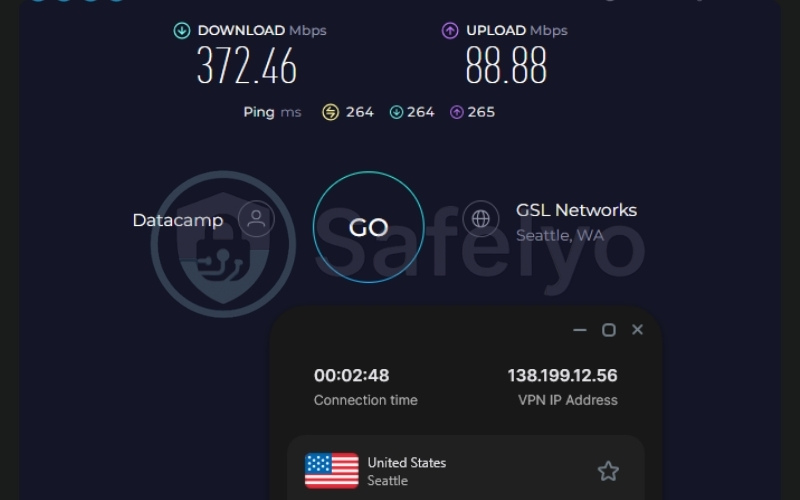
Despite the highly affordable price tag, Surfshark delivers incredibly reliable performance across different global regions via the modern WireGuard protocol. During our evaluation, it maintained a strong 372.46 Mbps download, 88.88 Mbps upload, and a 264 ms ping on distant US servers.
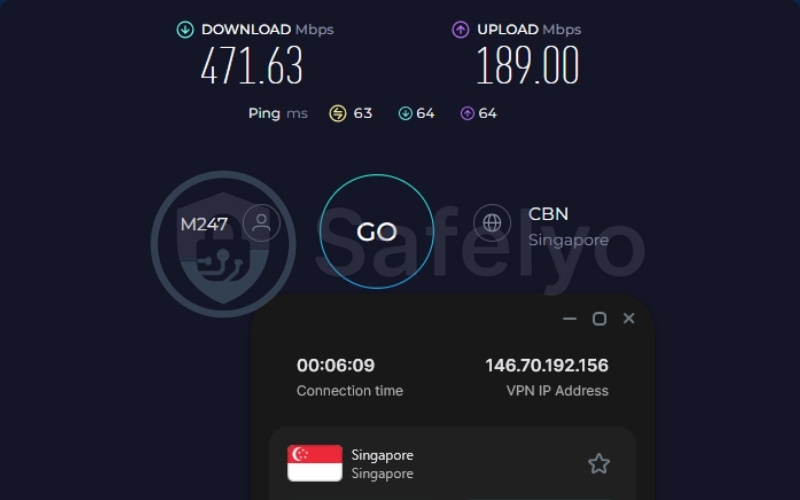
On regional Singapore servers, it surged to an impressive 471.63 Mbps download, 189.00 Mbps upload, and a 63 ms ping. This sustained throughput easily handles simultaneous 4K streaming across different televisions in the exact same household without bottlenecking your router.
Whether you are watching a live sports broadcast in the living room while someone else streams a 4K movie in the bedroom, the connection remains flawlessly stable.
| Server Location | Download (Mbps) | Upload (Mbps) | Ping (ms) |
|---|---|---|---|
| US | 372.46 | 88.88 | 264 |
| Singapore | 471.63 | 189.00 | 63 |
2.3.3. Hardware integrations and security
Surfshark prioritizes user privacy by utilizing a rigorously audited 100% RAM-only server network, which physically prevents the retention of any user browsing habits, connection timestamps, or streaming logs.
Additionally, the VPN integrates a highly effective CleanWeb feature. When you are using the native web browser on your Smart TV to stream content from unofficial sources, CleanWeb actively shields the television from intrusive pop-ups, malicious links, and hidden tracking scripts.
This holistic approach to security ensures your television is not just bypassing geo-blocks, but is actively protected from malware and data harvesting.
Best for: Large families or roommates seeking to secure multiple Smart TVs and devices under one affordable subscription.
2.4. #4. IPVanish: Best native interface for Fire TV
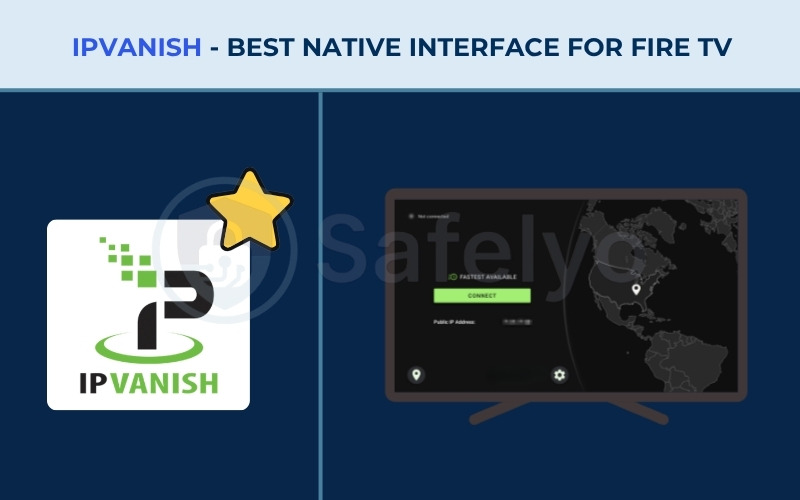
IPVanish holds a strong legacy with the Amazon Fire TV ecosystem. Its user interface is explicitly designed to be navigated with a D-pad remote, offering a seamless experience for users dealing with low-RAM streaming sticks that often struggle with heavier applications.
| Feature | Specification |
|---|---|
| Starting Price | $2.19/mo (Essential 2-year plan) |
| Company | IPVanish (owned by Ziff Davis, Inc.) |
| Jurisdiction | USA |
| Independent Audit | Yes (Schellman 2025) |
| No-Logs Policy | Yes (absolute zero logs) |
| RAM-Only Servers | Yes (transitioning to 100% RAM-only by 2027) |
| Servers | 3,400+ |
| Countries | 150+ locations |
| Avg. Download Speed | 411.05 Mbps |
| Avg. Upload Speed | 72.36 Mbps |
| Avg. Latency | 128 ms |
| Protocols | WireGuard, OpenVPN (UDP/TCP), IKEv2, IPSec |
| Kill Switch | Yes (dedicated TV Kill Switch App) |
| Obfuscation | Yes (OpenVPN Scramble) |
| Port Forwarding | No |
| Dedicated IP | No |
| Simultaneous Connections | Unlimited |
| Netflix Regions | US, UK, Japan, South Korea, India, Germany, etc. |
| Disney+ | Yes |
| BBC iPlayer | No |
| Torrent / P2P | Yes |
| Win/Mac/iOS/Android | Yes |
| Linux | Yes |
| Browser Extension | Yes (Chrome, Firefox, Edge via Secure Browser) |
| Router Support | Yes |
| Live Chat 24/7 | Yes |
| Refund Policy | 30-day money-back guarantee (1 and 2-year plans) |
| Free Trial | Yes (free trial on iOS and Android) |
| Overall Positioning | Best Native Interface & Fire TV Focus |
| Official Website | https://www.ipvanish.com |
Pros
Highly optimized UI specifically designed for Amazon Fire TV remotes.
Includes a dedicated TV Kill Switch to prevent IP leaks if the app crashes on low-RAM devices.
Unmetered simultaneous device connections.
Cons
Fails to unblock BBC iPlayer reliably.
Does not offer a Smart DNS tool for Samsung or LG TVs.
Based in the United States (Five Eyes jurisdiction).
2.4.1. Smart TV compatibility and streaming access
IPVanish is a powerhouse when deployed on Amazon and Android TV hardware. Notably, it fully supports both the newest Fire Sticks running Vega OS and older models utilizing Fire OS. As one of the very first VPN providers to be officially authorized by Amazon, IPVanish offers a native application built specifically for Vega OS, ensuring seamless integration on the latest streaming devices.
The layout avoids cluttered maps in favor of a straightforward, remote-friendly list format that allows users to instantly connect to optimized servers. It successfully unblocks massive content libraries including Netflix (US, UK, JP), Disney+, Prime Video, and JioHotstar.
However, it is important to note a specific regional failure: IPVanish struggles heavily with BBC iPlayer, making it a poor choice for British television fans.
The most significant compatibility hurdle with IPVanish is that it completely lacks a Smart DNS tool. Because IPVanish does not offer this feature, users with Samsung Tizen or LG WebOS televisions cannot use a simple IP spoofing trick. Instead, they are forced to configure a VPN directly on their home router to use IPVanish on those screens.
2.4.2. Speed, performance, and 4K reliability
IPVanish delivers remarkably consistent download speeds across tested regions, ensuring that low-RAM devices do not struggle to process the encrypted video feed.
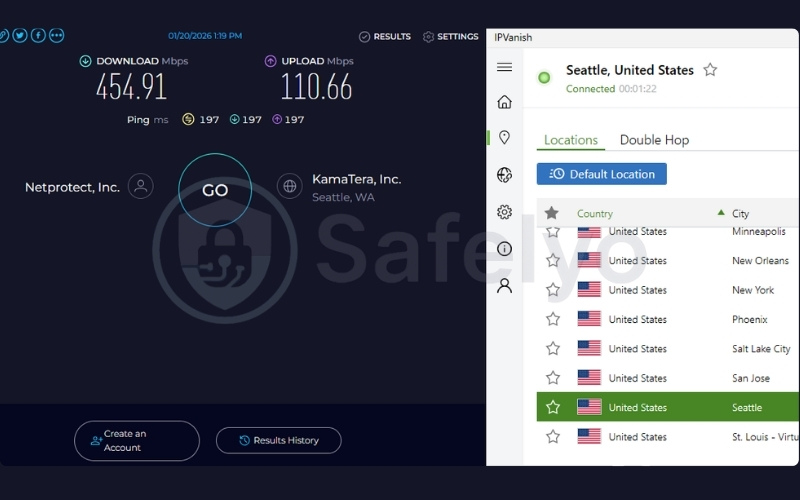
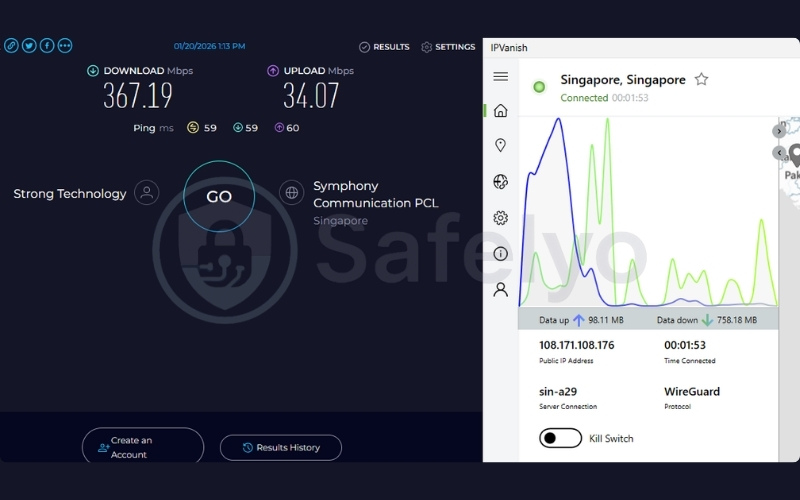
On US servers, IPVanish reached 454.91 Mbps download, 110.66 Mbps upload, and a 197 ms ping. Singapore servers hit 367.19 Mbps download, 34.07 Mbps upload, and a 59 ms ping.
While the upload speeds are slightly lower than competitors in certain regions, this metric does not negatively impact video consumption. The massive download throughput across both test locations is more than capable of sustaining buffer-free UHD video streams, allowing you to binge-watch international content without annoying quality drops.
| Server Location | Download (Mbps) | Upload (Mbps) | Ping (ms) |
|---|---|---|---|
| US | 454.91 | 110.66 | 197 |
| Singapore | 367.19 | 34.07 | 59 |
2.4.3. Hardware integrations and security
Smart TVs and Fire Sticks often suffer from severely limited internal memory (such as 1GB of RAM), causing heavy background applications to crash frequently.
IPVanish expertly addresses this hardware limitation with a dedicated TV Kill Switch App. This specialized fail-safe immediately cuts the internet connection if the VPN drops unexpectedly, preventing the television from automatically reverting to the local network and exposing the user’s real IP address to Netflix.
Currently transitioning its entire infrastructure to 100% RAM-only servers by 2027, IPVanish guarantees reliable zero-logs privacy while keeping your Fire Stick running smoothly.
Best for: Dedicated Amazon Fire TV users looking for a flawless, remote-friendly application interface.
2.5. #5. PrivadoVPN: Best 100% free streaming option
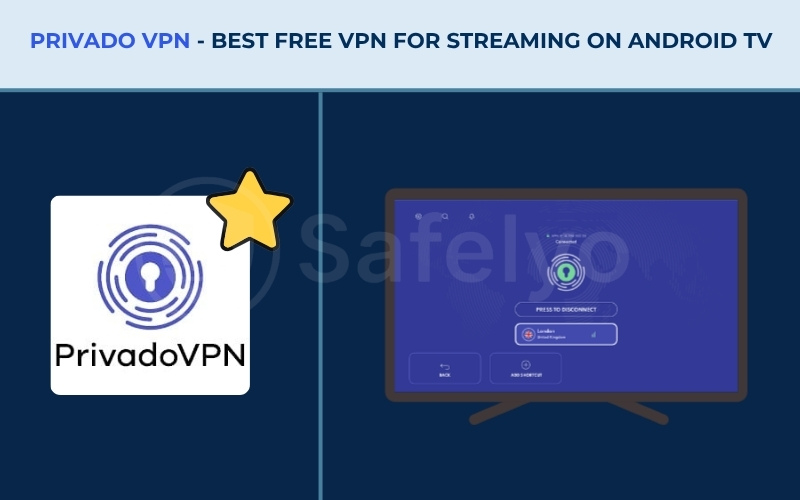
PrivadoVPN is the rarest find in the industry, operating as a genuinely safe, free VPN capable of bypassing streaming geo-blocks. Backed by strong Swiss privacy laws and lacking predatory ads, it establishes itself as the top freemium choice for casual viewers.
| Feature | Specification |
|---|---|
| Starting Price | $1.11/mo (24-month premium plan) |
| Company | PrivadoVPN |
| Jurisdiction | Switzerland |
| Independent Audit | No |
| No-Logs Policy | Yes |
| RAM-Only Servers | No |
| Servers | Hundreds of servers |
| Countries | 50 countries (12 locations for Free plan) |
| Avg. Download Speed | 456.63 Mbps |
| Avg. Upload Speed | 105.08 Mbps |
| Avg. Latency | 186 ms |
| Protocols | OpenVPN, IKEv2, WireGuard, SOCKS5 |
| Kill Switch | Yes |
| Obfuscation | Phantom Mode |
| Port Forwarding | No |
| Dedicated IP | No |
| Simultaneous Connections | 10 (Premium) / 1 (Free Plan) |
| Netflix Regions | US, UK, etc. |
| Disney+ | Yes |
| BBC iPlayer | Yes |
| Torrent / P2P | Yes |
| Win/Mac/iOS/Android | Yes |
| Linux | Yes |
| Browser Extension | Yes (Chrome, Firefox, Edge, Brave) |
| Router Support | Yes (Asus, DD-WRT, pfSense) |
| Live Chat 24/7 | Yes |
| Refund Policy | 30-day money-back guarantee (Premium) |
| Free Trial | Yes (permanent Free Plan with 10GB/month) |
| Overall Positioning | Best 100% Free Freemium Option |
| Official Website | https://privadovpn.com |
Pros
Permanent free tier requiring no credit card to register.
Successfully unblocks US Netflix and BBC iPlayer (rare for free plans).
Backed by strong Swiss privacy laws.
Cons
The free plan imposes a hard 10GB monthly data limit.
Free users are restricted to 1 simultaneous connection and 12 server locations.
Lacks independent infrastructure audits.
2.5.1. Smart TV compatibility and streaming access
Finding a free service that actually unblocks streaming platforms is incredibly difficult, but PrivadoVPN succeeds where others fail. The free tier reliably unblocks Netflix US, BBC iPlayer, MAX, and ESPN+, allowing users to bypass geographic restrictions without paying a premium subscription fee.
However, users must temper their expectations regarding the hard 10GB monthly data limit. Translating this cap into real-world impact is crucial: 10GB of data equates to roughly 3 to 4 hours of HD streaming, and significantly less if you attempt to stream in 4K UHD. The PrivadoVPN interface clearly displays a data consumption bar, allowing users to monitor their remaining allowance.
Because of this rigid ceiling, the free tier is purely suitable for occasional viewing, such as watching a specific weekend sports match or a movie, rather than daily binge-watching.
2.5.2. Speed, performance, and 4K reliability
Unlike most free VPN providers that severely throttle your bandwidth down to unwatchable speeds (often below 5 Mbps), PrivadoVPN generously provides premium, unthrottled speeds on its free servers.
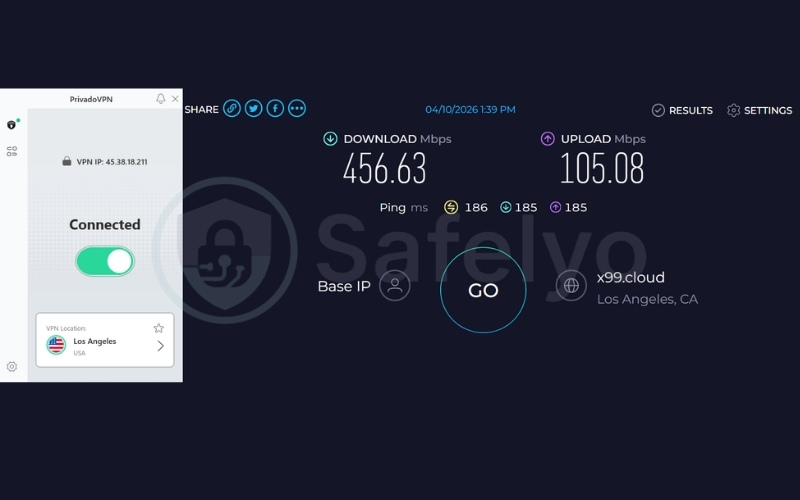
During our rigorous testing, PrivadoVPN recorded an outstanding 456.63 Mbps download speed, 105.08 Mbps upload, and a 186 ms ping on US servers.
This premium-level bandwidth ensures high-quality 4K playback without the constant buffering typically associated with freemium services. You will enjoy flawless, instantaneous video loading right up until you hit the firm data allowance.
| Server Location | Download (Mbps) | Upload (Mbps) | Ping (ms) |
|---|---|---|---|
| US | 456.63 | 105.08 | 186 |
2.5.3. Hardware integrations and security
Operating securely under Swiss jurisdiction provides PrivadoVPN users with immensely strong legal privacy protections. Switzerland sits firmly outside the invasive 14-Eyes intelligence alliance, guaranteeing that your streaming habits remain entirely safe from third-party intelligence data requests.
Best for: Casual streamers on a tight budget who need occasional access to US streaming libraries.
3. Why your smart TV needs a VPN (beyond streaming)
Internet providers often intentionally slow down Netflix and other streaming traffic during peak hours, causing frustrating buffering even on fast networks. A VPN tunnel completely bypasses this ISP throttling because it encrypts the data.
When the data is encrypted, the internet provider cannot identify what website or service you are visiting, preventing them from applying specific bandwidth limits to your television.
Beyond throttling, TV manufacturers use Automatic Content Recognition (ACR) to actively track your viewing habits and serve targeted ads on your home screen. A VPN masks your real IP address and location from the manufacturer.
4. How to set up a VPN on any smart TV (step-by-step)
The exact installation process depends entirely on the television’s operating system. Because Apple, Amazon, Google, Samsung, and LG all utilize entirely different software environments, you must select the method that matches your specific hardware.
4.1. Method 1: Native app installation (Android TV & Google TV)
Users with Sony Bravia, Nvidia Shield, or Chromecast devices can install the app natively from the official store. This is the simplest and most reliable method for securing a television.
- Open the Google Play Store: Using your television remote, press the Home button to return to the main dashboard and select the Google Play Store application.
- Search for the application: Navigate to the Search icon (magnifying glass) at the top of the screen and type in the name of your chosen provider (e.g., NordVPN or ExpressVPN).
- Install the software: Select the official application from the search results and click the Install button to download it directly to your television’s internal storage.
- Log in via QR code: Open the newly installed application. Instead of forcing you to painstakingly type a complex password using the remote control D-pad, most modern providers will display a QR code on the television screen. Simply scan this code with your smartphone camera to instantly log into your account and connect to a server.
4.2. Method 2: Smart DNS configuration (LG WebOS & Samsung Tizen)
Samsung and LG televisions do not support native VPN applications, requiring users to alter their network settings to spoof their location.
- Register your current IP address: Log into your VPN account dashboard using a computer or smartphone connected to your home Wi-Fi. Locate the Smart DNS section and click the button to register your current home IP address with the provider.
- Retrieve the custom DNS numbers: Once registered, the provider will display two custom DNS server addresses (Primary and Secondary) on your dashboard screen. Write these numbers down.
- Open TV Network Settings: On your television, press the Menu or Settings button on the remote. Navigate to the Network menu, select your active Wi-Fi or Ethernet connection, and enter the Advanced Settings screen.
- Input the custom IP: Scroll down to the DNS section. Change the DNS setting from “Automatic” to “Manual.” Carefully type in the custom DNS numbers provided by your VPN, save the settings, and restart the television to apply the changes.
Caution note: Smart DNS does not encrypt internet traffic; it only routes your location data to bypass geographical blocks.
4.3. Method 3: Router-level installation (the universal solution)
Flashing a router with custom firmware allows the device to run a VPN client at the hardware level, encrypting every single device connected to the Wi-Fi network. This is the most reliable workaround for Samsung and LG TVs that refuse native apps.
- Purchase a compatible or pre-flashed router: While you can manually flash firmware like DD-WRT or OpenWrt onto an existing compatible router, the safest method is purchasing a pre-flashed device, such as the ExpressVPN Aircove, which comes with the software pre-installed.
- Connect to the modem: Use an Ethernet cable to connect your newly purchased VPN router directly into your internet service provider’s main modem.
- Access the router dashboard: Connect a computer to the new router’s Wi-Fi network. Open a web browser and type in the router’s default gateway IP address (typically 192.168.1.1) to access the administrative control panel.
- Enter your VPN credentials: Follow the on-screen prompts to input your activation code or account credentials. Once activated, select a server location from the dashboard menu, and your television will instantly route through the encrypted tunnel.
5. 3 common smart TV VPN mistakes (and how to fix them)
Setting up a VPN on a television is rarely as straightforward as clicking a single button. Because televisions lack the flexible operating systems found on computers and smartphones, users frequently encounter unexpected technical roadblocks.
Whether you are dealing with proxy errors or incompatible casting features, understanding these common pitfalls is crucial. Let’s explore these specific hurdles and how to bypass them to get your streaming back on track.
5.1. The “Netflix Originals” Smart DNS trap
Many affiliates claim that Smart DNS unblocks everything effortlessly. In reality, tools like NordVPN’s Smart DNS specifically state in their official documentation that they only unblock “Netflix Originals.”
This means users completely miss out on licensed blockbusters and third-party regional content. If you want access to the full US or UK catalog on a locked TV, you must use a router setup or an Android TV box.
5.2. The screencasting IP mismatch error
Users frequently complain on Reddit that casting Netflix from a VPN-enabled phone to a television triggers an immediate error screen. This happens because the television connects directly to your home network.
When you attempt to cast, the television’s raw IP address bypasses the phone’s VPN tunnel entirely. Netflix reads the two conflicting IP addresses and flags the connection immediately as a proxy attempt.
To fix this, disable casting entirely. Instead, use a hardware-level router like the ExpressVPN Aircove, or plug a cheap Android TV dongle directly into the HDMI port, ensuring both the application and the screen share the exact same encrypted IP address.
5.3. Forgetting to refresh dynamic IPs for MediaStreamer
Smart DNS is not always a set-and-forget solution. ExpressVPN’s MediaStreamer requires your IP address to be actively registered in their system. If your internet service provider dynamically changes your home IP address, the Smart DNS configuration no longer matches your home network, breaking the connection instantly.
The workaround is simple: occasionally log into the ExpressVPN application on a smartphone connected to the same Wi-Fi network. This will automatically refresh the IP registry on their servers and restore the TV’s streaming connection.
6. Smart DNS vs. VPN: Which should you use?
Understanding the technical correlation between a Smart DNS tool and a full VPN application is essential for maximizing your television’s performance and security. While both tools allow you to bypass geographic restrictions, they operate using entirely different backend mechanisms.
Smart DNS routes traffic quickly because it lacks encryption entirely. It simply intercepts your location-based DNS requests and redirects them through a proxy server in your desired country. Because there is absolutely no cryptographic overhead dragging down the connection, Smart DNS is slightly faster for maintaining 4K streaming resolutions without buffering.
However, because the traffic is unencrypted, it offers zero privacy protection. Your internet service provider can still see exactly what platforms you are visiting, meaning Smart DNS cannot prevent ISP bandwidth throttling during peak hours.
On the other hand, a full VPN application encrypts all data leaving your television, wrapping it in an impenetrable tunnel before sending it to a remote server. This completely hides your activity from ISP throttling, DNS hijacking, and manufacturer tracking. While the encryption process causes a minor reduction in raw internet speed, premium protocols like NordLynx and Lightway are optimized to easily handle high-definition streaming without noticeable lag.
When deciding between the two, your choice depends entirely on your priorities:
- Choose Smart DNS if: You solely care about raw streaming speed on a locked television and are not concerned about ISP tracking or bandwidth throttling.
- Choose a full VPN if: You demand comprehensive privacy, need to prevent ISP throttling, or want reliable access to complex global content libraries on Android or Fire TV devices.
The $30 hardware workaround:
If you want to access full regional catalogs like US Netflix on a locked operating system (such as Samsung Tizen or LG WebOS) without the limitations and lack of encryption of Smart DNS, a practical alternative is purchasing an inexpensive Android TV dongle for around $30.
Plugging a device like a Chromecast with Google TV or an Onn 4K stick into your TV’s HDMI port allows you to bypass the manufacturer’s software constraints and install a native VPN application directly from the app store.
This approach provides a secure, encrypted connection for your streaming, though you can also achieve similar results by configuring the VPN directly on your home router to cover all your household devices simultaneously.
7. The truth about free VPNs for smart TVs (and what to use instead)
Many users search for free VPNs, often installing shady software on cheap, unbranded Android TV Boxes purchased online. Security researchers discovered the BadBox botnet operating on these exact devices.
Installing a generic free VPN on these infected boxes often turns the television into a node in a global botnet, silently draining network bandwidth and stealing private data in the background.
While reputable providers exist, they are intentionally limited. Proton VPN offers a secure free tier with unlimited data, but it simply lacks the ability to unblock streaming platforms. The free plan cannot bypass advanced geo-blocks on Smart TVs, making it utterly useless for accessing international Netflix or Disney+ catalogs.
The only safe free VPN capable of unblocking streaming platforms is PrivadoVPN. However, it implements a hard 10GB monthly data cap. This equates to only 3-4 hours of HD streaming, proving that unlimited free 4K streaming is entirely a myth.
The best method is leveraging a 30-day money-back guarantee from a premium provider like Surfshark or ExpressVPN, treating it as a risk-free trial. Ultimately, paying roughly $2.50 per month is incredibly cheap for a buffer-free, ad-free 4K streaming experience, keeping your network entirely safe from malicious botnets.
8. FAQs about VPN for Smart TV
Can you install a VPN directly on a smart TV?
Yes, you can install a VPN directly if you have an Android TV or Fire TV by downloading the app from the store. No, you cannot install a native app directly on Samsung Tizen, LG WebOS, or Roku TVs.
Which VPN is free for smart TV?
PrivadoVPN is the best free option for unblocking streaming platforms, but you must be aware of its firm 10GB monthly data cap. Proton VPN is also free and unlimited but fails to bypass streaming geo-blocks.
Can I cast Netflix to my TV while using a VPN?
No, casting from a VPN-enabled phone to a TV without a VPN triggers an IP mismatch error, causing Netflix to block the stream immediately.
Does Smart DNS encrypt my TV’s internet traffic?
No, Smart DNS only alters your location data to bypass regional blocks without encrypting the underlying internet traffic.
Why did my Fire TV VPN app stop working?
Your app likely stopped working because Amazon shifted its newer hardware to the Linux-based Vega OS, which breaks compatibility with traditional Android VPN apps.
Will a VPN slow down my Smart TV’s streaming performance?
Yes, a VPN will cause a minor speed drop due to encryption, but premium providers maintain high enough bandwidth to easily support 4K streaming without noticeable buffering.
Are VPNs legal to use for streaming?
Yes, using a VPN is entirely legal in most countries, though it may violate the terms of service of specific streaming platforms like Netflix.
Do I need a Smart TV to use a VPN?
No, you do not need a Smart TV to use a VPN; you can plug an inexpensive Android TV dongle or Fire Stick into any standard HDMI port to utilize a VPN app.
How do I hide my IP address on my Samsung Smart TV?
You must install a VPN directly on your Wi-Fi router or plug a VPN-enabled streaming stick into the television to hide your Samsung TV’s IP address.
What is the best alternative to Smart DNS?
The best alternative to Smart DNS is purchasing a $30 Android TV dongle, which allows you to run a fully encrypted native VPN application directly on the screen.
9. Conclusion
Navigating the fragmented operating systems of modern televisions can be frustrating, but choosing a well-optimized service significantly reduces the setup friction.
To help you narrow down the right choice for your specific hardware, here is a final summary of the top performers from our testing:
- NordVPN stands out as a highly capable choice for users with newer Android and Fire ecosystems, delivering massive bandwidth for seamless 4K streaming.
- ExpressVPN provides a highly effective router integration, making it a reliable solution for Samsung and LG owners who need full network coverage without relying on native apps.
- Surfshark remains an excellent budget alternative for large households, allowing unlimited simultaneous connections across all your devices.
- IPVanish offers an intuitive, remote-friendly interface that works exceptionally well on low-RAM streaming sticks and Amazon Vega OS devices.
- PrivadoVPN serves as a secure freemium option for casual viewers, providing access to US streaming libraries with a strict monthly data limit.
Getting started is straightforward once you identify your hardware. Simply check your television’s operating system to see if it supports native applications. From there, you can choose the most appropriate installation method (such as downloading a direct app or configuring a dedicated router) and connect to an international server to begin streaming securely.
To explore more in-depth reviews and find a suitable VPN for Smart TV for your specific home setup, check out our Best VPN category and visit the Safelyo homepage for comprehensive security guides.