For households managing multiple smartphones, laptops, and Smart TVs, an effective VPN should offer high simultaneous connection limits, stable bandwidth under load, and ideally, router support for whole-home coverage. Based on our 2026 hands-on network performance tests, Surfshark, Windscribe, and IPVanish are among the most capable options for securing multiple household devices.
In this review, we break down the top test-verified options to help you find suitable VPNs with multi-device support for your family’s needs.
VPNs with multi-device:
- Surfshark (Best for unlimited household devices): Offers unmetered simultaneous connections, retaining fast speeds on nearby servers to support multiple 4K Netflix streams across the house.
- Windscribe (Best for high-speed streaming): Delivers unlimited connections with a high load capacity and robust router compatibility for smart home setups.
- IPVanish (Best for budget-friendly unlimited connections): Provides unmetered device connections and retains robust speeds at a highly competitive entry price.
- ExpressVPN (Best for streamlined router integration): Secures unsupported smart home appliances and IoT devices directly at the network level through its proprietary Aircove router.
- Proton VPN (Best for secure 10-device privacy setups): Combines strong Swiss privacy standards with fast, stable connections to protect up to 10 simultaneous devices reliably.
- NordVPN (Best for consistent 4K streaming speed): Sustains exceptionally high download speeds during testing, supporting seamless streaming across its 10-device allowance.
- PIA (Best for cheap unlimited connections): Delivers unlimited device support and features Smart DNS.
- TunnelBear (Best for basic unlimited app usage): Provides unlimited app connections with great speeds, suitable for personal devices that do not require router integration.
Quick Comparison Table:
| VPN | Starting Price | Simultaneous Connections | Router Support | Nearby Server DL Speed |
|---|---|---|---|---|
| Surfshark | $2.49/mo | Unlimited | Yes | 471.63 Mbps |
| Windscribe | $3.00/mo | Unlimited | Yes | 452.56 Mbps |
| IPVanish | $2.19/mo | Unlimited | Yes | 367.19 Mbps |
| ExpressVPN | $2.49/mo | 10 – 14 | Yes | 472.41 Mbps |
| Proton VPN | $2.99/mo | 10 | Yes | 482.98 Mbps |
| NordVPN | $3.49/mo | 10 | Yes | 490.08 Mbps |
| PIA | $1.33/mo | Unlimited | Yes | 27.20 Mbps |
| TunnelBear | $3.33/mo | Unlimited | No | 460.08 Mbps |
Disclaimer: Prices and information are subject to change, and readers should check before purchasing. This article is for informational purposes only and does not constitute legal advice. Please use VPNs responsibly and legally.
1. How we tested and selected the best VPNs with multi-device support
For this review, all network and performance tests were conducted using a Windows 11 PC connected to a baseline fiber-optic connection of ~800 Mbps in Vietnam. To simulate real-world conditions, we selected testing servers across Asia (specifically in Singapore, Hong Kong, and Malaysia) and recorded the throughput via Ookla during simulated multi-device 4K streaming loads.
To fully understand how each brand performs under household conditions, we evaluated them carefully against the following parameters:
- Device policy and network coverage (30%): We verified the absolute maximum number of simultaneous connections. Higher scores went to brands offering “Unlimited” connections combined with native router support to protect IoT devices. Brands lacking router compatibility received lower scores in this category.
- Regional speed and load capacity (25%): Because multi-device 4K streaming requires significant bandwidth, we evaluated raw absolute speed on proximate testing servers. Services surpassing the ~350 Mbps threshold received higher scores for their ability to handle household bandwidth without notable buffering.
- Streaming and geo-unblocking (20%): We evaluated objectively on the ability to consistently access high-demand core libraries (US/UK Netflix, Disney+, BBC iPlayer) across multiple concurrent connections.
- Privacy and infrastructure (15%): We verified independent security audits (Deloitte, Cure53) and noted networks utilizing RAM-only infrastructure, which ensures connection data physically wipes upon server reboots.
- Value and pricing (10%): We calculated using the lowest available monthly price on long-term commitments to determine the cost-effectiveness of VPN.
| Evaluation Category | Weight |
|---|---|
| Device Policy & Network Coverage | 30% |
| Regional Speed & Load Capacity | 25% |
| Streaming & Geo-Unblocking | 20% |
| Privacy & Infrastructure | 15% |
| Value & Pricing | 10% |
2. VPNs with multi-device support: Top 8 ranked and tested
Choosing the right VPN for a multi-device household means looking past marketing claims and examining hard data. We have extensively tested the top providers in the industry to see how they handle heavy bandwidth loads, firm device limits, and complex network configurations.
Below is our detailed breakdown of the eight best multi-device VPNs, evaluating their speed retention, router compatibility, and overall ability to protect every screen in your home without causing frustrating slowdowns or sudden disconnects.
2.1. #1. Surfshark: Best for unlimited household devices
Surfshark removes the inconvenience of device limits for large families. At a $2.49 per month subscription rate, Surfshark legally covers all smartphones, tablets, and smart TVs in the house simultaneously. This unmetered connection policy reduces the need for users to constantly log each other out or manage active sessions through a web dashboard.
| Feature | Details |
|---|---|
| Best For | Unlimited Household Devices & Premium Regional Speeds |
| Starting Price | ~$2.49/mo (2-year plan) |
| Company | Surfshark B.V. |
| Jurisdiction | Netherlands |
| Independent Audit | Yes (Cure53, Deloitte, SecuRing) |
| No-Logs Policy | Yes |
| RAM-Only Servers | Yes (100% RAM-only network) |
| Servers | 4,500+ |
| Countries | 100 |
| Avg. Download Speed | 471.63 Mbps |
| Avg. Upload Speed | 189.00 Mbps |
| Avg. Latency | 63 ms |
| Protocols | WireGuard, OpenVPN, IKEv2, Dausos |
| Kill Switch | Yes |
| Obfuscation | Yes (NoBorders mode) |
| Port Forwarding | No |
| Dedicated IP | Yes |
| Simultaneous Connections | Unlimited |
| Netflix Regions | 28+ |
| Disney+ | Yes |
| BBC iPlayer | Yes |
| Torrent / P2P | Yes |
| Win/Mac/iOS/Android | Yes |
| Linux | Yes |
| Browser Extension | Yes |
| Router Support | Yes |
| Live Chat 24/7 | Yes |
| Refund Policy | 30-day money-back guarantee |
| Free Trial | Yes (7-day free trial) |
| Official Website | https://surfshark.com |
| Evaluation Criteria | Weight | Raw Score (/10) | Weighted Score |
|---|---|---|---|
| Device Policy & Network Coverage | 30% | 10.0 | 3.00 |
| Regional Speed & Load Capacity | 25% | 9.7 | 2.43 |
| Streaming & Geo-Unblocking | 20% | 9.5 | 1.90 |
| Privacy & Infrastructure | 15% | 9.5 | 1.42 |
| Value & Pricing | 10% | 9.0 | 0.90 |
| OVERALL MULTI-DEVICE RATING | 100% | – | 9.65 / 10 |
Pros
Unmetered simultaneous device connections.
Retains exceptionally fast speeds on testing servers.
Offers Dedicated IPs to bypass automated blockades.
100% RAM-only server network.
Cons
Does not offer Smart DNS capabilities for unsupported devices.
Does not support Port Forwarding.
2.1.1. Speed and load capacity for 4K streaming
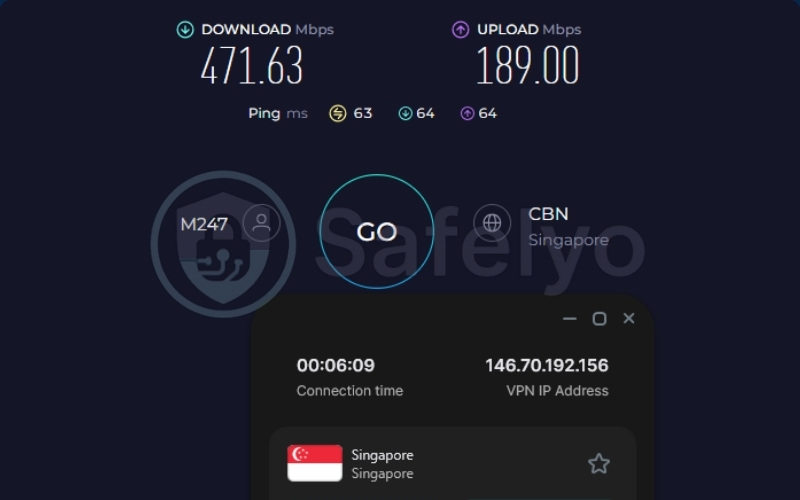
During our network performance testing, Surfshark delivered an impressive download speed of 471.63 Mbps alongside a low 63ms ping on our selected Singapore testing servers using the WireGuard protocol.
Maintaining a continuous 471 Mbps is a crucial factor for large households. It allows multiple users to stream high-definition 4K video content on different devices simultaneously with a drastically reduced risk of encountering buffering wheels or sudden video quality drops during peak hours. This level of bandwidth retention proves that the VPN tunnel will not act as a bottleneck for your internet connection.
2.1.2. Device policies and router integration
Surfshark enforces a truly unmetered and unlimited connection policy, making it an ideal choice for a crowded household. Furthermore, Surfshark offers direct router compatibility, allowing users to configure the VPN completely at the network level. By installing the service on your central home router, it automatically protects all connected hardware concurrently without ever needing a native application installed on every single device.
2.1.3. Geo-unblocking and Smart TV compatibility
In our detailed evaluation of streaming capabilities, Surfshark successfully unblocked 28+ Netflix regions, Disney+, and BBC iPlayer with remarkable consistency.
However, Surfshark no longer offers native Smart DNS functionality. If you want to bypass geo-blocks on unsupported devices like Smart TVs or gaming consoles, you are required to install Surfshark directly on your Wi-Fi router rather than simply adjusting the native DNS settings within the television’s network menu. This requires a slightly more technical initial setup process to achieve full living room coverage.
2.1.4. Privacy and infrastructure
Surfshark operates on a highly secure RAM-only server infrastructure, which physically ensures that all browsing data is entirely wiped the moment a server undergoes a reboot. Additionally, Surfshark includes an innovative Nexus Technology feature known as IP Rotator.
Unlike traditional VPN configurations where you hold a single IP address for the duration of your session, the IP Rotator automatically changes your assigned IP address every five to ten minutes without ever dropping your active VPN connection. The primary purpose of this background rotation is to significantly enhance your overall online privacy, making it incredibly difficult for third-party trackers, advertisers, or malicious entities to accurately monitor your digital footprint.
Best for: Households that need to secure numerous personal devices without counting connection limits.
2.2. #2. Windscribe: Best for high-speed streaming
Windscribe serves as a highly capable option for users requiring substantial bandwidth alongside comprehensive smart home integration. Windscribe provides strong connection speeds and unlimited personal device connections, making it an incredibly effective tool for users aiming to stream global content simultaneously. By removing hardware connection limits, this provider ensures that large households can protect every active smartphone and computer without worrying about hitting an arbitrary account cap.
| Feature | Details |
|---|---|
| Best For | High-Speed Multi-Device Streaming |
| Starting Price | From $3.00/mo (Build-a-Plan) |
| Company | Windscribe Limited |
| Jurisdiction | Canada |
| Independent Audit | Yes (Packetlabs, Leviathan Security Group) |
| No-Logs Policy | Yes (court-proven) |
| RAM-Only Servers | Yes (RAM disk infrastructure) |
| Servers | Not disclosed |
| Countries | 69+ |
| Avg. Download Speed | 452.56 Mbps |
| Avg. Upload Speed | 47.76 Mbps |
| Avg. Latency | 46 ms |
| Protocols | WireGuard, OpenVPN, IKEv2, Stealth, WStunnel, AmneziaWG |
| Kill Switch | Yes (Windscribe Firewall) |
| Obfuscation | Yes (Stealth, WStunnel) |
| Port Forwarding | Yes |
| Dedicated IP | No |
| Simultaneous Connections | Unlimited (for personal devices) |
| Netflix Regions | Yes (Global unblocking) |
| Disney+ | Yes |
| BBC iPlayer | Yes |
| Torrent / P2P | Yes |
| Win/Mac/iOS/Android | Yes |
| Linux | Yes |
| Browser Extension | Yes |
| Router Support | Yes |
| Live Chat 24/7 | No (Automated bot) |
| Refund Policy | Partial refund applied for unused days |
| Free Trial | Yes (permanent free plan up to 10GB/mo) |
| Official Website | https://windscribe.com |
| Evaluation Criteria | Weight | Raw Score (/10) | Weighted Score |
|---|---|---|---|
| Device Policy & Network Coverage | 30% | 10.0 | 3.00 |
| Regional Speed & Load Capacity | 25% | 9.5 | 2.38 |
| Streaming & Geo-Unblocking | 20% | 9.5 | 1.90 |
| Privacy & Infrastructure | 15% | 8.5 | 1.27 |
| Value & Pricing | 10% | 8.0 | 0.80 |
| OVERALL MULTI-DEVICE RATING | 100% | – | 9.35 / 10 |
Pros
Unlimited personal device connections.
Very low latency on testing servers.
Supports Port Forwarding natively.
Includes a generous permanent 10GB/month free plan.
Cons
Does not feature Smart DNS functionality.
Lacks 24/7 human live chat support.
2.2.1. Speed and load capacity for 4K streaming
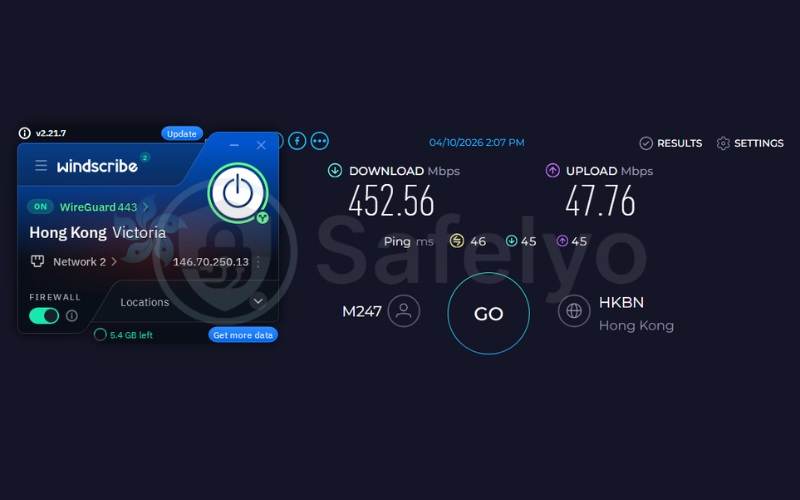
Our rigorous testing revealed that Windscribe retains an excellent 452.56 Mbps download speed alongside a 46ms ping on our Hong Kong testing servers. This incredibly low latency combined with substantial high bandwidth makes Windscribe a highly suitable candidate for households where demanding, concurrent digital activities frequently occur.
You can easily have one family member engaging in fast-paced online gaming while another streams 4K video content in a different room simultaneously, all without the VPN causing unexpected lag spikes or degrading the overall network performance.
2.2.2. Device policies and router integration
Windscribe sets itself apart by featuring an unlimited simultaneous connection policy specifically tailored for personal devices, ensuring you never have to count your active logins.
Crucially, Windscribe explicitly supports advanced router installations. This allows network administrators to configure the VPN directly on compatible firmware to cover the entire household Wi-Fi network under a single active connection point. This setup is highly advantageous for protecting an extensive smart home ecosystem, ensuring that smart appliances, security cameras, and personal electronics are seamlessly secured.
2.2.3. Geo-unblocking and Smart TV compatibility
When evaluated for content accessibility, Windscribe effectively unblocks a wide variety of global Netflix libraries, alongside seamless access to Disney+ and BBC iPlayer. Windscribe does not currently offer dedicated Smart DNS features.
We advise you that bypassing geo-blocks on Smart TVs or dedicated streaming boxes requires utilizing the router configuration method. While missing Smart DNS requires a manual router setup for big-screen streaming, it is a manageable process using Windscribe’s documentation.
2.2.4. Privacy and infrastructure
Windscribe relies on a highly secure RAM-only disk infrastructure to manage its network traffic, and it maintains an independently audited, court-proven no-logs policy that guarantees user privacy.
Additionally, Windscribe includes a highly customizable, built-in DNS filtering tool known as R.O.B.E.R.T. This powerful tool functions directly at the network level to proactively filter out malicious advertisements, known malware domains, and pervasive tracking scripts across all connected household devices. This not only improves overall privacy but directly reduces unnecessary data consumption across your network.
Best for: Users needing steady streaming speeds, port forwarding capabilities, and coverage across multiple personal devices.
2.3. #3. IPVanish: Best for budget-friendly unlimited connections
IPVanish operates as a cost-effective choice for broad device coverage across a large family. IPVanish supports unmetered connections, and coupled with its $2.19 per month pricing, it serves as a highly affordable way to secure multiple screens in a household simultaneously without straining a budget.
| Feature | Details |
|---|---|
| Best For | Budget-Friendly Unlimited Connections |
| Starting Price | $2.19/mo (2-year plan) |
| Company | IPVanish |
| Jurisdiction | USA |
| Independent Audit | Yes (Leviathan, Schellman) |
| No-Logs Policy | Yes |
| RAM-Only Servers | No (transitioning to 100% RAM-only by 2027) |
| Servers | 3,400+ |
| Countries | 150+ locations |
| Avg. Download Speed | 367.19 Mbps |
| Avg. Upload Speed | 34.07 Mbps |
| Avg. Latency | 59 ms |
| Protocols | WireGuard, OpenVPN, IKEv2, IPSec |
| Kill Switch | Yes |
| Obfuscation | Yes (OpenVPN Scramble) |
| Port Forwarding | No |
| Dedicated IP | No |
| Simultaneous Connections | Unlimited |
| Netflix Regions | US, UK, Japan, South Korea, India, Germany, etc. |
| Disney+ | Yes |
| BBC iPlayer | No |
| Torrent / P2P | Yes |
| Win/Mac/iOS/Android | Yes |
| Linux | Yes |
| Browser Extension | Yes |
| Router Support | Yes |
| Live Chat 24/7 | Yes |
| Refund Policy | 30-day money-back guarantee |
| Free Trial | Yes (7-day on mobile apps) |
| Official Website | https://www.ipvanish.com |
| Evaluation Criteria | Weight | Raw Score (/10) | Weighted Score |
|---|---|---|---|
| Device Policy & Network Coverage | 30% | 10.0 | 3.00 |
| Regional Speed & Load Capacity | 25% | 9.2 | 2.30 |
| Streaming & Geo-Unblocking | 20% | 8.5 | 1.70 |
| Privacy & Infrastructure | 15% | 8.5 | 1.28 |
| Value & Pricing | 10% | 9.5 | 0.95 |
| OVERALL MULTI-DEVICE RATING | 100% | – | 9.23 / 10 |
Pros
Highly competitive entry price at $2.19/mo.
Unlimited simultaneous connections.
Dedicated kill switch app available for Apple TV/Android TV.
Cons
Does not reliably unblock BBC iPlayer.
Lacks Smart DNS functionality.
Headquartered in the US.
2.3.1. Speed and load capacity for 4K streaming
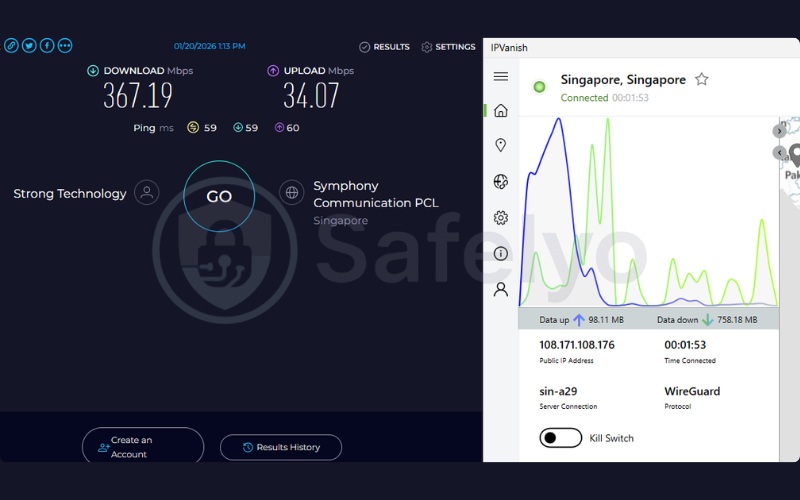
During our comprehensive performance trials, IPVanish returned 367.19 Mbps download speeds and a 59ms ping on our Singapore testing servers. This bandwidth capacity is completely sufficient to handle four to five simultaneous 4K streams across different household devices without significant buffering.
This ensures that a family can comfortably consume high-definition media without the VPN protocol consuming too much of the fundamental bandwidth provided by the primary internet service provider.
2.3.2. Device policies and router integration
IPVanish highlights a robust unmetered device connection policy for its users, completely removing the stress of managing active logins. Furthermore, IPVanish supports manual router installations and provides thorough setup guides for different firmware types.
This offers a highly practical method to protect a complete smart home network directly under a single IPVanish subscription account. Securing the home at the router level ensures that visitors and automated home systems are immediately protected the moment they connect to your Wi-Fi.
2.3.3. Geo-unblocking and Smart TV compatibility
In our streaming evaluations, IPVanish successfully unblocked several major Netflix regions alongside Disney+, but it currently struggles with accessing BBC iPlayer consistently on a regular basis. IPVanish entirely lacks Smart DNS functionality.
IPVanish offers a dedicated TV Kill Switch Application built specifically for Android TV and Fire TV environments. This adds native application protection directly to supported televisions, securing your streaming habits without needing complex router adjustments.
2.3.4. Privacy and infrastructure
Addressing concerns regarding its USA jurisdiction, IPVanish maintains an independently audited zero-logs policy to prove user data is not retained.
While not fully diskless yet, IPVanish is actively upgrading its infrastructure, targeting a complete transition to 100% RAM-only servers by 2027. By steadily eliminating standard hard drives from their network, they are significantly enhancing the physical security of all browsing data generated by your household devices, guaranteeing that no identifiable footprints can be seized during physical server inspections.
Best for: Budget-conscious families who prioritize broad app installation across mobile devices.
2.4. #4. ExpressVPN: Best for streamlined router integration
ExpressVPN stands out as a highly streamlined hardware solution for whole-home coverage. Despite limiting its standard app connections to a 10-14 device limit, ExpressVPN offers the proprietary Aircove router ecosystem, simplifying overall network protection into a much more manageable daily experience.
| Feature | Details |
|---|---|
| Best For | High-Capacity Ecosystems & Streamlined Router Integration |
| Starting Price | $2.49/mo (Basic 2-year plan) |
| Company | ExpressVPN (Kape Technologies) |
| Jurisdiction | British Virgin Islands |
| Independent Audit | Yes (KPMG, PwC, Cure53) |
| No-Logs Policy | Yes |
| RAM-Only Servers | Yes (TrustedServer technology) |
| Servers | Thousands |
| Countries | 105 |
| Avg. Download Speed | 472.41 Mbps |
| Avg. Upload Speed | 248.36 Mbps |
| Avg. Latency | 45 ms |
| Protocols | Lightway, OpenVPN, WireGuard, IKEv2 |
| Kill Switch | Yes (Network Lock) |
| Obfuscation | Yes (automatic on every server) |
| Port Forwarding | Yes (router only) |
| Dedicated IP | Yes |
| Simultaneous Connections | 10 – 14 (depending on tier) |
| Netflix Regions | 25+ |
| Disney+ | Yes |
| BBC iPlayer | Yes |
| Torrent / P2P | Yes |
| Win/Mac/iOS/Android | Yes |
| Linux | Yes |
| Browser Extension | Yes |
| Router Support | Yes |
| Live Chat 24/7 | Yes |
| Refund Policy | 30-day money-back guarantee |
| Free Trial | Yes (3-day on iOS and Android) |
| Official Website | https://expressvpn.com |
| Evaluation Criteria | Weight | Raw Score (/10) | Weighted Score |
|---|---|---|---|
| Device Policy & Network Coverage | 30% | 8.5 | 2.55 |
| Regional Speed & Load Capacity | 25% | 9.7 | 2.43 |
| Streaming & Geo-Unblocking | 20% | 9.5 | 1.90 |
| Privacy & Infrastructure | 15% | 9.5 | 1.42 |
| Value & Pricing | 10% | 9.0 | 0.90 |
| OVERALL MULTI-DEVICE RATING | 100% | – | 9.20 / 10 |
Pros
Centralized home network protection via the Aircove router.
High 472 Mbps download and 45ms ping on testing servers.
TrustedServer (RAM-only) technology.
Automatic obfuscation on every server.
Cons
Limits standard app connections to 10-14 devices.
Port forwarding is restricted to the router application.
2.4.1. Speed and load capacity for 4K streaming
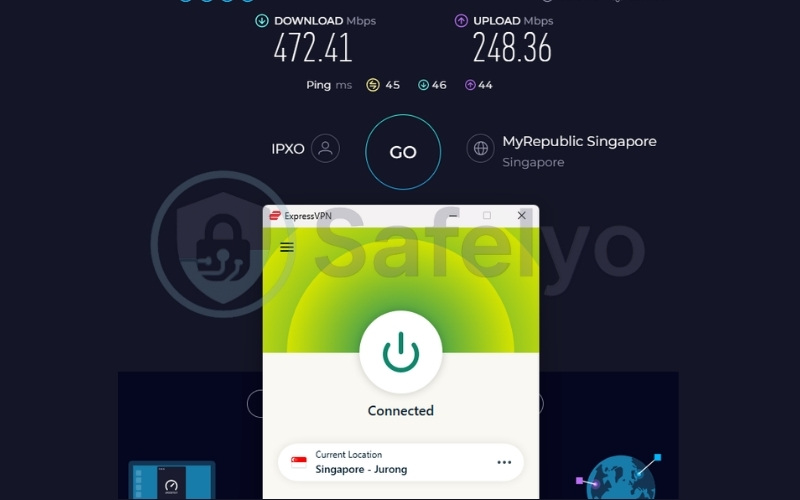
ExpressVPN produced incredibly robust results during our testing phase, hitting 472.41 Mbps for downloads, a notable 248.36 Mbps for uploads, and a low 45ms ping on Singapore testing servers using the proprietary Lightway protocol.
This exceptionally high upload speed combined with low latency makes ExpressVPN a highly reliable option for households balancing dense video conferencing workloads alongside heavy entertainment streaming activities. Lightway specifically minimizes battery drain on mobile phones, which is a massive benefit for multi-device households.
2.4.2. Device policies and router integration
ExpressVPN limits connections to a 10 to 14 app limit based on the user’s specific subscription tier. However, ExpressVPN introduces the seamless Aircove Router solution to bypass these boundaries.
Installing ExpressVPN on a standard router, or utilizing the pre-configured Aircove hardware, counts as exactly one connection. This effectively extends premium encryption to the entire home network, including IoT devices and gaming consoles, without dealing with the frustrating complexities of manual firmware flashing.
2.4.3. Geo-unblocking and Smart TV compatibility
ExpressVPN provides seamless, consistent access to 25+ major Netflix regions, Disney+, and BBC iPlayer. Crucially, ExpressVPN also features the highly praised “MediaStreamer” Smart DNS function. This specific network function allows users to unblock global content directly on Apple TVs and gaming consoles without dealing with standard encryption overhead. By avoiding heavy encryption, MediaStreamer significantly aids in retaining maximum baseline speeds specifically for ultra-high-definition living room streaming.
2.4.4. Privacy and infrastructure
ExpressVPN utilizes advanced TrustedServer technology across its entire network, which means the RAM-only infrastructure ensures no connection logs or user activity ever touch a physical hard drive.
ExpressVPN features automatic obfuscation that runs silently in the background of every connection. This critical technology assists in hiding dense multi-device traffic on restrictive networks, ensuring your internet service provider cannot throttle your bandwidth simply because they detect a VPN tunnel operating in your home.
Best for: Users seeking to manage device limits effectively through a pre-configured VPN router ecosystem.
2.5. #5. Proton VPN: Best for secure 10-device privacy setups
Proton VPN is a fundamentally strong option for privacy-focused households. While Proton VPN restricts accounts to 10 simultaneous connections, it provides strong Swiss privacy standards, fast speeds, and complete router support to lock down a family’s digital footprint.
| Feature | Details |
|---|---|
| Best For | Secure 10-Device Privacy Setups |
| Starting Price | $2.99/mo |
| Company | Proton AG |
| Jurisdiction | Switzerland |
| Independent Audit | Yes (Securitum) |
| No-Logs Policy | Yes |
| RAM-Only Servers | No (uses full-disk encryption instead) |
| Servers | 20,000+ |
| Countries | 145+ |
| Avg. Download Speed | 482.98 Mbps |
| Avg. Upload Speed | 143.44 Mbps |
| Avg. Latency | 46 ms |
| Protocols | WireGuard, IKEv2, Stealth |
| Kill Switch | Yes |
| Obfuscation | Yes (Stealth protocol) |
| Port Forwarding | Yes (paid plans only) |
| Dedicated IP | Yes (Business plans only) |
| Simultaneous Connections | 10 |
| Netflix Regions | 25+ |
| Disney+ | Yes |
| BBC iPlayer | Yes |
| Torrent / P2P | Yes |
| Win/Mac/iOS/Android | Yes |
| Linux | Yes (GUI and CLI) |
| Browser Extension | Yes |
| Router Support | Yes |
| Live Chat 24/7 | Yes (paid plan users only) |
| Refund Policy | 30 days |
| Free Trial | Yes (Permanent free plan) |
| Official Website | https://protonvpn.com |
| Evaluation Criteria | Weight | Raw Score (/10) | Weighted Score |
|---|---|---|---|
| Device Policy & Network Coverage | 30% | 8.0 | 2.40 |
| Regional Speed & Load Capacity | 25% | 9.8 | 2.45 |
| Streaming & Geo-Unblocking | 20% | 9.5 | 1.90 |
| Privacy & Infrastructure | 15% | 9.5 | 1.43 |
| Value & Pricing | 10% | 8.0 | 0.80 |
| OVERALL MULTI-DEVICE RATING | 100% | – | 8.98 / 10 |
Pros
High 482 Mbps download speeds.
Headquartered in privacy-friendly Switzerland.
Strong Linux GUI app support.
Offers a basic permanent free tier (1 device limit).
Cons
Cap of 10 simultaneous connections on paid plans.
Lacks Smart DNS capabilities.
Relies on full-disk encryption rather than RAM-only servers.
2.5.1. Speed and load capacity for 4K streaming
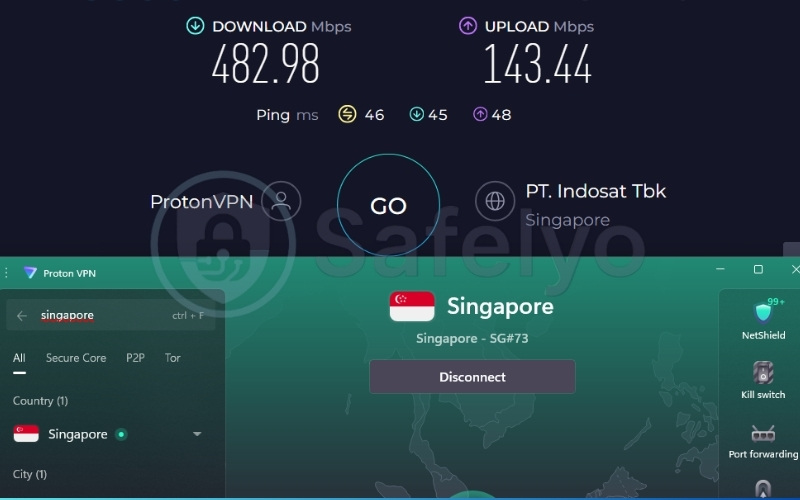
Proton VPN reached an impressive 482.98 Mbps download speed and a 46ms ping on our Singapore testing servers during our intensive trials. This massive bandwidth load capacity helps ensure that active downloading, gaming, or heavy video streaming across the ten allocated household devices can occur simultaneously without significant VPN-induced bottlenecks. It easily handles dense network environments where multiple individuals are demanding high bandwidth at the exact same moment.
2.5.2. Device policies and router integration
Proton VPN firmly caps its standard applications at a 10-device limit, which requires users to be mindful of their active logins. However, installing Proton VPN on a compatible network router effectively consolidates your entire household hardware ecosystem into a single encrypted connection.
This provides an incredibly effective alternative to per-device limitations, allowing you to secure dozens of smart devices while still keeping nine app connections free for mobile use outside the home.
2.5.3. Geo-unblocking and Smart TV compatibility
Proton VPN maintains excellent streaming performance, providing reliable access across 25+ global Netflix regions and Disney+. Proton VPN does not offer Smart DNS capabilities. You can resolve this by setting up Proton VPN on your home router, which will route all connected devices through the encrypted tunnel automatically. This ensures your televisions and gaming consoles access streaming libraries without needing specialized DNS proxies.
2.5.4. Privacy and infrastructure
Proton VPN vastly benefits from its strong Swiss jurisdiction and routine, transparent Securitum audits. While Proton VPN does not currently utilize RAM-only servers, impenetrable full-disk encryption is used to lock down the server hardware entirely against physical seizures. Furthermore, Proton VPN features NetShield, an advanced network-level blocker that proactively stops tracking scripts and malicious advertisements across all connected devices, significantly speeding up general browser load times.
Best for: Privacy-conscious families prioritizing Swiss data standards and high speeds over unmetered app installations.
2.6. #6. NordVPN: Best for consistent 4K streaming speed on 10 devices
NordVPN is a remarkably strong performer for speed-intensive household tasks. NordVPN recorded incredibly high raw speeds in our testing framework. While standard user accounts are restricted to 10 connections, its NordLynx protocol efficiently manages the heavy bandwidth load required in a multi-device 4K streaming environment.
| Feature | Details |
|---|---|
| Best For | Consistent 4K Streaming Speed on 10 Devices |
| Starting Price | $3.49/mo (Basic 2-year plan) |
| Company | Nord Security |
| Jurisdiction | Panama |
| Independent Audit | Yes (PwC, Deloitte) |
| No-Logs Policy | Yes |
| RAM-Only Servers | Yes |
| Servers | 9,500+ |
| Countries | 149 |
| Avg. Download Speed | 490.08 Mbps |
| Avg. Upload Speed | 162.51 Mbps |
| Avg. Latency | 50 ms |
| Protocols | NordLynx, OpenVPN, IKEv2, NordWhisper |
| Kill Switch | Yes |
| Obfuscation | Yes (NordWhisper stealth protocol) |
| Port Forwarding | No |
| Dedicated IP | Yes |
| Simultaneous Connections | 10 |
| Netflix Regions | 26+ |
| Disney+ | Yes |
| BBC iPlayer | Yes |
| Torrent / P2P | Yes |
| Win/Mac/iOS/Android | Yes |
| Linux | Yes |
| Browser Extension | Yes |
| Router Support | Yes |
| Live Chat 24/7 | Yes |
| Refund Policy | 30-day money-back guarantee |
| Free Trial | Yes (3-day on Android) |
| Official Website | https://nordvpn.com |
| Evaluation Criteria | Weight | Raw Score (/10) | Weighted Score |
|---|---|---|---|
| Device Policy & Network Coverage | 30% | 8.0 | 2.40 |
| Regional Speed & Load Capacity | 25% | 9.9 | 2.48 |
| Streaming & Geo-Unblocking | 20% | 9.5 | 1.90 |
| Privacy & Infrastructure | 15% | 9.5 | 1.42 |
| Value & Pricing | 10% | 7.0 | 0.70 |
| OVERALL MULTI-DEVICE RATING | 100% | – | 8.90 / 10 |
Pros
High download speeds (490 Mbps) suitable for heavy loads.
NordLynx protocol aids in maintaining stable connections.
SmartPlay feature supports Smart TV unblocking.
RAM-only servers audited by Deloitte.
Cons
Limit of 10 simultaneous connections.
Slightly higher starting price compared to others on this list ($3.49/mo).
Does not support port forwarding.
2.6.1. Speed and load capacity for 4K streaming
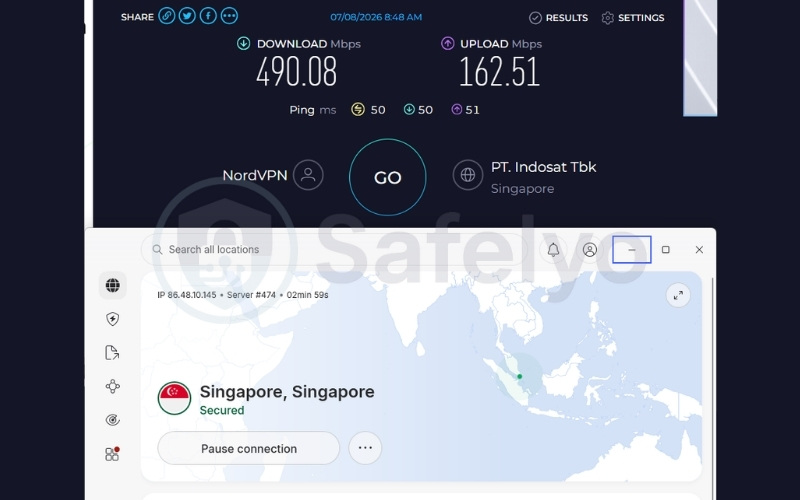
NordVPN delivered the absolute highest speed test results in our evaluation, pushing a 490.08 Mbps download rate and a 50ms ping during our tests on Singapore servers via the highly efficient NordLynx protocol.
This exceptional level of speed indicates that a dense household can easily run multiple connected devices streaming 4K video concurrently without the VPN acting as a significant network bottleneck. Users will not experience sudden video degradation even when the network is under extreme stress.
2.6.2. Device policies and router integration
NordVPN maintains a firm 10-device limit for its standard application usage, requiring users to log out of unused hardware occasionally. However, users managing extensive household hardware can bypass this completely by configuring NordVPN on their home router using the provider’s detailed configuration guides. This method centralizes the entire network protection, counting as exactly one allocated connection while covering dozens of uncounted IoT devices in secure encryption.
2.6.3. Geo-unblocking and Smart TV compatibility
NordVPN highlights vast accessibility, unlocking 26+ major Netflix regions and BBC iPlayer with ease. Crucially, NordVPN offers proprietary “SmartPlay” technology. This unique internal setup smoothly integrates standard VPN encryption with Smart DNS elements automatically in the background.
This highly advanced architecture enables users to unblock complex streaming content on Smart TVs and Apple TVs smoothly without needing to manually tweak DNS addresses deep within their television’s system settings.
2.6.4. Privacy and infrastructure
NordVPN operates under a privacy-friendly Panamanian jurisdiction and runs a transparent, fully audited 100% RAM-only infrastructure. Furthermore, NordVPN provides “Threat Protection Pro,” a premium feature that actively helps filter out malicious advertisements, known malware, and pervasive tracking scripts across all connected devices. This security layer operates efficiently even when the primary VPN tunnel is not fully active, adding continuous value to your device ecosystem.
Best for: Households focused on maintaining high 4K streaming performance across a set number of devices.
2.7. #7. PIA: Best for cheap unlimited connections
PIA (Private Internet Access) represents a highly affordable option that offers completely unlimited devices for an exceptionally low $1.33 per month. However, PIA showed noticeable speed reductions during heavy testing, making it more suitable for lighter multi-device use rather than heavy international streaming across a large household.
| Feature | Details |
|---|---|
| Best For | Cheap Unlimited Connections |
| Starting Price | $1.33/mo (3-year plan) |
| Company | PIA Private Internet Access, Inc. |
| Jurisdiction | USA |
| Independent Audit | Yes (Deloitte) |
| No-Logs Policy | Yes (verified by court cases) |
| RAM-Only Servers | Yes |
| Servers | 35,000+ |
| Countries | 90 |
| Avg. Download Speed | 27.20 Mbps |
| Avg. Upload Speed | 107.71 Mbps |
| Avg. Latency | 57 ms |
| Protocols | OpenVPN, WireGuard, IKEv2/IPSec |
| Kill Switch | Yes |
| Obfuscation | Yes (Multi-Hop Obfuscation) |
| Port Forwarding | Yes |
| Dedicated IP | Yes (token-based) |
| Simultaneous Connections | Unlimited |
| Netflix Regions | 21+ |
| Disney+ | Yes |
| BBC iPlayer | Yes |
| Torrent / P2P | Yes |
| Win/Mac/iOS/Android | Yes |
| Linux | Yes |
| Browser Extension | Yes |
| Router Support | Yes |
| Live Chat 24/7 | Yes |
| Refund Policy | 30-day money-back guarantee |
| Free Trial | Yes (7-day on mobile apps) |
| Official Website | https://privateinternetaccess.com |
| Evaluation Criteria | Weight | Raw Score (/10) | Weighted Score |
|---|---|---|---|
| Device Policy & Network Coverage | 30% | 10.0 | 3.00 |
| Regional Speed & Load Capacity | 25% | 5.0 | 1.25 |
| Streaming & Geo-Unblocking | 20% | 9.5 | 1.90 |
| Privacy & Infrastructure | 15% | 9.0 | 1.35 |
| Value & Pricing | 10% | 10.0 | 1.00 |
| OVERALL MULTI-DEVICE RATING | 100% | – | 8.50 / 10 |
Pros
Very low long-term price ($1.33/mo).
Unlimited simultaneous device connections.
Supports Port Forwarding and Smart DNS.
Audited no-logs policy, tested in court.
Cons
Noticeable speed reductions on testing servers (27 Mbps) during testing.
Headquartered in the USA.
2.7.1. Speed and load capacity for 4K streaming
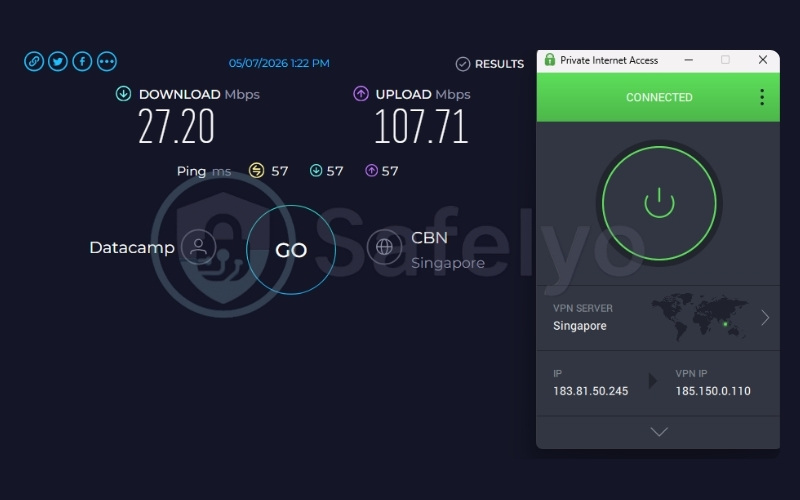
During our performance testing on Singapore servers, PIA recorded a significant speed drop, landing at 27.20 Mbps download with a 57ms ping. A drop to 27 Mbps means a household attempting to run multiple 4K streams will experience buffering, making it better suited for lighter browsing tasks rather than heavy entertainment.
2.7.2. Device policies and router integration
PIA highlights a completely unrestricted, unmetered connection policy that removes the headache of managing daily active logins. Additionally, PIA comprehensively supports direct router installation for advanced users. They even offer pre-configured PIA routers through an exclusive FlashRouters partnership, which serves as a massive benefit for users seeking significantly easier hardware setups without the looming risk of accidentally corrupting their own expensive equipment.
2.7.3. Geo-unblocking and Smart TV compatibility
PIA possesses the technical capacity to access 21+ global Netflix regions reliably alongside BBC iPlayer. Crucially, PIA includes native Smart DNS capabilities directly in its dashboard. Users can easily configure their Smart TVs, Apple TVs, and video game consoles to access international media content without enduring the standard VPN encryption overhead. This lightweight routing process specifically helps mitigate the frustrating speed reductions we previously documented.
2.7.4. Privacy and infrastructure
PIA enforces a highly transparent no-logs policy that has been physically maintained and validated in a legal court setting, providing solid reassurance regarding its USA jurisdiction. PIA proudly maintains a 100% Open Source transparency standard and features the MACE ad-blocker.
This integrated tool aids in comprehensively protecting connected devices from malware at the DNS level, stopping malicious code before it can even attempt to load onto your family’s devices.
Best for: Technical users seeking affordable, unmetered protection who can utilize Smart DNS for TVs to manage streaming speeds.
2.8. #8. TunnelBear: Best for basic unlimited app usage
TunnelBear serves as a straightforward VPN that possesses a very specific hardware limitation. TunnelBear offers solid connection speeds and unlimited device connections exclusively for its native apps. However, you should note that TunnelBear does not offer router support, meaning it is more suited for securing personal laptops and phones rather than an entire centralized home network.
| Feature | Details |
|---|---|
| Best For | Basic Unlimited App Usage |
| Starting Price | $3.33/mo |
| Company | TunnelBear (owned by McAfee) |
| Jurisdiction | Canada |
| Independent Audit | Yes |
| No-Logs Policy | Yes |
| RAM-Only Servers | No |
| Servers | 8000+ |
| Countries | 45+ |
| Avg. Download Speed | 460.08 Mbps |
| Avg. Upload Speed | 193.17 Mbps |
| Avg. Latency | 52 ms |
| Protocols | WireGuard, OpenVPN, IKEv2 |
| Kill Switch | Yes (VigilantBear) |
| Obfuscation | Yes (GhostBear) |
| Port Forwarding | No |
| Dedicated IP | No |
| Simultaneous Connections | Unlimited |
| Netflix Regions | Yes |
| Disney+ | Yes |
| BBC iPlayer | Yes |
| Torrent / P2P | Yes |
| Win/Mac/iOS/Android | Yes |
| Linux | No (Manual OpenVPN only) |
| Browser Extension | Yes |
| Router Support | No |
| Live Chat 24/7 | No |
| Refund Policy | 30 days |
| Free Trial | No (offers a free plan 2GB/month) |
| Official Website | https://www.tunnelbear.com |
| Evaluation Criteria | Weight | Raw Score (/10) | Weighted Score |
|---|---|---|---|
| Device Policy & Network Coverage | 30% | 6.0 | 1.80 |
| Regional Speed & Load Capacity | 25% | 9.6 | 2.40 |
| Streaming & Geo-Unblocking | 20% | 9.5 | 1.90 |
| Privacy & Infrastructure | 15% | 8.0 | 1.20 |
| Value & Pricing | 10% | 7.5 | 0.75 |
| OVERALL MULTI-DEVICE RATING | 100% | – | 8.05 / 10 |
Pros
Unlimited simultaneous app connections.
Retains excellent 460 Mbps download speeds on testing servers.
Incredibly user-friendly interface for beginners.
Capable of unblocking major global streaming platforms.
Cons
No router support (restricts ability to protect IoT devices).
Does not offer Smart DNS features.
Lacks 24/7 live chat support.
2.8.1. Speed and load capacity for 4K streaming
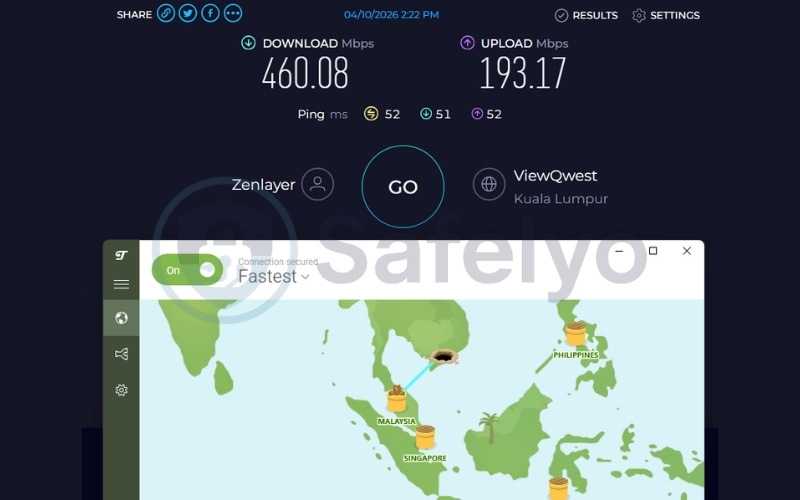
TunnelBear retained exceptionally high speeds throughout our benchmark testing, measuring a 460.08 Mbps download rate and a 52ms ping on our Malaysia testing servers. These fantastic speeds allow multiple mobile phones, tablets, or laptops concurrently running the native TunnelBear application to stream 4K entertainment media simultaneously without encountering significant network throttling or devastating bandwidth limitations that commonly plague lower-tier VPN services.
2.8.2. Device policies and router integration
TunnelBear grants a fully unlimited connection policy specifically designed for its native mobile and desktop applications. You should note that TunnelBear lacks router support. This means you must run the application individually on each device you want to secure.
As a result, hardware without native app support will remain unprotected on your Wi-Fi network. While this limits complete home coverage, it works perfectly fine for securing a large number of individual mobile phones.
2.8.3. Geo-unblocking and Smart TV compatibility
TunnelBear possesses the consistent capability to access major platforms like Netflix, Disney+, and BBC iPlayer without major friction. However, TunnelBear completely lacks Smart DNS functionality. Because TunnelBear also lacks router support, utilizing the VPN to unblock restricted media on complex entertainment systems like Apple TVs, Roku sticks, or Xbox consoles is not natively supported or easily achievable in any practical capacity.
2.8.4. Privacy and infrastructure
TunnelBear falls under Canadian jurisdiction but maintains regular independent security audits to thoroughly verify user privacy claims. Furthermore, TunnelBear features GhostBear obfuscation technology. This specific tunneling feature actively helps mask your encrypted VPN traffic to look like regular internet browsing, which helps maintain multi-device stability on heavily monitored networks that attempt to actively block or throttle standard encrypted data packets.
Best for: Users seeking straightforward protection for personal phones and laptops who do not require Smart TV or router integration.
3. App limits vs. router installation: How to bypass device caps legally
Managing separate VPN applications on dozens of multiple personal devices can rapidly consume mobile battery life and severely complicate your daily network setup. An incredibly effective, permanent solution is configuring a premium VPN directly at the foundational router level.
Securing a router counts as exactly one single connection toward your subscription limit but protects all connected hardware, like smart fridges and gaming consoles, entirely automatically the moment they join the Wi-Fi network.
3.1. The DIY route: Flashing DD-WRT and OpenWrt
Technical users can manually install highly advanced open-source firmware like DD-WRT or OpenWrt on compatible, high-performance ASUS or Netgear routers to explicitly support standard VPN protocols natively. However, installing custom firmware incorrectly carries a massive risk; it can permanently corrupt the router’s software entirely, rendering the hardware useless.
To safely mitigate this risk, premium providers like Surfshark and NordVPN offer highly detailed DD-WRT configuration files and meticulous, step-by-step documentation to gently guide users safely through the manual flashing process without destroying their network infrastructure.
3.2. The plug-and-play route: Pre-configured VPN routers
For a totally frictionless and instantaneous experience, ExpressVPN specifically offers the proprietary Aircove router. The streamlined, highly visual setup interface of the Aircove starkly contrasts the complicated, text-heavy manual flashing process required for open-source firmware.
For everyday users seeking absolute convenience, a pre-configured router offers an accessible, fast way to secure a whole household network. The Aircove even features “Device Groups,” allowing you to seamlessly drag and drop different household devices into different global server locations with a single click, all without requiring advanced technical knowledge or coding skills.
4. Securing unsupported devices: Smart TVs, Xbox, and IoT
Devices such as Apple TV, Roku, Xbox, and basic smart appliances frequently do not natively support standard VPN applications because their internal operating systems completely lack the necessary network interfaces to establish complex encrypted tunnels. If your chosen VPN provider lacks router compatibility, securely routing these stubborn devices becomes incredibly difficult and frustrating.
Premium providers specifically solve this exact hardware gap by introducing Smart DNS functionalities (such as ExpressVPN’s MediaStreamer or PIA’s Smart DNS) as an alternative. Smart DNS specifically updates your television’s location settings to access geo-blocked services directly without fully encrypting the payload traffic.
This lightweight, proxy-based protocol helps maintain exceptionally high streaming speeds on televisions and gaming consoles by avoiding the heavy encryption overhead that frequently decreases standard VPN speeds, ensuring your 4K media never buffers. For VPNs that omit this feature, utilizing a router setup is the standard workaround.
5. The hidden annoyance: Why sharing the same VPN server triggers CAPTCHAs (and how to fix it)
When multiple devices in a household connect to the exact same VPN server, or when a VPN is installed directly on the home router, they all share a single IP address. Automated website security systems, like Cloudflare or Google, often flag this dense, highly concentrated traffic coming from a single source as a potential automated bot network.
This triggers endless, highly frustrating CAPTCHA verification prompts every time you try to search the web. While multi-device VPNs allow you to avoid this by simply choosing different servers for each device, households that require a unified connection need a better workaround.
The most common and effective solution to this specific problem is utilizing a Dedicated IP address. Providers like NordVPN, Surfshark and ExpressVPN offer Dedicated IPs as an add-on feature. Unlike standard shared servers where thousands of strangers use the same digital address, a Dedicated IP is assigned exclusively to your account, completely eliminating the suspicious background noise that triggers CAPTCHAs.
Alternatively, using Split Tunneling to exclude your browser from the VPN while keeping your torrent client or streaming app encrypted can easily bypass these verification loops without paying for a dedicated IP.
6. Free VPNs vs. paid VPNs for multiple devices: The 1-device limitation
Users frequently seek to protect their family hardware for free to avoid incurring recurring monthly subscription fees. However, this is largely a trap. Free VPNs almost universally restrict user accounts to a hard 1-device limit.
Furthermore, they restrict access to premium streaming sites and enforce harsh data caps, such as a mere 2GB per month, which easily runs out during a single hour of high-definition video streaming. If multiple devices aggressively attempt to share the free account login simultaneously, providers will simply block the connection entirely.
Instead of constantly struggling with these severe, unavoidable limitations, we advise you to utilize the 30-day money-back guarantees heavily offered by premium providers like Surfshark or ExpressVPN to secure your household temporarily. This clever strategy allows you to thoroughly test the full premium service across all your family’s hardware completely risk-free before ever fully committing financially to a long-term plan.
7. FAQs about VPNs with multi-device support
Can I use Surfshark on multiple devices at the same time?
Yes, Surfshark allows completely unlimited simultaneous connections under a single subscription, making it perfect for sharing across a large family ecosystem.
How many devices does Proton VPN support?
Proton VPN explicitly supports 10 simultaneous connections on its premium paid plans, but limits users to exactly 1 connection on its basic free tier.
Does connecting multiple devices to a VPN slow down my internet?
Encrypting multiple streams simultaneously can severely affect your network’s overall processing capacity and naturally divide your available bandwidth, which may result in lower individual device speeds depending on your specific router’s hardware processing capabilities.
Do I need to install a VPN on every single device?
No. If you configure the VPN centrally on a compatible network router, every single device that connects to your home Wi-Fi is automatically protected under the encrypted tunnel without needing its own separate application installed.
How do I bypass the 10-device limit on NordVPN?
You can bypass this restriction by installing NordVPN directly on a compatible home router. This setup secures all devices on your Wi-Fi network while only consuming a single connection slot from your account limit.
8. Conclusion
Finding effective VPNs with multi-device support requires carefully balancing simultaneous connection limits with sufficient, unthrottled 4K streaming speeds that will not collapse under heavy household bandwidth stress. You must also factor in proper router compatibility if you want to seamlessly protect stubborn living room gadgets like Apple TVs and gaming consoles without dealing with frustrating application restrictions.
Surfshark is a remarkably strong choice for broad app coverage and providing truly unlimited hardware limits, while ExpressVPN’s Aircove ecosystem remains an absolutely leading option for whole-home hardware setups and streamlined, beginner-friendly router configurations.
By selecting a provider that natively supports your household’s unique network demands, you can effortlessly maintain fast connection speeds across all your hardware. For more detailed provider breakdowns and comprehensive network reviews, explore our expansive Best VPN guides on Safelyo.