Your iPhone holds your personal messages, banking details, and private photos. Leaving it unprotected on public Wi-Fi is risky, but finding a trustworthy security app is incredibly frustrating. The App Store is flooded with deceptive tools that secretly log your data or drain your battery before noon.
You need an application that runs quietly in the background, keeps your connection fast, and actually respects your privacy. We understand exactly what makes a mobile security tool reliable for everyday use.
To help you find the best VPN for iPhone, we rigorously tested the top contenders directly on physical iOS devices. Let’s look at the safest options that genuinely protect your data and unlock global streaming platforms.
| Rank | Best for | App Store rating | Starting price |
|---|---|---|---|
| #1. NordVPN | Best overall / Best performance | 4.7/5 | From $2.99/mo |
| #2. ExpressVPN | Best iOS app experience | 4.7/5 | From $2.79/mo |
| #3. Surfshark | Best value / Budget option | 4.7/5 | From $1.99/mo |
| #4. Proton VPN | Best feature-rich option | 4.6/5 | From $4.49/mo |
| #5. PIA | Most customizable iPhone VPN | 4.7/5 | From $1.98/mo |
| #6. CyberGhost | Best for streaming beginners | 4.2/5 | From $2.19/mo |
Performance & Pricing Disclaimer: Speed test results reflect our specific testing conditions in April 2026. Your actual speeds will vary by location, device, and network. VPN providers also frequently update their pricing and trial terms. Always verify the latest details directly on the provider’s website before purchasing.
1. How we tested the best VPN for iPhone (Methodology)
We installed each service on physical iOS devices to see exactly how they perform in real daily usage. All of our speed tests were conducted from a physical location in Vietnam to ensure authentic results. Keep in mind that your actual speeds will naturally vary. Things like your baseline network speed, physical location, distance to the server, and even the time of day can all affect how fast your connection feels.
We evaluated every contender using a strict set of core criteria to find the safest choices:
- iOS app stability: We monitored how often the application crashed or disconnected during background operation.
- Speed testing: We categorized the download speed drops into Low (0-20 Mbps), Moderate (20-100 Mbps), and High Speeds (100+ Mbps) to give you a clear performance picture.
- Streaming unblocking: We checked if the application could successfully bypass geographical restrictions on major video platforms.
- Verified no-logs policies: We only accepted providers that have undergone independent third-party audits to prove they do not store your data.
2. Best VPN for iPhone: Top paid picks
Premium VPN services typically offer a higher level of security, faster connections, and more reliable streaming capabilities. We reviewed the top paid options available to see which ones justify their subscription costs.
Note: All App Store ratings and review counts mentioned in this guide are based on data from April 8, 2026, and are for the US region.
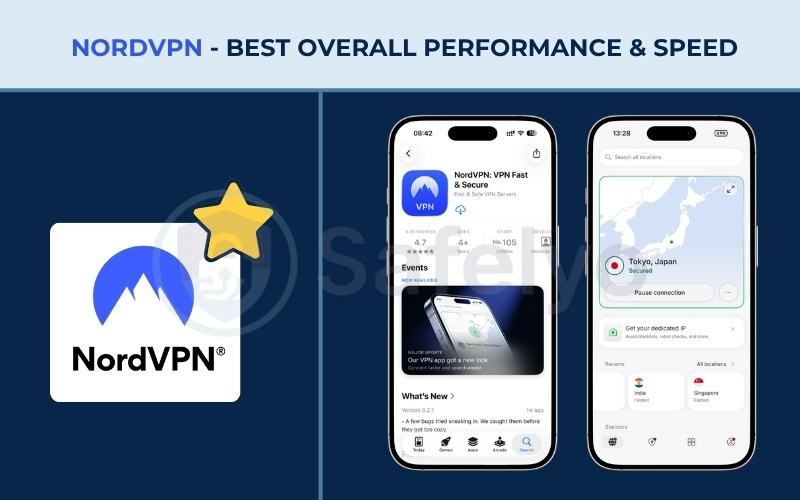
2.1. #1. NordVPN: Best overall performance & speed
NordVPN maintains a strong position in the market by offering consistent security features and stable speeds. We tested its capabilities thoroughly to see how it handles daily tasks.
| Feature | Details |
| Starting price | From $2.99/mo |
| Servers & locations | 9,200+ VPN servers covering 211+ locations |
| Jurisdiction | Panama |
| No-logs policy | Audited No-Logs Policy, verified by PwC and Deloitte |
| Streaming services | Netflix (26+ Libs), Hulu, BBC iPlayer, Disney+, Amazon Prime Video, HBO Max, DAZN, YouTube TV |
| Speed test results | High Speeds (100+ Mbps) across all tested regions (US, UK, Japan, India) |
| Gaming performance | Stable connection, 164 ms ping to Japan, Meshnet for LAN parties |
| Torrenting/P2P | Dedicated P2P-optimized servers available |
| Dedicated IP | Available for an additional fee |
| Security features | Threat Protection Pro™, Meshnet, Dark Web Monitor, RAM-only servers, Double VPN, Onion Over VPN, 10 Gbps backbone |
| VPN protocols | NordLynx, NordWhisper, OpenVPN, IKEv2 |
| Simultaneous connections | Up to 10 devices |
| App Store rating | 4.7/5 (668K ratings) |
| Customer support | 24/7 Live Chat support & Email |
Pros
- Consistently achieves High Speeds (100+ Mbps) globally using the proprietary NordLynx protocol.
- SmartPlay technology seamlessly unblocks multiple international streaming libraries without proxy errors.
- Independently audited zero-logs policy and RAM-only servers ensure maximum data privacy.
Cons
Renewal prices increase significantly after the first promotional subscription term.
Performance & speed
NordVPN provides remarkably stable download speeds across a wide variety of global locations. We observed that the proprietary NordLynx protocol consistently pushes performance past the 100 Mbps threshold, securing a High Speeds rating across distant test servers in the US and UK, as well as regional locations like Japan.
This robust level of bandwidth ensures you can handle heavy daily internet tasks without frustrating interruptions. During our practical evaluations, the connection remained completely reliable even when we intentionally switched between local Wi-Fi and cellular mobile networks. You will notice practically no delay when loading complex websites, downloading large work files, or participating in demanding video conference calls while on the move.
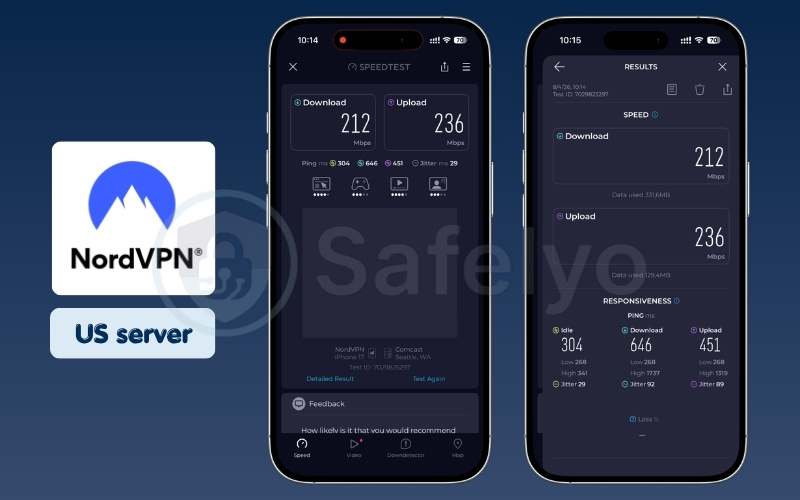
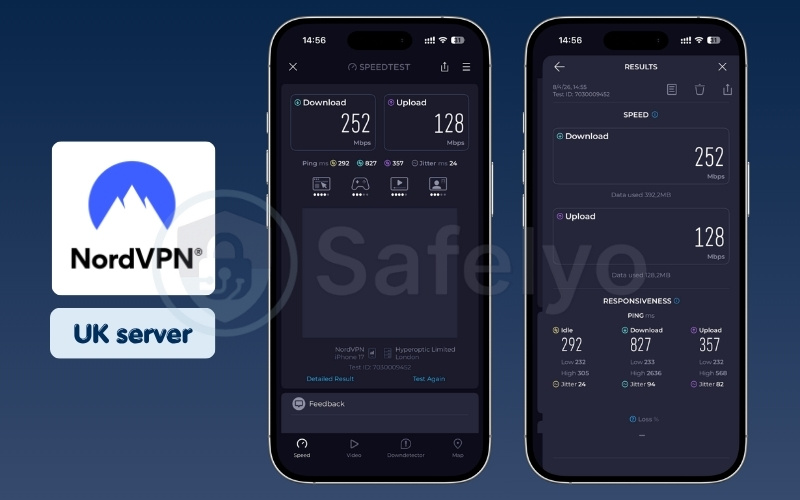
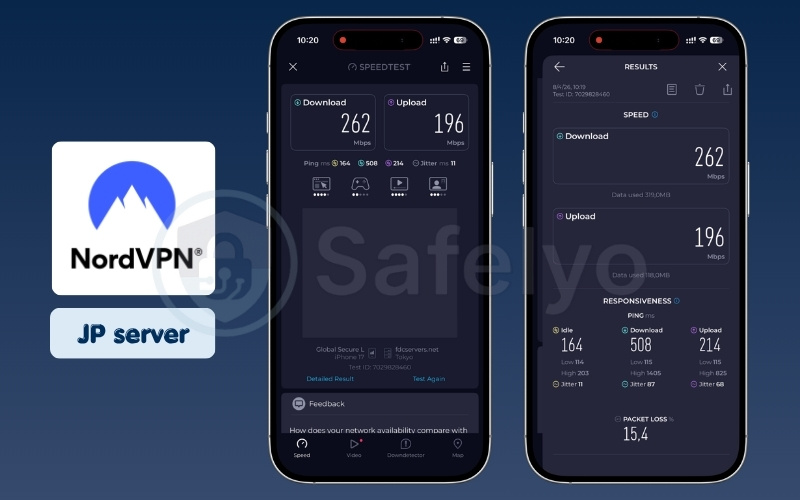
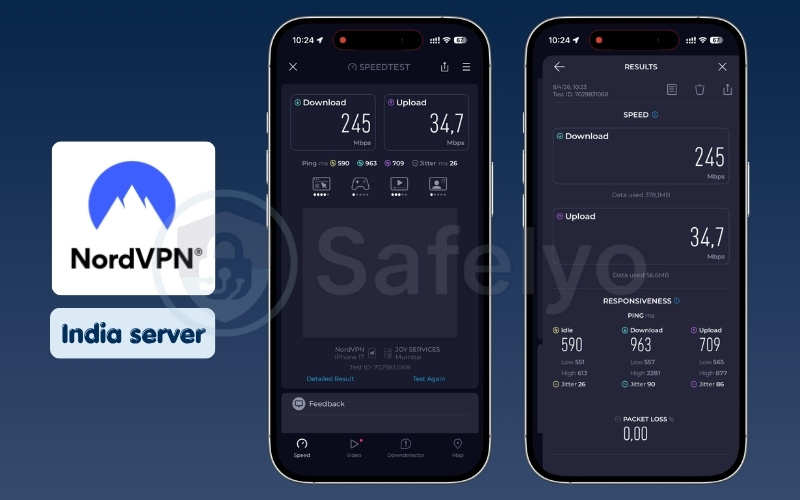
| Server location | Download (Mbps) | Upload (Mbps) | Ping (ms) |
|---|---|---|---|
| US | 212 | 236 | 304 |
| UK | 252 | 128 | 292 |
| Japan | 262 | 196 | 164 |
| India | 245 | 34.7 | 590 |
Streaming & unblocking
NordVPN handles video streaming very reliably across multiple geographical regions. You do not need to configure special settings or switch servers multiple times to find a working connection. In our experience, tapping a US or UK server immediately grants access to local Netflix or Hulu libraries with remarkably consistent video quality.
The service utilizes advanced SmartPlay technology behind the scenes to seamlessly route your DNS requests past strict geographical blocks. This eliminates the dreaded proxy detection errors that frequently plague lesser services. We found it incredibly easy to load heavy 4K video streams instantly, allowing you to relax and enjoy your favorite international shows without facing constant buffering screens.
Privacy & security
The company operates from Panama, a location without mandatory data retention laws that could compromise your privacy. We appreciate that independent auditing firms like PwC and Deloitte have thoroughly examined their server infrastructure. These audits confirm they genuinely do not store user activity or connection logs at any time.
Furthermore, they run their entire global network on volatile RAM-only servers, meaning all temporary operational data is physically wiped every time a machine restarts. You also get access to advanced tools like Double VPN, which routes your traffic through two separate countries for maximum encryption. This makes it a highly secure choice for protecting sensitive personal information.
Connecting to public Wi-Fi without this level of encryption exposes your daily browsing activity to local network monitoring. Protect your personal mobile data and secure your iPhone with NordVPN (backed by a 30-day money-back guarantee).
iOS app experience
The iOS application is robust and straightforward for everyday navigation. We found navigating the standard server list highly intuitive for finding specific countries or specialized servers. You can quickly search for a city using the text bar or simply tap the quick connect button for immediate, automated protection.
The application remains remarkably stable while running quietly in the device background throughout the day. It also avoids bombarding you with unnecessary notifications, focusing entirely on maintaining your secure tunnel. We found it very easy to locate and toggle advanced settings, making the overall experience pleasant for users who prefer a clean, functional mobile interface.
Best for: Most iPhone users wanting a fast, secure, set-it-and-forget-it experience.
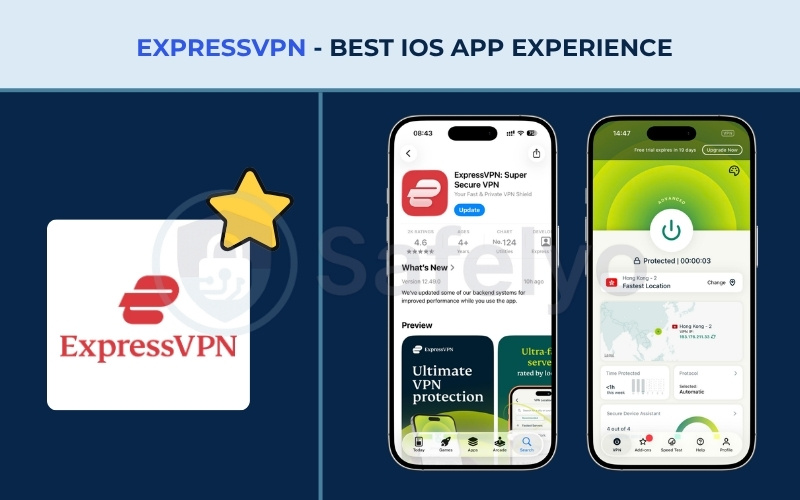
2.2. #2. ExpressVPN: Best iOS app experience
ExpressVPN focuses on providing a clean interface and a premium user experience. We explored its design and performance to see if it meets its high expectations.
| Feature | Details |
| Starting price | From $2.79/mo |
| Servers & locations | 105 countries across 170+ locations, 3,000+ servers |
| Jurisdiction | The British Virgin Islands (BVI) |
| No-logs policy | Independently audited no-logs policy, audited by PwC, KPMG, and Cure53 |
| Streaming services | Netflix (25+ Libs), Hulu, Disney+, Amazon Prime, BBC iPlayer, HBO Max, YouTube TV |
| Speed test results | High Speeds (100+ Mbps) on US/UK/Japan servers, Moderate Speeds (20-100 Mbps) in India. |
| Gaming performance | Low latency (102 ms to Japan), Cloud gaming friendly |
| Torrenting/P2P | Supported across all server locations |
| Dedicated IP | Paid add-on or included in Pro plan |
| Security features | Lightway protocol, TrustedServer (RAM-only infrastructure), Threat Manager (DNS-level blocking), Built-in Ad Blocker |
| VPN protocols | Lightway (UDP/TCP), OpenVPN, IKEv2 |
| Simultaneous connections | Up to 14 devices |
| App Store rating | 4.7/5 (414K ratings) |
| Customer support | 24/7 Live Chat & Email support |
Pros
A latency of 102 ms to Japan makes it capable for casual mobile gaming.
Consistently unblocks over 25 Netflix libraries without triggering proxy errors.
The clean, one-tap application design is incredibly beginner-friendly.
Cons
Noticeably more expensive than competing premium privacy services.
Download speeds occasionally drop to Moderate levels on India servers.
Performance & speed
ExpressVPN utilizes its proprietary Lightway protocol to deliver incredibly solid networking results. We recorded a ping latency of 102 ms when connecting to Japan, which is acceptable for casual mobile gaming sessions. The connection process itself is almost instantaneous, establishing a secure tunnel in mere fractions of a second.
It easily achieved the High Speeds threshold across core servers located in the US and UK. However, we did notice that the specific servers located in India performed at a slightly lower Moderate Speed level during peak hours. Despite this minor dip on this specific routing path, the overall speed consistency remains excellent for daily browsing and downloading tasks.
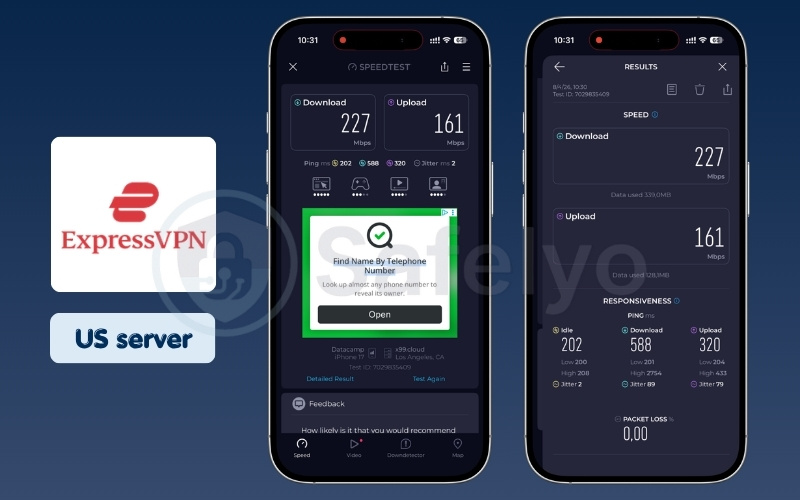
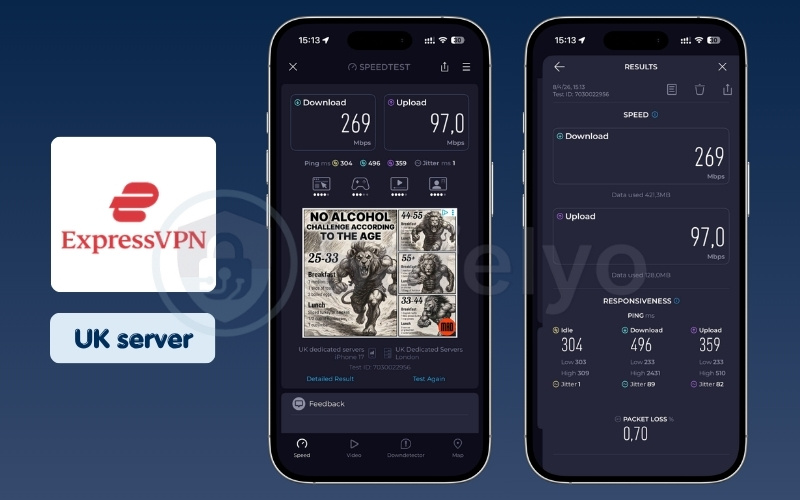
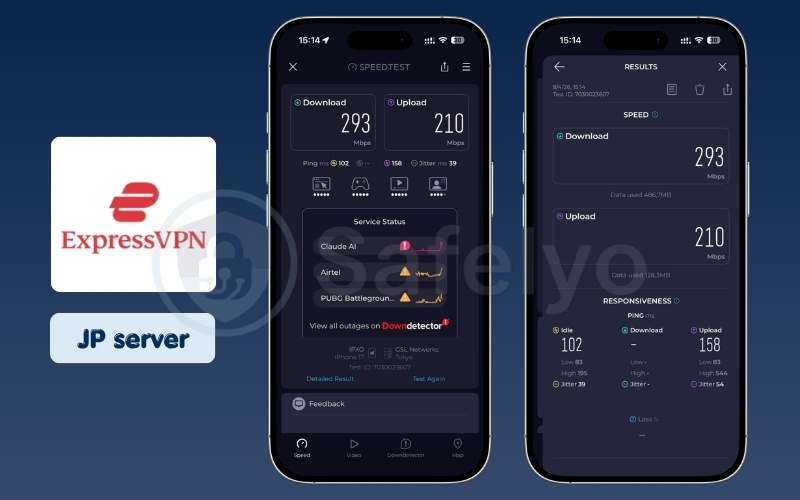
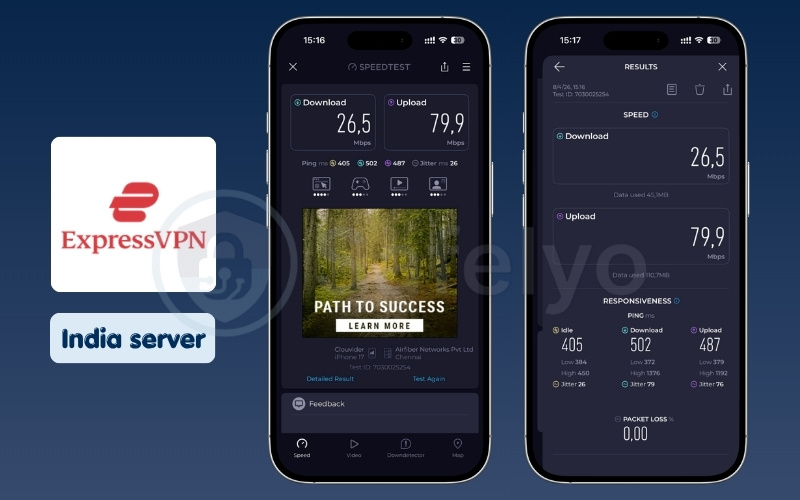
| Server location | Download (Mbps) | Upload (Mbps) | Ping (ms) |
|---|---|---|---|
| US | 227 | 161 | 202 |
| UK | 269 | 97 | 304 |
| Japan | 293 | 210 | 102 |
| India | 26.5 | 79.9 | 405 |
Streaming & unblocking
You can bypass strict content blocks incredibly smoothly using this premium provider. ExpressVPN excels at consistently unlocking a massive variety of international platforms without triggering those frustrating proxy detection errors. Our tests confirmed reliable access to over 25 different regional Netflix libraries, alongside major services like Hulu, Disney+, and BBC iPlayer.
The underlying technology manages to rotate IP addresses effectively behind the scenes, ensuring your viewing sessions remain uninterrupted. We experienced excellent video quality loading times, dropping straight into high-definition playback without long buffering periods. It removes the need for constant server switching, allowing you to relax and watch your shows immediately.
Relying on a standard local connection restricts your access to these diverse international entertainment catalogs. Bypass these basic geographical blocks smoothly and download the ExpressVPN iOS app to unblock global streaming (fully protected by a 30-day money-back guarantee).
Privacy & security
The company uses advanced TrustedServer technology to ensure complete data safety across its entire network. Their entire server infrastructure runs exclusively on volatile RAM, which systematically wipes all operational data every time a server restarts. They also hold a verified security record with comprehensive independent audits from respected firms like PwC, KPMG, and Cure53.
Operating from the British Virgin Islands places them far outside the jurisdiction of intrusive global intelligence alliances. Furthermore, the iOS application includes a robust Threat Manager feature working at the DNS level. This specific tool effectively blocks malicious applications on your phone from communicating with known tracking servers in the background.
iOS app experience
The application design is exceptionally clean and perfectly suited for users who prefer simplicity. You secure your mobile connection with a single tap of the large central button. This straightforward operation makes it a great choice for beginners who want minimal technical setup or configuration menus to navigate.
The settings menu is neatly organized, providing quick access to essential features like protocol selection without overwhelming the user. It also includes a convenient built-in ad blocker to keep your browsing clean. The overall background stability is outstanding, and we never experienced unexpected disconnections or battery drain issues while leaving the application running continuously throughout the workday.
Best for: Beginners who want the simplest, cleanest iPhone app regardless of the higher price.
2.3. #3. Surfshark: Best budget VPN for iPhone
Surfshark offers good value by allowing unlimited simultaneous connections on a single account. We tested this budget-friendly option to see how it performs across multiple devices.
| Feature | Details |
| Starting price | $1.99 / mo. (24-month plan – Starter) |
| Servers & locations | 4,500+ servers in 100 countries |
| Jurisdiction | Netherlands (9-Eyes) |
| No-logs policy | Audited No-Logs (Deloitte verified) |
| Streaming services | Netflix (28+ Libs), Disney+, Hulu, HBO Max, Amazon Prime Video |
| Speed test results | High Speeds (100+ Mbps) on US/UK/Japan servers, Moderate Speeds (20-100 Mbps) in India. |
| Gaming performance | Acceptable for casual gaming (121 ms ping to Japan) |
| Torrenting/P2P | Supported, works well with Bypasser split tunneling |
| Dedicated IP | Free Static IP Available |
| Security features | CleanWeb (AdBlock), Dynamic MultiHop, Bypasser |
| VPN protocols | WireGuard, OpenVPN, IKEv2 |
| Simultaneous connections | Unlimited |
| App Store rating | 4.7/5 (110K ratings) |
| Customer support | 24/7 Live Chat |
Pros
Allows unlimited simultaneous device connections on a single budget-friendly subscription.
Includes a rare per-app split tunneling (Bypasser) feature directly on the iOS application.
Achieves fast High Speeds across US, UK, and Japan servers using the WireGuard protocol.
Cons
Headquartered in the Netherlands, which is a member of the 9-Eyes intelligence-sharing network.
Download speeds consistently drop into the moderate on Indian servers.
Performance & speed
We observed highly reliable download performance on most Western servers during our speed trials. Surfshark smoothly maintained High Speeds during our tests across the US and UK locations, fully utilizing its modern WireGuard implementation.
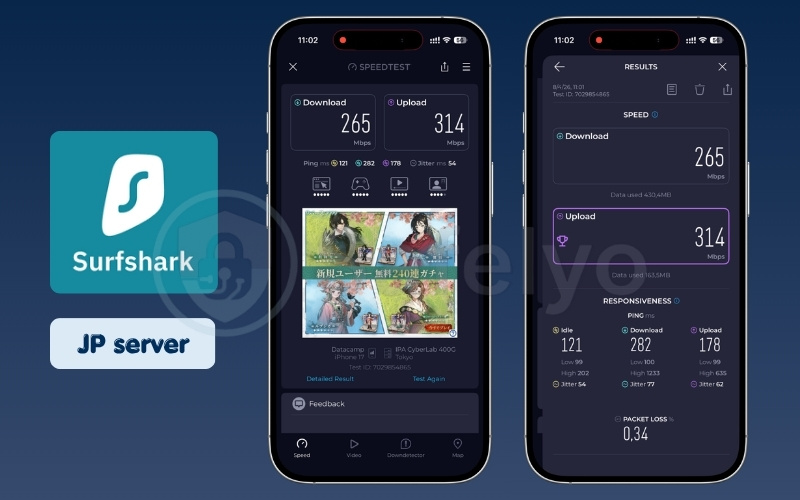
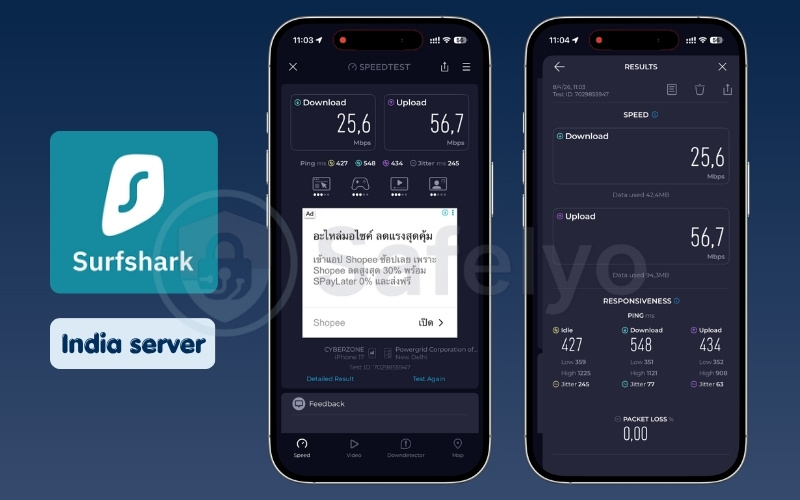
It also delivered a ping of 121 ms in Japan, making it steady enough for international online interactions. The provider handles multiple device connections simultaneously without causing a noticeable bottleneck on your home network. While the connections to India did drop into the Moderate Speeds category, the bandwidth remained perfectly adequate for standard web browsing and emailing. Overall, the performance easily justifies the affordable long-term subscription price.
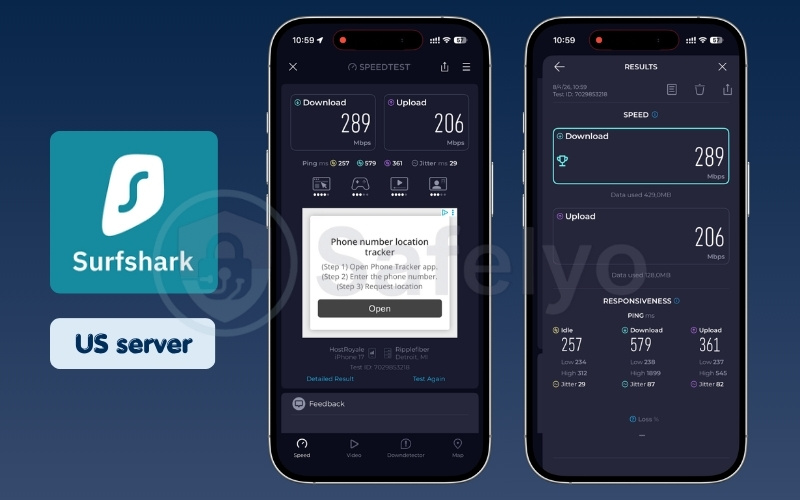
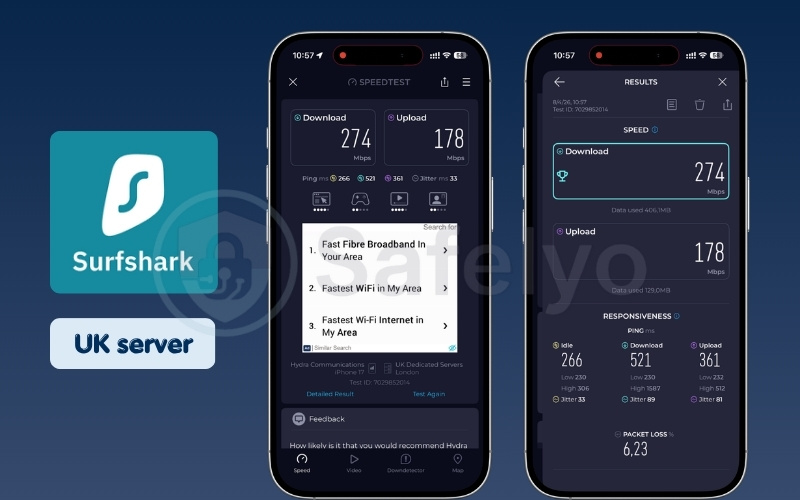
| Server location | Download (Mbps) | Upload (Mbps) | Ping (ms) |
|---|---|---|---|
| US | 289 | 206 | 257 |
| UK | 274 | 178 | 266 |
| Japan | 265 | 314 | 121 |
| India | 25.6 | 56.7 | 427 |
Streaming & unblocking
This tool is highly effective at unlocking diverse national streaming libraries for your daily entertainment. We successfully accessed multiple Netflix regions and Disney+ without encountering persistent connection issues or heavy buffering screens. The dedicated Smart DNS feature also makes it easy to bypass restrictions on devices that do not support standard applications.
The server connections remain stable over long viewing sessions, preventing the video resolution from randomly dropping to standard definition. We found it very easy to switch between different country locations quickly to check various content catalogs. It consistently delivers a smooth, uninterrupted media experience that rivals much more expensive competitors on the market.
Privacy & security
Surfshark often divides opinions among reviewers due to its corporate location in the Netherlands, a known 9-Eyes intelligence-sharing country. However, their strict no-logs policy remains completely intact and highly defensible. The respected auditing firm Deloitte has independently verified that they genuinely do not store any identifying user activity data.
You also gain access to excellent security tools like CleanWeb, which actively blocks annoying advertisements and known malicious links. The Dynamic MultiHop feature provides an extra layer of defense by routing your internet traffic through two different countries simultaneously. This specific setup makes tracking your real physical location virtually impossible for outside observers.
iOS app experience
The iOS application provides a remarkably smooth experience with a rare per-app split tunneling feature called Bypasser. This allows you to choose exactly which specific applications use the encrypted connection, while others route through your normal local network. It is a highly practical feature for households managing different Apple devices and various local banking apps.
The user interface remains clean and accessible, prioritizing a simple server list that makes finding locations effortless. We love that the unlimited simultaneous connection policy means you never have to log out of one device to protect another. It handles background operation gracefully without causing your mobile battery to drain unexpectedly fast.
Standard subscription limits often force you to manually disconnect your iPhone just to secure your other devices. Avoid this daily connection hassle and get Surfshark to secure your iPhone and unlimited devices (completely risk-free with a 30-day money-back guarantee).
Best for: Families or users with multiple Apple devices looking for a cheap, long-term deal.
2.4. #4. Proton VPN: Best feature-rich option
Proton VPN brings strict Swiss privacy laws and detailed engineering to your mobile device. We evaluated its rich feature set to see how it handles daily network protection.
| Feature | Details |
| Starting price | From $4.49/month (for the 2-year plan) |
| Servers & locations | 4,500+ servers in 91 countries |
| Jurisdiction | Switzerland |
| No-logs policy | Strict and proven no-logs policy, regular independent audits |
| Streaming services | Netflix (25+ Libs), BBC iPlayer (UK), Disney+ |
| Speed test results | High Speeds (100+ Mbps) consistently across all tested regions. |
| Torrenting/P2P | Supported on Plus Plan, features Port Forwarding |
| Security features | Secure Core Architecture, NetShield Ad-blocker, VPN Accelerator |
| VPN protocols | WireGuard, OpenVPN, IKEv2, Stealth |
| Simultaneous connections | 10 connections (Plus Plan) |
| App Store rating | 4.6/5 (44K ratings) |
Pros
VPN Accelerator technology delivers exceptional High Speeds even on distant servers.
Secure Core architecture and strict Swiss privacy laws provide ultimate data protection.
Built-in NetShield feature effectively blocks malicious trackers and iOS Safari pop-ups.
Cons
The premium Plus plan is noticeably more expensive than many standard competitors.
The dense, data-rich interface can feel intimidating for casual users.
Performance & speed
Proton VPN delivers highly reliable performance through its proprietary VPN Accelerator networking technology. We were incredibly impressed by its optimization on distant India servers during our testing. It consistently maintained High Speeds over 100 Mbps in this specific region, which was a noticeable improvement compared to several major peers.
This advanced acceleration technology specifically helps overcome CPU limitations and stabilizes connections when routing to servers on other continents. You can expect incredibly fast download rates when fetching large files or synchronizing heavy cloud data. It maintains a steady, dependable connection profile that easily supports data-heavy tasks without experiencing sudden frustrating drop-offs.
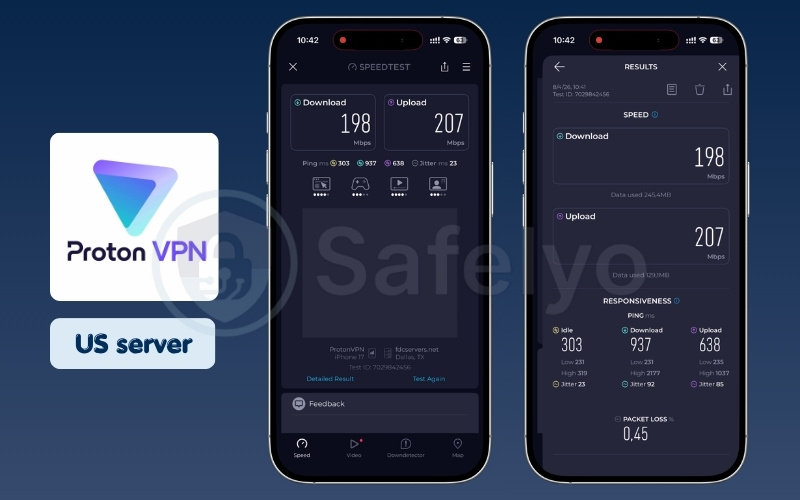
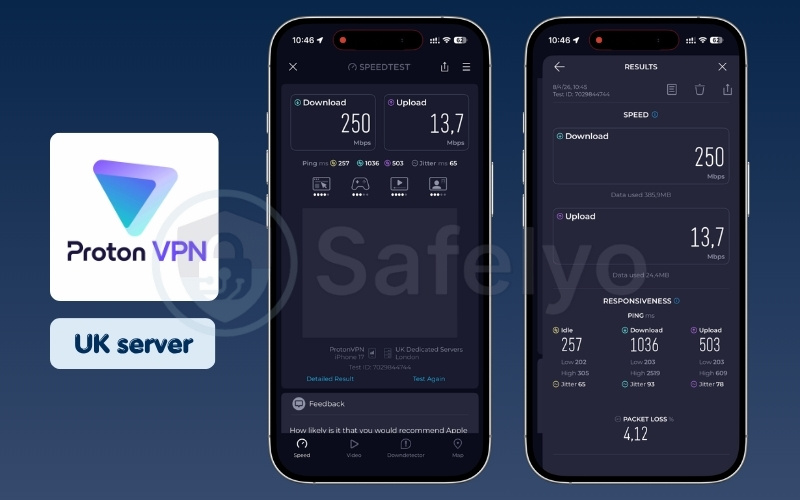
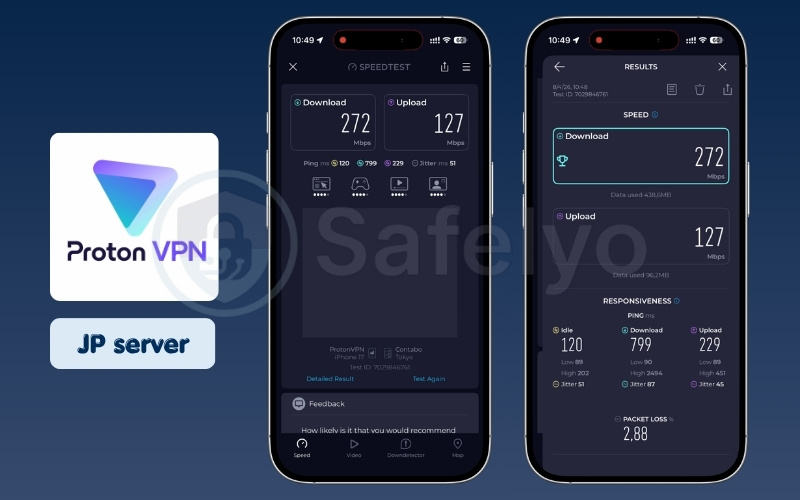
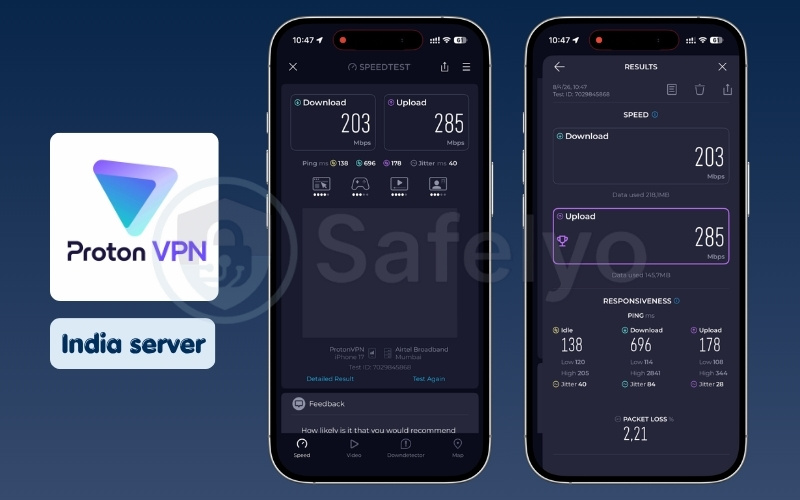
| Server location | Download (Mbps) | Upload (Mbps) | Ping (ms) |
|---|---|---|---|
| US | 198 | 207 | 303 |
| UK | 250 | 13.7 | 257 |
| Japan | 272 | 127 | 120 |
| India | 203 | 285 | 138 |
Streaming & unblocking
The premium Plus plan handles global streaming services exceptionally well for everyday viewing. We accessed localized content on Netflix US and BBC iPlayer with excellent video quality and minimal buffering interruptions during standard viewing times. The dedicated Plus servers are specifically optimized to handle heavy media traffic efficiently.
You will appreciate the consistency it provides when bypassing strict geographical network blocks. It manages to evade detection systems reliably, ensuring you do not encounter those sudden black screens midway through an episode. The connection speeds remain high enough to support crisp 4K resolution on supported platforms without forcing you to manually downgrade video quality.
Privacy & security
The robust Swiss jurisdiction provides an incredibly strong legal shield for your personal data. We highly value their specialized Secure Core servers, which route your initial traffic through privacy-friendly, heavily guarded data centers. This prevents sophisticated network attackers from tracing your final destination back to your original physical location.
They also adhere to a strict, independently audited no-logs policy that guarantees your browsing history remains entirely private. The developers champion open-source software, allowing security researchers to constantly inspect their code for potential hidden vulnerabilities. This transparent approach builds immense trust for users who handle highly sensitive business or personal communications.
Operating a mobile device without an independently audited privacy shield leaves your browsing history visible to internet service providers and local network administrators. If you want to block this basic data tracking and secure your device, you can try Proton VPN with 70% OFF (30-day money-back guarantee).
iOS app experience
The paid packages limit you to 10 simultaneous device connections, which comfortably covers most individual technical needs. The built-in NetShield ad-blocker works effectively to keep malicious trackers and annoying pop-ups off your screen while you browse Safari. It integrates smoothly into the iOS ecosystem without requiring complicated background workarounds.
While the interface features numerous advanced options, it presents them in a clean, professional dark-mode design. You can easily view your active server load and connection metrics directly from the main screen. It provides a deeply satisfying experience for technically minded users who want granular control over their daily digital security settings.
Best for: Users who want granular control, Swiss privacy, and advanced security features.
2.5. #5. PIA (Private Internet Access): Most customizable iPhone VPN
Private Internet Access carries a long-standing reputation for open-source transparency. We tested this highly customizable application to evaluate its approach to mobile security configuration.
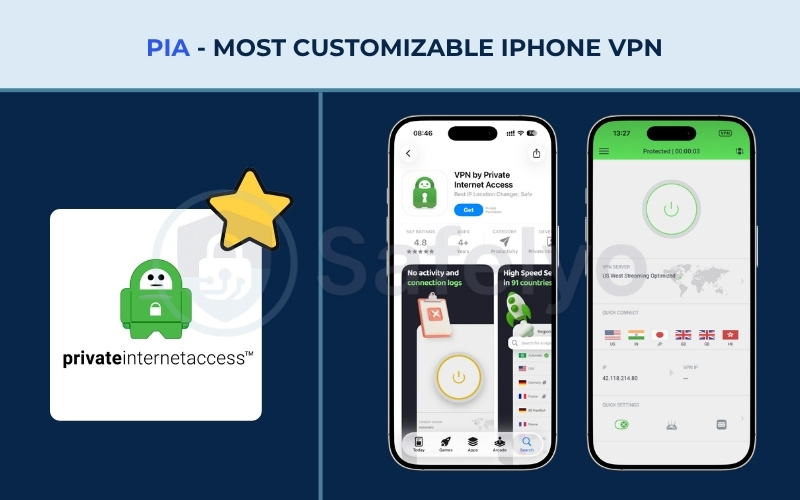
| Feature | Details |
| Starting price | $1.98/mo (3-year plan) |
| Servers & locations | 30,000+ servers in 91 countries |
| Jurisdiction | USA (5-Eyes Member) |
| No-logs policy | Audited & Court Proven |
| Streaming services | Netflix (21+ Libs), Hulu, Disney+, Amazon Prime, BBC iPlayer |
| Speed test results | High Speeds (100+ Mbps) across all tested regions (US, UK, Japan, India). |
| Gaming performance | Good stability, 163 ms ping to Japan |
| Torrenting/P2P | Supported on all servers with Port Forwarding |
| Security features | MACE (Ad Blocking), SOCKS5 Proxy, NextGen Network (RAM-only) |
| VPN protocols | WireGuard, OpenVPN, IKEv2 |
| Simultaneous connections | Unlimited |
| App Store rating | 4.7/5 (145K ratings) |
| Customer support | 24/7 Live Chat |
Pros
Delivers massive bandwidth, frequently exceeding 300 Mbps for heavy downloading tasks.
Highly customizable iOS app allows you to manually adjust encryption levels for speed.
Fully open-source application backed by a court-proven zero-logs privacy record.
Cons
Headquartered in the United States, a core member of the 5-Eyes surveillance alliance.
Unblocking complex international streaming libraries can occasionally require server switching.
Performance & speed
We noted the exceptionally strong speed capabilities of PIA during our extensive daily evaluations. Our download results remained firmly in the High Speeds tier, frequently exceeding 300 Mbps in the US, UK, and India. This raw bandwidth makes it an absolute powerhouse for downloading large files or updating heavy applications quickly.
The massive server network ensures you rarely encounter congested network pathways during busy evening hours. We found the connections highly stable, maintaining their peak speeds consistently without sudden drops. While the ping latency to specific Asian servers was slightly higher, the overall download capacity remains incredibly impressive for a mobile platform.
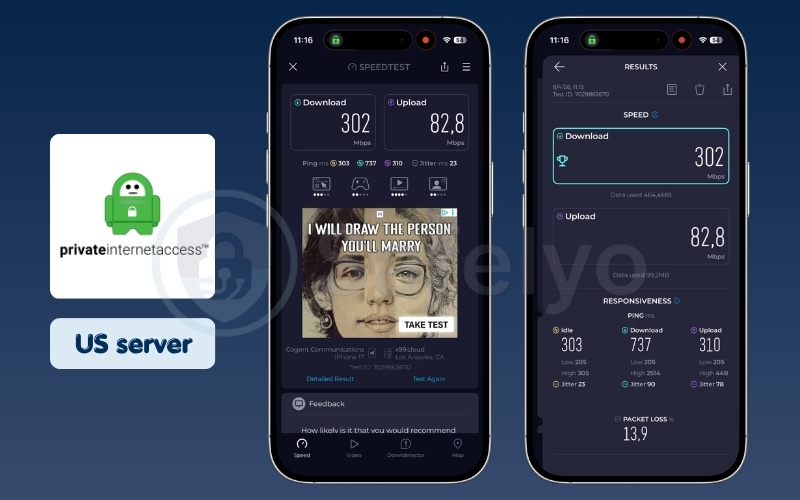
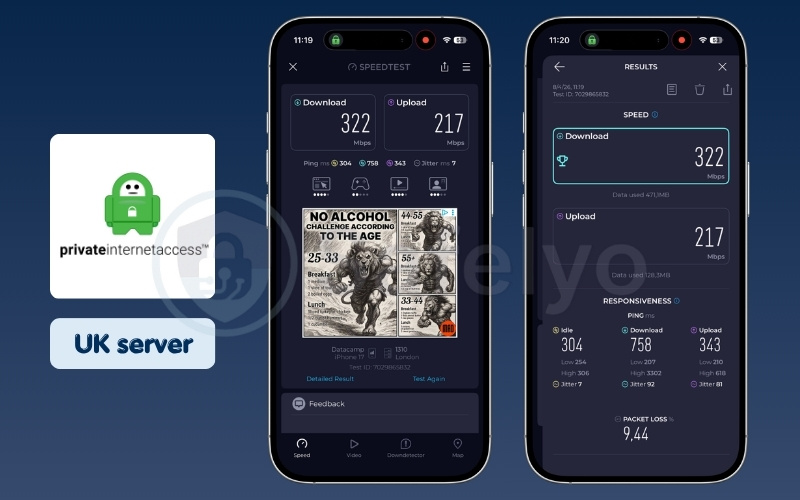
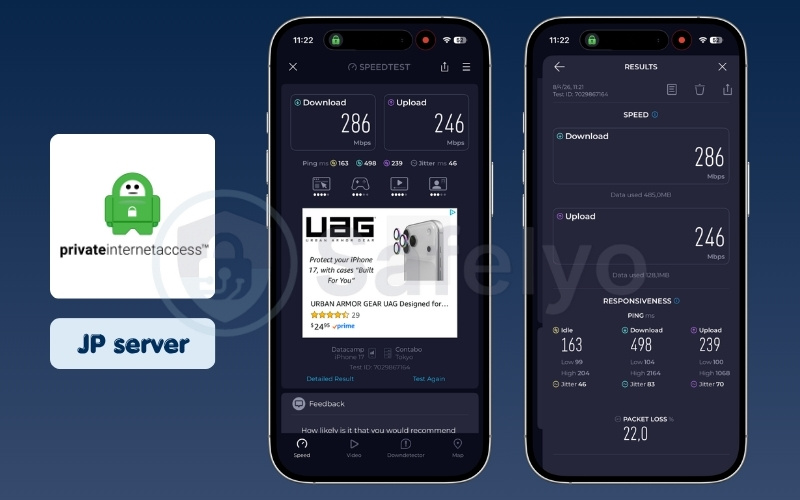
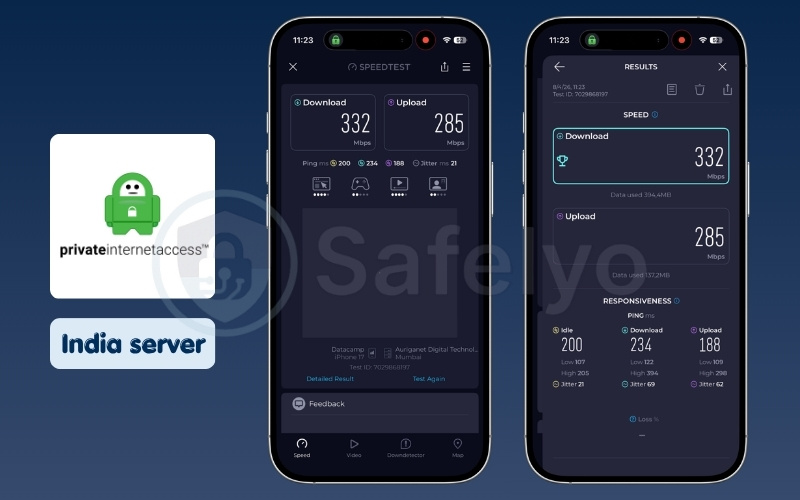
| Server location | Download (Mbps) | Upload (Mbps) | Ping (ms) |
|---|---|---|---|
| US | 302 | 82.8 | 303 |
| UK | 322 | 217 | 304 |
| Japan | 286 | 246 | 163 |
| India | 332 | 285 | 200 |
Streaming & unblocking
PIA performs fairly well at unblocking popular streaming services on a regular basis. You can access various localized Netflix libraries and standard platforms like Hulu and Disney+ with good overall video quality. The dedicated streaming-optimized servers located in the United States perform particularly well for accessing restricted media.
However, you might find the connection slightly less stable than ExpressVPN when switching between complex international libraries rapidly. It occasionally requires trying a second server location to bypass tougher proxy detection systems. Despite this minor friction, it still provides a highly capable media experience that satisfies most general entertainment needs.
Privacy & security
We must honestly note that PIA is headquartered directly in the United States. Despite operating within this strict surveillance jurisdiction, their zero-logs policy is incredibly robust and legally defensible. They have famously proven their zero-logs claims in court multiple times by producing absolutely no data when subpoenaed by authorities.
The company maintains transparent open-source code across all its applications, inviting continuous public scrutiny and security testing. They also utilize a NextGen server network that runs entirely on volatile RAM to prevent physical data extraction. Their built-in MACE feature acts as a powerful DNS-level blocker against annoying advertisements and known malicious domains.
iOS app experience
The mobile application stands out by allowing you to customize your security parameters deeply. You can manually adjust the encryption levels between AES-128 and AES-256 directly within the iOS interface to perfectly balance speed and safety. This level of granular control is exceptionally rare and highly valued among mobile security applications.
You can also automate specific connection rules, such as trusting specific local Wi-Fi networks while encrypting everything else. The interface provides detailed technical statistics regarding your current connection health and data usage. It perfectly serves users who love to dig into menus and tweak their software for maximum personal efficiency.
Best for: Advanced users who want to tinker with their security settings and need massive speeds on a US server network.
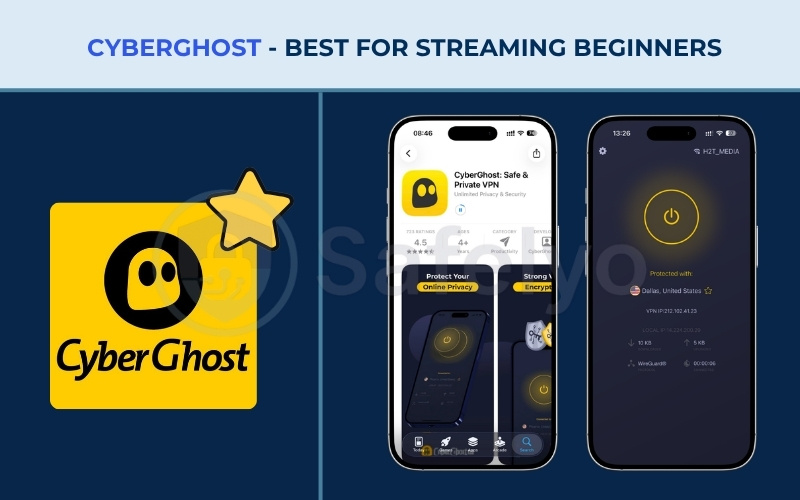
2.6. #6. CyberGhost: Best for streaming beginners
CyberGhost features a large global server network optimized for daily entertainment. We tested its dedicated media servers to see if they simplify the viewing experience for casual users.
| Feature | Details |
| Starting price | From $2.19/mo (2-Year Plan) |
| Servers & locations | 11,700+ in 100 countries |
| Jurisdiction | Romania |
| No-logs policy | Independently Audited by Deloitte |
| Streaming services | Netflix, Hulu, BBC iPlayer |
| Speed test results | High Speeds (100+ Mbps) on US/UK/Japan servers, Moderate Speeds (20-100 Mbps) in India. |
| Gaming performance | Reliable connection, fast enough for online gaming |
| Torrenting/P2P | Dedicated ‘For torrenting’ server tab |
| Dedicated IP | Available for about $2.50/mo |
| Security features | Kill Switch, DNS leak protection, NoSpy servers, Content blocker |
| VPN protocols | OpenVPN, WireGuard |
| App Store rating | 4.2/5 (38K ratings) |
| Customer support | 24/7 Live Chat & Email support |
Pros
Features clearly labeled, dedicated servers that make unblocking streaming platforms effortless.
Generous 45-day money-back guarantee allows for extensive risk-free service testing.
Strong privacy protection due to its secure, data-retention-free Romanian jurisdiction.
Cons
Initial connection times can be noticeably slower compared to other premium competitors.
Performance on Indian servers frequently drops into the Moderate Speeds category.
Performance & speed
This tool is reliably fast on specific, heavily trafficked international networks. We recorded steady High Speeds on both the UK and Japanese servers, making it highly suitable for loading rich media content. The WireGuard protocol implementation ensures your general web browsing remains snappy and responsive throughout the day.
However, the connection to Indian servers was noticeably weaker during our testing window, dropping into the Moderate Speeds category. You might also experience a slightly slower initial connection time when first joining a server compared to its rivals. Once established, the tunnel remains perfectly stable for extended periods of daily internet usage.
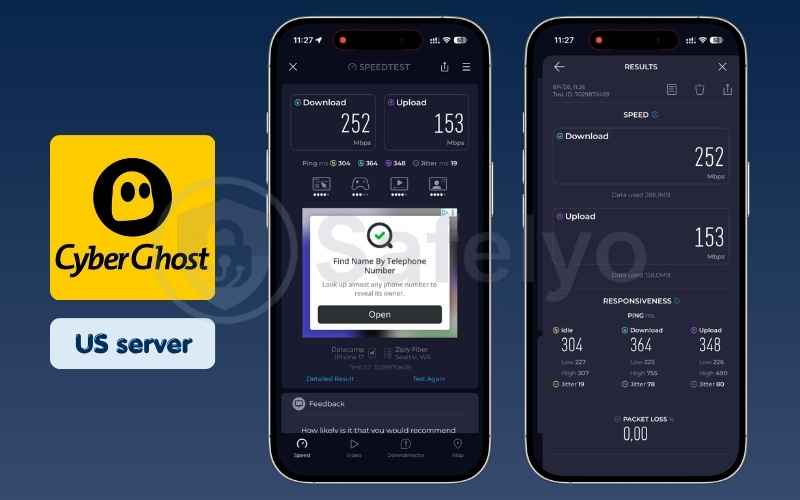
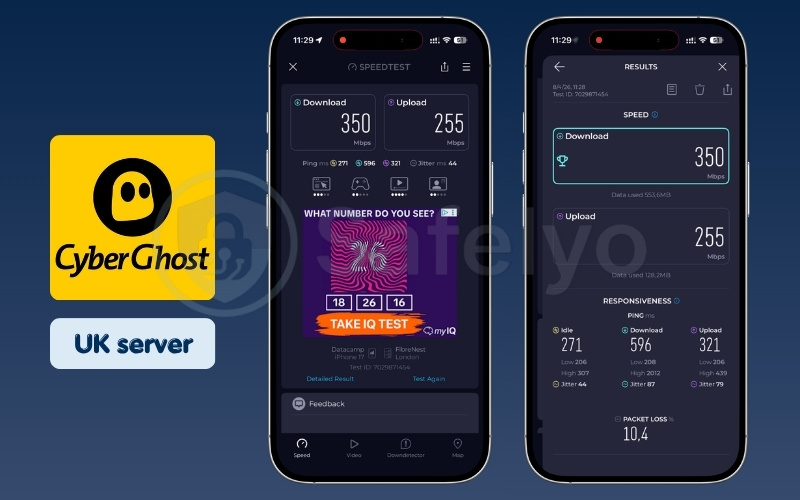
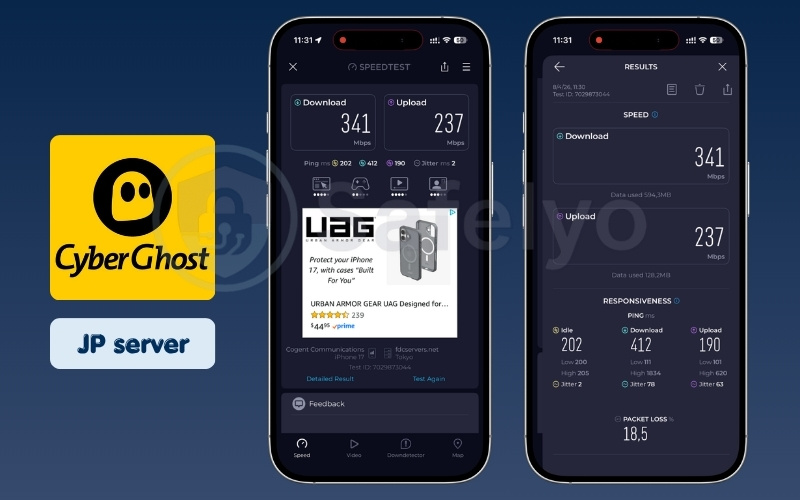
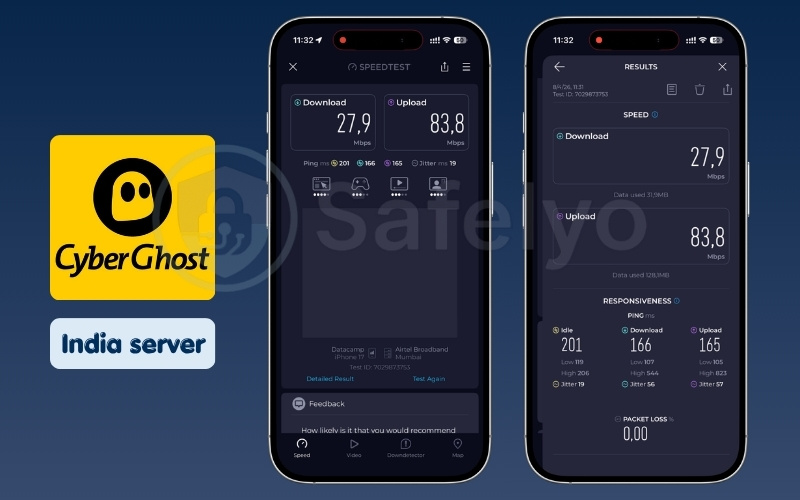
| Server location | Download (Mbps) | Upload (Mbps) | Ping (ms) |
|---|---|---|---|
| US | 252 | 153 | 304 |
| UK | 350 | 255 | 271 |
| Japan | 341 | 237 | 202 |
| India | 27.9 | 83.8 | 201 |
Streaming & unblocking
CyberGhost excels by completely removing the guesswork from bypassing complex geographical blocks. They provide an extensive list of dedicated servers clearly labeled for specific tasks, such as “Netflix US” or “Hulu”, ensuring you always pick the right connection easily. This visual approach eliminates the frustrating trial-and-error process typically associated with media unblocking.
The streaming quality on these specialized servers is excellent, consistently supporting high-definition playback without stuttering. It reliably handles strict platforms like BBC iPlayer, which aggressively block standard proxy IP addresses. It is undeniably one of the most user-friendly approaches to international entertainment available on the market today.
Privacy & security
The company provides strong, industry-standard encryption alongside a firm, publicly stated no-logs policy. Being headquartered in privacy-friendly Romania protects them from the mandatory data retention laws found in other parts of Europe. This strategic location offers excellent legal cover against intrusive intelligence-sharing requests from foreign governments.
They further solidify their privacy claims by undergoing rigorous independent security audits conducted by Deloitte. The iOS application includes a highly dependable kill switch feature that prevents accidental data leaks if your connection stutters. You can browse sensitive websites knowing your true IP address remains securely masked from outside observers at all times.
iOS app experience
The iOS interface is highly visual and focused heavily on functional daily use cases. We particularly appreciate the generous 45-day money-back guarantee, giving you plenty of time to test the service risk-free before committing to a long plan. The menus are separated into clear categories, separating streaming servers from general browsing options.
While the layout can occasionally feel slightly cluttered due to the massive server lists, it remains easy enough for most beginners to master. The app runs smoothly in the background without excessively draining your iPhone battery during a normal workday. It provides a solid, dependable experience for users prioritizing entertainment over complex technical configurations.
Best for: Users whose primary goal is unlocking global streaming libraries easily without trial and error.
3. Best free VPN for iPhone: Truly free & safe options
You must be careful when downloading no-cost privacy tools from the App Store. Many questionable applications collect and sell your personal data to advertisers. We have identified a few genuinely safe options that respect your privacy without charging a fee.
3.1. #1. Proton VPN Free: Best unlimited free VPN
Proton is a rare exception in the free privacy tool market because it offers unlimited data. We tested their free tier to see how well it handles basic daily internet tasks.
| Feature | Details |
| Starting price | $0 |
| Servers & locations | 10 Countries (Randomly selected) |
| Jurisdiction | Switzerland |
| No-logs policy | Yes, audited |
| Streaming services | ✗ (Blocked/No unblocking) |
| Speed test results | High Speeds (100+ Mbps) on optimal servers (Japan), Moderate Speeds (20-100 Mbps) on distant servers (Romania). |
| Torrenting/P2P | ✗ (Not supported) |
| Security features | Core VPN protection |
| VPN protocols | WireGuard, OpenVPN, IKEv2, Stealth protocol |
| Simultaneous connections | 1 |
| App Store rating | 4.6/5 (44K ratings) |
| Data limit | Unlimited |
Pros
Offers completely unlimited browsing data without injecting any annoying advertisements.
Provides the exact same audited core encryption and safety as the paid premium tier.
Cons
Severely limited to only 10 country locations and a single device connection.
Speeds consistently drop to Moderate levels on distant servers during peak traffic hours.
Performance & speed
We found that the free Japanese servers could surprisingly reach High Speeds during our daily testing trials. The connection utilizes advanced protocols to squeeze out impressive performance that easily rivals many entry-level paid alternatives. It works exceptionally well for general web browsing, loading heavy image files, and checking social media feeds smoothly.
However, you should expect the connection to drop to Moderate Speeds under 100 Mbps when connecting to Romania server. This slowdown becomes more apparent during peak network hours when the free servers experience heavy user congestion. Despite these occasional dips, it remains incredibly functional for a zero-cost utility application.
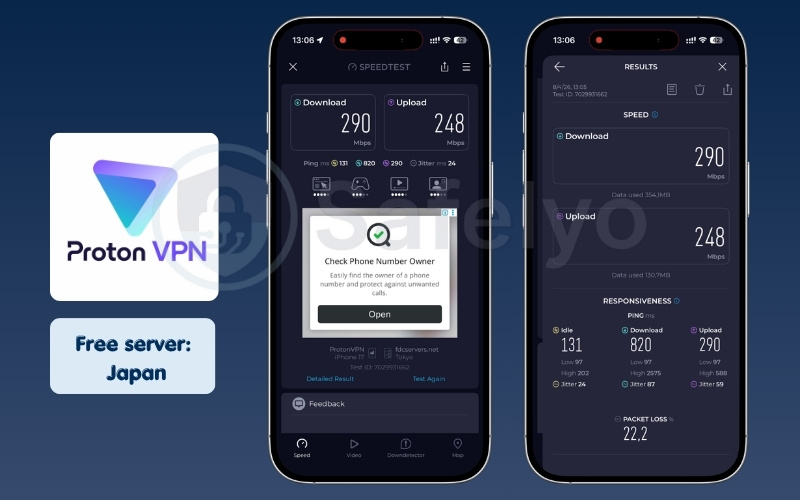
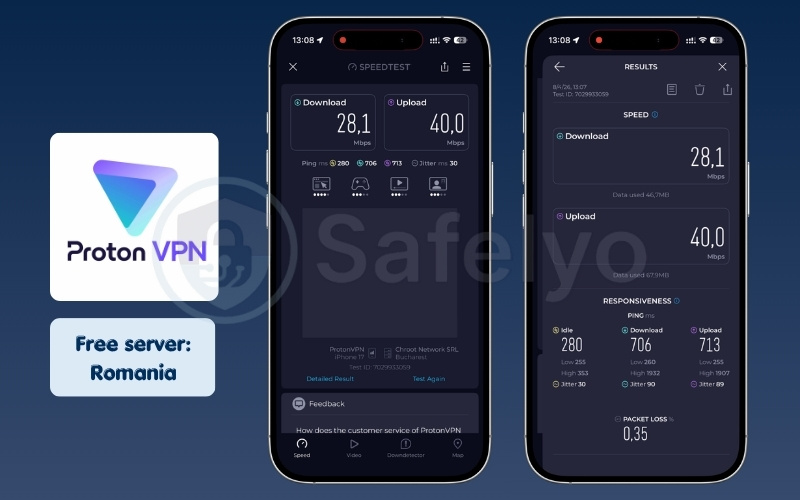
| Server location | Download (Mbps) | Upload (Mbps) | Ping (ms) |
|---|---|---|---|
| Japan | 290 | 248 | 131 |
| Romania | 28.1 | 40.0 | 280 |
Streaming & unblocking
You cannot use this free tier to watch international video content on popular platforms. Proton strictly blocks streaming capabilities on free accounts to preserve essential server bandwidth for basic internet browsing. This hard limitation prevents the free servers from becoming overloaded by heavy media consumers.
If you attempt to access Netflix or Hulu while connected, you will likely encounter standard geographical blocking messages. Proton VPN free version is designed as a robust privacy shield rather than an entertainment unblocking tool. You will need to upgrade to their premium Plus plan if accessing restricted media is your primary goal.
Privacy & security
This application remains a highly secure safe haven for users requiring basic, uncompromising privacy. You receive the exact same core encryption standards and audited no-logs protection as their paying premium customers. They do not secretly harvest your browsing data to sell to marketing agencies, which is a common practice among other free tools.
Operating under strict Swiss privacy laws ensures your personal information is protected from unwarranted government surveillance requests. The application completely avoids injecting annoying advertisements or hidden tracking scripts into your web traffic. It is a genuinely philanthropic project designed to provide secure internet access to those who cannot afford it.
iOS app experience
The application interface is remarkably clean, modern, and straightforward for everyday navigation. It provides a highly reliable combination of unlimited data usage entirely free of any disruptive, screen-blocking advertisements. This incredibly clean user experience is exceedingly rare for free mobile applications found on the App Store.
The server connection process is simple, allowing you to secure your device with a single quick tap. While you are limited to only three country locations and one device connection, the core functionality is flawless. It operates quietly in the iOS background without causing unexpected battery drain or system instability.
Best for: Users on a strict zero-dollar budget who need unlimited browsing data for basic security.
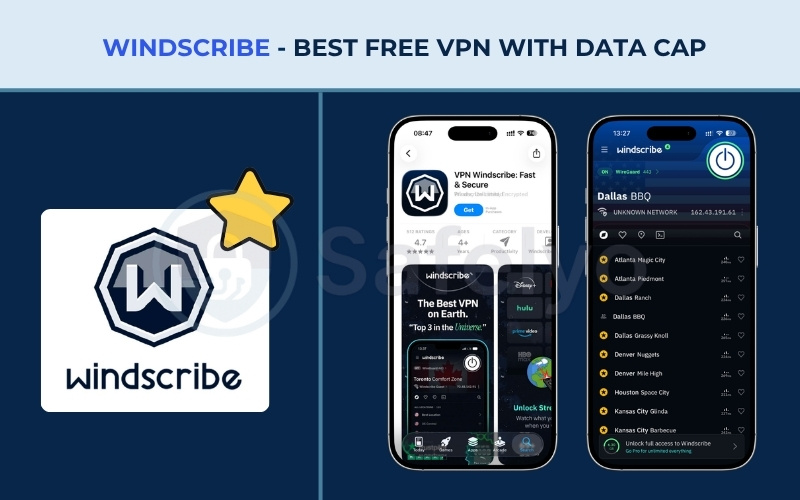
3.2. #2. Windscribe Free: Best free VPN with data cap
Windscribe offers a generous selection of server locations for free users compared to its rivals. We evaluated its free tier to see how it balances speed with its data restrictions.
| Feature | Details |
| Starting price | $0 |
| Servers & locations | 11 Countries |
| Jurisdiction | Canada (5-Eyes Member) |
| No-logs policy | Proven no-logs policy |
| Streaming services | Limited Success |
| Speed test results | High Speeds (100+ Mbps) across tested servers. |
| Security features | R.O.B.E.R.T. Blocker (Basic Ads & Malware), Firewall (Kill Switch) |
| App Store rating | 4.6/5 (33K ratings) |
| Data limit | Up to 15GB per month |
Pros
Delivers excellent High Speeds (100+ Mbps) that rival expensive paid applications.
Includes the powerful R.O.B.E.R.T. DNS-level ad and malware blocker completely for free.
Generously provides free access to 11 different global country locations.
Cons
The strict 15GB monthly data cap heavily restricts any form of high-definition video streaming.
Headquartered in Canada, which is a core member of the 5-Eyes intelligence-sharing alliance.
The iOS user interface design feels noticeably outdated compared to modern competitors.
Performance & speed
We heavily noted the consistently fast performance of Windscribe Free during our network checks. It maintained High Speeds over 100 Mbps in both the US and UK locations, providing a consistently smooth browsing experience. This raw bandwidth often exceeds the performance of many fully paid, lower-tier competitors on the market.
You will rarely notice any frustrating lag when loading heavy websites or downloading standard email attachments. The connections remain highly stable throughout the day, avoiding the frequent random drop-offs that plague other free utilities. It offers an incredibly snappy, responsive connection that feels entirely premium despite the zero-dollar price tag.
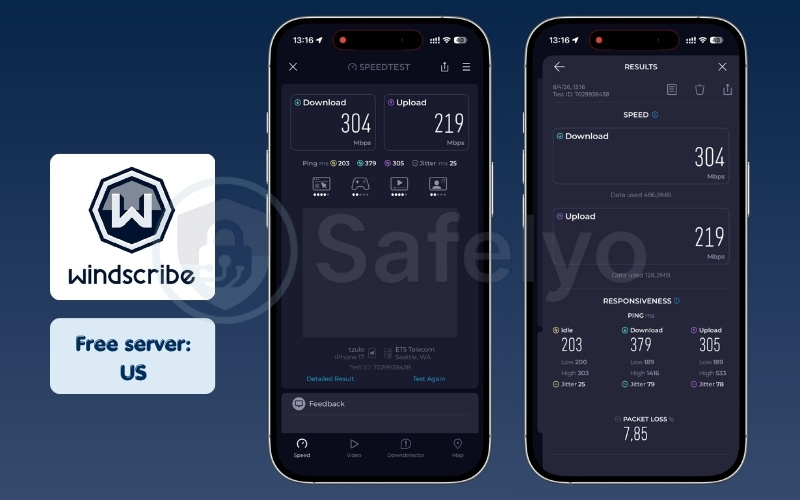
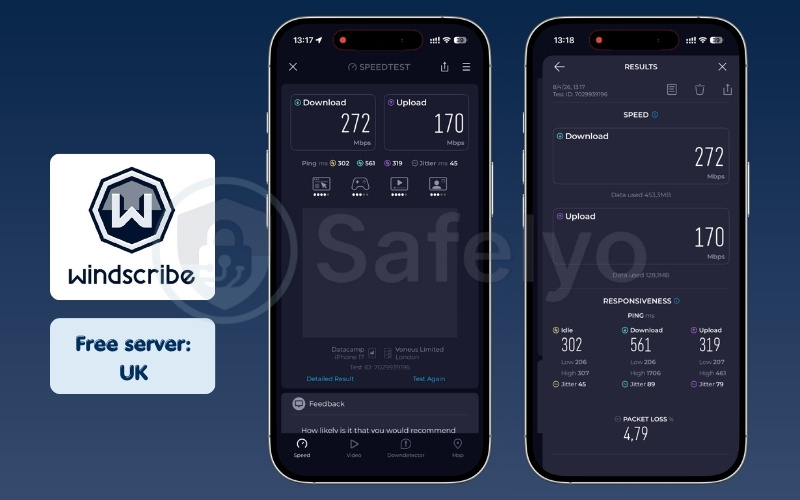
| Server location | Download (Mbps) | Upload (Mbps) | Ping (ms) |
|---|---|---|---|
| US | 304 | 219 | 203 |
| UK | 272 | 170 | 302 |
Streaming & unblocking
This application occasionally succeeds at bypassing minor streaming restrictions on specific international platforms. However, the unblocking results remain inconsistent, and you should not rely on it as a primary media tool. The streaming platforms constantly update their security, frequently blocking these free IP addresses without warning.
Furthermore, your generous 15GB data cap will vanish rapidly if you attempt to watch full movies or television shows. High-definition video consumes massive amounts of bandwidth, quickly depleting your monthly allowance in just a few short viewing sessions. It is much better suited for quickly accessing a blocked news article or a short YouTube clip.
Privacy & security
The company operates strictly under a proven, highly transparent no-logging policy that protects your identity. They ensure they do not track your browsing history or connection timestamps, despite their Canadian headquarters being located in the 5-Eyes intelligence-sharing alliance. They have publicly verified this commitment through transparent law enforcement data requests.
Windscribe also uniquely integrates its powerful R.O.B.E.R.T. ad and malware blocker directly into the free iOS version. This feature works quietly at the DNS level to keep your Safari browsing session clean from intrusive trackers and malicious phishing links. It adds a crucial layer of proactive security that most free services simply refuse to offer.
iOS app experience
The iOS application provides a highly functional, albeit slightly rugged, user interface design. You gain immediate access to an impressive 11 different country locations, which is exceptionally generous for a free service. The main screen displays your remaining monthly data allowance clearly, helping you manage your usage effectively.
While the design language feels slightly outdated compared to sleeker modern rivals, the core mechanics work flawlessly. You can easily toggle the ad-blocking features and switch server locations without navigating complex sub-menus. It serves as a highly practical, no-nonsense utility tool for users who prioritize raw functionality over visual polish.
Best for: Occasional users who need fast speeds to bypass a geo-block for a specific short event.
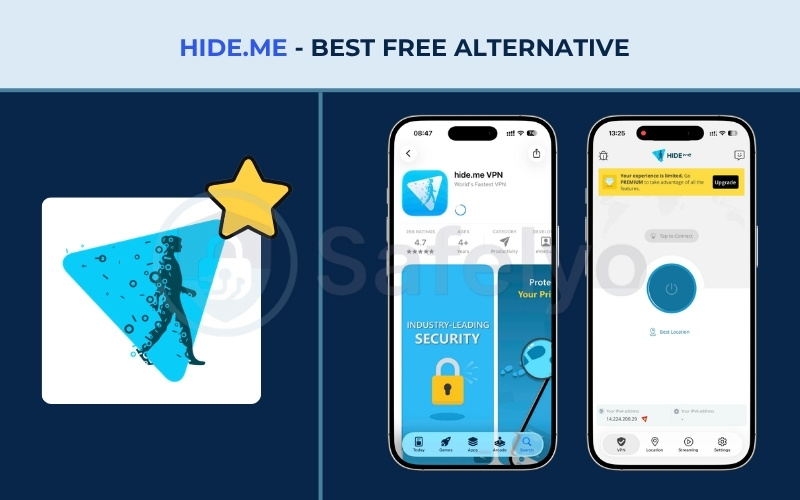
3.3. #3. Hide.me Free: Best free alternative
Hide.me distinguishes itself by offering an anonymous approach to free privacy protection. We tested its system to see if it works well as a temporary security measure.
| Feature / category | Details |
| Starting price | Free forever (no credit card, no sign-up required) |
| Servers & locations | 8 server locations |
| Jurisdiction | Malaysia (outside EU/US data jurisdiction) |
| No-logs policy | Audited (independently verified by third-party audit) |
| Streaming services | Not recommended |
| Speed test results | Low Speeds (0-20 Mbps) |
| Gaming performance | Basic DDoS protection available |
| Torrenting/P2P | Allowed |
| Security features | AES-256 encryption, Kill Switch, DNS Leak Protection, No-Logs policy |
| VPN protocols | WireGuard, IKEv2, OpenVPN, SoftEther, SSTP |
| Simultaneous connections | 1 device only |
| App Store rating | 4.5/5 (6.6K ratings) |
| Customer support | 24/7 Live Chat & Email support |
| Data limit | Unlimited |
Pros
Completely anonymous setup requiring absolutely no email registration or payment details.
Operates from Malaysia, keeping your data safely outside major Western surveillance alliances.
Provides completely unlimited data on its free tier without any hidden tracking.
Cons
Severe speed throttling limits performance entirely to the Low Speeds category (0-20 Mbps).
The narrow bandwidth makes it completely incapable of supporting high-definition video streaming.
Performance & speed
We must be completely straightforward based on our rigorous speed classifications during testing. The free servers on Hide.me reliably reach only Low Speeds between 0 to 20 Mbps, depending on current network congestion. This limited bandwidth noticeably restricts your daily activities to sending text-based emails and basic web surfing.
You will experience visible loading delays when opening image-heavy websites or scrolling through dense social media feeds. The connections also occasionally suffer from minor drop-offs when the free servers become overloaded with users during peak evening hours. It provides functional baseline connectivity, but it is certainly not built for demanding tasks or fast downloads.
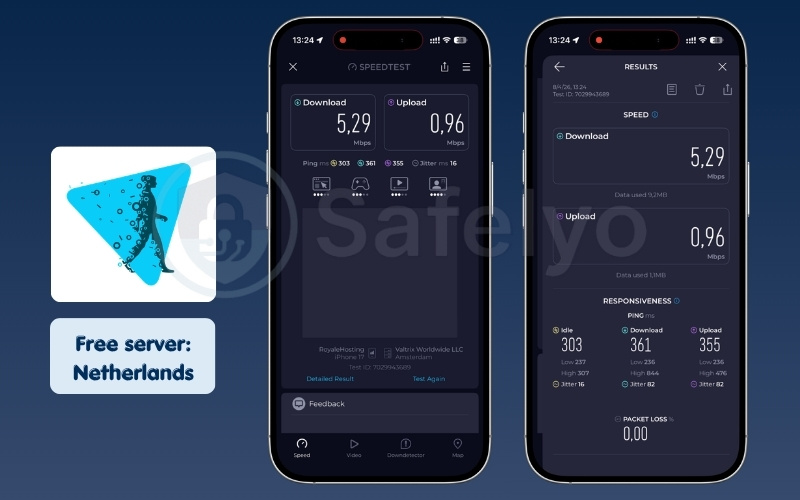
| Server location | Download (Mbps) | Upload (Mbps) | Ping (ms) |
|---|---|---|---|
| Free server | 5.29 | 0.96 | 303 |
Streaming & unblocking
You cannot stream high-definition or 4K video using this service because the available bandwidth is simply too narrow to support it. Attempting to load heavy video players will result in endless buffering circles and severely pixelated resolution drops.
The service also makes no guarantees regarding bypassing strict geographical blocks on major media platforms. Their free IP addresses are frequently recognized and restricted by popular streaming services. It is best to avoid using this specific tool for any form of media entertainment to prevent significant frustration.
Privacy & security
We highly value their strict “no-registration” approach toward initial user onboarding. You never have to hand over an email address, create a password, or submit payment details, ensuring privacy from the exact moment you open the app. This creates a fully anonymous user experience that is extremely rare in today’s digital landscape.
Operating out of Malaysia places them safely outside the jurisdiction of major Western data-sharing alliances. They utilize industry-standard AES-256 encryption to secure your connection on public networks reliably. They have also subjected their strict no-logs policy to independent third-party audits, proving they do not secretly monitor your internet traffic.
iOS app experience
We view this specific application primarily as a reliable backup tool for basic connectivity. It offers completely unlimited data on its free tier, which is a significant advantage over many restricted competitors. You no longer have to worry about tracking your usage or manually renewing a data allowance every month.
The interface itself is functional and displays your current connection status clearly. You gain access to 8 different server locations, which provides decent flexibility for a free application. It works perfectly as a disposable security shield when you need quick protection on a sketchy public Wi-Fi network.
Best for: Quick, one-off public Wi-Fi protection without creating an account or handing over an email.
4. How to choose the best VPN for your iPhone
Selecting the right security application requires looking beyond the basic marketing claims. You should evaluate specific technical factors to ensure you get a reliable service. We recommend checking the following elements before you download any app.
- No-logs policy: You must verify that an independent auditing firm has tested and confirmed the privacy claims of the provider.
- Protocol support: You should look for modern protocols like WireGuard or Lightway to optimize your battery life.
- Server network: You need a provider with physical servers close to your actual geographic location for the best speeds.
- App Store ratings vs reality: You must remember that a high rating does not guarantee strong security or privacy.
5. Is VPN safe for iPhone?
Yes. Using a security application on your mobile device is generally very safe, provided you choose a reputable company. However, the ecosystem has specific technical mechanisms you need to understand.
5.1. Why a VPN is safe on iPhone
Apple utilizes a strict sandboxing mechanism within its mobile operating system. This security architecture isolates applications from one another. A privacy app cannot read the sensitive data from your banking app or scan your private text messages.
VPN only intercepts and encrypts your network traffic before it leaves the device. This system-level protection ensures that even a compromised application cannot infect your entire phone. Developers must comply with Apple’s strict guidelines to stay on the App Store, adding another layer of inherent safety. You can browse knowing that your core operating system defends your personal information automatically.
5.2. When a VPN can be unsafe
You expose your device to risks when you download unverified applications from unknown developers. These questionable tools often exploit users in several ways. Always check the developer reputation and permissions before installation.
- Data logging: Malicious developers track your browsing habits and sell this information to marketing agencies.
- Malware infections: Fake tools can inject tracking code into your device to monitor your activity.
- Ad injection: Untrustworthy applications will flood your screen with intrusive advertisements while you browse the internet.
6. Which VPN should I use? (iPhone scenario guide)
We understand that choosing the right tool depends entirely on your daily habits. Here are our tailored recommendations for common user scenarios based on our test results.
6.1. Best VPN for streaming Netflix on iPhone
Surfshark, NordVPN, and ExpressVPN are the best VPNs for streaming Netflix on your iPhone.
Bypassing video blocks requires a service with a large server network and consistent speeds. A weak connection can result in buffering or frustrating proxy errors. These premium applications regularly rotate their IP addresses to help evade detection systems, allowing you to access your favorite shows with clear resolution.
Why they are effective for streaming:
- Large global networks: They provide reliable connections to various regional Netflix libraries, including popular ones in the US and UK.
- Consistent speeds: These applications easily maintained download speeds over 100 Mbps in our tests, which supports high-definition playback without stuttering.
- Smart DNS technology: They seamlessly route your requests behind the scenes to help avoid standard “proxy detected” screens.
If your main goal is watching international shows, these three applications handle the process quietly in the background.
6.2. Best VPN for iPhone gaming (Low latency picks)
ExpressVPN is our primary recommendation for mobile gamers needing a stable connection, with Surfshark serving as a capable alternative.
Mobile gamers require manageable ping levels to avoid lag spikes during matches. Standard protocols can sometimes add delay, affecting your overall gameplay experience. A VPN optimized for speed will route your traffic efficiently to reduce latency and maintain stability.
Why they fit mobile gaming:
- Efficient protocols: ExpressVPN’s Lightway protocol establishes connections quickly and helps keep latency low.
- Ping results: ExpressVPN achieved a ping of 102 ms to Japan during our tests, providing acceptable latency for casual mobile gaming. Surfshark followed closely with a steady 121 ms.
- Network stability: They help maintain a consistent connection, reducing the chance of sudden drop-offs during crucial gaming moments.
ExpressVPN and Surfshark provide the necessary stability to keep your mobile gaming sessions responsive.
6.3. Best VPN for iPhone when traveling abroad
Proton VPN, Surfshark, and NordVPN are highly capable tools for keeping your iPhone connected when traveling overseas.
Travelers often encounter restrictive networks in hotels or foreign countries that block standard encrypted traffic. You need an application with specialized routing to hide the fact that you are using a VPN, ensuring you can still access your home banking services or communication apps.
Why they are practical for travel:
- Stealth capabilities: Proton VPN offers a dedicated Stealth protocol designed specifically to disguise your traffic as regular web browsing.
- Multi-hop routing: Surfshark’s Dynamic MultiHop and NordVPN’s Double VPN route your data through two different countries, adding an extra layer of location masking.
- Global reach: Their extensive server networks ensure you can usually find a working connection back to your home region.
Whether you need to check a local bank account or bypass a restrictive hotel Wi-Fi network, these providers offer the necessary features to maintain your access.
6.4. Best VPN for iPhone on public Wi-Fi / coffee shops
Hide.me Free and Proton VPN Free provide practical, immediate protection for public Wi-Fi networks at no cost.
Open networks at cafes and airports can expose your basic browsing data to local observers. It is generally unsafe to log into personal accounts on public Wi-Fi without an active encrypted shield. You need a simple tool to secure your connection the moment you join these networks.
Why they are suited for cafes:
- Zero cost barrier: Both offer functional free tiers without requiring payment details. Hide.me even allows you to connect without creating an account.
- Strict no-logs policies: They do not track or sell your browsing history while you use their free public servers.
- Standard security: They utilize industry-standard AES-256 encryption to secure your web traffic before any data leaves your phone.
If you simply need a reliable security layer while checking emails at a cafe, these free options keep your session private.
6.5. Best VPN for iPhone without slowing it down
PIA (Private Internet Access) and Windscribe Free are excellent choices if you want to minimize any impact on your connection speed.
To be clear, modern security applications do not slow down your iPhone’s actual hardware. However, the encryption process naturally reduces your internet bandwidth. While almost all top providers today use fast protocols, highly optimized software minimizes this network impact even further so your browsing remains snappy.
Why they maintain fast connections:
- Customizable performance: PIA allows you to adjust your encryption levels (such as switching to AES-128) directly in the app to prioritize raw download speed when maximum security is not required.
- Optimized network overhead: Both applications implement modern protocols highly efficiently, stripping away unnecessary bloat to ensure the encryption process uses minimal bandwidth on iOS devices.
- High-speed tiers: PIA frequently exceeded 300 Mbps in our tests, while Windscribe Free consistently maintained speeds over 100 Mbps, which is a particularly impressive feat for a free tier.
For users who want security without noticeably sacrificing their download speeds, these two applications offer highly optimized network routing.
7. Does VPN drain iPhone battery?
Yes, running an encryption tool constantly will consume extra power from your device. However, the exact amount of battery drain depends heavily on the specific protocol you choose.
7.1. Battery drain by protocol efficiency
Modern protocols are built specifically for mobile devices to minimize energy consumption and maximize efficiency. Older technologies require significantly more processing power to maintain the encrypted tunnel, which drains your battery. We compared the estimated power usage of the most common options available today. Understanding these differences helps you choose the right setting for a full day of secure browsing.
| Protocol | Efficiency rating |
| WireGuard | Highly efficient (Minimal battery drain) |
| IKEv2 | Moderately efficient (Standard battery drain) |
| OpenVPN | Resource intensive (Heavier battery drain) |
If you want to understand exactly how this process works, read our complete guide on Does VPN drain battery.
7.2. When a VPN can drain more battery
Your phone will consume power faster under specific unstable conditions that force the processor to work harder. You should be aware of these common environmental factors to extend your daily battery life. Monitoring your network environment helps prevent these sudden drops in battery percentage.
- Constantly switching between Wi-Fi and Cellular networks forces the app to reconnect repeatedly, consuming heavy power.
- Connecting to a server located far across the world requires more effort to maintain a stable digital handshake.
- Using an outdated application version can cause background processing loops and poor optimization.
7.3. How to reduce battery usage
You can maximize your device lifespan with a few simple adjustments to your daily routine. Follow these practical tips to save battery life without sacrificing your basic digital security. Implementing these habits ensures your phone stays protected only when necessary.
- Change your application settings to use the WireGuard protocol exclusively for optimal efficiency.
- Disable the “Always-On” feature when you are securely connected to your trusted home Wi-Fi network.
- Close the application completely when you are just playing offline games or do not need active privacy protection.
8. iOS-specific VPN limitations you need to know
Apple enforces strict sandboxing rules that limit how third-party applications interact with your system. These restrictions change how certain security features operate compared to desktop computers.
8.1. Why the kill switch works differently on iPhone
A kill switch normally blocks all internet access if your secure connection drops unexpectedly. However, Apple does not allow third-party applications full root control over your network hardware. This limitation changes how security companies design their protective features for the mobile ecosystem.
Note: The iOS kill switch relies on a Network Extension rather than a system-level block. This means it might let a tiny amount of data slip through during a sudden network transition before it fully engages. You must understand this slight delay if you handle highly sensitive materials.
8.2. “Always-on” VPN is not what you think
Many users expect their application to maintain a permanent connection at all times in the background. The mobile operating system actively handles background tasks differently to save battery and preserve memory. Apple restricts apps from running continuously without strict permissions.
Warning: A true “Always-On” connection on an Apple device actually requires a custom Mobile Device Management (MDM) profile. Individual users only get a “Connect on Demand” feature, which pauses the connection when the phone sleeps and wakes it up when you access the internet. This design choice prioritizes your battery over continuous background encryption.
9. Free VPN vs. paid VPN: Which is right for you?
Choosing between a free or premium service comes down to how you plan to use the internet on a daily basis. If you only need basic protection occasionally, exploring the best free VPN options might be sufficient for your needs.
We created a simple comparison to help you understand the core differences between a truly free service and a paid subscription. Premium services invest heavily in infrastructure, offering massive networks and dedicated customer support.
Free tools, while helpful for quick tasks, often come with strict limitations to manage their server costs. For a more detailed breakdown of these differences, check out our free vs paid VPN comparison. Review the table below to decide which investment makes the most sense for your privacy needs.
| Feature | Truly free VPNs | Paid VPNs |
| Data Allowance | Usually limited (e.g., 10GB/month) | Unlimited |
| Server Choice | Very limited (1-11 countries) | Massive global networks |
| Streaming | Rarely works | Unblocks major platforms |
| Speed | Throttled or Moderate Speeds | High Speeds |
| Best For | Basic public Wi-Fi protection | Daily use and heavy streaming |
10. How to set up a VPN on iPhone (step-by-step)
Getting started with a security application on your mobile device takes only a few minutes. The modern ecosystem is designed to make installation smooth and straightforward. Follow these simple steps to protect your internet connection immediately without any technical frustration.
10.1. How to install via the App Store
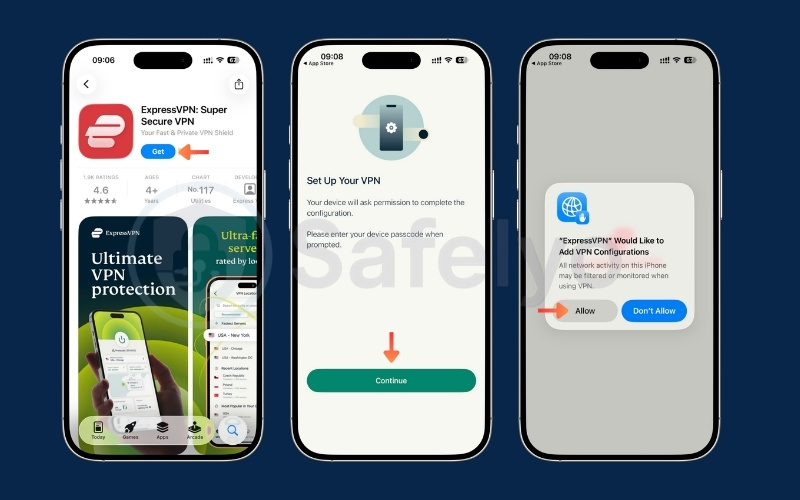
Downloading your chosen privacy application directly from the official store is the safest and most straightforward method for most users. This guarantees you receive the verified, secure software version. Follow these simple steps:
- Open the App Store on your iPhone and search for your selected provider.
- Tap the download icon to install the official application.
- Launch the application and log into your newly created account.
- Tap the large connection button for the first time to initiate the setup.
- When the iOS system displays a security prompt, tap “Allow” to add new VPN Configurations.
- Confirm the action using your device passcode or Face ID to establish the secure tunnel successfully.
10.2. How to install manually via VPN configuration
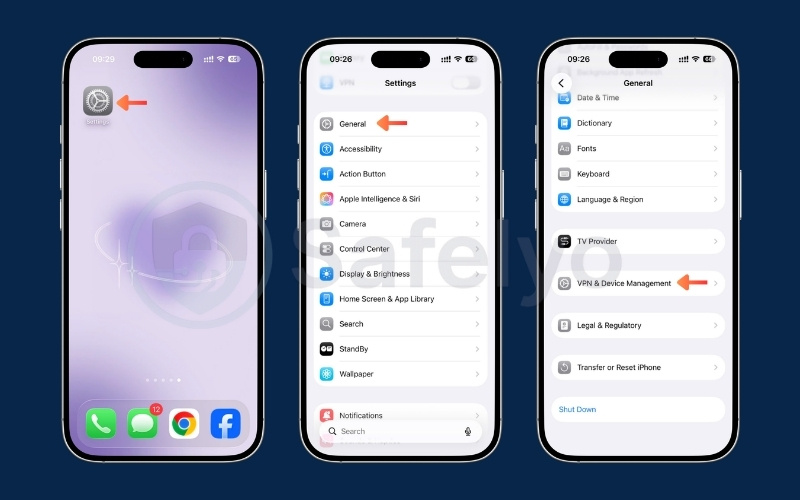
Configuring a secure connection manually is highly useful if you operate on restrictive networks that actively block standard privacy applications from opening. Follow these steps to configure your connection:
- Navigate directly to your device Settings.
- Tap on General, and select the VPN and Device Management menu option to begin the manual setup process safely.
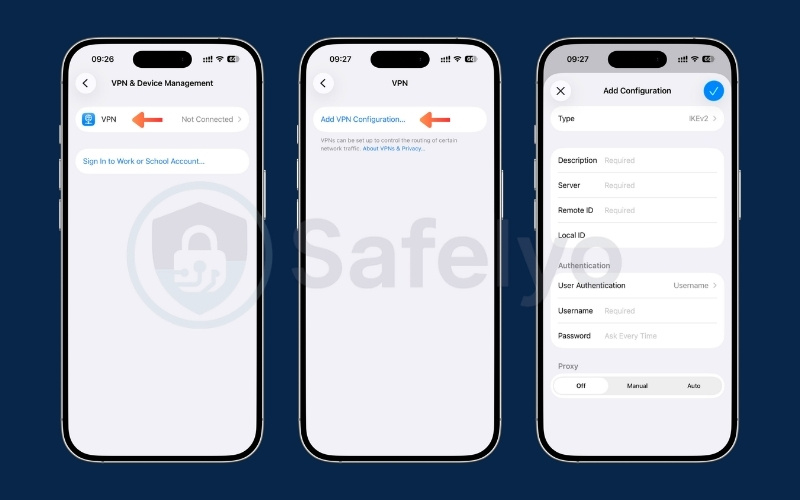
- Tap Add VPN Configuration and choose your desired protocol type (such as IKEv2).
- Carefully input the specific server address, remote ID, and your unique account credentials provided by your chosen service operator.
- Tap Done in the top corner to save these details.
- You can now quickly toggle the secure connection on or off directly from your main settings menu without needing a separate application.
11. iCloud Private Relay vs. VPN: What’s the difference?
Apple offers a built-in privacy feature called Private Relay for users with an active iCloud+ subscription. Many people confuse this tool with a full security application. Private Relay only encrypts the traffic moving through the Safari web browser. It masks your IP address from websites, but it does not let you choose a specific global location to unblock content.
A dedicated security app encrypts your entire system-wide network connection. It protects the data from all your installed applications, not just your web browser. You also gain the ability to route your connection through thousands of servers worldwide to bypass geographical restrictions. This makes a dedicated app the superior choice for users wanting total device security and geo-unblocking capabilities.
If you want to understand all the technical differences in detail, read our full iCloud Private Relay vs. VPN comparison.
12. VPNs that didn’t make our list (and why)
We tested several popular applications that ultimately failed to meet our quality standards during the review process. You should avoid these services to protect your digital privacy and keep your device running smoothly. Relying on unsafe tools is often worse than browsing without any protection at all.
- Hotspot Shield: We excluded this service because its free version tracks user data and serves advertisements.
- Hola VPN: This is not a real security tool. It operates as a peer-to-peer network, meaning strangers use your internet bandwidth for their own browsing.
- SuperVPN: Security researchers have flagged this application for severe vulnerabilities and dangerous data leaks.
13. FAQs about best VPNs for iPhone
Many users have common questions regarding mobile privacy applications. We have provided clear, direct answers to help you understand the technology better.
What is the best VPN to use for an iPhone?
We consider NordVPN a top choice for mobile users. It offers a solid balance of fast download speeds, reliable security features, and streaming capabilities in a functional application.
Do VPNs really work on iPhone?
Yes, they work well to encrypt your data and hide your IP address. However, Apple limits how these tools operate in the background due to sandboxing rules, which changes how features like the kill switch function.
Which VPN is totally free for iPhone?
Proton VPN Free is a strong choice if you need unlimited data with privacy protections. Windscribe is an alternative if you need faster speeds but do not mind a 15GB monthly data limit.
What VPN works with Spectrum?
Premium services like NordVPN and ExpressVPN work well to bypass ISP throttling from providers like Spectrum. They hide your traffic, preventing the provider from slowing down your connection during heavy streaming.
Does a VPN slow down my iPhone?
Yes, the encryption process naturally causes a small drop in connection speed. However, using modern protocols like WireGuard typically results in a minor speed loss, which you will barely notice during normal usage.
Should you leave VPN on all the time on iPhone?
Yes, you should leave it active if you frequently connect to public Wi-Fi networks to ensure safety. However, running the application constantly will consume more battery power. We recommend utilizing the “Connect on Demand” feature in your iOS settings to balance security with your battery life.
14. Conclusion
Choosing the best VPN for iPhone is a practical step to protect your personal data on public networks and access restricted content. We tested the top providers to bring you options that deliver speed, security, and true value. Whether you choose the overall performance of NordVPN or a completely free tool like Proton, securing your digital life is straightforward.
Remember to review your personal needs before making a final decision. Take control of your mobile privacy today by downloading a verified, trustworthy app.
For more insights on safeguarding your digital footprint, explore our comprehensive Best VPN guides and independent reviews at Safelyo.